2024 CHEVROLET SILVERADO EV mirror
[x] Cancel search: mirrorPage 269 of 429
Chevrolet Silverado EV Owner Manual (GMNA-Localizing-U.S./Canada-
16702912) - 2024 - CRC - 1/17/23
268 Driving and Operating
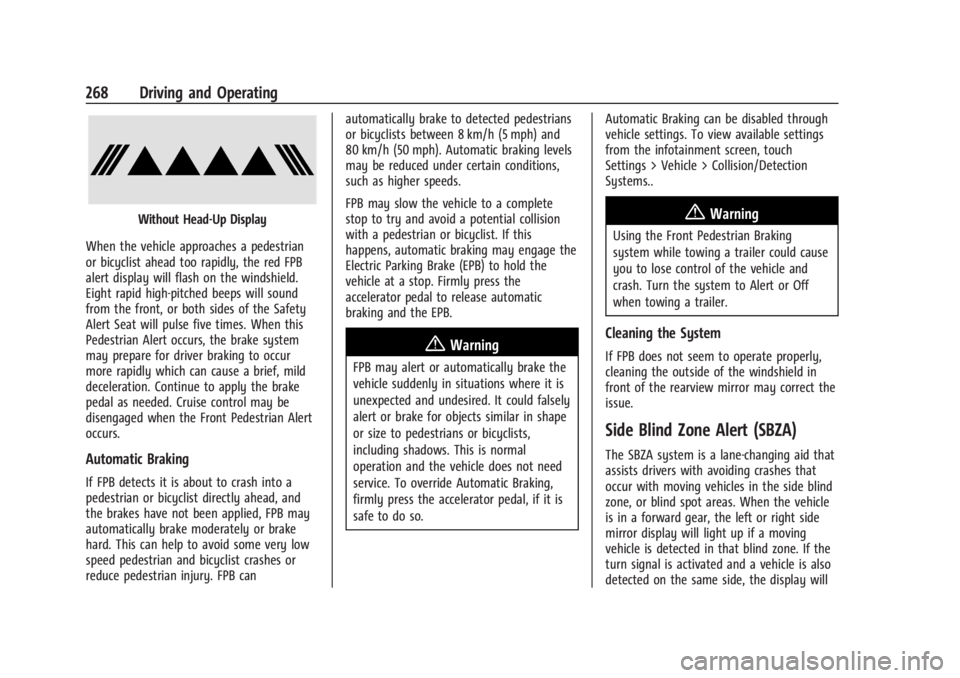
Without Head-Up Display
When the vehicle approaches a pedestrian
or bicyclist ahead too rapidly, the red FPB
alert display will flash on the windshield.
Eight rapid high-pitched beeps will sound
from the front, or both sides of the Safety
Alert Seat will pulse five times. When this
Pedestrian Alert occurs, the brake system
may prepare for driver braking to occur
more rapidly which can cause a brief, mild
deceleration. Continue to apply the brake
pedal as needed. Cruise control may be
disengaged when the Front Pedestrian Alert
occurs.
Automatic Braking
If FPB detects it is about to crash into a
pedestrian or bicyclist directly ahead, and
the brakes have not been applied, FPB may
automatically brake moderately or brake
hard. This can help to avoid some very low
speed pedestrian and bicyclist crashes or
reduce pedestrian injury. FPB can automatically brake to detected pedestrians
or bicyclists between 8 km/h (5 mph) and
80 km/h (50 mph). Automatic braking levels
may be reduced under certain conditions,
such as higher speeds.
FPB may slow the vehicle to a complete
stop to try and avoid a potential collision
with a pedestrian or bicyclist. If this
happens, automatic braking may engage the
Electric Parking Brake (EPB) to hold the
vehicle at a stop. Firmly press the
accelerator pedal to release automatic
braking and the EPB.
{Warning
FPB may alert or automatically brake the
vehicle suddenly in situations where it is
unexpected and undesired. It could falsely
alert or brake for objects similar in shape
or size to pedestrians or bicyclists,
including shadows. This is normal
operation and the vehicle does not need
service. To override Automatic Braking,
firmly press the accelerator pedal, if it is
safe to do so.
Automatic Braking can be disabled through
vehicle settings. To view available settings
from the infotainment screen, touch
Settings > Vehicle > Collision/Detection
Systems..
{Warning
Using the Front Pedestrian Braking
system while towing a trailer could cause
you to lose control of the vehicle and
crash. Turn the system to Alert or Off
when towing a trailer.
Cleaning the System
If FPB does not seem to operate properly,
cleaning the outside of the windshield in
front of the rearview mirror may correct the
issue.
Side Blind Zone Alert (SBZA)
The SBZA system is a lane-changing aid that
assists drivers with avoiding crashes that
occur with moving vehicles in the side blind
zone, or blind spot areas. When the vehicle
is in a forward gear, the left or right side
mirror display will light up if a moving
vehicle is detected in that blind zone. If the
turn signal is activated and a vehicle is also
detected on the same side, the display will
Page 270 of 429
Chevrolet Silverado EV Owner Manual (GMNA-Localizing-U.S./Canada-
16702912) - 2024 - CRC - 1/17/23
Driving and Operating 269
flash as an extra warning not to change
lanes. Since this system is part of the Lane
Change Alert (LCA) system, read the entire
LCA section before using this feature.
Lane Change Alert (LCA)
If equipped, the LCA system is a
lane-changing aid that assists drivers with
avoiding lane change crashes that occur with
moving vehicles in the side blind zone
(or spot) areas or with vehicles rapidly
approaching these areas from behind. The
LCA warning display will light up in the
corresponding outside mirror and will flash
if the turn signal is on.
Side Blind Zone Alert (SBZA) is included as
part of the LCA system.
{Warning
LCA does not alert the driver to vehicles
outside of the system detection zones,
pedestrians, bicyclists, or animals. It may
not provide alerts when changing lanes
under all driving conditions. Failure to use
proper care when changing lanes may
result in injury, death, or vehicle damage.(Continued)
Warning (Continued)
Before making a lane change, always
check mirrors, glance over your shoulder,
and use the turn signals.
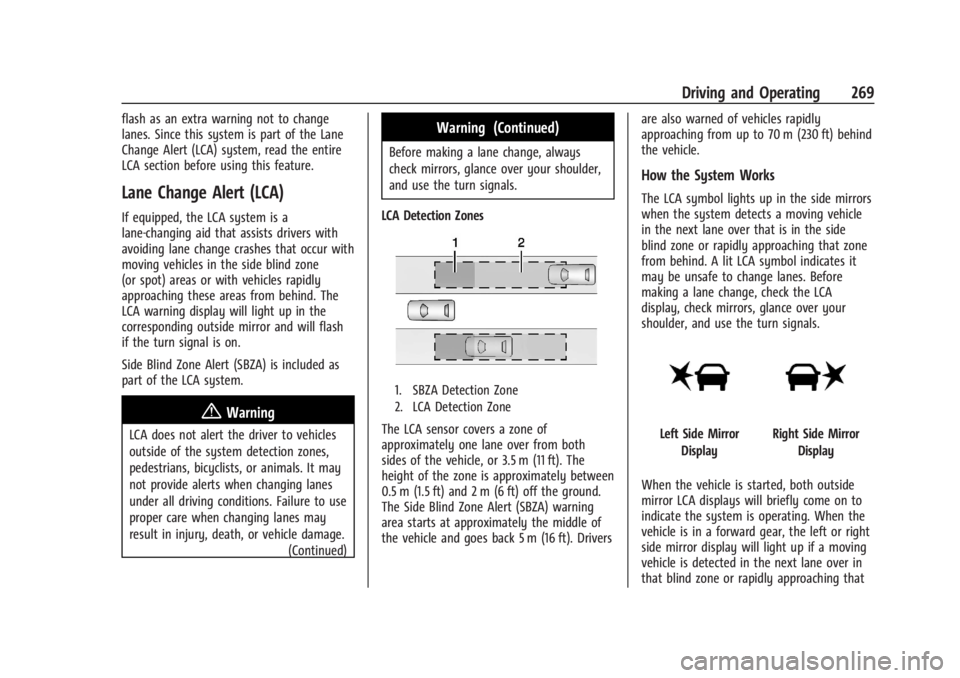
LCA Detection Zones
1. SBZA Detection Zone
2. LCA Detection Zone
The LCA sensor covers a zone of
approximately one lane over from both
sides of the vehicle, or 3.5 m (11 ft). The
height of the zone is approximately between
0.5 m (1.5 ft) and 2 m (6 ft) off the ground.
The Side Blind Zone Alert (SBZA) warning
area starts at approximately the middle of
the vehicle and goes back 5 m (16 ft). Drivers are also warned of vehicles rapidly
approaching from up to 70 m (230 ft) behind
the vehicle.
How the System Works
The LCA symbol lights up in the side mirrors
when the system detects a moving vehicle
in the next lane over that is in the side
blind zone or rapidly approaching that zone
from behind. A lit LCA symbol indicates it
may be unsafe to change lanes. Before
making a lane change, check the LCA
display, check mirrors, glance over your
shoulder, and use the turn signals.
Left Side Mirror
DisplayRight Side Mirror Display
When the vehicle is started, both outside
mirror LCA displays will briefly come on to
indicate the system is operating. When the
vehicle is in a forward gear, the left or right
side mirror display will light up if a moving
vehicle is detected in the next lane over in
that blind zone or rapidly approaching that
Page 271 of 429
Chevrolet Silverado EV Owner Manual (GMNA-Localizing-U.S./Canada-
16702912) - 2024 - CRC - 1/17/23
270 Driving and Operating
zone. If the turn signal is activated in the
same direction as a detected vehicle, this
display will flash as an extra warning not to
change lanes.
LCA can be disabled through vehicle
personalization.To view available settings
from the infotainment screen, touch
Settings > Vehicle > Collision/Detection
Systems. If LCA is disabled by the driver, the
LCA mirror displays will not light up.
When the System Does Not Seem to
Work Properly
The LCA system requires some driving for
the system to calibrate to maximum
performance. This calibration may occur
more quickly if the vehicle is driven on a
straight highway road with traffic and
roadside objects (e.g., guardrails, barriers).
LCA displays may not come on when
passing a vehicle quickly or for a stopped
vehicle. LCA may alert to objects attached to
the vehicle, such as a bicycle, or object
extending out to either side of the vehicle.
Attached objects may also interfere with the
detection of vehicles. This is normal system
operation; the vehicle does not need service.LCA may not always alert the driver to
vehicles in the next lane over, especially in
wet conditions or when driving on sharp
curves. The system does not need to be
serviced. The system may light up due to
guardrails, signs, trees, shrubs, and other
non-moving objects. This is normal system
operation; the vehicle does not need service.
LCA may not operate when the LCA sensors
in the left or right corners of the rear
bumper are covered with mud, dirt, snow,
ice, or slush, or in heavy rainstorms. For
cleaning instructions, see "Washing the
Vehicle" under
Exterior Care0379. If the DIC
still displays the system unavailable
message after cleaning both sides of the
vehicle toward the rear corners of the
vehicle, see your dealer.
If the LCA displays do not light up when
moving vehicles are in the side blind zone or
rapidly approaching this zone and the
system is clean, the system may need
service. Take the vehicle to your dealer.
Driving with a Trailer
If equipped with Lane Change Alert (LCA),
the LCA detection zones that extend back
from the side of the vehicle do not move
further back when a trailer is towed. Use caution while changing lanes when
towing a trailer.
Bicycle Detection
If equipped, the system may detect a
bicyclist approaching from the side or rear
of the vehicle.
If this occurs, a chime will sound in the
direction of the detection, and the Safety
Alert Seat will pulse if enabled through
vehicle settings. To view available settings
from the infotainment screen, touch
Settings > Vehicle > Collision/Detection
Systems.
Bicyclist Detection is available when the
vehicle is in D (Drive), P (Park), and for a
short time after the vehicle is turned off.
If the vehicle detects a bicyclist when it is
off, a DIC message may display and alert to
the direction of the detection. In some
cases, an Unavailable message may display.
This is normal and does not mean that the
system is broken.
Detection Zones
When the vehicle is in P (Park) or is turned
off, a bicyclist can be detected 11 m (36 ft)
behind the vehicle or 10 m (33 ft) to the
side of the vehicle.
Page 272 of 429
Chevrolet Silverado EV Owner Manual (GMNA-Localizing-U.S./Canada-
16702912) - 2024 - CRC - 1/17/23
Driving and Operating 271
When the vehicle is in D (Drive), a bicyclist
can be detected 3 m (10 ft) behind the
vehicle or to the side of the vehicle.
Turning the Feature On or Off
Bicyclist Detection can be turned on or off
through vehicle settings. To view available
settings from the infotainment screen, touch
Settings > Vehicle > Collision/Detection
Systems.
Blind Zone Steering Assist (BZSA)
If equipped, the Blind Zone Steering Assist
(BZSA) system can detect a potential crash
with a moving vehicle in the lane you are
entering. It provides a brief, urgent turn of
the steering wheel to alert you to take
action to avoid a collision.
BZSA works with the Lane Keep Assist (LKA).
BZSA operates when the vehicle is in a
forward gear, and only when LKA is enabled
and able to assist. SeeLane Keep Assist
(LKA) 0274.
BZSA will provide a steering correction when
your vehicle is about to leave the current
lane of travel, with the possibility of a
collision with a vehicle in the adjacent lane.
This steering correction happens closer to
the center of the lane and has a stronger steering correction than LKA. Unlike LKA, the
steering correction with BSZA will happen
even if your turn signal is on in the
direction of lane departure.
In addition to the BZSA steering
intervention, the
Awill turn amber, six
beeps or six seat pulses will occur,
if equipped with Safety Alert Seat, and
8or|will flash on the outside
rear view mirror.
{Warning
Do not rely on Blind Zone Steering Assist
(BZSA) to prevent crashes. This system
does not replace the need to pay
attention and drive safely. Failure to use
proper care when driving may result in
vehicle damage, injury, or death.
.BZSA performance may be affected by
weather and road conditions.
.BZSA does not provide steering
assistance to avoid a vehicle that is in,
or has entered, your lane of travel.
.BZSA will not prevent a towed trailer
from crossing into the adjacent lane.
Always monitor the trailer position
(Continued)
Warning (Continued)
while towing to ensure it is in the
same lane as your vehicle. BZSA is
only designed to detect when your
vehicle unintentionally crosses
detected lane lines.
Traffic Sign Assistant
If equipped, Traffic Sign Assistant recognizes
designated traffic signs via the front camera
located behind the windshield in front of the
interior rear view mirror, and displays the
detected speed limit in the Driver
Information Center (DIC). Additionally, speed
limit information from the navigation
system map database may be used.
Caution
The system is intended to assist the
driver within a defined speed range to
discern certain traffic signs. Always pay
attention to posted speed limit signs.
Do not ignore traffic signs which are not
displayed by the system.
(Continued)
Page 276 of 429
Chevrolet Silverado EV Owner Manual (GMNA-Localizing-U.S./Canada-
16702912) - 2024 - CRC - 1/17/23
Driving and Operating 275
The LKA system is not intended to keep the
vehicle centered in the lane. LKA will not
assist or alert if the turn signal is active,
or if it detects that you are accelerating,
braking, or actively steering. LKA can be
overridden by turning the steering wheel.
If the system detects you are steering
intentionally across a lane marker, the LDW
alert may not be given. Do not expect the
LDW alert to occur when you are
intentionally crossing the lane marker.
{Warning
The LKA system does not continuously
steer the vehicle. It may not keep the
vehicle in the lane or give a Lane
Departure Warning (LDW) alert, even if a
lane marking is detected.
The LKA and LDW systems may not:
.Provide an alert or enough steering
assist to avoid a lane departure or
crash.
.Detect lane markings under poor
weather or visibility conditions. This
can occur if the windshield or
headlamps are blocked by dirt, snow,(Continued)
Warning (Continued)
or ice; if they are not in proper
condition; or if the sun shines directly
into the camera.
.Detect road edges.
.Detect lanes on winding or hilly roads.
If LKA only detects lane markings on one
side of the road, it will only assist or
provide an LDW alert when approaching
the lane on the side where it has
detected a lane marking. Even with LKA
and LDW, you must steer the vehicle.
Always keep your attention on the road
and maintain proper vehicle position
within the lane, or vehicle damage,
injury, or death could occur. Always keep
the windshield, headlamps, and camera
sensors clean and in good repair. Do not
use LKA in bad weather conditions or on
roads with unclear lane markings, such as
construction zones.
{Warning
Using LKA on slippery roads could cause
loss of control of the vehicle and a crash.
Turn the system off.
{Warning
LKA will not alert the driver if a towed
trailer crosses into an adjacent lane of
travel. Serious injury or property damage
may occur if the trailer moves into
another lane. Always monitor the trailer
position while towing to make sure it is
within the same lane as the tow vehicle.
How the System Works
LKA uses a camera sensor installed on the
windshield ahead of the rearview mirror to
detect lane markings. It may provide brief
steering assist if it detects an unintended
lane departure. It may further provide an
audible alert or the driver seat may pulse
indicating that a lane marking has been
crossed. The system does not provide an
LDW when intentionally steering across a
lane marker.
Page 277 of 429
Chevrolet Silverado EV Owner Manual (GMNA-Localizing-U.S./Canada-
16702912) - 2024 - CRC - 1/17/23
276 Driving and Operating
To turn LKA on and off, pressAon the
instrument panel to the left of the steering
wheel. If equipped, the indicator light on the
button comes on when LKA is on and turns
off when LKA is disabled. In some vehicles,
you must press the button for more than
three seconds to turn LKA off.
LKA is not available when Terrain Mode,
Snow/Ice Mode, or Off-Road Mode is
selected.
See Driver Mode Control 0209. See
Four-Wheel Steering 0210.
When attempting to enable LKA in any of
the above conditions, LKA UNAVAILABLE will
display.
When on,
Ais white, if equipped,
indicating that the system is not ready to
assist.
Ais green if LKA is ready to
assist. LKA may assist by gently turning the
steering wheel if the vehicle approaches a
detected lane marking.
Ais amber when
assisting. It may also provide a Lane
Departure Warning (LDW) alert by flashing
Aamber if the vehicle crosses a
detected lane marking. Additionally, there
may be three beeps, or the driver seat may
pulse three times, on the right or left,
depending on the lane departure direction. Take Steering
The LKA system does not continuously steer
the vehicle. If LKA does not detect active
driver steering, an alert and chime may be
provided. Steer the vehicle to dismiss. LKA
may become temporarily unavailable after
repeated take steering alerts.
When the System Does Not Seem to
Work Properly
The system performance may be
affected by:
.Close vehicles ahead.
.Sudden lighting changes, such as when
driving through tunnels.
.Banked roads.
.Roads with poor lane markings, such as
two-lane roads.
If the LKA system is not functioning
properly when lane markings are clearly
visible, cleaning the windshield may help.
A camera blocked message may display if
the camera is blocked. Some driver
assistance systems may have reduced
performance or not work at all. An LKA or
LDW unavailable message may display if the
systems are temporarily unavailable. This
message could be due to a blocked camera. The LKA system does not need service. Clean
the outside of the windshield behind the
rearview mirror.
LKA assistance and/or LDW alerts may occur
due to tar marks, shadows, cracks in the
road, temporary or construction lane
markings, or other road imperfections. This
is normal system operation; the vehicle does
not need service. Turn LKA off if these
conditions continue.
Surround Vision Recorder
If equipped, this system records the 360°
camera views to an SD card. Only images
are recorded, no sound. An SD card will be
needed for this system. The minimum
recommended SD card specifications are at
least 64GB with FAT32 file system, Class V30
or greater.
Page 295 of 429
Chevrolet Silverado EV Owner Manual (GMNA-Localizing-U.S./Canada-
16702912) - 2024 - CRC - 1/17/23
294 Driving and Operating
Driving Characteristics and
Towing Tips
{Warning
You can lose control when towing a
trailer if the correct equipment is not
used or the vehicle is not driven properly.
For example, if the trailer is too heavy or
the trailer brakes are inadequate for the
load, the vehicle may not stop as
expected. You and others could be
seriously injured. The vehicle may also be
damaged, and the repairs would not be
covered by the vehicle warranty. Pull a
trailer only if all the steps in this section
have been followed. Ask your dealer for
advice and information about towing a
trailer with the vehicle.
Driving with a Trailer
Trailering is different than just driving the
vehicle by itself. Trailering affects handling,
acceleration, braking, and durability.
Successful and safe trailering requires proper
use of the correct equipment.The following information has many
time-tested, important trailering tips and
safety rules. Many of these are important
for your safety and that of your passengers.
Read this section carefully before towing a
trailer.
When towing a trailer:
.Become familiar with, and follow all state
and local laws that apply to trailer
towing. These requirements vary from
state to state.
.State laws may require the use of
extended side view mirrors. If your
visibility is limited or restricted while
towing, install extended side view mirrors
on your vehicle, even if not required.
.Do not tow a trailer during the first
800 km (500 mi) of vehicle use to prevent
damage to vehicle.
.Do not drive over 800 km/h (50 mph) and
do not make starts at full throttle during
the first 800 km (500 mi) of trailer
towing.
.Tow in D (Drive). Tow/Haul Mode is
recommended for heavier trailers. See
Driver Mode Control
0209.
.One-Pedal Driving can be a useful feature
when towing. See One-Pedal Driving
0 203. The following advanced driver assistance
features should be turned off when towing
a trailer, and may turn off automatically
when a trailer is detected:
.Park Assist
.Reverse Automatic Braking (RAB)
.Rear Cross Traffic Alert (RCTA)
.Rear Cross Traffic Braking (RCTB)
.Lane Change Alert (LCA)
.Super Cruise and Adaptive Cruise Control
(ACC), unless equipped with trailering
functionality, see
Adaptive Cruise Control
(Advanced) 0217.
Automatic Emergency Braking (AEB) and
Front Pedestrian Braking (FPB) should be set
to Alert unless equipped with Super Cruise.
Do not use Automatic Parking Assist (APA)
while towing a trailer.
Towing a trailer requires experience. The
combination of the vehicle and trailer is
longer and not as responsive as the vehicle
itself. Become familiar with handling and
braking of the combination by driving on a
level road surface before driving on public
roads.
Page 296 of 429
Chevrolet Silverado EV Owner Manual (GMNA-Localizing-U.S./Canada-
16702912) - 2024 - CRC - 1/17/23
Driving and Operating 295
The trailer structure, the tires, and the
brakes must be all be rated to carry the
intended cargo. Inadequate trailer
equipment can cause the combination to
operate in an unexpected or unsafe manner.
Before driving, inspect all trailer hitch parts
and attachments, safety chains, electrical
connectors, lamps, tires, and mirrors. See
Towing Equipment0301. If the trailer has
electric brakes, start the combination
moving and then manually apply the trailer
brake controller to check the trailer brakes
work. During the trip, occasionally check
that the cargo and trailer are secure and
that the lamps and any trailer brakes are
working.
Towing with a Stability Control System
When towing, the stability control system
might be heard. The system reacts to
vehicle movement caused by the trailer,
which mainly occurs during cornering. This is
normal when towing heavier trailers.
Following Distance
Stay at least twice as far behind the vehicle
ahead as you would when driving without a
trailer to help to avoid heavy braking and
sudden turns.
Passing
More passing distance is needed when
towing a trailer. The combination of the
vehicle and trailer will not accelerate as
quickly and is much longer than the vehicle
alone. It is necessary to go much farther
beyond the passed vehicle before returning
to the lane. Pass on level roadways. Avoid
passing on hills if possible.
Backing Up
Hold the bottom of the steering wheel with
one hand. To move the trailer to the left,
move that hand to the left. To move the
trailer to the right, move that hand to the
right. Always back up slowly and, if possible,
have someone guide you.
Making Turns
Caution
Turn more slowly and make wider arcs
when towing a trailer to prevent damage
to your vehicle. Making very sharp turns
could cause the trailer to contact the
vehicle. Make wider turns than normal when towing,
so the trailer does not go over soft
shoulders, over curbs, or strike road signs,
trees, or other objects. Always signal turns
well in advance. Do not steer or brake
suddenly.
Driving on Grades
Reduce speed before starting down a long or
steep downhill grade. Use regenerative
braking to help slow the vehicle or maintain
speed by keeping the vehicle in gear and
limiting the initial battery charge to 80% or
less. Avoid using Regen on Demand. See
Hill
and Mountain Roads 0190.
Viewing Systems
If equipped, the viewing systems on the
vehicle can improve visibility while hitching,
backing up, and driving with a trailer. See
Advanced Driver Assistance Systems 0244.
Parking on Hills
{Warning
To prevent serious injury or death,
always park your vehicle and trailer on a
level surface when possible.