2024 CHEVROLET CORVETTE idle
[x] Cancel search: idlePage 252 of 362
Chevrolet Corvette Owner Manual (GMNA-Localizing-U.S./Canada/Mexico-
17272984) - 2024 - CRC - 2/20/23
Vehicle Care 251
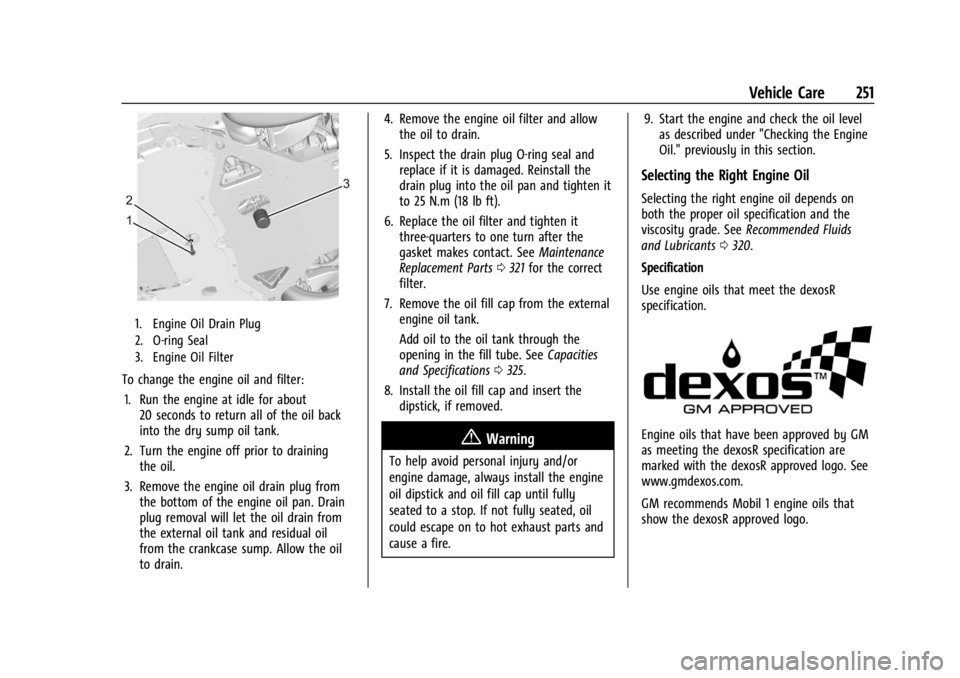
1. Engine Oil Drain Plug
2. O-ring Seal
3. Engine Oil Filter
To change the engine oil and filter:1. Run the engine at idle for about 20 seconds to return all of the oil back
into the dry sump oil tank.
2. Turn the engine off prior to draining the oil.
3. Remove the engine oil drain plug from the bottom of the engine oil pan. Drain
plug removal will let the oil drain from
the external oil tank and residual oil
from the crankcase sump. Allow the oil
to drain. 4. Remove the engine oil filter and allow
the oil to drain.
5. Inspect the drain plug O-ring seal and replace if it is damaged. Reinstall the
drain plug into the oil pan and tighten it
to 25 N.m (18 lb ft).
6. Replace the oil filter and tighten it three-quarters to one turn after the
gasket makes contact. See Maintenance
Replacement Parts 0321 for the correct
filter.
7. Remove the oil fill cap from the external engine oil tank.
Add oil to the oil tank through the
opening in the fill tube. See Capacities
and Specifications 0325.
8. Install the oil fill cap and insert the dipstick, if removed.
{Warning
To help avoid personal injury and/or
engine damage, always install the engine
oil dipstick and oil fill cap until fully
seated to a stop. If not fully seated, oil
could escape on to hot exhaust parts and
cause a fire. 9. Start the engine and check the oil level
as described under "Checking the Engine
Oil." previously in this section.
Selecting the Right Engine Oil
Selecting the right engine oil depends on
both the proper oil specification and the
viscosity grade. See Recommended Fluids
and Lubricants 0320.
Specification
Use engine oils that meet the dexosR
specification.
Engine oils that have been approved by GM
as meeting the dexosR specification are
marked with the dexosR approved logo. See
www.gmdexos.com.
GM recommends Mobil 1 engine oils that
show the dexosR approved logo.
Page 262 of 362
Chevrolet Corvette Owner Manual (GMNA-Localizing-U.S./Canada/Mexico-
17272984) - 2024 - CRC - 2/20/23
Vehicle Care 261
by your dealer. The high voltage cooling
system reservoirs have tamper- resistant
pressure caps. The coolant should only be
serviced by a qualified technician.
Engine Overheating
The vehicle has several indicators to warn of
engine overheating.
There is an engine coolant temperature
gauge on the instrument cluster. SeeEngine
Coolant Temperature Gauge 087. The
vehicle may also display a message on the
Driver Information Center (DIC).
If the decision is made not to lift the hatch
but to get service help right away, see
Roadside Assistance Program 0332.
If the decision is made to lift the hatch,
make sure the vehicle is parked on a level
surface.
Then check to see if the engine cooling fans
are running. There are two cooling fans
located in the front (one at each corner) and
two cooling fans in the rear (one on each
side of the engine). If the engine is
overheating, the fans should be running.
If they are not, do not continue to run the
engine, and have the vehicle serviced.
Caution
Do not run the engine if there is a leak
in the engine cooling system. This can
cause a loss of all coolant and can
damage the system and vehicle. Have
any leaks fixed right away.
If Steam Is Coming from the Engine
{Warning
Steam and scalding liquids from a hot
cooling system are under pressure.
Turning the pressure cap, even a little,
can cause them to come out at high
speed and you could be burned. Never
turn the cap when the cooling system,
including the pressure cap, is hot. Wait
for the cooling system and pressure cap
to cool.
If Steam Is Coming from the Engine
Compartment with no Overheat Warning
Water from rain and car washes could enter
the engine compartment and contact hot
surfaces. If steam is coming from the engine
compartment with no accompanying
overheat warning, no service is needed.
If No Steam Is Coming from the Engine
If an engine overheat warning is displayed
but no steam can be seen or heard, the
problem may not be too serious. Sometimes
the engine can get a little too hot when the
vehicle:
.Climbs a long hill on a hot day.
.Stops after high-speed driving.
.Idles for long periods in traffic.
If the overheat warning is displayed with no
sign of steam: 1. Turn the air conditioning off.
2. Turn the heater on to the highest temperature and to the highest fan
speed. Open the windows as necessary.
3. When it is safe to do so, pull off the road, shift to P (Park) or N (Neutral), and
let the engine idle.
If the engine coolant temperature gauge is
no longer in the shaded area or an overheat
warning no longer displays, the vehicle can
be driven. Continue to drive the vehicle
slowly for about 10 minutes. Keep a safe
vehicle distance from the vehicle in front.
If the warning does not come back on,
Page 263 of 362
Chevrolet Corvette Owner Manual (GMNA-Localizing-U.S./Canada/Mexico-
17272984) - 2024 - CRC - 2/20/23
262 Vehicle Care
continue to drive normally and have the
cooling system checked for proper fill and
function.
If the warning continues, pull over safely,
and park the vehicle right away.
If there is no sign of steam, idle the engine
for three minutes while parked. If the
warning is still displayed, turn off the
engine until it cools down.
Washer Fluid
What to Use
When the vehicle needs windshield washer
fluid, be sure to read the manufacturer
instructions before use. If the vehicle will be
operating in an area where the temperature
may fall below freezing, use a fluid that has
sufficient protection against freezing.
Adding Washer Fluid
1. Open the hood. SeeHood017.
2. Open the cap with the washer symbol
on it. Add washer fluid until the tank
is full.
Caution
.Do not use washer fluid that contains
any type of water repellent coating.
This can cause the wiper blades to
chatter or skip.
.Do not use engine coolant (antifreeze)
in the windshield washer. It can
damage the windshield washer system
and paint.
.Do not mix water with ready-to-use
washer fluid. Water can cause the
solution to freeze and damage the
washer fluid tank and other parts of
the washer system.
.When using concentrated washer fluid,
follow the manufacturer instructions
for adding water.
.Fill the washer fluid tank only
three-quarters full when it is very cold.
This allows for fluid expansion if
freezing occurs, which could damage
the tank if it is completely full.
Brakes
Disc brake linings have built-in wear
indicators that make a high-pitched warning
sound when the brake linings are worn and
new linings are needed. The sound can come
and go or can be heard all the time when
the vehicle is moving, except when applying
the brake pedal firmly.
{Warning
The brake wear warning sound means
that soon the brakes will not work well.
That could lead to a crash. When the
brake wear warning sound is heard, have
the vehicle serviced.
Caution
Continuing to drive with worn-out brake
linings could result in costly brake
repairs.
Properly torqued wheel nuts are necessary
to help prevent brake pulsation. When tires
are rotated, inspect brake linings for wear
and evenly tighten wheel nuts in the proper
sequence to torque specifications. See
Capacities and Specifications 0325.
Page 303 of 362
Chevrolet Corvette Owner Manual (GMNA-Localizing-U.S./Canada/Mexico-
17272984) - 2024 - CRC - 2/20/23
302 Vehicle Care
7. Locate the battery positive (+) terminaland remote jump starting negative
(−) post.
8. Check that the jumper cables do not have loose or missing insulation. If they
do, you could get a shock. The vehicles
could be damaged too.
9. Open the discharged battery positive (+) terminal trim cover and connect one end
of the positive (+) cable.
10. Do not let the other end of the positive (+) cable to touch metal.
Connect it to the good battery
positive (+) terminal.
11. Connect one end of the negative (−) cable to the good battery negative (−)
terminal.
Do not let the other end touch anything
until the next step.
12. Connect the other end of the negative (−) cable to the remote jump starting
negative (−) post. 13. Start the vehicle with the good battery
and run the engine for at least
four minutes.
14. Try to start the vehicle that had the discharged battery. If it will not start
after a few tries, it probably needs
service.
Jumper Cable Removal
Reverse the sequence exactly when
removing the jumper cables.
After starting the disabled vehicle and
removing the jumper cables, allow it to idle
for several minutes.
The power windows may need to be
initialized. See “Window Indexing” under
Power Windows 029.
Jump Start Box Procedure (E-Ray Only)
If equipped with a lithium-ion battery,
another option is to use a jump start box
and/or pack to revive the battery.
Caution
Electrical shorting may occur and damage
the vehicle if either of the following
is done:
.The jump start box is set to ON before
beginning the jump starting procedure
.The jump start box is connected or
removed in the wrong order
The repairs would not be covered by the
vehicle warranty. Always set the jump
start box to OFF before starting the jump
starting procedure, and connect and
remove the jump start box in the correct
order, making sure that the cables do not
touch each other or other metal.
1. Set the jump start box to OFF.
2. Connect the red (+) cable to the discharged lithium-ion battery
positive (+) tab.
3. Connect the black (–) cable to the discharged lithium-ion battery negative
(–) post.