2024 CADILLAC XT4 air condition
[x] Cancel search: air conditionPage 182 of 373

Cadillac XT4 Owner Manual (GMNA-Localizing-U.S./Canada/Mexico-
17180837) - 2024 - CRC - 2/28/23
Driving and Operating 181
If the vehicle is left parked and running with
the remote key outside the vehicle, it will
continue to run for up to 15 minutes.
If the vehicle is left parked and running with
the remote key inside the vehicle, it will
continue to run for up to 30 minutes.
The vehicle could turn off sooner if it is
parked on a hill, due to lack of
available fuel.
The timer will reset if the vehicle is taken
out of P (Park) while it is running.
Engine Exhaust{
Warning
Engine exhaust contains carbon monoxide
(CO), which cannot be seen or smelled.
Exposure to CO can cause
unconsciousness and even death.
Exhaust may enter the vehicle if:
.The vehicle idles in areas with poor
ventilation (parking garages, tunnels,
deep snow that may block underbody
airflow or tail pipes).
.The exhaust smells or sounds strange
or different. (Continued)
Warning (Continued)
.The exhaust system leaks due to
corrosion or damage.
.The vehicle exhaust system has been
modified, damaged, or improperly
repaired.
.There are holes or openings in the
vehicle body from damage or
aftermarket modifications that are not
completely sealed.
If unusual fumes are detected or if it is
suspected that exhaust is coming into the
vehicle:
.Drive it only with the windows
completely down.
.Have the vehicle repaired immediately.
Never park the vehicle with the engine
running in an enclosed area such as a
garage or a building that has no fresh air
ventilation.
Running the Vehicle While Parked
It is better not to park with the engine
running. If the vehicle is left with the engine running,
follow the proper steps to be sure the
vehicle will not move. See
Shifting Into Park
0 179 andh Engine Exhaust 0181.
If parking on a hill and pulling a trailer, see
Driving Characteristics and Towing Tips
0 250.
Automatic Transmission
The shift pattern is displayed in the top of
the shift lever. The selected gear position
will illuminate red on the shift lever, while
all others will be displayed in white. If the
shift is not immediate, as in very cold
conditions, the indicator on the shift lever
may flash until it is fully engaged.
Page 186 of 373

Cadillac XT4 Owner Manual (GMNA-Localizing-U.S./Canada/Mexico-
17180837) - 2024 - CRC - 2/28/23
Driving and Operating 185
Caution (Continued)
transmission fluid. This message clears
when the transmission fluid has cooled
sufficiently.
D : This position is for normal driving.
If more power is needed for passing, press
the accelerator pedal down.
To shift into D (Drive):
1. Bring the vehicle to a complete stop.
2. From the center position, move the shift lever back.
.If the vehicle is in P (Park), press the
shift lock release button while pulling
the shift lever back.
.D will illuminate in red.
.After releasing the shift lever, it will
return to the center position.
To shift out of D (Drive): 1. Bring the vehicle to a complete stop.
2. Shift to the desired gear.
3. After releasing the shift lever, it will return to the center position.
Downshifting the transmission in slippery
road conditions could result in skidding. See
“Skidding” underLoss of Control 0166.
Caution
Spinning the tires or holding the vehicle
in one place on a hill using only the
accelerator pedal may damage the
transmission. The repair will not be
covered by the vehicle warranty. If the
vehicle is stuck, do not spin the tires.
When stopping on a hill, use the brakes
to hold the vehicle in place.
Engine speeds may be increased while
driving at highway speeds while the engine
is still warming up.
Manual Mode
Tap Shift Caution
Driving with the engine at a high rpm
without upshifting while using Tap Shift,
could damage the vehicle. Always upshift
when necessary while using Tap Shift.
If equipped, vehicles with Tap Shift have
controls on the back of the steering wheel
to manually shift the automatic
transmission.
Permanent Tap Shift Mode
To enter Permanent Tap Shift Mode:1. With the vehicle in D (Drive), pull back on the shift lever to activate M (Manual
Mode). The M in the shift pattern will
illuminate in red, and the D will switch
to white.
2. After releasing the shift lever, it will return to the center position.
Page 210 of 373

Cadillac XT4 Owner Manual (GMNA-Localizing-U.S./Canada/Mexico-
17180837) - 2024 - CRC - 2/28/23
Driving and Operating 209
.The Driver Attention System (DAS) detects
the driver's head and eyes are directed
toward the road.
.The lane markings are clearly visible and
able to be detected by the system.
Super Cruise may be unavailable if Super
Cruise detects the outside air temperature is
very cold.
Poor Conditions
Poor Conditions Using Super Cruise
{Warning
Super Cruise may not begin steering
immediately, even when Super Cruise is
available and
Zhas been pressed. To
prevent serious injury or death, only
remove your hands from the steering
wheel if the steering wheel light bar, the
Super Cruise light
Z, and the Adaptive
Cruise Control (ACC) light
\are green.
To engage:
.Press5to turn on ACC. Make sure the
white
\indicator displays in the
instrument cluster. See Adaptive Cruise
Control (Advanced) 0196.
.When Super Cruise is available, the white
Super Cruise light
Zwill display in the
instrument cluster.
.PressZ. ACC will set the speed at the
current vehicle speed. If ACC has a
previously set speed, it may resume at
that speed.
If Auto Set Speed is enabled and a speed
limit sign is detected, ACC will set the speed
to the road speed limit (+/- the selected
offset). For Auto Set Speed customization,
see Adaptive Cruise Control (Advanced)
0 196.
{Warning
Always monitor the vehicle speed and
make sure that you are following the
speed limit, regardless of the Auto Set
Speed status.
Page 213 of 373

Cadillac XT4 Owner Manual (GMNA-Localizing-U.S./Canada/Mexico-
17180837) - 2024 - CRC - 2/28/23
212 Driving and Operating
Take Over Alert
{Warning
Super Cruise will not maintain the
vehicle’s speed while the steering wheel
light bar is flashing red. If the steering
wheel light bar flashes red, immediately
resume manual steering to prevent
serious injury or death. If you do not
resume manual steering, the vehicle will
begin to slow in the same lane and
eventually come to a complete stop on
the road.
Any time the steering wheel light bar
flashes red, resume manual steering
immediately.
To begin steering manually, hold the
steering wheel firmly (with both hands)
using the highlighted regions as shown in
the picture below.
The Super Cruise lightZwill also turn red
in the instrument cluster and a message will
display in the Driver Information Center
(DIC). In addition, beeps will sound, or the
Safety Alert Seat will vibrate. To view
available settings from the infotainment
home screen, touch Settings > Vehicle >
Collision/Detection Systems. After you begin
steering manually, then Super Cruise will
disengage.
The red flashing steering wheel light bar
could occur under any of the following
conditions:
.Lane markings are poor or visibility is
limited.
.The Driver Attention System (DAS) does
not detect that the driver's head and eyes
are directed toward the road.
.ACC is canceled.
.The vehicle is on a tight curve, or the
lanes are too wide, or the vehicle goes
into a curve too fast.
.The road speed limit of the Super
Cruise-compatible, non-divided road is
below 72 km/h (45 mph).
.The Super Cruise-compatible road ends.
.The vehicle is approaching an intersection
controlled by a traffic light, stop sign,
or other traffic control device.
.A Super Cruise system fault occurs.
.Super Cruise is unable to complete the
lane change maneuver.
.Super Cruise detects the outside air
temperature is very cold.
The steering wheel light bar may flash
amber if the system anticipates certain
conditions that may require the driver to
take steering control. The Super Cruise light
Zwill also turn amber in the instrument
cluster, and a message will display in the
DIC. When the steering wheel light bar
flashes amber, resume manual steering to
prevent further escalation.
Page 214 of 373

Cadillac XT4 Owner Manual (GMNA-Localizing-U.S./Canada/Mexico-
17180837) - 2024 - CRC - 2/28/23
Driving and Operating 213
Attention to the Road
{Warning
Super Cruise is a driver assistance system
and cannot accurately detect or predict
all situations. Super Cruise is not a crash
avoidance system. To prevent serious
injury or death, you must supervise the
driving task and monitor the road
conditions. You may need to respond to
traffic events by steering, braking,
or accelerating. SeeDefensive Driving
0 164. Super Cruise also cannot
determine whether you are awake,
asleep, impaired, or properly focused on
safe driving. The vehicle could crash into
other vehicles, drive out of the lane,
or drive off the road. Complete attention
is always required while driving, even
while using Super Cruise. Be prepared to
take over steering or apply the brakes at
any time.
{Warning
To prevent serious injury or death, be
alert and pay special attention when
passing highway exits, entrances, and
crossings with Super Cruise, and be ready
to take control of the vehicle when
necessary. Changes in lane markings
around exits and entrances can
momentarily cause Super Cruise to not
detect the correct lane. If this occurs,
Super Cruise may attempt steering inputs
to bring the vehicle back into the correct
lane and, in rare circumstances, could
over-correct and cause the vehicle to
momentarily cross into a lane next to
your vehicle unless you manually steer to
maintain your lane position. The Driver Attention System (DAS) on the
steering column continually monitors driver
head and eye position to estimate driver
attention to the road. The camera does not
record or share pictures, audio, or video.
Sunglasses, hats, or other types of clothing
that change the shape of the head may
interfere with camera performance. To
improve camera performance, raise or lower
the steering wheel, or change the seat
position.
Page 224 of 373

Cadillac XT4 Owner Manual (GMNA-Localizing-U.S./Canada/Mexico-
17180837) - 2024 - CRC - 2/28/23
Driving and Operating 223
Location Services
This setting enables or disables sharing of
vehicle location outside the vehicle for
certain purposes. Even if the Location
Services setting is disabled, vehicle location
information will continue to be shared for
emergency services and Super Cruise,
if equipped.
System Care
The camera on the steering column has a
lens cover that may become dirty over time
and affect camera performance. Clean the
lens cover with a soft cloth sprayed with
glass cleaner. Wipe the lens gently, then dry
it. Never use abrasive cloths/cleaners or
corrosive chemicals of any kind on the lens
cover.
Super Cruise uses the front radar, front
camera, and 360 degree cameras for its
operation. Clean surfaces are required for
Super Cruise operation. SeeAdaptive Cruise
Control (Advanced) 0196, “Surround Vision
Camera” underAdvanced Driver Assistance
Systems 0223, and Lane Keep Assist (LKA)
0 245 for care information.Caution
The Super Cruise system is a highly
sophisticated system and should only be
serviced by technicians with the proper
training, tools, and safety instructions,
which your dealer has. Without proper
training and tools the vehicle may
become damaged.
Advanced Driver Assistance
Systems
This vehicle may have features that work
together to help avoid crashes or reduce
crash damage while driving, backing, and
parking. Read this entire section before
using these systems.
{Warning
Do not rely on the Driver Assistance
Systems. These systems do not replace
the need for paying attention and driving
safely. You may not hear or feel alerts or
warnings provided by these systems.
Failure to use proper care when driving
may result in injury, death, or vehicle
damage. See Defensive Driving 0164.
(Continued)
Warning (Continued)
Under many conditions, these systems
will not:
.Detect children, pedestrians, bicyclists,
or animals.
.Detect vehicles or objects outside the
area monitored by the system.
.Work at all driving speeds.
.Warn you or provide you with enough
time to avoid a crash.
.Work under poor visibility or bad
weather conditions.
.Work if the detection sensor is not
cleaned or is covered by ice, snow,
mud, or dirt.
.Work if the detection sensor is
covered up, such as with a sticker,
magnet, or metal plate.
.Work if the detection sensor viewing
zone is interrupted by an installed
accessory, such as a bike rack, or hitch
mounted cargo carrier.
.Work if the area surrounding the
detection sensor is damaged or not
properly repaired. (Continued)
Page 229 of 373

Cadillac XT4 Owner Manual (GMNA-Localizing-U.S./Canada/Mexico-
17180837) - 2024 - CRC - 2/28/23
228 Driving and Operating
Turning the System On and Off
The Park Assist System can be turned on or
off using the infotainment system. To view
available settings from the infotainment
screen, touch Settings > Vehicle > Collision/
Detection Systems.
The
Xbutton is used to turn on or off
the Park Assist, which also turns on or off
the Backing Warning and Reverse Automatic
Braking (RAB) at the same time. When the
system is turned off, a system off message
is shown on the display. This message
disappears after a short period of time.
Turn off Park Assist when towing a trailer to
prevent unwanted beeps and when a bike
rack is attached to ensure proper operation. When the System Does Not Seem to Work
Properly
If a service message displays, check the
following conditions:
.The sensors may not be clean. Keep the
vehicle's front and rear bumpers free of
mud, dirt, snow, ice, and slush. For
cleaning instructions, see
Exterior Care
0 321.
.The Park Assist sensors may be covered
by frost or ice. Frost or ice can form
around and behind the sensors and may
not always be seen; this can occur after
washing the vehicle in cold weather. The
message may not clear until the frost or
ice has melted.
If a service message displays and the above
conditions do not exist, take the vehicle to
your dealer for repairs.
If the Park Assist System does not activate
due to a temporary condition, a system off
message is shown on the display. This can
occur under the following conditions:
.The driver has disabled the system.
.An object is currently blocking the rear
sensors (for example, bike rack, tailgate,
trailer hitch, etc.). Once the object is
removed, Park Assist will return to normal
operation.
.The bumper is damaged. Take the vehicle
to your dealer for repairs.
.Other conditions, such as vibrations from
a jackhammer or the compression of air
brakes on a very large truck, are affecting
system performance.
Automatic Parking Assist (APA)
Automatic Parking Assist (APA) with
Braking
If equipped, under certain conditions APA
with Braking can use sensors based on sonar
technology along the vehicle’s front, rear
and sides to detect a parking spot, and
automatically park the vehicle with some
driver assistance. The vehicle will
automatically maneuver into a detected spot
moving at or near idle speed. It does this by
automatically steering and braking while the
driver is responsible for acceleration and
gear shifting as needed. The driver must
always be prepared to apply braking or
Page 231 of 373
Cadillac XT4 Owner Manual (GMNA-Localizing-U.S./Canada/Mexico-
17180837) - 2024 - CRC - 2/28/23
230 Driving and Operating
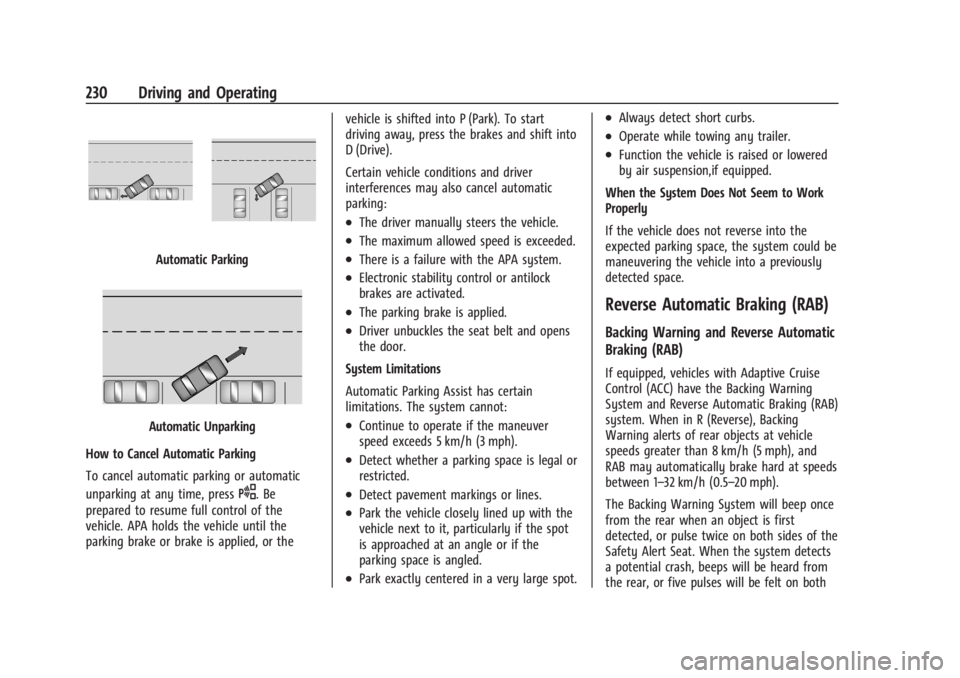
Automatic Parking
Automatic Unparking
How to Cancel Automatic Parking
To cancel automatic parking or automatic
unparking at any time, press
O. Be
prepared to resume full control of the
vehicle. APA holds the vehicle until the
parking brake or brake is applied, or the vehicle is shifted into P (Park). To start
driving away, press the brakes and shift into
D (Drive).
Certain vehicle conditions and driver
interferences may also cancel automatic
parking:
.The driver manually steers the vehicle.
.The maximum allowed speed is exceeded.
.There is a failure with the APA system.
.Electronic stability control or antilock
brakes are activated.
.The parking brake is applied.
.Driver unbuckles the seat belt and opens
the door.
System Limitations
Automatic Parking Assist has certain
limitations. The system cannot:
.Continue to operate if the maneuver
speed exceeds 5 km/h (3 mph).
.Detect whether a parking space is legal or
restricted.
.Detect pavement markings or lines.
.Park the vehicle closely lined up with the
vehicle next to it, particularly if the spot
is approached at an angle or if the
parking space is angled.
.Park exactly centered in a very large spot.
.Always detect short curbs.
.Operate while towing any trailer.
.Function the vehicle is raised or lowered
by air suspension,if equipped.
When the System Does Not Seem to Work
Properly
If the vehicle does not reverse into the
expected parking space, the system could be
maneuvering the vehicle into a previously
detected space.
Reverse Automatic Braking (RAB)
Backing Warning and Reverse Automatic
Braking (RAB)
If equipped, vehicles with Adaptive Cruise
Control (ACC) have the Backing Warning
System and Reverse Automatic Braking (RAB)
system. When in R (Reverse), Backing
Warning alerts of rear objects at vehicle
speeds greater than 8 km/h (5 mph), and
RAB may automatically brake hard at speeds
between 1–32 km/h (0.5–20 mph).
The Backing Warning System will beep once
from the rear when an object is first
detected, or pulse twice on both sides of the
Safety Alert Seat. When the system detects
a potential crash, beeps will be heard from
the rear, or five pulses will be felt on both