Page 627 of 766

625
Maintenance
This chapter discusses basic maintenance.
Before Performing MaintenanceInspection and Maintenance ............ 626
Safety When Performing Maintenance .... 627Parts and Fluids Used in Maintenance Service ........................................... 628
Maintenance Minder
TM..................... 629
Maintenance Under the Hood
Maintenance Items Un der the Hood .... 637Opening the Hood ........................... 639
Recommended Engine Oil ................ 640
Oil Check ......................................... 641
Adding Engine Oil ............................ 643
Changing the Engine Oil and Oil Filter..... 644
Engine Coolant ................................ 648
Transmission Fluid ............................ 652
Brake/Clutch
* Fluid .......................... 653
Refilling Window Washer Fluid......... 654
Replacing Light Bulbs ....................... 655
Checking and Maintaining Wiper Blades.... 657
Checking and Maintaining Tires
Checking Tires ................................. 659
Tire and Loading Information Label ... 661
Tire Labeling .................................... 661
DOT Tire Quality Grading (U.S. Vehicles) .... 663Wear Indicators................................ 665
Tire Service Life ................................ 665 Tire and Wheel Replacement ........... 666
Tire Rotation .................................... 667
Winter Tires ..................................... 668
Battery ............................................... 671
Remote Transmitter Care Replacing the Remote Battery .......... 673
Climate Control System Maintenance .... 675Cleaning
Interior Care .................................... 676
Exterior Care.................................... 679
Accessories and Modifications Accessories ...................................... 682
Modifications................................... 683
* Not available on all models
24 ACURA INTEGRA-313S56100.book 625 ページ 2023年2月13日 月曜日 午後2時41分
Page 629 of 766

627
uuBefore Performing Maintenance uSafety When Performing Maintenance
Continued
Maintenance
Safety When Performing Maintenance
Some of the most important safety precau tions are given here. However, we cannot
warn you of every conceivable hazard that can arise in performing maintenance.
Only you can decide whether you should perform a given task.
• To reduce the possibility of fire or explos ion, keep cigarettes, sparks, and flames
away from the battery and all fuel related parts.
• Never leave rags, towels, or other flammable objects under the hood.
u Heat from the engine and exhaust can ignite them, causing a fire.
• To clean parts, use a co mmercially available degreaser or parts cleaner, not
gasoline.
• Wear eye protection and prot ective clothing when working with the battery or
compressed air.
• Engine exhaust contains carbon monoxide, which is poisonous and can kill you.
u Only operate the engine if th ere is sufficient ventilation.
■Maintenance Safety
1Safety When Performing Maintenance
3WARNING
Improperly maintaining this vehicle or
failing to correct a pr oblem before driving
can cause a crash in which you can be
seriously hurt or killed.
Always follow the inspection and
maintenance recommendations according
to the schedules in this owner’s manual.
3WARNING
Failure to properly follow maintenance
instructions and prec autions can cause you
to be seriously hurt or killed.
Always follow the procedures and
precautions in this owner’s manual.
24 ACURA INTEGRA-313S56100.book 627 ページ 2023年2月13日 月曜日 午後2時41分
Page 639 of 766
637Continued
Maintenance
Maintenance Under the Hood
Maintenance Items Under the Hood
1.5 L engine models
Brake/Clutch* Fluid
(Black Cap)
Radiator Cap Washer Fluid
(Blue Cap)
Engine Oil Dipstick
(Orange) Engine Oil Fill Cap Battery
Engine Coolant
Reserve Tank
* Not available on all models
24 ACURA INTEGRA-313S56100.book 637 ページ 2023年2月13日 月曜日 午後2時41分
Page 640 of 766
638
uuMaintenance Under the Hood uMaintenance Items Under the Hood
Maintenance
2.0 L engine models
Engine Oil Dipstick
(Black)
Engine Oil Fill Cap Engine Coolant
Reserve Tank Engine Coolant
Reserve Tank Cap
Washer Fluid
(Blue Cap)
Battery Brake/Clutch Fluid
(Black Cap)
24 ACURA INTEGRA-313S56100.book 638 ページ 2023年2月13日 月曜日 午後2時41分
Page 673 of 766

671
Maintenance
Battery
Checking the Battery
The condition of the battery is monitored by a
sensor located on the negative terminal of the
battery. If there is a problem with this sensor,
the driver information interface will display a
warning message. If this happens, have your
vehicle inspected by a dealer.
Check the battery term inals for corrosion
monthly.
If your vehicle’s battery is disconnected or
goes dead:
• The audio system is disabled.
2 Reactivating the audio system P. 237
•The clock resets.
2 Clock P. 150
•The immobilizer system needs to be reset.
2 Immobilizer System Indicator P. 98
1Battery
WARNING: Battery post, terminals,
and related accessories contain lead
and lead compounds.
Wash your hands after handling.
3WARNING
The battery gives off explosive hydrogen
gas during normal operation.
A spark or flame can cause the battery to
explode with enough force to kill or
seriously hurt you.
When conducting any battery
maintenance, wear prot ective clothing and
a face shield, or have a skilled technician do
it.
1.5 L engine models
2.0 L engine models
Canadian models only
24 ACURA INTEGRA-313S56100.book 671 ページ 2023年2月13日 月曜日 午後2時41分
Page 674 of 766

672
uuBattery uCharging the Battery
Maintenance
Charging the Battery
Disconnect both battery cables to prevent da maging your vehicle’s electrical system.
Always disconnect the negative (–) cable first, and reconnect it last.1 Battery
When you find corrosion, cl ean the battery terminals
by applying a baking powder and water solution.
Clean the terminals with a damp towel. Cloth/towel
dry the battery. Coat the terminals with grease to
help prevent future corrosion.
When replacing the battery, the replacement must be
of the same specifications.
Consult a dealer for more information.
The battery installed in this vehicle is specifically
designed for a model wi th Auto Idle Stop.
Using a battery other than this specified type may
shorten the battery life, a nd prevent Auto Idle Stop
from activating. If you need to replace the battery,
make sure to select the specified type and size. Ask a
dealer for more details.
The Vehicle Stability Assist
TM (VSA ®) system, Adaptive
Cruise Control (ACC)*, Adaptive Cruise Control
(ACC) with Low Speed Follow (LSF)*, and safety
support indicators may come on in amber along with
a message in the gauge when you set the power
mode to ON after re connecting the battery.
Drive a short distance at more than 12 mph (20 km/h).
Each indicator should go off. If any do not, have your
vehicle checked by a dealer.
Models with Auto Idle Stop
* Not available on all models
24 ACURA INTEGRA-313S56100.book 672 ページ 2023年2月13日 月曜日 午後2時41分
Page 675 of 766

673Continued
Maintenance
Remote Transmitter Care
Replacing the Remote Battery
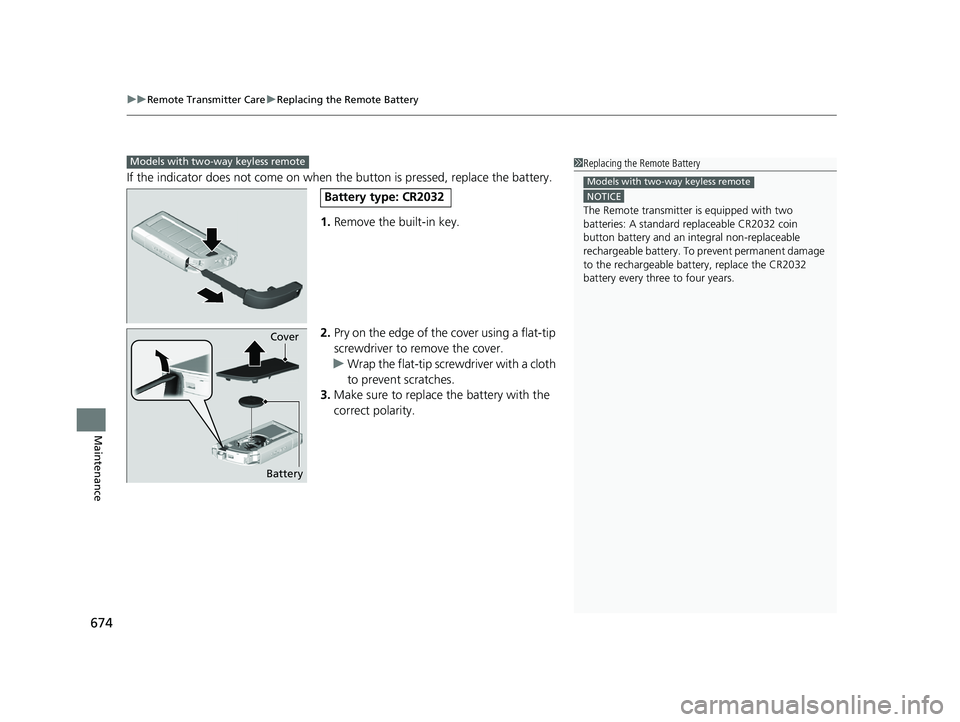
If the indicator does not come on when the button is pressed, replace the battery.
1. Remove the built-in key.
2. Pry on the edge of the cover using a flat-tip
screwdriver to remove the cover.
u Wrap the flat-tip screwdriver with a cloth
to prevent scratches.
3. Make sure to replace the battery with the
correct polarity.
1Replacing the Remote Battery
NOTICE
An improperly disposed of battery can damage the
environment. Always conf irm local regulations for
battery disposalM
Replacement batteries are commercially available or
at a dealer.
3WARNING
CHEMICAL BURN HAZARD
The battery that powers the remote
transmitter can cause severe internal burns
and can even lead to death if swallowed.
Keep new and used batteries away from
children.
If you suspect that a child has swallowed
the battery, seek medical attention
immediately.
Models without two-way keyless remote
Battery type: CR2032
Battery Cover
24 ACURA INTEGRA-313S56100.book 673 ページ 2023年2月13日 月曜日 午後2時41分
Page 676 of 766
uuRemote Transmitter Care uReplacing the Remote Battery
674
Maintenance
If the indicator does not come on when the button is pressed, replace the battery.
1. Remove the built-in key.
2. Pry on the edge of the cover using a flat-tip
screwdriver to remove the cover.
u Wrap the flat-tip screwdriver with a cloth
to prevent scratches.
3. Make sure to replace the battery with the
correct polarity.
Models with two-way keyless remote1 Replacing the Remote Battery
NOTICE
The Remote transmitter is equipped with two
batteries: A standard replaceable CR2032 coin
button battery and an in tegral non-replaceable
rechargeable battery. To prevent permanent damage
to the rechargeable battery, replace the CR2032
battery every three to four years.
Models with two-way keyless remote
Battery type: CR2032
Battery Cover
24 ACURA INTEGRA-313S56100.book 674 ページ 2023年2月13日 月曜日 午後2時41分