Page 88 of 766

86
Instrument Panel
Indicators
Indicators come on/blink depending on the condition of the vehicle. Messages may
display on the driver information interface at the same time. Please take the
appropriate action outlined in the message, such as contacting a dealer.
M (7-speed manual
shift mode) Indicator/
Shift Indicator
* P. 91
Parking Brake and
Brake System
Indicator (Red)
Parking Brake and
Brake System
Indicator (Amber)U.S.
Canada
U.S.
Canada
Automatic Brake
Hold System
Indicator
Automatic Brake
Hold IndicatorU.S.
Canada
*1 : When you set the power mode to ON, these indicators come on to indicate that system checks are being perf ormed. They go off a few seconds later or after the engine
has started. If an indicator does not come on or turn off, th ere may be a malfunction in the corresponding system. To resolve t he issue, follow the instructions in the
owner's manual.
P. 88
*1
Malfunction
Indicator Lamp
Charging System
Indicator
Seat Belt Reminder
Indicator Low Fuel Indicator
P. 90
P. 90
P. 90
P. 91
P.
91
*1
*1
*1
Shift Position
Indicator* P. 91
Transmission System
Indicator
* P. 92
P. 93
P. 94
*1
Anti-lock Brake System
(ABS ) Indicator
Vehicle Stability
AssistTM (VSA®)
System Indicator
Vehicle Stability Assist
TM
(VSA®) OFF Indicator
Supplemental
Restraint System
Indicator
Electric Power
Steering (EPS) System
Indicator
*1
P. 94
P. 94
P. 95*1
*1
P. 95
*1 P. 94
*1 *1
*1 *1
Shift Up Indicator* P. 92
Shift Down Indicator* P. 92
Gear Position
Indicator* P. 92
* Not available on all models
24 ACURA INTEGRA-313S56100.book 86 ページ 2023年2月13日 月曜日 午後2時41分
Page 95 of 766
93
uuIndicators u
Continued
Instrument Panel
IndicatorNameOn/BlinkingExplanation
Seat Belt Reminder
Indicator
●Blinks and the beeper sounds for a few
seconds if you are not wearing a seat belt
when you set the power mode to ON, then
the indicator comes on.
●If the front passenger is not wearing a seat
belt, the indicator comes on a few seconds
later.
●Comes on for a while when the rear seat
belt is unfastened while the power mode in
ON.
●Blinks while driving if you and/or any
passenger has not fastened a seat belt. The
beeper sounds and the indicator blinks at
regular intervals.
●The beeper stops and the indicator goes off when
you and the passengers fasten their seat belts.
●Stays on after you and/or the passengers have
fastened the seat belt(s) - A detection error may
have occurred in the sensor. Have your vehicle
checked by a dealer.
2 Seat Belt Reminder P. 42
24 ACURA INTEGRA-313S56100.book 93 ページ 2023年2月13日 月曜日 午後2時41分
Page 96 of 766

94
uuIndicators u
Instrument Panel
IndicatorNameOn/BlinkingExplanation
Low Fuel Indicator
●Comes on when the fuel reserve is running
low (approximately 1. 8 U.S. gal/7.0 Liter
left).●Refuel your vehicle as soon as possible.
●Blinks if there is a problem with the fuel
gauge.●Have your vehicle checked by a dealer.
Anti-lock Brake
System ( ABS)
Indicator
●Comes on if there is a problem with the
ABS.●Stays on constantly - Have your vehicle checked
by a dealer. With this indicator on, your vehicle still
has normal braking abil ity but no anti-lock
function.
2 Anti-lock Brake System (ABS) P. 605
Supplemental
Restraint System
Indicator
●Comes on if a problem with any of the
following is detected:
-Supplemental Restraint System
- Side airbag system
- Side curtain airbag system
- Seat belt tensioner●Stays on constantly - Have your vehicle checked
by a dealer.
Electric Power
Steering (EPS)
System Indicator
• Comes on if there is a problem with the
EPS system.•Stays on constantly - Have your vehicle checked
by a dealer.
• Do not drive displays on the driver
information interface - Immediately stop in a
safe place and contact a dealer.
2 If the Electric Power Steering (EPS) System
Indicator Comes On P. 725
24 ACURA INTEGRA-313S56100.book 94 ページ 2023年2月13日 月曜日 午後2時41分
Page 120 of 766
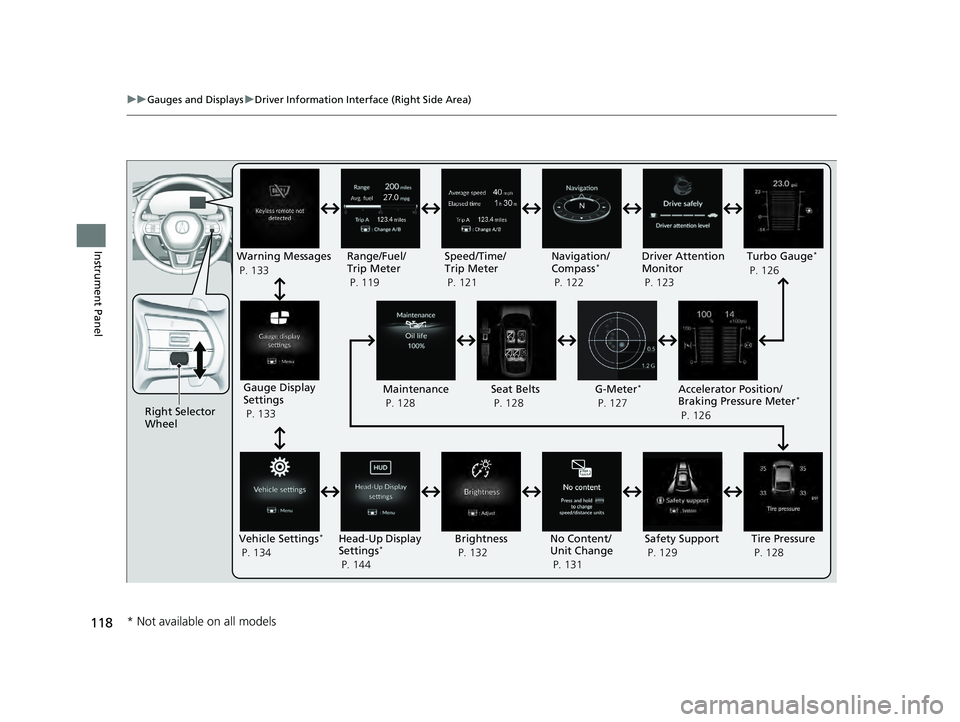
118
uuGauges and Displays uDriver Information Interface (Right Side Area)
Instrument Panel
Right Selector
Wheel Warning Messages
P. 133
Range/Fuel/
Trip Meter
P. 119
No Content/
Unit Change
P. 131Driver Attention
Monitor
P. 123
Navigation/
Compass
*
P. 122
Speed/Time/
Trip Meter
P. 121
Gauge Display
Settings
P. 133 Maintenance
P. 128
Safety Support
P. 129
Seat Belts
P. 128
Vehicle Settings
*
P. 134 Head-Up Display
Settings*
P. 144 Brightness
P. 132
Tire Pressure
P. 128
Turbo Gauge*
P. 126
Accelerator Position/
Braking Pressure Meter
*
P. 126
G-Meter
*
P. 127
* Not available on all models
24 ACURA INTEGRA-313S56100.book 118 ページ 2023年2月13日 月曜日 午後2時41分
Page 127 of 766

Continued125
uuGauges and Displays uDriver Information Interface (Right Side Area)
Instrument Panel
■The Driver Attention Monitor resets when:
• The engine is turned off.
• The driver unfastens the seat belt and ope ns the door while the vehicle is stopped.
■For the Driver Attention Monitor to function:
• The vehicle must be traveling above 25 mph (40 km/h).
• The electric power steering (EPS) system indicator must be off.
■Depending on driving conditions or other factors, the Driver Attention
Monitor may not function in the following circumstances:
• The steering assist function of the Lane Keeping Assist System (LKAS) is active.
2Lane Keeping Assist System (LKAS) P. 553
•The condition of the road is poor; e. g., the surface is unpaved or bumpy.
• It is windy.
• The driver is frequently op erating the vehicle in an assertive manner, such as
changing lanes or accelerating.
■Customizing
You can change the Driver Atte ntion Monitor settings. Select Tactile and audible
alert
*1/ Tactile And Audible Alert*2, Tactile alert*1/Tactile Alert*2, or OFF .
2Vehicle Settings* P. 134
2 Customized Features P. 367
*1: Models with 7-in. Color Touchscreen
*2: Models with 9-in. Color Touchscreen
1For the Driver Attention Monitor to function:
The bars on the driver information interface remain
grayed-out unless the Driv er Attention Monitor is
functioning.
Models with 7-in. Color Touchscreen
Models with 9-in. Color Touchscreen
* Not available on all models
24 ACURA INTEGRA-313S56100.book 125 ページ 2023年2月13日 月曜日 午後2時41分
Page 130 of 766
uuGauges and Displays uDriver Information Interface (Right Side Area)
128
Instrument Panel
Occurs, under specified conditions, when seat belts are latched or unlatched.
2Seat Belt Reminder P. 42
Shows the remaining oil life and Maintenance MinderTM.
2Maintenance MinderTM P. 629
Shows each tire’s pressure.
2Tire Pressure Monitoring System (TPMS) with Tire Fill Assist P. 478
■Seat Belts
■Maintenance
■Tire Pressure Monitor1Tire Pressure Monitor
Tire pressure status is di splayed via green and amber
icons.
The icons turn amber if tire pressure is too low, or if
there is a problem with the system. “--” is displayed
if there is a problem.
24 ACURA INTEGRA-313S56100.book 128 ページ 2023年2月13日 月曜日 午後2時41分
Page 204 of 766

uuSeats uFront Seats
202
Controls
Adjust the driver’s seat-back to a comfortable,
upright position, leaving ample space
between your chest and the airbag cover in
the center of the steering wheel.
The front seat passenger should also adjust
their seat-back to a comfortable, upright
position.
Reclining a seat-back so that the shoulder part of the belt no longer rests against the
occupant’s chest reduces the protective capa bility of the belt. It also increases the
chance of sliding under the belt in a crash and being seriously injured. The farther a
seat-back is reclined, the greater the risk of injury.
■Adjusting the Seat-Backs1 Adjusting the Seat-Backs
Do not put a cushion, or other object, between the
seat-back and your back.
Doing so may interfere with proper seat belt or airbag
operation.
If you cannot get far e nough away from the steering
wheel and still reach th e controls, we recommend
that you investigate whether some type of adaptive
equipment may help.
3WARNING
Reclining the seat-back too far can result in
serious injury or death in a crash.
Adjust the seat-back to an upright position,
and sit well back in the seat.
24 ACURA INTEGRA-313S56100.book 202 ページ 2023年2月13日 月曜日 午後2時41分
Page 207 of 766

205
uuSeats uMaintain a Proper Sitting Position
Controls
Maintain a Proper Sitting Position
After all occupants have adjusted their seats and head restraints* and put on their
seat belts, it is very important that they continue to sit upright well back in their seats
with their feet on the floor until the vehicl e is safely parked and the engine is off.
Sitting improperly can increase the chance of injury during a crash. For example, if
an occupant slouches, lies down, turns si deways, sits forward, leans forward or
sideways, or puts one or both feet up, the chance of injury during a crash is greatly
increased.
In addition, an occupant who is out of posi tion in the front seat can be seriously or
fatally injured in a crash by striking interior parts of the vehicle or being struck by an
inflating front airbag.1 Maintain a Proper Sitting Position
3WARNING
Sitting improperly or out of position can
result in serious injury or death in a crash.
Always sit upright, well back in the seat,
with your feet on the floor.
* Not available on all models
24 ACURA INTEGRA-313S56100.book 205 ページ 2023年2月13日 月曜日 午後2時41分