Page 193 of 766

191
uuOperating the Switches Around the Steering Wheel uWipers and Washers
Continued
Controls
Wipers and Washers
The windshield wipers and washers can be
used when the power mode is in ON.
■MIST
The wipers run at high speed until you release
the lever.
■Wiper switch (OFF, INT*1/AUTO*2, LO,
HI)
Move the lever up or down to change the
wiper settings.
■Adjusting wiper operation*
Turn the adjustment ring to adjust the wiper
operation.
■Washer
Sprays while you pull the lever toward you.
When you release the le ver for more than one
second, the spray stops, the wipers sweep two
or three more times to clear the windshield,
and then stop.
*1 : Models with manual intermittent operation
*2 : Models with automati c intermittent operation
■Windshield Wiper/Washer1Wipers and Washers
NOTICE
Do not use the wipers when the windshield is dry.
The windshield will get sc ratched, or the rubber
blades will get damaged.
NOTICE
Turn the washers off if no washer fluid comes out.
The pump may get damaged.
NOTICE
In cold weather, the blades may freeze to the
windshield.
Operating the wipers in th is condition may damage
the wipers. Use the defogger to warm the
windshield, then turn the wipers on.
If the vehicle speeds up while the wipers are operating
intermittently, the length of the wipe interval shortens.
When the vehicle speeds up, the wiper operation’s
shortest delay setting ( ) and the LO setting become
the same.
The wiper motor may stop motor operation
temporarily to prevent an overload. Wiper operation
will return to normal within a few minutes.
If the wiper stops operating due to any obstacle such as
the buildup of snow, park the vehicle in a safe place.
Rotate the wiper switch to OFF, set the power mode
to ACCESSORY or VEHICLE OFF, then remove the
obstacle.
Models with intermittent time adjustment ring
Intermittent Time
Adjustment Ring*
MIST
INT
*1/AUTO*2
OFF
LO : Low speed wipe
HI: High speed wipe Pull to
use
washer.
Lower speed, fewer sweeps
Higher speed, more sweeps
* Not available on all models
24 ACURA INTEGRA-313S56100.book 191 ページ 2023年2月13日 月曜日 午後2時41分
Page 195 of 766

193
uuOperating the Switches Around the Steering Wheel uRear Defogger/Heated Door Mirror Button
Controls
Rear Defogger/Heated Door Mirror Button
Press the rear defogger and heated door mirror button to defog the rear window
and mirrors* when the power mode is in ON.
The rear defogger and heated door mirror
automatically switch off after 10-30 minutes
depending on the outside temperature.
However, if the outside temperature is 32°F
(0°C) or below, it does not automatically
switch off.
1 Rear Defogger/Heated Door Mirror Button
This system consumes a lot of power, so turn it off
when the window has been defogged.
Also, do not use the system for a long time while the
engine is idling. This may weaken the battery, making
it difficult to start the engine.
When the power mode is se t to ON and the outside
temperature is below 41°F (5°C), the heated door
mirror may automatically activate for 10 minutes.
* Not available on all models
24 ACURA INTEGRA-313S56100.book 193 ページ 2023年2月13日 月曜日 午後2時41分
Page 196 of 766

194
uuOperating the Switches Around the Steering Wheel uDriving Position Memory System*
Controls
Driving Position Memory System*
You can store two driver’s seat positions (except for power lumbar) with the driving
position memory system.
When you unlock and open the driver’s door with a keyless remote or keyless access
system, the seat adjusts to retracted posi tions of one of the two preset positions
automatically.
• DRIVER 1 transmitter is linked to memory button 1.
• DRIVER 2 transmitter is linked to memory button 2.
The driver’s seat moves rearward depending
on the set seating position once you
•Stop the vehicle.
• Put the transmission in
(P (continuously
variable transmission).
• Turn the engine off.
• Open the driver’s door.
Once the power mode is in the ACCESSORY
position, the driver’s seat moves forward to
the DRIVER 1 or 2 preset position.
1 Driving Position Memory System*
Using the audio/informati on screen, you can disable
the automatic seat adjustment function. 2 Customized Features P. 367
The driver’s seat easy exit feature can be turned ON/
OFF. 2 Customized Features P. 367
System Operation
The system will not operate if:
•Either memory button is pre ssed while the seat is in
motion.
•The seat positions are ad justed while in operation.•Either of the memorized positions is set fully to the
rear.
The system may not recognize a key if:
•The key is in close proximity to a cell phone or other
wireless device.
•Both keys are in the vehicle at the same time.
•The Driving Position Memory System is disabled in
customized features.
•Opening driver's door wi thout fully grabbing the
door handle.
DRIVER 1 DRIVER 2
* Not available on all models
24 ACURA INTEGRA-313S56100.book 194 ページ 2023年2月13日 月曜日 午後2時41分
Page 197 of 766

195
uuOperating the Switches Around the Steering Wheel uDriving Position Memory System*
Controls
1. Set the power mode to ON. Adjust the
driver’s seat to the desired position.
2. Press the SET button.
u The SET button indicator lights will come
on.
3. Press the memory button
(1 or (2 within
five seconds of pressing the SET button.
u You will hear the beeper, and the SET
button indicator light goes off.
1. Put the transmission into
(P.
2. Press a memory button (
(1 or (2).
1. Apply the parking brake.
2. Press a memory button (
(1 or (2).
The seat will automatically move to the
memorized position.
■Storing a Position in Memory1 Storing a Position in Memory
After you press the SET button, the storing operation
will be canceled when:
•You do not press the memory button within five
seconds.
•You readjust the seat position before the double-
beep.
•You set the power mode to any position except
ON.
SET Button
Memory Button 1
Memory Button 2
■Recalling the Stored Position1 Recalling the Stored Position
The seat will st op moving if you:
•Press the SET button or memory button (1 or (2.
•Adjust the seat position.
•Put the transmission into a position other than (P
(continuously variable transmission).
•Release the parking brake (manual transmission).
Memory ButtonsContinuously variable transmission models
Manual transmission models
24 ACURA INTEGRA-313S56100.book 195 ページ 2023年2月13日 月曜日 午後2時41分
Page 201 of 766
199Continued
Controls
Seats
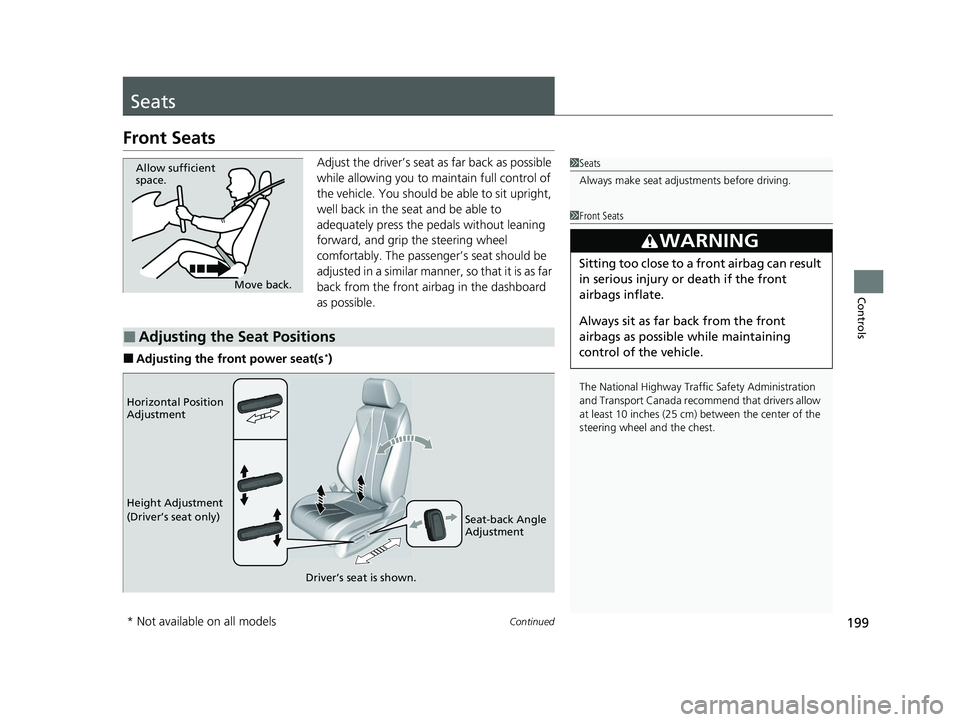
Front Seats
Adjust the driver’s seat as far back as possible
while allowing you to ma intain full control of
the vehicle. You should be able to sit upright,
well back in the seat and be able to
adequately press the pedals without leaning
forward, and grip the steering wheel
comfortably. The passenger’s seat should be
adjusted in a similar manner, so that it is as far
back from the front airbag in the dashboard
as possible.
■Adjusting the front power seat(s*)
1 Seats
Always make seat adjustments before driving.
1Front Seats
The National Highway Traffic Safety Administration
and Transport Cana da recommend that drivers allow
at least 10 inches (25 cm) between the center of the
steering wheel and the chest.
3WARNING
Sitting too close to a front airbag can result
in serious injury or death if the front
airbags inflate.
Always sit as far back from the front
airbags as possible while maintaining
control of the vehicle.
Move back.
Allow sufficient
space.
■Adjusting the Seat Positions
Horizontal Position
Adjustment
Height Adjustment
(Driver’s seat only)
Seat-back Angle
Adjustment
Driver’s seat is shown.
* Not available on all models
24 ACURA INTEGRA-313S56100.book 199 ページ 2023年2月13日 月曜日 午後2時41分
Page 225 of 766
Continued223
uuInterior Convenience Items uOther Interior Convenience Items
Controls
The power mode must be in ON to use the
heated steering wheel.
Press the button on th e lower side of the
steering wheel.
When a comfortable temperature is reached,
press the button again to turn it off.
The heated steering wheel is turned off every
time you start the engine, even if you turned it
on the last time yo u drove the vehicle.
■Heated Steering Wheel
Canadian models
1Heated Steering Wheel
Do not use the heated st eering wheel continuously
when the engine is off. Under such conditions, the
battery may be weaken ed, making the engine
difficult to start.
24 ACURA INTEGRA-313S56100.book 223 ページ 2023年2月13日 月曜日 午後2時41分
Page 244 of 766

242
Features
Audio System Basic Operation
To use the audio system, the power mode must be in ACCESSORY or ON.
Use the selector knob or MENU button to
access some audio functions.
Press to switch between the normal and
extended display fo r some functions.
Selector knob: Rotate left or right to scroll
through the available choices. Press to set
your selection.
MENU button: Press to display the menu
screen. (Back) button: Press to go back to the
previous display.
Models with 7-in. Color Touchscreen1 Audio System Basic Operation
These indications are used to show how to operate
the selector knob.
Rotate to select.
Press to enter.
Menu Items 2 Adjust Clock P. 150
2 Adjusting the Sound P. 243
2 Display Setup P. 244
2 Customized Features P. 362
Press the buttons on the steering wheel to change
any audio setting. 2 Audio Remote Controls P. 238
Touchscreen operation
•Use simple gestures - in cluding touching, swiping
and scrolling - to operate certain audio functions.
•Some items may be grayed -out during driving to
reduce the potential for distraction.
•You can select them when the vehicle is stopped.•Wearing gloves may limit or prevent touchscreen
response.
You can change the touchs creen sensitivity setting.
2 Customized Features P. 362
(Back)
Button
Selector Knob
MENU Button
Menu Display
24 ACURA INTEGRA-313S56100.book 242 ページ 2023年2月13日 月曜日 午後2時41分
Page 339 of 766

337
uuAudio System Basic Operation uAndroid AutoTM
Continued
Features
■Connect Android Auto wireless ly with the steering wheel
1. Press and hold the (Talk) button on the steering wheel.
2. Pair the Android phone to the vehicle’s Bluetooth® HandsFreeLink ® (HFL) system.
2Phone Setup P. 410
3.Check the box on Android Auto.
u If you select Android Auto , you cannot select Audio and Phone .
4. Select Connect .
5. Select Yes.
u If your Android phone asks to accept for connecting Android Auto, accept for
connection. A confirmation message for AcuraLink Assist appears.
6. Select Yes or No .
■Connect Android Auto wirelessly at start-up (when there is no phone
paired to the system)
1. Set the power mode to ACCESSORY or ON.
2. Select OK.
u If there is no registered device, the Bluetooth® pairing screen will be displayed.
u If you check the box with Do not show this again, this screen will not be
displayed.
3. Pair the Android phone to the vehicle’s Bluetooth® HandsFreeLink ® (HFL) system.
2Phone Setup P. 410
4.Check the box on Android Auto.
u If you select Android Auto , you cannot select Audio and Phone .
5. Select Connect .
6. Select Yes.
u If your Android phone asks to accept for connecting Android Auto, accept for
connection. A confirmation message for AcuraLink Assist appears.
7. Select Yes or No .
24 ACURA INTEGRA-313S56100.book 337 ページ 2023年2月13日 月曜日 午後2時41分
