Page 135 of 766

Continued133
uuGauges and Displays uDriver Information Interface (Right Side Area)
Instrument Panel
■Arrange content on the right side area
You can choose which contents to display on the right side area. 1.Press the right selector wheel when you
select the Gauge display settings on the
driver information interface.
2. Roll the right selector wheel to scroll to
select Hide/show , then press the right
selector wheel.
3. Roll the right selector wheel to scroll
between contents, then press the right
selector wheel to check or uncheck them.
You can check if there are any active warning messages.
■Gauge Display Settings1 Arrange content on the right side area
Contents that are gray ca nnot be removed from the
right side area.
When you customize settings, shift to
( P.
When you customize setti ngs, set the parking brake.
Continuously variable transmission models
Manual transmission models
■Warnings1Warnings
If there are multiple warnings, you can roll the right
selector wheel to see other warnings.
24 ACURA INTEGRA-313S56100.book 133 ページ 2023年2月13日 月曜日 午後2時41分
Page 186 of 766

184
uuOperating the Switches Around the Steering Wheel uLight Switches
Controls
Light Switches
Rotating the light switch turns the lights on
and off, regardless of the power mode
setting.
■High beams
Push the lever forward until you hear a click.
■Low beams
When in high beams, pull the lever back to
return to low beams.
■Flashing the high beams
Pull the lever back, and release it.
■Lights off
Turn the lever to OFF either when:
• The shift lever is in
(P (continuously
variable transmission).
• The parking brake is applied.
To turn the lights on ag ain, turn the lever to
OFF to cancel the lights off mode. Even if you
do not cancel the lights off mode, the lights
come on automatically when:
• The transmission is taken out of
(P
(continuously variable transmission) and the
parking brake is released.
• The vehicle starts to move.
■Manual Operation1Light Switches
If you leave the power mode in VEHICLE OFF while
the lights are on, a chime sounds when the driver’s
door is opened.
When the lights are on, the lights on indicator in the
instrument pane l will be on.
2 Lights On Indicator P. 96
Do not leave the lights on when the engine is off
because it will cause the battery to discharge.
If you suspect that the he adlights are not positioned
properly, have the vehicl e inspected by a dealer.
Turns on parking lights, side
marker, tail, and rear license
plate lights
Turns on headlights, side
marker, parking lights, tail, and
rear license plate lights
High Beams
Flashing the high beams
Low Beams
24 ACURA INTEGRA-313S56100.book 184 ページ 2023年2月13日 月曜日 午後2時41分
Page 187 of 766

Continued185
uuOperating the Switches Around the Steering Wheel uLight Switches
Controls
Automatic lighting control can be used when
the power mode is in ON.
When the light switch is in AUTO, the
headlights and other exterior lights will switch
on and off automatically depending on the
ambient brightness.
The headlights come on when you unlock a
door in dark areas with the headlight switch in
AUTO .
u Once you lock the door, the headlights
will go off.
■Automatic Operation (automatic lighting control)1 Automatic Operation (aut omatic lighting control)
We recommend that you tu rn on the lights manually
when driving at night, in a de nse fog, or in dark areas
such as long tunnels or parking facilities.
The light sensor is in the location shown below.
Do not cover this light sensor with anything;
otherwise, the automatic lighting system may not
work properly.
Light Sensor
Models without automatic
intermittent wipers
Light Sensor
Models with automatic
intermittent wipers
24 ACURA INTEGRA-313S56100.book 185 ページ 2023年2月13日 月曜日 午後2時41分
Page 189 of 766
187
uuOperating the Switches Around the Steering Wheel uFog Lights*
Controls
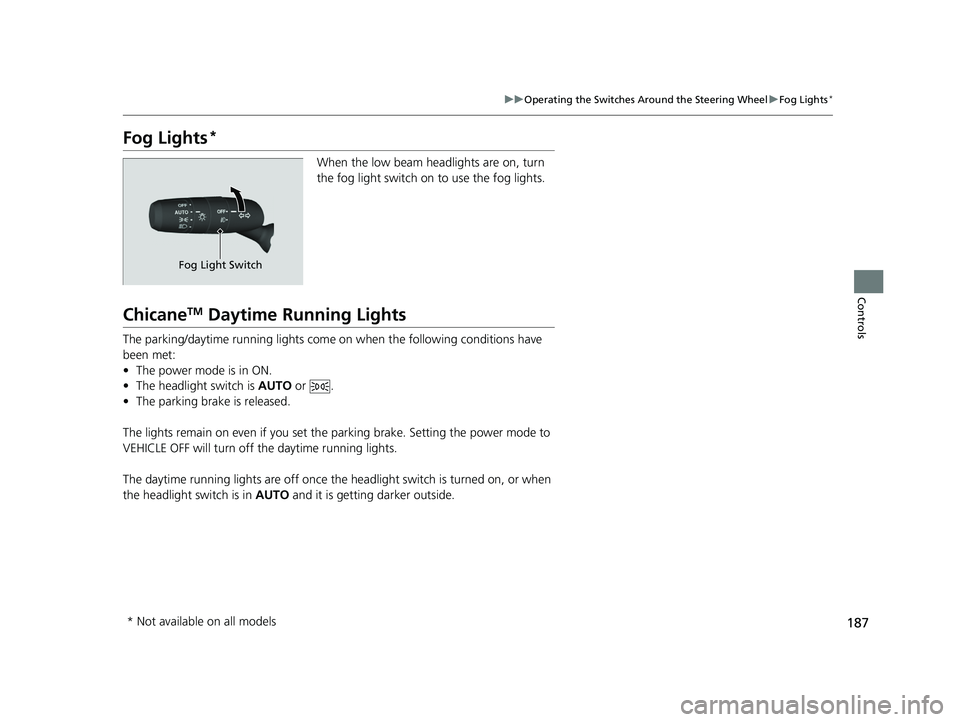
Fog Lights*
When the low beam headlights are on, turn
the fog light switch on to use the fog lights.
ChicaneTM Daytime Running Lights
The parking/daytime running lights come on when the following conditions have
been met:
• The power mode is in ON.
• The headlight switch is AUTO or .
• The parking brake is released.
The lights remain on even if you set th e parking brake. Setting the power mode to
VEHICLE OFF will turn off the daytime running lights.
The daytime running lights are off once the h eadlight switch is turned on, or when
the headlight switch is in AUTO and it is getting darker outside.
Fog Light Switch
* Not available on all models
24 ACURA INTEGRA-313S56100.book 187 ページ 2023年2月13日 月曜日 午後2時41分
Page 197 of 766

195
uuOperating the Switches Around the Steering Wheel uDriving Position Memory System*
Controls
1. Set the power mode to ON. Adjust the
driver’s seat to the desired position.
2. Press the SET button.
u The SET button indicator lights will come
on.
3. Press the memory button
(1 or (2 within
five seconds of pressing the SET button.
u You will hear the beeper, and the SET
button indicator light goes off.
1. Put the transmission into
(P.
2. Press a memory button (
(1 or (2).
1. Apply the parking brake.
2. Press a memory button (
(1 or (2).
The seat will automatically move to the
memorized position.
■Storing a Position in Memory1 Storing a Position in Memory
After you press the SET button, the storing operation
will be canceled when:
•You do not press the memory button within five
seconds.
•You readjust the seat position before the double-
beep.
•You set the power mode to any position except
ON.
SET Button
Memory Button 1
Memory Button 2
■Recalling the Stored Position1 Recalling the Stored Position
The seat will st op moving if you:
•Press the SET button or memory button (1 or (2.
•Adjust the seat position.
•Put the transmission into a position other than (P
(continuously variable transmission).
•Release the parking brake (manual transmission).
Memory ButtonsContinuously variable transmission models
Manual transmission models
24 ACURA INTEGRA-313S56100.book 195 ページ 2023年2月13日 月曜日 午後2時41分
Page 369 of 766
367Continued
Features
Customized Features
Use the audio/information screen to customize certain features.
With the power mode in ON, pre ss the button, and then select General
Settings and select a setting item.
■How to Customize the General Settings
1Customized Features
When you customize settings:
•Make sure that the vehicle is at a complete stop.
•Shift to (P.
•Set the parking brake.
To customize features detail, refer to the following. 2 System P. 368
2 Smartphone Connection P. 371
2 Connections P. 372
2 Display P. 373
2 Sound P. 373
2 Camera P. 374
2 Voice Control
* P. 374
Continuously variable transmission models
Manual transmission models
Models with 9-in. Color Touchscreen
Audio/Information Screen
* Not available on all models
24 ACURA INTEGRA-313S56100.book 367 ページ 2023年2月13日 月曜日 午後2時41分
Page 379 of 766

377
uuCustomized Features u
Continued
Features
*1:Default Setting
Customizable Features Description Selectable Settings
Traffic Sign Recognition
System Speed Limit
Warning Enables over speed limit warning
when speed limit is exceeded.
2Traffic Sign Recognition System P. 583ON*1/OFF
Speed Limit Warning
Threshold SettingSelect speed limit warning threshol d based on personal preference.
2Traffic Sign Recognition System P. 583
Speed Limit*1/
Speed Limit+3mph /
Speed Limit+5mph /
Speed Limit+10mph
(When mph is selected)
Speed Limit
*1/
Speed Limit+5km/h /
Speed Limit+10km/h /
Speed Limit+15km/h
(When km/h is selected)
Driver Attention Monitor Changes the setting for the
driver attention monitor.
2Driver Attention Monitor P. 123
OFF/Tactile Alert/ Tactile
And Audible Alert*1
Rev Match System*Toggles the rev match system.
2 Rev Match System P. 449ON*1/OFF
Rear Sensor Setting
Toggles the rear Parking Sensor. This selection will also affect the
rear Low Speed Braking Control.
2 Parking Sensor System* P. 609
2 Low Speed Braking Control* P. 501, 507
ON*1/OFF
* Not available on all models
24 ACURA INTEGRA-313S56100.book 377 ページ 2023年2月13日 月曜日 午後2時41分
Page 427 of 766

425
Driving
This chapter discusses driving and refueling.
Before Driving................................... 426
Towing a Trailer ................................ 432
When Driving
Starting the Engine .......................... 433
Precautions While Driving................. 441
Continuously Variable Transmission*... 443Shifting .................................... 444 , 448Acura Integrated Dynamics System .. 452, 454Auto Idle Stop*........................ 463, 469Vehicle Stability AssistTM (VSA®), aka
Electronic Stability Control (ESC),
System ........................................ 474
Agile Handling Assist ....................... 476 Limited Slip Differential (LSD) ........... 477
Tire Pressure Monitoring System (TPMS)
with Tire Fill Assist .......................... 478
Tire Pressure Monitoring System (TPMS) - Required Federal Explanation ......... 480
Blind Spot Information System ......... 482
AcuraWatch
TM................................... 486
Collision Mitigati on Braking SystemTM
(CMBSTM) ....................................... 489
Low Speed Braking Control*.... 501, 507
Adaptive Cruise Control (ACC) with Low Speed Follow
*............................... 512
Adaptive Cruise Control (ACC)*....... 533 Lane Keeping Assist System (LKAS).... 553
Traffic Jam Assist
*........................... 565
Road Departure Miti gation System... 574
Traffic Sign Recognition System ....... 583
Front Wide View Camera ................. 590
Sonar Sensors
*................................ 592
Braking .............................................. 594
Parking Your Vehicle ........................ 607
Multi-View Rear Camera .................. 617
Refueling ........................................... 619
Fuel Economy and CO
2 Emissions .... 623
Turbo Engine Vehicle ....................... 624
* Not available on all models
24 ACURA INTEGRA-313S56100.book 425 ページ 2023年2月13日 月曜日 午後2時41分