2024 ACURA INTEGRA driving display
[x] Cancel search: driving displayPage 255 of 766

253
uuAudio System Basic Operation uPlaying Bluetooth ® Audio
Continued
Features
Playing Bluetooth ® Audio
Your audio system allows you to listen to music from your Bluetooth-compatible
phone.
This function is available when the phone is paired an d connected to the vehicle’s
Bluetooth ® HandsFreeLink ® (HFL) system.
2Phone Setup P. 390
1Playing Bluetooth ® Audio
Not all Bluetooth-enabled phones with streaming
audio capabilities are compatible with the system.
For a list of compatible phones:
•U.S.: Visit www.handsfreelink.com/Acura , or call 1-
888-528-7876.
•Canada: For more info rmation on smartphone
compatibility, call 1-855-490-7351.
In some states, it may be il legal to perform some data
device functions while driving.
Only one phone can be used with HFL at a time.
When there are more than two paired phones in the
vehicle, the system automatically connects to the
prioritized phone. You can a ssign priority to a phone
in the Bluetooth Settings menu.
2 HFL Menus P. 388
To change the searched phone manually, select Go
to Device List .
In some cases, the name of the artist, album, or track
may not appear correctly.
Some functions may not be available on some devices.
If a phone is currently conne cted via Apple CarPlay or
Android Auto, Bluetooth® Audio from that phone is
unavailable. However, a se cond previously paired
phone can stream Bluetooth® Audio by selecting
Audio from the Bluetooth® device list.
2 Phone Setup P. 390
MEDIA Button
Press to select Bluetooth® Audio.
VOL/ AUDIO
(Volume/Power) Knob
Press to turn the audio
system on and off.
Turn to adjust the
volume.
MENU Button
Press to display the
menu items.
Audio/Information Screen
Bluetooth Indicator
Appears wh
en your phone
is connected to HFL.
Track Buttons
Press or to
change files.
Repeat Icon
Select to repeat the current file. Shuffle Icon
Select to play all files in the current
category in random order.Selector Knob
Turn to change files.
Press and turn to
select an item, then
press to set your
selection.
(Back) Button
Press to
go back to
the previous display.
Play/Pause Icon
Select to play/pause a file.
24 ACURA INTEGRA-313S56100.book 253 ページ 2023年2月13日 月曜日 午後2時41分
Page 271 of 766

269
uuAudio System Basic Operation uAudio/Information Screen
Continued
Features
Audio/Information Screen
Displays the audio status and wallpaper. From this display, you can go to various
setup options.
■Using the audio/in formation screen
Press the button to go to the home screen.
Select the following icons on the home screen or after selecting All Apps .
■Phone
Displays the HFL information.
2 Bluetooth ® HandsFreeLink ® P. 405
■FM/AM/SiriusXM/USB/Bluetooth Audio
Displays information for each audio format.
■Switching the Display
1 Using the audio/in formation screen
Touchscreen operation
•Use simple gestures - in cluding touching, swiping,
and scrolling - to operate certain audio functions.
•Some items may be grayed -out during driving to
reduce the potential for distraction.
•You can select them when the vehicle is stopped.•Wearing gloves may limit or prevent touchscreen
response.
You can change the touchs creen sensitivity setting.
2 Customized Features P. 367
Home Screen
Button
All Apps
24 ACURA INTEGRA-313S56100.book 269 ページ 2023年2月13日 月曜日 午後2時41分
Page 315 of 766

313
uuAudio System Basic Operation uPlaying Bluetooth ® Audio
Continued
Features
Playing Bluetooth ® Audio
Your audio system allows you to listen to music from your Bluetooth-compatible
phone.
This function is available when the phone is paired an d connected to the vehicle’s
Bluetooth ® HandsFreeLink ® (HFL) system.
2Phone Setup P. 410
1Playing Bluetooth ® Audio
Not all Bluetooth-enabled phones with streaming
audio capabilities are compatible with the system.
For a list of compatible phones:
•U.S.: Visit www.handsfreelink.com/Acura ,
or call 1-888-528-7876.
•Canada: For more info rmation on smartphone
compatibility, call 1-855-490-7351.
It may be illegal to pe rform some data device
functions while driving.
Only one phone can be used with HFL at a time.
When there are more than two paired phones in the
vehicle, the system automatically connects to the
prioritized phone. You can a ssign priority to a phone
in the Bluetooth ® device list.
2 Phone Setup P. 410
The connected phone for Bluetooth® Audio can be
different.
If more than one phone is paired to the HFL system,
there may be a delay before the system begins to play.
In some cases, the name of the artist, album, or track
may not appear correctly.
Some functions may not be available on some devices.
If a phone is currently conne cted via Apple CarPlay or
Android Auto, Bluetooth® Audio from that phone is
unavailable. However, a se cond previously paired
phone can stream Bluetooth® Audio by selecting
from the Bluetooth ® device list.
2 Phone Setup P. 410
Audio/Information Screen
Browse Icon
Select to display the menu items. Play/Pause IconBluetooth Indicat
o
r
Appears when your phone
is connected to HFL.
Track Icons
Select or to change tracks.
Select and hold to move rapidly
within a track.
Repeat Icon
Select to repeat the
current track.
(Back) Button
Press to go back
to the previous
display.VOL/ AUDIO
(Volume/Power) Knob
Press to turn the audio
system on and off.
Turn to adjust the
volume.
Shuffle Icon
Select to play all files
in the current
category in random
order.
24 ACURA INTEGRA-313S56100.book 313 ページ 2023年2月13日 月曜日 午後2時41分
Page 390 of 766

388
uuBluetooth ® HandsFreeLink ®u HFL Menus
Features
HFL Menus
The power mode must be in ACCESSORY or ON to use the system.1HFL Menus
To use HFL, you must first pair your Bluetooth-
compatible cell phone to th e system while the vehicle
is parked.
Some functions are limited while driving. A message
appears on the screen when the vehicle is moving
and the operation is canceled.
PHONE button
Recent Calls
*1All
Pair a phone to the system.Connect New Device
Change DeviceConnect a paired phone.
Priority Device
Set a device as the priority device.
Bluetooth Settings
Keypad*1
Settings
Favorite
Contacts*1(Existing entry list)
Contacts*1
Dialed
Missed
Received
Display the last outgoing, incoming, and missed calls.
Display the last outgoing calls.
Display the last missed calls.
Display the last incoming calls.
Dial the selected number in the favorite contacts list.
Display the phonebook of the paired phone.
Enter a phone number to dial.
Disconnect All DeviceDisconnect a paired phone from the system.
Delete Device
Delete a previously paired phone.*1 : Available only when a phone is connected to HFL.
24 ACURA INTEGRA-313S56100.book 388 ページ 2023年2月13日 月曜日 午後2時41分
Page 447 of 766
Continued445
uuWhen Driving uShifting
Driving
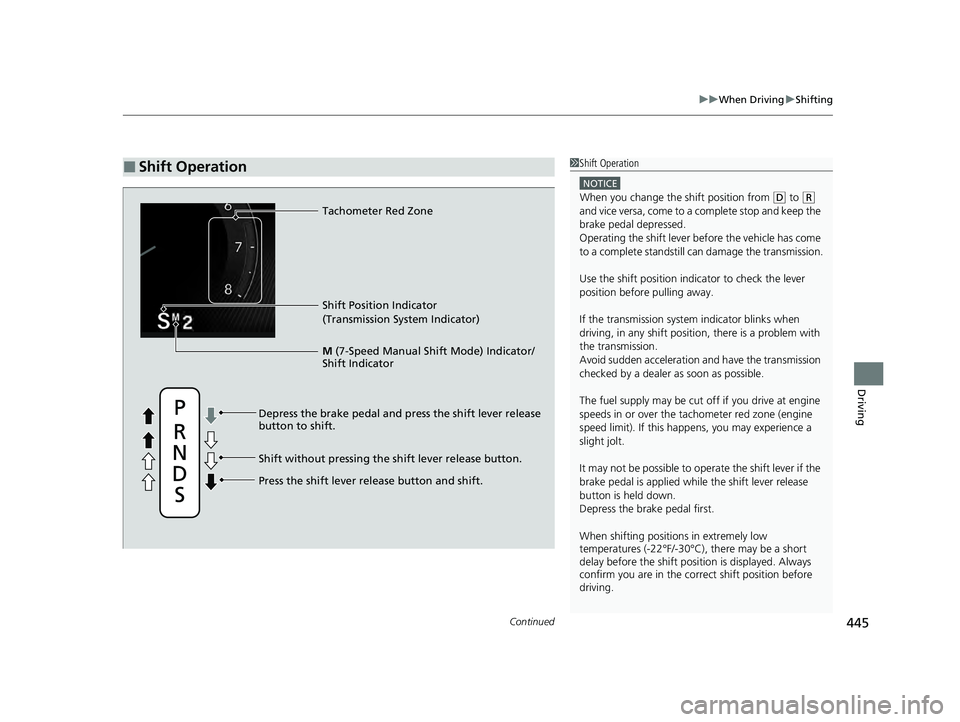
■Shift Operation1Shift Operation
NOTICE
When you change the shift position from (D to (R
and vice versa, come to a complete stop and keep the
brake pedal depressed.
Operating the shift lever be fore the vehicle has come
to a complete standstill can damage the transmission.
Use the shift position indicator to check the lever
position before pulling away.
If the transmission system indicator blinks when
driving, in any shift positi on, there is a problem with
the transmission.
Avoid sudden acceleration and have the transmission
checked by a dealer as soon as possible.
The fuel supply may be cut of f if you drive at engine
speeds in or over the ta chometer red zone (engine
speed limit). If this happe ns, you may experience a
slight jolt.
It may not be possible to operate the shift lever if the
brake pedal is applied while the shift lever release
button is held down.
Depress the brake pedal first.
When shifting positions in extremely low
temperatures (-22°F/-30°C), there may be a short
delay before the shift posit ion is displayed. Always
confirm you are in the corr ect shift position before
driving.
Shift Position Indicator
(Transmission System Indicator)
Press the shift lever release button and shift. Depress the brake pedal and press the shift lever release
button to shift.
Shift without pressing the shift lever release button. M
(7-Speed Manual Shift Mode) Indicator/
Shift Indicator
Tachometer Red Zone
24 ACURA INTEGRA-313S56100.book 445 ページ 2023年2月13日 月曜日 午後2時41分
Page 448 of 766

uuWhen Driving uShifting
446
Driving
Use the paddle shifters to change betw een 1st and 7th speeds without releasing
your hands from the steering wheel. The transmission switches to the 7-speed
manual shift mode when you pull a paddle shi fter while driving. This mode is useful
when engine braking is needed.
■When the transmi ssion is in (D:
The shift mode goes into the 7-speed ma nual shift mode temporarily, and the
number is displayed in the shift indicator.
The 7-speed manual shift mode is canceled automatically if you drive at constant
speed or accelerate, and the number in the shift indicator goes off.
You can cancel this mode by pulling the
(+ paddle shifter for a few seconds.
The 7-speed manual shift mode is especially useful when reducing the vehicle speed
temporarily before making a turn.
■When the transmi ssion is in (S:
The shift mode goes into the 7- speed manual shift mode. The M indicator and the
speed number are displayed in the shift indicator. As the vehicle speed slows down,
the transmission automatically shifts down accordingly. When the vehicle comes to
a stop, it automatically shifts down into 1st.
If the vehicle speed increases and the engi ne speed reaches near the tachometer red
zone, the transmission au tomatically shifts up.
You can only pull away in 1st speed.
When canceling the 7-speed manual shi ft mode, move the shift position from
(S to
(D or pull the (+ paddle shifter for a few seconds. When the 7-speed manual shift
mode is canceled, the M indicator and shift in dicator will turn off.
■7-Speed Manual Shift Mode17-Speed Manual Shift Mode
In the 7-speed manual shif t mode, the transmission
shifts up or down by operating either paddle shifter
under the following conditions:
Shift Up; The engine sp eed reaches the lowest
threshold of the hi gher speed position.
Shift Down; The engine sp eed reaches the highest
threshold of the lower speed position.
When the engine speed reaches near the tachometer
red zone, the transmission shifts up automatically.
When the engine speed reaches the lowest threshold
of the selected speed positi on, the transmission shifts
down automatically.
Operating the paddle shifters on slippery surfaces
may cause the tires to lock up. In this case, the 7-
speed manual shift mode is canceled and goes back
to the normal
( D driving mode.
24 ACURA INTEGRA-313S56100.book 446 ページ 2023年2月13日 月曜日 午後2時41分
Page 457 of 766

455
uuWhen Driving uAcura Integrated Dynamics System
Continued
Driving
■Selecting the Dynamic Mode
INDIVIDUAL Setting screen
2 P. 460 SPORT
Mode
NORMAL Mode
COMFORT Mode
Changing modes by
Dynamic Mode
switch
or INDIVIDUAL button
alters the screen on
the driver information
interface. Audio/Information Screen
INDIVIDUAL Mode
Press and hold the INDIVIDUAL
button or select Customize
2 Customized Features P. 367
Press the or button on the
audio/information screen.
2
Audio System Basic Operation
P. 267
Dynamic Mode
Switch
Press the INDIVIDUAL button
Press the Dynamic Mode switch
up or down
INDIVIDUAL
Button
*1: The display returns to audio/information
screen a few seconds after pressing the
Dynamic Mode switch or INDIVIDUAL button.
*1
*1
1.5 L engine models
24 ACURA INTEGRA-313S56100.book 455 ページ 2023年2月13日 月曜日 午後2時41分
Page 458 of 766

456
uuWhen Driving uAcura Integrated Dynamics System
Driving
INDIVIDUAL Setting screen
2 P. 460 SPORT+
Mode
SPORT Mode
COMFORT Mode
Changing modes by
Dynamic Mode
switch
or INDIVIDUAL button
alters the screen on
the driver information
interface. Audio/Information Screen
INDIVIDUAL Mode
Press and hold the INDIVIDUAL
button or select Customize
2 Customized Features P. 367
Press the or button on the
audio/information screen.
2
Audio System Basic Operation
P. 267
Dynamic Mode
Switch
Press the INDIVIDUAL button
Press the Dynamic Mode switch
up or down
INDIVIDUAL
Button
*1: The display returns to audio/information
screen a few seconds after pressing the
Dynamic Mode switch or INDIVIDUAL button.
*1
*1
2.0 L engine models
24 ACURA INTEGRA-313S56100.book 456 ページ 2023年2月13日 月曜日 午後2時41分