2023 TOYOTA TUNDRA display
[x] Cancel search: displayPage 287 of 616

2874-5. Using the driving support systems
4
Driving
■The system can be operated when
●The engine switch is in ON mode.
● Intuitive parking assist function is on.
● The vehicle speed is less than about 6 mph (10 km/h).
● A shift position other than P is selected.
■ Sensor detection information
●The sensor’s detection areas are limited to the areas around th e vehicle’
front and rear bumpers.
● The following situations may occur during use.
• Depending on the shape of the object and other factors, the de tection dis-
tance may shorten, or detection may be impossible.
• Detection may be impossible if static objects draw too close to the sen- sor.
• There will be a short delay between static object detection and display (warning buzzer sounds). Even at low speeds, there is a possibi lity that
the object will come within 11.9 in. (30 cm) before the display is shown
and the warning buzzer sounds.
• It might be difficult to hear the buzzer due to the volume of the audio sys- tem or air flow noise of the air conditioning system.
• It may be difficult to hear the sound of this system due to the buzzers of other systems.
■ Objects which the system may not be properly detected
The shape of the object may prevent the sensor from detecting i t. Pay partic-
ular attention to the following objects:
● Wires, fences, ropes, etc.
● Cotton, snow and other materials that absorb sound waves
● Sharply-angled objects
● Low objects
● Tall objects with upper sections projecting outwards in the dir ection of your
vehicle
■ Situations in which the syst em may not operate properly
Certain vehicle conditions and the surrounding environment may affect the
ability of a sensor to correctly detect objects. Particular instances where this
may occur are listed below.
● There is dirt, snow, water drops or ice on a sensor. (Cleaning the sensors
will resolve this problem.)
● A sensor is frozen. (Thawing the area will resolve this problem .)
In especially cold weather, if a sensor is frozen the sensor di splay may be
displayed abnormally, or objects, such as a wall, may not be detected.
Page 290 of 616

2904-5. Using the driving support systems
●When vehicle horns, vehicle detectors, motorcycle engines, air brakes of
large vehicles, the clearance sonar of other vehicles or other devices which
produce ultrasonic waves are near the vehicle
● If the front of the vehicle is raised or lowered due to the car ried load
● If the orientation of a sensor has been changed due to a collis ion or other
impact
● The vehicle is approaching a tall or curved curb
● Driving close to columns (H-shaped steel beams, etc.) in multi- story parking
garages, construction sites, etc.
● If the vehicle cannot be driven in a stable manner, such as whe n the vehicle
has been in an accident or is malfunctioning
● When a tire chains, compact spare tire or an emergency tire pun cture repair
kit is used
■ If a message is displayed on th e multi-information display
P. 495
■ Customization
Settings (e.g. buzzer volume) can be changed.
(Customizable features P. 568)
■ Certification (Canada only)
This ISM device complies with Canadian ICES-001. ●On an extremely bumpy road, on an
incline, on gravel, or on grass
Page 293 of 616

2934-5. Using the driving support systems
4
Driving
Rear Cross Traffic Alert buzzer (Rear Cross Traffic Alert function
only)
When a vehicle approaching from the right or left rear of the v ehicle is
detected, a buzzer sounds from behind the left-hand rear pillar .
■The outside rear view mirror indicators visibility
When under strong sunlight, the outside rear view mirror indica tor may be dif-
ficult to see.
■ Rear Cross Traffic Alert buzzer hearing
Rear Cross Traffic Alert function may be difficult to hear over noises such as
high audio volume.
■ When there is a malfunction in the Blind Spot Monitor system
If a system malfunction is detected due to any of the following reasons, warn-
ing messages will be displayed: ( P. 496)
● There is a malfunction with the sensors
● The sensors have become dirty
● The outside temperature is extremely high or low
● The sensor voltage has become abnormal
■ Certification for the Blind Spot Monitor system
For vehicles sold in the U.S.A.
FCC ID: OAYSRR2A
This device complies with part 15 of the FCC Rules. Operation is subject to
the following two conditions:
(1) This device may not cause harmful interference, and
(2) this device must accept any interference received, includin g interference
that may cause undesired operation.
FCC Warning
Changes or modifications not expressly approved by the party re sponsible for
compliance could void the user’s authority to operate the equip ment.
For vehicles sold in Canada
Applicable law: Canada 310
This device complies with Industry Canada licence-exempt RSS standard(s).
Operation is subject to the following two conditions: (1) this device may not
cause interference, and (2) this device must accept any interfe rence, includ-
ing interference that may cause undesired operation of the devi ce.
Frequency bands: 24.05 – 24.25 GHz
Output power: less than 20 milliwatts
3
Page 314 of 616
3144-5. Using the driving support systems
Multi-terrain Select
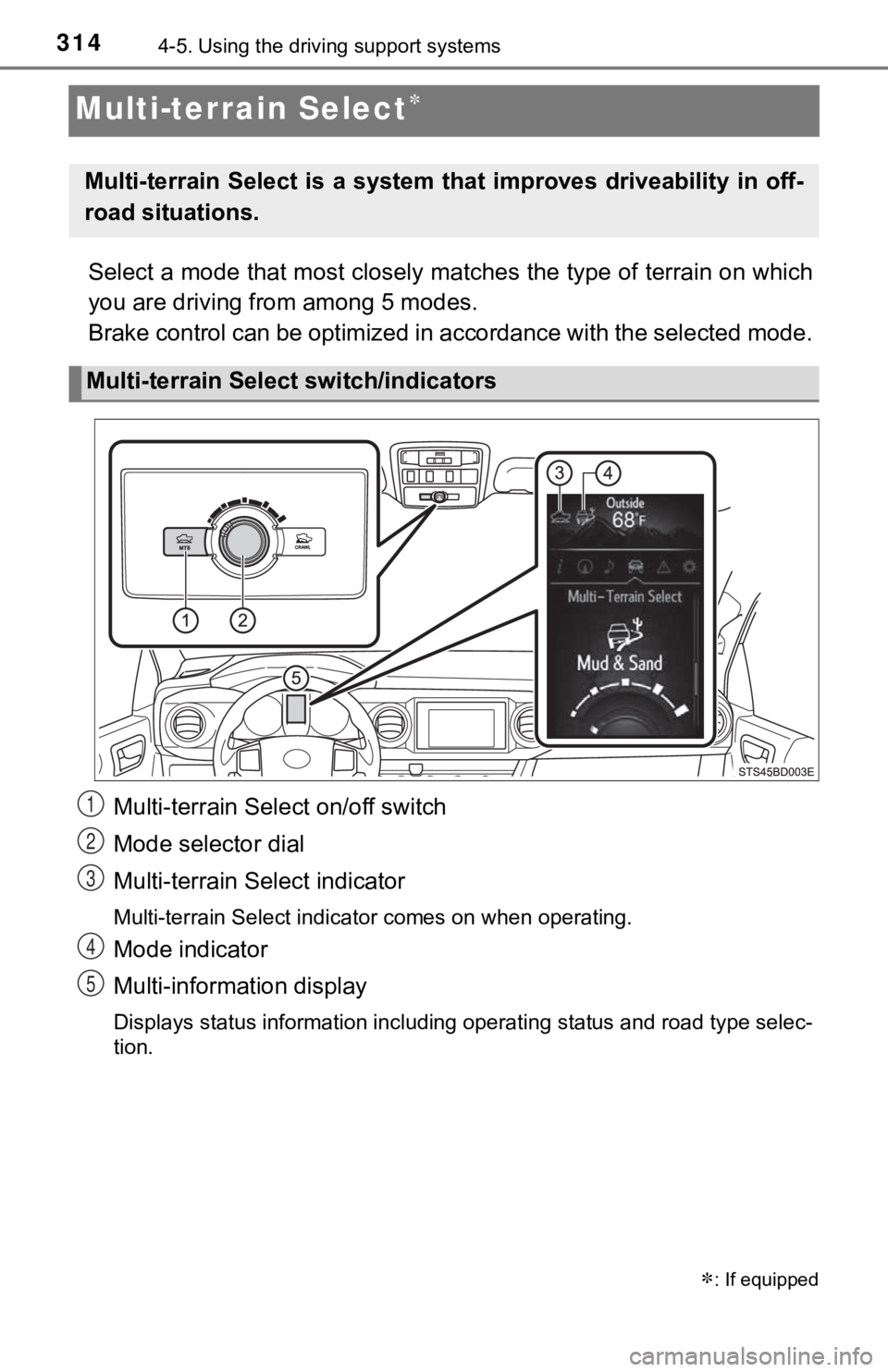
Select a mode that most closely matches the type of terrain on which
you are driving from among 5 modes.
Brake control can be optimized i n accordance with the selected mode.
Multi-terrain Select on/off switch
Mode selector dial
Multi-terrain Select indicator
Multi-terrain Select indicator comes on when operating.
Mode indicator
Multi-information display
Displays status information including operating status and road type selec-
tion.
: If equipped
Multi-terrain Select is a system that improves driveability in off-
road situations.
Multi-terrain Select switch/indicators
1
2
3
4
5
Page 316 of 616
3164-5. Using the driving support systems
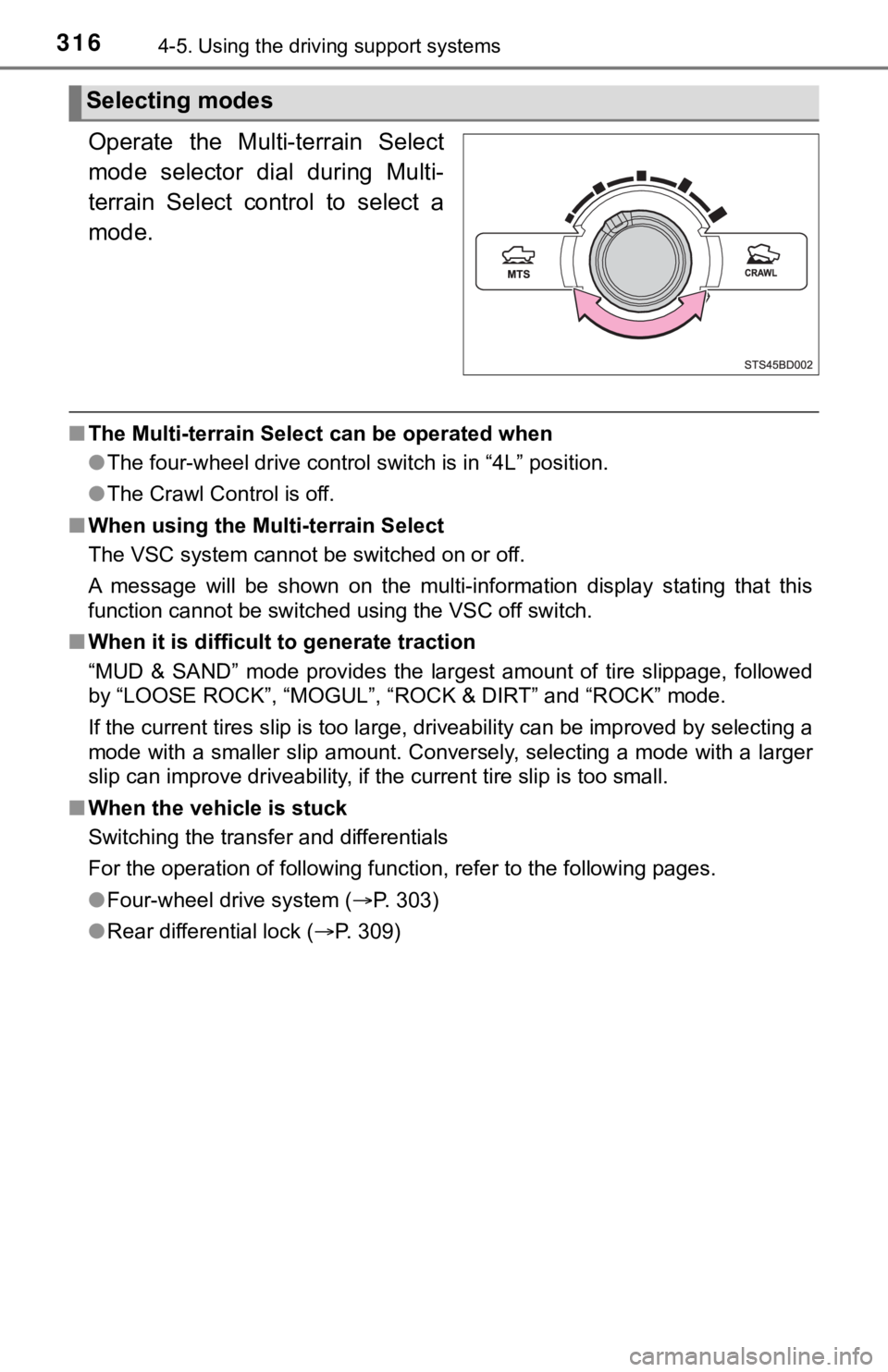
Operate the Multi-terrain Select
mode selector dial during Multi-
terrain Select control to select a
mode.
■The Multi-terrain Select can be operated when
●The four-wheel drive control switch is in “4L” position.
● The Crawl Control is off.
■ When using the Multi-terrain Select
The VSC system cannot be switched on or off.
A message will be shown on the multi-information display statin g that this
function cannot be switched using the VSC off switch.
■ When it is difficult to generate traction
“MUD & SAND” mode provides the largest amount of tire slippage, followed
by “LOOSE ROCK”, “MOGUL”, “ROCK & DIRT” and “ROCK” mode.
If the current tires slip is too large, driveability can be imp roved by selecting a
mode with a smaller slip amount. Conversely, selecting a mode with a larger
slip can improve driveability, if the current tire slip is too small.
■ When the vehicle is stuck
Switching the transfer and differentials
For the operation of following function, refer to the following pages.
● Four-wheel drive system ( P. 303)
● Rear differential lock ( P. 309)
Selecting modes
Page 318 of 616
3184-5. Using the driving support systems
Crawl Control
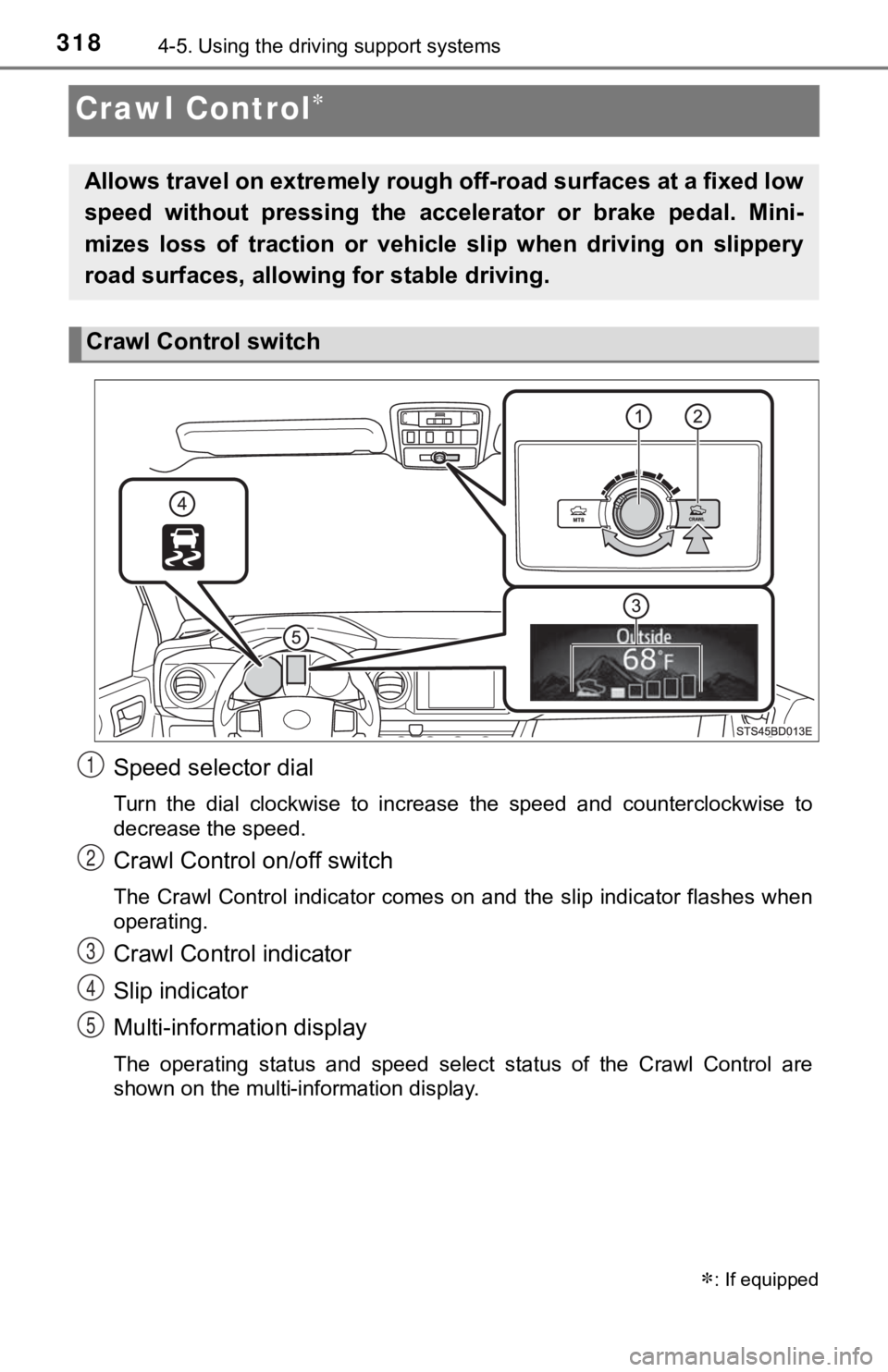
Speed selector dial
Turn the dial clockwise to increase the speed and counterclockw ise to
decrease the speed.
Crawl Control on/off switch
The Crawl Control indicator comes on and the slip indicator flashes when
operating.
Crawl Control indicator
Slip indicator
Multi-information display
The operating status and speed select status of the Crawl Contr ol are
shown on the multi-information display.
: If equipped
Allows travel on extremely rough off-road surfaces at a fixed low
speed without pressing the accel erator or brake pedal. Mini-
mizes loss of traction or vehic le slip when driving on slippery
road surfaces, allowing for stable driving.
Crawl Control switch
1
2
3
4
5
Page 319 of 616
3194-5. Using the driving support systems
4
Driving
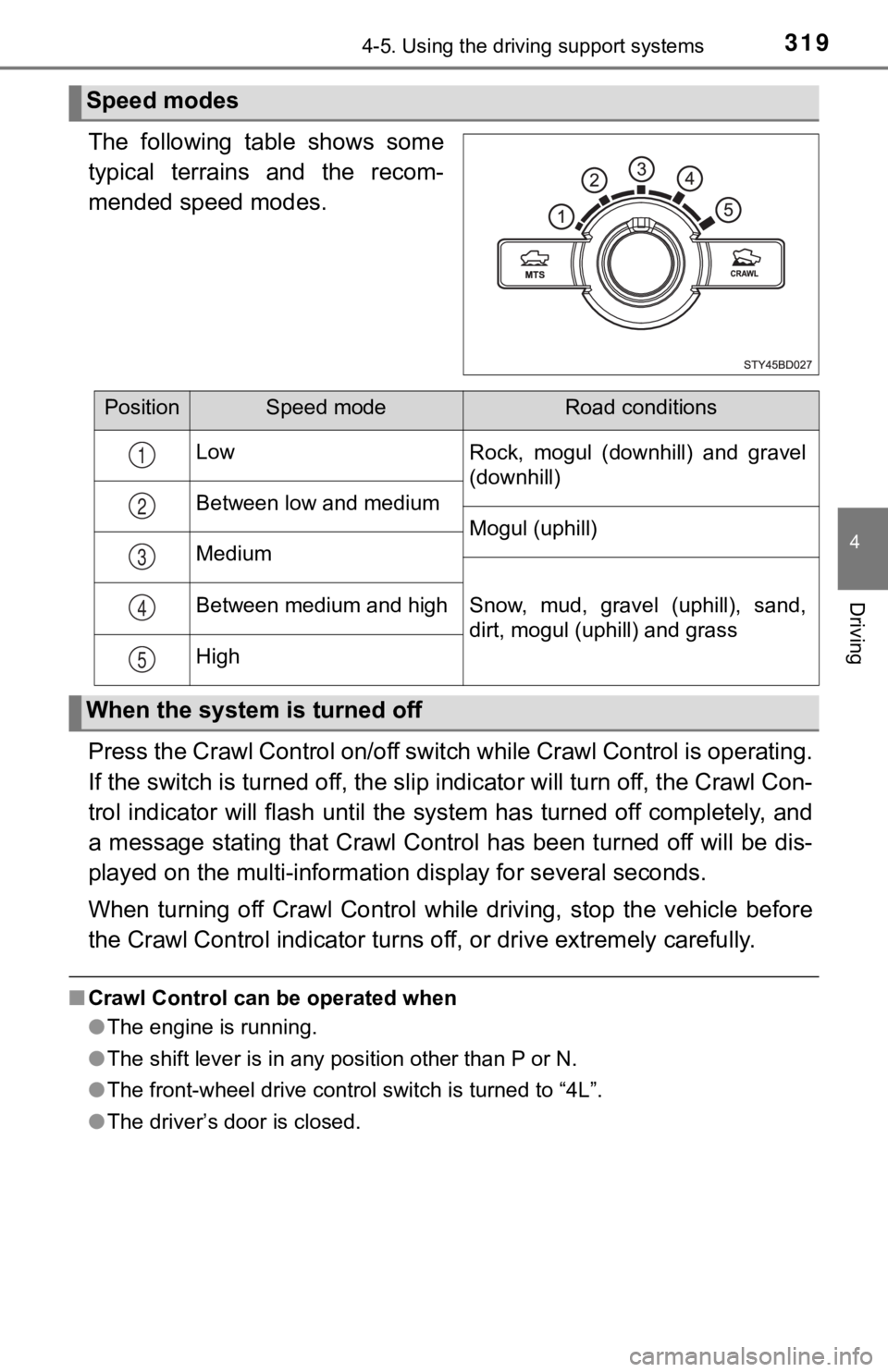
The following table shows some
typical terrains and the recom-
mended speed modes.
Press the Crawl Control on/off switch while Crawl Control is operating.
If the switch is turned off, the slip indicator will turn off, the Crawl Con-
trol indicator will flash until the system has turned off compl etely, and
a message stating that Crawl Control has been turned off will b e dis-
played on the multi-informati on display for several seconds.
When turning off Crawl Control while driving, stop the vehicle before
the Crawl Control indi cator turns off, or drive extremely caref ully.
■Crawl Control can be operated when
●The engine is running.
● The shift lever is in any position other than P or N.
● The front-wheel drive control switch is turned to “4L”.
● The driver’s door is closed.
Speed modes
PositionSpeed modeRoad conditions
Low Rock, mogul (downhill) and gravel
(downhill)
Between low and medium Mogul (uphill)
Medium
Snow, mud, gravel (uphill), sand,
dirt, mogul (uphill) and grass
Between medium and high
High
1
2
3
4
5
When the system is turned off
Page 320 of 616

3204-5. Using the driving support systems
■Automatic system cancelation
In the following situations, the buzzer will sound intermittently and Crawl Con-
trol will be canceled automatically. In this event, the Crawl C ontrol indicator
will flash and then goes off, and a message stating that Crawl Control has
been turned off will be displayed on the multi-information disp lay for several
seconds.
● When the shift lever is shifted to P or N
● When the front-wheel drive control switch is turned to “4H”
● When the driver’s door is opened
■ Function limitations
When the vehicle speed exceeds appr oximately 15 mph (25 km), engine con-
trol and brake control will stop temporarily. In this event, th e Crawl Control
indicator will flash.
■ When the Crawl Control system is operated continuously
● If Crawl Control is used continuously for a long time, the buzz er will sound, a
malfunction notification will be displayed on the multi-informa tion display,
the Crawl Control indicator goes off, and Crawl Control will be temporarily
inoperable as a result of the brake system overheating. In this event, stop
the vehicle immediately in a safe place, and allow the brake sy stem to cool
down sufficiently until the “TRAC OFF” indicator will goes off. (In the mean-
time, normal driving is possible.)
● If Crawl Control is used continuously for a long time, the buzz er will sound,
the system will be temporarily canceled, and a malfunction noti fication will
be displayed on the multi-information display as a result of th e automatic
transmission system overheating. Stop the vehicle in a safe pla ce until the
display goes off.
■ Sounds and vibrations caused by the Crawl Control system
● A sound may be heard from the engine compartment when the engin e is
started or just after the vehicle begins to move. This sound do es not indicate
that a malfunction has occurred in Crawl Control system.
● Either of the following conditions may occur when the Crawl Con trol system
is operating. None of these indicates that a malfunction has occurred.
• Vibrations may be felt through the vehicle body and steering.
• A motor sound may be heard after the vehicle comes to a stop.
■ When there is a malfunction in the system
Warning lights and/or warning messages will turn on. ( P. 489)