2023 TOYOTA SIENNA HYBRID emergency lever
[x] Cancel search: emergency leverPage 21 of 602

21Pictorial index
■Instrument panel
Power switch ................................................... ...................P.234
Starting the hybrid system/chan ging the modes ..........P.234, 237
Emergency stop of the hybrid system ............................ ......P.457
When the hybrid system will not start .......................... ........P.499
Warning messages ..............................................................P.475
Shift lever.................................................... ........................P.241
Changing the shift position.................................... ...............P.242
Precautions against towing ..................................................P.460
When the shift lever does not move............................. ........P.243
Meters ......................................................... ..................P.97, 101
Reading the meters/adjusting the instrument panel light ............................................................... ..........P.97, 99, 101, 103
Warning lights/indicator lights ................................ ................P.92
When the warning lights come on ................................ ........P.464
Multi-information display . .................................................P.104
Display .................................................................................P.104A
B
C
D
Page 22 of 602

22Pictorial index
Energy monitor.....................................................................P.122
When the warning messages are displayed ........................ P.475
Turn signal lever ................................................................P.245
Headlight switch ................................................................P.251
Headlights/parking lights/tail lights/
license plate lights/daytime running lights .................... ........P.251
Fog lights
*1............................................................... ............P.257
Windshield wiper and washer switch ..............................P.257
Rear window wiper and washer switch ...........................P.260
Usage.......................................................... .................P.257, 260
Adding washer fluid ..............................................................P.418
Warning messages ..............................................................P.475
Emergency flasher switch ....................................... ..........P.456
Hood lock release lever ........................................ .............P.410
Tilt and telescopic steering control switch/
tilt and telescopic steering lock release lever ................ .P.186
Adjustment ..................................................... ......................P.186
Driving position memory
*1....................................................P.179
Air conditioning system ............................. .......................P.348
Usage.......................................................... .........................P.348
Rear window defogger ........................................... ..............P.350
Multimedia system
*1, 2
*1
: If equipped
*2: Refer to “NAVIGATI ON AND MULTIMEDIA SYSTEM OWNER’S MAN-
UAL”.
E
F
G
H
I
J
K
Page 239 of 602

2374-2. Driving procedures
4
Driving
Modes can be changed by
pressing the power switch with
the brake pedal released. (The
mode changes each time the
switch is pressed.)
WARNING
■Stopping the hybrid system
in an emergency
●If you want to stop the hybrid
system in an emergency while
driving the vehicle, press and
hold the power switch for more
than 2 seconds, or press it
briefly 3 times or more in suc-
cession. (P.457)
However, do not touch the
power switch while driving
except in an emergency. Turn-
ing the hybrid system off while
driving will not cause loss of
steering or braking control.
However, power assist for the
steering wheel may be lost mak-
ing it difficult to steer smoothly
before stopping the vehicle
depending on the remaining
charge in the 12-volt battery or
usage conditions. In this situa-
tion, you should pull over and
stop the vehicle as soon as it is
safe to do so.
●If the power switch is operated
while the vehicle is running, a
warning message will be shown
on the multi-info rmation display
and a buzzer sounds.
●When restarting the hybrid sys-
tem after an emergency shut-
down, shift the shift lever to N
and press the power switch
shortly and firmly.
■When parking
Exhaust gases include harmful
carbon monoxide (CO), which is
colorless and odorless. Observe
the following precautions.
Failure to do so may cause
exhaust gases to enter the vehicle
and may lead to an accident
caused by light-headedness, or
may lead to death or a serious
health hazard.
●If the vehicle is in a poorly venti-
lated area or a closed area,
such as a garage, stop the
hybrid system.
●Do not leave the vehicle with
the hybrid system operating for
a long time. If such a situation
cannot be avoided, park the
vehicle in an open space and
ensure that exhaust fumes do
not enter the ve hicle interior.
●Do not leave the hybrid system
operating in an area with snow
build-up, or where it is snowing.
If snowbanks build up around
the vehicle while the hybrid sys-
tem is operating, exhaust gases
may collect and enter the vehi-
cle.
Changing power switch
modes
Page 240 of 602

2384-2. Driving procedures
1OFF*
The emergency flashers can be
used.
2ACC
Some electrical components such
as the audio system can be used.
“ACCESSORY” will be displayed
on the multi-info rmation display.
3ON
All electrical com ponents can be
used.
“IGNITION ON” will be displayed on
the multi-inform ation display.
*: If the shift lever is in a position
other than P when turning off the
hybrid system, the power switch
will remain ON, will not turn to
OFF.
■Auto power off function
●If the vehicle is left in ACC or ON
(the hybrid system is not operat-
ing) for more than 20 minutes with
the shift lever in P, the power
switch will automatically turn to
OFF.
●If the 12-volt battery is low with the
shift lever is in P and the power
switch is in ACC or ON (the hybrid
system is not operating), a buzzer sounds and a message will be dis-
played on the multi-information
display. If this continues, the
power switch is automatically turn
to OFF.
However, this function cannot
entirely prevent the 12-volt battery
discharge. Do not leave the vehi-
cle with the power switch in ACC
or ON for long periods of time
when the hybrid system is not
operating.
If the hybrid system is stopped
with the shift lever in a position
other than P, the power switch
will not be turned to OFF but
instead be turned to ACC. Per-
form the following procedure to
turn the switch to OFF:
1
Check that the parking brake
is set.
2 Shift the shift lever to P.
3 Check that “Turn Power Off”
is displayed on the multi-
information display and press
NOTICE
■To prevent 12-volt battery dis-
charge
●Do not leave the power switch
in ACC or ON for long periods of
time without the hybrid system
on.
●If “ACCESSORY” or “IGNITION
ON” is displayed on the multi-
information display, the power
switch is not in OFF. Exit the
vehicle after turning the power
switch to OFF.
When stopping the hybrid
system with the shift lever
in a position other than P
Page 245 of 602
2434-2. Driving procedures
4
Driving
the shift release button is pushed
first, the shift lock will not be
released.
■Shift lock system
The shift lock system is a system to
prevent accidental operation of the
shift lever in starting.
The shift lever can be shifted from P
only when the pow er switch is in
ON, the brake pedal is depressed
and the shift release button is
pushed.
■If the shift lever cannot be
shifted from P
First, check whether the brake pedal
is being depressed.
If the shift lever cannot be shifted
even though the brake pedal is
depressed and the shift release but-
ton is pushed, there may be a prob-
lem with the shift lock system. Have
the vehicle insp ected by your
Toyota dealer immediately.
The following steps may be used as
an emergency measure to ensure
that the shift lev er can be shifted.
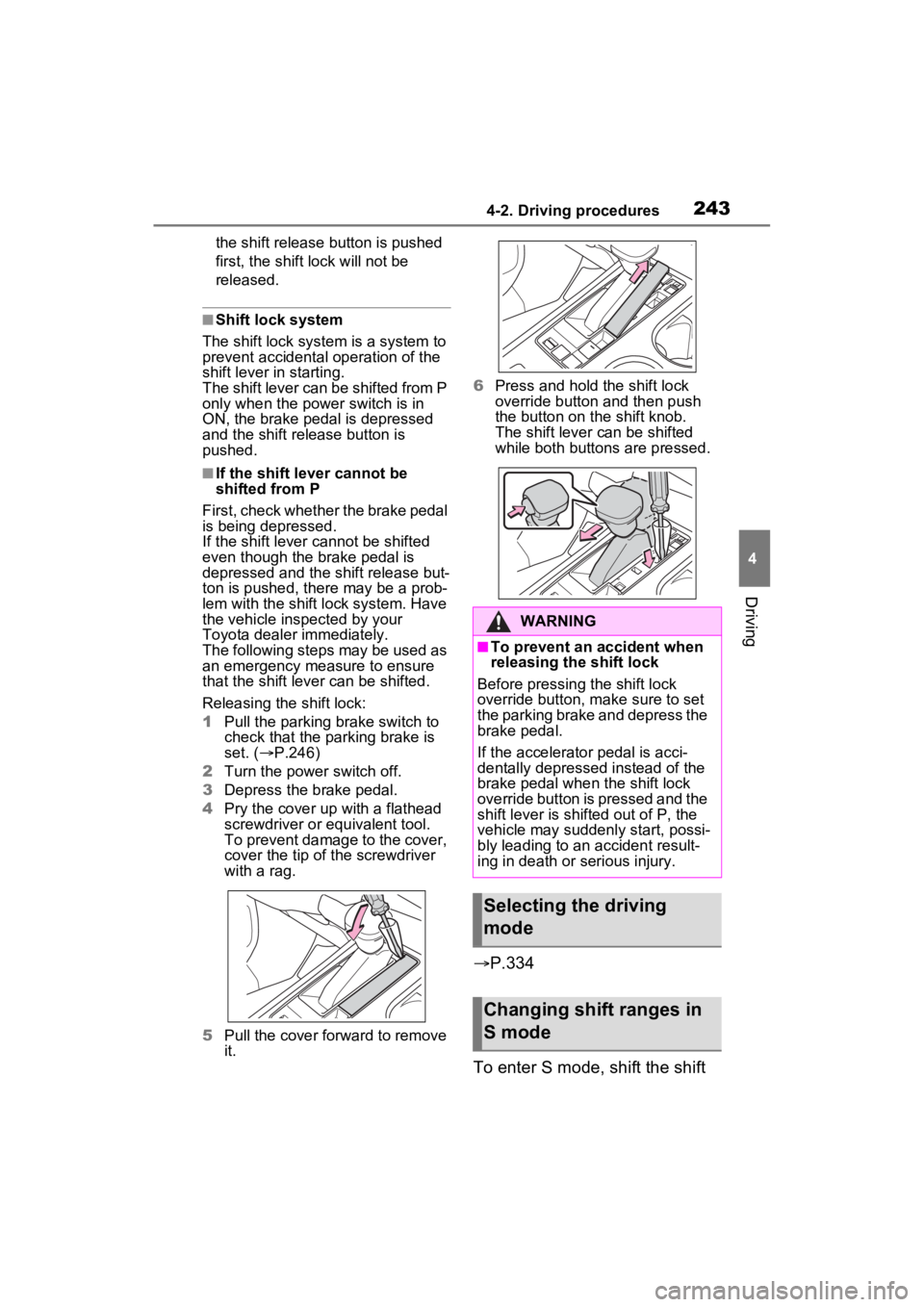
Releasing the shift lock:
1 Pull the parking brake switch to
check that the parking brake is
set. ( P.246)
2 Turn the power switch off.
3 Depress the brake pedal.
4 Pry the cover up with a flathead
screwdriver or equivalent tool.
To prevent damage to the cover,
cover the tip of the screwdriver
with a rag.
5 Pull the cover forward to remove
it. 6
Press and hold the shift lock
override button and then push
the button on the shift knob.
The shift lever can be shifted
while both buttons are pressed.
P.334
To enter S mode, shift the shift
WARNING
■To prevent an accident when
releasing the shift lock
Before pressing the shift lock
override button, m ake sure to set
the parking brake and depress the
brake pedal.
If the accelerator pedal is acci-
dentally depressed instead of the
brake pedal when the shift lock
override button is pressed and the
shift lever is shifted out of P, the
vehicle may suddenly start, possi-
bly leading to an accident result-
ing in death or serious injury.
Selecting the driving
mode
Changing shift ranges in
S mode
Page 248 of 602

2464-2. Driving procedures
■Using the manual mode
The parking brake can be set
and released manually.
Parking brake indicator light
(U.S.A.)
Parking brake indicator light
(Canada)
Parking brake switch indica-
tor
1 Pull the switch to set the parking brake.
The parking brake indicator light
and Parking brake switch indicator
will turn on.
Pull and hold the parking brake
switch if an emergency occurs and
it is necessary to
operate the park-
ing brake while driving.
2 Push the switch to release
the parking brake.
• Operate the parking brake switch
while depressing the brake pedal.
• Parking brake automatic release function ( P.247)
Make sure that the parking brake
indicator light and parking brake
switch indicator turn off.
If the parking brake indicator
light and parking brake switch
indicator flash, operate the
switch again. ( P.470)
■Turning the automatic
mode on
While the vehicle is stopped,
pull and hold the parking brake
switch until a buzzer sounds and
a message is shown on the
multi-information display.
When the automatic mode is
turned on, the parking brake
operates as follows.
Parking brake
The parking brake can be
set or released automati-
cally or manually. In auto-
matic mode, the parking
brake can be set or released
automatically according to
shift lever operation. Also,
even in automatic mode, the
parking brake can be set or
released manually.
Operating instructions
A
B
C
Page 324 of 602

3224-5. Using the driving support systems
on
■The rear camera detection func-
tion is operational when
●The power switch is in ON.
●RCD function is on.
●The shift lever is in R.
■Setting the buzzer volume
The buzzer volume can be adjusted
on the multi-inform ation display.
( P.112)
■Muting the buzzer sound
The buzzer can be temporarily
muted by pressing “OK” of the meter
control switches w hile a suggestion
that says mute is available is shown
on the multi-info rmation display.
■If “Rear Camera Detection
Unavailable Remove the Dirt of
Rear Camera” is displayed on
the multi-information display
A rear camera lens may be dirty or
covered with snow or ice. In such
cases, if it is removed from the rear
camera lens, the system should
return to normal. ( It may be neces-
sary to drive the vehicle for some
time before the system returns to
normal. Even afte r the camera
cleaning washer operated, driving
the vehicle may al so be necessary.)
■If “Rear Camera Detection
Unavailable See Owner’s Man-
ual” is displayed on the multi-
information display
●If this message is displayed after
the 12-volt battery has been dis-
connected and reconnected, fully
turn the steering wheel to the left
and then the right on level ground.
●If this message is displayed only
when the shift lever is in R, the
rear camera lens may be dirty.
Clean the rear camera lens.
■Situations in which the system
may not operate properly
●Some pedestrians, such as the following, may no
t be detected by
the rear camera detection func-
tion, preventing the function from
operating properly:
• Pedestrians who are bending for- ward or squatting
• Pedestrians who are lying down
• Pedestrians who are running
• Pedestrians who suddenly enter the detection area
• People riding a bicycle, skate- board, or other light vehicle
• Pedestrians wearing oversized clothing such as a rain coat, long
skirt, etc., making their silhouette
obscure
• Pedestrians whose body is par- tially hidden by an object, such as
a cart or umbrella
• Pedestrians which are obscured by darkness, such as at night
●In some situations, such as the
following, pedestrians may not be
detected by the rear camera
detection function, preventing the
function from operating properly:
• When backing up in inclement weather (rain, snow, fog, etc.)
• When the rear camera is
obscured (dirt, snow, ice, etc. are
attached) or scratched
• When a very bright light, such as
the sun, or the headlights of
another vehicle, shines directly
into the rear camera
• When backing up in a place where the surrounding brightness
changes suddenly, such as at the
entrance or exi t of a garage or
underground parking lot
• When backing up in a dim envi-
ronment such as during dusk or in
an underground parking lot
• When the dedicated camera
cleaning washer is operating
• When the camera position and direction are deviated
• When a towing hook is attached
• When water droplets are flowing
on the camera lens
• When the vehicle height is
extremely changed (nose up,
nose down)
• When tire chains or an emergency
Page 335 of 602

3334-5. Using the driving support systems
4
Driving
mately 9 mph (15 km/h) or less.
• Vehicles are approaching from the right or left at the rear of the vehi-
cle at a traveling speed of approx-
imately 5 mph (8 km/h) or more.
• The shift lever is in R.
• The Parking Support Brake deter-
mines that a stronger than normal
brake operation is necessary to
avoid a collision with an approach-
ing vehicle.
●Brake control
• Hybrid system output restriction control is operating
• The Parking Support Brake deter- mines that an emergency brake
operation is necessary to avoid a
collision with an approaching vehi-
cle.
■The Parking Support Brake
function (rear-crossing vehi-
cles) will stop operating when
The function will st op operating if
any of the following conditions are
met:
●Hybrid system output restriction
control
• The Parking Support Brake is dis-
abled.
• The collision becomes avoidable with normal brake operation.
• A vehicle is no longer approaching from the right or left at the rear of
the vehicle.
●Brake control
• The Parking Support Brake is dis-
abled.
• Approximately 2 seconds have elapsed since the vehicle was
stopped by brake control.
• The brake pedal is depressed after the vehicle is stopped by
brake control.
• A vehicle is no longer approaching from the right or left at the rear of
the vehicle.
■Detection area of the Parking
Support Brake function (rear-
crossing vehicles)
The detection area of the Parking
Support Brake function (rear-cross- ing vehicles) differs from the detec-
tion area of the RCTA function
(
P.308). Therefore, even if the
RCTA function detects a vehicle
and provides an alert, the Parking
Support Brake function (rear-cross-
ing vehicles) may not start operat-
ing.
■Situations in which the system
may not operate properly
P.309
■Situations in which the system
may operate even if there is no
possibility of a collision
P.310