2023 TOYOTA SIENNA HYBRID roof
[x] Cancel search: roofPage 137 of 602
1353-2. Opening, closing and locking the doors
3
Before driving
has been placed on the rear seat
depending on opening and closing
of a sliding door. Therefore,
depending on the situation, the
rear seat reminder function may
not operate and you may still for-
get the luggage, etc. on the rear
seat, or it may operate unneces-
sarily.
●The rear seat reminder function
can be enabled/disabled.
( P.539)
■Customization
Settings (e.g. unlocking function
using a key) can be changed.
(Customizable features: P.541)
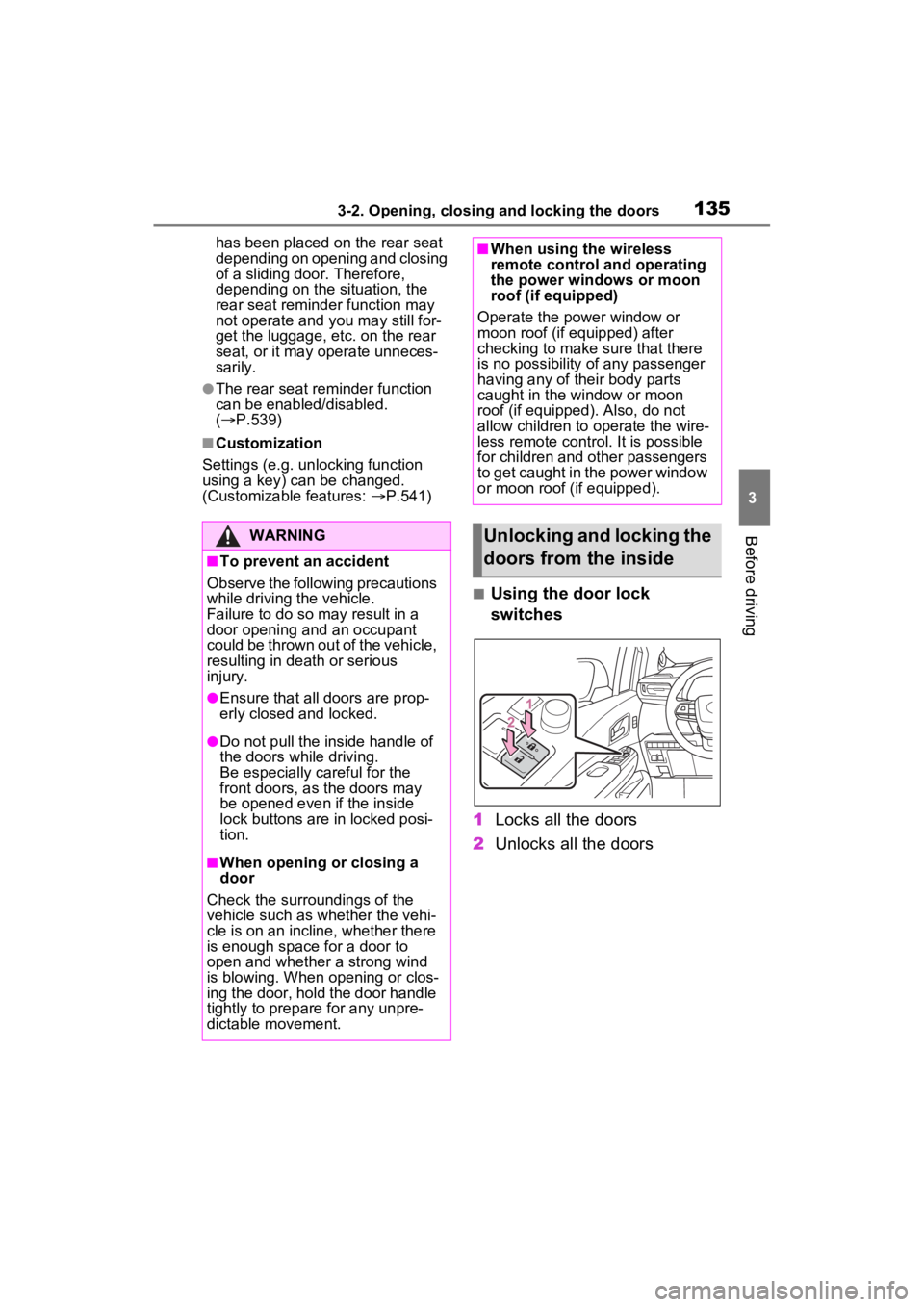
■Using the door lock
switches
1 Locks all the doors
2 Unlocks all the doors
WARNING
■To prevent an accident
Observe the following precautions
while driving t he vehicle.
Failure to do so m ay result in a
door opening and an occupant
could be thrown out of the vehicle,
resulting in dea th or serious
injury.
●Ensure that all doors are prop-
erly closed and locked.
●Do not pull the inside handle of
the doors while driving.
Be especially careful for the
front doors, as the doors may
be opened even if the inside
lock buttons are in locked posi-
tion.
■When opening or closing a
door
Check the surroundings of the
vehicle such as whether the vehi-
cle is on an incline, whether there
is enough space for a door to
open and whether a strong wind
is blowing. When opening or clos-
ing the door, hold the door handle
tightly to prepare for any unpre-
dictable movement.
■When using the wireless
remote control and operating
the power windows or moon
roof (if equipped)
Operate the power window or
moon roof (if equipped) after
checking to make sure that there
is no possibility of any passenger
having any of their body parts
caught in the window or moon
roof (if equipped). Also, do not
allow children to operate the wire-
less remote control. It is possible
for children and other passengers
to get caught in the power window
or moon roof (if equipped).
Unlocking and locking the
doors from the inside
Page 193 of 602

1913-4. Adjusting the steering wheel and mirrors
3
Before driving
driving, make sure the back door
is closed.
●If the display is difficult to see due
to reflected light, close the sun-
shade for the moon roof (if
equipped).
●Any of the following conditions
may occur when driving in the
dark, such as at night. None of
them indicates that a malfunction
has occurred.
• Colors of objects in the displayed image may differ from their actual
color.
• Depending on the height of the lights of the vehicle behind, the
area around the vehicle may
appear white and blurry.
• Automatic image adjustment for
brighter surrounding image may
cause flickering.
If it is difficult to see the displayed
image or flickering bothers you,
change to optical mirror mode.
●The Digital Rear-view Mirror may
become hot while it is in digital
mirror mode.
This is not a malfunction.
●Depending on your physical con-
dition or age, it may take longer
than usual to focus on the dis-
played image. In this case,
change to optical mirror mode.
●Do not let passengers stare at the
displayed image when the vehicle
is being driven, as doing so may
cause motion sickness.
■When the system malfunctions
If the symbol show n in the illustra-
tion is displayed when using the
Digital Rear-view Mirror in digital
mirror mode, the system may be
malfunctioning. Th e symbol will dis-
appear in a few seconds. Operate
the lever, change to optical mirror
mode and have the vehicle
inspected by your Toyota dealer.
■Adjusting the mirror height
The height of the rear view mir-
ror can be adjusted to suit your
driving posture.
Change to optical mirror mode,
adjusting the height of the rear
view mirror by moving it up and
down.
■Display settings (digital
mirror mode)
Settings of the display in the dig-
ital mirror mode, on/off opera-
tion of the automatic anti-glare
function, etc. can be changed.
1 Press the menu button.
Adjusting the mirror
Page 198 of 602

1963-4. Adjusting the steering wheel and mirrors
SymptomLikely causeSolution
The image is difficult to
see.
The mirror surface is
dirty.Clean the mirror surface
gently, using a soft dry
cloth.
Sunlight or headlights
are shining directly into
the Digital Rear-view
Mirror.
Change to optical mirror
mode.
(If the light is coming
through the moon roof [if
equipped], close the
sunshade.)
• T h e v e h i c l e i s i n a d a r k area.
• The vehicle is near a TV tower, broadcast-
ing station, electric
power plant, or other
location where strong
radio waves or electri-
cal noise may be pres-
ent.
• The temperature around the camera is
extremely high/low.
• The ambient tempera- ture is extremely low.
• It is raining or humid.
• Sunlight or headlights are shining directly into
the camera lens.
• The vehicle is under fluorescent lights,
sodium lights, mer-
cury lights, etc.
• Exhaust gas is obstructing the cam-
era.
Change to optical mirror
mode.
(Change back to digital
mirror mode when the
conditions have
improved.)
Page 204 of 602

2023-5. Opening, closing the windows and moon roof
3-5.Opening, closing the windows and moon roof
The power windows can be
opened and closed using the
switches.
Operating the switch moves the
side windows as follows:
1Closing
2 One-touch closing
*
3Opening
4 One-touch opening
*
*: To stop the side window partway,
operate the switch in the opposite
direction.
■The power windows can be
operated when
The power swit ch is in ON.
■Operating the power windows
after turning th e hybrid system
off
The power windows can be oper-
ated for approximately 45 seconds
even after the power switch is
turned to ACC or OFF. They cannot,
however, be operated once either
front door is opened.
■Jam protection function
If an object becomes jammed between the side window and the
window frame while the side window
is closing, side window movement is
stopped and the side window is
opened slightly.
■Catch protection function
If an object becomes caught
between the door and side window
while the side window is opening,
side window movement is stopped.
■When the power window cannot
be opened or closed
When the jam protection function or
catch protection function operates
unusually and the side window can-
not be opened and closed, perform
the following operations with the
power window swit ch of that door.
●Stop the vehicle. With the power
switch in ON, within 4 seconds of
the jam protection function or
catch protection f unction activat-
ing, continuously operate the
power window switch in the one-
touch closing direction or one-
touch opening direction so that the
side window can be opened and
closed.
●If the side window cannot be
opened and closed even when
performing the above operations,
perform the follo wing procedure
for function initialization.
1 Turn the power switch to ON.
2 Pull and hold the power window
switch in the on e-touch closing
direction and completely close
the side window.
3 Release the power window
switch for a m oment, resume
pulling the switch in the one-
touch closing direction, and hold
it there for approximately 6 sec-
onds or more.
4 Press and hold the power win-
dow switch in the one-touch
opening direction. After the side
window is completely opened,
continue holding the switch for
an additional 1 second or more.
Power windows
Opening and closing the
power windows
Page 205 of 602
2033-5. Opening, closing the windows and moon roof
3
Before driving
5Release the power window
switch for a m oment, resume
pushing the switch in the one-
touch opening direction, and
hold it there for a pproximately 4
seconds or more.
6 Pull and hold the power window
switch in the one-touch closing
direction again. After the side
window is completely closed,
continue holding the switch for a
further 1 second or more.
If you release the switch while the
side window is moving, start again
from the beginning.
If the side window reverses and
cannot be fully closed or opened,
have the vehicle inspected by your
Toyota dealer.
■Door lock linked power window
operation
●The power windows can be
opened and closed using the
mechanical key.
* ( P.503)
●The power windows can be
opened using the wireless remote
control.
* ( P.132)
●Vehicles with alarm: The alarm
may be triggered if the alarm is set
and the power window is closed
using the door lock linked power
window operation function.
( P.89)
*: These settings must be custom-
ized at your To yota dealer.
■Power window open reminder
function
The buzzer sounds and a message
is shown on the multi-information
display when the power switch is
turned to OFF and the driver’s door
is opened with the power windows
open.
■Customization
Settings (e.g. linked door lock oper-
ation) can be changed. (Customiz-
able features: P.545)
WARNING
Observe the following precau-
tions.
Failing to do so may result in
death or serious injury.
■Closing the power windows
●The driver is responsible for all
the power window operations,
including the operation for the
passengers. In order to prevent
accidental operation, especially
by a child, do not let a child
operate the power windows. It is
possible for children and other
passengers to have body parts
caught in the power window.
Also, when ridin g with a child, it
is recommended to use the win-
dow lock switch. ( P.204)
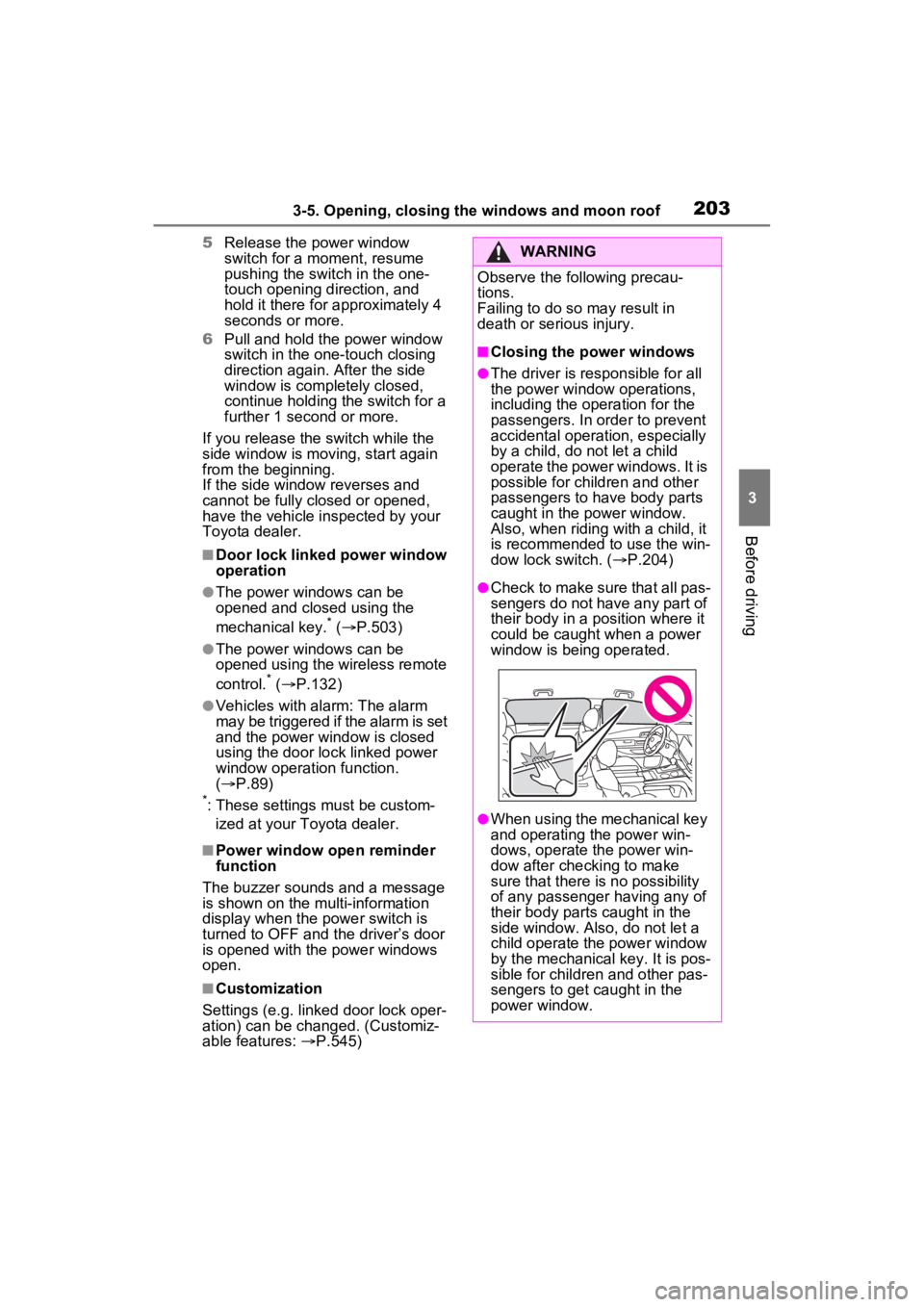
●Check to make sure that all pas-
sengers do not have any part of
their body in a position where it
could be caught when a power
window is being operated.
●When using the mechanical key
and operating the power win-
dows, operate the power win-
dow after checking to make
sure that there is no possibility
of any passenger having any of
their body parts caught in the
side window. Also, do not let a
child operate the power window
by the mechanical key. It is pos-
sible for children and other pas-
sengers to get caught in the
power window.
Page 206 of 602

2043-5. Opening, closing the windows and moon roof
This function can be used to
prevent children from acciden-
tally opening or closing a pas-
senger window.
Press the switch.
The indicator will come on and
the passenger windows will be locked.
The passenger windows can still be
opened and closed using the
driver’s switch even if the lock
switch is on.
■The window lock switch can be
operated when
The power switch is in ON.
WARNING
●When exiting the vehicle, turn
the power switch to OFF, carry
the key and exit the vehicle
along with the child. There may
be accidental operation, due to
mischief, etc., that may possibly
lead to an accident.
■Jam protection function
●Never use any part of your body
to intentionally a ctivate the jam
protection function.
●The jam protection function may
not work if something gets
jammed just before the side
window is fully closed. Be care-
ful not to get any part of your
body jammed in the side win-
dow.
■Catch protection function
●Never use any part of your body
or clothing to intentionally acti-
vate the catch p rotection func-
tion.
●The catch protection function
may not work if something gets
caught just before the side win-
dow is fully opened. Be careful
not to get any part of your body
or clothing caught in the side
window.
Preventing accidental
operation (window lock
switch)
A
Page 207 of 602

2053-5. Opening, closing the windows and moon roof
3
Before driving
*: If equipped
■Opening and closing
1 Opens the moon roof
*
The moon roof stops slightly before
the fully open position to reduce
wind noise.
Press the switch again to fully open
the moon roof.
2Closes the moon roof*
*: Lightly press either side of the
moon roof switch to stop the
moon roof partway.
■Tilting up and down 1
Tilts the moon roof up
*
2Tilts the moon roof down*
*: Lightly press e ither side of the
moon roof switch to stop the
moon roof partway.
■The moon roof can be operated
when
The power switch is in ON.
■Operating the moon roof after
turning the hybrid system off
The moon roof can be operated for
approximately 45 s econds after the
power switch is turned to ACC or
OFF. It cannot, however, be oper-
ated once either front door is
opened.
■Jam protection function
If an object is dete cted between the
moon roof and the frame while the
moon roof is closing or tilting down,
travel is stopped and the moon roof
opens slightly.
■Sunshade
The sunshade can be opened and
closed manually. However, the sun-
shade will open aut omatically when
the moon roof is opened.
■Door lock linked moon roof
operation
●The moon roof can be opened
and closed using the mechanical
key.
* ( P.503)
●The moon roof can be opened
using the wireless remote control.*
( P.132)
●Vehicles with alarm: The alarm
may be triggered if the alarm is set
and the moon roof is closed using
the door lock linked moon roof
operation function. ( P.89)
*: These settings must be custom-
ized at your Toyota dealer.
Moon roof*
Use the overhead switches
to open and close the moon
roof and tilt it up and down.
Operating the moon roof
Page 208 of 602
2063-5. Opening, closing the windows and moon roof
■When the moon roof does not
close normally
Perform the following procedure:
1 Stop the vehicle.
2 Press and hold the close switch.
*
The moon roof will close, reopen
and pause for approximately 10
seconds. Then it will close again
and stop at the completely closed
position.
3 Check to make sure that the
moon roof is completely closed
and then release the switch.
*: If the switch is released at the
incorrect time, the procedure will
have to be performed again from
the beginning.
If the moon roof do es not fully close
even after performing the above
procedure correctly, have the vehi-
cle inspected by your Toyota dealer.
■If the moon roof does not move
normally
If the moon roof does not open or
close normally or the automatic
opening function does not operate,
perform the followi ng initialization
procedure.
1 Stop the vehicle.
2 Press and hold the down switch.
*
The moon roof will stop at the tilt-up
position. After that, it will open,
close, tilt up, tilt down, and stop at
the fully closed position.
3Confirm that the moon roof has
completely stopped and release
the switch.
*: If you release the switch while the
moon roof is moving, perform the
procedure again from the begin-
ning.
If, after performing the above proce-
dures correctly, the moon roof still
does not open or close normally or
the automatic opening function does not operate, have the vehicle
inspected by your Toyota dealer.
■Moon roof open reminder func-
tion
The buzzer sounds and a message
is shown on the mu lti-information
display when the power switch is
turned to OFF and the driver’s door
is opened with t he moon roof open.
■Customization
Settings (e.g. linked door lock oper-
ation) can be changed. (Customiz-
able features: P.545)
WARNING
Observe the following precau-
tions.
Failure to do so may cause death
or serious injury.
■Opening the moon roof
●Do not allow any passengers to
put their hands or head outside
the vehicle while it is moving.
●Do not sit on top of the moon
roof.
■Opening and closing the
moon roof
●The driver is responsible for
moon roof opening and closing
operations.
In order to prevent accidental
operation, especially by a child,
do not let a child operate the
moon roof. It is possible for chil-
dren and other passengers to
have body parts caught in the
moon roof.