2023 TOYOTA SIENNA HYBRID remote control
[x] Cancel search: remote controlPage 136 of 602

1343-2. Opening, closing and locking the doors
( P.89)
■Impact detection door lock
release system
In the event that t he vehicle is sub-
ject to a strong impact, all the doors
are unlocked. Depending on the
force of the impact or the type of
accident, however, the system may
not operate.
■Operation signals (vehicles
with entry function)
A buzzer sounds and the emer-
gency flashers flash to indicate that
the doors have been
locked/unlocked . (Locked: Once;
Unlocked: Twice)
■Security feature
If a door is not opened within
approximately 60 seconds after the
vehicle is unlocked, the security fea-
ture automatically locks the vehicle
again. (Vehicles with entry function:
However, depending on the location
of the electronic key, the key may
be detected as being in the vehicle.
In this case, vehicle may be
unlocked.)
■When the door cannot be
locked by the lock sensor on
the upper part of the door han-
dle (vehicles with entry func-
tion)
If the door will no t lock even when
the topside sensor area is touched,
try touching both the topside and
underside sensor areas at the same
time. When gloves are being worn,
remove the gloves.
■Door lock buzzer
If an attempt to lock the doors using the entry function or wireless remote
control is made when a door is not
fully closed, a buzzer sounds contin-
uously for 5 seconds. Fully close the
door to stop the buzzer, and lock the
vehicle once more.
■Setting the alarm (if equipped)
Locking the doors will set the alarm
system. ( P.89)
■Conditions affecting the opera-
tion of the smart key system or
wireless remote control
P.166
■If the smart key system or the
wireless remote control does
not operate properly
●Use the mechanical key to lock
and unlock the doors. ( P.502)
●Replace the key battery with a
new one if it is depleted. ( P.444)
■If the 12-volt b attery is dis-
charged
The doors cannot be locked and
unlocked using the smart key sys-
tem or wireless remote control. Lock
or unlock the do ors using the
mechanical key. ( P.133, 502)
■Rear seat reminder function
●In order to r emind you not to for-
get the luggage, etc. on the rear
seat, when the power switch is
turned to OFF afte r any of the fol-
lowing conditions are met, a
buzzer will sound and a message
will be displayed on the multi-
information display for approxi-
mately 6 seconds.
• The hybrid system is started
within 10 minutes after opening
and closing a sliding door.
• A sliding door has been opened and closed after the hybrid system
is started. However, if a sliding
door is opened and then closed
within approximately 2 seconds,
the rear seat rem inder function
may not operate.
●The rear seat reminder function
determines that t he luggage, etc.
Page 137 of 602
1353-2. Opening, closing and locking the doors
3
Before driving
has been placed on the rear seat
depending on opening and closing
of a sliding door. Therefore,
depending on the situation, the
rear seat reminder function may
not operate and you may still for-
get the luggage, etc. on the rear
seat, or it may operate unneces-
sarily.
●The rear seat reminder function
can be enabled/disabled.
( P.539)
■Customization
Settings (e.g. unlocking function
using a key) can be changed.
(Customizable features: P.541)
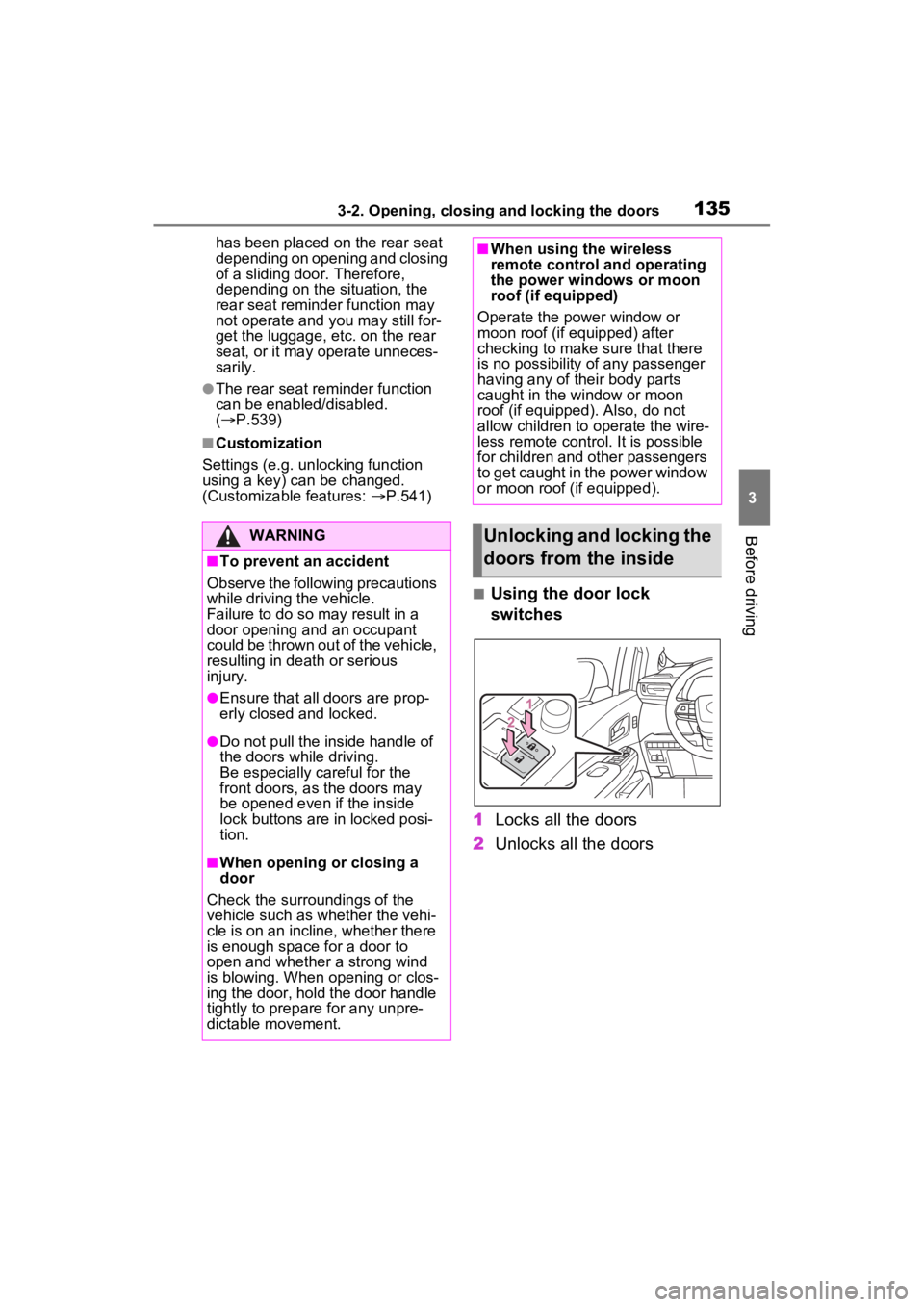
■Using the door lock
switches
1 Locks all the doors
2 Unlocks all the doors
WARNING
■To prevent an accident
Observe the following precautions
while driving t he vehicle.
Failure to do so m ay result in a
door opening and an occupant
could be thrown out of the vehicle,
resulting in dea th or serious
injury.
●Ensure that all doors are prop-
erly closed and locked.
●Do not pull the inside handle of
the doors while driving.
Be especially careful for the
front doors, as the doors may
be opened even if the inside
lock buttons are in locked posi-
tion.
■When opening or closing a
door
Check the surroundings of the
vehicle such as whether the vehi-
cle is on an incline, whether there
is enough space for a door to
open and whether a strong wind
is blowing. When opening or clos-
ing the door, hold the door handle
tightly to prepare for any unpre-
dictable movement.
■When using the wireless
remote control and operating
the power windows or moon
roof (if equipped)
Operate the power window or
moon roof (if equipped) after
checking to make sure that there
is no possibility of any passenger
having any of their body parts
caught in the window or moon
roof (if equipped). Also, do not
allow children to operate the wire-
less remote control. It is possible
for children and other passengers
to get caught in the power window
or moon roof (if equipped).
Unlocking and locking the
doors from the inside
Page 138 of 602

1363-2. Opening, closing and locking the doors
■Using the inside lock but-
tons
1 Locks the door
2 Unlocks the door
The front doors can be opened by
pulling the inside ha ndle even if the
lock buttons are in the lock position.
■Locking the front doors from
the outside without a key
1 Move the inside lock button to
the lock position.
2 Close the door.
The door cannot be locked if the
power switch is in ACC or ON, or
the electronic key is left inside the
vehicle.
Depending on the position of the
electronic key, the key may not be
detected correctly and the door may
be locked.
■Open door warning buzzer
If the vehicle speed reaches 3 mph
(5 km/h), a buzzer sounds to indi-
cate that the door(s) or the hood is
not fully closed.
The open door(s) or hood is dis-
played on the multi-information dis-
play.
■When all the doors are locked
with the entry function, wireless
remote control or key
●The doors cannot be unlocked
with the door lock switch.
●The door lock switch can be reset
by unlocking all the doors with the entry function, wireless remote
control or key.
The following functions can be
set or canceled:
For instructions on customizing,
refer to P.538.
Automatic door locking
and unlocking systems
FunctionOperation
Speed linked
door locking
function
All doors are
automatically
locked when
vehicle speed is
approximately 12
mph (20 km/h) or
higher.
Shift position
linked door lock-
ing function
All doors are
automatically
locked when
shifting the shift
lever to position
other than P.
Shift position
linked door
unlocking func-
tionAll doors are
automatically
unlocked when
shifting the shift
lever to P.
Driver’s door
linked door
unlocking func-
tion
All doors are
automatically
unlocked when
driver’s door is
opened within
approximately 45
seconds after
turning the power
switch off.
Page 140 of 602

1383-2. Opening, closing and locking the doors
■Using the entry function (if
equipped)
P.132
■Using the wireless remote
control
P.130
■Using the door lock
switches
P.135
■Using the inside lock but-
tons
1 Locks the door
2 Unlocks the door
WARNING
●Open the sliding door fully while
passengers are getting on or off
on a downward slope. Do not
operate the outside handle or
inside handle while the door is
open as the door could sud-
denly close by itself causing
injury.
●When opening or closing the
sliding door, take extra care to
prevent your fingers etc. from
being caught.
●Do not put your hands or feet on
the sliding door arms, rails and
pillars. Be careful not to get your
hands or feet caught in the slid-
ing doors.
Unlocking and locking the
sliding door from outside
Unlocking and locking the
sliding door from inside
Page 144 of 602

1423-2. Opening, closing and locking the doors
3When the kick sensor detects
that your foot is pulled back,
the sliding door will automati-
cally fully open/close.
If a foot is moved under the rocker
moulding while the sliding door is
opening/closing, the sliding door
will stop moving.
If a foot is moved under the rocker
moulding again during the halted
operation, the sliding door will per-
form the reverse operation.
The sliding door cannot be
opened by the inside door han-
dle and the second seat sliding
door switch when the lock is set.
1Unlock
2 Lock
These locks can be set to prevent
children from opening the sliding
doors. Push down on each sliding
door switch to lock that sliding door.
■The power sliding door can be
operated when
●Open operation: The shift lever is
in P or the vehicle speed is below
1.9 mph (3 km/h).
●The power sliding door system is
enabled.
●The power sliding door is
unlocked. (Except for the wireless
remote control operation or smart
key system operation.)
●The sliding door child-protector
lock is not set. (However, the
switch for the front occupants and
the outside handle still operate the
power sliding door.)
■Power sliding doors
●The power sliding doors can be
opened/closed manually when the
power sliding door function is can-
celed with the main switch.
●If the sensor detects jamming of a
person or an object while the
power sliding door is automatically
opening/closin g, a buzzer will
beep and the power sliding door
will stop after rev ersing approxi-
mately 3.9 in. (10 cm). When the
power sliding door is operated
again after the stop, the door will
be operated as follows.
To operate the door reversely:
• Pull the outside door handle, or press the switch of the sliding door
handle or using the kick sensor.
To operate the d oor in open direc-
tion:
• Pull the inside door handle in open direction, or press the
“OPEN” side of the power sliding
door switch.
To operate the door in close direc-
tion:
• Pull the inside door handle in close direction or press the
“CLOSE” side of the power sliding
door switch.
After the jam protection function
operates, the power sliding door
cannot be operated even if the
switch to open and close the sliding
door on the electronic key is
pressed.Sliding door child-protec-
tor locks
Page 145 of 602

1433-2. Opening, closing and locking the doors
3
Before driving
■The situations in which the slid-
ing door does not open com-
pletely
The left side sliding door does not
open completely when the fuel filler
door is opened.
■Jam protection function
Sensor is attached to the front
edge of the power sliding door. If
any object obstructs the power slid-
ing door when cl osing, the power
sliding door will stop after reversing
approximately 3.9 in. (10 cm).
■Sliding door reserve lock func-
tion
This function is a function which
reserves locking of all doors before-
hand, when the power sliding door
is open.
When the following procedure is
performed, all the doors except the
power sliding door are locked and
then power sliding door will also be
locked at the same time it is closed.
1 Close all doors, except the
power sliding door.
2 During the power sliding door
closing operation, lock the doors
using the smart key system from
the front doors ( P.132) or the wireless remote control.
(
P.132)
A buzzer sounds and the emer-
gency flashers flash to indicate that
all the doors have been closed and
locked.
●If the electronic key is placed
inside the vehicle after starting a
close operation via the door
reserve lock function, the elec-
tronic key may become locked
inside the vehicl e. Make sure to
always carry the electronic key on
your person.
●If the power sliding door does not
fully close due to the operation of
the jam protection function, etc.,
while the sliding door is automati-
cally closing after a door reserve
lock operation is performed, the
door reserve lock function is can-
celed and all the doors will unlock.
●Before leaving the vehicle, make
sure that all the doors are closed
and locked.
■Power sliding door brake func-
tion
When the power sliding door
detects an abnorma lity and stops
operating, power sliding door brake
function may be activated. When
brake function is activated, door
movement is restricted by the brake
and motion may appear to be not
smooth. This is not malfunction.
Move the door to fully closed posi-
tion to reset the system and normal
power sliding doo r function will
resume.
■Sliding door closer
In the event that the sliding door is
left slightly open, the sliding door
closer will automatically close it to
the fully closed position.
■Power sliding door operation
Wireless remote control: Even if the
door is locked, pressing and holding
the sliding door bu ttons will unlock
all doors and start open operation.
A
Page 147 of 602

1453-2. Opening, closing and locking the doors
3
Before driving
following situations.
●When a large amount of water is
applied to the rocker moulding,
such as when the vehicle is being
washed or in heavy rain
●When dirt is wiped off the rocker
moulding
●When a small animal or small
object, such as a ball, moves
under the rocker moulding
●When an object is moved from
under the rocker moulding
●If someone is swinging their legs
while sitting on the rocker mould-
ing
●If the legs or another part of some-
one’s body contacts the rocker
moulding while passing by the
vehicle
●When the vehicle is parked near
an electrical noise source which
affects the sensitivity of the Hands
Free Power Slidin g Door, such as
a pay parking spot , gas station,
electrically heated road, or fluo-
rescent light
●When the vehicle is near a TV
tower, electric power plant, radio
station, large display, airport or
other facility that generates strong
radio waves or electrical noise
●When the vehicle is parked in a
place where objects such as
plants are near the rocker mould-
ing
●If luggage, etc. is set near the
rocker moulding
●If accessories or a vehicle cover is
installed/removed near the rocker
moulding
●When the vehicle is being towed
To prevent unintentional operation,
turn the Hands Free Power Sliding
Door (kick sensor) operation setting
off. ( P.112)
■Automatic car washes
P.396
■Conditions affecting the opera-
tion of the smart key system or
wireless remote control
P.166
■Customization
Settings (e.g. opening and closing
operation) can be changed. (Cus-
tomizable features: P.543)
WARNING
■Sliding door closer
●In the event that the sliding door
is left slightly open, the sliding
door closer will automatically
close it to the fu lly closed posi-
tion. It takes several seconds
before the sliding door closer
begins to operate. Be careful
not to catch fingers or anything
else in the sliding door, as this
may cause bone fractures or
other serious injuries.
●Use caution when using the
sliding door clos er. The sliding
door closer operates even when
the power sliding door system is
canceled.
■Power sliding doors
Observe the following precautions
when the power sliding door sys-
tem is enabled. Failure to do so
may cause death or serious
injury.
Page 154 of 602

1523-2. Opening, closing and locking the doors
Unlocks all the doors
The doors cannot be unlocked for 3
seconds after the doors are locked.
■Using the wireless remote
control
P.132
■Operation signals
A buzzer sounds and the emer-
gency flashers flash to indicate that
the doors have been
locked/unlocked . (Locked: once;
Unlocked: twice)
■Security feature
If a door is not opened within
approximately 60 seconds after the
vehicle is unlocked, the security fea-
ture automatically locks the vehicle
again.
■Using the door lock switch
P.135
■Open
Raise the back door while pressing up the back door
opener to release the lock to
open the back door.
■Close
Lower the back door using the
back door handle , and make
sure to push the back door
down from the outside to close
it.
Be careful not to pull the back door
sideways when closing the back
door with the handle.
■Luggage compartment light
P.156
■If the back door opener is inop-
erative
The back door can be unlocked
from the inside.
1 Remove the both side covers.
Unlocking and locking the
back door from the inside
Opening/closing the back
door (vehicles without
power back door)
A