2023 TOYOTA RAV4 PRIME maintenance
[x] Cancel search: maintenancePage 549 of 662

5518-2. Steps to take in an emergency
8
When trouble arises
WARNING
■Maintenance of the tires
(vehicles with tire pressure
warning system)
Each tire, including the spare (if
provided), should be checked
monthly when cold and inflated to
the inflation pressure recom-
mended by the vehicle manufac-
turer on the vehicle placard or tire
inflation pressure label (tire and
load information label). (If your
vehicle has tires of a different size
than the size indicated on the
vehicle placard or tire inflation
pressure label [tire and load infor-
mation label], you should deter-
mine the proper tire inflation
pressure for those tires.)
As an added safe ty feature, your
vehicle has been equipped with a
tire pressure m onitoring system
(TPMS-tire pressure warning sys-
tem) that illuminates a low tire
pressure telltale (tire pressure
warning light) when one or more
of your tires is significantly under-
inflated. Accordingly, when the
low tire pressure telltale (tire pres-
sure warning light) illuminates,
you should stop and check your
tires as soon as possible, and
inflate them to the proper pres-
sure. Driving on a significantly
under-inflated tire causes the tire
to overheat and can lead to tire
failure. Under-inflation also
reduces fuel efficiency and tire
tread life, and may affect the vehi-
cle’s handling and stopping abil-
ity.
Please note that the TPMS (tire
pressure warning system) is not a
substitute for proper tire mainte-
nance, and it is the driver’s
responsibility to m aintain correct
tire pressure, even if under-infla-
tion has not reached the level to
trigger illumination of the TPMS
low tire pressure te lltale (tire pres-
sure warning light).
Your vehicle has also been
equipped with a TPMS (tire pres-
sure warning system) malfunc-
tion indicator to indicate when the
system is not operating properly.
The TPMS (tire pressure warning
system) malfunction indicator is
combined with the low tire pres-
sure telltale (tire pressure warning
light). When the system detects a
malfunction, the te lltale will flash
for approximately one minute and
then remain continuously illumi-
nated. This sequence will con-
tinue upon subsequent vehicle
start-ups as long as the malfunc-
tion exists. When the malfunction
indicator is illuminated, the sys-
tem may not be ab le to detect or
signal low tire pressure as
intended.
TPMS (tire pressure warning sys-
tem) malfunctions may occur for a
variety of reasons, including the
installation of replacement or
alternate tires or wheels on the
vehicle that prevent the TPMS
(tire pressure warning system)
from functioning properly. Always
check the TPMS (tire pressure
warning system) malfunction tell-
tale after replacing one or more
tires or wheels on your vehicle to
ensure that the replacement or
alternate tires and wheels allow
the TPMS (tire pressure warning
system) to continue to function
properly.
Page 552 of 662

5548-2. Steps to take in an emergency
tion display, the vehicle may have
run out of fuel. Stop the vehicle in
a safe place and, if the fuel level is
low, refuel the vehicle.
• “Hybrid system stopped”
• “Engine Stopped”
●If “Maintenance required for
DCDC converter cooling parts
See Owner’s Manual” is shown,
the filter may be clogged, the air
intake vent may be blocked, or
there may be a gap in the duct.
Therefore, perform the following
correction procedure.
• If the air intake vent or filter of the DC/DC converter are dirty, per-
form the procedures on P.515 to
clean them.
• If the warning message is shown when the air intake vent and filter
of the DC/DC converter are not
dirty, have the vehicle inspected
at your Toyota dealer.
●If “12-Volt Battery Charging Sys-
tem Malfunction Stop in a Safe
Place See Owner’s Manual” is
shown
Indicates a malfunction in the vehi-
cle’s charging system. Pull over and
stop the vehicle as soon as it is safe
to do so.
While the message is displayed, the
functions of the air conditioning, etc.
may be partially lim ited in order to
reduce the power consumption of
the 12-volt battery.
■If “Hybrid System Overheated
Output Power Reduced” is
shown
The message may be shown when
driving under severe operating con-
ditions. (For example, when driving
up a long steep hill or driving up a
steep hill in reverse.)
Coping method: P.574
■If “Traction Battery Needs to be
Protected Refrain from the Use
of N Position” is shown
This message may be displayed
when the shift lever is in N.
As the hybrid battery (traction bat-
tery) cannot be charged when the
shift lever is in N, shift the shift lever
to P when the vehicle is stopped.
■If “Traction Battery Needs to be
Protected Shift into P to
Restart” is shown
This message is displayed when the
hybrid battery (traction battery)
charge has becom e extremely low
because the shift lever has been left
in N for a certain amount of time.
When operating the vehicle, shift to
P and restart the hybrid system.
■If “Shift to P Before Exiting
Vehicle” is shown
Message is displayed when the
driver’s door is opened without turn-
ing the power switch to OFF with the
shift lever in any p osition other than
P.
Shift the shift lever to P.
■If “Shift is in N Release Acceler-
ator Before Shifting” is shown
Message is displayed when the
accelerator pedal has been
depressed and the shift lever is in N.
Release the accelerator pedal and
shift the shift lever to D or R.
■If “Press brake when vehicle is
stopped Hybrid system may
overheat” is shown
Message is displayed when the
accelerator pedal is depressed to
maintain the vehicl e position when
stopped on a upward slope, etc.
If this continues, the hybrid system
may overheat.
Release the accelerator pedal and
depress the brake pedal.
Page 553 of 662

5558-2. Steps to take in an emergency
8
When trouble arises
■If “Auto Power OFF to Conserve
Battery” is shown
Power was turned off due to the
automatic power off function.
Next time when starting the hybrid
system, operate th e hybrid system
for approximatel y 5 minutes to
recharge the 12-volt battery.
■If “Engine Oil Level Low Add or
Replace” is displayed
The engine oil level may be low.
Check the level of the engine oil,
and add engine oil if necessary.
This message may be displayed if
the vehicle is sto pped on a slope.
Move the vehicle to a level surface
and check if the message disap-
pears.
■If “Maintenance Required
Soon” is shown
Indicates that all maintenance
according to the dr iven distance on
the maintenance schedule
* should
be performed soon.
Comes on approximately 4500
miles (7200 km) after the message
has been reset.
If necessary, perf orm maintenance.
Please reset the message after the
maintenance is performed.
( P.479)
*: Refer to the separate “Scheduled
Maintenance Guide” or “Owner’
Manual Supplement” for the main-
tenance interval applicable to your
vehicle.
■If “Maintenance Required Visit
Your Dealer” is shown
Indicates that all maintenance is
required to correspond to the driven
distance on the maintenance sched-
ule
*.
Comes on approximately 5000
miles (8000 km) after the message
has been reset. (The indicator will
not work properly unless the mes-
sage has been reset.) Perform the necessary mainte-
nance. Please reset the message
after the maintenance is performed.
(
P.479)
*: Refer to the separate “Scheduled
Maintenance Guide” or “Owner’
Manual Supplement” for the main-
tenance interval applicable to your
vehicle.
■If “Engine Maintenance
Required Visit Your Dealer” is
shown
The engine or an engine component
is malfunctioning. Have the vehicle
inspected by your Toyota dealer
immediately.
■If a message that indicates the
malfunction of front camera is
displayed
The following systems may be sus-
pended until the problem shown in
the message is resolved. (P.338,
541)
●PCS (Pre-Collision System)
●LTA (Lane Tracing Assist)
●AHB (Automatic High Beam)
●RSA (Road Sign Assist)*
●Dynamic radar cruise control with
full-speed range
*: If equipped
■If a message that indicates the
malfunction of radar sensor is
displayed
The following systems may be sus-
pended until the problem shown in
the message is resolved. (P.338,
541)
●PCS (Pre-Collision System)
●LTA (Lane Tracing Assist)
●Dynamic radar cruise control with
full-speed range
■If “Radar Cruise Control
Unavailable See Owner’s Man-
ual” is shown
The dynamic radar cruise control
Page 554 of 662
5568-2. Steps to take in an emergency
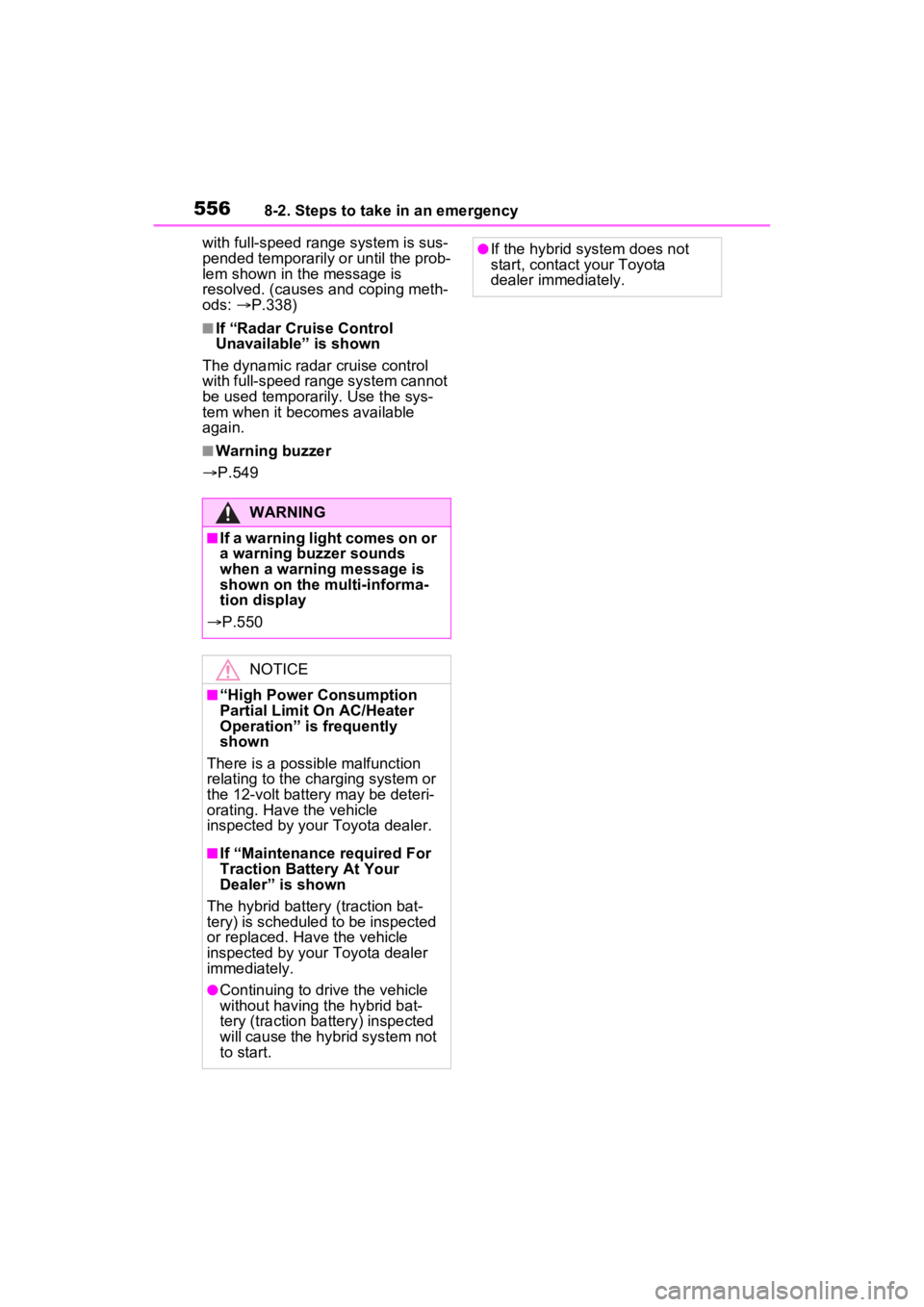
with full-speed range system is sus-
pended temporarily or until the prob-
lem shown in the message is
resolved. (causes a nd coping meth-
ods: P.338)
■If “Radar Cruise Control
Unavailable” is shown
The dynamic radar cruise control
with full-speed range system cannot
be used temporarily. Use the sys-
tem when it bec omes available
again.
■Warning buzzer
P.549
WARNING
■If a warning light comes on or
a warning buzzer sounds
when a warning message is
shown on the multi-informa-
tion display
P.550
NOTICE
■“High Power Consumption
Partial Limit On AC/Heater
Operation” is frequently
shown
There is a possible malfunction
relating to the charging system or
the 12-volt battery may be deteri-
orating. Have the vehicle
inspected by your Toyota dealer.
■If “Maintenance required For
Traction Battery At Your
Dealer” is shown
The hybrid battery (traction bat-
tery) is scheduled to be inspected
or replaced. Have the vehicle
inspected by your Toyota dealer
immediately.
●Continuing to dri ve the vehicle
without having the hybrid bat-
tery (traction battery) inspected
will cause the hybrid system not
to start.
●If the hybrid system does not
start, contact your Toyota
dealer immediately.
Page 577 of 662
579
9
9
Vehicle specifications
Vehicle specifications
9-1. SpecificationsMaintenance data (fuel, oil level, etc.) .................. 580
Fuel information .......... 587
Tire information ........... 589
9-2. Customization Customizable features 599
9-3. Initialization Items to initialize ......... 615
Page 578 of 662
5809-1. Specifications
9-1.Specifications
*: Unladen vehicle
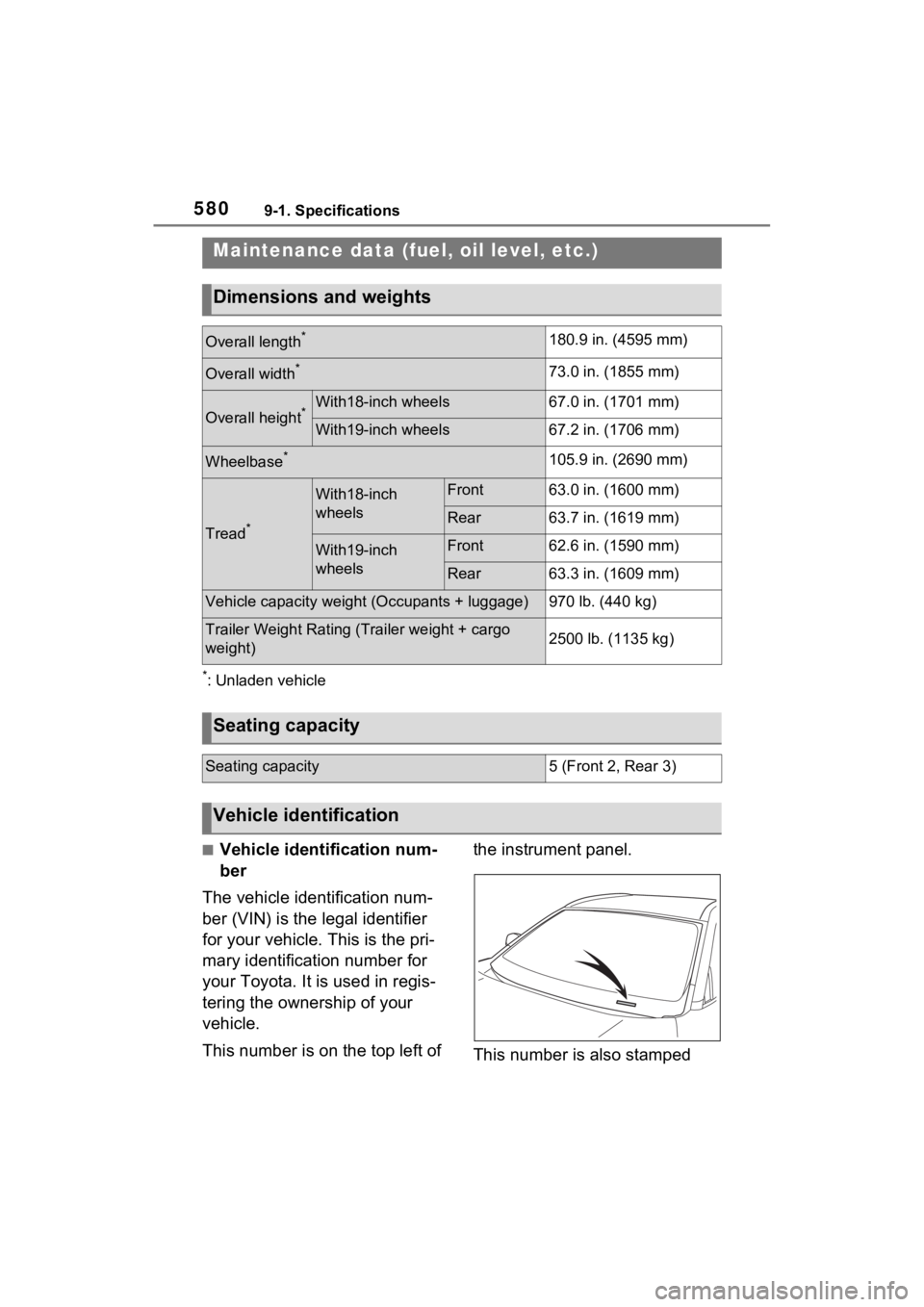
■Vehicle identification num-
ber
The vehicle identification num-
ber (VIN) is the legal identifier
for your vehicle. This is the pri-
mary identification number for
your Toyota. It is used in regis-
tering the ownership of your
vehicle.
This number is on the top left of the instrument panel.
This number is also stamped
Maintenance data (fuel, oil level, etc.)
Dimensions and weights
Overall length*180.9 in. (4595 mm)
Overall width*73.0 in. (1855 mm)
Overall height*With18-inch wheels67.0 in. (1701 mm)
With19-inch wheels67.2 in. (1706 mm)
Wheelbase*105.9 in. (2690 mm)
Tread*
With18-inch
wheelsFront63.0 in. (1600 mm)
Rear63.7 in. (1619 mm)
With19-inch
wheelsFront62.6 in. (1590 mm)
Rear63.3 in. (1609 mm)
Vehicle capacity weight (Occupants + luggage)970 lb. (440 kg)
Trailer Weight Rating (T
railer weight + cargo
weight)2500 lb. (1135 kg)
Seating capacity
Seating capacity5 (Front 2, Rear 3)
Vehicle identification
Page 613 of 662
6159-3. Initialization
9
Vehicle specifications
9-3.Initialization
*: If equipped
Items to initialize
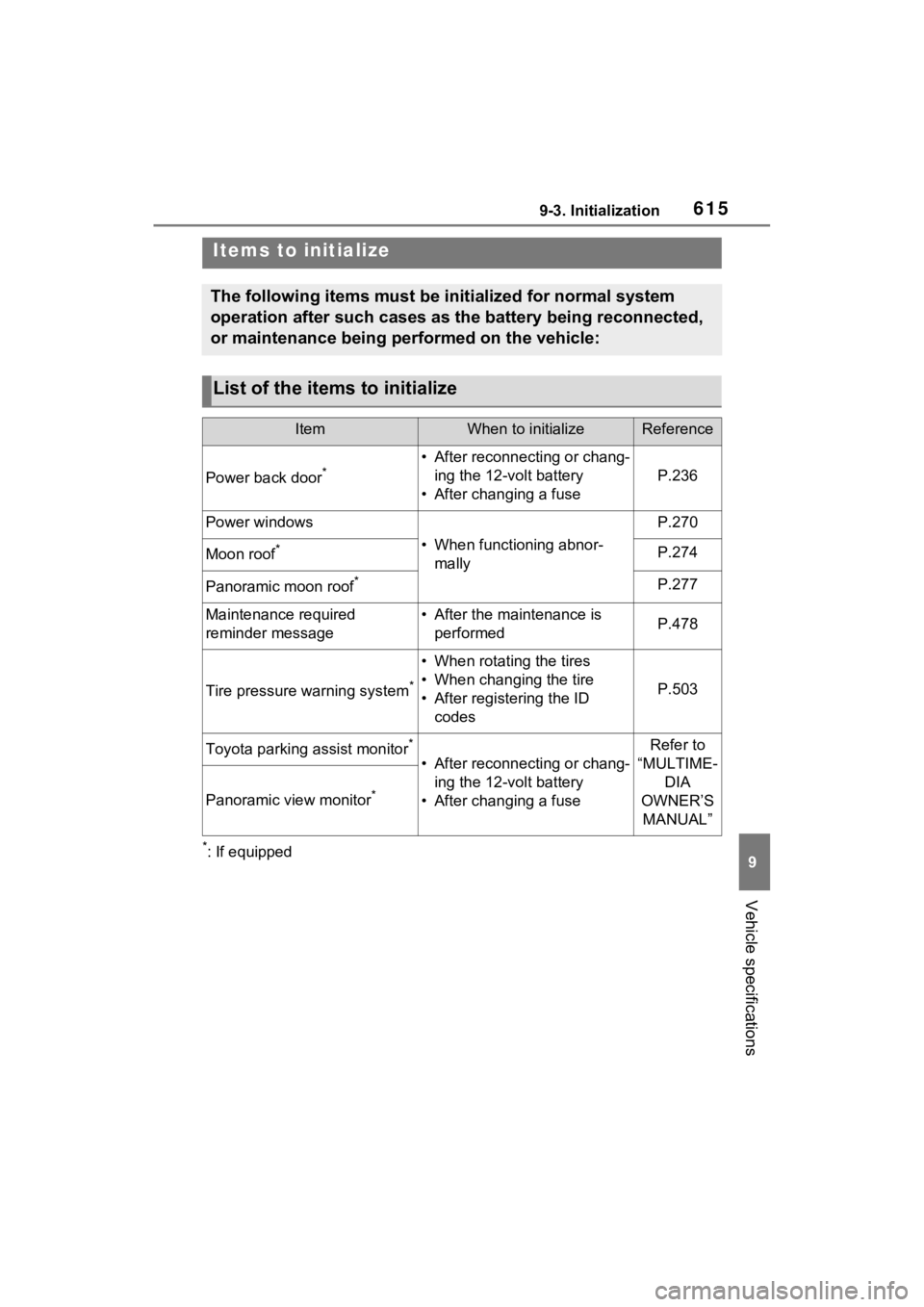
The following items must be initialized for normal system
operation after such cases as the battery being reconnected,
or maintenance being performed on the vehicle:
List of the items to initialize
ItemWhen to initializeReference
Power back door*• After reconnecting or chang-ing the 12-volt battery
• After changing a fuse
P.236
Power windows
• When functioning abnor- mally
P.270
Moon roof*P.274
Panoramic moon roof*P.277
Maintenance required
reminder message• After the maintenance is performedP.478
Tire pressure warning system*
• When rotating the tires
• When changing the tire
• After registering the ID codes
P.503
Toyota parking assist monitor*
• After reconnecting or chang-ing the 12-volt battery
• After changing a fuse
Refer to
“MULTIME- DIA
OWNER’S MANUAL”
Panoramic view monitor*
Page 633 of 662

635Alphabetical Index
Alphabetical Index
A
A/C“My Room Mode” ................. 148
Air conditioning filter ............. 513
Automatic air conditioning sys-tem ..................................... 422
Eco air conditioning mode .... 423
Front seat concentrated airflow mode (S-FLOW) ................. 428
Humidity sensor ................... 430
Remote Air Conditioning System ........................................... 431
ABS (Anti-lock Brake System) ............................................... 407Function ............................... 407
Warning light ........................ 543
ACA (Active Cornering Assist) ............................................... 407
AC charging cable .................. 100 CCID (Charging Circuit Interrupt-ing Device) ......................... 101
If the charging connector cannot be unlocked ........................ 108
Indicator ............................... 102
Locking and unlocking.......... 106
Maintenance......................... 104
Safety functions.................... 102
Acoustic Vehicle Alerting Sys- tem ........................................... 83
Active Cornering Assist (ACA) ............................................... 407
Airbags ...................................... 33 Airbag operating conditions.... 35
Airbag precautions for your child............................................. 38
Airbag warning light.............. 543
Correct driving posture ........... 27
Curtain shield airbag operating conditions ............................. 36
Curtain shield airbag precautions ............................................. 38 Front passenger occupant clas-
sification system ...................43
General airbag precautions ....38
Locations of airbags ...............33
Modification and disposal of air- bags......................................41
Seat cushion airbag................33
Side airbag operating conditions .............................................36
Side airbag precautions..........38
Side and curtain shield airbags operating conditions .............36
Side and curtain shield airbags precautions ...........................38
SRS airbag instructions for Canadian owners ...............621
SRS airbags ...........................33
SRS warning light .................543
Air conditioning filter .............513
Air conditioning system “My Room Mode” ..................148
Air conditioning filter .............513
Automatic air conditioning sys-tem .....................................422
Eco air conditioning mode ....423
Front seat concent rated airflow
mode (S-FLOW) .................428
Remote Air Conditioning System ...........................................431
Air intake vent (DC/DC converter) .................................................89Cleaning ...............................515
Alarm .........................................71 Warning buzzer .. ..................541
Anchor brackets ... ..............52, 61
Antenna (Smart key system) .241
Anti-lock brake system (ABS)407 Function................................407
Warning light ........................543
Approach warning ..................373
Armrest ......... ......................... ..454
Assist grips .............................454