2023 TOYOTA RAV4 PLUG-IN HYBRID ad blue
[x] Cancel search: ad bluePage 162 of 718

1602-2. Charging
(P.162)
Return button
Press to close the “Charging schedule” screen.
Main content displayed on the calendar:
When “Charge Now” is set to on, the blue icon will be displayed on the gray
line.
■Registering the charging
schedule
1Display the “Charging sched-
ule” screen. (P.159)
2Press “Add”.
The “Add event” screen will be dis-
played on the screen.
3Select charging mode.
Press “Start at set time” or “Departure
time” to set the desired charging mode,
and set the time by pressing buttons on
the screen.
When “Start at set time” is selected:
Set the charging start time (start time), then press “OK”.
When “Departure time” is selected:
Set the charging end time (departure
time), then press “OK”.
4When the charging mode is set
to “Departure time”, set the air
conditioning-linked function to
on or off.
DisplayContent
Gray lineCurrent time
Green iconThe charging mode is set to “Departure
time”
Blue iconThe charging mode is set to “Start at set
time”
E
Page 189 of 718

187
3
3-1. Instrument cluster
Vehicle status information and indicators
The display of the speedometer can be selected from two types, analog or
digital. ( P.206)
■Analog speedometer
The units used on the meter and display may differ depending on the target region.
Hybrid System Indicator
Displays the hybrid system output or regeneration level (P.190)
Speedometer
Displays the vehicle speed
Clock
Automatically adjusts the time by using the GPS time information (GPS clock).
For details, refer to “Multimedia owner’s manual”
Fuel gauge
Displays the quantity of fuel remaining in the tank
SOC (State of Charge) gauge
Displays the amount of charge remaining in the traction battery.
When the gauge is in the green zone, EV driving is possible. When the gauge is in
the blue zone, EV driving is no longer possible (in this situation, the vehicle switches
Gauges and meters (with 7-inch display)
The meters display various drive information.
Meter display
A
B
C
D
E
Page 191 of 718

189
3 3-1. Instrument cluster
Vehicle status information and indicators
Automatically adjusts the time by using the GPS time information (GPS clock).
For details, refer to “Multimedia owner’s manual”.
Fuel gauge
Displays the quantity of fuel remaining in the tank
SOC (State of Charge) gauge
Displays the amount of charge remaining in the traction battery.
When the gauge is in the green zone, EV driving is possible. When the gauge is in
the blue zone, EV driving is no longer possible (in this situation, the vehicle switches
to HV mode). Charge the hybrid battery (traction battery) to allow EV driving.
Odometer, trip meter and instrument cluster light control display
Odometer:
Displays the total distance that the vehicle has been driven
Trip meter:
Displays the distance the vehicle has been driven since the meter was last reset.
Trip meters A and B can be used to record and display different distances inde-
pendently.
Instrument cluster light control:
Displays the brightness of the instrument cluster lights that can be adjusted.
Outside temperature (P.190)
Multi-information display
Presents the driver with a variety of driving-related data (P.199)
Displays warning messages if a malfunction occurs (P.544)
Shift position and shift range indicator
Displays the selected shift position or selected shift range (P.315)
■The meters and display illuminate
when
The power switch is in ON.
■When changing driving mode
●Speedometer color is changed follow-
ing the selected driving mode.
(P.411)
●Speedometer color is changed follow-
ing the selected driving mode or when
Trail Mode is turned on. (P.411,
413)
■If the units of measure for speed-
ometer can be changed (if
equipped)
The other units of measure is also dis-
played as shown in the illustrations.
D
E
F
G
H
I
Page 199 of 718

197
3 3-1. Instrument cluster
Vehicle status information and indicators
area, more Eco-friendly driving can be
achieved.
Power area
Shows that an Eco-friendly driving range
is being exceeded (during full power
driving etc.)
Hybrid Eco area (HV mode)
Shows that gasoline engine power is not
being used very often.
The gasoline engine will automatically
stop and restart under various condi-
tions.
EV driving area (EV mode or AUTO
EV/HV mode)
Shows that the vehicle is driven using
only the electric motor (traction motor).
*: When used in this manual, regenera-
tion refers to the conversion of energy
created by the movement of the vehi-
cle into electrical energy.
■Hybrid System Indicator is dis-
played when
The Hybrid System Indicator is dis-
played in the following situations:
●The shift position is in D or S.
●The hybrid system is started.
■SOC (State of Charge) gauge
Displays the current amount of charge
remaining in the traction battery.
●The remaining battery for EV driving
in EV mode is displayed in green, and
the remaining battery used in HV
mode is displayed in blue.
●The amount of the remaining battery
displayed decrease as the vehicle is
driven and increase when the hybrid
battery (traction battery) is charged,
electrical energy is regenerated using
the regenerative braking (P.90) or
electricity is generated by the gasoline
engine.
●If the remaining battery is not dis-
played in green, HV mode is automat-
ically selected and EV mode cannot
be used. To enable EV driving, charge
the hybrid battery (traction battery).
(P.106)
The hybrid battery (traction battery)
is fully charged
The hybrid battery (traction battery)
for EV mode is not remaining
■Distance to empty
●This distance is computed based on
your average fuel consumption. As a
result, the actual distance that can be
driven may differ from that displayed.
●When only a small amount of fuel is
added to the tank, the display may not
be updated. When refueling, turn the
power switch off. If the vehicle is refu-
eled without turning the power switch
off, the display may not be updated.
●When “Refuel” is displayed, the
remaining fuel amount is low and the
distance that can be driven with the
remaining fuel cannot be calculated.
Refuel immediately.
■EV driving range
●When the air conditioning system is
operating, is displayed next to
the EV driving range and the EV driv-
ing range with the air conditioning sys-
tem on is displayed.
●The EV driving range may shorten
even when not driving due to power
consumption by the system.
●For details, refer to “EV driving range”
C
D
E
A
B
Page 204 of 718
2023-1. Instrument cluster
(traction battery). (P.90)
Distance to empty
Displays the driving range with remain-
ing fuel. (P.204)
Average fuel economy
Displays the average fuel economy
since the function was reset or the
average fuel economy after starting or
refueling.
*1, 2, 3
The average fuel economy selected by
“Fuel Economy” on the screen is
displayed. (P.206)
Current fuel economy
Displays the instantaneous current fuel
Economy.
*1: Use the displayed fuel consumption
as a reference only.
*2: Average fuel economy since the
function was reset can be reset by
pressing and holding .
*3: Average fuel economy after starting
is reset each time the hybrid system
stops.
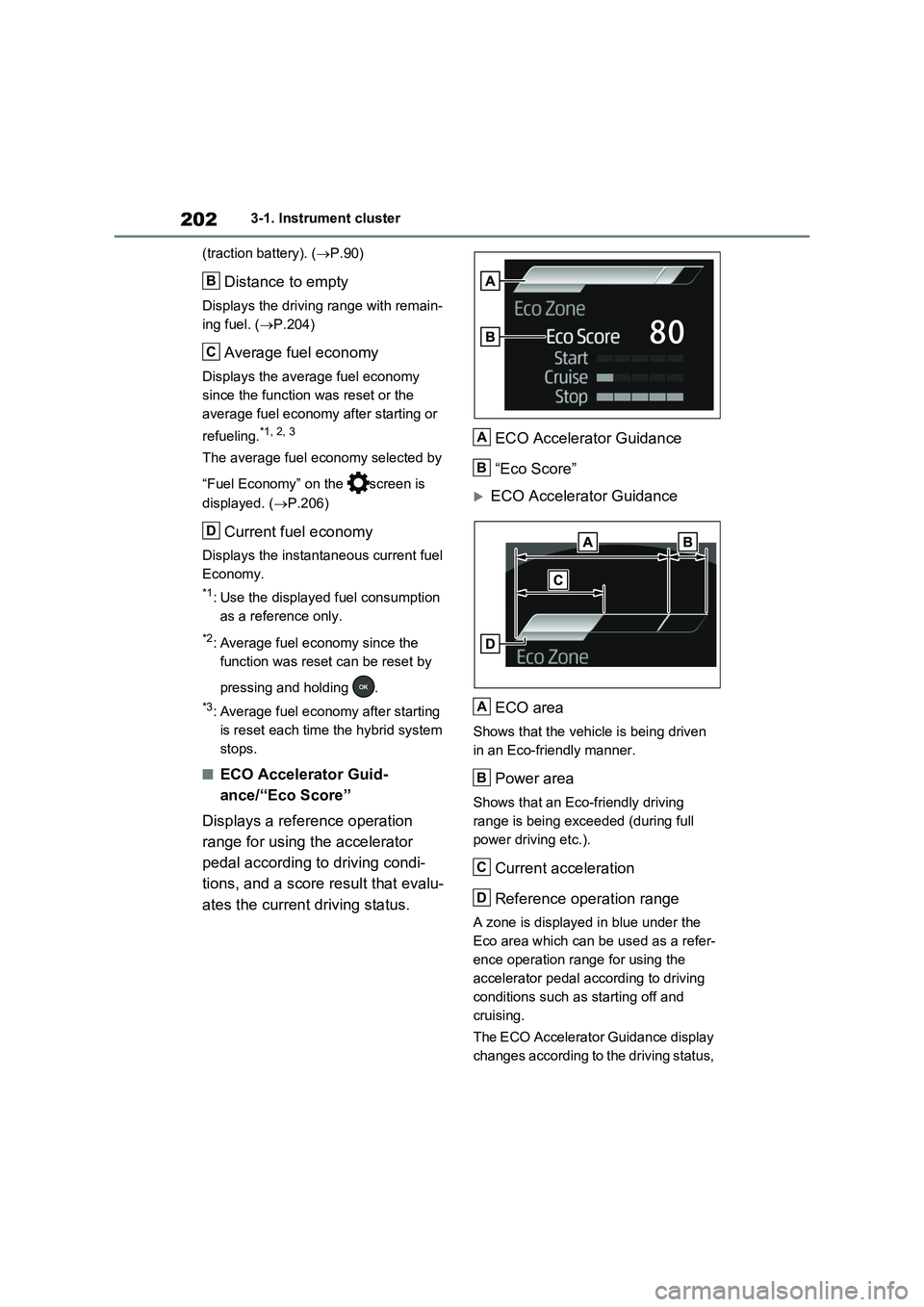
■ECO Accelerator Guid-
ance/“Eco Score”
Displays a reference operation
range for using the accelerator
pedal according to driving condi-
tions, and a score result that evalu-
ates the current driving status.ECO Accelerator Guidance
“Eco Score”
ECO Accelerator Guidance
ECO area
Shows that the vehicle is being driven
in an Eco-friendly manner.
Power area
Shows that an Eco-friendly driving
range is being exceeded (during full
power driving etc.).
Current acceleration
Reference operation range
A zone is displayed in blue under the
Eco area which can be used as a refer-
ence operation range for using the
accelerator pedal according to driving
conditions such as starting off and
cruising.
The ECO Accelerator Guidance display
changes according to the driving status,
B
C
D
A
B
A
B
C
D
Page 217 of 718

215
3 3-1. Instrument cluster
Vehicle status information and indicators
Shows that the vehicle is being driven
in an Eco-friendly manner.
Power area
Shows that an Eco-friendly driving
range is being exceeded (during full
power driving etc.).
Current acceleration
Reference operation range
A zone is displayed in blue under the
Eco area which can be used as a refer-
ence operation range for using the
accelerator pedal according to driving
conditions such as starting off and
cruising.
The ECO Accelerator Guidance display
changes according to the driving status,
such as when starting off or cruising.
It is easier to drive in an Eco-friendly
manner by driving according to the dis-
play showing the accelerator pedal
operations and staying within the refer-
ence operation range.
■“Eco Score”
The driving status for the following
3 situations are evaluated in 5 lev-
els: Smooth start-off acceleration
(“Start”), driving without sudden
acceleration (“Cruise”) and smooth
stopping (“Stop”). Each time the
vehicle is stopped, a score result is
displayed out of a perfect score of
100 points.Score result
“Start”
“Cruise”
“Stop”
3 situations are displayed with each
icon while driving.
How to read the bar display:
After starting off, “Eco Score” display
does not start until the vehicle speed
exceeds approximately 30km/h
(19mph).
The “Eco Score” is reset each time the
vehicle starts off to start a new evalua-
tion.
■ECO Accelerator Guidance/“Eco
Score” will not operate when
The ECO Accelerator Guidance/“Eco
Score” will not operate in the following
situations:
●The Hybrid System Indicator is not
operating.
●The vehicle is being driven using the
B
C
D
ScoreBar display
Unrated
Low
High
A
B
C
D
Page 229 of 718

227
3 3-1. Instrument cluster
Vehicle status information and indicators
Multimedia Display
Press from the main menu,
then press “Energy flow”.
■Reading the display
The arrows will appear in accor-
dance with the energy flow. When
there is no energy flow, arrows will
not be displayed.
The color of the arrows will change as
follows
Blue: When the hybrid battery (traction
battery) is regenerated or charged.
Orange: When the hybrid battery (trac-
tion battery) is in use.
Red: When the gasoline engine is in
use.
Multi-information display (vehi-
cles with 7-inch display)
The image shows all the arrows as an
example. The actual display will vary
depending on conditions.
Gasoline engine
Hybrid battery (traction battery)
Front tires
Rear tires
Multi-information display (vehi-
cles with 12.3-inch display)
The image shows all the arrows as an
example. The actual display will vary
depending on conditions.
Gasoline engine
Front tires
Rear tires
Hybrid battery (traction battery)
Multimedia Display
The image shows all the arrows as an
example. The actual display will vary
depending on conditions.
Gasoline engine
Front electric motor (traction
motor)
Hybrid battery (traction battery)
Charging connector
A
B
C
D
A
B
C
D
A
B
C
D
Page 230 of 718

2283-1. Instrument cluster
Rear electric motor (traction
motor)
Rear tires
Front tires
■Color of the hybrid battery (traction
battery) on the center display
It will be green when the hybrid battery
(traction battery) is being charged, and
yellow when the hybrid battery (traction
battery) is being used.
■Remaining charge amount warning
of hybrid battery (traction battery)
●The buzzer sounds intermittently
when the hybrid battery (traction bat-
tery) remains without charging while
the shift lever is in N, or the remaining
charge amount drops below a certain
level. If the remaining charge amount
drops further, the buzzer sounds con-
tinuously.
●When a warning message is shown
on the multi-information display and
the buzzer sounds, follow the instruc-
tions displayed on the screen to per-
form troubleshooting.
■Color of the gasoline engine on the
center display
It will be blue when the engine is warm-
ing up, and it will turn to red when the
warming up is finished.
Hybrid system output may be restricted
when the gasoline engine is displayed in
blue.
■Display procedure
Press from the main menu,
then press “Trip information”.
■Current fuel consumption
screen
If a screen other than current fuel
consumption screen is displayed,
press “Current”.
Use the displayed average fuel con-
sumption as a reference.
The image is an example only, and may
vary slightly from actual conditions.
Resetting the consumption data
Fuel consumption in the past 15
minutes
Current fuel consumption
Average vehicle speed since the
hybrid system was started.
Trip range
Elapsed time since the hybrid
system was started.
■History screen
If a screen other than history
screen is displayed, press “History”.
Use the displayed average fuel con-
sumption as a reference.
The image is an example only, and may
vary slightly from actual conditions.
Consumption screen
E
F
G
A
B
C
D
E
F