2023 TOYOTA RAV4 remote control
[x] Cancel search: remote controlPage 170 of 574

1703-5. Opening, closing the windows and moon roof
*: If equipped
■Opening and closing
1 Opens the moon roof
*
The moon roof stops slightly before
the fully open position to reduce
wind noise.
Press the switch again to fully open
the moon roof.
2Closes the moon roof*
*: Lightly press either side of the
moon roof switch to stop the
moon roof partway.
■Tilting up and down 1
Tilts the moon roof up
*
2Tilts the moon roof down*
*: Lightly press e ither side of the
moon roof switch to stop the
moon roof partway.
■The moon roof can be operated
when
The engine switch is in ON.
■Operating the moon roof after
turning the engine off
The moon roof can be operated for
approximately 45 s econds after the
engine switch is tu rned to ACC or
OFF. It cannot, however, be oper-
ated once either front door is
opened.
■Jam protection function
If an object is dete cted between the
moon roof and the frame while the
moon roof is closing or tilting down,
travel is stopped and the moon roof
opens slightly.
■Sunshade
The sunshade can be opened and
closed manually. However, the sun-
shade will open aut omatically when
the moon roof is opened.
■Door lock linked moon roof
operation
●The moon roof can be opened
and closed using the mechanical
key.
* ( P.475)
●The moon roof can be opened
using the wireless remote control.*
( P.119)
●Vehicles with alarm: The alarm
may be triggered if the alarm is set
and the moon roof is closed using
the door lock linked moon roof
operation function. ( P.71)
*: These settings must be custom-
ized at your Toyota dealer.
Moon roof*
Use the overhead switches
to open and close the moon
roof and tilt it up and down.
Operating the moon roof
Page 172 of 574
1723-5. Opening, closing the windows and moon roof
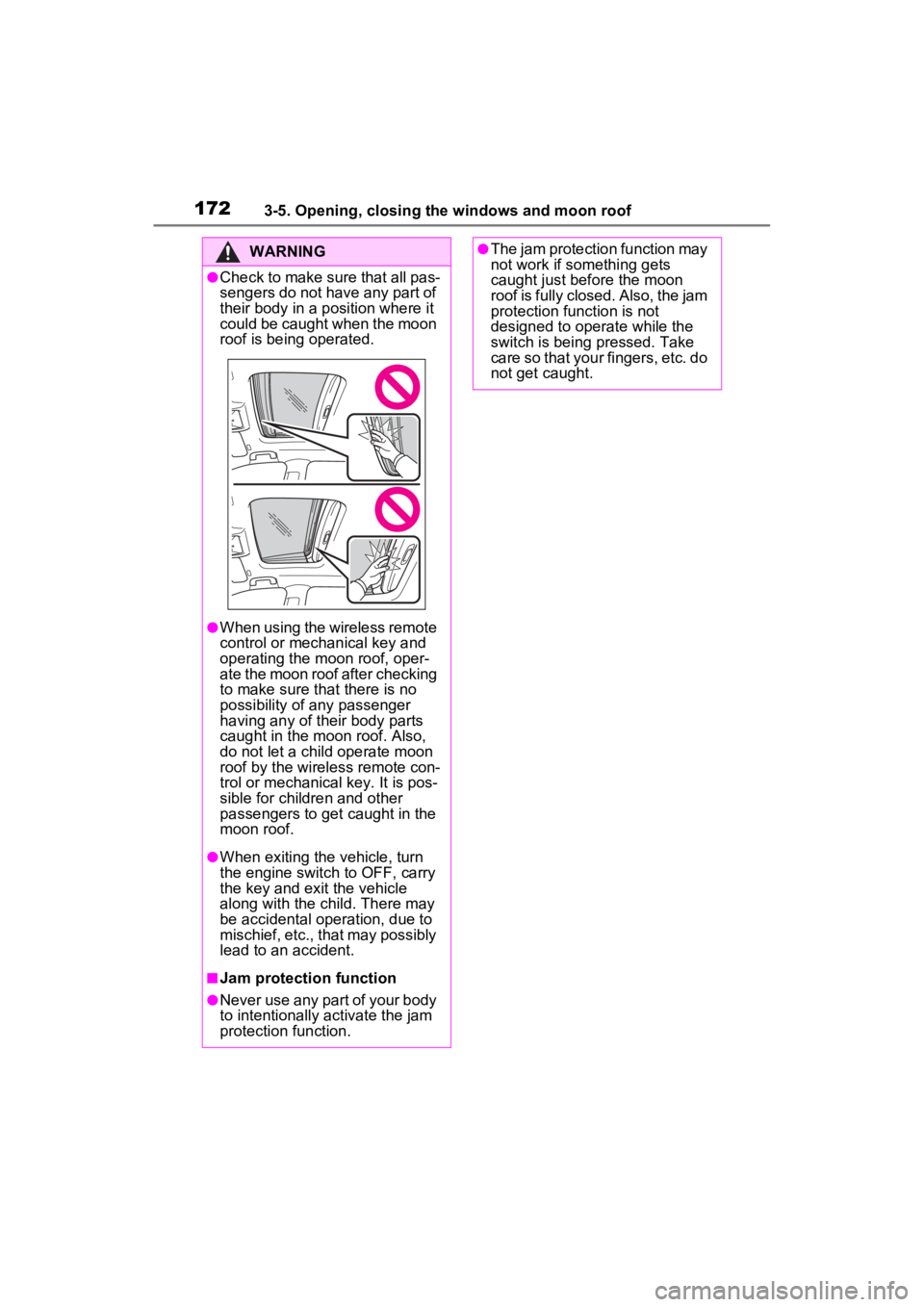
WARNING
●Check to make sure that all pas-
sengers do not have any part of
their body in a position where it
could be caught when the moon
roof is being operated.
●When using the wireless remote
control or mechanical key and
operating the moon roof, oper-
ate the moon roof after checking
to make sure that there is no
possibility of any passenger
having any of their body parts
caught in the moon roof. Also,
do not let a child operate moon
roof by the wireless remote con-
trol or mechanical key. It is pos-
sible for children and other
passengers to get caught in the
moon roof.
●When exiting the vehicle, turn
the engine switch to OFF, carry
the key and exit the vehicle
along with the child. There may
be accidental operation, due to
mischief, etc., that may possibly
lead to an accident.
■Jam protection function
●Never use any part of your body
to intentionally a ctivate the jam
protection function.
●The jam protection function may
not work if something gets
caught just before the moon
roof is fully closed. Also, the jam
protection function is not
designed to operate while the
switch is being pressed. Take
care so that your fingers, etc. do
not get caught.
Page 174 of 574

1743-5. Opening, closing the windows and moon roof
backward. The panoramic moon
roof and electronic sunshade will
open automatically.
The panoramic moon roof can be
opened from the tilt-up position.
*: Quickly slide and release the
switch in either direction to
stop the panoramic moon roof
partway.
Closes the panoramic moon
roof
Slide and hold the switch for-
ward. The panoramic moon roof will
fully close automatically.
■The panoramic moon roof can
be operated when
The engine switch is in ON.
■Operating the panoramic moon
roof after turning the engine off
The panoramic moon roof and elec-
tronic sunshade can be operated for approximately 45 s
econds after the
engine switch is tu rned to ACC or
OFF. They cannot, however, be
operated once eithe r front door is
opened.
■Jam protection function
If an object is dete cted between the
panoramic moon roof and the frame
in the following situations, travel is
stopped and the panoramic moon
roof opens slightly.
●The panoramic moon roof is clos-
ing or tilting down.
●The electronic sunshade is clos-
ing.
■Closing both the panoramic
moon roof and electronic sun-
shade
Slide the switch forward.
The electronic sunshade will close
to the half-open position and pause.
The panoramic moo n roof will then
fully close. Then the electronic sun-
shade will fully close.
■Door lock linked panoramic
moon roof operation
●The panoramic moon roof can be
opened and closed using the
mechanical key.
* ( P.475)
●The panoramic moon roof can be
opened using the wireless remote
control.
* ( P.119)
●Vehicles with alarm: The alarm
may be triggered if the alarm is set
and the panoramic moon roof is
closed using the door lock linked
panoramic moon roof operation
function. ( P.71)
*: These settings must be custom-
ized at your Toyota dealer.
■When the panoramic moon roof
or electronic sunshade does
not close normally
Perform the following procedure:
1 Stop the vehicle.
Page 176 of 574

1763-5. Opening, closing the windows and moon roof
WARNING
●Check to make sure that all pas-
sengers do not have any part of
their body in a position where it
could be caught when the pan-
oramic moon roof is being oper-
ated.
●When using the wireless remote
control or mechanical key and
operating the panoramic moon
roof, operate the panoramic
moon roof after checking to
make sure that there is no pos-
sibility of any passenger having
any of their body parts caught in
the panoramic moon roof. Also,
do not let a child operate pan-
oramic moon roof by the wire-
less remote control or
mechanical key. It is possible
for children and other passen-
gers to get caught in the pan-
oramic moon roof.
●When exiting the vehicle, turn
the engine switch to OFF, carry
the key and exit the vehicle
along with the child. There may
be accidental operation, due to
mischief, etc., that may possibly
lead to an accident.
■Jam protection function
●Never use any part of your body
to intentionally activate the jam
protection function.
●The jam protection function may
not work if something gets
caught just before the pan-
oramic moon roof or electronic
sunshade is fully closed. Also,
the jam protection function is
not designed to operate while
the switch is being pressed.
Take care so that your fingers,
etc. do not get caught.
■To prevent burns or injuries
Do not touch the area between
the underside of the panoramic
moon roof and the electronic sun-
shade. Your hand may get caught
and you could injure yourself.
Also, if the vehicle is left in direct
sunlight for a long time, the under-
side of the panoramic moon roof
could become very hot and could
cause burns.
NOTICE
■To prevent damage to the
panoramic moon roof
●Before opening the panoramic
moon roof, make sure that there
are no foreign objects, such as
stones or ice, around the open-
ing.
●Do not hit the surface or edge of
the panoramic moon roof with
hard objects.
■After the vehicle has been
washed or rained on
Before opening the panoramic
moon roof, wipe any water off the
panoramic moon roof. Otherwise,
water may enter the cabin when
the panoramic moon roof is
opened.
Page 367 of 574

3675-4. Using the other interior features
5
Interior features
NOTICE
●The portable device is being
charged with a cable connected
●There is foreign matter between
the charge area and portable
device
●Charging has caused the porta-
ble device to heat up
●The temperature around the
charging tray is 95°F (35°C) or
higher, such as in extreme heat
●The portable device is placed
with its charging side facing up
●When the charging coil for the
portable device is misaligned
from the charge area (In particu-
lar, small portable devices such
as foldable devices may be mis-
aligned from the charging area
while driving)
●The portable device is larger
than the charging tray
●The camera lens protrudes 3
mm (0.12 in) or more from the
surface of the portable device
●The vehicle is in an area where
strong electrical waves or noise
are emitted, such as near a tele-
vision tower, power plant, gaso-
line station, broadcasting
station, large display, airport,
etc.
●Any of the following objects that
is 0.08 in (2 mm) or thicker is
between the charging side of
the portable device and the
charge area
• Thick cases or covers
• Thick decorations
• Accessories, such as finger rings, straps, etc.
●When the portable device is in
contact with, or is covered by
any of the following metallic
objects:
• A card that has metal on it, such as aluminum foil, etc.
• A pack of cigarettes that includes aluminum foil
• A wallet or bag that is made of metal
• Coins
• A heating pad
• CDs, DVDs or other media
• A metal accessory
• A case or cover made of metal
• Casing which has magnet in it on the charging side of the por-
table device
●Electric wave type wireless
remote controls are being used
nearby
●The electronic key is not inside
the vehicle
●2 or more portable devices are
placed on the charging tray at
the same time
If charging is abnormal or the
operation indicator light contin-
ues to flash for any other reason,
the wireless char ger may be mal-
functioning. Contact your Toyota
dealer.
Page 370 of 574

3705-4. Using the other interior features
device.
Vehicles with auto anti-glare
inside rear view mirrorHomeLink
® indicator light
Garage door operation indi-
cators
HomeLink
® icon
Illuminates while HomeLink® is
operating.
Buttons
Vehicles with Digital Rear-
view Mirror
HomeLink
® indicator light
Illuminates above each button
selected.
HomeLink® icon Garage door operation indi-
cators
HomeLink
® logo
Appears while HomeLink® is oper-
ating.
When the HomeLink
® button is
pressed, the logo disappears even
while the HomeLink
® is operating.
Setting icon
Press the menu button to change
the setting.
Menu buttons
HomeLink
® buttons
■Codes stored in the HomeLink®
memory
●The registered codes are not
erased even if the battery cable is
disconnected.
●If learning failed when registering
a different code to a HomeLink®
button that already has a code
registered to it, the already regis-
tered code will not be erased.
A
B
C
D
A
B
WARNING
■When programming a garage
door or other remote control
device
The garage door or other device
may operate, so ensure people
and objects are out of danger to
prevent potential harm.
C
D
E
F
G
Page 371 of 574

3715-4. Using the other interior features
5
Interior features■Before programming
HomeLink
®
During programming, it is pos-
sible that garage doors,
gates, or other devices may
operate. For this reason,
make sure that people and
objects are clear of the
garage door or other devices
to prevent injury or other
potential harm.
It is recommended that a new
battery be placed in the
remote control transmitter for
successful programming.
Garage door opener motors
manufactured after 1995 may
be equipped with rolling code
protection. If this is the case, you may need a stepladder or
other sturdy, safe device to
reach the “Learn” or “Smart”
button on the garage door
opener motor.
■Programming HomeLink®
Steps
2 through 4 must be per-
formed within 60 seconds, oth-
erwise the HomeLink
® indicator
light will stop flashing and pro-
gramming will not be success-
fully completed.
1 Vehicles with Digital Rear-
view Mirror: Press the
HomeLink
® button or menu
button
When the HomeLink® button is
pressed:
Homelink
® Training Tutorial will be
displayed to assist you program-
ming the HomeLink
®.
When Homelink
® Training Tutorial
is displayed, follow the instructions
displayed.
When the menu button is pressed:
Press the menu button and
select the “Set U p >”. Homelink
®
Training Tutorial will be displayed
to assist you programming the
HomeLink
®.
When Homelink
® Training Tutorial
is displayed, follow the instructions
displayed.
2 Press and release the
HomeLink
® button you want
to program and check that
the HomeLink
® indicator light
flashes (orange).
3 Point the remote control
transmitter for the device at
WARNING
■Conforming to federal safety
standards
Do not use the HomeLink
® com-
patible transceiver with any
garage door opener or device that
lacks safety stop and reverse fea-
tures as required by federal safety
standards.
This includes any garage door
that cannot detect an interfering
object. A door or device without
these features increases the risk
of death or se rious injury.
■When operating or program-
ming HomeLink®
Never allow a child to operate or
play with the HomeLink® buttons.
Programming HomeLink®
Page 372 of 574

3725-4. Using the other interior features
the rear view mirror, 1 to 3 in.
(25 to 75 mm) from the
HomeLink
® buttons.
Keep the HomeLink® indicator light
in view while programming.
4 Program a device.
Programming a device other
than an entry gate (for U.S.A.
owners)
Press and hold the remote con-
trol transmitter button until the
HomeLink
® indicator light
changes from slowly flashing
orange to rapidly flashing green
(rolling code) or continuously lit
green (fixed code), then release
the button.
Programming an entry gate
(for U.S.A. owners)/Program-
ming a device in the Cana-
dian market
Press and release the remote
control transmitter button at 2
second intervals, repeatedly,
until the HomeLink
® indicator
light changes from slowly flash-
ing orange to rapidly flashing
(green) (rolling code) or continu-
ously lit (green) (fixed code).
5 Test the HomeLink
® opera-
tion by pressing the newly
programmed button and
observing the HomeLink
®
indicator light:
HomeLink
® indicator light illu-
minates: Programming of a
fixed code device has com-
pleted. The garage door or
other device should operate
when a HomeLink
® button is
pressed and released.
HomeLink
® indicator light
flashes rapidly: The garage
door opener or other device is
equipped with a rolling code.
To complete programming,
firmly press and hold the
HomeLink
® button for 2 sec-
onds then release it.
If the garage door or other
device does not operate, pro-
ceed to “Programming a roll-
ing code system”.
6 Repeat the steps above to
program another device for