2023 TOYOTA RAV4 light
[x] Cancel search: lightPage 349 of 574

3495-3. Using the storage features
5
Interior features
5-3.Using the storage features
Open tray (P.353)
Auxiliary boxes ( P.352)
Bottle holders ( P.352)
Console box ( P.351)
Cup holders ( P.351)
Glove box ( P.351)
List of storage features
Location of the storage features
A
B
C
D
E
F
:$51,1*
■Items that should not be left
in the vehicle
Do not leave glasses, lighters or
spray cans in the storage spaces,
as this may cau se the following
when cabin temperature becomes
high:
●Glasses may be deformed by
heat or cracked if they come
into contact with other stored
items.
●Lighters or spray cans may
explode. If they come into con-
tact with other stored items, the
lighter may catch fire or the
spray can may release gas,
causing a fire hazard.
Page 358 of 574

3585-4. Using the other interior features
5-4.Using the other interior features
1To set the visor in the forward
position, flip it down.
2 To set the visor in the side
position, flip down, unhook,
and swing it to the side.
3 To use the side extender (if
equipped), place the visor in
the side position, then slide it
backward.
Slide the cover to open.
The light turns on when the cover is
opened.
■Automatic light off to prevent
battery discharge
If the vanity light s remain on when the engine switch is turned to OFF,
the lights will go off automatically
after 20 minutes.
The power outlet can be used
for the following components:
12 V: Accessories that run on
less than 10 A.
120 VAC: Accessories that use
less than 100 W.
■12 V
Front
Open the lid.
Rear (if equipped)
Open the lid.
Other interior features
Sun visors
Vanity mirrors
NOTICE
■To prevent battery discharge
Do not leave the vanity lights on
for extended periods while the
engine is off.
Power outlet
Page 361 of 574

3615-4. Using the other interior features
5
Interior features
A portable device can be
charged by just placing Qi stan-
dard wireless charge compatible
portable devices according to
the Wireless Power Consortium,
such as smartphones and
mobile batteries, etc., on the
charge area.
This function cannot be used
with portable devices that are
larger than the charging tray. Also, depending on the portable
device, it may not operate as
normal. Please read the opera-
tion manual for portable devices
to be used.
■The “Qi” logo
The “Qi” logo is a trademark of
the Wireless Power Consortium.
■Name for all parts
Charge area
*
Charging tray
Power supply switch
Operation indicator light
*: Portable devices and wireless chargers contain charging coils.
The charging coil in the wireless
charger can be moved within the
charge area near the center of
the charging tray. If the charging
coil inside a portable device is
detected in the charge area, the
charging coil inside the wireless
NOTICE
●When the USB Type-C charging
ports are not in use, close the
lids. If a foreign object or liquid
enters a port may cause a short
circuit.
●Do not apply excessive force to
or impact the USB Type-C
charging ports.
●Do not disassemble or modify
the USB Type-C charging ports.
■To prevent damage to exter-
nal devices
●Do not leave external devices in
the vehicle. The temperature
inside the vehicle may become
high, resulting in damage to an
external device.
●Do not push down on or apply
unnecessary force to an exter-
nal device or the cable of an
external device while it is con-
nected.
■To prevent battery discharge
Do not use the USB Type-C
charging ports for a long period of
time when the engine is off.
Wireless charger (if
equipped)A
B
C
D
Page 362 of 574

3625-4. Using the other interior features
charger will move toward it and
start charging. If the charging coil
inside a portable device moves
outside of the charge area,
charging will automatically stop.
If 2 or more porta ble devices are
placed on the charging tray, their
charging coils may not be prop-
erly detected and they may not
be charged.
■Using the wireless charger
1 Press the power supply
switch of the wireless char-
ger.
Switches on and off with each
press of the power supply switch.
When turned on, the operation indi-
cator light (green) comes on.
Even with the engi ne off, the on/off
state of the power supply switch is
memorized.
2 Place the portable device on
the charging tray
Place the charging side of the por-
table device down with the center of
the device in the center of the
charge area. Depending on the por-
table device, its charging coil may
not be in the center of the device. In
this case, place the portable device
so that its chargi ng coil is centered
in the charging area.
When charging, the operation indi-
cator light (orange) comes on.
If charging is not occurring, try plac- ing the portable device as close to
the center of the charging area as
possible. If char
ging is not per-
formed, the operation indicator light
will slowly illuminate in green and
orange alternatively and a sound of
charging coil operation may be
heard repeatedly.
When charging is complete, the
operation indicator light (green)
comes on.
■Recharging function
When charging is complete
and after a fixed time in the
charge suspension state,
charging restarts.
If a portable device is moved
significantly within the
charging area, the charging
coil may disconnect and
charging may temporarily be
stopped. However, if a
charging coil is detected
within the charging area, the
charging coil inside the wire-
less charger will move near
the other coil and charging
will resume.
■Rapid charging function
The following portable
devices support rapid
charging.
Page 363 of 574
3635-4. Using the other interior features
5
Interior features
• Portable devices compliant with WPC Ver1.2.4 and compatible
with rapid charging
• iPhone’s with an iOS version that supports 7.5 W charging (iPhone
8 and later models)
To switch to the rapid
charging function, press the
power supply switch 3 times
while charging. When rapid
charging is possible, the oper-
ation indicator light will switch
from orange to flashing
between green and orange.
When charging is complete,
the rapid charging function
will stop. Switch again to the
rapid charging function to use
rapid charging again.
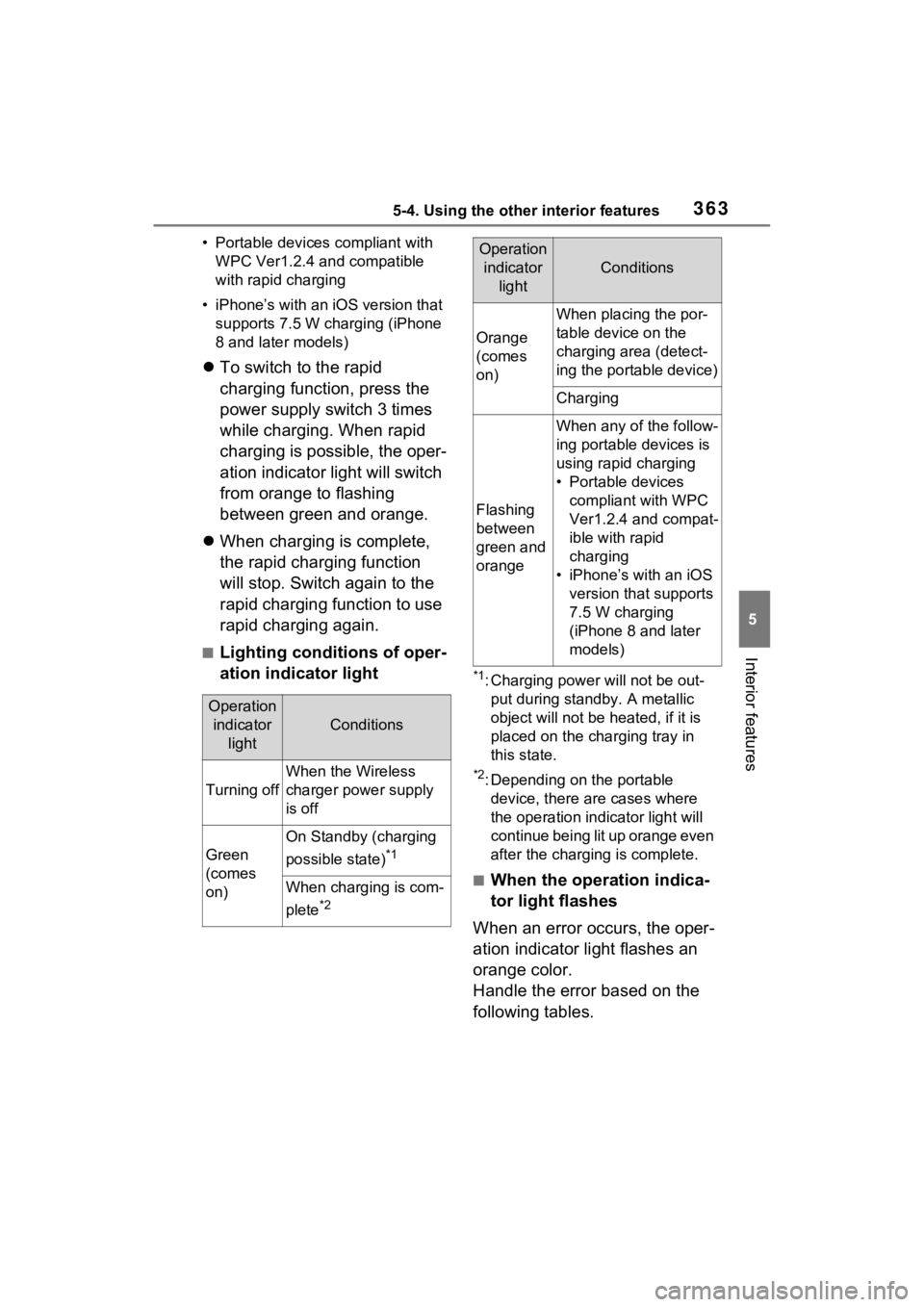
■Lighting conditions of oper-
ation indicator light
*1: Charging power will not be out-
put during standb y. A metallic
object will not be heated, if it is
placed on the charging tray in
this state.
*2: Depending on the portable device, there are cases where
the operation indicator light will
continue being lit up orange even
after the charging is complete.
■When the operation indica-
tor light flashes
When an error occurs, the oper-
ation indicator light flashes an
orange color.
Handle the error based on the
following tables.
Operation indicator light
Conditions
Turning off
When the Wireless
charger power supply
is off
Green
(comes
on)
On Standby (charging
possible state)
*1
When charging is com-
plete
*2
Orange
(comes
on)
When placing the por-
table device on the
charging area (detect-
ing the portable device)
Charging
Flashing
between
green and
orange
When any of the follow-
ing portable devices is
using rapid charging
• Portable devices compliant with WPC
Ver1.2.4 and compat-
ible with rapid
charging
• iPhone’s with an iOS version that supports
7.5 W charging
(iPhone 8 and later
models)
Operation indicator light
Conditions
Page 364 of 574

3645-4. Using the other interior features
Flashing repeatedly once
every second (Orange)
Repeatedly flashes 3 times
continuously (Orange)
Suspected
causesHandling method
Vehicle to char-
ger communica-
tion failure.
If the engine is
running, stop
and then restart
the engine. If the
engine switch is
in ACC, start the
engine.
( P.204)
Suspected
causesHandling method
Foreign sub-
stance detection:
A metallic for-
eign substance
is in the charge
area, and so the
abnormal heat-
ing prevention
function oper-
ated
Remove the for-
eign substance
from the charge
area.
Portable device
misaligned:
The charging coil
in the portable
device moved
outside of the
charge area, and
so the abnormal
heating preven-
tion function
operated
Remove the por-
table device from
the charging
tray, check that
the operation
indicator light
switches back to
green, and then
once again place
the device near
the center of the
charging tray. If
there is a case or
cover attached
to the portable
device, remove
it.
Page 365 of 574

3655-4. Using the other interior features
5
Interior features
Repeatedly flashes 4 times
continuously (Orange)
■The wireless charger can be
operated when
The engine switch is in ACC or ON.
■Usable portable devices
●Qi standard wireless charge stan-
dard can be used on compatible
devices. However, not all Qi stan-
dard devices and compatibility are
guaranteed.
●Starting with mobile phones and
smartphones, it is aimed for low
power electrically supplied porta-
ble devices of no more than 5W.
●However, chargin g exceeding 5 W
is supported by the following por-
table devices.
• Charging at 7.5 W or less is sup- ported by iPhone’s that support
7.5 W charging.
• Charging at 10 W or less is sup- ported by portable devices compli-
ant with EPP output as defined by
WPC standard Ver1.2.4.
■Using the smart key system
If the smart key system detects the
key while a device is being charged,
charging will be temporarily
stopped.
■When covers and accessories
are attached to portable devices
Do not charge in situations where cover and accessories not able to
handle Qi are attached to the porta-
ble device. Depending on the type
of cover (including the certain genu-
ine manufacture
parts) and acces-
sory, it may not be possible to
charge. When charging is not per-
formed even with the portable
device placed on the charge area,
remove the cover and accessories.
■While charging, noise enters
the AM radio
●Turn off the wireless charger and
confirm that the noise has
decreased. If the noise
decreases, continuously pushing
the power supply switch of the
wireless charger for 2 seconds,
the frequency of the charger can
be changed and the noise can be
reduced. Also, on that occasion,
the operation indicator light will
flash orange 2 times.
●iPhone’s use a particular fre-
quency for rapid charging.
Depending on the iOS version,
rapid charging may not be per-
formed while switching frequen-
cies.
■Important points of the wireless
charger
●If the electronic key cannot be
detected within the vehicle inte-
rior, charging c annot be done.
When the door is opened and
closed, charging may be tempo-
rarily suspended.
●When charging, the wireless
charging device and portable
device will get warmer, however
this is not a malfunction.
When a portable device gets
warm while char ging, charging
may stop due to the protection
function on the portable device
side. In this case, when the tem-
perature of the portable device
drops significantly, charge again.
The fan may start operating to lower
the temperature inside the wireless
charger, however this is not a mal-
Suspected causesHandling method
Safety shut-
down resulting
when the tem-
perature within
the wireless
charger
exceeded the set
valueStop charging,
remove the por-
table device from
the charging
tray, wait for the
temperature to
drop, and then
start charging
again.
Page 366 of 574

3665-4. Using the other interior features
function.
■Operation sounds
A buzzing noise may be heard when
pressing the power supply switch to
turn the power supply on, when
turning the engine switch to ACC or
ON while the wireless charger
power supply is on, or when detect-
ing a portable device. However, this
is not a malfunction.
■If the smartphone OS has been
updated
If the smartphone OS has been
updated to a newer version, its
charging specifications may have
changed significantly. For details,
check the information on the manu-
facturer’s website.
■Trademark information
iPhone is a trademark of Apple Inc.,
registered in the U.S. and other
countries.
WARNING
■Caution while driving
When charging a portable device,
for safety reasons, the driver
should not operate the main part
of the portable device while driv-
ing.
■Caution while in motion
Do not charge lightweight devices
such as wireless headphones
while in motion. These devices
are very light and may be ejected
from the charging tray, which may
lead to unforeseen accidents.
■Caution regarding interfer-
ence with electronic devices
People with implantable cardiac
pacemakers, cardiac resynchroni-
zation therapy-pacemakers or
implantable cardio verters, as well
as any other electrical medical
device, should consult their physi-
cian about the usage of the wire-
less charger.
■To prevent malfunctions or
burns
Observe the following precau-
tions. Failure to do so may result
in a equipment failure and dam-
age, catch fire, bur ns due to over-
heat or electric shock.
●Do not insert any metallic
objects between the charge
area and the portable device
while charging
●Do not attach a n aluminum
sticker or other metallic object to
the charge area
●Do not attach a n aluminum
sticker or other metallic object to
the side of the portable device
(or to its case or cover) that
touches the charge area
●Do not use the ch arging tray as
a small storage space
●Do not subject to a strong force
or impact
●Do not disassemb le, modify or
remove
●Do not charge devices other
than specified portable devices
●Keep away from magnetic items
●Do not charge devices if the
charge area is covered in dust
●Do not cover with a cloth or sim-
ilar material
NOTICE
■Situations in which the func-
tion may not operate normally
Devices may not be charged nor-
mally in the following situations.
●The portable device is fully
charged