2023 TOYOTA RAV4 HYBRID parking brake
[x] Cancel search: parking brakePage 3 of 586

3TABLE OF CONTENTS
1
2
3
4
5
6
7
8
9
Panoramic moon roof....189
4-1. Before driving Driving the vehicle......... 195
Cargo and luggage ....... 202
Vehicle load limits ......... 205
Trailer towing ................ 206
Dinghy towing ............... 216
4-2. Driving procedures Power (ignition) switch (vehi-cles without smart key sys-
tem) ............................. 217
Power (ignition) switch (vehi- cles with smart key system).................................... 219
EV drive mode .............. 224
Hybrid transmission ...... 226
Turn signal lever ........... 230
Parking brake ................ 231
Brake Hold .................... 235
4-3. Operating the lights and wipers
Headlight switch ............ 237
AHB (Automatic High Beam) .................................... 240
Fog light switch ............. 244
Windshield wipers and washer......................... 244
Rear window wiper and washer......................... 247
4-4. Refueling Opening the fuel tank cap.................................... 2494-5. Using the driving support
systems
Toyota Safety Sense 2.5 252
PCS (Pre-Collision System) .................................... 257
LTA (Lane Tracing Assist) .................................... 268
RSA (Road Sign Assist) 279
Dynamic radar cruise control with full-speed range ... 282
BSM (Blind Spot Monitor) .................................... 293
Intuitive parking assist ... 298
RCTA (Rear Cross Traffic Alert) function .............. 307
PKSB (Parking Support Brake) .......................... 312
Parking Support Brake func- tion (static objects) ...... 318
Parking Support Brake func- tion (rear-crossing vehicles)
.................................... 321
Driving mode s elect switch
.................................... 323
Trail Mode (AWD vehicles) .................................... 324
Driving assist systems ... 326
4-6. Driving tips Hybrid Electric Vehicle driv-ing tips ......................... 332
Winter driving tips .......... 334
Utility vehicle precautions .... ...
............................. 337
4Driving
Page 21 of 586
21Pictorial index
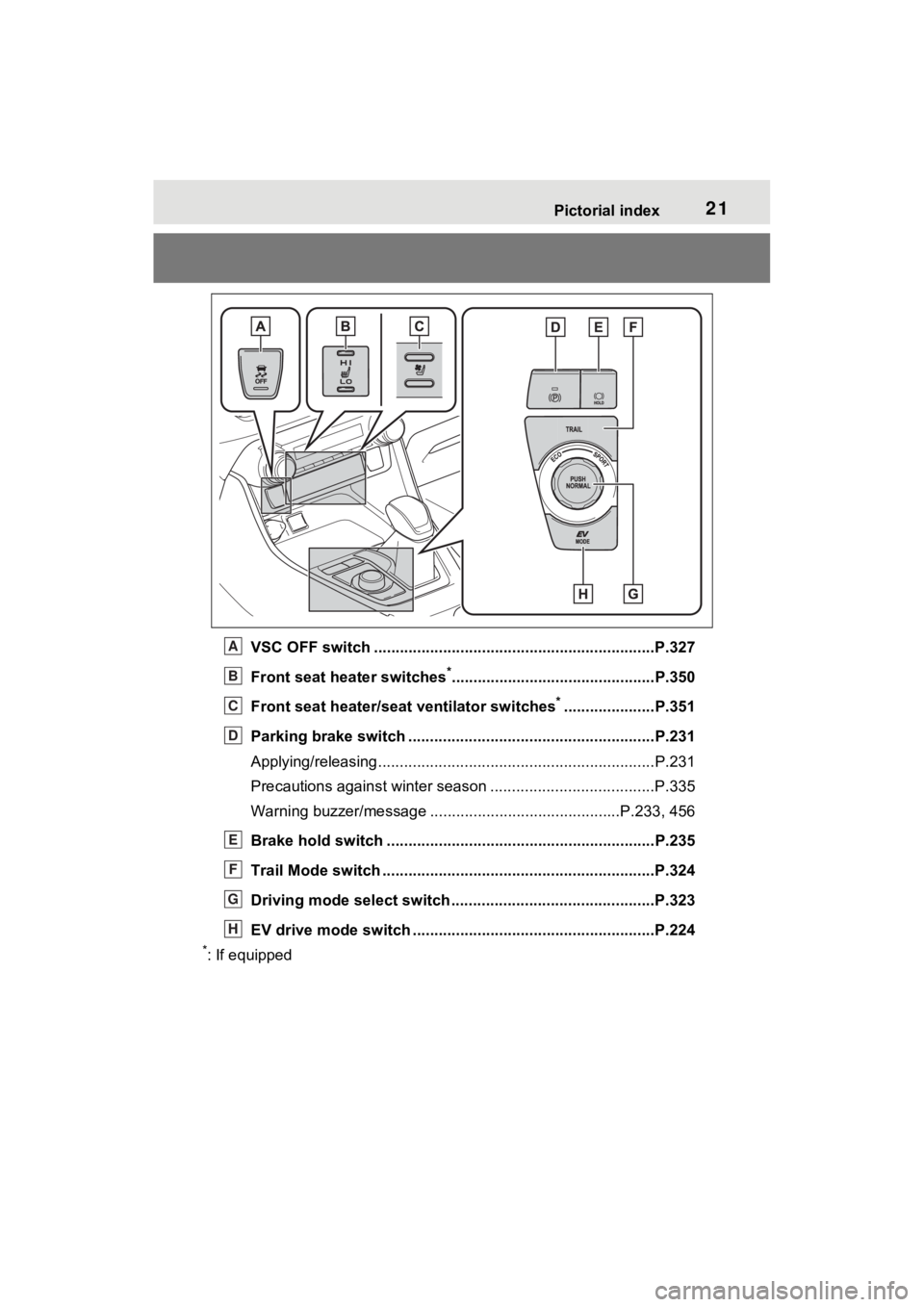
VSC OFF switch .................................................................P.327
Front seat heater switches
*...............................................P.350
Front seat heater/seat ventilator switches
*.....................P.351
Parking brake switch ........................................... ..............P.231
Applying/releasing............................................. ...................P.231
Precautions against winter season .............................. ........P.335
Warning buzzer/message ... .........................................P.233, 456
Brake hold switch .............................................. ................P.235
Trail Mode switch ...............................................................P.324
Driving mode select switch ..................................... ..........P.323
EV drive mode switch ........................................... .............P.224
*: If equipped
A
B
C
D
E
F
G
H
Page 72 of 586

721-4. Hybrid system
■Charging the 12-volt battery
P.487
■After the 12-volt battery has dis-
charged or when the terminal
has been removed and installed
during replace, etc.
The gasoline engine may not stop
even if the vehicle is being driven by
the hybrid battery (traction battery).
If this continues for a few days, con-
tact your To yota dealer.
■Sounds and vibrations specific
to a Hybrid Electric Vehicle
There may be no engine sound or
vibration even though the vehicle is
able to move with the “READY” indi-
cator is illuminate d. For safety,
make sure to shift the shift lever to P
and apply the parking brake when
parked.
The following sounds or vibrations
may occur when the hybrid system
is operating and are not a malfunc-
tion:
●Motor sounds may be heard from
the engine compartment.
●Sounds may be heard from the
hybrid battery (traction battery)
under the rear seats when the
hybrid system starts or stops.
●Relay operating sounds such as a
snap or soft clank will be emitted
from the hybrid battery (traction
battery), under the rear seats,
when the hybrid system is started
or stopped.
●Sounds from the hybrid system
may be heard when the back door
is open.
●Sounds may be heard from the
transmission when the gasoline
engine starts or stops, when driv-
ing at low speeds, or during idling.
●Engine sounds may be heard
when accelerating sharply.
●Sounds may be heard due to
regenerative braking when the
brake pedal is dep ressed or as
the accelerator pedal is released.
●Vibration may be felt when the
gasoline engine starts or stops.
●Cooling fan sounds may be heard
from the air intake vent under the
rear seat.
■Maintenance, repair, recycling,
and disposal
Contact your Toyota dealer regard-
ing maintenance, repair, recycling
and disposal. Do n ot dispose of the
vehicle yourself.
When driving with the gasoline
engine stopped, a sound, which
changes in accordance with the
driving speed, will be played in
order to warn people nearby of
the vehicle’s approach. The
sound will stop when the vehicle
speed exceeds approximately
22 mph (35 km/h).
■Acoustic Vehicle Alerting Sys-
tem
In the following cases, the Acoustic
Vehicle Alerting System may be dif-
ficult for surrounding people to hear.
●In very noisy areas
●In the wind or the rain
Also, as the Acoust ic Vehicle Alert-
ing System is installed on the front
of the vehicle, it may be more diffi-
cult to hear from the rear of the vehi-
cle compared to the front.
■If “Proximity Notification Sys-
tem Malfunction Visit Your
Dealer” is displayed on the
multi-information display
The system may be malfunctioning.
Have the vehicle inspected by your
Toyota dealer.
Acoustic Vehicle Alerting
System
Page 76 of 586
761-4. Hybrid system
■Running out of fuel
When the vehicle has run out of fuel
and the hybrid system cannot be
started, refuel th e vehicle with at
least enough gasoline to make the
low fuel level warning light ( P.462)
go off. If there is only a small
amount of fuel, th e hybrid system
may not be able to start. (The stan-
dard amount of fuel is about 2.3 gal.
[8.8 L, 1.9 Imp.gal.], when the vehi-
cle is on a level su rface. This value
may vary when the vehicle is on a
slope. Add extra fuel when the vehi-
cle is inclined.)
■Electromagnetic waves
●High voltage parts and cables on
Hybrid Electric Vehicles incorpo-
rate electromagnetic shielding,
and therefore emi t approximately
the same amount of electromag-
netic waves as conventional gaso-
line powered vehicles or home
electronic appliances.
●Your vehicle may cause sound
interference in so me third party-
produced radio parts.
■Hybrid battery (tr action battery)
The hybrid battery (traction battery)
has a limited service life. The lifes-
pan of the hybrid battery (traction
battery) can change in accordance
with driving style and driving condi-
tions.
■Starting the hybrid system in an
extremely cold environment
When the hybrid battery (traction
battery) is extremely cold (below
approximately -22°F [-30°C]) under
the influence of t he outside tem-
perature, it may no t be possible to
start the hybrid system. In this case,
try to start the hybrid system again
after the temperature of the hybrid
battery increases due to the outside
temperature increase etc.
WARNING
■High voltage precautions
This vehicle has high voltage DC
and AC systems as well as a 12-
volt system. DC and AC high volt-
age is very dangerous and can
cause severe burns and electric
shock that may result in death or
serious injury.
●Never touch, disassemble,
remove or replace the high volt-
age parts, cables or their con-
nectors.
●The hybrid system will become
hot after starting as the system
uses high voltage. Be careful of
both the high voltage and the
high temperature, and always
obey the warning labels
attached to the vehicle.
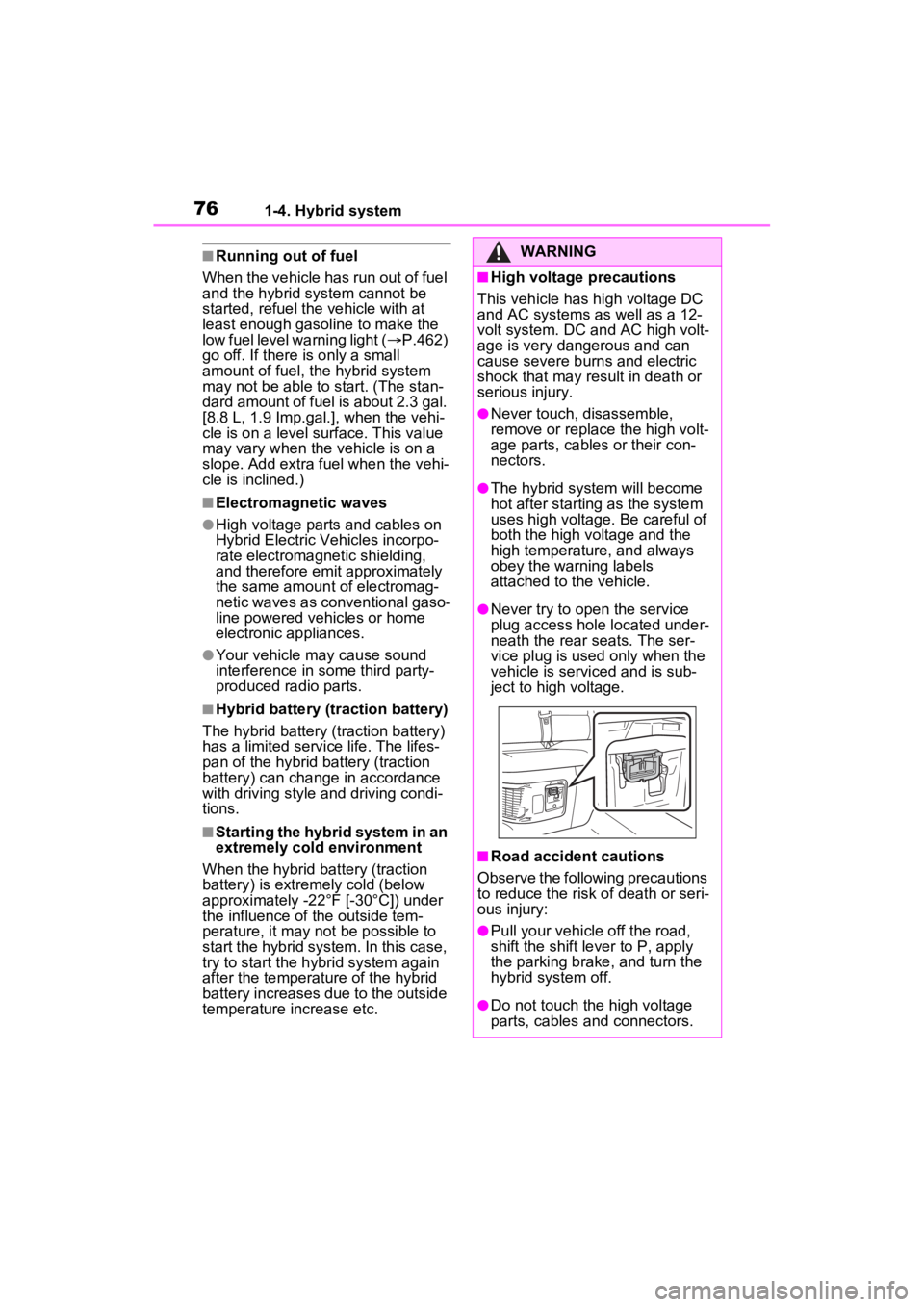
●Never try to open the service
plug access hole located under-
neath the rear seats. The ser-
vice plug is used only when the
vehicle is serviced and is sub-
ject to high voltage.
■Road accident cautions
Observe the following precautions
to reduce the risk of death or seri-
ous injury:
●Pull your vehicle off the road,
shift the shift le ver to P, apply
the parking brake, and turn the
hybrid system off.
●Do not touch the high voltage
parts, cables and connectors.
Page 89 of 586
892-1. Instrument cluster
2
Vehicle status information and indicators
*1: These lights turn on when the
power switch is turned to ON to
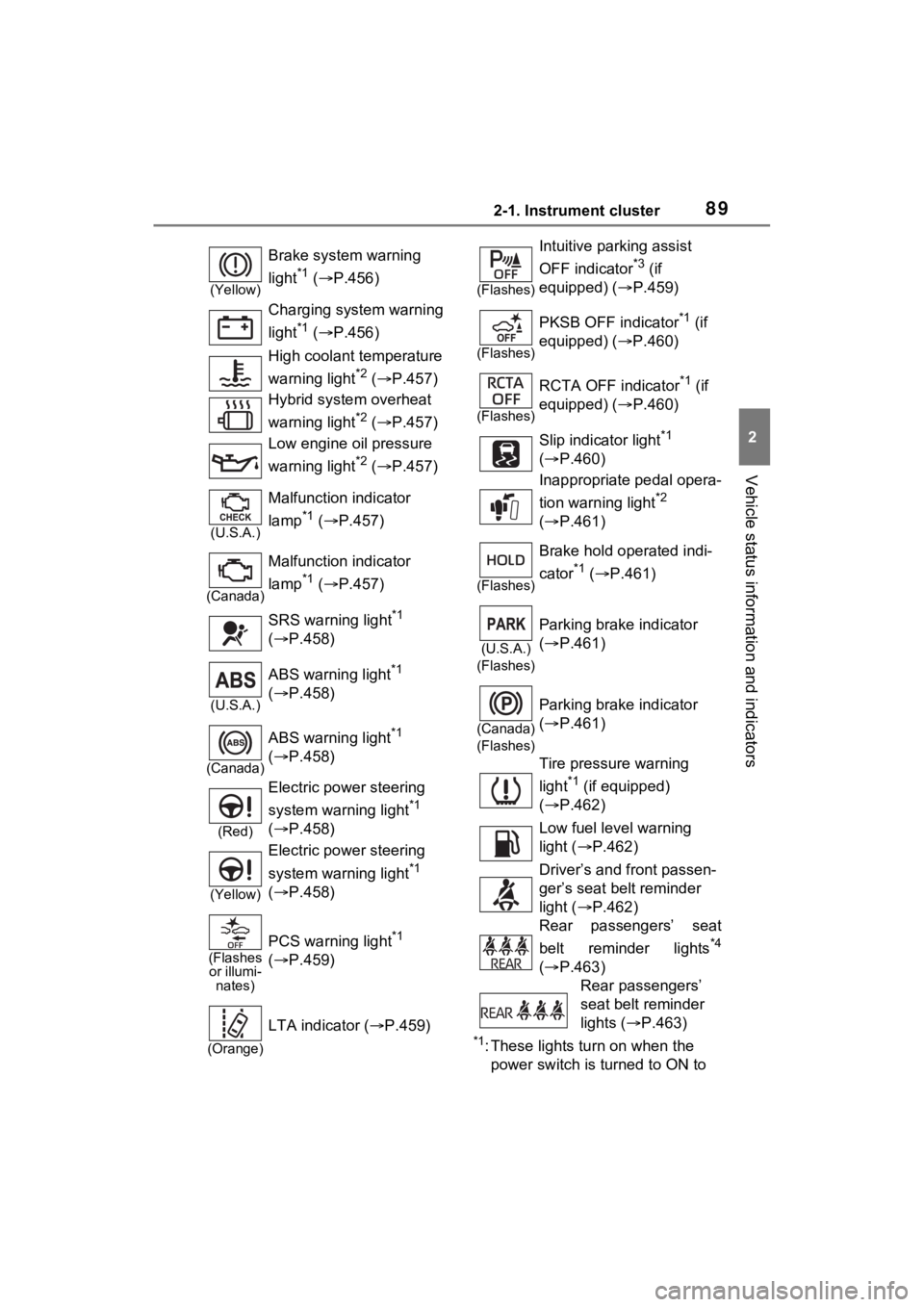
(Yellow)
Brake system warning
light
*1 ( P.456)
Charging system warning
light
*1 ( P.456)
High coolant temperature
warning light
*2 ( P.457)
Hybrid system overheat
warning light
*2 ( P.457)
Low engine oil pressure
warning light
*2 ( P.457)
(U.S.A.)
Malfunction indicator
lamp
*1 ( P.457)
(Canada)
Malfunction indicator
lamp
*1 ( P.457)
SRS warning light
*1
( P.458)
(U.S.A.)
ABS warning light*1
( P.458)
(Canada)
ABS warning light*1
( P.458)
(Red)
Electric power steering
system warning light
*1
( P.458)
(Yellow)
Electric power steering
system warning light
*1
( P.458)
(Flashes
or illumi- nates)
PCS warning light*1
( P.459)
(Orange)
LTA indicator ( P.459)
(Flashes)
Intuitive parking assist
OFF indicator
*3 (if
equipped) ( P.459)
(Flashes)
PKSB OFF indicator*1 (if
equipped) ( P.460)
(Flashes)
RCTA OFF indicator*1 (if
equipped) ( P.460)
Slip indicator light
*1
( P.460)
Inappropriate pedal opera-
tion warning light
*2
( P.461)
(Flashes)
Brake hold operated indi-
cator
*1 ( P.461)
(U.S.A.)
(Flashes)
Parking brake indicator
( P.461)
(Canada)
(Flashes)
Parking brake indicator
( P.461)
Tire pressure warning
light
*1 (if equipped)
( P.462)
Low fuel level warning
light ( P.462)
Driver’s and front passen-
ger’s seat belt reminder
light ( P.462)
Rear passengers’ seat
belt reminder lights
*4
( P.463)
Rear passengers’
seat belt reminder
lights ( P.463)
Page 91 of 586
912-1. Instrument cluster
2
Vehicle status information and indicators
*1: This light illuminates on the multi-information display with a
message.
*2: Depending on the operating con-ditions of the system, the color
and state (illuminat ed/blinking) of
the indicator change.
*3: The light comes on when the system is turned off.
*4: Intuitive parking assist OFF indi-cator turns on wh en the power
switch is turned t o ON while the
Intuitive parking assist function is
on. It will turn off after a few sec-
onds.
*5: These lights tu rn on when the
power switch is turned to ON to
indicate that a system check is
being performed. They will turn
off after the hybrid system is on,
or after a few seconds. There
may be a malfunction in a sys-
tem if the lights do not turn on, or
turn off. Have the vehicle
inspected by your Toyota dealer.
*6: This light illuminates on the out- side rear view mirrors.
*7: When the outside temperature is approximately 37°F (3°C) or
lower, the indicator will flash for
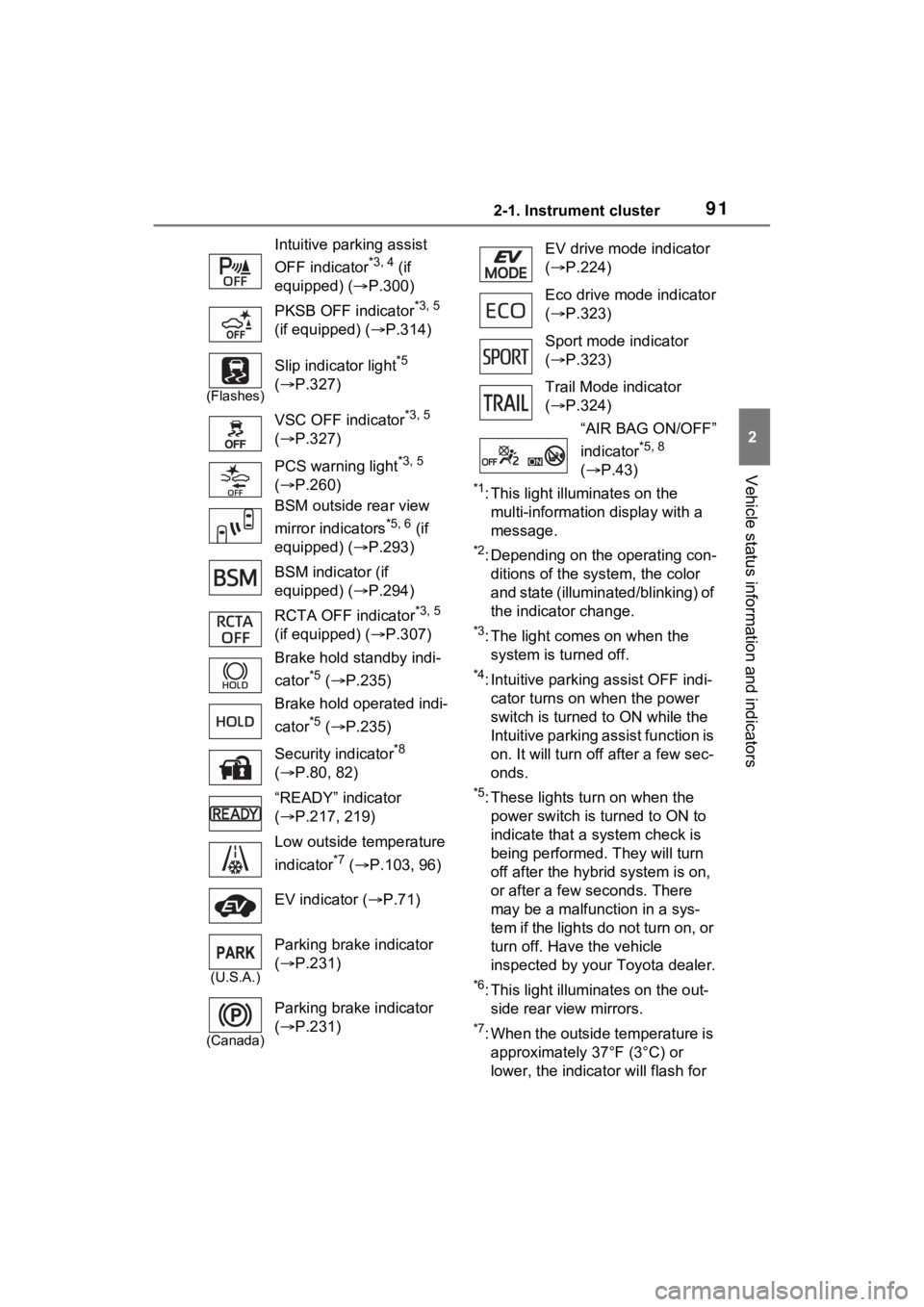
Intuitive parking assist
OFF indicator
*3, 4 (if
equipped) ( P.300)
PKSB OFF indicator
*3, 5
(if equipped) ( P.314)
(Flashes)
Slip indicator light*5
( P.327)
VSC OFF indicator
*3, 5
( P.327)
PCS warning light
*3, 5
( P.260)
BSM outside rear view
mirror indicators
*5, 6 (if
equipped) ( P.293)
BSM indicator (if
equipped) ( P.294)
RCTA OFF indicator
*3, 5
(if equipped) ( P.307)
Brake hold standby indi-
cator
*5 ( P.235)
Brake hold operated indi-
cator
*5 ( P.235)
Security indicator
*8
( P.80, 82)
“READY” indicator
( P.217, 219)
Low outside temperature
indicator
*7 ( P.103, 96)
EV indicator ( P.71)
(U.S.A.)
Parking brake indicator
( P.231)
(Canada)
Parking brake indicator
( P.231)
EV drive mode indicator
( P.224)
Eco drive mode indicator
( P.323)
Sport mode indicator
( P.323)
Trail Mode indicator
( P.324)
“AIR BAG ON/OFF”
indicator
*5, 8
( P.43)
Page 112 of 586
1122-1. Instrument cluster
PCS on/off
Select to enable/disable the pre-
collision system.
“Sensitivity”
Select to change t he pre-collision
warning timing.
■ BSM (Blind Spot Moni-
tor) (if equipped) ( P.293)
Select to set up the following
items.
BSM (Blind Spot Monitor)
on/off
Select to enable/disable the BSM
system.
“Brightness”
Select to switch the brightness of
the outside rear view mirror indica-
tors. ( P.294)
“Sensitivity”
Select to change the alert timing for
an approaching vehicle.
■ (Intuitive parking
assist) (if equipped)
( P.298)
Select to set up the following
items.
Intuitive parking assist on/off
Select to enable/disable the Intui-
tive parking assist.
“Volume”
Select to set the volume of the
buzzer which sounds when the
Intuitive parking assist is operated.
■RCTA (Rear Cross Traffic
Alert) (if equipped)
(P.307)
RCTA (Rear Cross Traffic
Alert) on/off
Select to enable /disable the RCTA
system.
“Volume”
Select to change the RCTA buzzer
volume.
■ PKSB (Parking Sup-
port Brake System) (if
equipped) ( P.312)
Select to enable/disable the
Parking Support Brake function.
■ RSA (Road Sign
Assist) (if equipped)
( P.279)
Select to set up the following
items.
Road Sign Assist on/off
Select to enable /disable the RSA
system.
“Notification method”
Select to change each notification
method used to notify the driver
when the system recognizes
excess speed and Do Not Enter
sign.
“Notification Level”
Select to change each notification
level used to notify the driver when
the system recognizes a speed limit
sign.
■ Vehicle Settings
PBD (Power Back Door)
Page 123 of 586

1232-1. Instrument cluster
2
Vehicle status information and indicators
■RCTA (Rear Cross Traffic
Alert) (if equipped)
( P.307)
Select to set up the following
items.
RCTA (Rear Cross Traffic
Alert) on/off
Select to enable/disable the
RCTA system.
“Volume”
Select to set the volume of the
buzzer which sounds when
the RCTA is operated.
■PKSB (Parking Sup-
port Brake System) (if
equipped) ( P.312)
Select to enable/disable the
Parking Support Brake function.
■RSA (Road Sign Assist)
(if equipped)
Select to set up the following
items.
Road Sign Assist on/off
Select to enable/disable the
RSA system.
“Notification Method”
Select to change each notifi-
cation method used to notify
the driver when the system
recognizes excess speed and
Do Not Enter sign.
“Notification Level”
Select to change each notifi-
cation level used to notify the
driver when the system recog-
nizes a speed limit sign.
■Vehicle Settings
PBD (Power Back Door)
(if equipped) ( P.154)
Select to set up t he following items.
• System settings Select to enable/disable the
power back door system.
• “Hands Free”
*
Select to enable/disable the
Hands Free Power Back Door.
• “Opening Adjustment” Select the open position when
power back door is fully open.
•“Volume” Select to set the volume of the
buzzer which sounds when the
power back door system oper-
ates.
*: Vehicles with Hands Free Power Back Door
“Scheduled Maintenance”
Select to reset the scheduled
maintenance information
(message indicating mainte-
nance is required and dis-
tance until the next
maintenance) after all mainte-
nance is performed.
“TPWS” (Tire Pressure Warn-
ing System) ( P.412)
• “Set Pressure”
Select to initialize the tire pres-
sure warning system.
• “Change Wheel” Select to change the tire pressure
warning system sensor ID code
set. To enable this function, a
second set of tire pressure warn-
ing system sensor ID codes must