2023 TOYOTA RAV4 HYBRID battery
[x] Cancel search: batteryPage 114 of 586
1142-1. Instrument cluster
“AWD”:
Select to enable/disable the AWD
system display (P.110).
• “Drive Info Type”
Select to change the drive informa-
tion type display between trip and
total. ( P.109).
• “Drive Info Items”
Select to set the items on the upper
and lower side of the drive informa-
tion screen from three items, aver-
age speed, distance and total time.
“Trip Summary”
Select to set the items displayed
when the power switch is turned off.
“Pop-Up Display”
Select to enable/d isable the follow-
ing pop-up displays, which may
appear in some situations.
• Intersection guidance display of the navigation system-linked sys-
tem (if equipped)
• Incoming call display of the hands-free phone system (if
equipped)
• Audio operation
• Volume operation
• Voice control (if equipped)
“MID OFF”
A blank screen is displayed.
“Default Settings”
Select to reset the meter display
settings.
■Suspension of the settings dis-
play
●In the following si tuations, opera-
tion of the setting s display will be
temporarily suspended. • When a warning message
appears on the multi-information
display
• When the vehicle begins to move
●Settings for functions not
equipped to the vehicle are not
displayed.
●When a function is turned off, the
related settings for that function
are not selectable.
Select to display warning mes-
sages and measures to be
taken if a malfunction is
detected. ( P.466)
Displays suggestions to the
driver in the following situations.
To select a response to a dis-
WARNING
■Cautions during setting up
the display
As the hybrid system needs to be
operating during setting up the
display, ensure that the vehicle is
parked in a place with adequate
ventilation. In a closed area such
as a garage, exhaust gases
including harmful carbon monox-
ide (CO) may collect and enter
the vehicle. This may lead to
death or a serious health hazard.
NOTICE
■During setting up the display
To prevent 12-vo lt battery dis-
charge, ensure that the hybrid
system is operating while setting
up the display features.
Warning message display
Convenience Services
(Suggestion function)
Page 125 of 586
1252-1. Instrument cluster
2
Vehicle status information and indicators
Select to display warning mes-
sages and measures to be
taken if a malfunction is
detected. (P.466)
Displays suggestions to the
driver in the following situations.
To select a response to a dis-
played suggestion, use the
meter control switches.
■Suggestion to turn off the
headlights
If the headlights are left on for a
certain amount of time after the
engine switch has been turned
off, a suggestion message will
be displayed.
When the headlight switch is in
the AUTO position: The mes-
sage asking if you wish to turn
the headlights off is displayed.
To turn the headlights off, select
“Yes”.
If the driver’s door is opened after
the engine switch is turned off, this
suggestion message will not be dis-
played.
■Customization
Convenience Services (Suggestion
function) can be turned on/off. (Cus-
tomizable features: P.517NOTICE
■During setting up the display
To prevent 12-vo lt battery dis-
charge, ensure that the hybrid
system is operating while setting
up the display features.
Warning message display
Convenience Services
(Suggestion function)
Page 126 of 586

1262-1. Instrument cluster
Multimedia Display
Multi-information display
Meter control switches
The energy monitor can be used
to check the vehicle drive status,
hybrid system operation status
and energy regeneration status.
■Display procedure
Multi-information display
Use the meter control switches,
display the energy monitor on
the multi-information display.
For detail regardi ng the multi-infor-
mation display, refer to P.109, 120.
Multimedia Display
Press from the main menu,
then press “Energy flow”.
■Reading the display
The arrows will appear in accor-
dance with the energy flow.
When there is no energy flow,
arrows will not be displayed.
The color of the arrows will change
as follows
Blue: When the hybrid battery (trac-
tion battery) is regenerated or
charged.
Orange: When the hybrid battery
(traction battery) is in use.
Red: When the gasoline engine is
in use.
Multi-information display (7-
inch display)
The image shows all the arrows as
an example. The ac tual display will
vary depending on conditions.
Gasoline engine
Hybrid battery (traction bat-
tery)
Front tires
Rear tires
Energy monitor/con-
sumption screen
You can view the status of
your hybrid system and fuel
consumption information
on the multi-information
display and Multimedia Dis-
play.
System components
Energy monitor
A
B
C
A
B
C
D
Page 127 of 586
1272-1. Instrument cluster
2
Vehicle status information and indicators
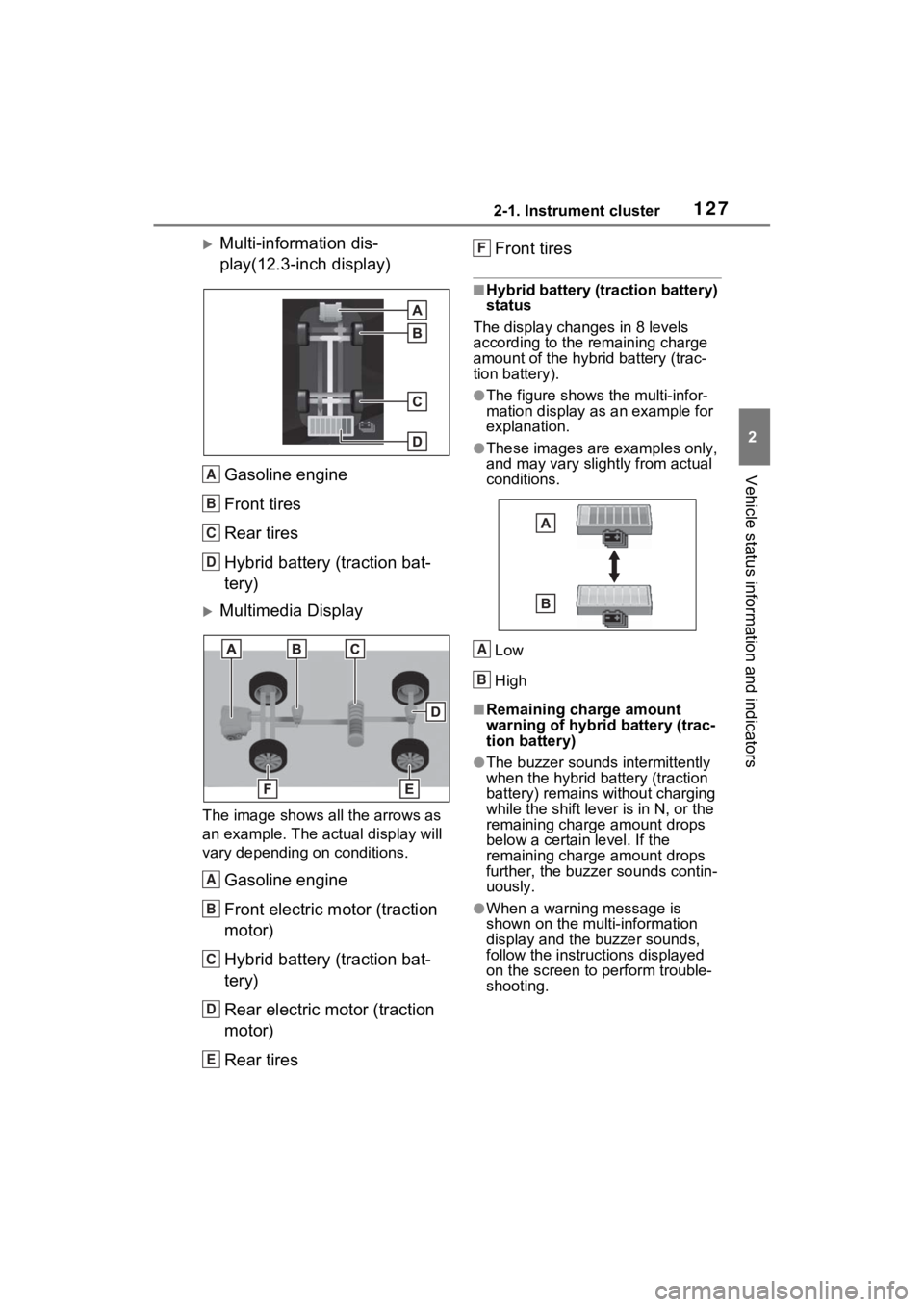
Multi-information dis-
play(12.3-inch display)Gasoline engine
Front tires
Rear tires
Hybrid battery (traction bat-
tery)
Multimedia Display
The image shows all the arrows as
an example. The actual display will
vary depending on conditions.
Gasoline engine
Front electric motor (traction
motor)
Hybrid battery (traction bat-
tery)
Rear electric motor (traction
motor)
Rear tires Front tires
■Hybrid battery (traction battery)
status
The display changes in 8 levels
according to the remaining charge
amount of the hybrid battery (trac-
tion battery).
●The figure shows the multi-infor-
mation display as an example for
explanation.
●These images are examples only,
and may vary slightly from actual
conditions.
Low
High
■Remaining charge amount
warning of hybri d battery (trac-
tion battery)
●The buzzer sounds intermittently
when the hybrid battery (traction
battery) remains without charging
while the shift lever is in N, or the
remaining charge amount drops
below a certain level. If the
remaining charge amount drops
further, the buzz er sounds contin-
uously.
●When a warning message is
shown on the multi-information
display and the buzzer sounds,
follow the instruct ions displayed
on the screen to perform trouble-
shooting.
A
B
C
D
A
B
C
D
E
F
A
B
Page 132 of 586
1303-1. Key information
3-1.Key information
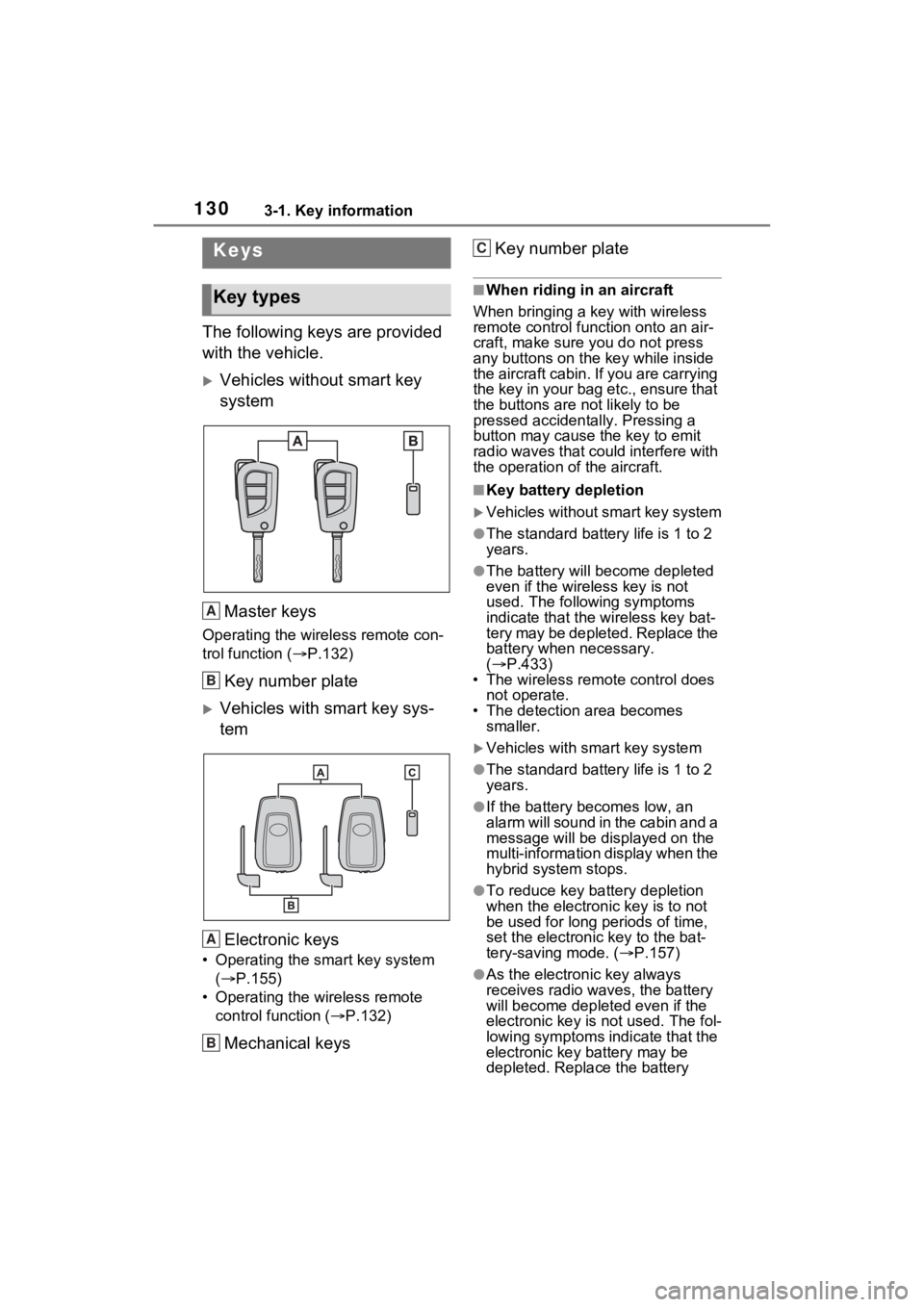
The following keys are provided
with the vehicle.
Vehicles without smart key
systemMaster keys
Operating the wireless remote con-
trol function ( P.132)
Key number plate
Vehicles with smart key sys-
tem
Electronic keys
• Operating the smart key system ( P.155)
• Operating the wireless remote control function ( P.132)
Mechanical keys Key number plate
■When riding in an aircraft
When bringing a ke y with wireless
remote control func tion onto an air-
craft, make sure you do not press
any buttons on the key while inside
the aircraft cabin. If you are carrying
the key in your bag etc., ensure that
the buttons are not likely to be
pressed accidentally. Pressing a
button may cause the key to emit
radio waves that could interfere with
the operation of the aircraft.
■Key battery depletion
Vehicles without smart key system
●The standard battery life is 1 to 2
years.
●The battery will be come depleted
even if the wireless key is not
used. The following symptoms
indicate that the wireless key bat-
tery may be depleted. Replace the
battery when necessary.
( P.433)
• The wireless remote control does not operate.
• The detection area becomes
smaller.
Vehicles with smart key system
●The standard battery life is 1 to 2
years.
●If the battery bec omes low, an
alarm will sound in the cabin and a
message will be disp layed on the
multi-information display when the
hybrid system stops.
●To reduce key battery depletion
when the electronic key is to not
be used for long periods of time,
set the electronic key to the bat-
tery-saving mode. ( P.157)
●As the electronic key always
receives radio waves, the battery
will become depleted even if the
electronic key is not used. The fol-
lowing symptoms indicate that the
electronic key battery may be
depleted. Replace the battery
Keys
Key types
A
B
A
B
C
Page 133 of 586
1313-1. Key information
3
Before driving
when necessary.
• The smart key system or the wire- less remote control does not oper-
ate.
• The detection area becomes smaller.
• The LED indicator on the key sur- face does not turn on.
You can replace the battery by your-
self ( P.433). However, as there is
a danger that the electronic key may
be damaged, it is recommended
that replacement is carried out by
your Toyota dealer.
●To avoid serious deterioration, do
not leave the electronic key within
3 ft. (1 m) of the following electri-
cal appliances t hat produce a
magnetic field:
• TVs
• Personal computers
• Cellular phones, cordless phones and battery chargers
• Table lamps
• Induction cookers
■If a message regarding the state
of the electronic key or power
switch mode, etc. is shown
(vehicles with smart key sys-
tem)
To prevent trapping the electronic
key inside the vehicle, leaving the
vehicle carrying the electronic key
on your person without turning the
power switch to O FF or other pas-
sengers from unintentionally taking
the key out of the vehicle, etc., a
message that prompts the user to
confirm the state of the electronic
key or power switch mode may be
shown on the multi -information dis-
play. In those cases, follow the
instructions on the display immedi-
ately.
■If “Key Battery Low Replace
Key Battery” is displayed on
the multi-information display
(vehicles with smart key sys-
tem)
The electronic key has a low bat- tery. Replace the electronic key bat-
tery. (
P.433)
■Replacing the battery
P.433
■Confirmation of the registered
key number
The number of keys already regis-
tered to the vehi cle can be con-
firmed. Ask your Toyota dealer for
details.
■If “A New Key has been Regis-
tered Contact Your Dealer for
Details” is dis played on the
multi-information display (vehi-
cles with smart key system)
This message will be displayed
each time the driver’s door is
opened when the doors are
unlocked from the outside for
approximately 10 days after a new
electronic key has been registered.
If this message is displayed but you
have not had a new electronic key
registered, ask your Toyota dealer
to check if an unknown electronic
key (other than those in your pos-
session) has been registered.
NOTICE
■To prevent key damage
●Do not drop the keys, subject
them to strong shocks or bend
them.
●Do not expose the keys to high
temperatures for long periods of
time.
●Do not get the keys wet or wash
them in an ultrasonic washer,
etc.
●Do not attach m etallic or mag-
netic materials to the keys or
place the keys close to such
materials.
●Do not disassemble the keys.
Page 135 of 586

1333-1. Key information
3
Before driving
Opens and closes the power
back door
*2 ( P.145)
Sounds the alarm ( P.133)
*1: These settings must be custom-
ized at your Toyota dealer.
*2: If equipped
■Theft deterrent panic mode
Vehicles without smart key system
When is pressed for longer
than about 1 seco nd, an alarm will
sound intermittentl y and the vehicle
lights will flash to deter any person
from trying to break into or damage
your vehicle.
To stop the alarm, press any button
on the key.
Vehicles with smart key system
When is pressed for longer
than about 1 seco nd, an alarm will
sound intermittentl y and the vehicle
lights will flash to deter any person
from trying to break into or damage
your vehicle.
To stop the alarm, press any button
on the electronic key.
■Conditions affecting operation
Vehicles without smart key system
The wireless remote control function
may not operate normally in the fol-
lowing situations.
●When the wireles s key battery is
depleted
●Near a TV tower, electric power
plant, gas station, radio station,
large display, airpo rt or other facil-
ity that generates strong radio
waves or electrical noise
●When carrying a portable radio,
cellular phone or other wireless
communication device
●When the wireless key is in con-
tact with, or is c overed by a metal-
lic object
●When other wireless key (that
emits radio waves) is being used
nearby
●If window tint wit h a metallic con-
tent or metallic objects are
attached to the rear window
Vehicles with smart key system
P.157
D
E
Page 136 of 586
1343-1. Key information
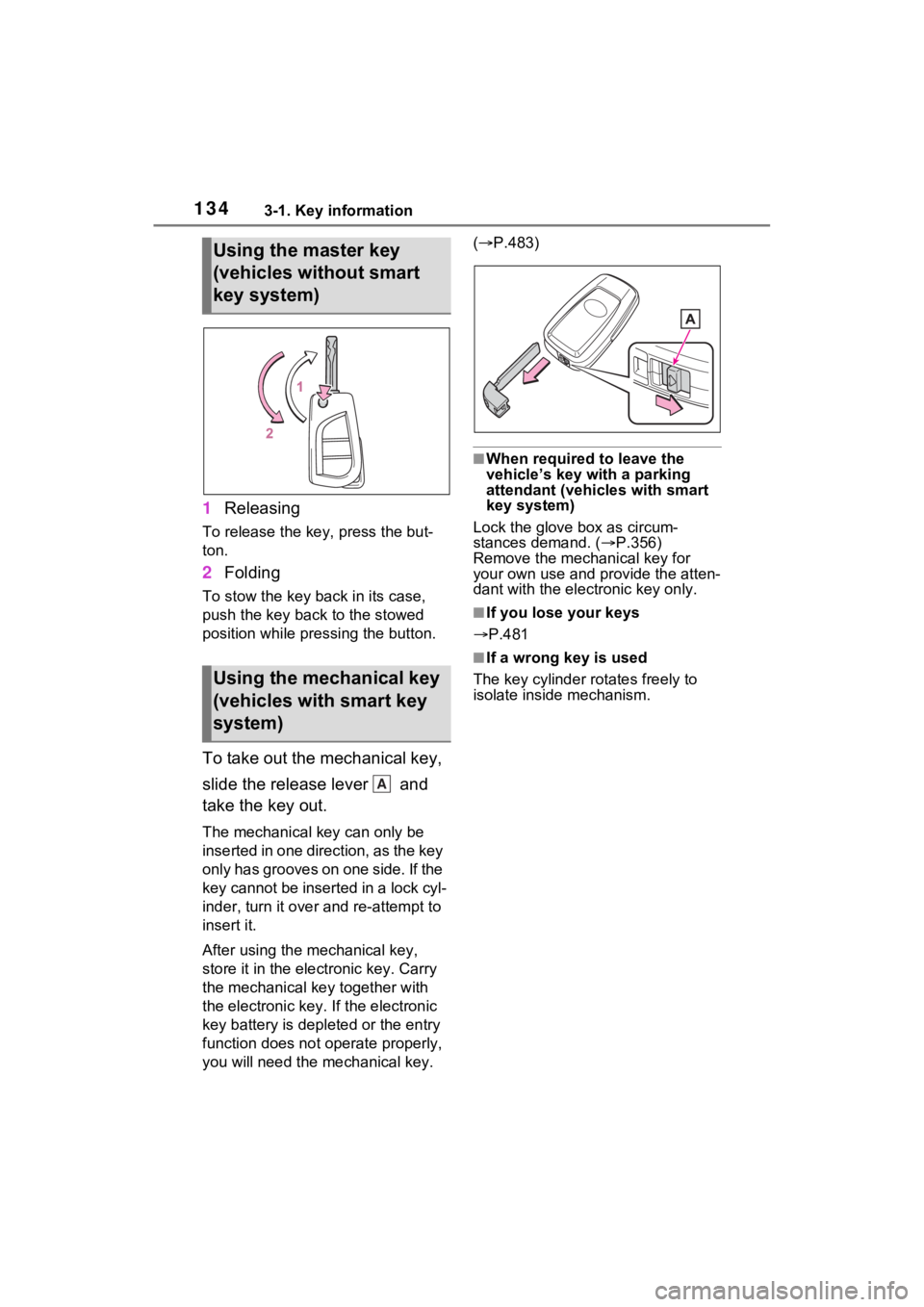
1Releasing
To release the key, press the but-
ton.
2Folding
To stow the key back in its case,
push the key back to the stowed
position while pre ssing the button.
To take out the mechanical key,
slide the release lever and
take the key out.
The mechanical key can only be
inserted in one direction, as the key
only has grooves on one side. If the
key cannot be inserted in a lock cyl-
inder, turn it over and re-attempt to
insert it.
After using the mechanical key,
store it in the electronic key. Carry
the mechanical key together with
the electronic key. If the electronic
key battery is dep leted or the entry
function does not operate properly,
you will need the m echanical key. (
P.483)
■When required to leave the
vehicle’s key wi th a parking
attendant (vehicles with smart
key system)
Lock the glove box as circum-
stances demand. ( P.356)
Remove the mechanical key for
your own use and p rovide the atten-
dant with the elec tronic key only.
■If you lose your keys
P.481
■If a wrong key is used
The key cylinder rotates freely to
isolate inside mechanism.
Using the master key
(vehicles without smart
key system)
Using the mechanical key
(vehicles with smart key
system)
A