2023 TOYOTA PRIUS PLUG-IN HYBRID audio
[x] Cancel search: audioPage 274 of 818
2724-1. Key information
Prius Plug-in Hybrid_OM_OM47F38E_(EE)
NOTICE
■To prevent key damage
● Do not drop the keys, subject them to strong shocks or bend them.
● Do not expose the keys to high temperatures for long periods of time.
● Do not get the keys wet or wash them in an ultrasonic washer etc.
● Do not attach metallic or magnetic materials to the keys or place the keys
close to such materials.
● Do not disassemble the keys.
● Do not attach a sticker or anything else to the surface of the electronic key.
● Do not place the keys near objects that produce magnetic fields, such as
TVs, audio systems and induction cookers.
● Do not place the keys near medical electrical equipment such as low-fre-
quency therapy equipment or microwave therapy equipment, and do not
receive medical attention with the keys on your person.
■ Carrying the electronic key on your person
Carry the electronic key 10 cm (3.9 in.) or more away from electric appli-
ances that are turned on. Radio wave s emitted from electric appliances
within 10 cm (3.9 in.) of the electronic key may interfere with the key, caus-
ing the key to not function properly.
■ In case of a smart entry & start system malfunction or other key-related
problems
Take your vehicle with all the electronic keys provided with your vehicle to
any authorized Toyota retailer or Toyota authorized repairer, or any reliable
repairer.
■ When an electronic key is lost
If the electronic key remains lost, the risk of vehicle theft increases signifi-
cantly. Visit any authorized Toyota reta iler or Toyota authorized repairer, or
any reliable repairer imm ediately with all remaining electronic keys that
were provided with your vehicle.
Page 288 of 818
2864-2. Opening, closing and locking the doors
Prius Plug-in Hybrid_OM_OM47F38E_(EE)
■Conditions affecting operation
The smart entry & start system, wireless remote control and immobilizer sys-
tem use weak radio waves. In the following situations, the communication
between the electronic key and the vehicle may be affected, preventing the
smart entry & start system, wireless remote control and immobilizer system
from operating properly. (Ways of coping: P. 695)
●When the electronic key battery is depleted
●Near a TV tower, electric power plant, gas station, radio station, large dis-
play, airport or other facility that generates strong radio waves or electrical
noise
●When the electronic key is in contact with, or is covered by the following
metallic objects
• Cards to which aluminum foil is attached
• Cigarette boxes that have aluminum foil inside
• Metallic wallets or bags
• Coins
• Hand warmers made of metal
• Media such as CDs and DVDs
●When other wireless key (that emit radio waves) is being used nearby
●When carrying the electronic key together with the following devices that
emit radio waves
• Portable radio, cellular phone, cordless phone or other wireless commu-
nication devices
• Another vehicle’s electronic key or a wireless key that emits radio waves
• Personal computers or personal digital assistants (PDAs)
• Digital audio players
• Portable game systems
●If window tint with a metallic content or metallic objects are attached to the
rear window
●When the electronic key is placed near a battery charger or electronic
devices
Page 327 of 818

3255-2. Driving procedures
Prius Plug-in Hybrid_OM_OM47F38E_(EE)
5
Driving
Modes can be changed by pressing the power switch with the brake
pedal released. (The mode changes each time the switch is pressed.)
Off
The emergency flashers can be
used.
ACCESSORY mode
Some electrical components such
as the audio system can be used.
“Accessory” is displayed on the
main display.
ON mode
All electrical components can be
used.
“Ignition ON” is displayed on the
main display.
■Auto power off function
If the vehicle is left in ACCESSORY mode for more than 20 minutes or ON
mode (the hybrid system is not operating) for more than an hour with the shift
position in P, the power switch will automatically turn off. However, this func-
tion cannot entirely prevent the 12-volt battery discharge. Do not leave the
vehicle with the power switch in ACCESSORY or ON mode for long periods
of time when the hybrid system is not operating.
■Sounds and vibrations specific to a hybrid vehicle
P. 9 6
■Electronic key battery depletion
P. 270
■When the ambient temperature is low, such as during winter driving con-
ditions
●When starting the hybrid system, the flashing time of the “READY” indicator
may be long. Leave the vehicle as it is until the “READY” indicator is steady
on, as steady means the vehicle is able to move.
●When the hybrid battery (traction battery) is extremely cold (below approxi-
mately -30C [-22F]) under the influence of the outside temperature, it may
not be possible to start the hybrid system. In this case, try to start the hybrid
system again after the temperature of the hybrid battery increases due to
the outside temperature increase etc.
Changing power switch modes
1
2
3
Page 394 of 818
3925-5. Using the driving support systems
Prius Plug-in Hybrid_OM_OM47F38E_(EE)
■Temporary cancelation of functions
●When operation conditions are no longer met, a function may be temporarily
canceled. However, when the operation conditions are met again, operation
of the function is automatically restored. (P. 390)
●If the operation conditions (P. 391) are no longer met while the lane cen-
tering function is operating, the buzzer may sound to indicate that the func-
tion has been temporarily canceled.
■Steering assist function/lane centering function
●Depending on the vehicle speed, lane departure situation, road conditions,
etc., the driver may not feel the function is operating or the function may not
operate at all.
●The steering control of the function is overridden by the driver’s steering
wheel operation.
●Do not attempt to test the operation of the steering assist function.
■Lane departure alert function
●The warning buzzer may be difficult to hear due to external noise, audio
playback, etc.
●If the edge of the course
* is not clear or straight, the lane departure alert
function may not operate.
●Do not attempt to test the operation of the lane departure alert function.
*: Boundary between asphalt and the side of the road, such as grass, soil, or
a curb
Page 427 of 818

4255-5. Using the driving support systems
Prius Plug-in Hybrid_OM_OM47F38E_(EE)
5
Driving
■The BSM outside rear view mirror indicators visibility
When under strong sunlight, the outside rear view mirror indicator may be dif-
ficult to see.
■The Rear Crossing Traffic Alert buzzer hearing
The Rear Crossing Traffic Alert buzzer may be difficult to hear over loud
noises such as high audio volume.
■When “Blind Spot Monitor Unavailable” is shown on the multi-informa-
tion display
The sensor voltage has become abnormal, water, snow mud, etc., may be
built up in the vicinity of the sensor area of bumper (P. 438). Removing the
water, snow, mud, etc., from the vicinity of the sensor area bumper should
return it to normal. Also, the sensor may not function normally when used in
extremely hot or cold weather.
■When “Blind Spot Monitor System Malfunction Visit Your Dealer” is
shown on the multi-information display
There may be a sensor malfunction or misaligned. Have the vehicle
inspected by any authorized Toyota retailer or Toyota authorized repairer, or
any reliable repairer.
Page 453 of 818

4515-5. Using the driving support systems
Prius Plug-in Hybrid_OM_OM47F38E_(EE)
5
Driving
When the sensors detect an obstacle, the following displays inform
the driver of the position and distance to the obstacle.
■Multi-information display
Front center sensor opera-
tion
Front corner sensor opera-
tion
Front side sensor operation
Rear side sensor operation
Rear corner sensor operation
Rear center sensor operation
• The operation display is gray when the sensors are operating.
• The front side sensor operation displays and rear side sensor operation
displays are not shown until a scan of the side areas is completed.
■
Audio system screen
When the Toyota parking assist
monitor is displayed:
A simplified image is displayed
on the right upper corner of the
audio system screen when an
obstacle is detected.
Display
1
2
3
4
5
6
Page 454 of 818

4525-5. Using the driving support systems
Prius Plug-in Hybrid_OM_OM47F38E_(EE)
■Distance display
Sensors that detect an obstacle will illuminate continuously or blink.
Sensor detection display, obstacle distance
Multi-informa-
tion display
*
Audio system
screen
*
Approximate distance to obstacle
Front corner,
front center and
front side
sensorsRear corner,
rear center and
rear side
sensors
(continuous)(blinking
slowly)
100 cm (3.3 ft.)
to 60 cm (2.0 ft)150 cm (4.9 ft.)
to 60 cm
(2.0 ft.)
(continuous)(blinking)
60 cm (2.0 ft.) to
45 cm (1.5 ft)
60 cm (2.0 ft.)
to 45 cm
(1.5 ft.)
100 cm (3.3 ft.)
to 70 cm (2.3 ft.)100 cm (3.3 ft.)
to 70 cm (2.3 ft.)
60 cm (2.0 ft.)
to 45 cm
(1.5 ft.)
60 cm (2.0 ft.) to
45 cm (1.5 ft)
(continuous)(blinking
rapidly)
45 cm (1.5 ft.) to
35 cm (1.2 ft.)
45 cm (1.5 ft.)
to 35 cm
(1.2 ft.)
70 cm (2.3 ft.) to
30 cm (1.0 ft.)70 cm (2.3 ft.) to
30 cm (1.0 ft.)
45 cm (1.5 ft.)
to 35 cm
(1.2 ft.)
45 cm (1.5 ft.) to
35 cm (1.2 ft.)
(blinking)(continuous)
Less than
35 cm (1.2 ft.)
Less than
35 cm (1.2 ft.)
Less than
30 cm (1.0 ft.)Less than
30 cm (1.0 ft.)
Less than
35 cm (1.2 ft.)
Less than
35 cm (1.2 ft.)
Far
Near
16
1
2
3
4
5
6
1
2
3
4
5
6
1
2
3
4
5
6
Page 458 of 818
4565-5. Using the driving support systems
Prius Plug-in Hybrid_OM_OM47F38E_(EE)
■Sensor detection information
● The sensor’s detection areas are limited to the areas around the vehicle’s
bumper.
● Depending on the shape of the obstacle and other factors, the detection dis-
tance may shorten, or detection may be impossible.
● Obstacles may not be detected if they are too close to the sensor.
● There will be a short delay between obstacle detection and display. Even
when traveling at a low speed, if you come too close to an obstacle before
the display and buzzer activate, the display and buzzer may not activate at
all.
● Thin posts or objects lower than the sensor may not be detected when
approached, even if they have been detected once.
● It might be difficult to hear beeps due to the volume of audio system or air
flow noise of the air conditioning system.
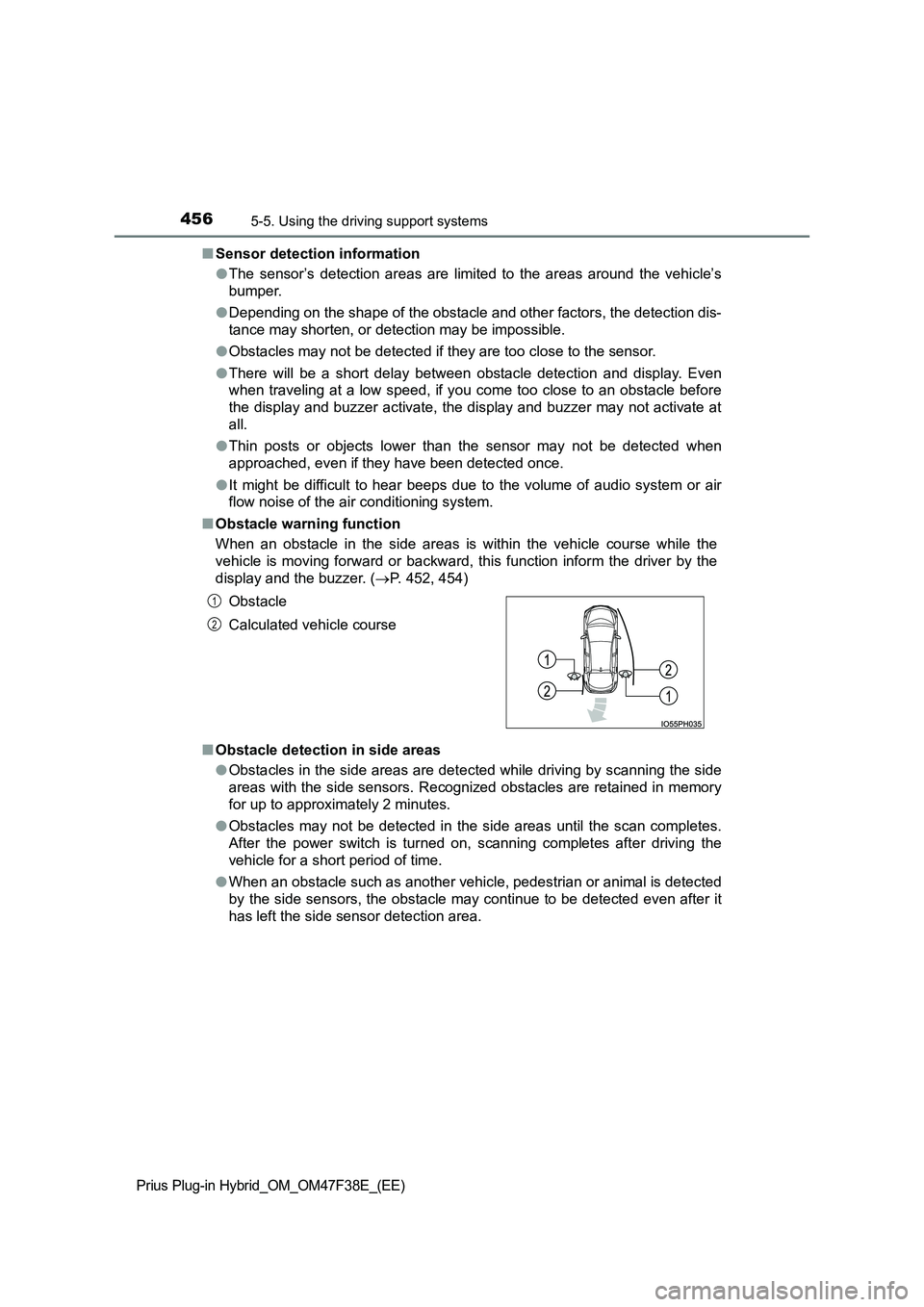
■ Obstacle warning function
When an obstacle in the side areas is within the vehicle course while the
vehicle is moving forward or backward, this function inform the driver by the
display and the buzzer. ( P. 452, 454)
■ Obstacle detection in side areas
● Obstacles in the side areas are detected while driving by scanning the side
areas with the side sensors. Recognized obstacles are retained in memory
for up to approximately 2 minutes.
● Obstacles may not be detected in the side areas until the scan completes.
After the power switch is turned on, scanning completes after driving the
vehicle for a short period of time.
● When an obstacle such as another vehicle, pedestrian or animal is detected
by the side sensors, the obstacle may continue to be detected even after it
has left the side sensor detection area.
Obstacle
Calculated vehicle course
1
2