Page 93 of 770

91
1
1-5. Theft deterrent system
PRIUS_OM_OM47F32E_(EE)
For safety and security
Immobilizer system
The indicator light flashes after
the power switch has been turned
off to indicate that the system is
operating.
The indicator light stops flashing
after the power switch has been
turned to ACCESSORY or ON
mode to indicate that the system
has been canceled.
■ System maintenance
The vehicle has a maintenance-free type immobilizer system.
■ Conditions that may cause the system to malfunction
● If the grip portion of the key is in contact with a metallic object
● If the key is in close proximity to or touching a key registered to the security
system (key with a built-in transponder chip) of another vehicle
The vehicle’s keys have built-in transponder chips that prevent
the hybrid system from starting if a key has not been previously
registered in the vehicle’s on-board computer.
Never leave the keys inside the vehicle when you leave the vehi-
cle.
This system is designed to help prevent vehicle theft but does not
guarantee absolute security against all vehicle thefts.
NOTICE
■ To ensure the system operates correctly
Do not modify or remove the system. If modified or removed, the proper
operation of the system cannot be guaranteed.
Page 95 of 770

93
1
1-5. Theft deterrent system
PRIUS_OM_OM47F32E_(EE)
For safety and security
Alar m
The alarm uses light and sound to give an alert when an intrusion is
detected.
The alarm is triggered in the following situations when the alarm is
set:
● A locked door or back door is unlocked or opened in any way other
than using the entry function or wireless remote control. (The doors
will lock again automatically.)
● The hood is opened.
● If equipped, the intrusion sensor detects something moving inside
the vehicle. (An intruder gets in the vehicle.)
Close the doors and hood, and
lock all the doors using the entry
function or wireless remote con-
trol. The system will be set auto-
matically after 30 seconds.
The indicator light changes from
being on to flashing when the sys-
tem is set.
Do one of the following to deactivate or stop the alarm.
● Unlock the doors using the entry function or wireless remote con-
trol.
● Start the hybrid system. (The alarm will be deactivated or stopped
after a few seconds.)
: If equipped
The alarm
Setting the alarm system
Deactivating or stopping the alarm
Page 105 of 770
1032. Instrument cluster
2
Instrument cluster
PRIUS_OM_OM47F32E_(EE)
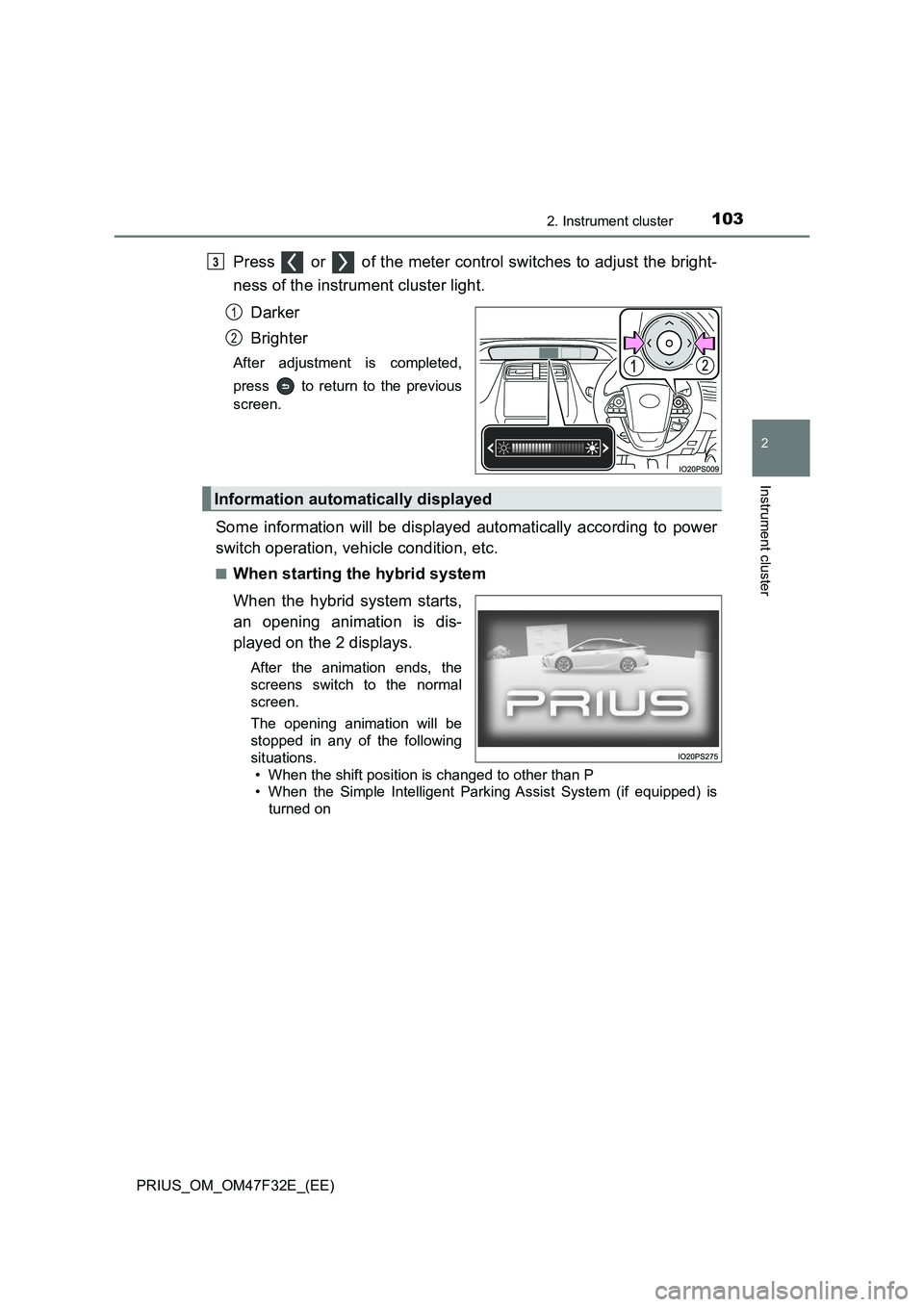
Press or of the meter control switches to adjust the bright-
ness of the instrument cluster light.
Darker
Brighter
After adjustment is completed,
press to return to the previous
screen.
Some information will be displayed automatically according to power
switch operation, vehicle condition, etc.
■When starting the hybrid system
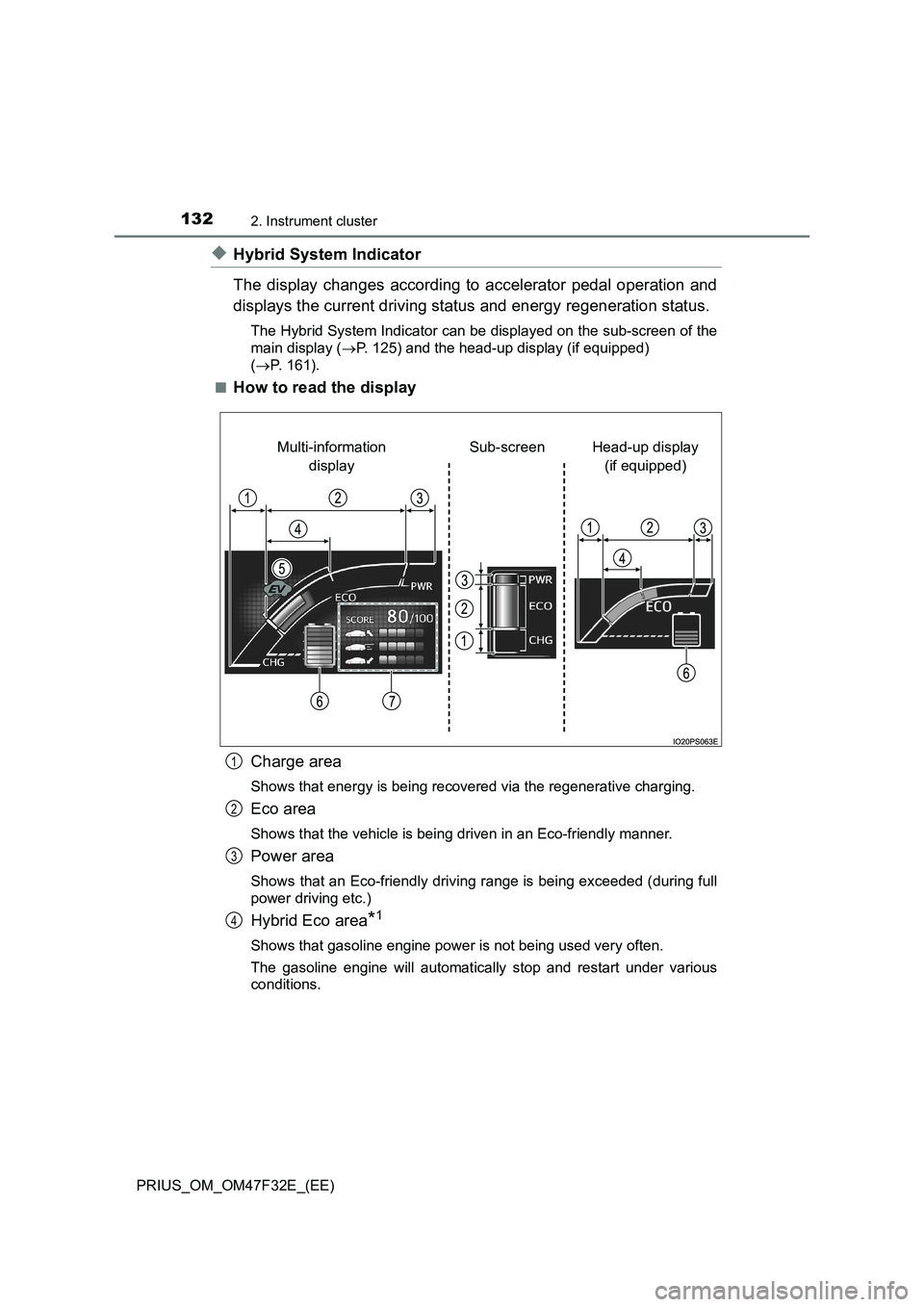
When the hybrid system starts,
an opening animation is dis-
played on the 2 displays.
After the animation ends, the
screens switch to the normal
screen.
The opening animation will be
stopped in any of the following
situations.
• When the shift position is changed to other than P
• When the Simple Intelligent Parking Assist System (if equipped) is
turned on
3
1
2
Information automatically displayed
Page 107 of 770
1052. Instrument cluster
2
Instrument cluster
PRIUS_OM_OM47F32E_(EE)■
When the power switch is turned off (vehicles with the intru-
sion sensor)
The intrusion sensor on/off
selection screen is displayed on
the multi-information display.
(P. 9 6 )
■When stopping the hybrid system
From the time the hybrid system is started until it is turned off, the
driving time, distance traveled, average fuel consumption and Eco
score (P. 134, 150) result are displayed on the multi-information
display approximately every 30 seconds.
Driving time since hybrid sys-
tem started
Distance traveled since
hybrid system started
Average fuel consumption
after hybrid system started
Eco score result and advice
Score display for each Eco
score item (P. 134, 150)
1
2
3
4
5
Page 118 of 770
1162. Instrument cluster
PRIUS_OM_OM47F32E_(EE)
WARNING
■If a safety system warning light does not come on
Should a safety system light such as the ABS and SRS warning light not
come on when you start the hybrid system, this could mean that these sys-
tems are not available to help protect you in an accident, which could result
in death or serious injury. Have the vehicle inspected by any authorized
Toyota retailer or Toyota authorized repairer, or any reliable repairer imme-
diately if this occurs.
NOTICE
■ To prevent damage to the engine and its components
The engine may be overheating if the high coolant temperature warning
light comes on or flashes. In this case, immediately stop the vehicle in a
safe place, and check the engine after it has cooled completely. ( P. 645)
Page 134 of 770
1322. Instrument cluster
PRIUS_OM_OM47F32E_(EE)
◆Hybrid System Indicator
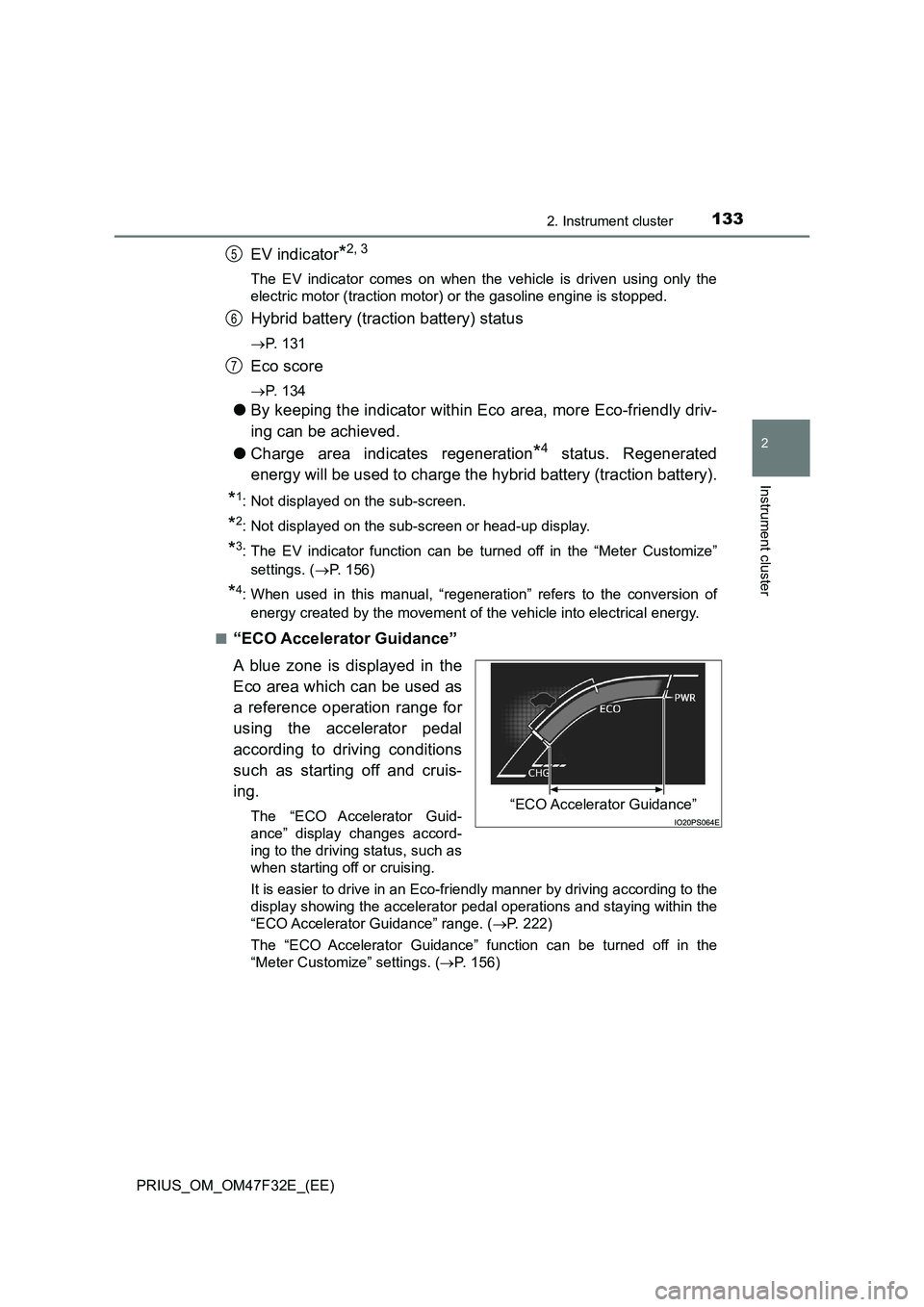
The display changes according to accelerator pedal operation and
displays the current driving status and energy regeneration status.
The Hybrid System Indicator can be displayed on the sub-screen of the
main display (P. 125) and the head-up display (if equipped)
(P. 161).
■
How to read the display
Charge area
Shows that energy is being recovered via the regenerative charging.
Eco area
Shows that the vehicle is being driven in an Eco-friendly manner.
Power area
Shows that an Eco-friendly driving range is being exceeded (during full
power driving etc.)
Hybrid Eco area*1
Shows that gasoline engine power is not being used very often.
The gasoline engine will automatically stop and restart under various
conditions.
Head-up display
(if equipped) Sub-screen Multi-information
display
1
2
3
4
Page 135 of 770
1332. Instrument cluster
2
Instrument cluster
PRIUS_OM_OM47F32E_(EE)
EV indicator*2, 3
The EV indicator comes on when the vehicle is driven using only the
electric motor (traction motor) or the gasoline engine is stopped.
Hybrid battery (traction battery) status
P. 1 3 1
Eco score
P. 1 3 4
●By keeping the indicator within Eco area, more Eco-friendly driv-
ing can be achieved.
●Charge area indicates regeneration
*4 status. Regenerated
energy will be used to charge the hybrid battery (traction battery).
*1: Not displayed on the sub-screen.
*2: Not displayed on the sub-screen or head-up display.
*3: The EV indicator function can be turned off in the “Meter Customize”
settings. (P. 156)
*4: When used in this manual, “regeneration” refers to the conversion of
energy created by the movement of the vehicle into electrical energy.
■
“ECO Accelerator Guidance”
A blue zone is displayed in the
Eco area which can be used as
a reference operation range for
using the accelerator pedal
according to driving conditions
such as starting off and cruis-
ing.
The “ECO Accelerator Guid-
ance” display changes accord-
ing to the driving status, such as
when starting off or cruising.
It is easier to drive in an Eco-friendly manner by driving according to the
display showing the accelerator pedal operations and staying within the
“ECO Accelerator Guidance” range. (P. 222)
The “ECO Accelerator Guidance” function can be turned off in the
“Meter Customize” settings. (P. 156)
5
6
7
“ECO Accelerator Guidance”
Page 136 of 770
1342. Instrument cluster
PRIUS_OM_OM47F32E_(EE)■
Eco score
The driving status for the following 3 situations are evaluated in 5
levels: Smooth start-off acceleration (“Eco-Start”), driving without
sudden acceleration (“Eco-Cruise”) and smooth stopping (“Eco-
Stop”). Each time the vehicle is stopped, a score result is displayed
out of a perfect score of 100 points.
Score result
“Eco-Start” status
“Eco-Cruise” status
“Eco-Stop” status
How to read the bar display:
*: For items not currently evaluated, the display reads 0.
●The Eco score is reset each time the vehicle starts off to start a new
evaluation.
●When the shift position is P, only the Eco score display area is
enlarged and displayed. When the shift position is shifted from P,
the display returns to normal.
●When the hybrid system stops, the current total score result and
advice on how to increase the score are displayed. (P. 105)
1
2
3
4
ScoreLow*High
Bar display