Page 144 of 770
1422. Instrument cluster
PRIUS_OM_OM47F32E_(EE)■
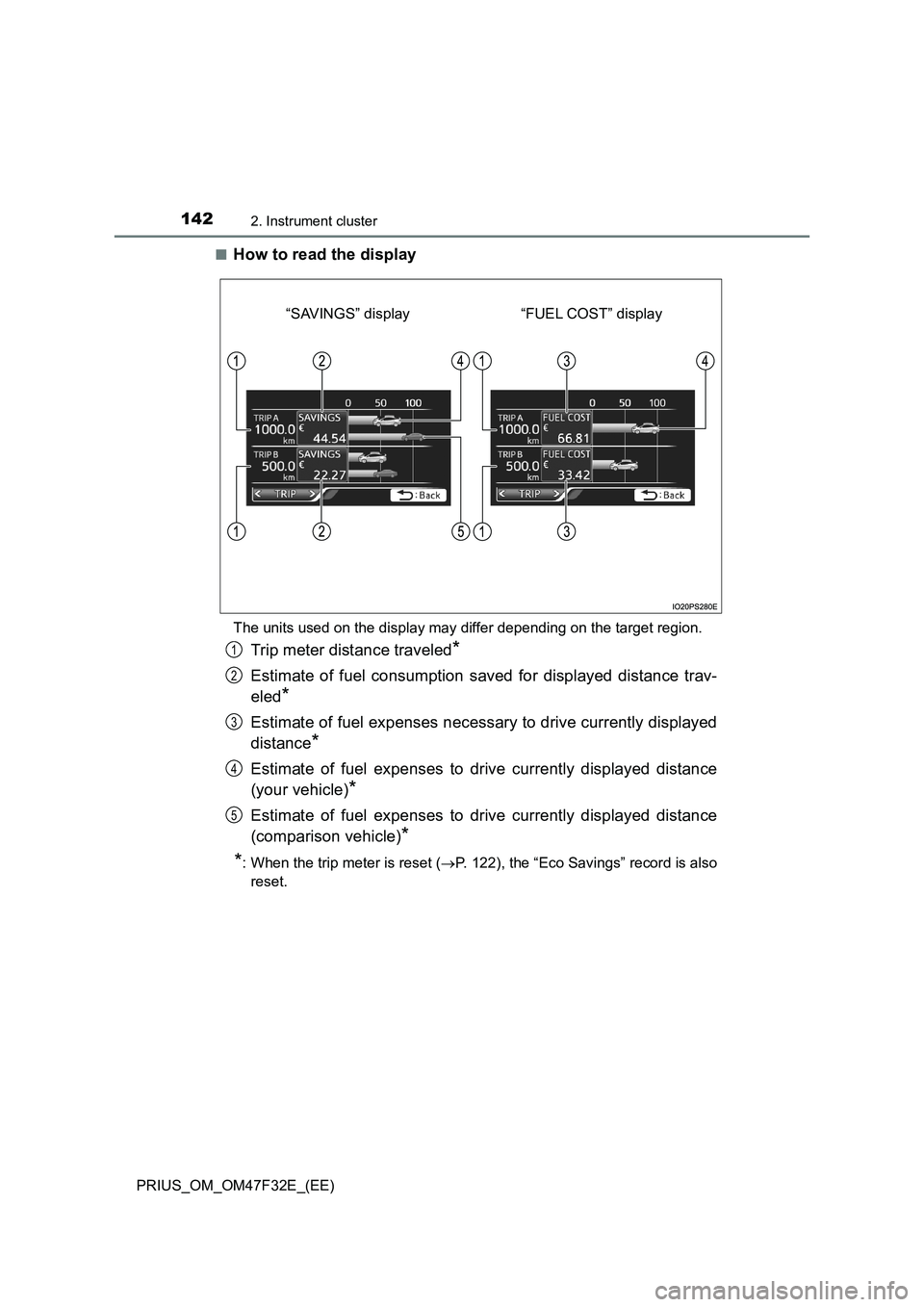
How to read the display
The units used on the display may differ depending on the target region.
Trip meter distance traveled*
Estimate of fuel consumption saved for displayed distance trav-
eled
*
Estimate of fuel expenses necessary to drive currently displayed
distance
*
Estimate of fuel expenses to drive currently displayed distance
(your vehicle)
*
Estimate of fuel expenses to drive currently displayed distance
(comparison vehicle)
*
*
: When the trip meter is reset (P. 122), the “Eco Savings” record is also
reset.
“FUEL COST” display “SAVINGS” display
1
2
3
4
5
Page 145 of 770
1432. Instrument cluster
2
Instrument cluster
PRIUS_OM_OM47F32E_(EE)■
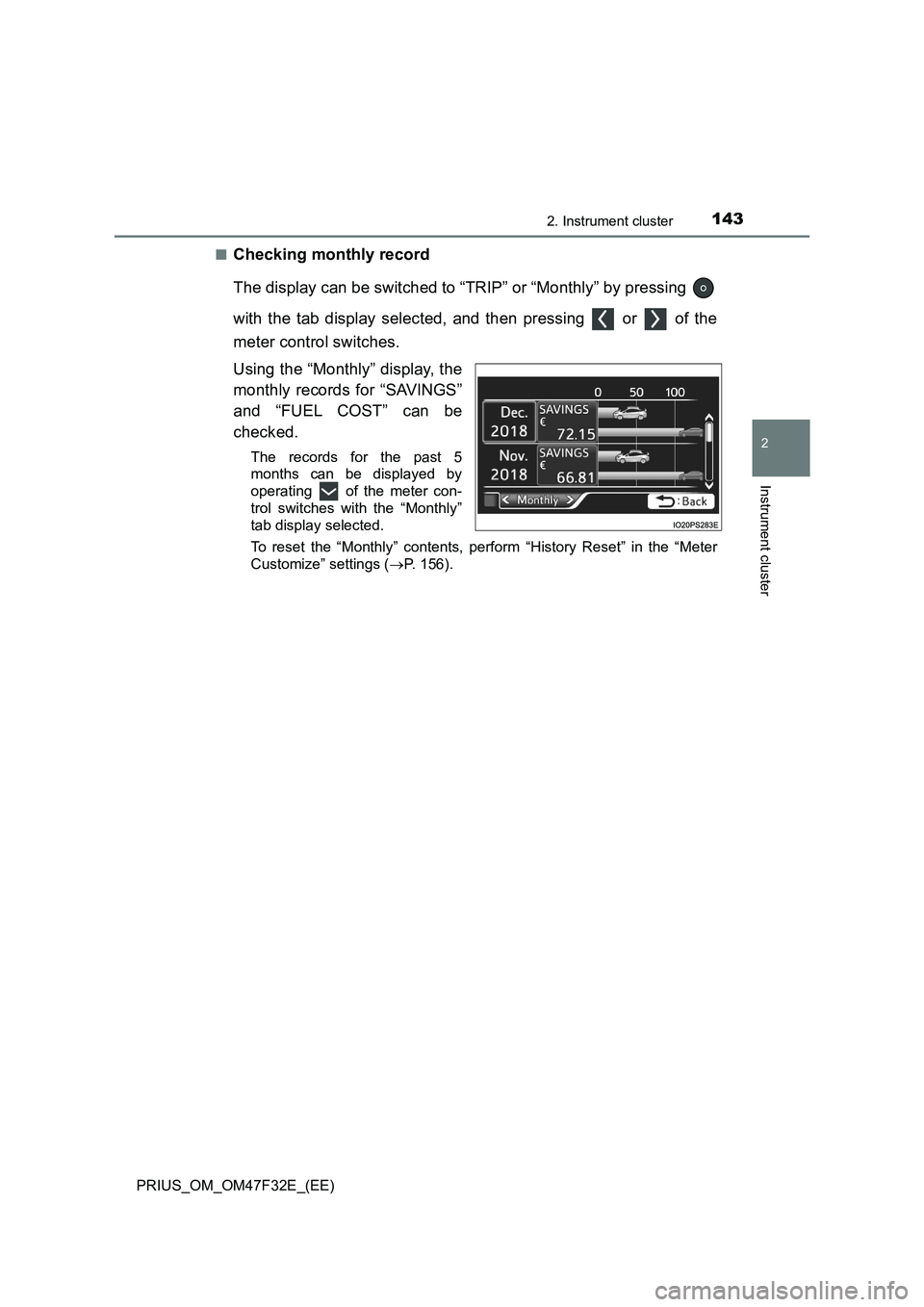
Checking monthly record
The display can be switched to “TRIP” or “Monthly” by pressing
with the tab display selected, and then pressing or of the
meter control switches.
Using the “Monthly” display, the
monthly records for “SAVINGS”
and “FUEL COST” can be
checked.
The records for the past 5
months can be displayed by
operating of the meter con-
trol switches with the “Monthly”
tab display selected.
To reset the “Monthly” contents, perform “History Reset” in the “Meter
Customize” settings (P. 156).
Page 147 of 770
1452. Instrument cluster
2
Instrument cluster
PRIUS_OM_OM47F32E_(EE)■
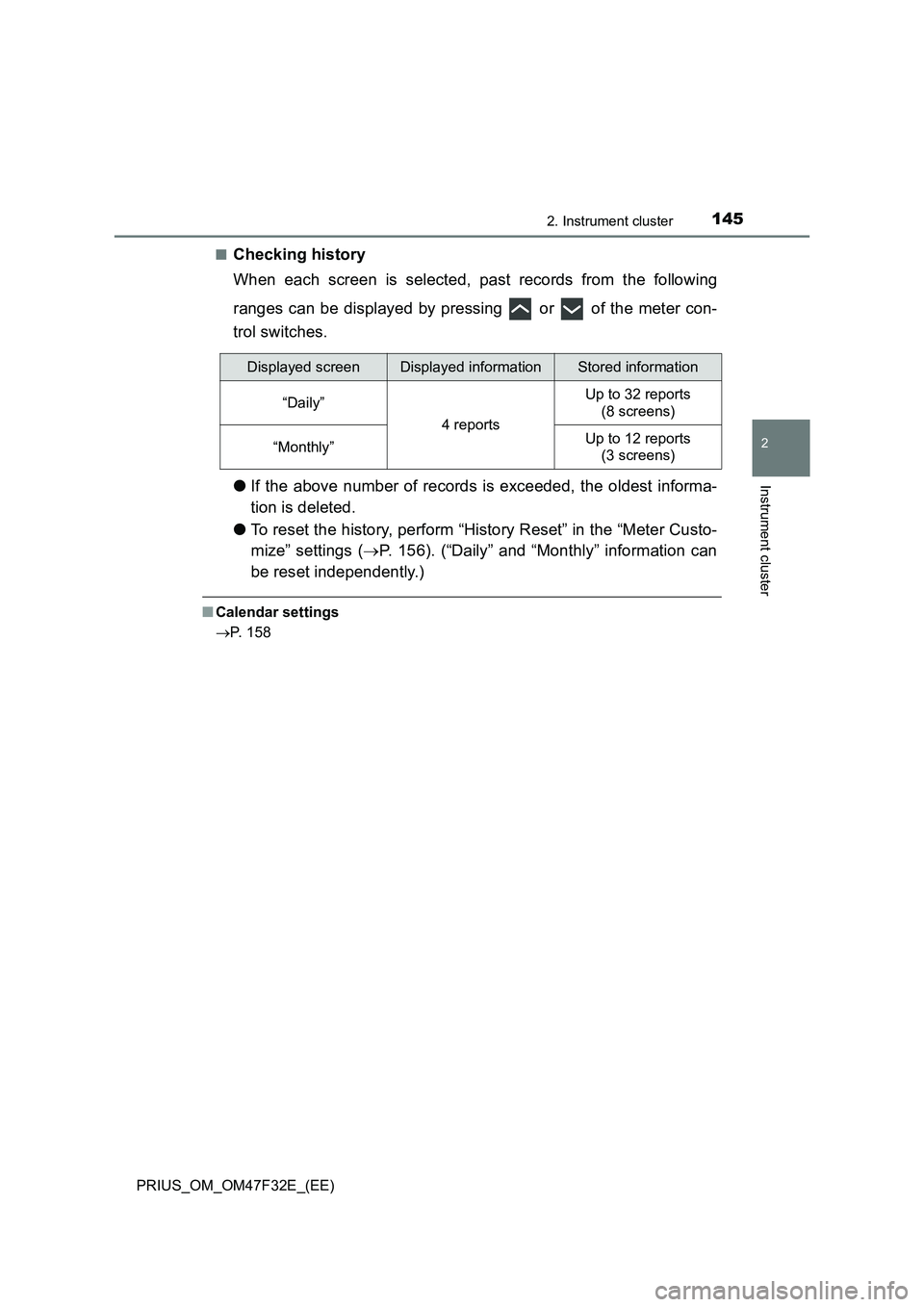
Checking history
When each screen is selected, past records from the following
ranges can be displayed by pressing or of the meter con-
trol switches.
●If the above number of records is exceeded, the oldest informa-
tion is deleted.
●To reset the history, perform “History Reset” in the “Meter Custo-
mize” settings (P. 156). (“Daily” and “Monthly” information can
be reset independently.)
■Calendar settings
P. 158
Displayed screenDisplayed informationStored information
“Daily”
4 reports
Up to 32 reports
(8 screens)
“Monthly”Up to 12 reports
(3 screens)
Page 159 of 770

1572. Instrument cluster
2
Instrument cluster
PRIUS_OM_OM47F32E_(EE)
*1: If equipped
*2: When the screen is turned off, pressing displays the setting screen
again.
*3: Left-hand drive vehicles only
*4: The possible displayed languages differ according to the target region.
“Language”*4
“English” (English)
Switches the language dis-
played on the screen.
“Français” (French)
“Español” (Spanish)
“Deutsch” (German)
“Italiano” (Italian)
“ ” (Russian)
“Türkçe” (Turkish)
“Calendar”
Day/Month/YearChanges the date used to
record fuel consumption data.
“Eco Savings”*1
(
P. 141)
“Gasoline Price”Registers data used to calcu-
late and record “Eco Savings”.
“COMP. Consumption”
“History
Reset”
“Monthly Fuel
Consumption”“Yes”Deletes data of “Fuel Con-
sumption Record (Monthly)”.
(P. 136)
“No”
“Eco Savings
(Monthly)”
*1
“Yes”Deletes data of “Eco Savings
(Monthly)”. (P. 1 4 1 )
“No”
“Eco-Diary
(Daily)”“Yes”Deletes data of “Eco-Diary
(Daily)”. (P. 144)
“No”
“Eco-Diary
(Monthly)”“Yes”Deletes data of “Eco-Diary
(Monthly)”. (P. 1 4 4 )
“No”
“Initialization”“Yes”Returns the combination meter
settings to their initial settings.
“No”
ItemSettingsSetting result
Page 166 of 770
1642. Instrument cluster
PRIUS_OM_OM47F32E_(EE)
■Enabling/disabling of the head-up display
When the head-up display is turned off with the “HUD” switch, it is not dis-
played until the “HUD” switch is used to turn the head-up display on again.
(Operation of the head-up display is not linked with the power switch.)
■ Display brightness
● The brightness of the head-up display is automatically adjusted according to
the operation status of the headlights (on/off) and the brightness of the sur-
roundings.
● When the brightness of the head-up display is adjusted to a certain level or
higher, the display automatically dims when the vehicle is stopped. Once the
vehicle starts off and the vehicle speed reaches approximately 5 km/h
(3.1 mph) or more, the display automatically returns to its previous bright-
ness.
■ Vehicle speed display
In extremely cold environments, the display of the speedometer and the vehi-
cle speed of the head-up display may slightly differ.
■ Head-up display
The head-up display may seem dark and hard to see when viewed through
sunglasses, especially polarized sunglasses.
■ When the 12-volt battery is disconnected
The customize settings of the head-up display will be reset.
WARNING
■ Before using the head-up display
● Check that the position and brightness of the head-up display image does
not interfere with safe driving. Incorrect adjustment of the image’s position
or brightness may obstruct the driver’s view and lead to an accident,
resulting in death or serious injury.
● Do not continuously look at the head-up display while driving as you may
fail to see pedestrians, objects on the road, etc. ahead of the vehicle.
Page 171 of 770
1692. Instrument cluster
2
Instrument cluster
PRIUS_OM_OM47F32E_(EE)■
Display procedure
Press the “MENU” button.
Select “Info” on the “Menu” screen.
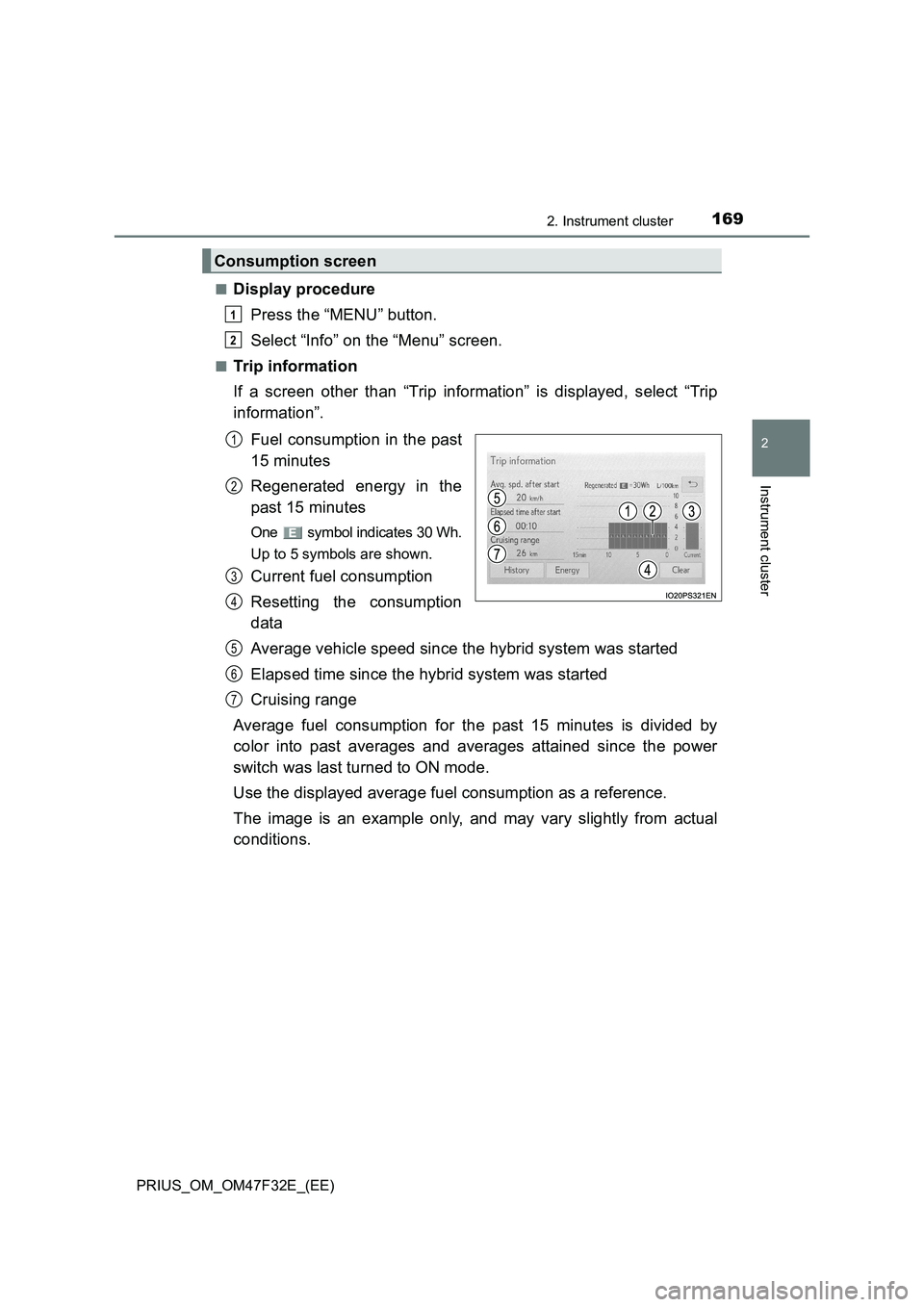
■Trip information
If a screen other than “Trip information” is displayed, select “Trip
information”.
Fuel consumption in the past
15 minutes
Regenerated energy in the
past 15 minutes
One symbol indicates 30 Wh.
Up to 5 symbols are shown.
Current fuel consumption
Resetting the consumption
data
Average vehicle speed since the hybrid system was started
Elapsed time since the hybrid system was started
Cruising range
Average fuel consumption for the past 15 minutes is divided by
color into past averages and averages attained since the power
switch was last turned to ON mode.
Use the displayed average fuel consumption as a reference.
The image is an example only, and may vary slightly from actual
conditions.
Consumption screen
1
2
1
2
3
4
5
6
7
Page 172 of 770
1702. Instrument cluster
PRIUS_OM_OM47F32E_(EE)■
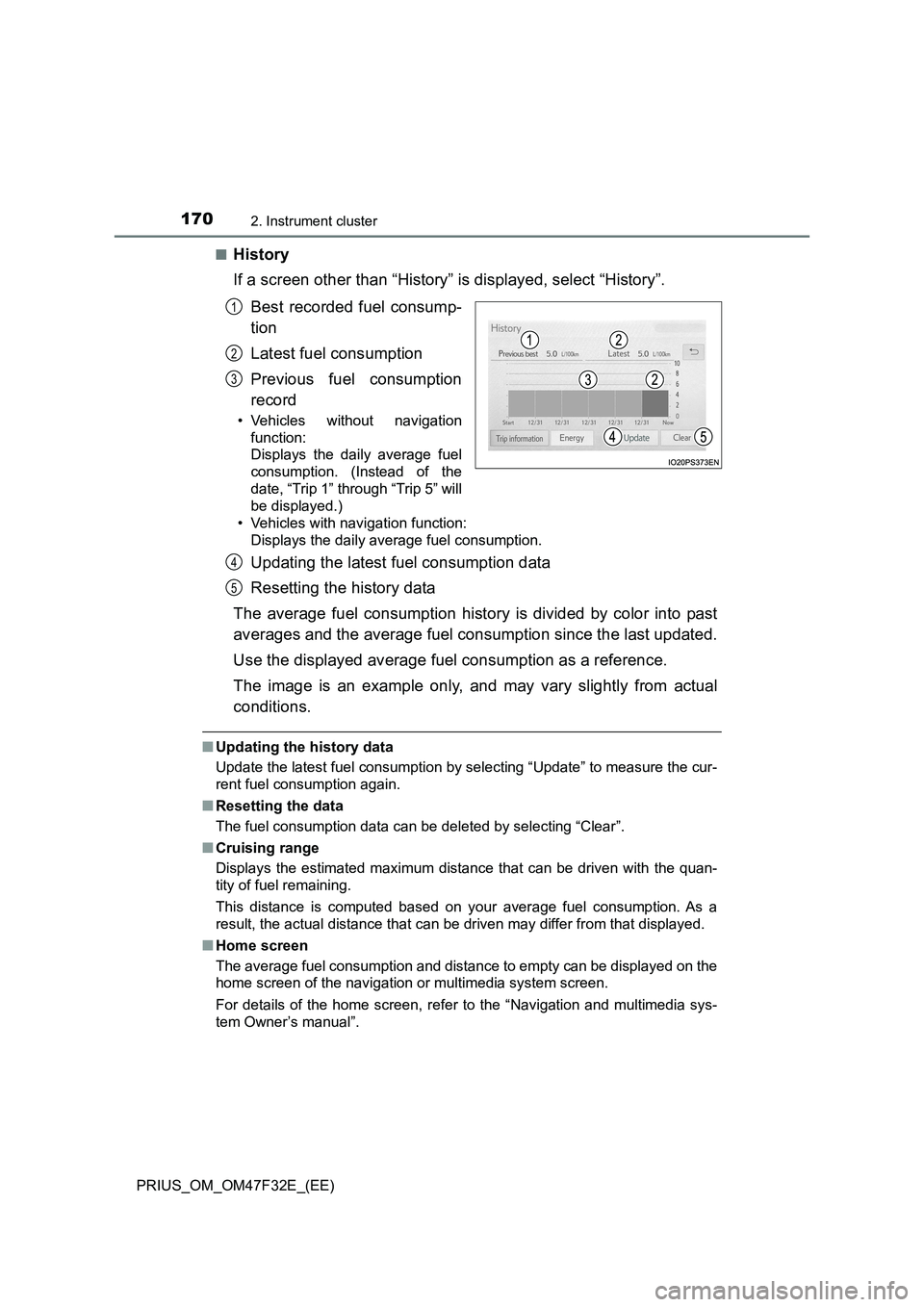
History
If a screen other than “History” is displayed, select “History”.
Best recorded fuel consump-
tion
Latest fuel consumption
Previous fuel consumption
record
• Vehicles without navigation
function:
Displays the daily average fuel
consumption. (Instead of the
date, “Trip 1” through “Trip 5” will
be displayed.)
• Vehicles with navigation function:
Displays the daily average fuel consumption.
Updating the latest fuel consumption data
Resetting the history data
The average fuel consumption history is divided by color into past
averages and the average fuel consumption since the last updated.
Use the displayed average fuel consumption as a reference.
The image is an example only, and may vary slightly from actual
conditions.
■Updating the history data
Update the latest fuel consumption by selecting “Update” to measure the cur-
rent fuel consumption again.
■Resetting the data
The fuel consumption data can be deleted by selecting “Clear”.
■Cruising range
Displays the estimated maximum distance that can be driven with the quan-
tity of fuel remaining.
This distance is computed based on your average fuel consumption. As a
result, the actual distance that can be driven may differ from that displayed.
■Home screen
The average fuel consumption and distance to empty can be displayed on the
home screen of the navigation or multimedia system screen.
For details of the home screen, refer to the “Navigation and multimedia sys-
tem Owner’s manual”.
1
2
3
4
5
Page 536 of 770
5346-3. Do-it-yourself maintenance
PRIUS_OM_OM47F32E_(EE)■The initialization operation (vehicles with the tire pressure warning sys-
tem)
●Make sure to carry out initialization after adjusting the tire inflation pressure.
Also, make sure the tires are cold before carrying out initialization or tire
inflation pressure adjustment.
●If you have accidentally turned the power switch off during initialization, it is
not necessary to press the reset switch again as initialization will restart
automatically when the power switch has been turned to ON mode for the
next time.
●If you accidentally press the reset switch when initialization is not necessary,
adjust the tire inflation pressure to the specified level when the tires are
cold, and conduct initialization again.
■Warning performance of the tire pressure warning system (if equipped)
The warning of the tire pressure warning system will change in accordance
with the conditions under which it was initialized. For this reason, the system
may give a warning even if the tire pressure does not reach a low enough
level, or if the pressure is higher than the pressure that was adjusted to when
the system was initialized.
■When initialization of the tire pressure warning system has failed (vehi-
cles with the tire pressure warning system)
Initialization can be completed in a few minutes. However, in the following
cases, the settings have not been recorded and the system will not operate
properly. If repeated attempts to record tire inflation pressure settings are
unsuccessful, have the vehicle inspected by any authorized Toyota retailer or
Toyota authorized repairer, or any reliable repairer.
●When operating the initialization of the system, the tire pressure warning
light does not flash 3 times and the setting message does not appear on the
multi-information display.
●After driving for a certain period of time since the initialization has been
completed, the warning light comes on after blinking for 1 minute.
■Registering ID codes (vehicles with the tire pressure warning system)
The ID codes of the tire pressure warning valve and transmitters for two sets
of wheels can be registered.
It is not necessary to register the ID codes when replacing normal tires with
snow tires, if the ID codes for the wheels of both normal tires and snow tires
are registered beforehand.
For information about changing ID codes, ask any authorized Toyota retailer
or Toyota authorized repairer, or any reliable repairer.