2023 TOYOTA PRIUS remote start
[x] Cancel search: remote startPage 192 of 770

1903-2. Opening, closing and locking the doors
PRIUS_OM_OM47F32E_(EE)■Conditions affecting operation
The smart entry & start system, wireless remote control and immobilizer sys-
tem use weak radio waves. In the following situations, the communication
between the electronic key and the vehicle may be affected, preventing the
smart entry & start system, wireless remote control and immobilizer system
from operating properly. (Ways of coping: P. 636)
●When the electronic key battery is depleted
●Near a TV tower, electric power plant, gas station, radio station, large dis-
play, airport or other facility that generates strong radio waves or electrical
noise
●When the electronic key is in contact with, or is covered by the following
metallic objects
• Cards to which aluminum foil is attached
• Cigarette boxes that have aluminum foil inside
• Metallic wallets or bags
• Coins
• Hand warmers made of metal
• Media such as CDs and DVDs
●When other wireless key (that emit radio waves) is being used nearby
●When carrying the electronic key together with the following devices that
emit radio waves
• Portable radio, cellular phone, cordless phone or other wireless commu-
nication devices
• Another vehicle’s electronic key or a wireless key that emits radio waves
• Personal computers or personal digital assistants (PDAs)
• Digital audio players
• Portable game systems
●If window tint with a metallic content or metallic objects are attached to the
rear window
●When the electronic key is placed near a battery charger or electronic
devices
Page 193 of 770

1913-2. Opening, closing and locking the doors
3
Operation of each component
PRIUS_OM_OM47F32E_(EE)■Note for the entry function
●Even when the electronic key is within the effective range (detection areas),
the system may not operate properly in the following cases:
• The electronic key is too close to the window or outside door handle, near
the ground, or in a high place when the doors are locked or unlocked.
• The electronic key is on the instrument panel, floor, or in the door pockets
or glove box when the hybrid system is started or power switch modes
are changed.
●Do not leave the electronic key on top of the instrument panel or near the
door pockets when exiting the vehicle. Depending on the radio wave recep-
tion conditions, it may be detected by the antenna outside the cabin and the
door will become lockable from the outside, possibly trapping the electronic
key inside the vehicle.
●As long as the electronic key is within the effective range, the doors may be
unlocked or locked by anyone.
●Even if the electronic key is not inside the vehicle, it may be possible to start
the hybrid system if the electronic key is near the window.
●The doors may unlock if a large amount of water splashes on the door han-
dle, such as in the rain or in a car wash when the electronic key is within the
effective range. (The door will automatically be locked after approximately
30 seconds if the doors are not opened and closed.)
●If the wireless remote control is used to lock the doors when the electronic
key is near the vehicle, there is a possibility that the door may not be
unlocked by the entry function. (Use the wireless remote control to unlock
the doors.)
●Touching the door lock sensor while wearing gloves may delay or prevent
lock operation. Remove the gloves and touch the lock sensor again.
●On some models: When the lock operation is performed using the lock sen-
sor, recognition signals will be shown up to two consecutive times. After this,
no recognition signals will be given.
●If the door handle becomes wet while the electronic key is within the effec-
tive range, the door may lock and unlock repeatedly. In this case, follow the
following correction procedures to wash the vehicle.
• Place the electronic key in a location 2 m (6 ft.) or more away from the
vehicle. (Take care to ensure that the key is not stolen.)
• Set electronic key to battery-saving mode to disable the smart entry &
start system. (P. 189)
Page 194 of 770

1923-2. Opening, closing and locking the doors
PRIUS_OM_OM47F32E_(EE)●If the electronic key is inside the vehicle and a door handle becomes wet
during a car wash, a message may be shown on the multi-information dis-
play and a buzzer will sound outside the vehicle. To turn off the alarm, lock
all the doors.
●The lock sensor may not work properly if it comes into contact with ice,
snow, mud, etc. Clean the lock sensor and attempt to operate it again.
●A sudden approach to the effective range or door handle may prevent the
doors from being unlocked. In this case, return the door handle to the origi-
nal position and check that the doors unlock before pulling the door handle
again.
●If there is another electronic key in the detection area, it may take slightly
longer to unlock the doors after the door handle is gripped.
■When the vehicle is not driven for extended periods
●To prevent theft of the vehicle, do not leave the electronic key within 2 m
(6 ft.) of the vehicle.
●The smart entry & start system can be deactivated in advance. (P. 670)
■To operate the system properly
Make sure to carry the electronic key when operating the system. Do not get
the electronic key too close to the vehicle when operating the system from the
outside of the vehicle.
Depending on the position and holding condition of the electronic key, the key
may not be detected correctly and the system may not operate properly. (The
alarm may go off accidentally, or the door lock prevention may not operate.)
■If the smart entry & start system does not operate properly
●Locking and unlocking the doors: Use the mechanical key. (P. 636)
●Starting the hybrid system: P. 637
■Customization
Settings (e.g. smart entry & start system) can be changed.
(Customizable features: P. 670)
■If the smart entry & start system has been deactivated in a customized
setting
●Unlocking and locking the doors:
Use the wireless remote control or mechanical key. (P. 177, 636)
●Starting the hybrid system and changing power switch modes: P. 637
●Stopping the hybrid system: P. 245
Page 525 of 770
5236-3. Do-it-yourself maintenance
PRIUS_OM_OM47F32E_(EE)
6
Maintenance and care
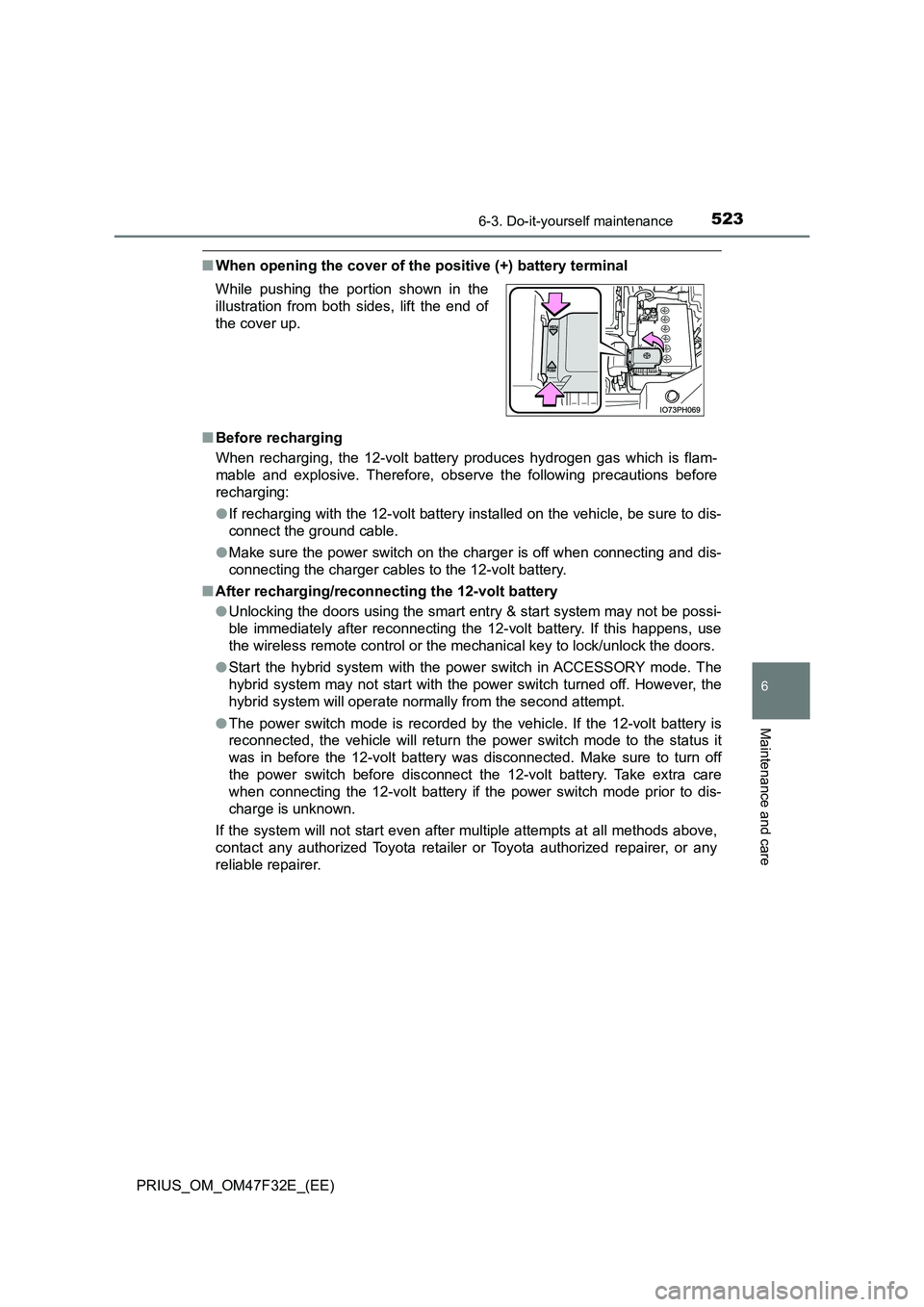
■When opening the cover of the positive (+) battery terminal
■ Before recharging
When recharging, the 12-volt battery produces hydrogen gas which is flam-
mable and explosive. Therefore, obser ve the following precautions before
recharging:
● If recharging with the 12-volt battery installed on the vehicle, be sure to dis-
connect the ground cable.
● Make sure the power switch on the charger is off when connecting and dis-
connecting the charger cables to the 12-volt battery.
■ After recharging/reconnecting the 12-volt battery
● Unlocking the doors using the smart entry & start system may not be possi-
ble immediately after reconnecting the 12-volt battery. If this happens, use
the wireless remote control or the mechanical key to lock/unlock the doors.
● Start the hybrid system with the power switch in ACCESSORY mode. The
hybrid system may not start with the power switch turned off. However, the
hybrid system will operate normally from the second attempt.
● The power switch mode is recorded by the vehicle. If the 12-volt battery is
reconnected, the vehicle will return the power switch mode to the status it
was in before the 12-volt battery was disconnected. Make sure to turn off
the power switch before disconnect the 12-volt battery. Take extra care
when connecting the 12-volt battery if the power switch mode prior to dis-
charge is unknown.
If the system will not start even after multiple attempts at all methods above,
contact any authorized Toyota retailer or Toyota authorized repairer, or any
reliable repairer.
While pushing the portion shown in the
illustration from both sides, lift the end of
the cover up.
Page 557 of 770
5556-3. Do-it-yourself maintenance
PRIUS_OM_OM47F32E_(EE)
6
Maintenance and care
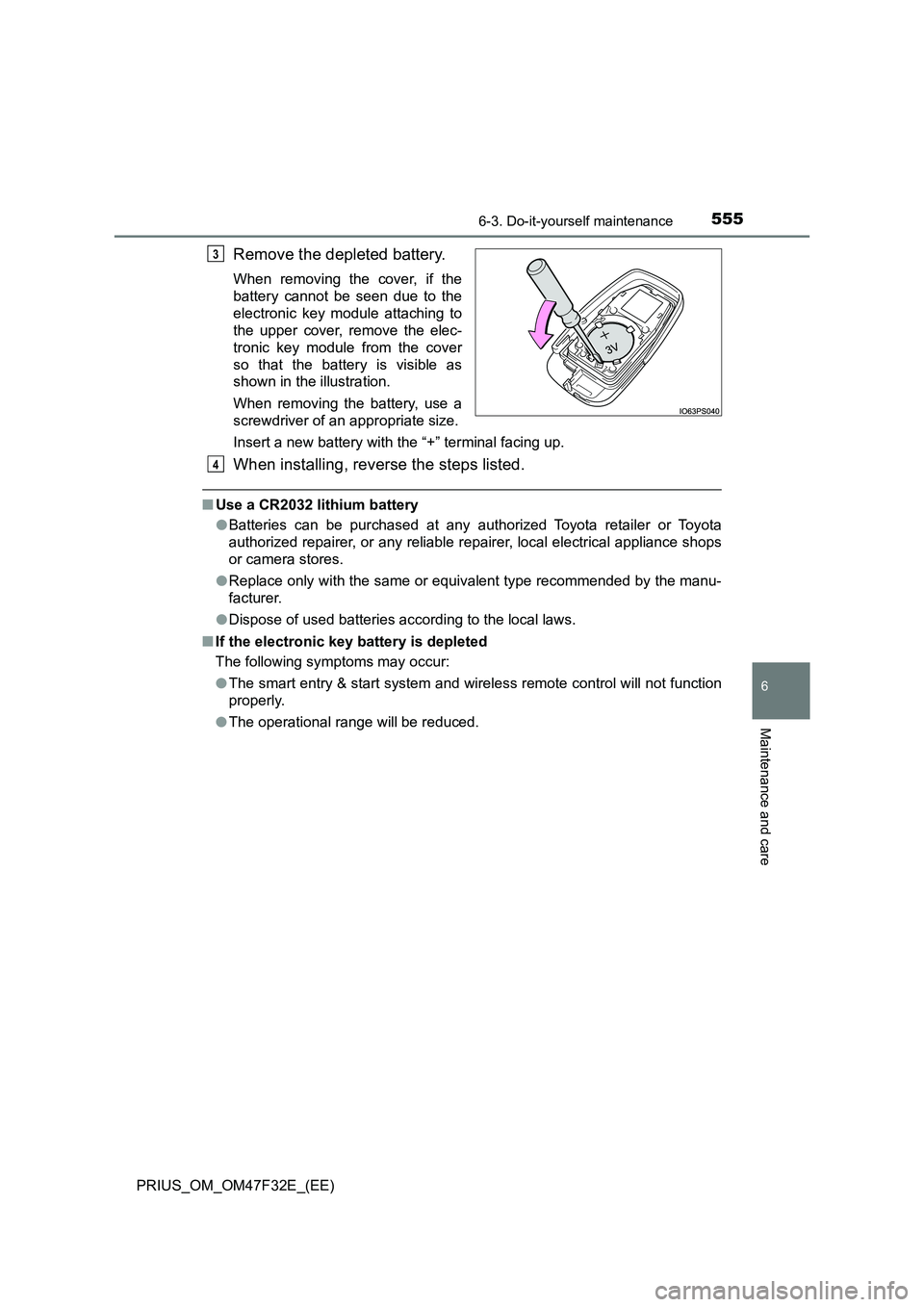
Remove the depleted battery.
When removing the cover, if the
battery cannot be seen due to the
electronic key module attaching to
the upper cover, remove the elec-
tronic key module from the cover
so that the battery is visible as
shown in the illustration.
When removing the battery, use a
screwdriver of an appropriate size.
Insert a new battery with the “+” terminal facing up.
When installing, reverse the steps listed.
■Use a CR2032 lithium battery
●Batteries can be purchased at any authorized Toyota retailer or Toyota
authorized repairer, or any reliable repairer, local electrical appliance shops
or camera stores.
●Replace only with the same or equivalent type recommended by the manu-
facturer.
●Dispose of used batteries according to the local laws.
■If the electronic key battery is depleted
The following symptoms may occur:
●The smart entry & start system and wireless remote control will not function
properly.
●The operational range will be reduced.
3
4
Page 558 of 770
5566-3. Do-it-yourself maintenance
PRIUS_OM_OM47F32E_(EE)
WARNING
■Battery precautions
Observe the following precautions.
Failure to do so may result in death or serious injury.
● Do not swallow the battery. Doing so may cause chemical burns.
● A coin battery or button battery is used in the electronic key. If a battery is
swallowed, it may cause severe chemical burns in as little as 2 hours and
may result in death or serious injury.
● Keep away new and removed batteries from children.
● If the cover cannot be firmly closed, stop using the electronic key and stow
the key in the place where children cannot reach, and then contact any
authorized Toyota retailer or Toyota authorized repairer, or any reliable
repairer as soon as possible.
● If you accidentally swallow a battery or put a battery into a part of your
body, get emergency medical attention immediately.
■ To prevent battery explosion or leakage of flammable liquid or gas
● Replace the battery with a new battery of the same type. If a wrong type of
battery is used, it may explode.
● Do not expose batteries to extremely low pressure due to high altitude or
extremely high temperatures.
● Do not burn, break or cut a battery.
■ Certification for the smart entry & start system
CAUTION
RISK OF EXPLOSION IF BATTERY IS REPLACED BY AN INCORRECT
TYPE.
DISPOSE OF USED BATTERIES ACCORDING TO THE INSTRUCTIONS
NOTICE
■ For normal operation after replacing the battery
Observe the following precautions to prevent accidents:
● Always work with dry hands.
Moisture may cause the battery to rust.
● Do not touch or move any other component inside the remote control.
● Do not bend either of the battery terminals.
Page 638 of 770
6367-2. Steps to take in an emergency
PRIUS_OM_OM47F32E_(EE)
If the electronic key does not operate
properly
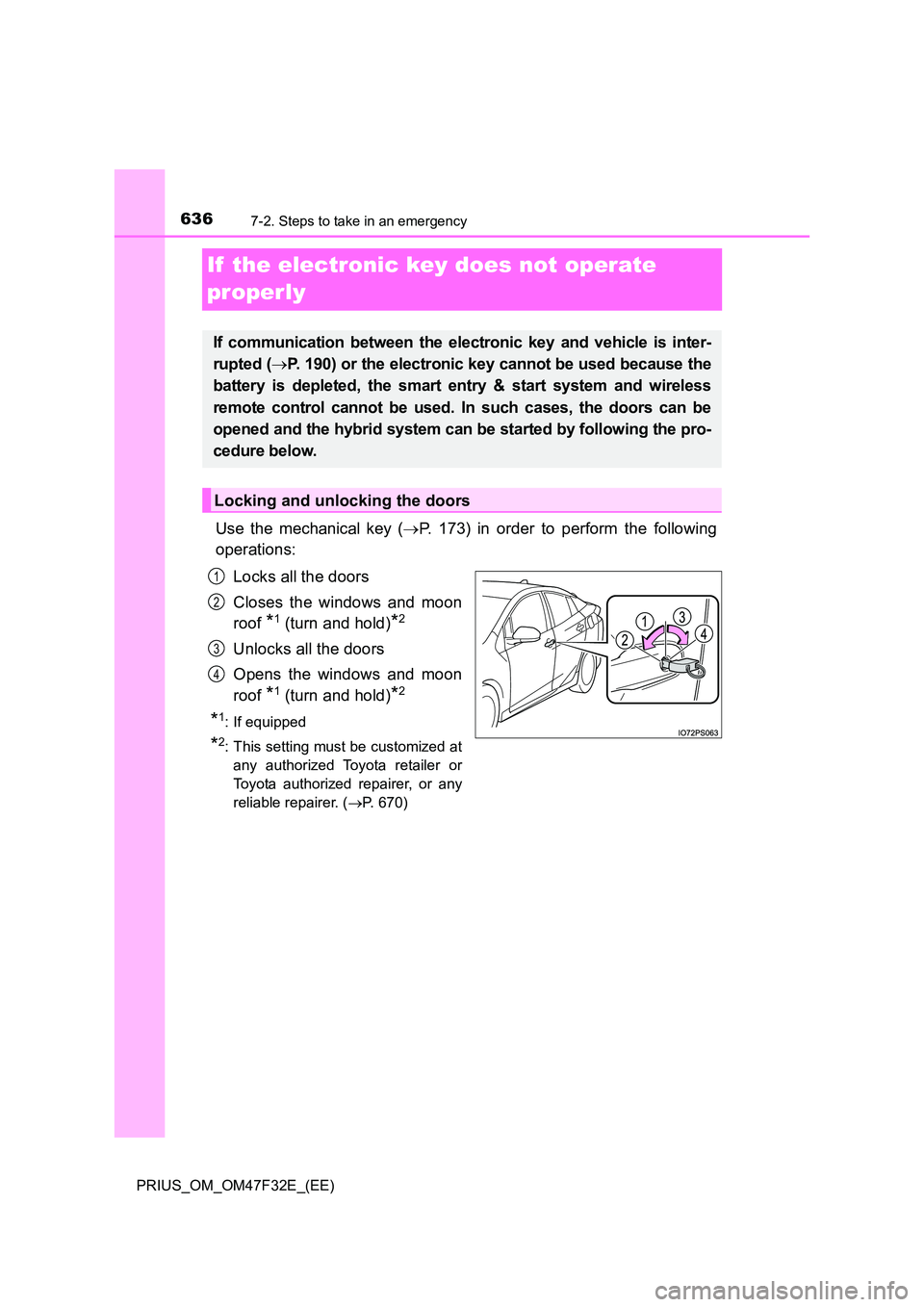
Use the mechanical key ( P. 173) in order to perform the following
operations:
Locks all the doors
Closes the windows and moon
roof *1 (turn and hold)*2
Unlocks all the doors
Opens the windows and moon
roof *1 (turn and hold)*2
*1: If equipped
*2: This setting must be customized at
any authorized Toyota retailer or
Toyota authorized repairer, or any
reliable repairer. ( P. 670)
If communication between the electronic key and vehicle is inter-
rupted ( P. 190) or the electronic key cannot be used because the
battery is depleted, the smart entry & start system and wireless
remote control cannot be used. In such cases, the doors can be
opened and the hybrid system can be started by following the pro-
cedure below.
Locking and unlocking the doors
1
2
3
4
Page 644 of 770
6427-2. Steps to take in an emergency
PRIUS_OM_OM47F32E_(EE)
■ When recharging or replacing the 12-volt battery
● In some cases, it may not be possible to unlock the doors using the smart
entry & start system when the 12-volt battery is discharged. Use the wire-
less remote control or the mechanical key to lock or unlock the doors.
● The hybrid system may not start on the first attempt after the 12-volt battery
has recharged but will start normally after the second attempt. This is not a
malfunction.
● The power switch mode is memorized by the vehicle. When the 12-volt bat-
tery is reconnected, the system will return to the mode it was in before the
12-volt battery was discharged. Before disconnecting the 12-volt battery,
turn the power switch off.
If you are unsure what mode the power switch was in before the 12-volt bat-
tery discharged, be especially careful when reconnecting the 12-volt battery.
● If the 12-volt battery discharges while the shift position is in P, it may not be
possible to shift the shift position to other positions. In this case, the vehicle
cannot be towed without lifting both front wheels because the front wheels
will be locked. ( P. 572)
■ When replacing the 12-volt battery
● Use a 12-volt battery that conforms to European regulations.
● Use a 12-volt battery that the case size is same as the previous one (LN1),
20 hour rate capacity (20HR) is equi valent (45Ah) or greater, and perfor-
mance rating (CCA) is equivalent (295A) or greater.
• If the sizes differ, the 12-volt battery cannot be properly secured.
• If the 20 hour rate capacity is low, even if the time period where the vehi-
cle is not used is a short time, the 12-volt battery may discharge and the
hybrid system may not be able to start.
● For details, consult any authorized Toyota retailer or Toyota authorized
repairer, or any reliable repairer.