Page 138 of 810

1362. Instrument cluster
HILUX_OM_OM0K789E_(EE)
■Eco Driving Indicator Zone Display/Eco Score
• Displays Zone of Eco driving with current Eco driving ratio based
on acceleration. ( P. 126)
• Displays the eco-driving total count to help improve the cus-
tomer’s eco driving techniques. ( P. 139)
■Eco Saving
Displays the fuel consumption comparison, the average fuel con-
sumption after reset, and the cost of the consumed fuel. ( P. 140)
■Steering angle
Displays the direction of the front tires.
The tire direction is displayed in 3 stages for both left and right, in accor-
dance with the angle of the tire.
While Toyota parking assist-sensor ( P. 320) is operating (if equipped)
or any door is not fully closed, the related information is displayed with
the direction of the front tires.
If a battery terminal is disconnected and reconnected, the display may
be disabled temporarily. After driving the vehicle for a while, the display
will be enabled.
■Speedometer display
Displays the vehicle speed.
■AdBlue™ gauge (if equipped)
Displays the quantity of AdBlue™ remaining in the tank. ( P. 141)
Page 147 of 810
145
3
Operation of
each component
HILUX_OM_OM0K789E_(EE)
3-1. Key information
Keys ................................... 146
3-2. Opening, closing and
locking the doors
Side doors.......................... 151
Access panels (smart-cab
models only) .................... 157
Tailgate .............................. 158
Smart entry & start
system ............................. 161
3-3. Adjusting the seats
Front seats ......................... 168
Rear seats ......................... 170
Head restraints .................. 173
3-4. Adjusting the steering
wheel and mirrors
Steering wheel ................... 176
Inside rear view mirror ....... 178
Outside rear view
mirrors ............................. 180
3-5. Opening and closing
the windows
Power windows .................. 183
Quarter windows
(smart-cab models).......... 187
Page 178 of 810
1763-4. Adjusting the steering wheel and mirrors
HILUX_OM_OM0K789E_(EE)
Steering wheel
Hold the steering wheel and
push the lever down.
Ty pe A
Adjust to the ideal position by
moving the steering wheel verti-
cally.
After adjustment, pull the lever up
to secure the steering wheel.
Ty pe B
Adjust to the ideal position by
moving the steering wheel hori-
zontally and vertically.
After adjustment, pull the lever up
to secure the steering wheel.
Adjustment procedure
1
2
2
Page 179 of 810
1773-4. Adjusting the steering wheel and mirrors
3
Operation of each component
HILUX_OM_OM0K789E_(EE)
To sound the horn, press on or
close to the mark.
■ After adjusting the steering wheel
Make sure that the steering wheel is securely locked.
The horn may not sound if the steering wheel is not securely locked.
Horn
WARNING
■ Caution while driving
Do not adjust the steering wheel while driving.
Doing so may cause the driver to mishandle the vehicle and cause an acci-
dent, resulting in death or serious injury.
■ After adjusting the steering wheel
Make sure that the steering wheel is securely locked.
Otherwise, the steering wheel may move suddenly, possibly causing an
accident, and resulting in death or serious injury.
Page 180 of 810
1783-4. Adjusting the steering wheel and mirrors
HILUX_OM_OM0K789E_(EE)
Inside rear view mirror
The height of the rear view mirror can be adjusted to suit your driving
posture.
Adjust the height of the rear view
mirror by moving it up and down.
Manual anti-glare inside rear view mirror
Reflected light from the headlights of vehicles behind can be reduced
by operating the lever.
Normal position
Anti-glare position
The rear view mirror’s position can be adjusted to enable suffi-
cient confirmation of the rear view.
Adjusting the height of rear view mirror
Anti-glare function
1
2
Page 181 of 810
1793-4. Adjusting the steering wheel and mirrors
3
Operation of each component
HILUX_OM_OM0K789E_(EE)
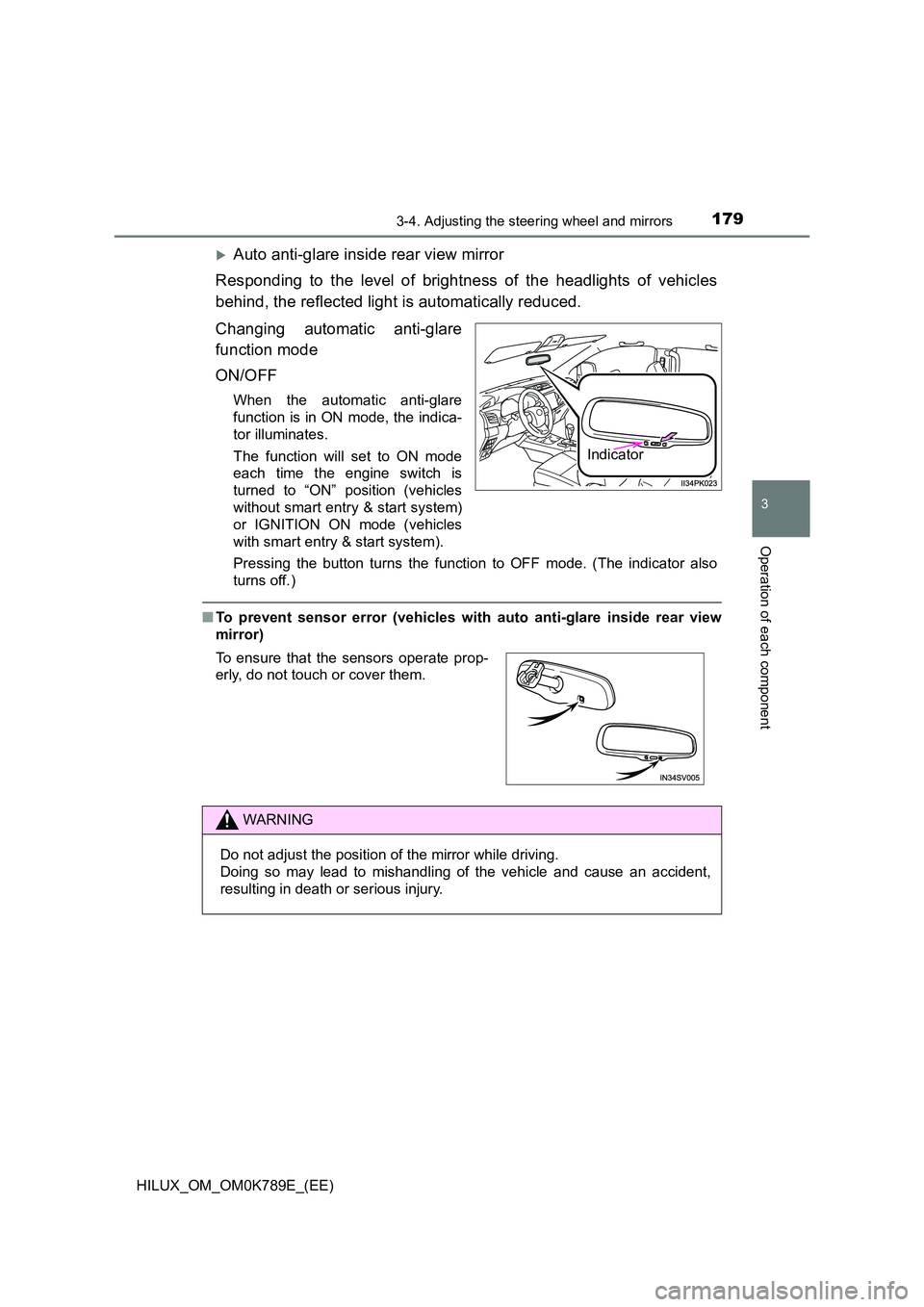
Auto anti-glare inside rear view mirror
Responding to the level of brightness of the headlights of vehicles
behind, the reflected light is automatically reduced.
Changing automatic anti-glare
function mode
ON/OFF
When the automatic anti-glare
function is in ON mode, the indica-
tor illuminates.
The function will set to ON mode
each time the engine switch is
turned to “ON” position (vehicles
without smart entry & start system)
or IGNITION ON mode (vehicles
with smart entry & start system).
Pressing the button turns the function to OFF mode. (The indicator also
turns off.)
■ To prevent sensor error (vehicles with auto anti-glare inside rear view
mirror)
Indicator
To ensure that the sensors operate prop-
erly, do not touch or cover them.
WARNING
Do not adjust the position of the mirror while driving.
Doing so may lead to mishandling of the vehicle and cause an accident,
resulting in death or serious injury.
Page 182 of 810
1803-4. Adjusting the steering wheel and mirrors
HILUX_OM_OM0K789E_(EE)
Outside rear view mirrors
Manual adjustable type
Adjust a mirror.
Power adjustable type
To select a mirror to adjust, turn
the switch.
Left
Right
To adjust the mirror, move the
switch.
Up
Right
Down
Left
Adjustment procedure
1
1
2
2
1
2
3
4
Page 183 of 810
1813-4. Adjusting the steering wheel and mirrors
3
Operation of each component
HILUX_OM_OM0K789E_(EE)
Manual folding type
Push the mirror back in the direc-
tion of the vehicle’s rear.
Power folding type
Press the switch.
Folding
Extending
■ Mirror angle can be adjusted when (power adjustable type)
Vehicles without smart entry & start system
The engine switch is in the “ACC” or “ON” position.
Vehicles with smart entry & start system
The engine switch is in ACCESSORY or IGNITION ON mode.
■ When the mirrors are fogged up (vehicles with outside rear view mirror
defoggers)
The outside rear view mirrors can be cleared using the mirror defoggers. Turn
on the rear window defogger to turn on the outside rear view mirror defog-
gers. ( P. 435, 444)
Folding the mirrors
1
2


