2023 TOYOTA HIGHLANDER engine compartment
[x] Cancel search: engine compartmentPage 4 of 552

4TABLE OF CONTENTS
Hood ..................................384
Positioning a floor jack ....... 385
Engine compartment .......... 386
Tires ................................... 393
Tire inflation pressure......... 405
Wheels ............................... 407
Air conditioning filter ........... 408
Electronic key battery ......... 410
Checking and replacing fuses ......................................... 412
Headlight aim ..................... 414
Light bulbs .......................... 415
7-1. Essential information Emergency flashers ........... 424
If your vehicle has to be stopped in an emergency .............. 424
If the vehicle is submerged or water on the road is rising......................................... 425
7-2. Steps to take in an emergency If your vehicle needs to be towed......................................... 427
If you think something is wrong ......................................... 429
Fuel pump shut off system ......................................... 430
If a warning light turns on or a warning buzzer sounds .... 431
If a warning message is dis- played .............................. 442
If you have a flat tire ........... 446
If the engine will not start ... 460
If you lose your keys .......... 461
If the fuel filler door cannot be opened ............................. 462
If the electronic key does not operate properly ............... 463
If the vehicle battery is dis- charged ............................ 465If your vehicle overheats ....
469
If the vehicle becomes stuck ......................................... 471
8-1. Specifications Maintenance data (fuel, oil level, etc.) .................................. 474
Fuel information ................. 482
Tire information .................. 484
8-2. Customization Customizable features ....... 494
8-3. Initialization Items to initialize ................ 507
9-1. For owners Reporting safety defects for U.S. owners ............................. 510
Reporting safety defects for Canadian owners ............. 510
Seat belt instructions for Cana- dian owners (in French) ... 511
SRS airbag instructions for Canadian owners (in French)......................................... 512
Headlight aim instructions for Canadian owners (in French)......................................... 519
What to do if... (Troubleshooting) ........ ................................. 522
Alphab
etical Index.............. 525
7When trouble arises
8Vehicle specifications
9For owners
Index
Page 131 of 552
1313-2. Opening, closing and locking the doors
3
Before driving
■When setting the open position
of the back door by the
multi-information display
The open position of the power back
door can be adjusted using the
multi-information display. ( P.494)
When opened, the power back door
will open to the last position set
using the power back door switch on
the back door or on the multi-infor-
mation display.
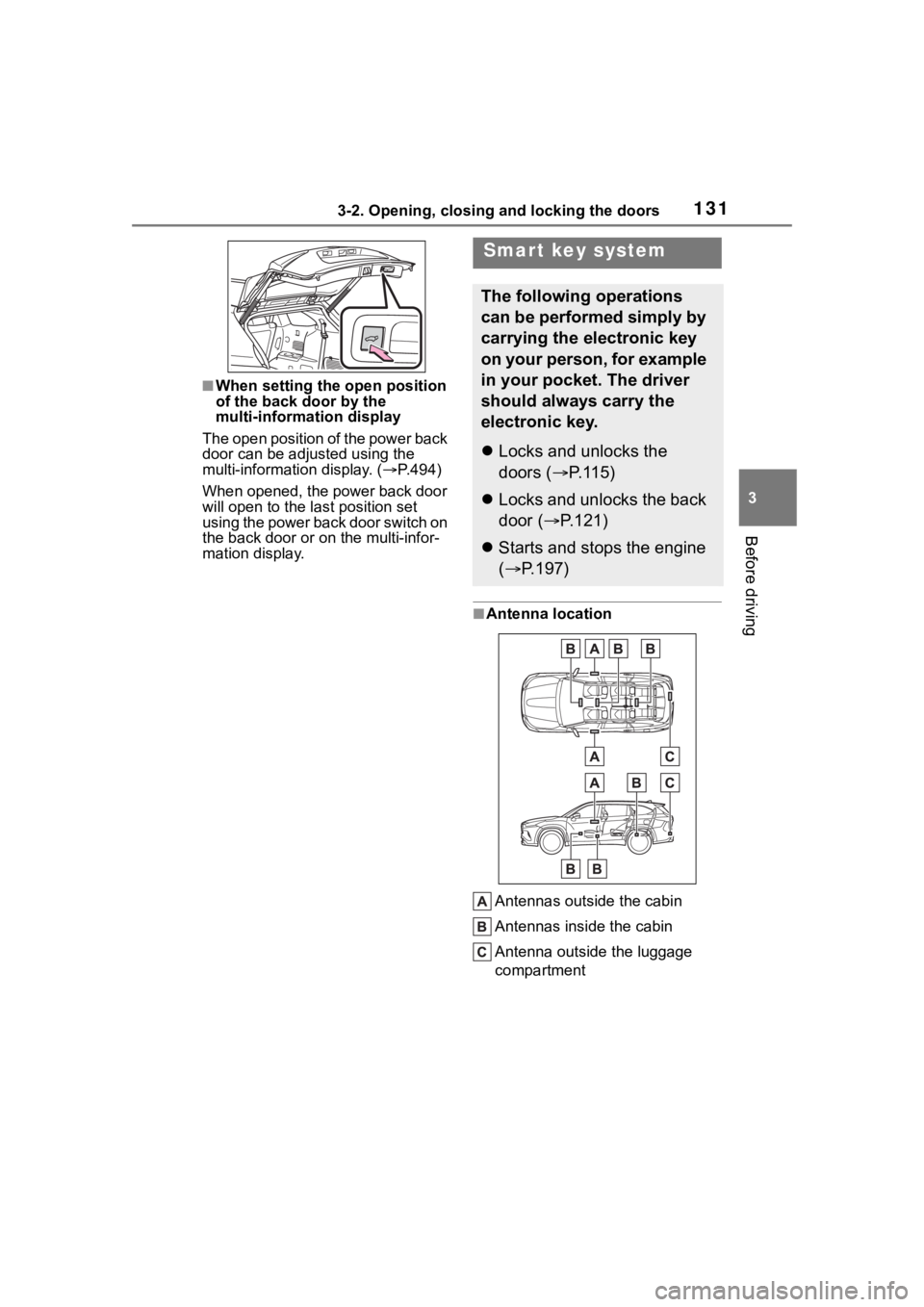
■Antenna location
Antennas outside the cabin
Antennas inside the cabin
Antenna outside the luggage
compartment
Smart key system
The following operations
can be performed simply by
carrying the electronic key
on your person, for example
in your pocket. The driver
should always carry the
electronic key.
Locks and unlocks the
doors ( P.115)
Locks and unlocks the back
door ( P.121)
Starts and stops the engine
( P.197)
Page 304 of 552
3044-5. Using the driving support systems
mal. Note that normal driving is
still possible even when Multi-ter-
rain Select brake control is not
operating.
*: After stopping the vehicle, do not stop the engine until the display
message has turned off.
■When Mud & Sand or Rock &
Dirt mode is canceled
In the following situations, Mud &
Sand mode or Rock & Dirt mode are
automatically canceled even if they
are selected.
●When the driving mode is
changed ( P.300)
●When the engine switch is turned
off
■Driving in Mud & Sand or Rock
& Dirt mode
The following types of situations
may occur, but they are not malfunc-
tions.
●Vibrations may be felt throughout
the vehicle or steering wheel
●Operating noise may be heard
from the engine compartment
■When an inspection at your
Toyota dealer is necessary
In the following si tuations, the sys-
tem may be malfunctioning. Have
the vehicle inspected by your Toyota
dealer immediately.
●When the slip indic ator light illumi-
nates while Mud & Sand or Rock
& Dirt mode is selected
●When the indicator for each mode
does not illuminate even though
Mud & Sand or Rock & Dirt mode
is selected
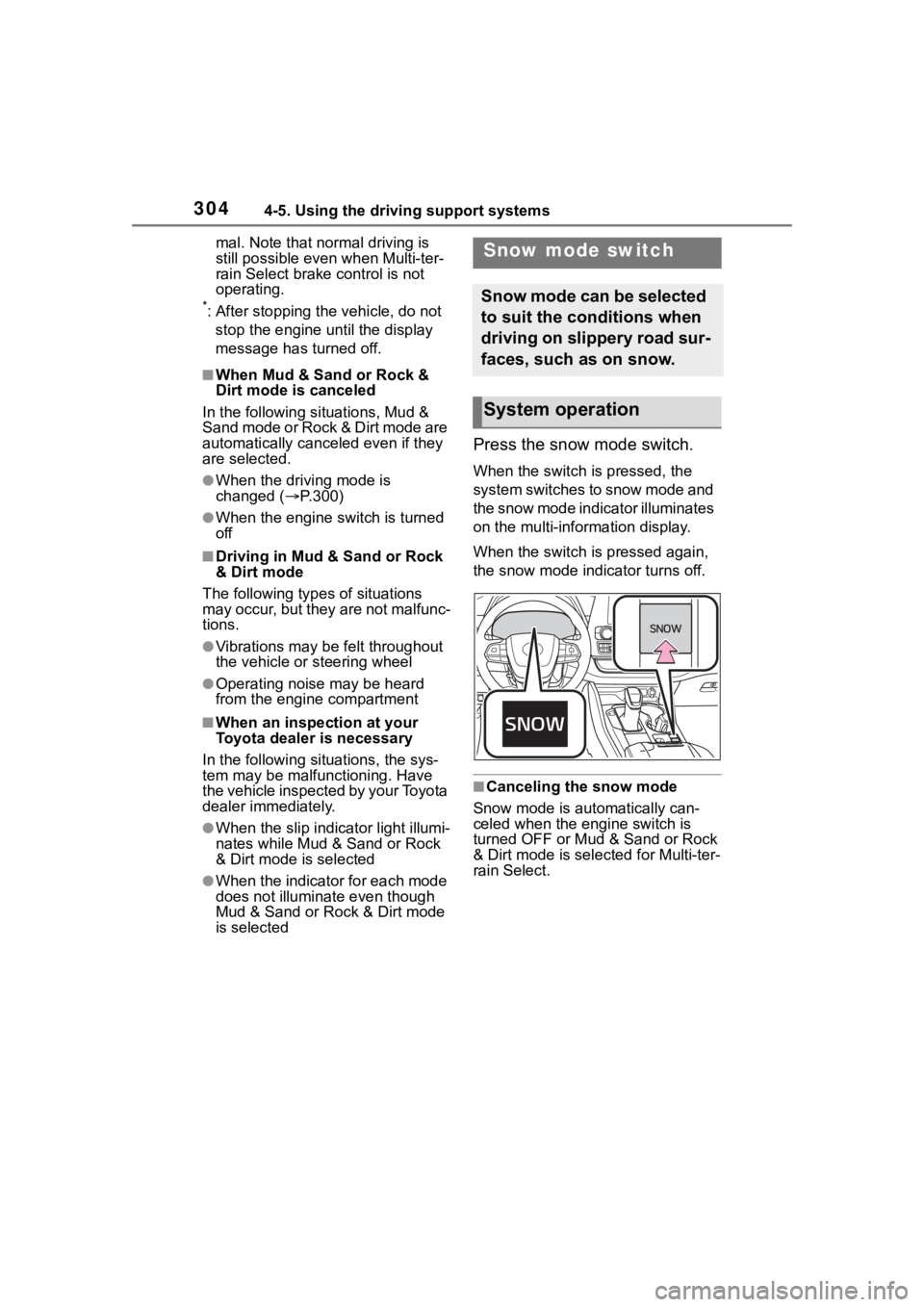
Press the snow mode switch.
When the switch is pressed, the
system switches to snow mode and
the snow mode indi cator illuminates
on the multi-information display.
When the switch is pressed again,
the snow mode indicator turns off.
■Canceling the snow mode
Snow mode is automatically can-
celed when the engine switch is
turned OFF or Mud & Sand or Rock
& Dirt mode is selec ted for Multi-ter-
rain Select.
Snow mode switch
Snow mode can be selected
to suit the conditions when
driving on slippery road sur-
faces, such as on snow.
System operation
Page 306 of 552

3064-5. Using the driving support systems
operation. The indicator will flash
during operation, and then go off
when the system is fully off.
■When the downhill assist con-
trol system is operated continu-
ously
This may cause the brake actuator
to overheat. In this case, the down-
hill assist control system will stop
operating, a buzzer will sound and
the downhill assist control system
indicator will start flashing, and
“Traction Control Turned OFF” will
be shown on the multi-information
display. Refrain from using the sys-
tem until the downhill assist control
system indicator stays on and the
message goes off. (The vehicle can
be driven normally during this time.)
■Sounds and vibrations caused
by the downhill assist control
system
●A sound may be heard from the
engine compartment when the
engine is started or just after the
vehicle begins to move. This
sound does not indicate that a
malfunction has occurred in down-
hill assist control system.
●Either of the following conditions
may occur when the downhill
assist control system is operating.
None of these are indicators that a
malfunction has occurred.
• Vibrations may be felt through the
vehicle body and steering.
• A motor sound may be heard after the vehicle comes to a stop.
■System malfunction
In the following ca ses, have your
vehicle checked by your Toyota
dealer.
●The downhill assist control system
indicator does not come on when
the engine switch is turned to ON.
●The downhill assist control system
indicator does not come on when
the downhill assist control switch
is pressed.
●The slip indicator comes on.
WARNING
■The system may not operate
on the following surfaces,
which may lead to an acci-
dent causing death or serious
injury
●Slippery surfaces such as wet
or muddy roads
●Icy surface
●Unpaved roads
Page 309 of 552

3094-5. Using the driving support systems
4
Driving
■Turning off both TRAC, VSC
and Trailer Sway Control sys-
tems
To turn the TRAC, VSC and Trailer
Sway Control systems off, press
and hold the switch for more
than 3 seconds while the vehicle is
stopped.
The VSC OFF indicator light will
come on and the “Traction Control
Turned OFF” will be shown on the
multi-information display.
*
Press the switch again to turn
the system back on.
*: On vehicles with PCS (Pre-Colli- sion System), PCS will also be
disabled (only Pre-Collision warn-
ing is available). The PCS warning
light will come on and a message
will be display ed on the
multi-informat ion display.
( P.228)
■When the message is dis-
played on the multi-information
display showing that TRAC has
been disabled even if the
switch has not been pressed
TRAC is temporary deactivated. If
the information continues to show,
contact your Toyota dealer.
■Operating conditions of
hill-start assist control
When the following four conditions
are met, the hill-start assist control
will operate:
●The shift lever is in a position
other than P or N (when starting
off forward/backward on an
upward incline)
●The vehicle is stopped
●The accelerator pedal is not
depressed
●The parking brake is not engaged
●The engine switch is in ON
■Automatic system cancelation
of hill-start assist control
The hill-start assist control will turn
off in any of the fo llowing situations:
●The shift lever is shifted to P or N
●The accelerator pedal is
depressed
●The brake pedal is depressed and
the parking brake is engaged
●2 seconds at maximum elapsed
after the brake pedal is released
●The engine switch is turned OFF
■Sounds and vibrations caused
by the ABS, brake assist, VSC,
Trailer Sway Control, TRAC and
hill-start assist control systems
●A sound may be heard from the
engine compartment when the
brake pedal is depressed repeat-
edly, when the engine is started or
just after the vehicle begins to
move. This sound does not indi-
cate that a malfunction has
occurred in any of these systems.
●Any of the following conditions
may occur when the above sys-
tems are operating. None of these
indicates that a malfunction has
occurred.
• Vibrations may be felt through the
vehicle body and steering.
• A motor sound may be heard also
after the vehicle comes to a stop.
• The brake pedal may pulsate
slightly after the ABS is activated.
• The brake pedal may move down slightly after the ABS is activated.
■Active Cornering Assist opera-
tion sounds and vibrations
When the Active Cornering Assist is
operated, operation sounds and
vibrations may be generated from
the brake system, but this is not a
malfunction.
Page 369 of 552

369
6
6
Maintenance and care
Maintenance and care
.6-1. Maintenance and careCleaning and protecting the vehicle exterior .......... 370
Cleaning and protecting the vehicle interior ........... 373
6-2. Maintenance Maintenance requirements.................................. 376
General maintenance.. 378
Emission inspection and maintenance (I/M) pro-
grams ........................ 380
6-3. Do-it-yourself mainte- nance
Do-it-yourself service pre- cautions ..................... 382
Hood ........................... 384
Positioning a floor jack .................................. 385
Engine compartment ... 386
Tires ............................ 393
Tire inflation pressure.. 405
Wheels ......... ...............407
Air conditioning filter .... 408
Electronic key battery.. 410
Checking and replacing fuses.......................... 412
Headlight aim .............. 414
Light bulbs................... 415
Page 371 of 552
3716-1. Maintenance and care
6
Maintenance and care
parts.
■Bumpers
Do not scrub with abrasive cleaners.
■Plated portions
If dirt cannot be removed, clean the
parts as follows:
●Use a soft cloth dampened with an
approximately 5% solution of neu-
tral detergent and water to clean
the dirt off.
●Wipe the surface with a dry, soft
cloth to remove any remaining
moisture.
●To remove oily deposits, use alco-
hol wet wipes or a similar product.
WARNING
■When washing the vehicle
Do not apply water to the inside of
the engine compartment. Doing
so may cause the electrical com-
ponents, etc. to catch fire.
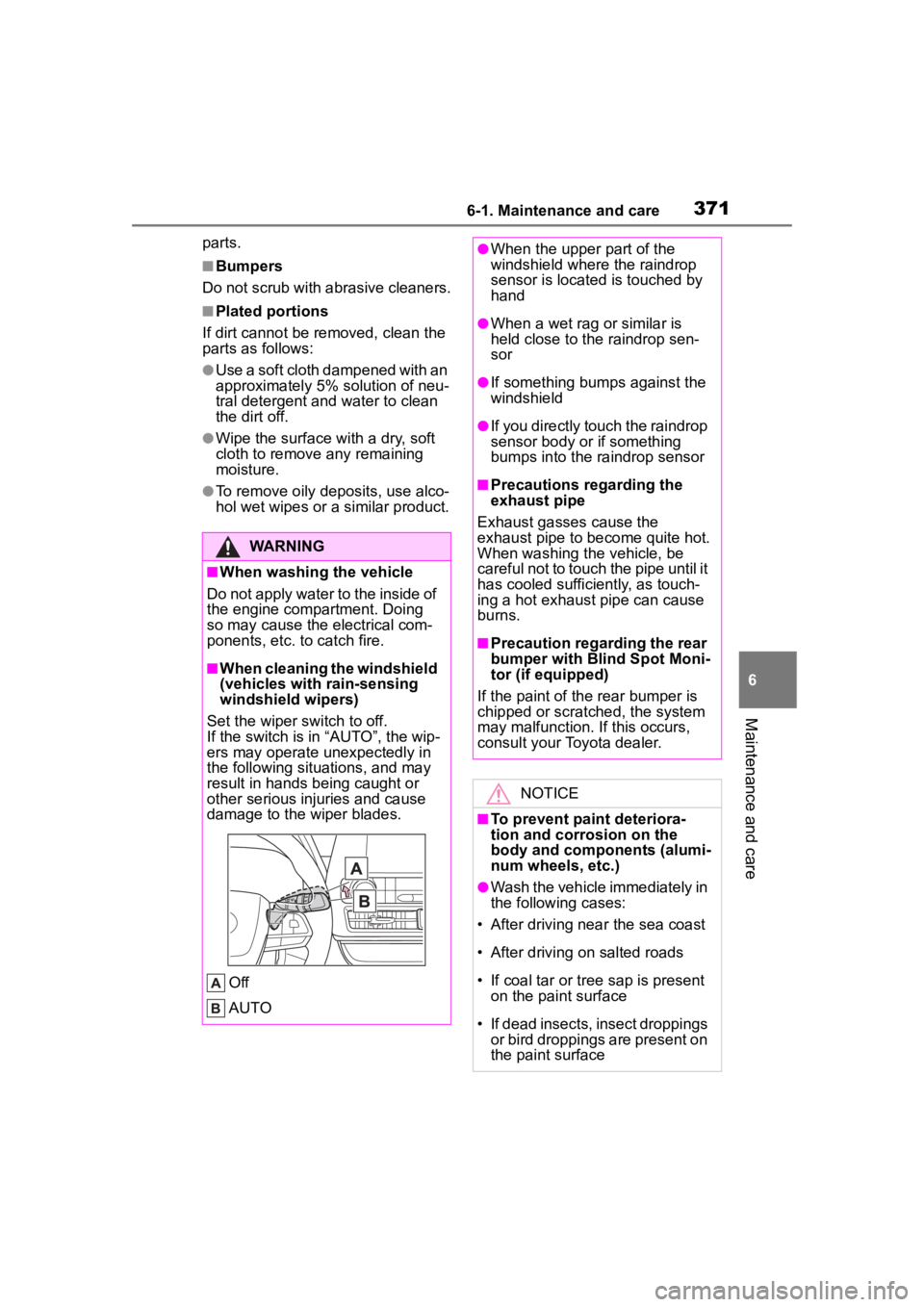
■When cleaning the windshield
(vehicles with rain-sensing
windshield wipers)
Set the wiper switch to off.
If the switch is in “AUTO”, the wip-
ers may operate unexpectedly in
the following situations, and may
result in hands being caught or
other serious injuries and cause
damage to the wiper blades.
Off
AUTO
●When the upper part of the
windshield where the raindrop
sensor is located is touched by
hand
●When a wet rag or similar is
held close to the raindrop sen-
sor
●If something bumps against the
windshield
●If you directly touch the raindrop
sensor body or if something
bumps into the ra indrop sensor
■Precautions regarding the
exhaust pipe
Exhaust gasses cause the
exhaust pipe to become quite hot.
When washing the vehicle, be
careful not to touch the pipe until it
has cooled sufficiently, as touch-
ing a hot exhaust pipe can cause
burns.
■Precaution regarding the rear
bumper with Blind Spot Moni-
tor (if equipped)
If the paint of th e rear bumper is
chipped or scratched, the system
may malfunction. If this occurs,
consult your Toyota dealer.
NOTICE
■To prevent paint deteriora-
tion and corrosion on the
body and components (alumi-
num wheels, etc.)
●Wash the vehicle immediately in
the following cases:
• After driving nea r the sea coast
• After driving on salted roads
• If coal tar or tree sap is present on the paint surface
• If dead insects, insect droppings or bird droppings are present on
the paint surface
Page 378 of 552

3786-2. Maintenance
General maintenance
Listed below are the general
maintenance items that
should be performed at the
intervals specified in the
“Owner’s Warranty Informa-
tion Booklet” or “Owner’s
Manual Supplement/Sched-
uled Maintenance Guide”. It
is recommended that any
problem you notice should
be brought to the attention
of your Toyota dealer or
qualified service shop for
advice.
WARNING
■If the engine is running
Turn the engine off and ensure
that there is adequate ventilation
before performing maintenance
checks.
Engine compartment
ItemsCheck points
BatteryCheck the connec-
tions. ( P.391)
Brake fluid
Is the brake fluid at
the correct level?
( P.390)
Engine coolant
Is the engine cool-
ant at the correct
level? ( P.389)
Engine oil
Is the engine oil at
the correct level?
( P.386)
Exhaust sys-
temThere should not
be any fumes or
strange sounds.
Radiator/con-
denser
The radiator and
condenser should
be free from for-
eign objects.
( P.390)
Washer fluid
Is there sufficient
washer fluid?
( P.392)
Vehicle interior
ItemsCheck points
Accelerator
pedal
• The accelerator
pedal should
move smoothly
(without uneven
pedal effort or
catching).
Automatic
transmission
“Park” mecha-
nism
• When parked on a slope and the
shift lever is in P,
is the vehicle
securely
stopped?
ItemsCheck points