2023 TOYOTA HIGHLANDER warning light
[x] Cancel search: warning lightPage 270 of 552

2704-5. Using the driving support systems
*: If equipped
Meter control switches
Turning the Blind Spot Monitor
on/off.
Outside rear view mirror indi-
cators
When driving:
When a vehicle is detected in a
blind spot of the outside rear view
mirrors or approaching rapidly from
behind into a blind spot, the outside
rear view mirror indicator on the
detected side will illuminate. If the
turn signal lever is operated toward
the detected side, the outside rear
view mirror indicator flashes.
BSM OFF indicator
Illuminates when the Blind Spot
Monitor is disabled.
■Outside rear view mirror indica-
tor visibility
In strong sunlight, the outside rear
view mirror indicator may be difficult
to see.
■When “Blind Spot Monitor
Unavailable” is shown on the
multi-information display
Ice, snow, mud, etc., may be
attached to the rear bumper around
the sensors. ( P.271) The system
should return to normal operation
after removing the ice, snow, mud,
BSM (Blind Spot Moni-
tor)*
The Blind Spot Monitor is a
system that uses rear side
radar sensors installed on
the inner side of the rear
bumper on the left and right
side to assist the driver in
confirming safety when
changing lanes.
WARNING
■Cautions regarding the use of
the system
The driver is solely responsible for
safe driving. Always drive safely,
taking care to o bserve your sur-
roundings.
The Blind Spot Monitor is a sup-
plementary function which alerts
the driver that a v ehicle is in a
blind spot of the outside rear view
mirrors or is approaching rapidly
from behind into a blind spot. Do
not overly rely on the Blind Spot
Monitor. As the function cannot
judge if it is safe to change lanes,
over reliance could lead to an
accident resulting in death or seri-
ous injury.
As the system may not function
correctly under certain condi-
tions, the driver’s own visual con-
firmation of safety is necessary.
System components
Page 271 of 552

2714-5. Using the driving support systems
4
Driving
etc. from the rear bumper. Addition-
ally, the sensors may not operate
normally when driving in extremely
hot or cold environments.
■When “Blind Spot Monitor Mal-
function Visit Your Dealer” is
shown on the multi-information
display
There may be a sensor malfunction
of misaligned. Have the vehicle
inspected by your Toyota dealer.
■Customization
Some functions can be customized.
( P.494)
WARNING
■To ensure the system can
operate properly
Blind Spot Monitor sensors are
installed behind the left and right
sides of the rear bumper respec-
tively. Observe the following to
ensure the Blind Spot Monitor can
operate correctly.
●Keep the sensors and the sur-
rounding areas on the rear
bumper clean at all times.
If a sensor or its surrounding area
on the rear bumper is dirty or cov-
ered with snow, the Blind Spot
Monitor may not operate and a
warning message (
P.270) will
be displayed. In this situation,
clear off the dirt or snow and drive
the vehicle with the operation con-
ditions of the BSM function
(
P.273) satisfied for approxi-
mately 10 minutes. If the warning
message does not disappear,
have the vehicle inspected by
your Toyota dealer.
●Do not attach a ccessories,
stickers (including transparent
stickers), aluminum tape, etc. to
a sensor or its surrounding area
on the rear bumper.
●Do not subject a sensor or its
surrounding area on the rear
bumper to a strong impact.
If a sensor is moved even
slightly off position, the system
may malfunction and vehicles
may not be detected correctly.
In the following si tuations, have
your vehicle inspected by your
Toyota dealer.
• A sensor or its surrounding area is subject to a strong impact.
• If the surrounding area of a sen- sor is scratched or dented, or
part of them h as become dis-
connected.
Page 276 of 552

2764-5. Using the driving support systems
Use the meter control switches
to enable/disable the intuitive
parking assist. (P.102)
1 Select of the multi-infor-
mation display and then
press .
2 Press or to select
and then press .
When the intuitive parking assist
function is disabled, the intuitive
parking assist OFF indicator
( P.76) illuminates.
To re-enable the system, select on the multi-information dis-
play, select and turn it on. If
the system is di sabled, it will
remain off even if the engine
switch is turned to ON after the
engine switch has been turned
off.
Turning intuitive parking
assist on/off
WARNING
■Cautions regarding the use of
the system
There is a limit t o the degree of
recognition accuracy and control
performance that this system can
provide, do not overly rely on this
system. The driver is always
responsible for paying attention to
the vehicle’ surroundings and
driving safely.
■To ensure the system can
operate properly
Observe the following precau-
tions.
Failing to do so may result in the
vehicle being unable to be driven
safely and possibly cause an acci-
dent.
●Do not damage the sensors,
and always keep them clean.
●Do not attach a sticker or install
an electronic component, such
as a backlit licen se plate (espe-
cially fluorescent type), fog
lights, fender po le or wireless
antenna near a radar sensor.
●Do not subject the surrounding
area of the sensor to a strong
impact. If subjected to an
impact, have the vehicle
inspected by your Toyota
dealer. If the front or rear
bumper needs to be
removed/installed or replaced,
contact your Toyota dealer.
●Do not modify, disassemble or
paint the sensors.
●Do not attach a license plate
cover.
●Keep your tires properly
inflated.
Page 302 of 552
3024-5. Using the driving support systems
Control that is suitable for the
following road conditions can be
performed by switching to either
of the two modes. Select a
mode that is appropriate for the
road condition.
■Mud & Sand mode
Suitable for driving on roads
with increased driving resis-
tance such as sandy roads,
muddy roads, etc.
■Rock & Dirt mode
Suitable for driving in bumpy
road conditions, such as on
unpaved forest roads.
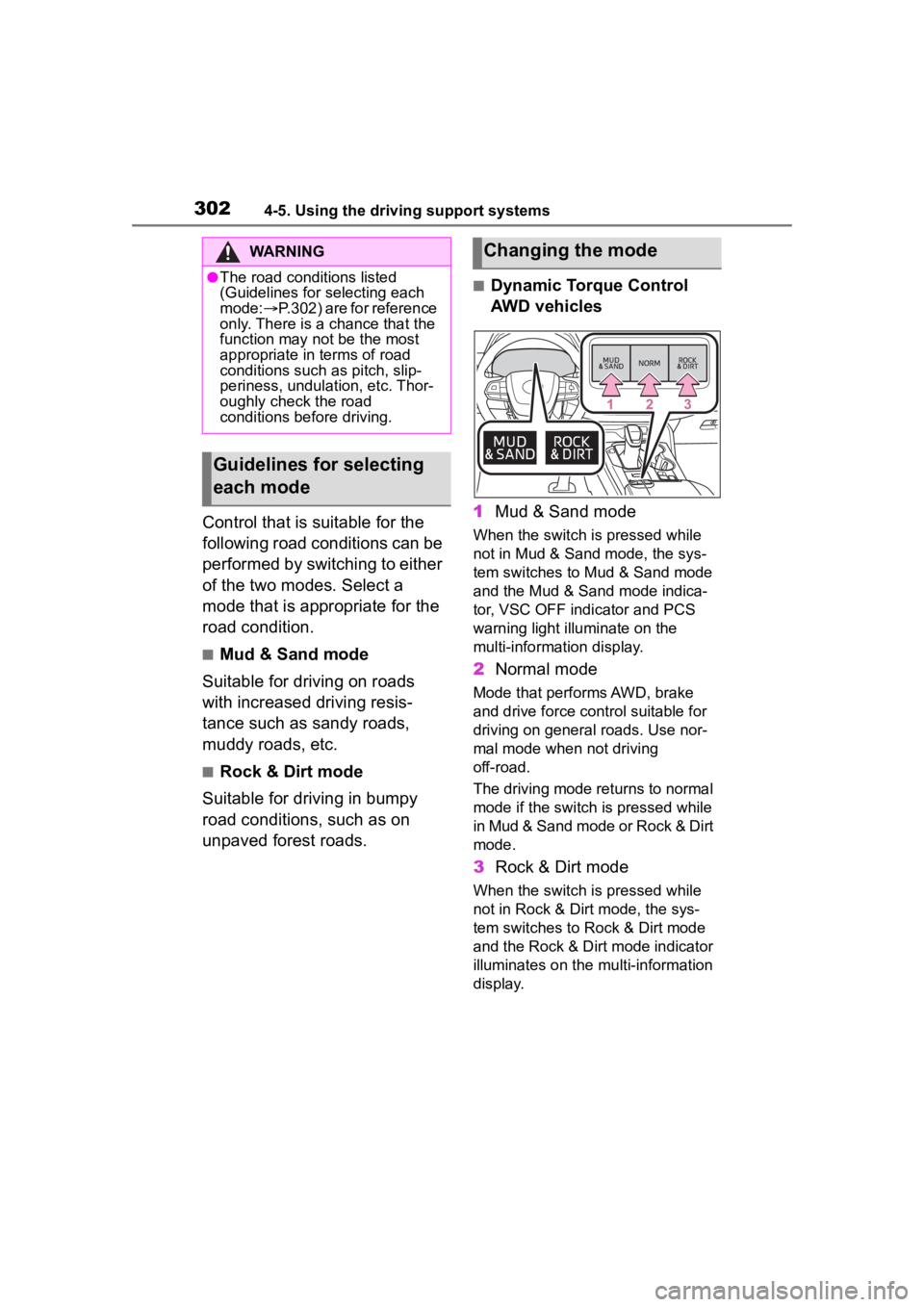
■Dynamic Torque Control
AWD vehicles
1 Mud & Sand mode
When the switch is pressed while
not in Mud & Sand mode, the sys-
tem switches to Mud & Sand mode
and the Mud & Sand mode indica-
tor, VSC OFF indi cator and PCS
warning light illuminate on the
multi-information display.
2 Normal mode
Mode that performs AWD, brake
and drive force cont rol suitable for
driving on general roads. Use nor-
mal mode when not driving
off-road.
The driving mode returns to normal
mode if the switch i s pressed while
in Mud & Sand mode or Rock & Dirt
mode.
3 Rock & Dirt mode
When the switch is pressed while
not in Rock & Dirt mode, the sys-
tem switches to Rock & Dirt mode
and the Rock & Dirt mode indicator
illuminates on the mu lti-information
display.
WARNING
●The road conditions listed
(Guidelines for selecting each
mode: P.302) are for reference
only. There is a chance that the
function may not be the most
appropriate in terms of road
conditions such as pitch, slip-
periness, undulation, etc. Thor-
oughly check the road
conditions before driving.
Guidelines for selecting
each mode
Changing the mode
Page 303 of 552

3034-5. Using the driving support systems
4
Driving
■Dynamic Torque Vectoring
AWD vehicles
1 Mud & Sand mode
When the switch is turned to the left
while not in Mud & Sand mode, the
system switches to Mud & Sand
mode and the Mud & Sand mode
indicator, VSC OFF indicator and
PCS warning light illuminate on the
multi-information display.
2Normal mode
Mode that performs AWD, brake
and drive force control suitable for
driving on general roads. Use nor-
mal mode when not driving
off-road.
The driving mode returns to normal
mode if the switch is pressed while
in Mud & Sand mode or Rock & Dirt
mode.
3Rock & Dirt mode
When the switch is turned to the
right while not in Rock & Dirt mode,
the system switches to Rock & Dirt
mode and the Rock & Dirt mode
indicator illuminates on the
multi-information display.
■Multi-terrain Select
●Multi-terrain Sele ct is intended for
use when driving on rough roads.
Drive in normal mode during nor-
mal driving.
●The Mud & Sand and Rock & Dirt modes control the
vehicle so that
it can maximize the drive force
and improve driv ability on rough
roads. As a result, fuel efficiency
may diminish when compared to
driving in normal mode.
■If Mud & Sand or Rock & Dirt
mode is selected
The AWD operation status display
will automatically switch on the
multi-information display.
■AWD control for Mud & Sand
and Rock & Dirt modes
If the vehicle speed exceeds the
speeds listed below, the same level
of AWD control for Normal mode is
performed, even if Mud & Sand or
Rock & Dirt mode is selected.
●Mud & Sand mode: Vehicle speed
is approximately 25 mph (40
km/h) or more
●Rock & Dirt mode: Vehicle speed
is approximately 16 mph (25
km/h) or more
If the vehicle speed drops below the
above speeds, the system automati-
cally returns to the AWD control for
each mode.
■When Multi-terrain Select brake
control temporarily stops oper-
ating
If Mud & Sand or Rock & Dirt mode
is continuously used for a long
period of time, th e brakes may over-
heat, and Multi-terrain Select brake
control may temporarily stop operat-
ing.
●At this time, the buzzer sounds
intermittently and “Traction Con-
trol Turned OFF” is displayed on
the multi-information display.
●If Multi-terrain Sele ct brake control
stops operating, stop the vehicle
in a safe location as soon as pos-
sible
* and wait until the system
temperature decreases. Once the
display message on the
multi-information d isplay turns off,
the brake control returns to nor-
Page 305 of 552
3054-5. Using the driving support systems
4
Driving
*: If equipped
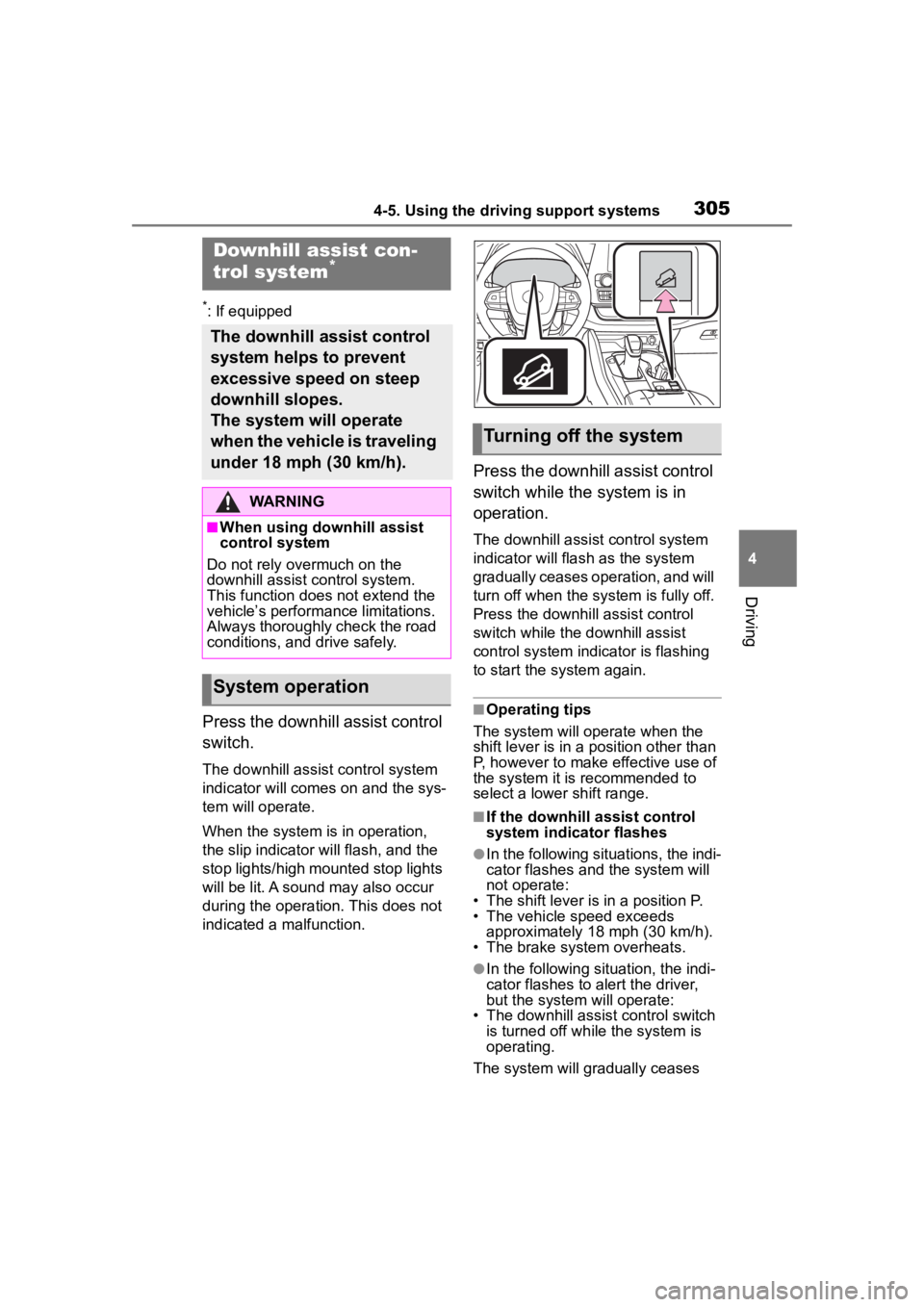
Press the downhill assist control
switch.
The downhill assist control system
indicator will comes on and the sys-
tem will operate.
When the system is in operation,
the slip indicator will flash, and the
stop lights/high mounted stop lights
will be lit. A sound may also occur
during the operation. This does not
indicated a malfunction.
Press the downhill assist control
switch while the system is in
operation.
The downhill assist control system
indicator will flash as the system
gradually ceases operation, and will
turn off when the system is fully off.
Press the downhill assist control
switch while the downhill assist
control system indicator is flashing
to start the system again.
■Operating tips
The system will o perate when the
shift lever is in a position other than
P, however to make effective use of
the system it is recommended to
select a lower shift range.
■If the downhill assist control
system indicator flashes
●In the following situ ations, the indi-
cator flashes and the system will
not operate:
• The shift lever is in a position P.
• The vehicle speed exceeds approximately 18 mph (30 km/h).
• The brake system overheats.
●In the following situation, the indi-
cator flashes to alert the driver,
but the system will operate:
• The downhill assist control switch is turned off while the system is
operating.
The system will gradually ceases
Downhill assist con-
trol system*
The downhill assist control
system helps to prevent
excessive speed on steep
downhill slopes.
The system will operate
when the vehicle is traveling
under 18 mph (30 km/h).
WARNING
■When using downhill assist
control system
Do not rely overmuch on the
downhill assist control system.
This function does not extend the
vehicle’s performance limitations.
Always thoroughly check the road
conditions, and drive safely.
System operation
Turning off the system
Page 309 of 552

3094-5. Using the driving support systems
4
Driving
■Turning off both TRAC, VSC
and Trailer Sway Control sys-
tems
To turn the TRAC, VSC and Trailer
Sway Control systems off, press
and hold the switch for more
than 3 seconds while the vehicle is
stopped.
The VSC OFF indicator light will
come on and the “Traction Control
Turned OFF” will be shown on the
multi-information display.
*
Press the switch again to turn
the system back on.
*: On vehicles with PCS (Pre-Colli- sion System), PCS will also be
disabled (only Pre-Collision warn-
ing is available). The PCS warning
light will come on and a message
will be display ed on the
multi-informat ion display.
( P.228)
■When the message is dis-
played on the multi-information
display showing that TRAC has
been disabled even if the
switch has not been pressed
TRAC is temporary deactivated. If
the information continues to show,
contact your Toyota dealer.
■Operating conditions of
hill-start assist control
When the following four conditions
are met, the hill-start assist control
will operate:
●The shift lever is in a position
other than P or N (when starting
off forward/backward on an
upward incline)
●The vehicle is stopped
●The accelerator pedal is not
depressed
●The parking brake is not engaged
●The engine switch is in ON
■Automatic system cancelation
of hill-start assist control
The hill-start assist control will turn
off in any of the fo llowing situations:
●The shift lever is shifted to P or N
●The accelerator pedal is
depressed
●The brake pedal is depressed and
the parking brake is engaged
●2 seconds at maximum elapsed
after the brake pedal is released
●The engine switch is turned OFF
■Sounds and vibrations caused
by the ABS, brake assist, VSC,
Trailer Sway Control, TRAC and
hill-start assist control systems
●A sound may be heard from the
engine compartment when the
brake pedal is depressed repeat-
edly, when the engine is started or
just after the vehicle begins to
move. This sound does not indi-
cate that a malfunction has
occurred in any of these systems.
●Any of the following conditions
may occur when the above sys-
tems are operating. None of these
indicates that a malfunction has
occurred.
• Vibrations may be felt through the
vehicle body and steering.
• A motor sound may be heard also
after the vehicle comes to a stop.
• The brake pedal may pulsate
slightly after the ABS is activated.
• The brake pedal may move down slightly after the ABS is activated.
■Active Cornering Assist opera-
tion sounds and vibrations
When the Active Cornering Assist is
operated, operation sounds and
vibrations may be generated from
the brake system, but this is not a
malfunction.
Page 312 of 552

3124-5. Using the driving support systems
WARNING
■When the TRAC/VSC/Trailer
Sway Control is activated
The slip indicator light flashes.
Always drive carefully. Reckless
driving may cause an accident.
Exercise particular care when the
indicator light flashes.
■When the TRAC/VSC/Trailer
Sway Control systems are
turned off
●Be especially careful and drive
at a speed appropriate to the
road conditions. As these are
the systems to help ensure
vehicle stability and driving
force, do not turn the
TRAC/VSC/Trailer Sway Con-
trol systems off unless neces-
sary.
●Trailer Sway Control is part of
the VSC system and will not
operate if VSC is turned off or
experiences a malfunction.
■Dynamic Torque Vectoring
AWD system
The cornering performance of the
AWD system has been improved.
However, do not overly rely on the
system and drive with caution.
■Replacing tires
Make sure that all tires are of the
specified size, brand, tread pat-
tern and total load capacity. In
addition, make sure that the tires
are inflated to the recommended
tire inflation pressure level.
The ABS, TRAC, Trailer Sway
Control and VSC systems will not
function correctly if different tires
are installed on the vehicle.
Contact your Toyota dealer for fur-
ther information when replacing
tires or wheels.
■Handling of tires and the sus-
pension
Using tires with any kind of prob-
lem or modifying the suspension
will affect the driving assist sys-
tems, and may cause a system to
malfunction.
■Trailer Sway Control precau-
tion
The Trailer Sway Control system
is not able to red uce trailer sway
in all situations. Depending on
many factors such as the condi-
tions of the vehicle, trailer, road
surface and driving environment,
the Trailer Sway Control system
may not be effective. Refer to
your trailer owner’s manual for
information on how to tow your
trailer properly.
■If trailer sway occurs
Observe the following precau-
tions.
Failing to do so may cause death
or serious injury.
●Firmly grip the steering wheel.
Steer straight ahead. Do not try
to control trailer sway by turning
the steering wheel.
●Begin releasing the accelerator
pedal immediately but very
gradually to reduce speed.
Do not increase speed. Do not
apply vehicle brakes.
If you make no extreme correction
with the steering or brakes, your
vehicle and traile r should stabi-
lize. ( P.186)