2023 TOYOTA HIGHLANDER battery
[x] Cancel search: batteryPage 466 of 552

4667-2. Steps to take in an emergency
on the second vehicle and connect the clamp at the other end of
the negative cable to .
Positive (+) battery terminal (your vehicle)
Positive (+) battery terminal (second vehicle)
Negative (-) battery term inal (second vehicle)
Solid, stationary, unpainted metallic point away from the batte ry
and any moving parts as shown in the illustration
4 Start the engine of the sec-
ond vehicle. Increase the
engine speed slightly and
maintain at that level for
approximately 5 minutes to
recharge the battery of your
vehicle.
5 Open and close any of the
doors of your vehicle with the
engine switch OFF.
6 Maintain the engine speed of
the second vehicle and start
the engine of your vehicle by
turning the engine switch to
ON.
7 Once the vehicle’s engine
has started, remove the
jumper cables in the exact reverse order from which
they were connected.
Once the engine starts, have the
vehicle inspected at your Toyota
dealer as soon as possible.
■Starting the engine when the
battery is discharged
The engine cannot be started by
push-starting.
■To prevent bat tery discharge
●Turn off the headlights and the
audio system while the engine is
stopped. (Vehicles with Stop &
Start system: Except when the
engine is stopped by the Stop &
Start system.)
●Turn off any unnecessary electri-
cal components when the vehicle
is running at a low speed for an
extended period, such as in heavy
Page 467 of 552

4677-2. Steps to take in an emergency
7
When trouble arises
traffic.
■When the battery is removed or
discharged
●Information stored in the ECU is
cleared. When the battery is
depleted, have the vehicle
inspected at you r Toyota dealer.
●Some systems may require initial-
ization. ( P.507)
■When removing the battery ter-
minals
When the battery terminals are
removed, the information stored in
the ECU is cleared . Before remov-
ing the battery terminals, contact
your Toyota dealer.
■Charging the battery
The electricity stor ed in the battery
will discharge gradu ally even when
the vehicle is not i n use, due to nat-
ural discharge and the draining
effects of certain electrical appli-
ances. If the vehicle is left for a long
time, the battery may discharge,
and the engine ma y be unable to
start. (The battery recharges auto-
matically during driving.)
■After jump starting the vehicle
(Vehicles with Stop & Start sys-
tem)
Be sure to disable the Stop & Start
system so that the battery can be
charged. ( P.265)
■When recharging or replacing
the battery
●In some cases, i t may not be pos-
sible to unlock the doors using the
smart key system when the bat-
tery is discharged. Use the wire-
less remote control or the
mechanical key to lock or unlock
the doors.
●The engine may not start on the
first attempt after the battery has
recharged but will start normally
after the se cond attempt. This is
not a malfunction.
●The engine switch mode is memo- rized by the vehicle. When the
battery is reconnected, the system
will return to the mode it was in
before the bat
tery was dis-
charged. Before disconnecting the
battery, turn the engine switch off.
If you are unsure what mode the
engine switch wa s in before the
battery discharged, be especially
careful when reconnecting the
battery.
●Vehicles with power back door:
The power back door must be ini-
tialized. ( P.127)
●Vehicles with Stop & Start system:
The Stop & Start system may not
automatically stop the engine for
up to an hour.
■When replacing the battery
●Use a Central Degassing type bat-
tery (European Regulations).
●Vehicles with Stop & Start system:
Use a genuine battery specifically
designed for use with the Stop &
Start system or a battery with
equivalent specifications to a gen-
uine battery. If an unsupported
battery is used, Stop & Start sys-
tem functions may be restricted to
protect the battery.
Also, battery per formance may
decrease and the engine may not
be able to restart. Contact your
Toyota dealer for details.
●Vehicles without Stop & Start sys-
tem: Use a battery that the case
size is same as the previous one
(LN3), 20 hour rate capacity
(20HR) is equivalent (70Ah) or
greater, and per formance rating
(CCA) is equivalent (603A) or
greater.
Vehicles with Stop & Start system:
Use a battery that the case size is
same as the previous one (LN3), 20
hour rate capacity (20HR) is equiva-
lent (65Ah) or greater, and perfor-
mance rating (CCA) is equivalent
(603A) or greater.
• If the sizes differ, the battery can- not be properly secured.
Page 468 of 552

4687-2. Steps to take in an emergency
• If the 20 hour rate capacity is low,
even if the time period where the
vehicle is not used is a short time,
the battery may discharge and the
engine may not be able to start.
For details, consult your Toyota
dealer.
WARNING
■When removing the battery
terminals
Always remove the negative (-)
terminal first. If the positive (+) ter-
minal contacts any metal in the
surrounding area when the posi-
tive (+) terminal is removed, a
spark may occur, l eading to a fire
in addition to electrical shocks
and death or serious injury.
■When disconnecting the bat-
tery
Do not disconnect the negative (-)
terminal on the body side. The
disconnected negative (-) terminal
may touch the positive (+) termi-
nal, which may cause a short and
result in death or serious injury.
■Avoiding battery fires or
explosions
Observe the following precautions
to prevent accidentally igniting the
flammable gas that may be emit-
ted from the battery:
●Make sure each jumper cable is
connected to the correct termi-
nal and that it is not unintention-
ally in contact with any other
than the intended terminal.
●Do not allow the other end of
the jumper cable connected to
the “+” terminal to come into
contact with any other parts or
metal surfaces in the area, such
as brackets or unpainted metal.
●Do not allow the + and - clamps
of the jumper cables to come
into contact with each other.
●Do not smoke, use matches,
cigarette lighter s or allow open
flame near the battery.
■Battery precautions
The battery contains poisonous
and corrosive acidic electrolyte,
while related parts contain lead
and lead compounds. Observe
the following precautions when
handling the battery:
●When working with the battery,
always wear safety glasses and
take care not to allow any bat-
tery fluids (acid) to come into
contact with skin, clothing or the
vehicle body.
●Do not lean over the battery.
●In the event that battery fluid
comes into contact with the skin
or eyes, immediately wash the
affected area with water and
seek medical attention. Place a
wet sponge or cloth over the
affected area until medical
attention can be received.
●Always wash your hands after
handling the battery support,
terminals, and other bat-
tery-related parts.
●Do not allow children near the
battery.
■When replacing the battery
●When the vent plug and indica-
tor are close to the hold down
clamp, the battery fluid (sulfuric
acid) may leak.
●For information regarding bat-
tery replacement, contact your
Toyota dealer.
Page 478 of 552
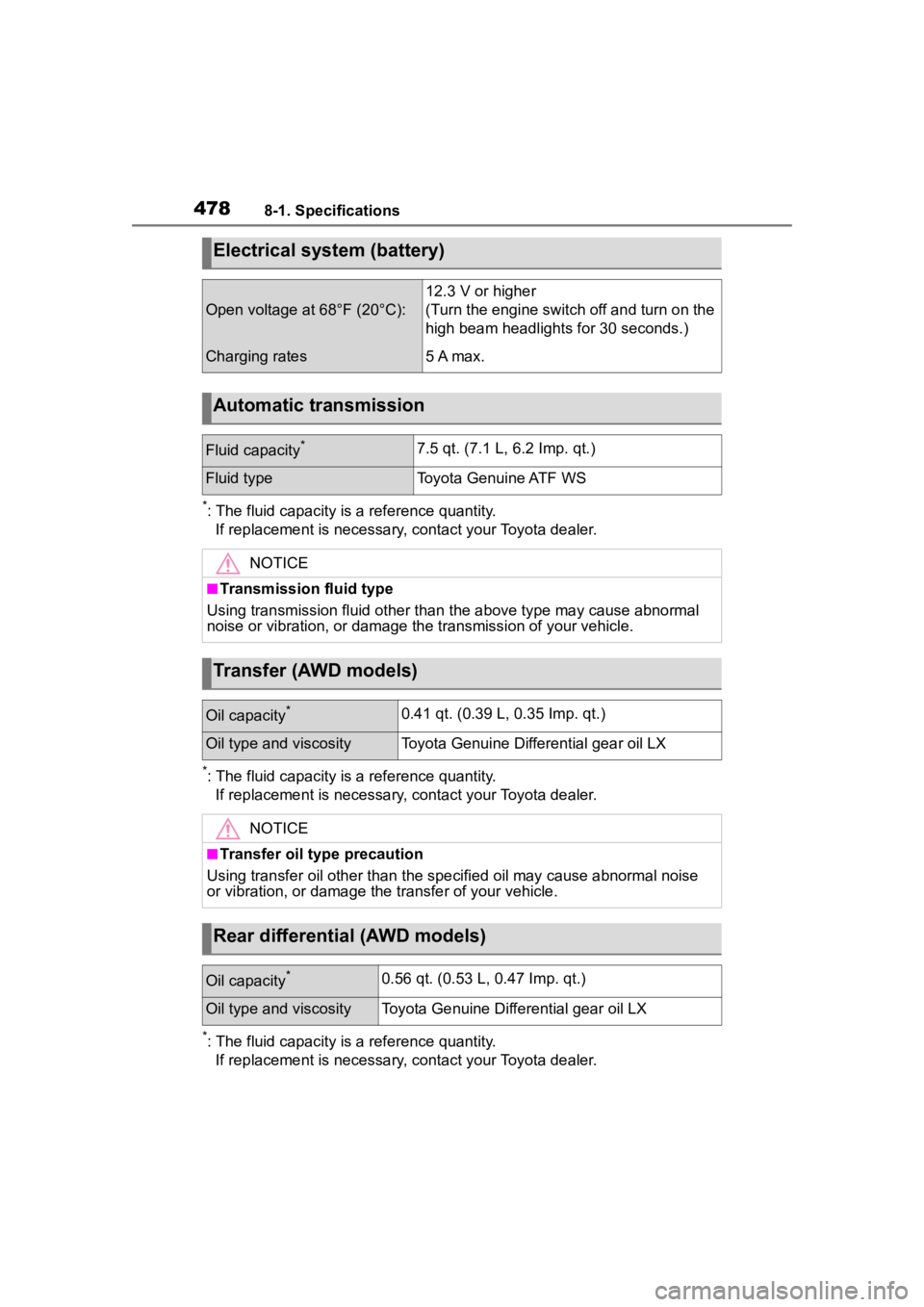
4788-1. Specifications
*: The fluid capacity is a reference quantity.If replacement is necessary, contact your Toyota dealer.
*: The fluid capacity is a reference quantity.If replacement is necessary, contact your Toyota dealer.
*: The fluid capacity is a reference quantity.If replacement is necessary, contact your Toyota dealer.
Electrical system (battery)
Open voltage at 68°F (20°C):
12.3 V or higher
(Turn the engine switch off and turn on the
high beam headlights for 30 seconds.)
Charging rates5 A max.
Automatic transmission
Fluid capacity*7.5 qt. (7.1 L, 6.2 Imp. qt.)
Fluid typeToyota Genuine ATF WS
NOTICE
■Transmission fluid type
Using transmission fluid other than the above type may cause ab normal
noise or vibration, or damage th e transmission of your vehicle.
Transfer (AWD models)
Oil capacity*0.41 qt. (0.39 L, 0.35 Imp. qt.)
Oil type and viscosityToyota Genuine Differential gear oil LX
NOTICE
■Transfer oil type precaution
Using transfer oil other than t he specified oil may cause abnormal noise
or vibration, or damage the transfer of your vehicle.
Rear differential (AWD models)
Oil capacity*0.56 qt. (0.53 L, 0.47 Imp. qt.)
Oil type and viscosityToyota Genuine Differential gear oil LX
Page 489 of 552

4898-1. Specifications
8
Vehicle specifications
Maximum loaded vehicle
weight
The sum of:
(a) Curb weight
(b) Accessory weight
(c) Vehicle capacity weight
(d) Production options weight
Normal occupant weight
150 lb. (68 kg) times the number of occu-
pants specified in the second column of
Table 1
* that follows
Occupant distribution
Distribution of occupants in a vehicle as
specified in the thi rd column of Table 1
*
below
Production options weight
The combined weight o f installed regular
production options weighing over 5 lb. (2.3
kg) in excess of the s tandard items which
they replace, not previously considered in
curb weight or accessory weight, including
heavy duty brakes, ride levelers, roof rack,
heavy duty battery, and special trim
Rim
A metal support for a tire or a tire and tube
assembly upon which the tire beads are
seated
Rim diameter (Wheel diame-
ter)Nominal diameter of the bead seat
Rim size designationRim diameter and width
Rim type designationThe industry manufacturer’s designation
for a rim by style or code
Rim widthNominal distance be tween rim flanges
Vehicle capacity weight (Total
load capacity)The rated cargo and luggage load plus 150
lb. (68 kg) times the vehicle’s designated
seating capacity
Vehicle maximum load on the
tire
The load on an individual tire that is deter-
mined by distributing to each axle its share
of the maximum loaded vehicle weight,
and dividing by two
Tire related termMeaning
Page 494 of 552

4948-2. Customization
8-2.Customization
■Changing by using the navi-
gation/multimedia system
1 Select on the main menu.
2 Select “Vehicle customize”.
3 Select the item to change the
settings of from the list.
Various setting can be changed.
Refer to the list o f settings that can
be changed for details.
For functions that can be turned
on/off, select (On)/
(Off).
■Changing by using the
meter control switches
7-inch display
1 Select of the multi-infor-
mation display and then
press .
2 Press or of the meter
control switch to select the desired item to be custom-
ized.
3 Press or press and hold .
The available settings will differ
depending on if is pressed or
pressed and held. Follow the
instructions on the display.
12.3-inch display
1 Select of the multi-infor-
mation display and then
press .
2 Press or of the meter
control switch to select the
desired item to be custom-
ized.
3 Press or press and hold .
The available settings will differ
depending on if is pressed or
pressed and held. Follow the
instructions on the display.
■When customizing using the
navigation/multimedia system
Stop the vehicle in a safe place,
apply the parking brake, and shift
the shift lever to P . Also, to prevent
battery discharge, leave the engine
running while customizing the fea-
tures.
Customizable features
Your vehicle includes a vari-
ety of electronic features
that can be personalized to
suit your preferences. The
settings of these features
can be changed using the
multi-information display,
the navigation/multimedia
system, or at your Toyota
dealer.
Customizing vehicle fea-
tures
Page 507 of 552
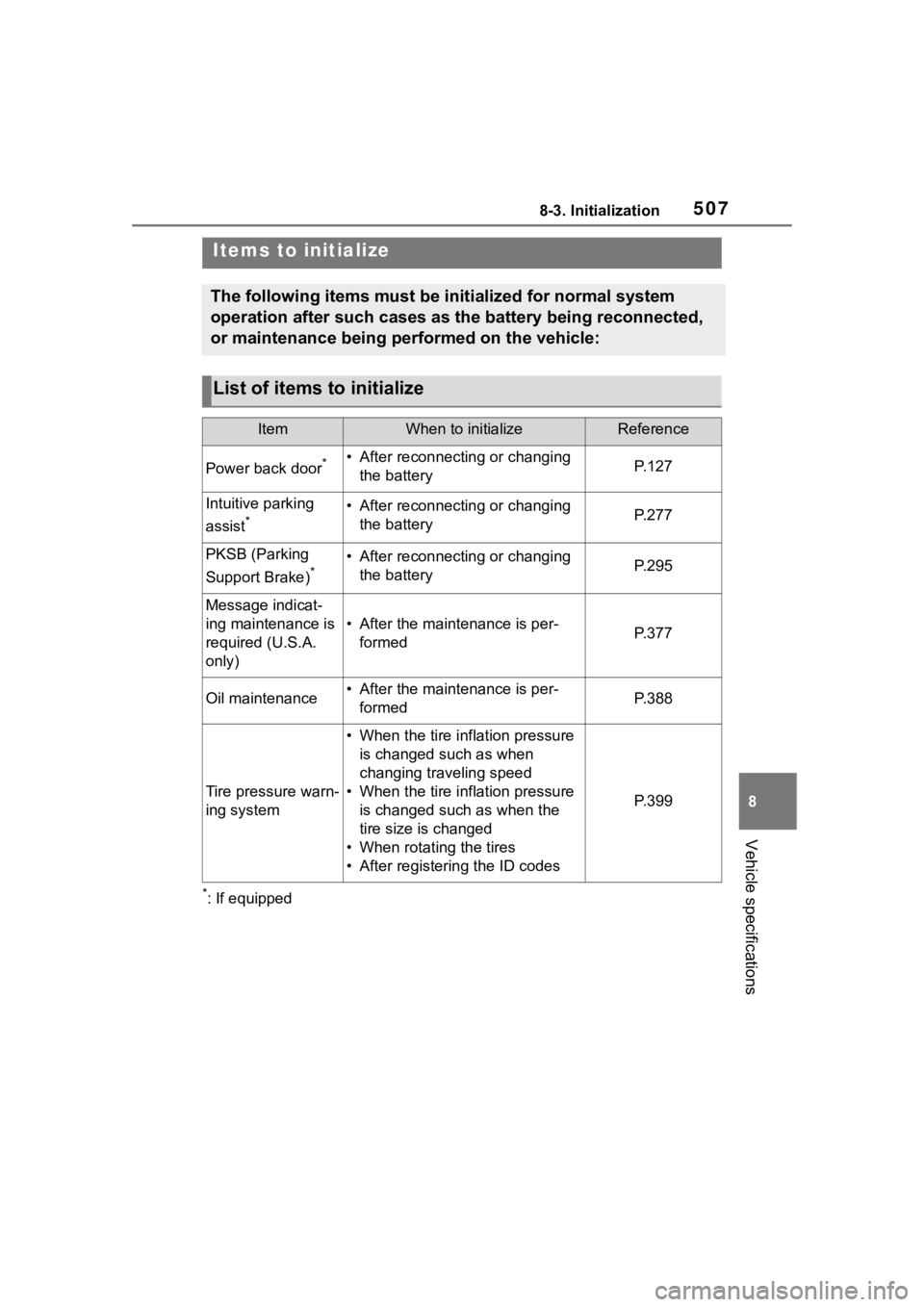
5078-3. Initialization
8
Vehicle specifications
8-3.Initialization
*: If equipped
Items to initialize
The following items must be initialized for normal system
operation after such cases as the battery being reconnected,
or maintenance being performed on the vehicle:
List of items to initialize
ItemWhen to initializeReference
Power back door*• After reconnecting or changing the batteryP. 1 2 7
Intuitive parking
assist
*• After reconnecting or changing the batteryP. 2 7 7
PKSB (Parking
Support Brake)
*• After reconnecting or changing the batteryP. 2 9 5
Message indicat-
ing maintenance is
required (U.S.A.
only)
• After the maintenance is per-formedP. 3 7 7
Oil maintenance• After the maintenance is per-formedP. 3 8 8
Tire pressure warn-
ing system
• When the tire inflation pressure is changed such as when
changing traveling speed
• When the tire inflation pressure is changed such as when the
tire size is changed
• When rotating the tires
• After registering the ID codes
P. 3 9 9
Page 522 of 552

522What to do if... (Troubleshooting)
1-1.What to do if... (Troubleshooting)What to do if... (Troubleshooting)
If you lose your mechanical
keys, new genuine mechani-
cal keys can be made by your
Toyota dealer. ( P.461)
If you lose your electronic
keys, the risk of vehicle theft
increases significantly. Con-
tact your Toyota dealer imme-
diately. ( P.461)
Is the electronic key battery
weak or depleted? ( P.410)
Is the engine switch in ON?
When locking the doors, turn the
engine switch off. ( P.198)
Is the electronic key left inside
the vehicle?
When locking the doors, make sure
that you have the electronic key on
your person.
The function may not operate properly due to the condition
of the radio wave. (
P.133)
Is the child-protector lock set?
The rear door cannot be opened
from inside the vehicle when the
lock is set. Open the rear door from
outside and then unlock the
child-protector lock. ( P. 1 1 8 )
Did you press the engine
switch while firmly depress-
ing the brake pedal?
( P.197)
Is the shift lever in P?
( P.197)
Is the electronic key any-
where detectable inside the
vehicle? ( P.132)
Is the electronic key battery
weak or depleted? ( P.410)
In this case, the engine can be
started in a temporary way.
( P.464)
Is the battery discharged?
( P.465)
If you have a problem,
check the following before
contacting your Toyota
dealer.
The doors cannot be
locked, unlocked, opened
or closed
You lose your keys
The doors cannot be
locked or unlocked
The rear door cannot be
opened
If you think something is
wrong
The engine does not start