Page 341 of 552
3415-3. Using the storage features
5
Interior features
1Unlock with the mechanical
key
2 Lock with the mechanical key
3 Open (pull lever)
■Glove box light
The glove box light turns on when
the tail lights are on.
Push the tab and slide the con-
sole box lid.
■Tray inside console box
The tray can be slid forward/back-
ward.
Front seats
Second seats (8-seat models)
Pull the armrest down.
WARNING
■When storage compartments
are not in use
When driving or when the storage
compartments are not in use,
keep the lids closed.
In the event of sudden braking or
sudden swerving, an accident
may occur due to an occupant
being struck by an open lid or the
items stored inside.
Glove box
Console box
Cup holders
Page 351 of 552
3515-4. Using the other interior features
5
Interior features
slowly illuminate in green and
orange alternatively and a sound of
charging coil operation may be
heard repeatedly.
When charging is complete, the
operation indicator light (green) will
illuminate.
■Rapid charging function
The following portable
devices support rapid
charging.
• Portable devices compliant with
WPC Ver1.2.4 and compatible
with rapid charging
• iPhone’s with an iOS version that supports 7.5 W charging (iPhone
8 and later models)
When a portable device that
supports rapid charging is
charged, charging automati-
cally switches to the rapid
charging function.
■Recharging function
If a certain amount of time has
elapsed since charging com-
pleted and the portable device
has not been moved, the
wireless charger will restart
charging.
If a portable device is moved
significantly within the
charging area, the charging
coil may disconnect and
charging may temporarily be
stopped. However, if a
charging coil is detected
within the charging area, the
charging coil inside the wire-
less charger will move near
the other coil and charging
will resume.
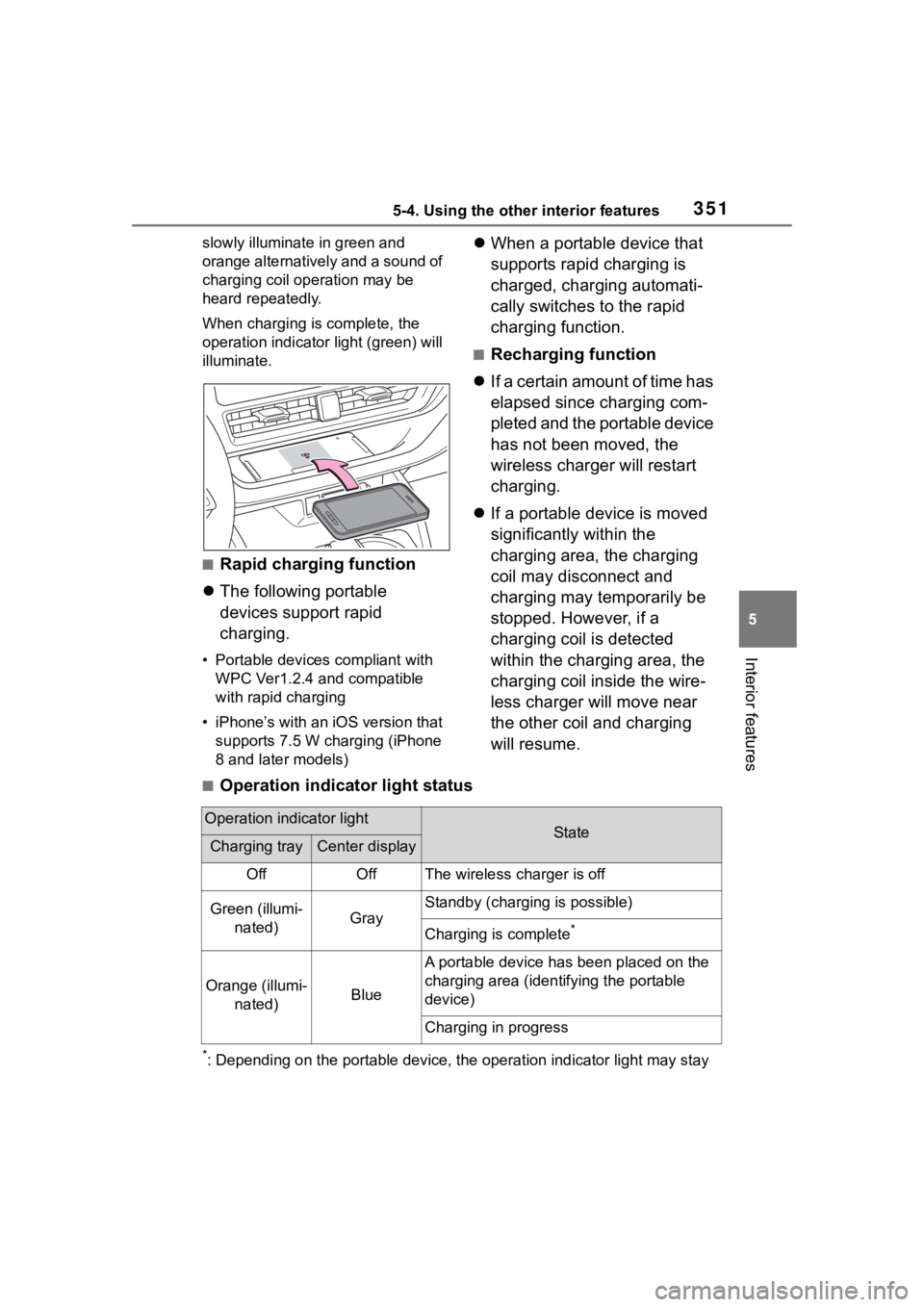
■Operation indicator light status
*: Depending on the portable devic e, the operation indicator light may stay
Operation indicator lightStateCharging trayCenter display
OffOffThe wireless charger is off
Green (illumi-
nated)Gray
Standby (charging is possible)
Charging is complete*
Orange (illumi- nated)Blue
A portable device has been placed on the
charging area (ident ifying the portable
device)
Charging in progress
Page 352 of 552
3525-4. Using the other interior features
illuminated (orange) after charging has completed.
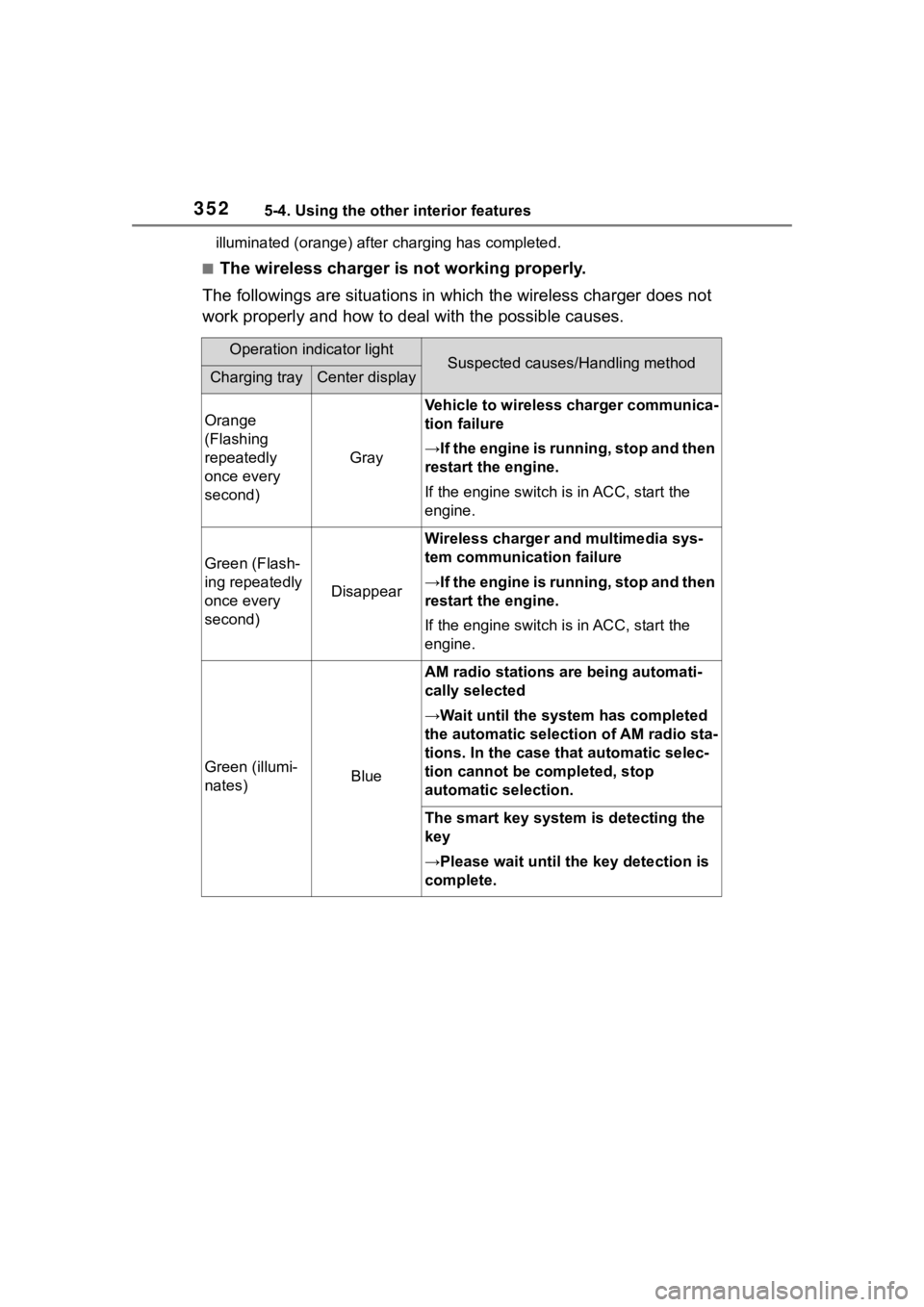
■The wireless charger is not working properly.
The followings are situations in which the wireless charger doe s not
work properly and how to deal with the possible causes.
Operation indicator lightSuspected causes/Handling methodCharging trayCenter display
Orange
(Flashing
repeatedly
once every
second)
Gray
Vehicle to wireless charger communica-
tion failure
→If the engine is running, stop and then
restart the engine.
If the engine switch is in ACC, start the
engine.
Green (Flash-
ing repeatedly
once every
second)
Disappear
Wireless charger and multimedia sys-
tem communica tion failure
→If the engine is running, stop and then
restart the engine.
If the engine switch is in ACC, start the
engine.
Green (illumi-
nates)Blue
AM radio stations are being automati-
cally selected
→Wait until the sys tem has completed
the automatic select ion of AM radio sta-
tions. In the case that automatic selec-
tion cannot be completed, stop
automatic selection.
The smart key system is detecting the
key
→Please wait until the key detection is
complete.
Page 353 of 552
3535-4. Using the other interior features
5
Interior features
■The wireless charger can be
operated when
The engine switch is in ACC or ON.
■Portable devices that can be
charged
●Portable devices compatible with
the Qi wireless charging standard
can be charged by the wireless
charger. However, compatibility
with all devices which meet the Qi
wireless charging standard is not
guaranteed.
●The wireless charger is designed
to supply low power electricity (5
W or less) to a cellular phone,
smartphone, or other portable
device.
●Failure to do so may result in the
possibility of fire, However, porta- ble devices, such as the following,
can be charged with more than 5
W.
• 7.5 W charging compatible iPhones can be charged at 7.5 W
or less.
• Portable devices which conform to WPC Ver 1.2.4 (Extended Power
profile ) can be charged at 10 W or
less.
■If a cover or accessory is
attached to the portable device
Do not charge a portable device if a
cover or accessory w hich is not Qi
compatible is atta ched. Depending
on the type of cover (including for
certain genuine manufacturer parts)
and/or accessory a ttached, it may
not be possible to charge the porta-
ble device. If the portable device is
placed on the charging area and
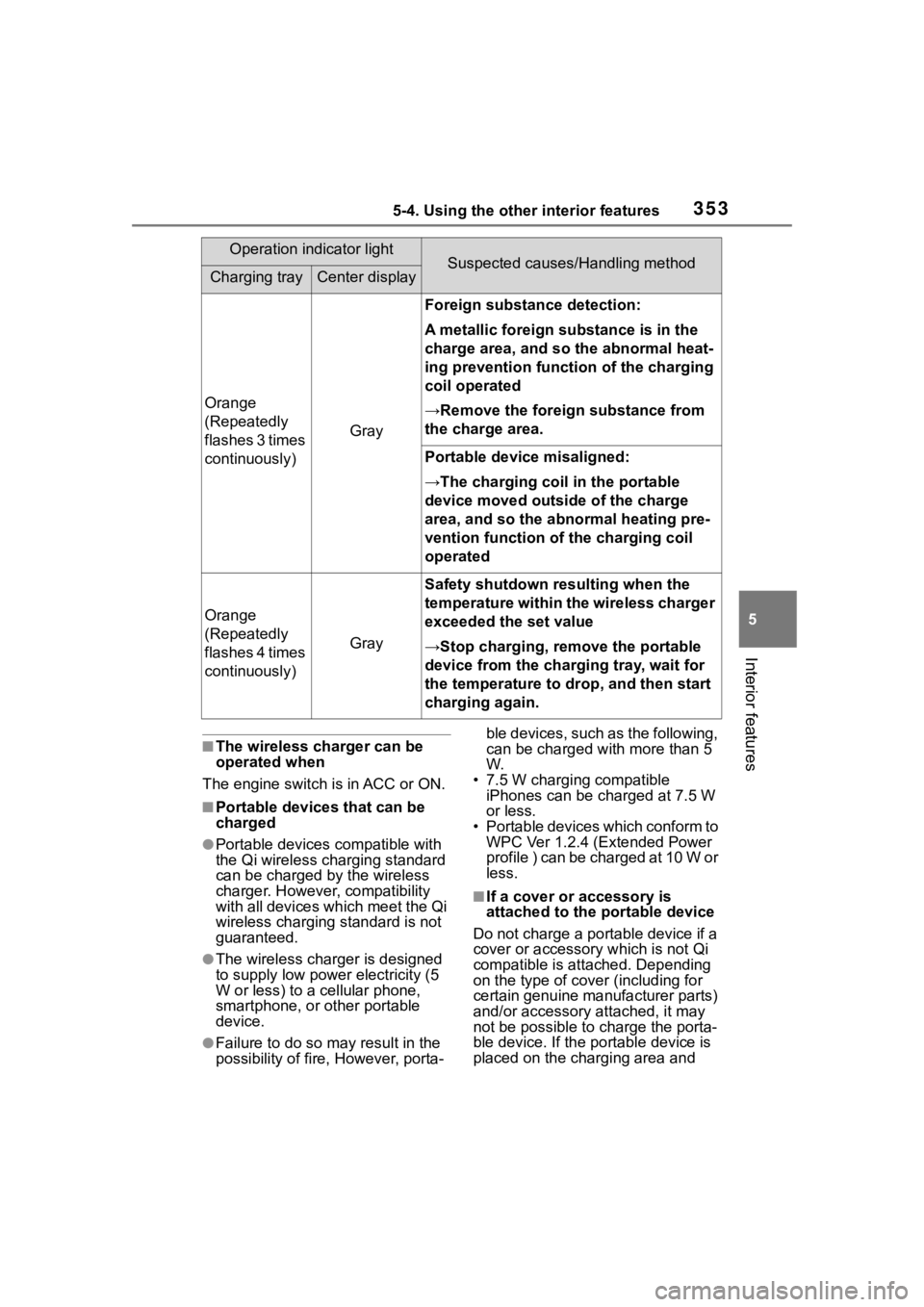
Orange
(Repeatedly
flashes 3 times
continuously)
Gray
Foreign substance detection:
A metallic foreign substance is in the
charge area, and so the abnormal heat-
ing prevention function of the charging
coil operated
→Remove the foreign substance from
the charge area.
Portable device misaligned:
→The charging coil in the portable
device moved outside of the charge
area, and so the abnormal heating pre-
vention function of the charging coil
operated
Orange
(Repeatedly
flashes 4 times
continuously)
Gray
Safety shutdown resulting when the
temperature within the wireless charger
exceeded the set value
→Stop charging, remove the portable
device from the charging tray, wait for
the temperature to drop, and then start
charging again.
Operation indicator lightSuspected causes/Handling methodCharging trayCenter display
Page 359 of 552
3595-4. Using the other interior features
5
Interior features
1To set the visor in the forward
position, flip it down.
2 To set the visor in the side
position, flip down, unhook,
and swing it to the side.
3 To use the side extender,
place the visor in the side
position, then slide it back-
ward.
Open the cover.
The light turns on when the cover is
opened.
■To prevent battery discharge
If the vanity light s remain on when
the engine switch is turned off, the
lights will go off automatically after
20 minutes.
1 Push the lid.
2 Push the lid back up half way.
■To use the overhead console
from the conversation mirror
state
Fully close the lid, then open it
again. ( P.343)
Sun visors
Vanity mirrors
NOTICE
■To prevent the battery from
being discharged
Do not leave the vanity lights on
for extended periods while the
engine is off.
Conversation mirror
Page 460 of 552
4607-2. Steps to take in an emergency
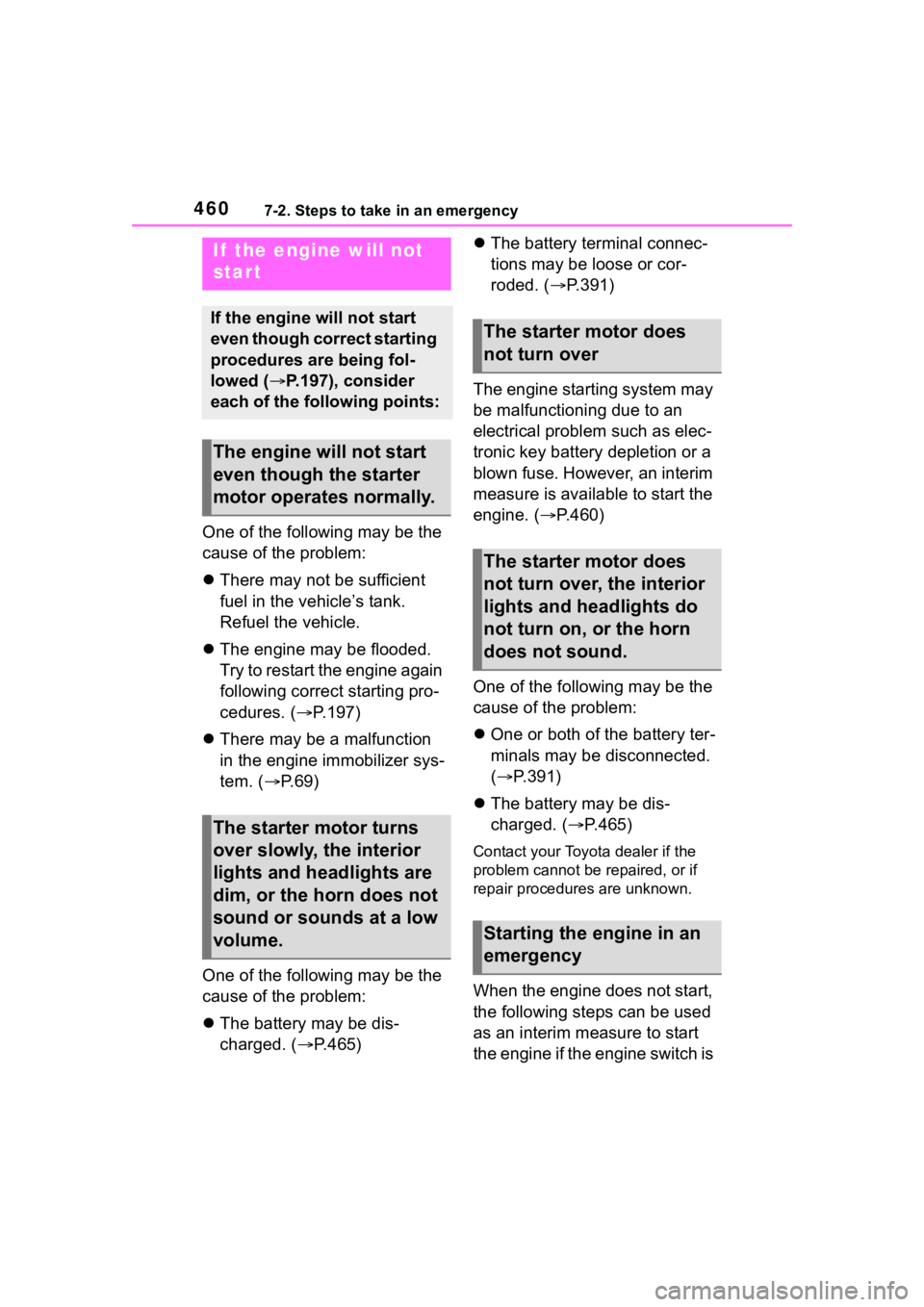
One of the following may be the
cause of the problem:
There may not be sufficient
fuel in the vehicle’s tank.
Refuel the vehicle.
The engine may be flooded.
Try to restart the engine again
following correct starting pro-
cedures. ( P.197)
There may be a malfunction
in the engine immobilizer sys-
tem. ( P. 6 9 )
One of the following may be the
cause of the problem:
The battery may be dis-
charged. ( P.465)
The battery terminal connec-
tions may be loose or cor-
roded. ( P.391)
The engine starting system may
be malfunctioning due to an
electrical problem such as elec-
tronic key battery depletion or a
blown fuse. However, an interim
measure is available to start the
engine. ( P.460)
One of the following may be the
cause of the problem:
One or both of the battery ter-
minals may be disconnected.
( P.391)
The battery may be dis-
charged. ( P.465)
Contact your Toyota dealer if the
problem cannot be repaired, or if
repair procedures are unknown.
When the engine does not start,
the following steps can be used
as an interim measure to start
the engine if the engine switch is
If the engine will not
start
If the engine will not start
even though correct starting
procedures are being fol-
lowed ( P.197), consider
each of the following points:
The engine wil l not start
even though the starter
motor operates normally.
The starter motor turns
over slowly, the interior
lights and headlights are
dim, or the horn does not
sound or sounds at a low
volume.
The starter motor does
not turn over
The starter motor does
not turn over, the interior
lights and headlights do
not turn on, or the horn
does not sound.
Starting the engine in an
emergency
Page 481 of 552
4818-1. Specifications
8
Vehicle specifications
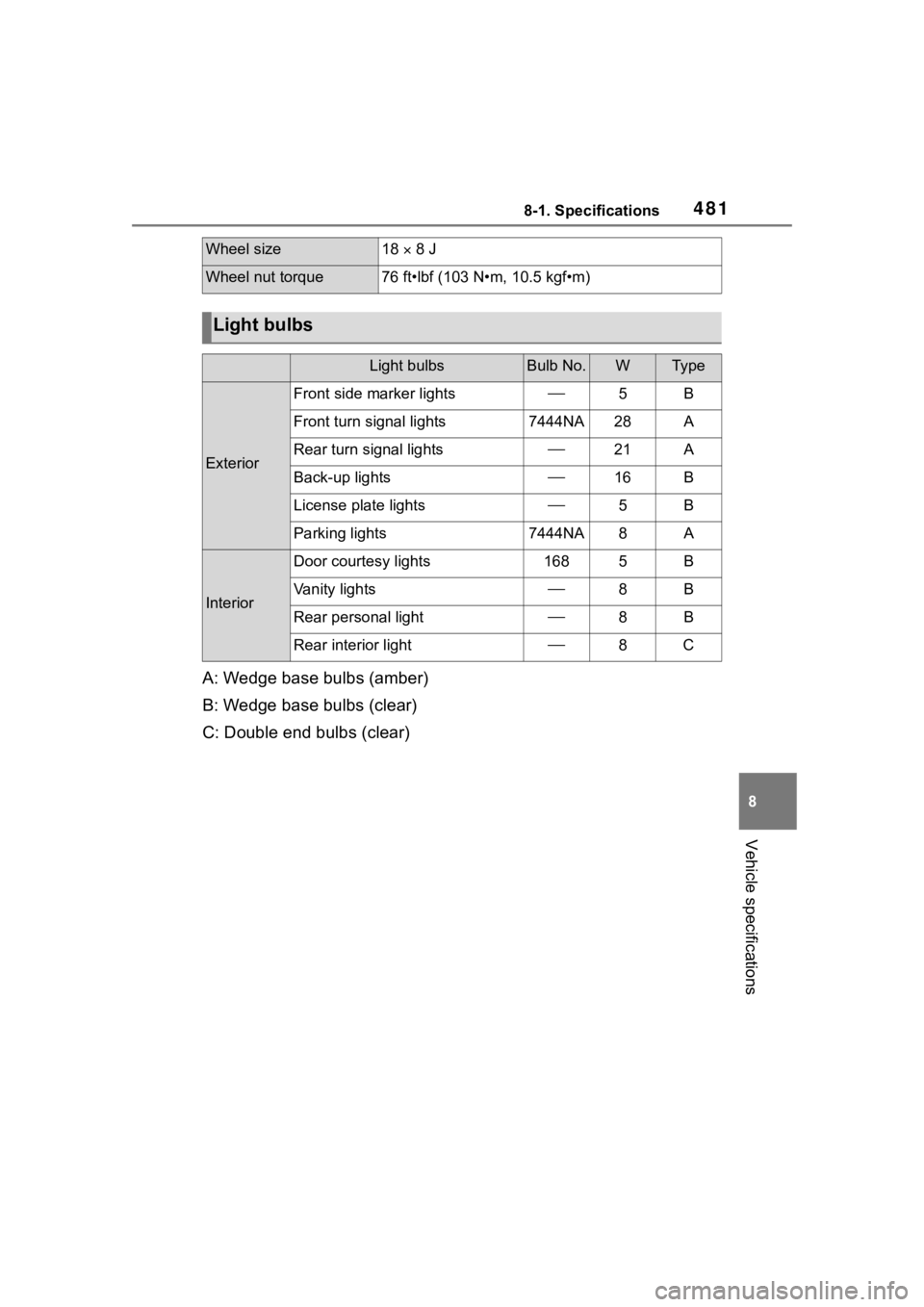
A: Wedge base bulbs (amber)
B: Wedge base bulbs (clear)
C: Double end bulbs (clear)
Wheel size18 8 J
Wheel nut torque76 ft•lbf (103 N•m, 10.5 kgf•m)
Light bulbs
Light bulbsBulb No.WTy p e
Exterior
Front side marker lights5B
Front turn signal lights7444NA28A
Rear turn signal lights21A
Back-up lights16B
License plate lights5B
Parking lights7444NA8A
Interior
Door courtesy lights1685B
Vanity lights8B
Rear personal light8B
Rear interior light8C
Page 505 of 552
5058-2. Customization
8
Vehicle specifications
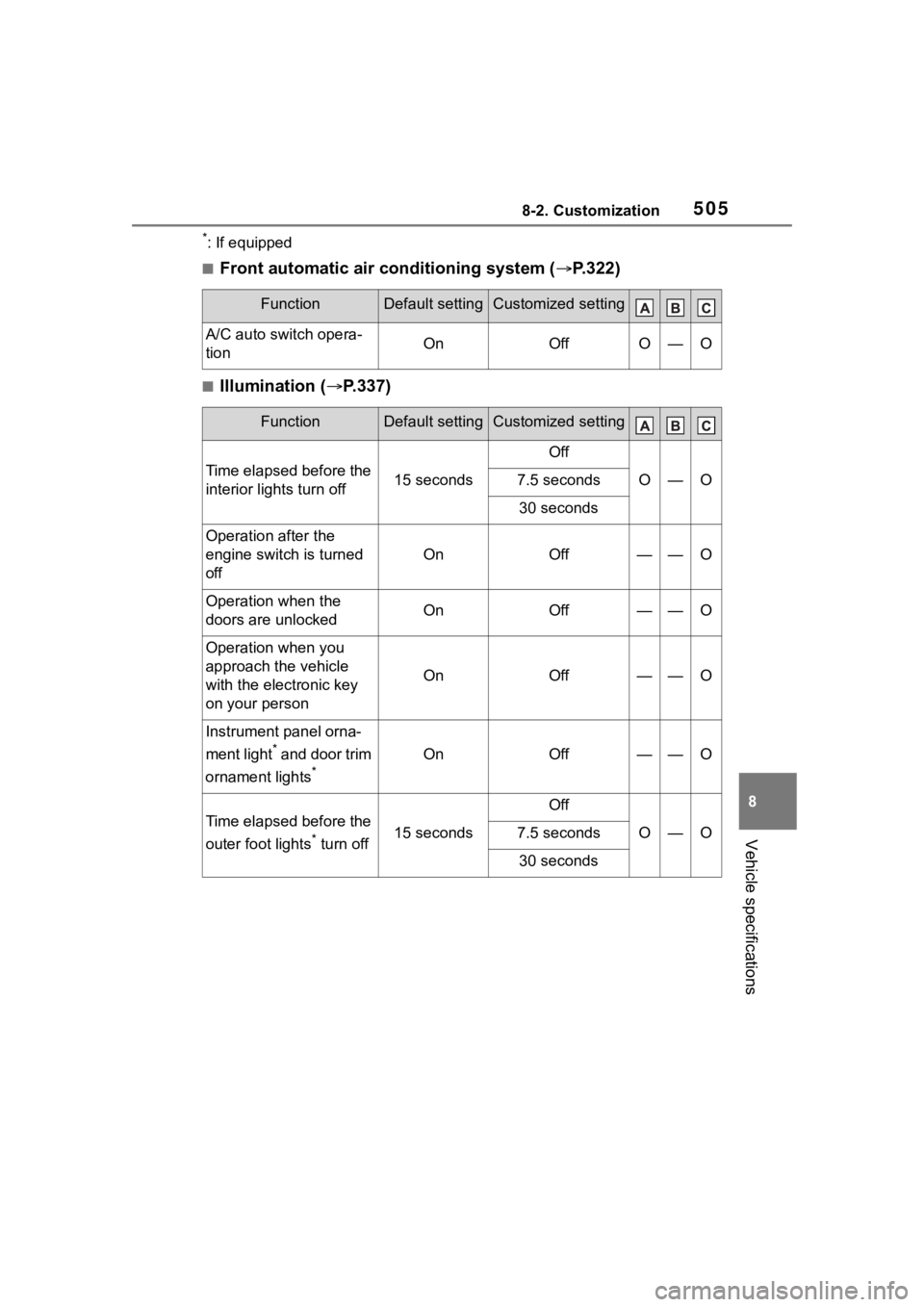
*: If equipped
■Front automatic air conditioning system (P.322)
■Illumination ( P.337)
FunctionDefault settingCustomized setting
A/C auto switch opera-
tionOnOffO—O
FunctionDefault settingCustomized setting
Time elapsed before the
interior lights turn off15 seconds
Off
O—O7.5 seconds
30 seconds
Operation after the
engine switch is turned
off
OnOff——O
Operation when the
doors are unlockedOnOff——O
Operation when you
approach the vehicle
with the electronic key
on your person
OnOff——O
Instrument panel orna-
ment light
* and door trim
ornament lights
*
OnOff——O
Time elapsed before the
outer foot lights
* turn off15 seconds
Off
O—O7.5 seconds
30 seconds