2023 TOYOTA COROLLA lane assist
[x] Cancel search: lane assistPage 361 of 468
3617-2. Steps to take in an emergency
7
When trouble arises
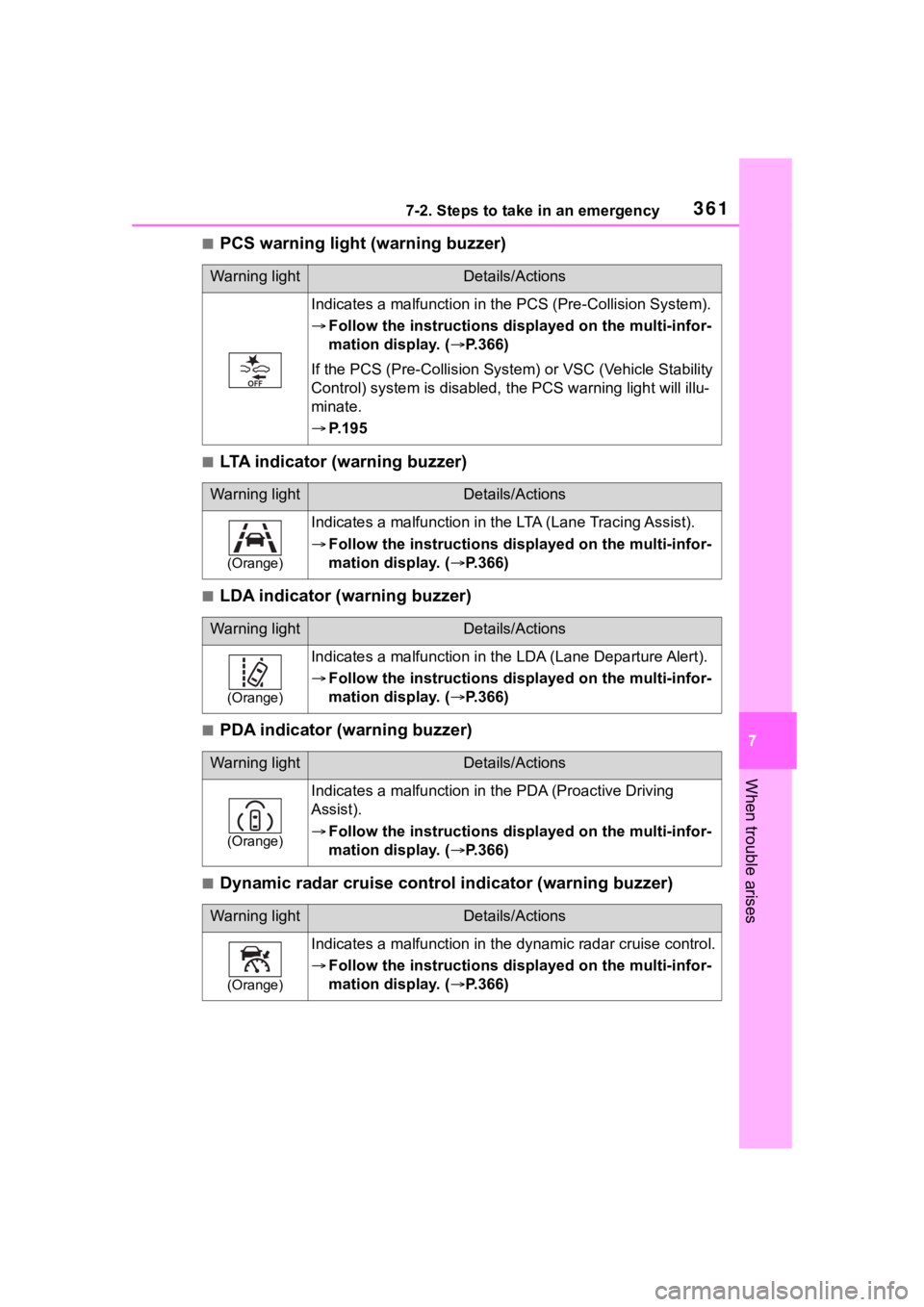
■PCS warning light (warning buzzer)
■LTA indicator (warning buzzer)
■LDA indicator (warning buzzer)
■PDA indicator (warning buzzer)
■Dynamic radar cruise control indicator (warning buzzer)
Warning lightDetails/Actions
Indicates a malfuncti on in the PCS (Pre-Collision System).
Follow the instructions di splayed on the multi-infor-
mation display. ( P.366)
If the PCS (Pre-Collision Syst em) or VSC (Vehicle Stability
Control) system is disabled, the PCS warning light will illu-
minate.
P. 1 9 5
Warning lightDetails/Actions
(Orange)
Indicates a malfunction in the LTA (Lane Tracing Assist).
Follow the instructions di splayed on the multi-infor-
mation display. ( P.366)
Warning lightDetails/Actions
(Orange)
Indicates a malfunction in the LDA (Lane Departure Alert).
Follow the instructions di splayed on the multi-infor-
mation display. ( P.366)
Warning lightDetails/Actions
(Orange)
Indicates a malfunction in the PDA (Proactive Driving
Assist).
Follow the instructions di splayed on the multi-infor-
mation display. ( P.366)
Warning lightDetails/Actions
(Orange)
Indicates a malfunction in the dynamic radar cruise control.
Follow the instructions di splayed on the multi-infor-
mation display. ( P.366)
Page 362 of 468
3627-2. Steps to take in an emergency
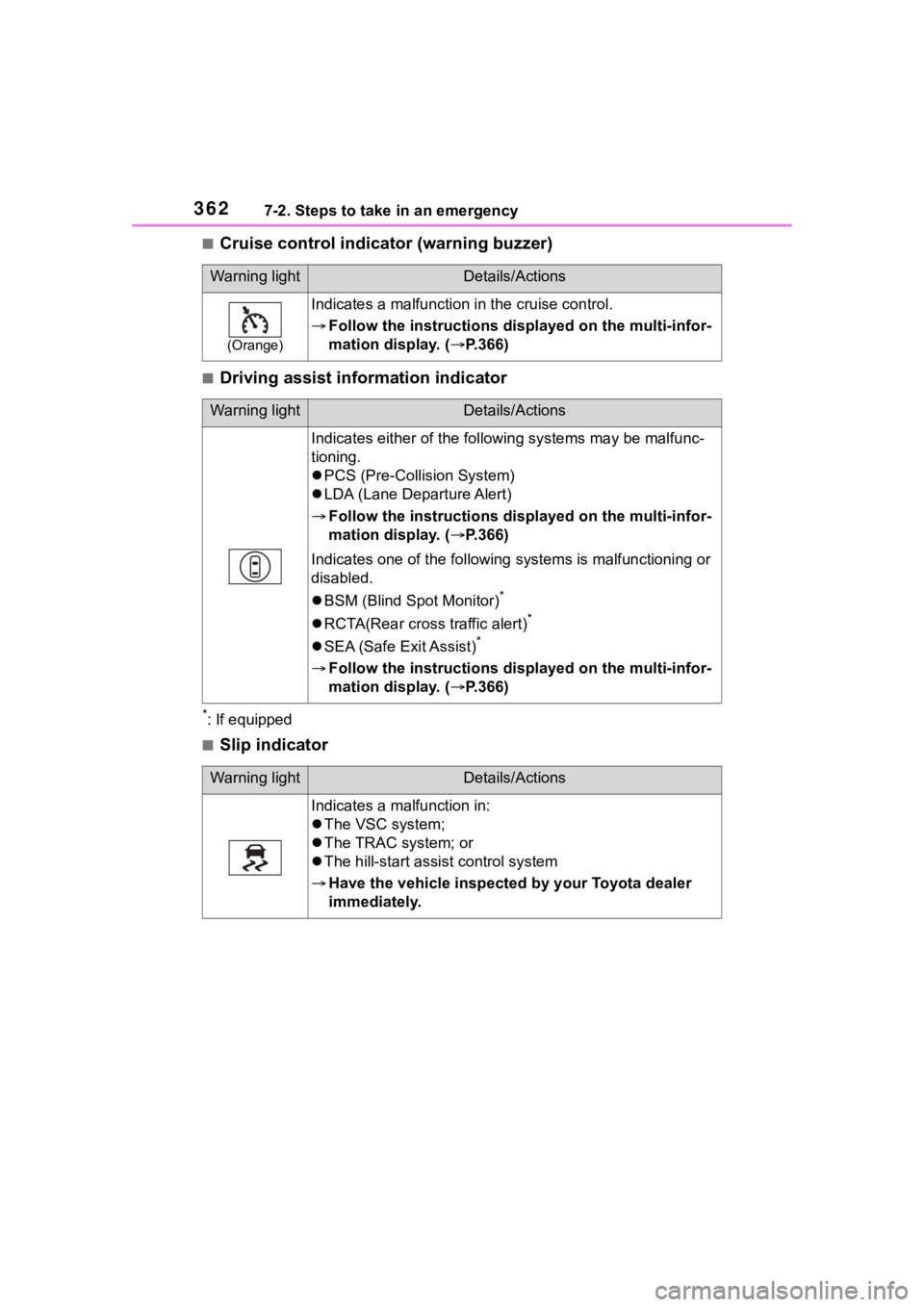
■Cruise control indicator (warning buzzer)
■Driving assist information indicator
*: If equipped
■Slip indicator
Warning lightDetails/Actions
(Orange)
Indicates a malfunction in the cruise control.
Follow the instructions di splayed on the multi-infor-
mation display. ( P.366)
Warning lightDetails/Actions
Indicates either of the follo wing systems may be malfunc-
tioning.
PCS (Pre-Collision System)
LDA (Lane Departure Alert)
Follow the instructions di splayed on the multi-infor-
mation display. ( P.366)
Indicates one of the following systems is malfunctioning or
disabled.
BSM (Blind Spot Monitor)
*
RCTA(Rear cross traffic alert)*
SEA (Safe Exit Assist)*
Follow the instructions di splayed on the multi-infor-
mation display. ( P.366)
Warning lightDetails/Actions
Indicates a malfunction in:
The VSC system;
The TRAC system; or
The hill-start assist control system
Have the vehicle inspected by your Toyota dealer
immediately.
Page 367 of 468

3677-2. Steps to take in an emergency
7
When trouble arises
the level of the engine oil, and add if
necessary.
This message may appear if the
vehicle is stopped on a slope. Move
the vehicle to a level surface and
check to see if the message disap-
pears.
■If “Engine Stopped Steering
Power Low” is displayed
This message is displayed if the
engine is stopped while driving.
When steering wheel operations are
heavier than usual, grip the steering
wheel firmly and operate it using
more force th an usual.
■If “Auto Power OFF to Conserve
Battery” is displayed
Power was cut off due to the auto-
matic power off function. Next time
when starting the engine, increase
the engine speed slightly and main-
tain that level for approximately 5
minutes to recha rge the battery.
■If “Headlight System Malfunc-
tion Visit Your Dealer” is dis-
played
The following systems may be mal-
functioning. Have the vehicle
inspected by your Toyota dealer
immediately.
●The LED headlight system
●AHB (Automatic High Beam)
■If “System Malfunction Visit
Your Dealer” is displayed
Indicates one of the following sys-
tems is disabled.
●PCS (Pre-Collision system)
●LDA (Lane Departure Alert)
●LTA (Lane Tracing Assist)
●AHB (Automatic High Beam)
●Dynamic radar cruise control
●RSA (Road Sign Assist) (if
equipped)
●BSM (Blind Spot Monitor) (if
equipped)
●RCTA (Rear Cross Traffic
Alert) (if equipped)
●SEA (Safe Exit Assist) (if
equipped)
Have the vehicle inspected by your
Toyota dealer immediately.
■If “System Stopped See
Owner’s Manual” is displayed
Indicates one of the following sys-
tems is disabled.
●PCS (Pre-Collision system)
●LDA (Lane Departure Alert)
●LTA (Lane Tracing Assist)
●AHB (Automatic High Beam)
●Dynamic radar cruise control
●RSA (Road Sign Assist) (if
equipped)
●BSM (Blind Spot Monitor) (if
equipped)
●RCTA (Rear Cross Traffic
Alert) (if equipped)
●SEA (Safe Exit Assist) (if
equipped)
Follow the following correction
methods.
• Check the voltage of the battery
• Check the sensors that the Toyota Safety Sense 3.0 uses for foreign
matter covering them. Remove
them if any. ( P.185)
Indicates the sensors may not be
operating properly. ( P.188)
When problems are solved and the
sensors are operational, this indica-
tion may disappear by itself.
■If “System Stopped Front Cam-
era Low Visibility See Owner’s
Manual” is displayed
Indicates one of the following sys-
tems is disabled.
●PCS (Pre-Collision system)
●LDA (Lane Departure Alert)
Page 368 of 468

3687-2. Steps to take in an emergency
●LTA (Lane Tracing Assist)
●AHB (Automatic High Beam)
●Dynamic radar cruise control
●RSA (Road Sign Assist) (if
equipped)
Follow the followi ng correction
methods.
• Using the windshield wipers, remove the dirt o r foreign matter
from the windshield.
• Using the air conditioning system, defog the windshield.
• Close the hood, r emove any stick-
ers, etc. to clear the obstruction in
front of the front camera.
■If “System Stopped Front Cam-
era Out of Temperature Range
Wait until Normal Temperature”
is displayed
Indicates one of the following sys-
tems is disabled.
●PCS (Pre-Collision system)
●LDA (Lane Departure Alert)
●LTA (Lane Tracing Assist)
●AHB (Automatic High Beam)
●Dynamic radar cruise control
●RSA (Road Sign Assist) (if
equipped)
Follow the followi ng correction
methods.
• If the front camera is hot, such as after the vehicle is parked in the
sun, use the air conditioning sys-
tem to decrease the temperature
around the front camera
• If a sunshade was used when the vehicle was parked, depending on
its type, the sunlight reflected from
the surface of the sunshade may
cause the temperature of the front
camera to become excessively
high
• If the front camera is cold, such
after the vehicle is parked in an
extremely cold environment, use the air conditioning system to
increase the temperature around
the front camera
■If “System Stopped Front Radar
Sensor Blocked Clean Radar
Sensor” is displayed
Indicates one of the following sys-
tems is disabled.
●PCS (Pre-Collision system)
●LDA (Lane Departure Alert)
●LTA (Lane Tracing Assist)
●AHB (Automatic High Beam)
●Dynamic radar cruise control
Follow the following correction
methods.
• Check if there is any foreign mat- ter attached to the radar sensor or
radar sensor cover and clean
them if necessary ( P.186)
• This message may be displayed when driving in an open area with
few nearby vehicles or structures,
such as a desert, grasslands, sub-
urbs, etc.
The message may be cleared by
driving the vehicle in an area with
structures, vehicles, etc., nearby.
■If “System Stopped Front Radar
Sensor Out of Temperature
Range Wait until Normal Tem-
perature” is displayed
Indicates one of the following sys-
tems is disabled.
●PCS (Pre-Collision system)
●LDA (Lane Departure Alert)
●LTA (Lane Tracing Assist)
●AHB (Automatic High Beam)
●Dynamic radar cruise control
Follow the following correction
methods.
The temperature of the radar sensor
is outside of the operating range.
Wait for the temperature to become
appropriate.
Page 369 of 468

3697-2. Steps to take in an emergency
7
When trouble arises
■If “System Stopped Front Radar
In Self Calibration See Owner’s
Manual” is displayed
Indicates one of the following sys-
tems is disabled.
●PCS (Pre-Collision system)
●LDA (Lane Departure Alert)
●LTA (Lane Tracing Assist)
●AHB (Automatic High Beam)
●Dynamic radar cruise control
Follow the followi ng correction
methods.
• Check if there is any foreign mat- ter attached to the radar sensor or
radar sensor cover and clean
them if necessary ( P.186)
• The radar sensor may be mis- aligned and will be adjusted auto-
matically while driving. Continue
driving for a while.
■If “Cruise Control Unavailable
See Owner’s Manual” is dis-
played
Indicates one of the following sys-
tems is disabled.
●Dynamic radar cruise control
●Cruise control
A message is displayed when the
driving assist s witch is pushed
repeatedly.
Press the driving assist switch
quickly and firmly.
■If “Maintenance Required
Soon” is displayed
Indicates that all maintenance
according to the dr iven distance on
the maintenance schedule
* should
be performed soon.
Comes on approximately 4500
miles (7200 km) after the message
has been reset. If necessary, per-
form maintenance. Please reset the
message after the maintenance is
performed. ( P.295)
*: Refer to the separate “Scheduled
Maintenance” or “Owner’s Man- ual Supplement”
for the mainte-
nance interval applicable to your
vehicle.
■If “Maintenance Required Visit
Your Dealer” is displayed
Indicates that all maintenance is
required to correspond to the driven
distance on the maintenance sched-
ule
*.
Comes on approximately 5000
miles (8000 km) after the message
has been reset. (The indicator will
not work properly unless the mes-
sage has been rese t.) Perform the
necessary maintenance. Please
reset the message after the mainte-
nance is performed. ( P.295)
*: Refer to the separate “Scheduled
Maintenance” or “Owner’s Man-
ual Supplement” for the mainte-
nance interval applicable to your
vehicle.
■If “Engine Maintenance
Required Visit Your Dealer” is
shown
The engine or an engine component
is malfunctioning. Have the vehicle
inspected by your Toyota dealer
immediately.
■If a message that indicates the
need for visiting your Toyota
dealer is displayed
The system or part shown on the
multi-information di splay is malfunc-
tioning. Have the vehicle inspected
by your Toyota dealer immediately.
■If a message that indicates the
need for referring to Owner’s
Manual is displayed
●If “Engine Coolant Temp High” is
displayed, follow t he instructions
accordingly. ( P.387)
●If the following message is dis-
played on the multi-information
display, it may indicate a malfunc-
tion. Have the vehicle inspected
by your Toyota dealer immedi-
Page 378 of 468
3787-2. Steps to take in an emergency
WARNING
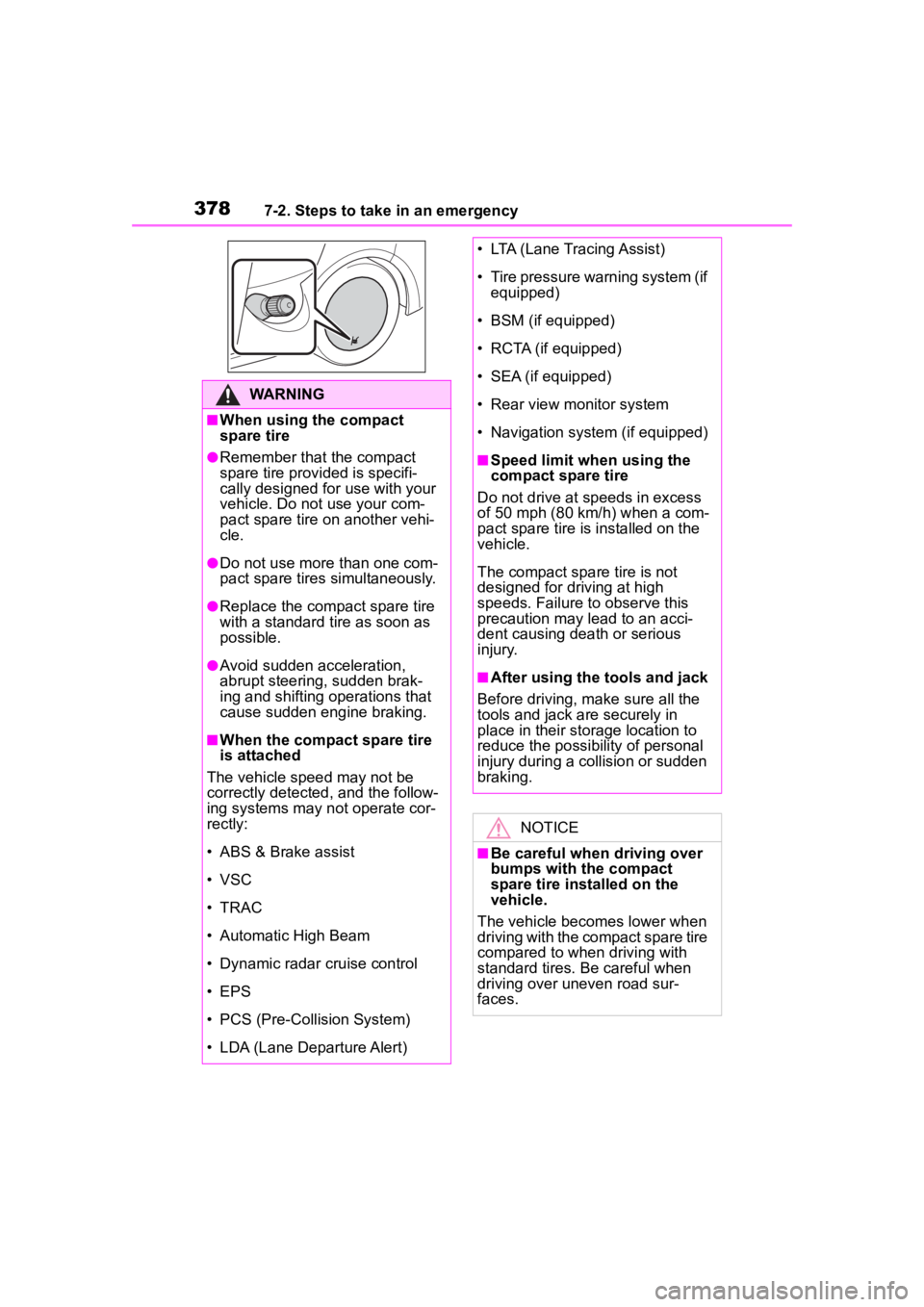
■When using the compact
spare tire
●Remember that the compact
spare tire provided is specifi-
cally designed for use with your
vehicle. Do not use your com-
pact spare tire on another vehi-
cle.
●Do not use more than one com-
pact spare tires simultaneously.
●Replace the compact spare tire
with a standard tire as soon as
possible.
●Avoid sudden acceleration,
abrupt steering, sudden brak-
ing and shifting operations that
cause sudden engine braking.
■When the compact spare tire
is attached
The vehicle speed may not be
correctly detecte d, and the follow-
ing systems may not operate cor-
rectly:
• ABS & Brake assist
• VSC
• TRAC
• Automatic High Beam
• Dynamic radar cruise control
• EPS
• PCS (Pre-Collision System)
• LDA (Lane Departure Alert)
• LTA (Lane Tracing Assist)
• Tire pressure warning system (if equipped)
• BSM (if equipped)
• RCTA (if equipped)
• SEA (if equipped)
• Rear view monitor system
• Navigation system (if equipped)
■Speed limit when using the
compact spare tire
Do not drive at speeds in excess
of 50 mph (80 km /h) when a com-
pact spare tire is installed on the
vehicle.
The compact spare tire is not
designed for driving at high
speeds. Failure to observe this
precaution may lead to an acci-
dent causing death or serious
injury.
■After using the tools and jack
Before driving, ma ke sure all the
tools and jack are securely in
place in their storage location to
reduce the possibility of personal
injury during a collision or sudden
braking.
NOTICE
■Be careful when driving over
bumps with the compact
spare tire installed on the
vehicle.
The vehicle becomes lower when
driving with the compact spare tire
compared to when driving with
standard tires. Be careful when
driving over uneven road sur-
faces.
Page 418 of 468
4188-2. Customization
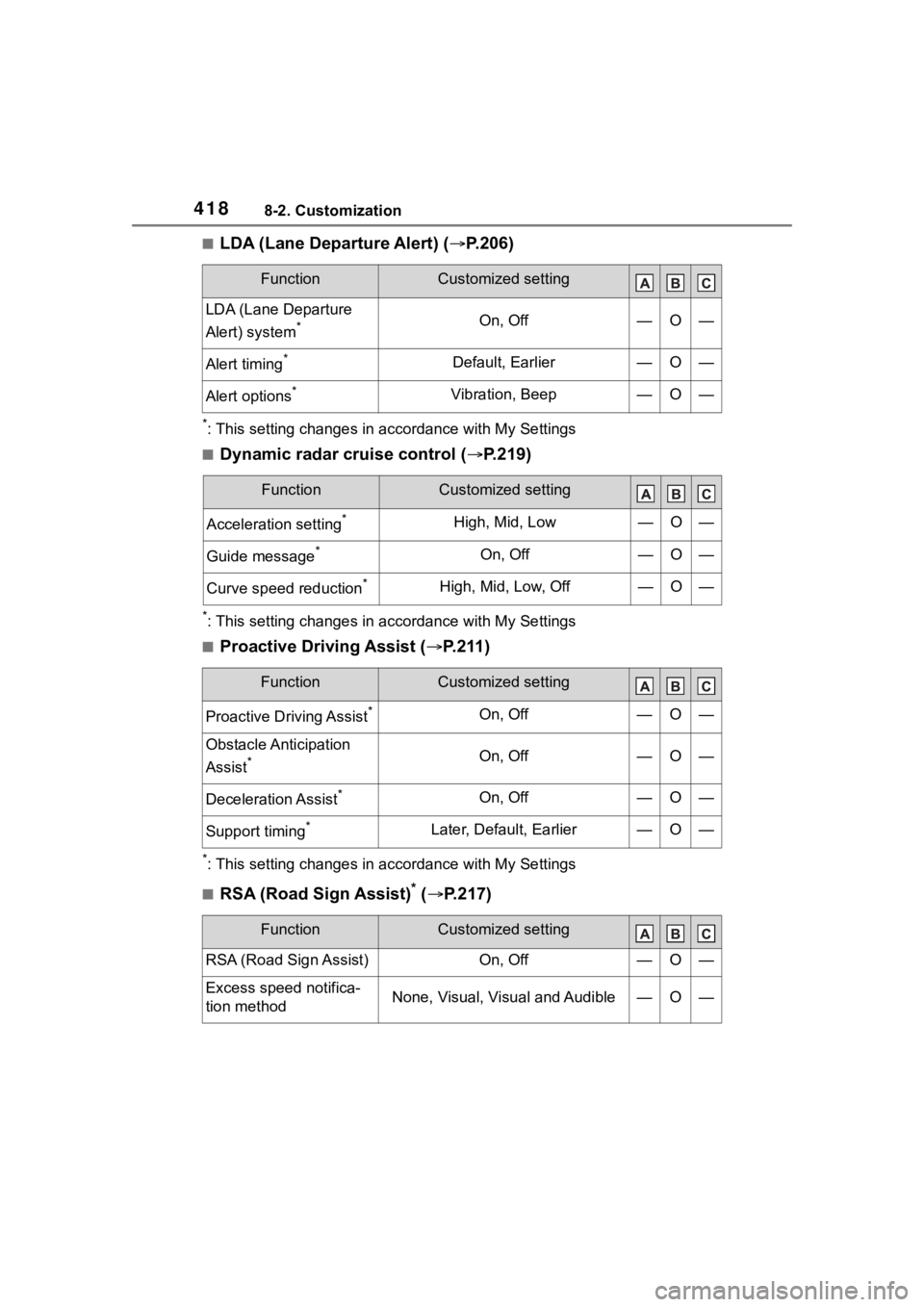
■LDA (Lane Departure Alert) (P.206)
*: This setting changes in a ccordance with My Settings
■Dynamic radar cruise control ( P.219)
*: This setting changes in a ccordance with My Settings
■Proactive Driving Assist ( P.211)
*: This setting changes in a ccordance with My Settings
■RSA (Road Sign Assist)* ( P.217)
FunctionCustomized setting
LDA (Lane Departure
Alert) system
*On, Off—O—
Alert timing*Default, Earlier—O—
Alert options*Vibration, Beep—O—
FunctionCustomized setting
Acceleration setting*High, Mid, Low—O—
Guide message*On, Off—O—
Curve speed reduction*High, Mid, Low, Off—O—
FunctionCustomized setting
Proactive Driving Assist*On, Off—O—
Obstacle Anticipation
Assist
*On, Off—O—
Deceleration Assist*On, Off—O—
Support timing*Later, Default, Earlier—O—
FunctionCustomized setting
RSA (Road Sign Assist)On, Off—O—
Excess speed notifica-
tion methodNone, Visual, Visual and Audible—O—
Page 444 of 468

444Alphabetical Index
L
Lane Departure Alert (LDA) ... 206
Lane Tracing Assist (LTA)...... 201 Operation ............................. 201
Language (multi-information dis- play) ................................. 95, 100
LATCH anchors ........................ 64
LDA (Lane Departure Alert) ... 206 Operation ............................. 206
LED accent lights Light switch .......................... 173
Replacing light bulbs ............ 341
Lever Auxiliary catch lever ............. 302
Hood lock release lever........ 302
Internal trunk release lever... 119
Shift lever ..................... 160, 162
Turn signal lever ................... 167
Wiper lever ........................... 178
License plate lights Light switch .......................... 173
Replacing light bulbs ............ 341
Wattage ................................ 398
Light bulbs Replacing ............................. 340
Lights AHB (Automatic High Beam) 175
Front interior lights ............... 271
Headlight switch ................... 173
Interior lights......................... 271
Interior lights list ................... 271
Personal lights...................... 272
Rear interior lights ................ 271
Replacing light bulbs ............ 341
Trunk light............................. 119
Turn signal lever ................... 167
Vanity lights .......................... 284
Wattage ................................ 398
Lock steering column ............ 154
LTA (Lane Tracing Assist) ...... 201 Operation ............................. 201 LTA (Lane Tracing Assist) switch
...............................................204
M
Maintenance Do-it-yourself maintenance ..300
General maintenance ...........296
Maintenance data .................392
Maintenance requirements ...294
Malfunction indicator lamp ....357
Manual air conditioning system ...............................................258
Menu icons ..........................91, 97
Meter Clock ................................86, 89
Indicators ................................84
Instrument panel light control88, 91
Meter control switches......92, 97
Meter light control ...................90
Meters ..............................86, 89
Multi-information display...91, 97
Settings ..........................95, 100
Warning lights .......................356
Warning message.................366
Mirrors Inside rear view mirror ..........131
Outside rear view mirror defog-gers ............................260, 265
Outside rear view mirrors .....132
Vanity mirrors........................284
Moon roof Door lock linked moon roof oper-ation....................................137
Jam protection function ........137
Operation..............................137
Multi-information display Audio system-linked display .95, 100
Clock ................................88, 91
Cruise control .......................228
Driving informati on display92, 98