2023 TOYOTA COROLLA CROSS light
[x] Cancel search: lightPage 66 of 500
661-3. Emergency assistance
The following indicator light pat-
terns indicate specific system
usage conditions:
Green indicator light on =
Active service
Green indicator light flashing
= Safety Connect call in pro-
cess
Red indicator light (except at
vehicle start-up) = System
malfunction (contact your Toy-
ota dealer)
No indicator light (off) =
Safety Connect service not
active
■Automatic Collision Notifi-
cation
In case of either airbag deploy-
ment or severe rear-end colli-
sion, the system is designed to
automatically call the response
center. The responding agent
receives the vehicle’s location
and attempts to speak with the
vehicle occupants to assess the
level of emergency. If the occu-
pants are unable to communi-
cate, the agent automatically
treats the call as an emergency,
contacts the nearest emer-
gency services provider to
describe the situation, and
requests that assistance be sent
to the location.
■Stolen Vehicle Location
If your vehicle is stolen, Safety
Connect can work with local
authorities to assist them in
locating and recovering the
vehicle. After filing a police
report, call the Customer Experi-
ence Center at 1-800-331-4331
in the United States,
1-877-855-8377 in Puerto Rico
or 1- 888-869-6828 in Canada,
and follow the prompts for
Safety Connect to initiate this
service.
In addition to assisting law
enforcement with recovery of a
stolen vehicle, Safety-Con-
nect-equipped vehicle location
data may, under certain circum-
stances, be shared with third
parties to locate your vehicle.
Further information is available
at Toyota.com in the United
States, Toyotapr.com in Puerto
Rico and Toyota.ca in Canada.
■Emergency Assistance But-
ton (“SOS”)
In the event of an emergency on
the road, push the “SOS” button
to reach the Safety Connect
response center. The answer-
ing agent will determine your
vehicle’s location, assess the
emergency, and dispatch the
necessary assistance required.
If you accidentally press the “SOS”
button, tell the response-center
agent that you are not experiencing
an emergency.
Safety Connect services
Page 68 of 500
681-4. Theft deterrent system
1-4.Theft deterrent system
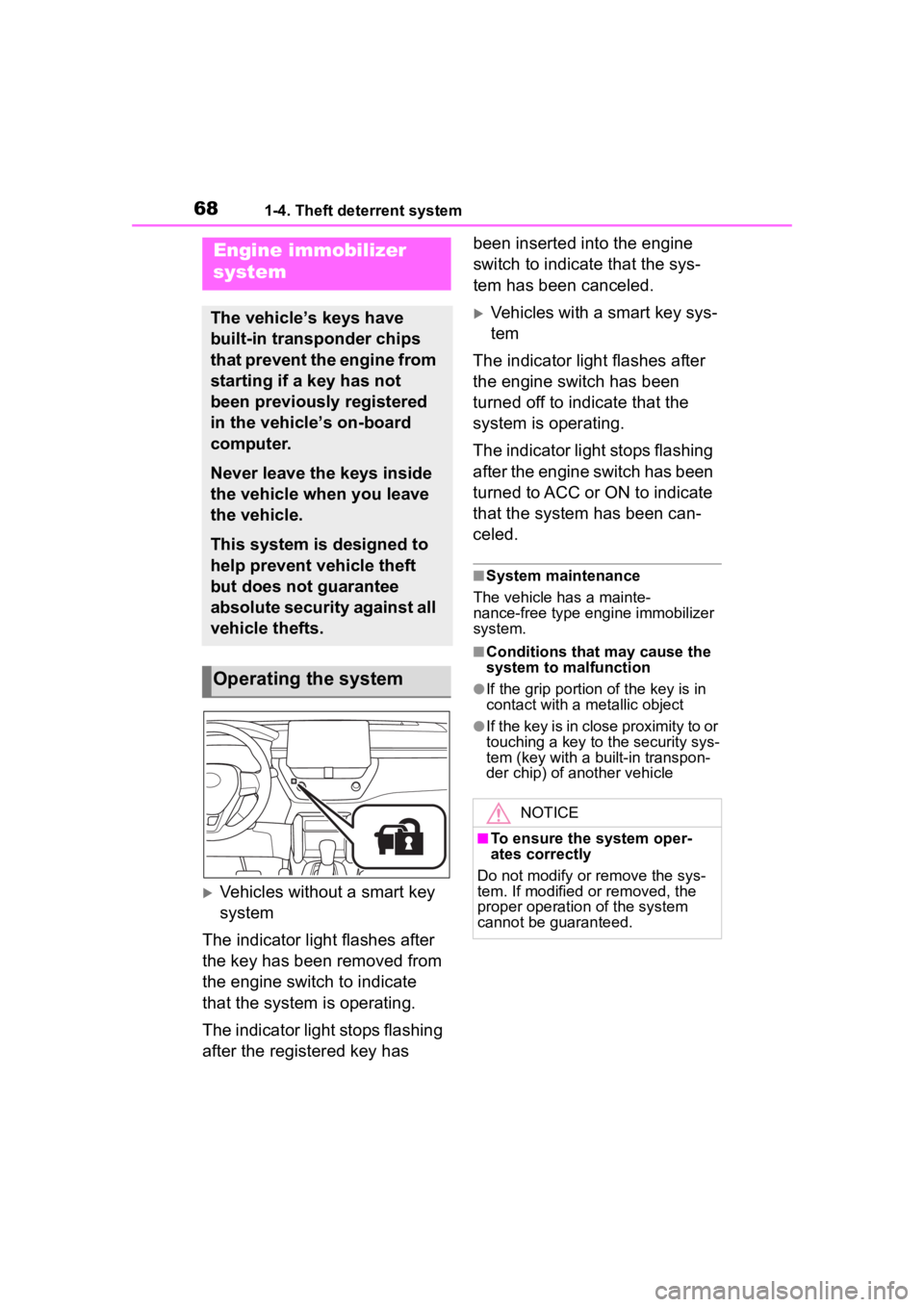
Vehicles without a smart key
system
The indicator light flashes after
the key has been removed from
the engine switch to indicate
that the system is operating.
The indicator light stops flashing
after the registered key has been inserted into the engine
switch to indicate that the sys-
tem has been canceled.
Vehicles with a smart key sys-
tem
The indicator light flashes after
the engine switch has been
turned off to indicate that the
system is operating.
The indicator light stops flashing
after the engine switch has been
turned to ACC or ON to indicate
that the system has been can-
celed.
■System maintenance
The vehicle has a mainte-
nance-free type engine immobilizer
system.
■Conditions that may cause the
system to malfunction
●If the grip portion of the key is in
contact with a metallic object
●If the key is in close proximity to or
touching a key to the security sys-
tem (key with a built-in transpon-
der chip) of another vehicle
Engine immobilizer
system
The vehicle’s keys have
built-in transponder chips
that prevent the engine from
starting if a key has not
been previously registered
in the vehicle’s on-board
computer.
Never leave the keys inside
the vehicle when you leave
the vehicle.
This system is designed to
help prevent vehicle theft
but does not guarantee
absolute security against all
vehicle thefts.
Operating the system
NOTICE
■To ensure the system oper-
ates correctly
Do not modify or remove the sys-
tem. If modified or removed, the
proper operation of the system
cannot be guaranteed.
Page 69 of 500

691-4. Theft deterrent system
1
For safety and security
*: If equipped
■Items to check before lock-
ing the vehicle
To prevent unexpected trigger-
ing of the alarm and vehicle
theft, make sure of the following:
Nobody is in the vehicle.
The windows and moon roof
(if equipped) are closed
before the alarm is set.
No valuables or other per-
sonal items are left in the
vehicle.
■Setting
Close the doors and hood, and
lock all the doors. The system
will set automatically after 30
seconds.
The indicator light changes from
being on to flashing when the sys-
tem is set.
If all doors are cl osed with back
door or hood open, alarm system
can be set.
■Deactivating or stopping
Do one of the following to deac-
tivate or stop the alarms:
Unlock the doors.
Turn the engine switch to
ACC or ON, or start the
engine. (The alarm will be
deactivated or stopped after a
few seconds.)
■System maintenance
The vehicle has a mainte-
nance-free type alarm system.
■Triggering of the alarm
The alarm may be triggered in the
following situations:
(Stopping the alarm deactivates the
alarm system.)
●The doors are unlocked using the
mechanical key.
Alarm*
The alarm uses light and
sound to give an alert when
an intrusion is detected.
The alarm is triggered in the
following situations when
the alarm is set:
A locked door is unlocked or
opened in any way other
than using the entry func-
tion or wireless remote con-
trol. (The doors will lock
again automatically.)
The hood is opened.
Setting/deactivating/stop-
ping the alarm system
Page 71 of 500

71
2
2
Vehicle status information and indicators
Vehicle status informationand indicators
.2-1. Instrument cluster
Warning lights and indica-tors ............................... 72
Gauges and meters (4.2-inch display) .......... 76
Gauges and meters (7-inch display) ......................... 79
Multi-information display (4.2-inch display) .......... 82
Multi-information display (7-inch display) ............. 89
Fuel consumption informa- tion ............................... 95
Page 72 of 500

722-1. Instrument cluster
2-1.Instrument cluster
For the purpose of explanation, the following illustrations display all
warning lights and indicators illuminated.
4.2-inch display
7-inch display
War ning lights and indicators
The warning lights and indicators on the instrument cluster,
center panel and outside rear view mirrors inform the driver of
the status of the vehicle’s various systems.
Warning lights and indicators displayed on the instru-
ment cluster
Page 73 of 500
732-1. Instrument cluster
2
Vehicle status information and indicators
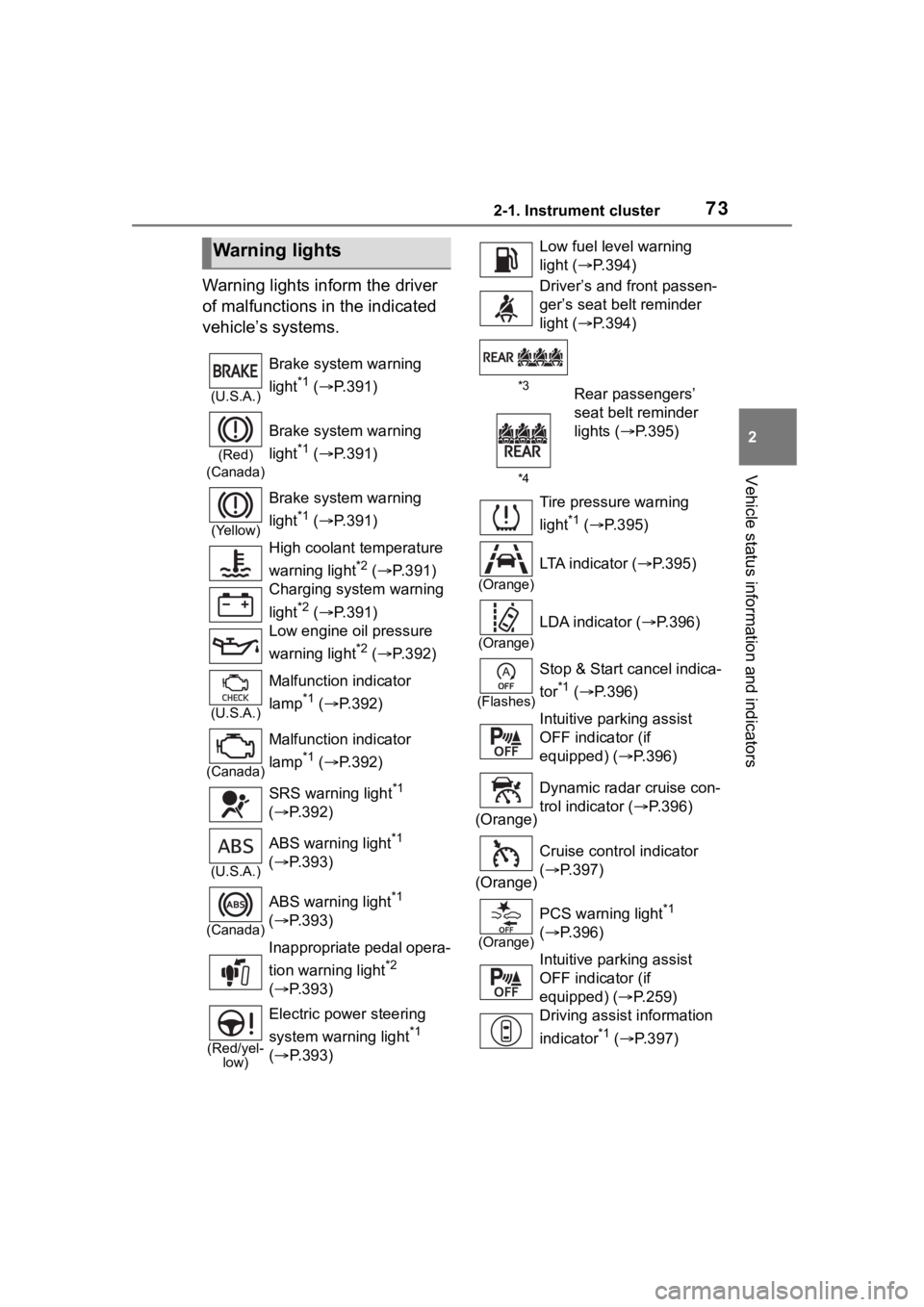
Warning lights inform the driver
of malfunctions in the indicated
vehicle’s systems.
Warning lights
(U.S.A.)
Brake system warning
light
*1 ( P.391)
(Red)
(Canada)
Brake system warning
light
*1 ( P.391)
(Yellow)
Brake system warning
light
*1 ( P.391)
High coolant temperature
warning light
*2 ( P.391)
Charging system warning
light
*2 ( P.391)
Low engine oil pressure
warning light
*2 ( P.392)
(U.S.A.)
Malfunction indicator
lamp
*1 ( P.392)
(Canada)
Malfunction indicator
lamp
*1 ( P.392)
SRS warning light
*1
( P.392)
(U.S.A.)
ABS warning light*1
( P.393)
(Canada)
ABS warning light*1
( P.393)
Inappropriate pedal opera-
tion warning light
*2
( P.393)
(Red/yel-
low)
Electric power steering
system warning light
*1
( P.393)
Low fuel leve l warning
light ( P.394)
Driver’s and front passen-
ger’s seat belt reminder
light ( P.394)
*3
*4Rear passengers’
seat belt reminder
lights ( P.395)
Tire pressure warning
light
*1 ( P.395)
(Orange)
LTA indicator ( P.395)
(Orange)
LDA indicator ( P.396)
(Flashes)
Stop & Start cancel indica-
tor
*1 ( P.396)
Intuitive parking assist
OFF indicator (if
equipped) ( P.396)
(Orange) Dynamic radar cruise con-
trol indicator (
P.396)
(Orange) Cruise control indicator
(
P.397)
(Orange)
PCS warning light*1
( P.396)
Intuitive parking assist
OFF indicator (if
equipped) ( P.259)
Driving assist information
indicator
*1 ( P.397)
Page 74 of 500

742-1. Instrument cluster
*1: These lights come on when the engine switch is turned to ON to
indicate that a system check is
being performed. They will turn
off after the engine is started, or
after a few seconds. There may
be a malfunction in a system if
the lights do not come on, or turn
off. Have the vehicle inspected
by your Toyota dealer.
*2: This light illuminates on the multi-information display.
*3: 4.2-inch display.
*4: 7-inch display.
The indicators inform the driver
of the operating state of the
vehicle’s various systems.
Slip indicator*1 ( P.397)
(Flashes)
(U.S.A.)
Parking brake indicator
( P.398)
(Flashes)
(Canada)
Parking brake indicator
( P.398)
(Flashes)
Brake hold operated indi-
cator ( P.398)
WARNING
■If a safety system warning
light does not come on
Should a safety system light such
as the ABS and SRS warning light
not come on when you start the
engine, this could mean that
these systems are not available to
help protect you in an accident,
which could result in death or seri-
ous injury. Have the vehicle
inspected by your Toyota dealer
immediately if this occurs.
Indicators
Turn signal indicator
( P.171)
(U.S.A.)
Headlight indicator
( P.178)
(Canada)
Tail light indicator
( P.178)
Headlight high beam indi-
cator ( P.180)
Automatic High Beam
indicator ( P.181)
Fog light indicator (if
equipped) ( P.184)
PCS warning light
*1, 2
( P.198)
(Green/ White) Cruise control indicator
(
P.231)
(Green/ White) Dynamic radar cruise con-
trol indicator (
P.223)
(Green/
White/Or ange
[Flashes] ) LDA indicator (
P.213)
(Green/W
hite/Orang e
[Flashes])LTA indicator ( P.208)
Page 75 of 500

752-1. Instrument cluster
2
Vehicle status information and indicators
*1: These lights come on when the engine switch is turned to ON to
indicate that a system check is being performed.
They will turn
off after the engine is started, or
after a few seconds. There may
be a malfunction in a system if
the lights do not come on, or turn
off. Have the vehicle inspected
by your Toyota dealer.
*2: This light comes on when the system is turned off.
*3: This light illuminates on the out-side rear view mirrors.
*4: This light illuminates on the multi-information display.
*5: When the outside temperature is approximately 37°F (3°C) or
lower, this indicator will flash for
approximately 10 seconds, then
stay on.
*6: This light illuminates on the air conditioning operation panel.
*7: This light illumina tes on the front
interior/personal lights.
BSM outside rear view
mirror indicators
*1, 3 (if
equipped) ( P.244)
Driving assist information
indicator
*1, 2 ( P.397)
Intuitive parking assist
OFF indicator
*2 (if
equipped) ( P.259)
Stop & Start indicator
( P.237)
Stop & Start cancel indica-
tor
*1, 2 ( P.238)
(Flashes)
Slip indicator*1 ( P.275)
VSC OFF indicator
*1, 2
( P.275)
Smart key system indica-
tor
*4 (if equipped)
( P.163)
(U.S.A.)
Parking brake indicator
( P.172)
(Canada)
Parking brake indicator
( P.172)
Brake hold standby indi-
cator ( P.175)
Brake hold operated indi-
cator ( P.175)
Eco Driving Indicator
Light
*1 ( P. 8 4 )
Low outside temperature
indicator
*5 ( P.76, 79)
Security indicator
*6
( P.68, 69)
“AIR BAG ON/OFF”
indicator
*1, 7 ( P. 3 7 )