Page 438 of 814

4364-5. Using the driving support systems
C-HR_HEV_OM_Europe_OM10764E
Press “” or “” of the meter control switches, select .
Press “ ” or “” of the meter control switches, select .
Press “ ” or “” of the meter control switches, select .
When the BSM function is disabled, the BSM OFF indicator (P. 435) illu-
minates. (Each time the power switch is turned off and then cha nged to
ON mode, the BSM function will be enabled automatically.)
■ The outside rear view mirror indicators visibility
When under strong sunlight, the out side rear view mirror indicator may be dif-
ficult to see.
■ When “Blind Spot Monitor Unavailable.” is shown on the multi-informa-
tion display
Water, snow mud, etc., may be built up in the vicinity of the s ensor area of
bumper ( P. 448).
Removing the water, snow, mud, etc., from the vicinity of the s ensor area
bumper should return it to normal.
Also, the sensor may not function normally when used in extreme ly hot or
cold weather.
■ When “Blind Spot Monitor System Malfunction. Visit Your Dealer.” is
shown on the multi-information display
There may be a sensor malfunction or misaligned. Have the vehic le
inspected by any authorized Toyota retailer or Toyota authorize d repairer, or
any reliable repairer.
■ Customization
Some functions can be customized. ( P. 786)
Turning the BSM function on/off
1
2
3
Page 451 of 814
4494-5. Using the driving support systems
4
Driving
C-HR_HEV_OM_Europe_OM10764E
The BSM function uses radar sensors to detect the following vehicles
traveling in adjacent lanes and advises the driver of the prese nce of
such vehicles via the indicators on the outside rear view mirro rs.
Vehicles that are traveling in areas that are not visible using the out-
side rear view mirrors (the blind spots)
Vehicles that are approaching rapidly from behind in areas that are
not visible using the outside rear view mirrors (the blind spot s)
BSM function
Page 452 of 814
4504-5. Using the driving support systems
C-HR_HEV_OM_Europe_OM10764E
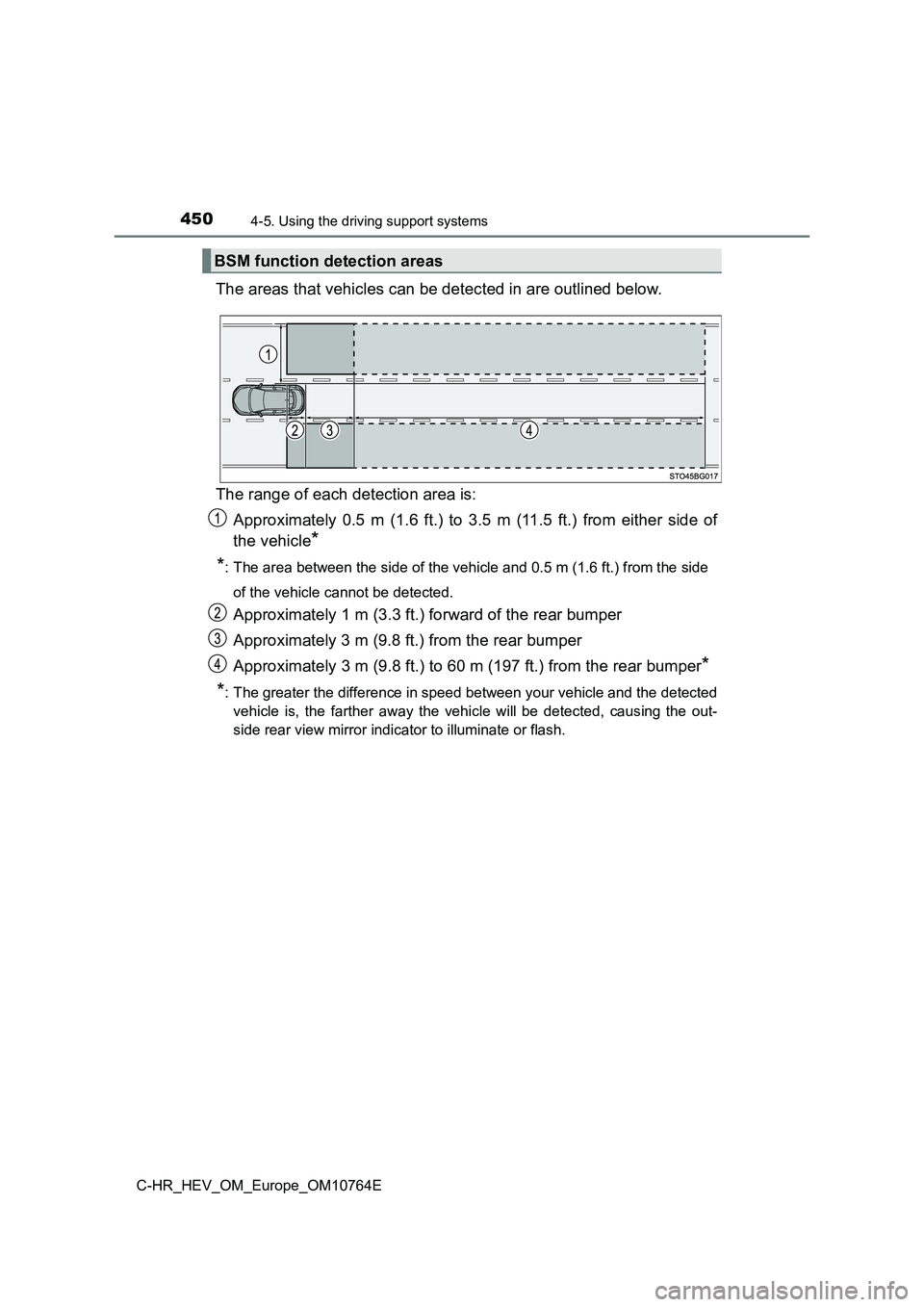
The areas that vehicles can be detected in are outlined below.
The range of each detection area is:
Approximately 0.5 m (1.6 ft.) to 3.5 m (11.5 ft.) from either s ide of
the vehicle*
*: The area between the side of the vehicle and 0.5 m (1.6 ft.) f rom the side
of the vehicle cannot be detected.
Approximately 1 m (3.3 ft.) forward of the rear bumper
Approximately 3 m (9.8 ft.) from the rear bumper
Approximately 3 m (9.8 ft.) to 60 m (197 ft.) from the rear bum per*
*: The greater the difference in speed between your vehicle and t he detected
vehicle is, the farther away the vehicle will be detected, caus ing the out-
side rear view mirror indicator to illuminate or flash.
BSM function detection areas
Page 469 of 814
467
4
4-5. Using the driving support systems
Driving
C-HR_HEV_OM_Europe_OM10764E
RCTA (Rear Crossing Traffic Aler t)
The RCTA function uses the BSM rear side radar sensors installed
behind the rear bumper. This function is intended to assist the driver
in checking areas that are not easily visible when backing up.
Outside rear view mirror indicators
When a vehicle approaching from the right or left at the rear o f the vehicle
is detected, both outside rear view mirror indicators flash.
RCTA buzzer
If a vehicle approaching from the right or left at the rear of the vehicle is
detected, a buzzer will sound. The buzzer also sounds for appro ximately
1 second immediately after the RCTA function is turned on.
“RCTA OFF” indicator
Illuminates when the Rear Cross ing Traffic Alert is disabled.
: If equipped
Summary of the Rear Crossing Traffic Alert
Page 470 of 814

4684-5. Using the driving support systems
C-HR_HEV_OM_Europe_OM10764E
Press “” or “” of the meter control switches, select .
Press “ ” or “” of the meter control switches, select .
Press “ ” or “” of the meter control switches, select “RCTA”.
When the RCTA function is disabled, the “RCTA OFF” indicator (P. 467)
illuminates. (Each time the power switch is turned off and then changed to
ON mode, the RCTA function will be enabled automatically.)
■ The outside rear view mirror indicators visibility
When under strong sunlight, the out side rear view mirror indicator may be dif-
ficult to see.
■ Hearing the RCTA buzzer
The RCTA buzzer may be difficult to hear over loud noises, such as if the
audio system volume is high.
■ When “RCTA Unavailable.” is shown on the multi-information display
Water, snow mud, etc., may be built up in the vicinity of the s ensor area of
bumper ( P. 448).
Removing the water, snow, mud, etc., from the vicinity of the s ensor area
bumper should return it to normal.
Also, the sensor may not function normally when used in extreme ly hot or
cold weather.
■ When “RCTA Malfunction Visit Your Dealer.” is shown on the multi-infor-
mation display
There may be a sensor malfunction or misaligned. Have the vehic le
inspected by any authorized Toyota retailer or Toyota authorize d repairer, or
any reliable repairer.
■ Rear side radar sensors
P. 448
Turning the RCTA function on/off
1
2
3
Page 471 of 814
4694-5. Using the driving support systems
4
Driving
C-HR_HEV_OM_Europe_OM10764E
The RCTA functions when your vehicle is in reverse. It can detect
other vehicles approaching from the right or left rear of the v ehicle. It
uses radar sensors to alert the driver of the other vehicle’s e xistence
through flashing the outside rear view mirror indicators and so unding
a buzzer.
RCTA function
Approaching vehicles Detection areas
WARNING
■ Cautions regarding the use of the system
There is a limit to the degree of recognition accuracy and cont rol perfor-
mance that this system can provide, do not overly rely on this system. The
driver is always responsible for paying attention to the vehicl e’s surround-
ings and driving safely. (P. 451)
■ To ensure the system can operate properly
P. 448
Page 503 of 814
5014-5. Using the driving support systems
4
Driving
C-HR_HEV_OM_Europe_OM10764E
Assume an ordinary posture for backing up, rest your hands
lightly on the steering wheel without applying any force, direc tly
confirm the safety of the area to the rear and around the vehic le
slowly back up while adjusting your speed by depressing the
brake pedal.
Depending on the condition of the parking space, steps to may
need to be repeated.
When the vehicle is almost entirely within the target parking s pot,
a high-pitched beep is emitted and the stop display is shown on
the display, stop the vehicle.
This completes the parallel parking assist mode.
● After stopping, feel free to maneuver the vehicle to reach the
desired parking spot.
● Be sure to back up while checking the area to the front and
rear of the vehicle directly and by using the mirrors.
11
611
12
Page 516 of 814
5144-5. Using the driving support systems
C-HR_HEV_OM_Europe_OM10764E
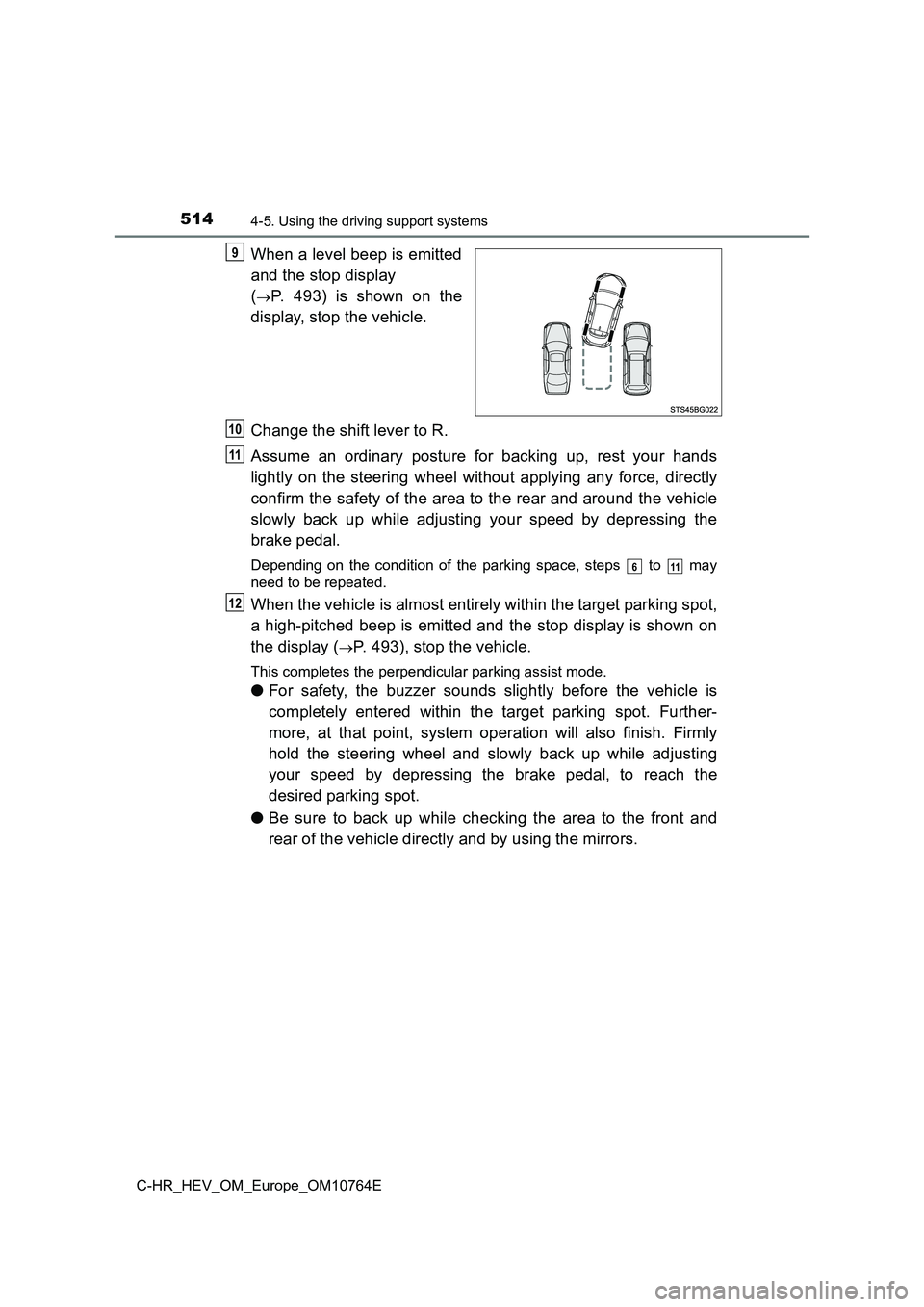
When a level beep is emitted
and the stop display
(P. 493) is shown on the
display, stop the vehicle.
Change the shift lever to R.
Assume an ordinary posture for backing up, rest your hands
lightly on the steering wheel without applying any force, direc tly
confirm the safety of the area to the rear and around the vehic le
slowly back up while adjusting your speed by depressing the
brake pedal.
Depending on the condition of the parking space, steps to may
need to be repeated.
When the vehicle is almost entirely within the target parking s pot,
a high-pitched beep is emitted and the stop display is shown on
the display (P. 493), stop the vehicle.
This completes the perpendicular parking assist mode.
● For safety, the buzzer sounds slightly before the vehicle is
completely entered within the target parking spot. Further-
more, at that point, system operation will also finish. Firmly
hold the steering wheel and slowly back up while adjusting
your speed by depressing the brake pedal, to reach the
desired parking spot.
● Be sure to back up while checking the area to the front and
rear of the vehicle directly and by using the mirrors.
9
10
11
611
12