2023 TOYOTA C-HR air condition
[x] Cancel search: air conditionPage 367 of 814
3654-5. Using the driving support systems
4
Driving
C-HR_HEV_OM_Europe_OM10764E
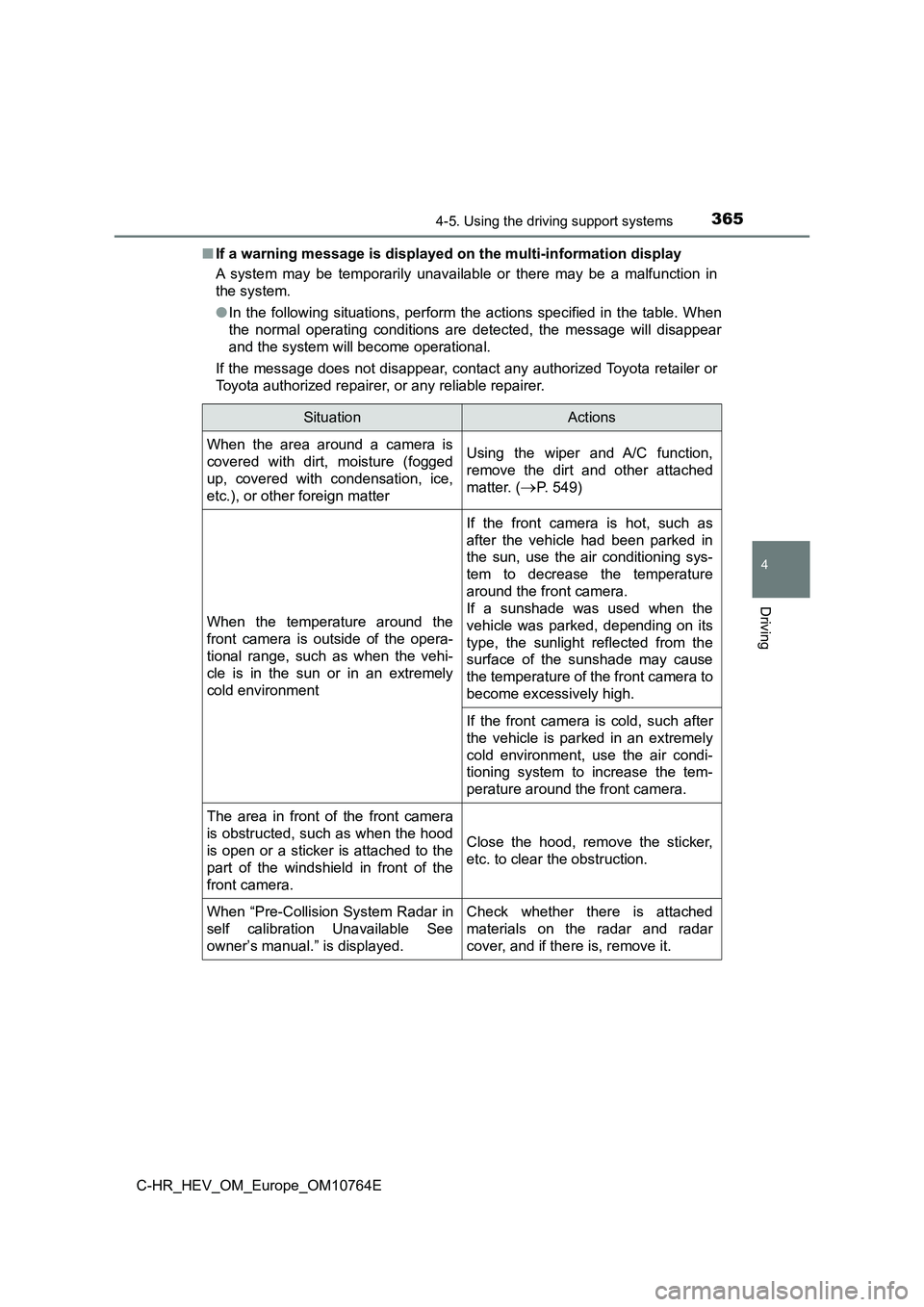
■ If a warning message is displayed on the multi-information display
A system may be temporarily unavailable or there may be a malfu nction in
the system.
● In the following situations, perform the actions specified in the table. When
the normal operating conditions are detected, the message will disappear
and the system will become operational.
If the message does not disappear, contact any authorized Toyot a retailer or
Toyota authorized repairer, or any reliable repairer.
SituationActions
When the area around a camera is
covered with dirt, moisture (fogged
up, covered with condensation, ice,
etc.), or other foreign matter
Using the wiper and A/C function,
remove the dirt and other attached
matter. (P. 549)
When the temperature around the
front camera is outside of the opera-
tional range, such as when the vehi-
cle is in the sun or in an extremely
cold environment
If the front camera is hot, such as
after the vehicle had been parked in
the sun, use the air conditioning sys-
tem to decrease the temperature
around the front camera.
If a sunshade was used when the
vehicle was parked, depending on its
type, the sunlight reflected from the
surface of the sunshade may cause
the temperature of the front camera to
become excessively high.
If the front camera is cold, such after
the vehicle is parked in an extremely
cold environment, use the air condi-
tioning system to increase the tem-
perature around the front camera.
The area in front of the front camera
is obstructed, such as when the hood
is open or a sticker is attached to the
part of the windshield in front of the
front camera.
Close the hood, remove the sticker,
etc. to clear the obstruction.
When “Pre-Collision System Radar in
self calibration Unavailable See
owner’s manual.” is displayed.
Check whether there is attached
materials on the radar and radar
cover, and if there is, remove it.
Page 368 of 814

3664-5. Using the driving support systems
C-HR_HEV_OM_Europe_OM10764E
● In the following situations, if the situation has changed (or the vehicle has
been driven for some time) and the normal operating conditions are
detected, the message will disappear and the system will become opera-
tional.
If the message does not disappear, contact any authorized Toyot a retailer or
Toyota authorized repairer, or any reliable repairer.
• When the temperature around the radar sensor is outside of the opera-
tional range, such as when the vehicle is in the sun or in an e xtremely
cold environment
• When the front camera cannot detect objects in front of the ve hicle, such
as when driving in the dark, snow, or fog, or when bright light s are shining
into the front camera
• Depending on the conditions in the vicinity of the vehicle, th e radar may
judge the surrounding environment can not be properly recognize d. In
that case, “Pre-Collision System Unavailable See owner’s manual .” is
displayed.
Page 401 of 814
3994-5. Using the driving support systems
4
Driving
C-HR_HEV_OM_Europe_OM10764E
■ Vehicle sway warning function
Depending on the vehicle and road conditions, the warning may n ot operate.
■ Warning message
If the following warning message is displayed on the multi-info rmation display
and the LTA indicator illuminates in orange, follow the appropr iate trouble-
shooting procedure. Also, if a different warning message is dis played, follow
the instructions displayed on the screen.
● “LTA Malfunction. Visit Your Dealer.”
The system may not be operating properly. Have the vehicle insp ected by
any authorized Toyota retailer or Toyota authorized repairer, o r any reliable
repairer.
● “LTA Unavailable”
The system is temporarily canceled due to a malfunction in a se nsor other
than the front camera. Turn the LTA system off, wait for a litt le while, and
then turn the LTA system back on.
● “LTA Unavailable at Current Speed.”
The function cannot be used as the vehicle speed exceeds the LT A opera-
tion range. Drive slower.
■ Customization
Function settings can be changed. (Customizable features: P. 786)
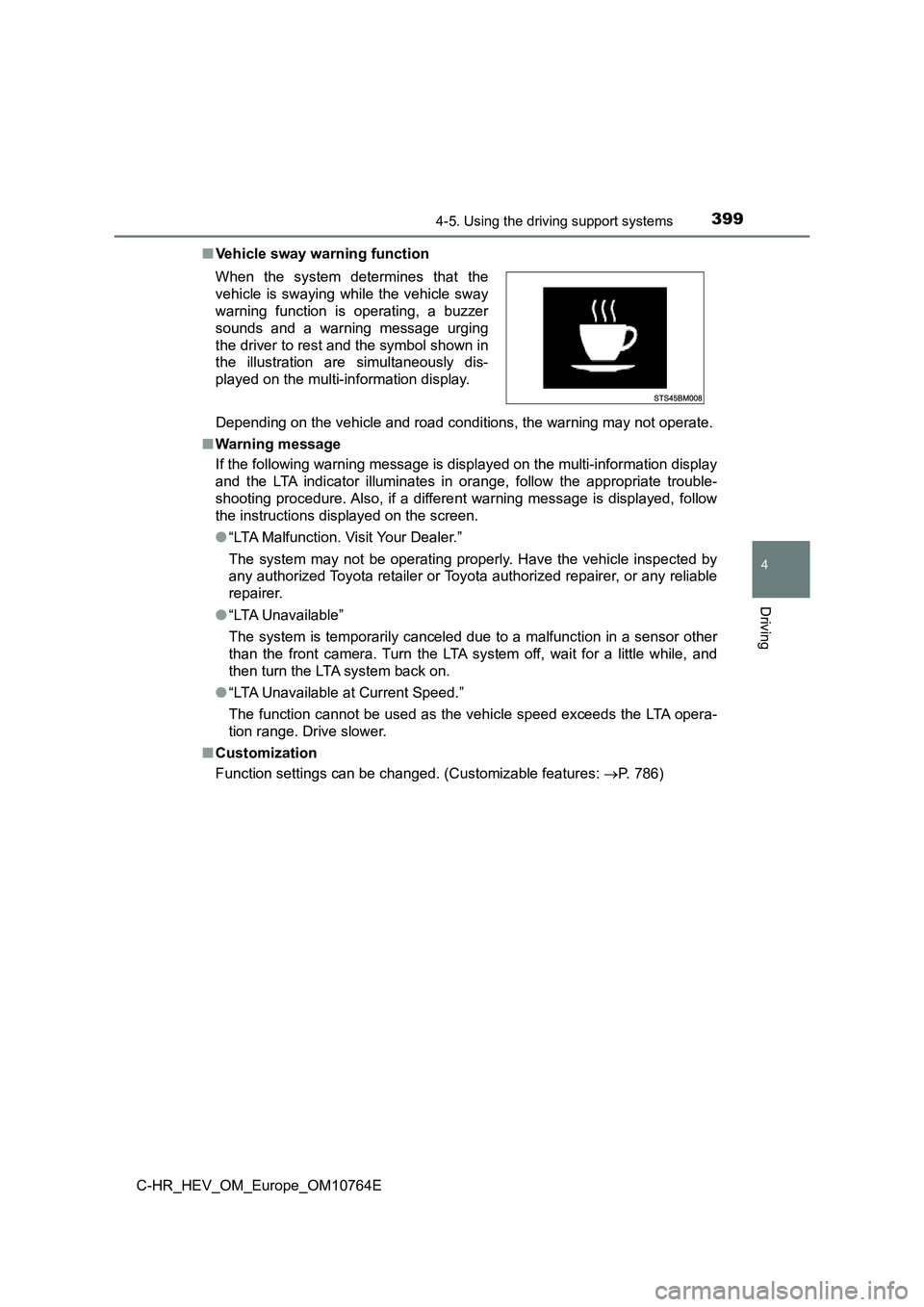
When the system determines that the
vehicle is swaying while the vehicle sway
warning function is operating, a buzzer
sounds and a warning message urging
the driver to rest and the symbol shown in
the illustration are simultaneously dis-
played on the multi-information display.
Page 424 of 814
4224-5. Using the driving support systems
C-HR_HEV_OM_Europe_OM10764E
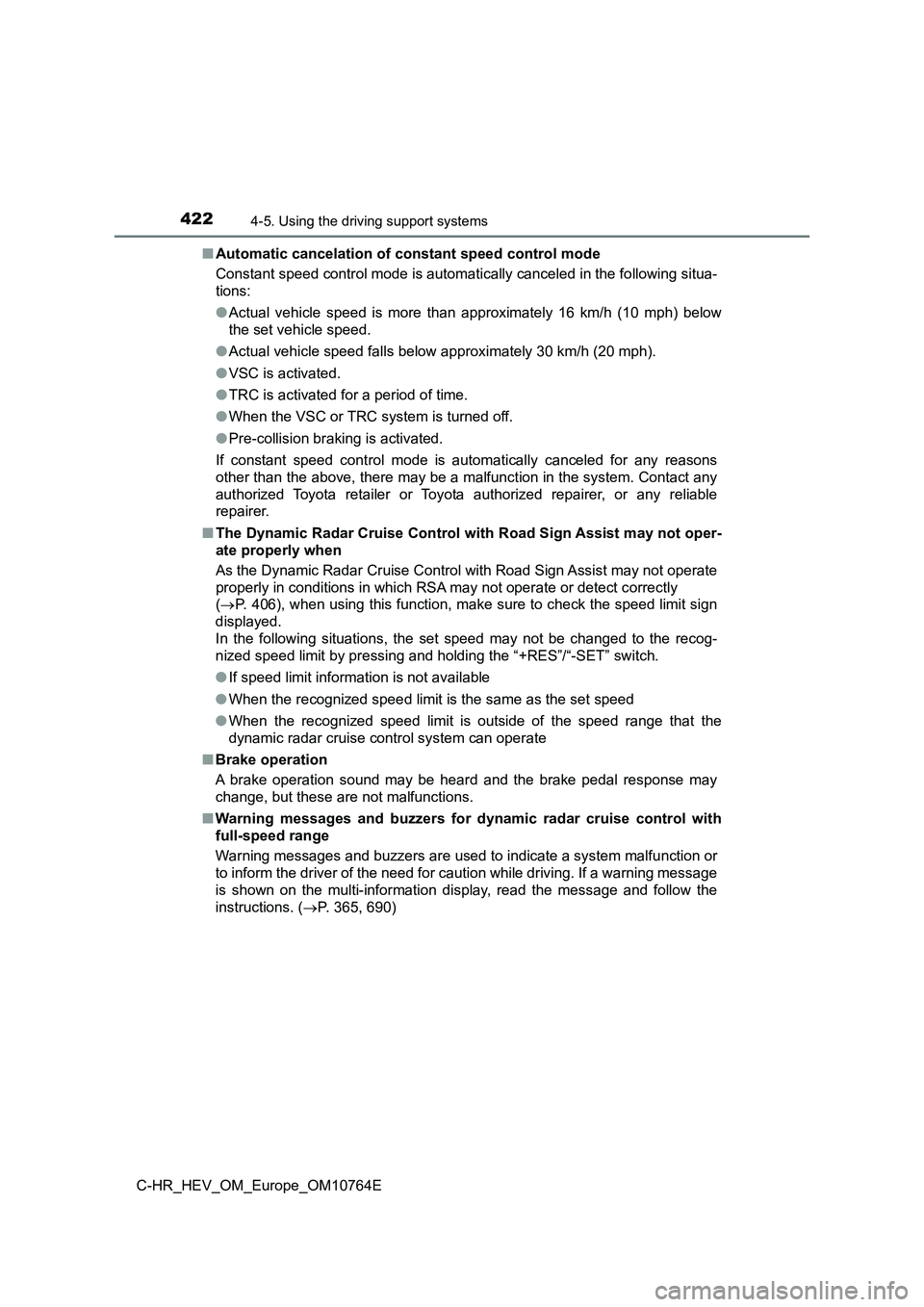
■ Automatic cancelation of constant speed control mode
Constant speed control mode is automatically canceled in the fo llowing situa-
tions:
● Actual vehicle speed is more than approximately 16 km/h (10 mph) below
the set vehicle speed.
● Actual vehicle speed falls below approximately 30 km/h (20 mph).
● VSC is activated.
● TRC is activated for a period of time.
● When the VSC or TRC system is turned off.
● Pre-collision braking is activated.
If constant speed control mode is automatically canceled for an y reasons
other than the above, there may be a malfunction in the system. Contact any
authorized Toyota retailer or Toyota authorized repairer, or an y reliable
repairer.
■ The Dynamic Radar Cruise Control with Road Sign Assist may not oper-
ate properly when
As the Dynamic Radar Cruise Control with Road Sign Assist may n ot operate
properly in conditions in which RSA may not operate or detect c orrectly
( P. 406), when using this function, make sure to check the speed limit sign
displayed.
In the following situations, the set speed may not be changed t o the recog-
nized speed limit by pressing and holding the “+RES”/“-SET” swi tch.
● If speed limit information is not available
● When the recognized speed limit is the same as the set speed
● When the recognized speed limit is outside of the speed range that the
dynamic radar cruise control system can operate
■ Brake operation
A brake operation sound may be heard and the brake pedal respon se may
change, but these are not malfunctions.
■ Warning messages and buzzers for dynamic radar cruise control with
full-speed range
Warning messages and buzzers are used to indicate a system malf unction or
to inform the driver of the need for caution while driving. If a warning message
is shown on the multi-information display, read the message and follow the
instructions. ( P. 365, 690)
Page 433 of 814
4314-5. Using the driving support systems
4
Driving
C-HR_HEV_OM_Europe_OM10764E
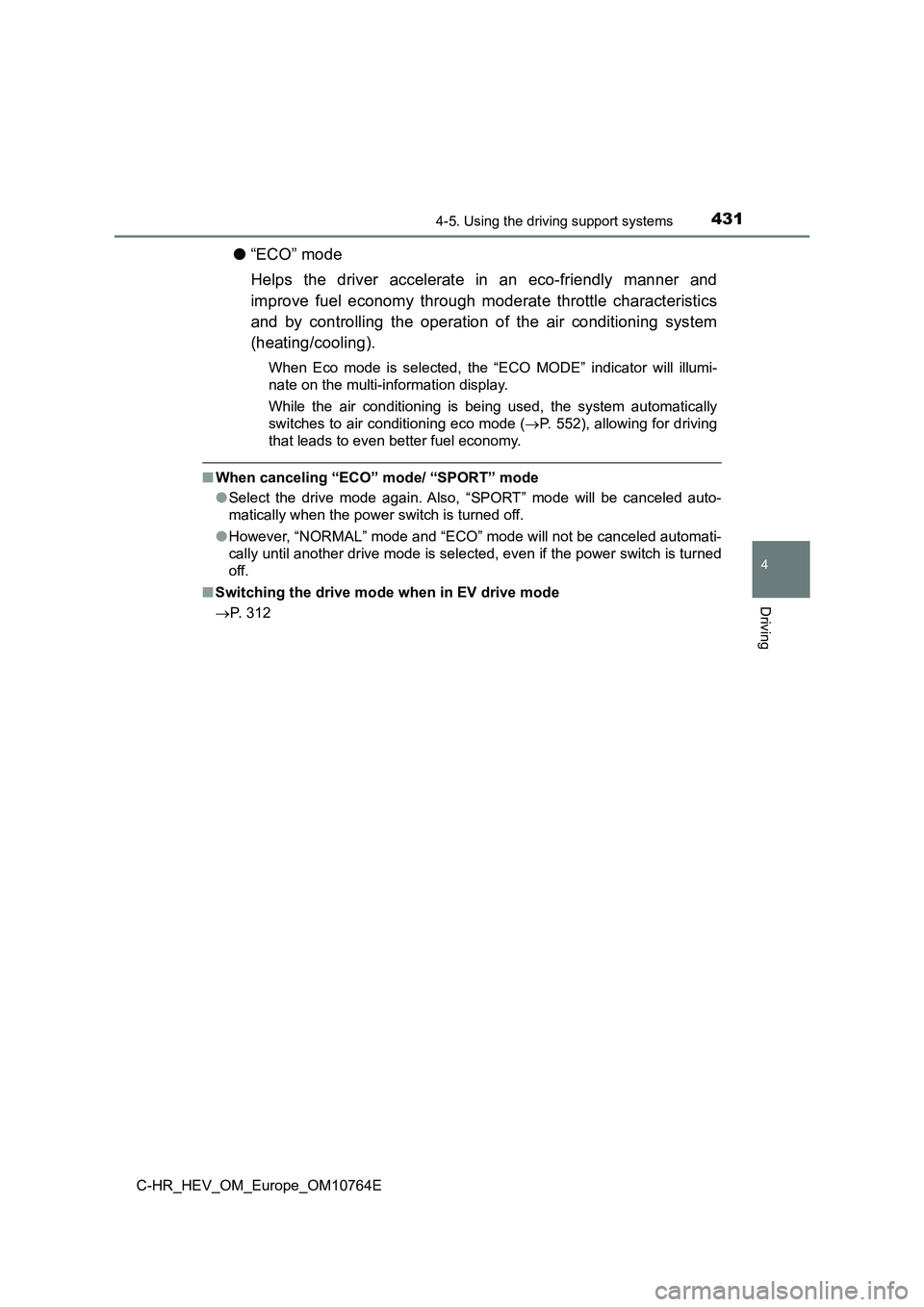
●“ECO” mode
Helps the driver accelerate in an eco-friendly manner and
improve fuel economy through moderate throttle characteristics
and by controlling the operation of the air conditioning system
(heating/cooling).
When Eco mode is selected, the “ECO MODE” indicator will illumi -
nate on the multi-information display.
While the air conditioning is being used, the system automatica lly
switches to air conditioning eco mode ( P. 552), allowing for driving
that leads to even better fuel economy.
■ When canceling “ECO” mode/ “SPORT” mode
● Select the drive mode again. Also, “SPORT” mode will be canceled auto-
matically when the power switch is turned off.
● However, “NORMAL” mode and “ECO” mode will not be canceled automati-
cally until another drive mode is selected, even if the power s witch is turned
off.
■ Switching the drive mode when in EV drive mode
P. 312
Page 450 of 814

4484-5. Using the driving support systems
C-HR_HEV_OM_Europe_OM10764E
WARNING
■To ensure the system can operate properly
One Blind Spot Monitor sensor is installed inside the left and right side of
the vehicle rear bumper respectively. Observe the following to ensure the
Blind Spot Monitor can function correctly.
If the warning message does not disappear, have the vehicle ins pected
by any authorized Toyota retailer or Toyota authorized repairer , or any reli-
able repairer.
● Do not subject a sensor or its surrounding area on the rear bumper to a
strong impact.
If a sensor is moved even slightly off position, the system may malfunction
and vehicles may not be detected correctly.
In the following situations, have your vehicle inspected by any authorized
Toyota retailer or Toyota authorized repairer, or any reliable repairer.
• A sensor or its surrounding area is subject to a strong impact .
• If the surrounding area of a sensor is scratched or dented, or part of
them has become disconnected.
● Do not disassemble the sensor.
● Do not attach accessories or stickers to the sensor or surrounding area on
the bumper.
● Do not modify the sensor or surrounding area on the bumper.
● Do not paint the rear bumper any color other than an official Toyota color.
●Keep the sensor and its surrounding
area on the bumper clean at all times. If
a sensor or its surrounding area on the
rear bumper is dirty or covered with
snow, the Blind Spot Monitor may not
operate and a warning message
( P. 436) will be displayed.
In this situation, clear off the dirt or
snow and drive the vehicle with the
operation conditions of the BSM func-
tion ( P. 451) satisfied for approxi-
mately 10 minutes.
Page 462 of 814

4604-5. Using the driving support systems
C-HR_HEV_OM_Europe_OM10764E
■The system can be operated when
● The power switch is in ON mode.
● Toyota parking assist-sensor function is on.
● The vehicle speed is less than about 10 km/h (6 mph).
● A shift lever other than P is selected.
● Vehicles with side sensors: Steering wheel is turned approximately 90° or
more
■ If “Parking assist unavailable. Clean parking assist sensor” is displayed
on the multi-information display
A sensor may be covered with ice, snow, dirt, etc. Remove the i ce, snow, dirt,
etc., from the sensor to return the system to normal.
Also, due to ice forming on a sensor at low temperatures, a war ning message
may be displayed or the sensor may not be able to detect an obj ect. Once the
ice melts, the system will return to normal.
■ If “Parking assist Malfunction Visit your dealer” is displayed on the
multi-information display
The system may not operate due to the malfunction of a sensor.
Have the vehicle inspected by any authorized Toyota retailer or Toyota autho-
rized repairer, or any reliable repairer.
■ Sensor detection information
The following situations may occur during use.
● The sensors may be able to only detect objects near the front and rear bum-
pers.
● Depending on the shape of the object and other factors, the detection dis-
tance may shorten, or detection may be impossible.
● If an object is extremely close to a sensor, it may not be detected.
● There will be a short delay between object detection and display. Even at
low speeds, there is a possibility that the object will come wi thin the sensor’s
detection areas before the display is shown and the warning bee p sounds.
● It might be difficult to hear the buzzer due to the volume of the audio system
or air flow noise of the air conditioning system.
● It may be difficult to hear the buzzer if buzzers for other systems are sound-
ing.
Page 476 of 814

4744-5. Using the driving support systems
C-HR_HEV_OM_Europe_OM10764E
● When there are spinning objects near your vehicle such as the fan of an air
conditioning unit
● When water is splashed or sprayed toward the rear bumper, such as from a
sprinkler
● Moving objects (flags, exhaust fumes, large rain droplets or snowflakes, rain
water on the road surface, etc.)
● When the distance between your vehicle and a guardrail, wall, etc., that
enters the detection area is short
● Gratings and gutters
● When a sensor or the area around a sensor is extremely hot or cold
● If the suspension has been modified or tires of a size other than specified
are installed
● If the front of the vehicle is raised or lowered due to the carried load
● When a vehicle passes by the side of
your vehicle
● When a detected vehicle turns while
approaching the vehicle