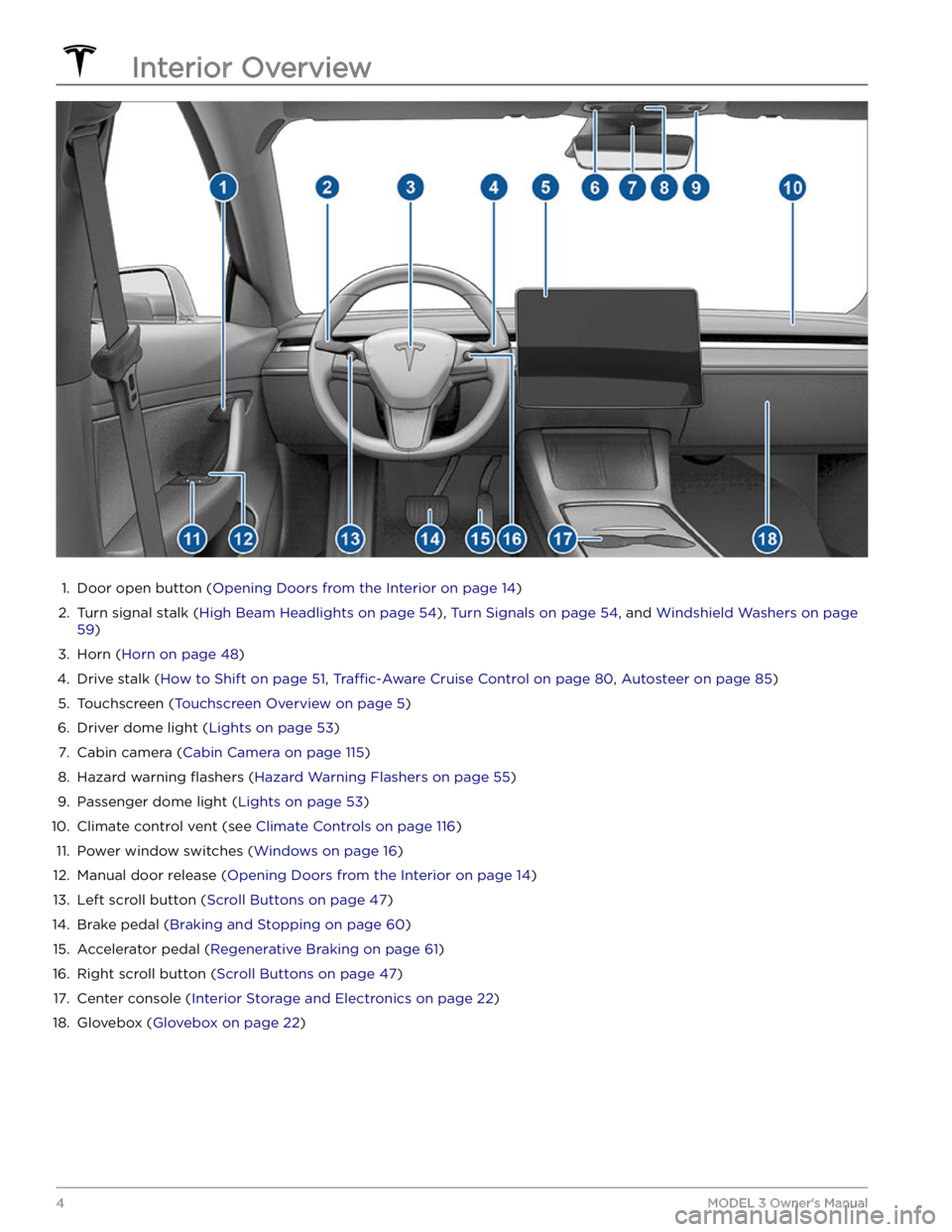
1.
Door open button (Opening Doors from the Interior on page 14)
2.
Turn signal stalk (High Beam Headlights on page 54), Turn Signals on page 54, and Windshield Washers on page
59)
3.
Horn (Horn on page 48)
4.
Drive stalk (How to Shift on page 51, Traffic-Aware Cruise Control on page 80, Autosteer on page 85)
5.
Touchscreen (Touchscreen Overview on page 5)
6.
Driver dome light (Lights on page 53)
7.
Cabin camera (Cabin Camera on page 115)
8.
Hazard warning flashers (Hazard Warning Flashers on page 55)
9.
Passenger dome light (Lights on page 53)
10.
Climate control vent (see Climate Controls on page 116)
11.
Power window switches (Windows on page 16)
12.
Manual door release (Opening Doors from the Interior on page 14)
13.
Left scroll button (Scroll Buttons on page 47)
14.
Brake pedal (Braking and Stopping on page 60)
15.
Accelerator pedal (Regenerative Braking on page 61)
16.
Right scroll button (Scroll Buttons on page 47)
17.
Center console (Interior Storage and Electronics on page 22)
18.
Glovebox (Glovebox on page 22)
Interior Overview
4MODEL 3 Owner
3.
After a few seconds, the Tesla logo appears. Wait approximately 30 seconds for the touchscreen to restart. If the
touchscreen is still unresponsive or demonstrating unusual behavior after a few minutes, try power cycling the
vehicle (if possible). See
Power Cycling the Vehicle on page 50.
NOTE: Pressing the scroll buttons only restarts the touchscreen. It does not restart any other vehicle component and
does not power
Model 3 off and on.
Customizing My Apps
For one-touch access to commonly used apps and controls, you can customize what displays in the My Apps area on
the touchscreen