2023 TESLA MODEL 3 door lock
[x] Cancel search: door lockPage 7 of 296

WARNING: Always pay attention to road and traffic conditions when driving. To minimize driver distraction and
ensure the safety of vehicle occupants as well as other road users, avoid using the touchscreen to adjust
settings while the vehicle is in motion.
Use the touchscreen to control many features that, in traditional cars, are controlled using physical buttons (for example, adjusting the cabin heating and air conditioning, headlights, etc.). You also use the touchscreen to control
media, navigate, use entertainment features, and customize
Model 3 to suit your preferences. For hands-free access
to common touchscreen controls, use voice commands (see
Voice Commands on page 125).
If the touchscreen is unresponsive or demonstrates unusual behavior, you can restart it (see Restarting the
Touchscreen on page 7).
NOTE: Illustrations are provided to improve conceptual understanding only. Depending on vehicle options, software
version, market region and regional and language settings, the details displayed on the screen will differ.
1.
Status bar: This area on the top of the touchscreen displays the time of day, the outside temperature, and the
following icons:
Touch to lock/unlock all doors and trunks.4:20 pmYour vehicle automatically updates the time. If the time is incorrect, confirm your vehicle has
internet and GPS connectivity with the latest software.
Touchscreen Overview
5Overview
Page 16 of 296

Using Exterior Door Handles
Use your thumb to push the wide part of the door
handle. The handle pivots toward you, and you can open
the door by pulling the handle or pulling the edge of the door.
The handle retracts automatically.
When a door or trunk is open, the
touchscreen displays the Door Open
indicator light.
NOTE: See Cold Weather Best Practices on page 74 to
ensure door handles function properly in cold weather.
WARNING: While using the door handle, take care
to avoid allowing fingers, jewelry, acrylic nails, etc.
from being pinched by the door or door handle
mechanism. Failure to do so may result in damage
or injury.
Opening Doors from the Interior
Model 3 doors are electrically powered. To open a door
while sitting inside, press the button located at the top of the interior door handle and push the door open.
NOTE: To prevent children from opening the rear doors,
turn on child locks (see
Child Locks on page 15).
You can also use the touchscreen popup to open and close doors when inside
Model 3 while the vehicle is in
Park.
To open a front door in the unlikely situation when
Model 3 has no power, pull up the manual door release
located in front of the window switches.
NOTE: Only the front doors are equipped with a manual
door release.
Doors
14MODEL 3 Owner
Page 17 of 296

CAUTION: Manual door releases are designed to
be used only in situations when Model 3 has no
power. When Model 3 has power, use the button
located at the top of the interior door handle.
Interior Locking and Unlocking
While sitting inside Model 3, you can lock and unlock all
doors and trunks by touching the lock icon
on the
touchscreen.
The icon changes to indicate whether
doors are locked or unlocked.
You can also unlock the doors by pressing the Park
button on the end of the drive stalk a second time.
Pressing this button once engages Park and pressing it again unlocks the doors.
Walk-Away Door Lock
Doors and trunks can automatically lock when you walk away carrying your phone key or paired key fob
(if
ordered after approximately October 1, 2019). To turn
this feature on or
off, touch Controls > Locks > Walk-
Away Door Lock.
When the doors lock, the exterior lights flash once and
the mirrors fold (if
Fold Mirrors is on). To also hear a
confirmation sound when Model 3 locks, touch Controls
> Locks > Lock Confirmation Sound.
Model 3 does not automatically lock if:
Page 24 of 296

Center Console
In addition to housing an RFID transmitter that reads key fobs and key cards (see
Key Card on page 10), the
center console includes cup holders, two storage
compartments, and
a wireless phone charger.
To open the main storage compartment, pull its cover upward. Open the front storage compartment by sliding its cover forward.
Second Row Console
Your Model 3 has a rear console integrated in the center
of the second row seat back. Pull the console down to
access the rear cup holders, or use it as an armrest.
Glovebox
To open the glovebox, touch Controls > Glovebox. The
glovebox automatically opens and its light turns on.
To close the glovebox, push it upward until it clicks into its closed position.
For additional glovebox security, touch Controls >
Safety > Glovebox PIN to set a 4-digit PIN (see
Glovebox PIN on page 127).
NOTE: If you leave the glovebox open, its light
eventually turns
off.
NOTE: The glovebox locks whenever closed and you
lock
Model 3 using the mobile app, key card, you leave
Model 3 carrying your phone key (if Walk-Away Door
Lock is turned on), or if Valet mode is active (see
Valet
Mode on page 46). It does not lock when Model 3 is
locked by touching the lock icon on the touchscreen.
WARNING: When driving, keep the glovebox
closed to prevent injury to a passenger if a
collision or sudden stop occurs.
Wireless Phone Charger
A wireless phone charger (if equipped), is integrated
into the front console to provide up to 15W of power to charge a Qi-enabled phone. Simply place your phone on
the charger. Your device may feel warm while charging, but this is a normal
effect of inductive charging.
When placed on the wireless charger, your phone
charges whenever the vehicle is powered on (the
touchscreen is on and you are inside the vehicle). Your
phone will not charge after exiting the vehicle
unless a
feature (such as Sentry mode) is enabled and providing
power to the USB ports. Model 3 will also not charge a
phone if the vehicle
Page 55 of 296
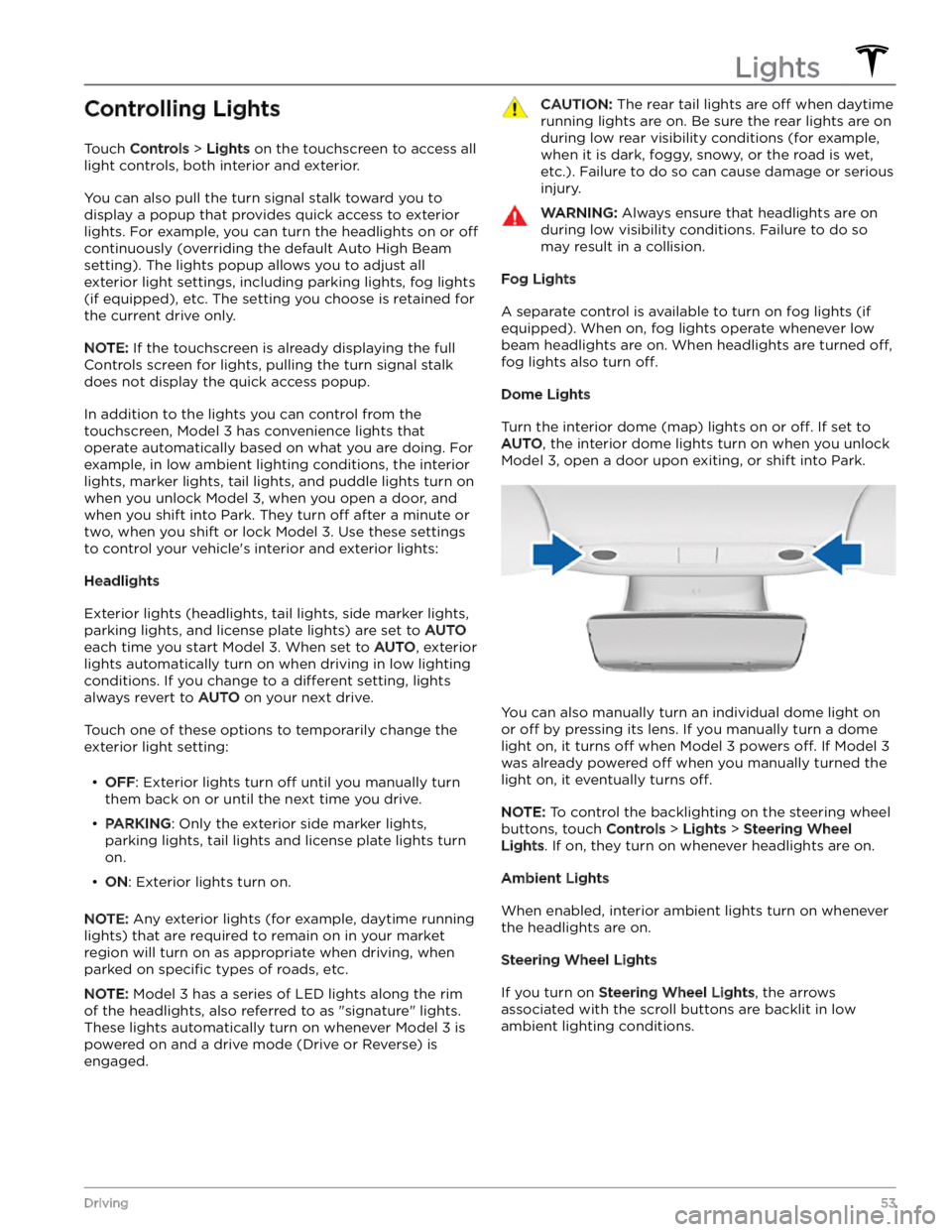
Controlling Lights
Touch Controls > Lights on the touchscreen to access all
light controls, both interior and exterior.
You can also pull the turn signal stalk toward you to
display a popup that provides quick access to exterior lights. For example, you can turn the headlights on or
off
continuously (overriding the default Auto High Beam
setting). The lights popup allows you to adjust all
exterior light settings, including parking lights, fog lights
(if equipped), etc. The setting you choose is retained for
the current drive only.
NOTE: If the touchscreen is already displaying the full
Controls screen for lights, pulling the turn signal stalk does not display the quick access popup.
In addition to the lights you can control from the touchscreen,
Model 3 has convenience lights that
operate automatically based on what you are doing. For
example, in low ambient lighting conditions, the interior lights, marker lights, tail lights, and puddle lights turn on when you unlock
Model 3, when you open a door, and
when you shift into Park. They turn
off after a minute or
two, when you shift or lock
Model 3. Use these settings
to control your vehicle
Page 129 of 296

About the Security System
If Model 3 does not detect an authenticated phone, key
fob, or key card and a locked door or trunk is opened, an
alarm sounds. The headlights and turn signals also
flash.
To deactivate the alarm, press any button on the mobile
app or tap your key card or key fob against the card reader located
just below the Autopilot camera on the
driver
Page 174 of 296

12.
Replace the underhood apron by aligning the clips into their openings in the front trunk. Press down to lock them in place. The clips make an audible clicking
sound when secured.
13.
Close the front trunk. If an alert to replace to low voltage lead-acid battery was previously shown on the touchscreen, ensure the alert no longer appears.
Vehicles Manufactured After
Approximately October 2020
Removal:
1.
Prepare the vehicle to remove the low voltage lead-
acid battery:
a.
Ensure the vehicle is in Park.
b.
Lower all windows.
c.
Open the front trunk.
d.
Leave a door propped open so you can get back
into the vehicle if needed.
e.
Disconnect the charge cable from the charge port.
2.
Remove the vehicle
Page 186 of 296

Cautions for Exterior CleaningCAUTION: Do not wash in direct sunlight.CAUTION: Do not use windshield treatment fluids.
Doing so can interfere with wiper friction and
cause a chattering sound.
CAUTION: Do not use hot water, detergents, or
highly alkaline or caustic cleaning products,
especially those containing hydroxide.
CAUTION: If using a pressure washer, maintain a
distance of at least 12" (30 cm) between the
nozzle and the surface of Model 3. Avoid aiming
the water jet directly at parking sensors (if
equipped). Keep the nozzle moving and do not
concentrate the water jet on any one area.
CAUTION: Do not aim water hoses directly at
windows, door, or hood seals or at electronic
modules or exposed cabling.
CAUTION: To avoid corrosive damage that may
not be covered by the warranty, rinse away any
road salt from the underside of the vehicle, wheel
wells, and brakes. After cleaning the vehicle, dry
the brakes by going on a short drive and applying
the brakes multiple times.
CAUTION: Avoid using tight-napped or rough
cloths, such as washing mitts. A high-quality
microfiber cleaning cloth is recommended.
CAUTION: If washing in an automatic car wash, use
touchless car washes only. These car washes have
no parts (brushes, etc.) that touch the surfaces of
Model 3. Some touchless car washes use caustic
solutions that, over time, can cause discoloration
of decorative exterior trim. Avoid exposure to
soaps and chemicals above pH 13. If unsure, check
the product label or ask the staff at the car wash.
Damage caused by improper washing is not
covered by the warranty.
CAUTION: If washing in an automatic car wash,
make sure the vehicle is locked. In addition, avoid
using controls on the touchscreen that can result
in accidentally opening doors or trunks while the
vehicle is being washed. Any damage caused is
not covered by the warranty.
CAUTION: Ensure the wipers are off before
washing Model 3 to avoid the risk of damaging the
wipers.
CAUTION: Do not use chemical based wheel
cleaners or pre-wash products. These can damage
the finish on the wheels.
WARNING: Never spray liquid at a high velocity
(for example, if using a pressure washer) towards
the charge port while Model 3 is charging. Failure
to follow these instructions can result in serious
injury or damage to the vehicle, charging
equipment, or property.
Cleaning the Interior
Frequently inspect and clean the interior to maintain its
appearance and to prevent premature wear. If possible,
immediately wipe up spills and remove marks. For
general cleaning, wipe interior surfaces using a soft cloth (such as
microfiber) dampened with a mixture of warm
water and mild non-detergent cleaner (test all cleaners on a concealed area before use). To avoid streaks, dry immediately with a soft lint-free cloth.
Interior Glass
Do not scrape, or use any abrasive cleaning fluid on
glass or mirrored surfaces. This can damage the
reflective surface of the mirror and the heating elements
in the rear window.
Airbags
Do not allow any substance to enter an airbag cover. This could
affect correct operation.
Dashboard and Plastic Surfaces
Do not polish the upper surfaces of the dashboard. Polished surfaces are
reflective and could interfere with
your driving view.
Seats
Wipe spills and chemical residues from interior surfaces as soon as possible using a soft cloth moistened with warm water and non-detergent soap. Wipe gently in a circular motion. Then wipe dry using a soft, lint-free cloth.
Although seating surfaces are designed to repel stains, Tesla recommends regular cleaning to maintain
performance and an as-new appearance. Promptly treat
dye transfer from clothing, such as indigo-dyed denim.
Avoid contact with harsh chemicals, including certain cosmetics. Never use cleaners containing alcohol or bleach. Spot-test cleaners on an inconspicuous area
before applying to visible surfaces.
Vacuum cloth seats as needed to remove any loose dirt.
CAUTION: Aftermarket, non-Tesla seat covers may
inhibit the sensitivity of a seat