2023 SUBARU SOLTERRA ambient temperature
[x] Cancel search: ambient temperaturePage 208 of 628
2084-4. Adjusting the steering wheel and mirrors
Owners Manual_USA_M42C01_en
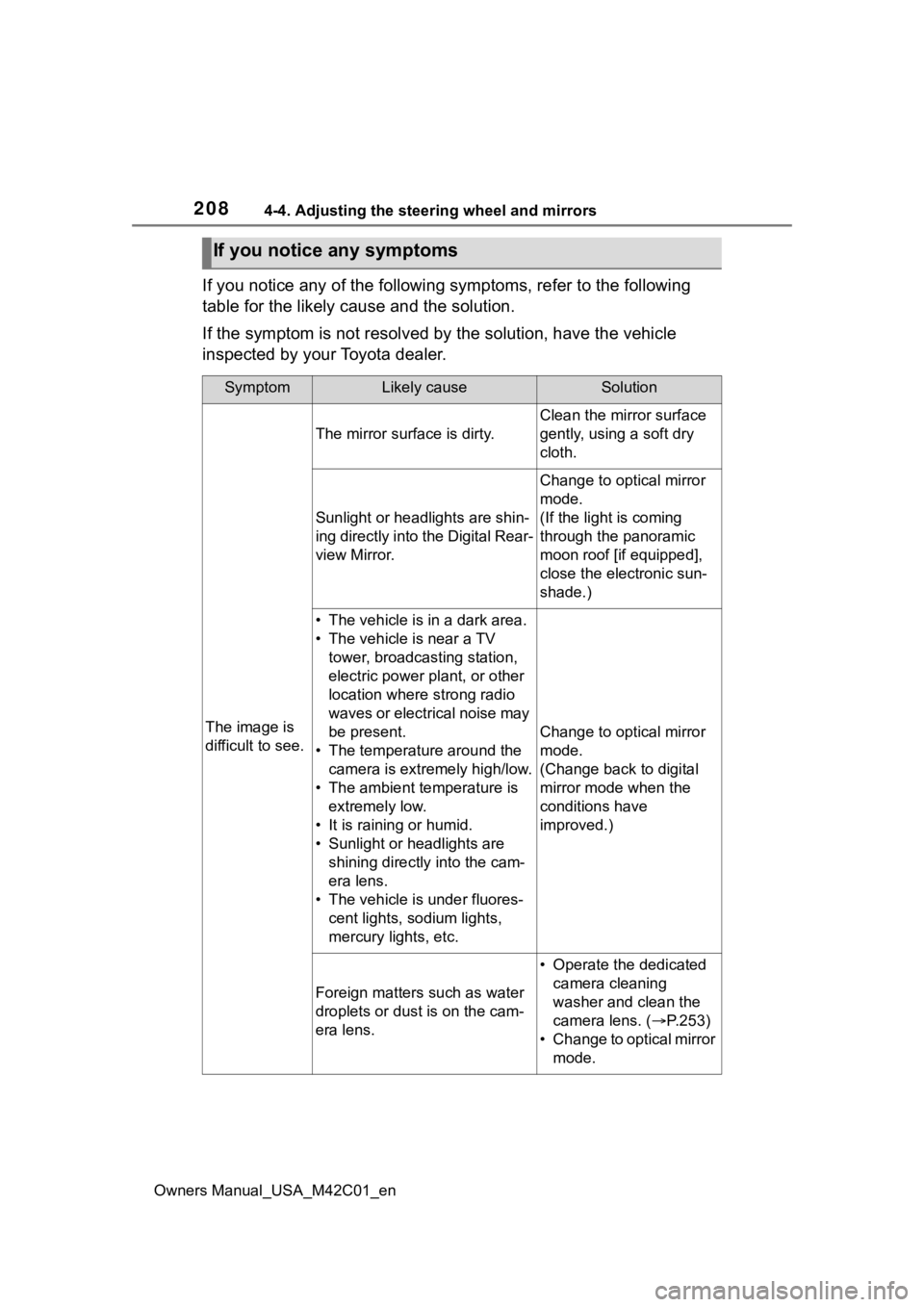
If you notice any of the following symptoms, refer to the following
table for the likely cause and the solution.
If the symptom is not resolved by the solution, have the vehicl e
inspected by your Toyota dealer.
If you notice any symptoms
SymptomLikely causeSolution
The image is
difficult to see.
The mirror surface is dirty.
Clean the mirror surface
gently, using a soft dry
cloth.
Sunlight or headlights are shin-
ing directly into the Digital Rear-
view Mirror.
Change to optical mirror
mode.
(If the light is coming
through the panoramic
moon roof [if equipped],
close the electronic sun-
shade.)
• The vehicle is in a dark area.
• The vehicle is near a TV tower, broadcasting station,
electric power plant, or other
location where strong radio
waves or electrical noise may
be present.
• The temperature around the camera is extremely high/low.
• The ambient te mperature is
extremely low.
• It is raining or humid.
• Sunlight or headlights are shining directly into the cam-
era lens.
• The vehicle is under fluores- cent lights, sodium lights,
mercury lights, etc.
Change to optical mirror
mode.
(Change back to digital
mirror mode when the
conditions have
improved.)
Foreign matters such as water
droplets or dust is on the cam-
era lens.
• Operate the dedicated camera cleaning
washer and clean the
camera lens. ( P.253)
• Change to optical mirror mode.
Page 232 of 628

2325-2. Driving procedures
Owners Manual_USA_M42C01_enshown on the multi-information
display, read the message and fol-
low the instructions.
●If the door is unlocked with the
mechanical key, the EV system
cannot be started using the smart
key system. Refer to P.540 to start
the EV system. However, if the
electronic key is carried inside the
vehicle and the do
ors are locked
( P.170), the EV system can be
started.
■When the ambient temperature
is low, such as during winter
driving conditions
●When starting the EV system, the
flashing time of the “READY” indi-
cator may be long. Leave the
vehicle as it is until the “READY”
indicator is steady on, as steady
means the vehicle is able to move.
●When the traction battery is
extremely cold (below approxi-
mately -22°F [-30°C]) under the
influence of the outside tempera-
ture, it may not be possible to start
the EV system. In this case, try to
start the EV system again after the
temperature of the traction battery
increases due to the outside tem-
perature increase, etc.
■Sounds and vibrations specific
to an battery electric vehicle
P. 7 4
■If the 12-volt battery is dis-
charged
The EV system cannot be started
using the smart key system. Refer
to P.541 to restart the EV system.
■Electronic key battery depletion
P. 1 6 2
■Conditions affecting operation
P. 1 8 8
■Note for the entry function
P. 1 8 9
■If there is a malfunction in the
smart key system
If “Smart Key System Malfunction”
is displayed on the multi-information
display, the system may be malfunc-
tioning. Have the vehicle inspected
by your Toyota dealer immediately.
■If the “READY” indicator does
not come on
In the event that the “READY” indi-
cator does not come on even after
performing the proper procedures
for starting the vehicle, contact your
Toyota dealer immediately.
■If the EV system is malfunction-
ing
P. 8 0
■Electronic key battery
P.497
■Operation of the power switch
●If the switch is not pressed shortly
and firmly, the power switch mode
may not change or the EV system
may not start.
●If attempting to restart the EV sys-
tem immediately after turning the
power switch to OFF, the EV sys-
tem may not start in some cases.
After turning the power switch to
OFF, please wait a few seconds
before restarti ng the EV system.
■Customization
If the smart key system has been
deactivated in a customized setting,
refer to P.540.
WARNING
■When starting the EV system
Always start the EV system while
sitting in the driver’s seat. Do not
depress the accelerator pedal
while starting the EV system
under any circumstances.
Doing so may cause an accident
resulting in death o r serious injury.
Page 263 of 628

2635-4. Using the driving support systems
Owners Manual_USA_M42C01_en
5
Driving
■Situations in which the sensors
may not operate properly
●When the height or inclination of
the vehicle has been changed due
to modifications
●When the windshield is dirty,
fogged up, cracked or damaged
●When the ambient temperature is
high or low
●When mud, water, snow, dead
insects, foreign matter, etc., is
attached to the fr ont of the sensor
●When in inclement weather such
as heavy rain, fog, snow, or a
sandstorm
●When water, snow, dust, etc. is
thrown up in front of the vehicle, or
when driving through mist or
smoke
●When the headlig hts are not illu-
minated while driving in the dark,
such as at night o r when in a tun-
nel
●When the lens of a headlight is
dirty and illumination is weak
●When the headlights are mis-
aligned
●When a headlight is malfunction-
ing
●When a the headlights of another vehicle, sunlight, or reflected light
shines directly into the front cam-
era
●When the brightness of the sur-
rounding area changes suddenly
●When driving near a TV tower,
broadcasting station, electric
power plant, radar equipped vehi-
cles, etc., or other location where
strong radio waves or electrical
noise may be present
●When a wiper blade is blocking
the front camera
●When in a location or near objects
which strongly reflect radio waves,
such as the following:
• Tunnels
• Truss bridges
• Gravel roads
• Rutted, snow-covered roads
• Walls
• Large trucks
• Manhole covers
• Guardrail
• Metal plates
●When near a step or protrusion
●When a detectable vehicle is nar-
row, such as a small mobility vehi-
cle
●When a detectable vehicle has a
small front or rear end, such as an
unloaded truck
●When a detectable vehicle has a
low front or rear end, such as a
low bed trailer
●When a detectable vehicle has
extremely high ground clearance
WARNING
●Do not modify or change the
headlights and other lights.
■Front camera installation area
on the windshield
If the system determines that the
windshield may be fogged up, it
will automatically operate the
heater to defog the part of the
windshield around the front cam-
era. When cleaning, etc., be care-
ful not to touch the area around
the front camera until the wind-
shield has cooled sufficiently, as
touching it may cause burns.
Page 346 of 628

3465-4. Using the driving support systems
Owners Manual_USA_M42C01_en
WARNING
●Depending on the condition of
the road surface or the vehicle,
the distance between the vehi-
cle and a parking space, etc., it
may not be possible to detect a
parking space or the system
may not be able to provide
assistance to the point the vehi-
cle is fully parked.
●This system will guide the vehi-
cle to appropriate positions for
changing the direction of travel,
however, if you feel that the
vehicle is approaching too close
to an adjacent parked vehicle at
any time, depress the brake
pedal and change the shift posi-
tion. However, if this is per-
formed, the number of times the
vehicle changes direction may
increase, and the vehicle may
be parked at an angle.
●As following objects may not be
detected, make sure to check
the safety of the area around
your vehicle and depress the
brake pedal to stop the vehicle if
it may collide with an object.
• Thin objects such as wire, fences, rope, etc.
• Cotton, snow and other materi- als that absorb sound waves
• Sharply-angled objects
• Low objects (curb stones, park- ing blocks, etc.)
• Tall objects with upper sections that protrude outward
●Even if there is an object in the
target parking space, it may not
be detected and assistance
may be performed.
●While the system is operating, if
it is likely that your vehicle will
collide with a nearby vehicle,
parking block, object, or person,
depress the brake pedal to stop
the vehicle and press the
Advanced Park main switch to
disable the system.
●Never use only the multimedia
display to view the area behind
the vehicle. The image dis-
played may dif fer than the
actual situation. Using only the
screen when backing up may
lead to an accident, such as a
collision with another vehicle.
When backing up, make sure to
look directly or use the mirrors
to check the safe ty of the area
around your vehicle, especially
behind the vehicle.
●When the ambient temperature
is extremely low, the screen
may appear dark or the dis-
played image may become
unclear. Also, as moving objects
may appear distorted or may
not be able to be seen on the
screen, make sure to directly
check the safety of the area
around your vehicle.
In the following situations, while
the vehicle is stopped and held
by Advanced Park, it may be
canceled and th e vehicle may
start moving. Immediately
depress the brake pedal. Fail-
ure to do so may lead to an
accident.
• When the driver’s door is opened
• When operations instructed by the system are not performed
within a certain amount of time
• When the brake pedal is depressed and th e vehicle is
stopped for a certain amount of
time
Page 351 of 628

3515-4. Using the driving support systems
Owners Manual_USA_M42C01_en
5
Driving
NOTICE
●Check the battery charge level
of the smartphon e before using
Remote control function. If the
battery of the smartphone dies
while operating Remote control
function, assist will be sus-
pended. Also, if the battery
charge level of the smartphone
is 20% or less when attempting
to start Remote control function,
Remote control function will not
be started.
●Turn on the Bluetooth communi-
cation function of the smart-
phone before using Remote
control function. Remote con-
trol function cannot be used if
the Bluetooth function is off.
●Do not turn off the Bluetooth
function of the smartphone or
disconnect from the multimedia
system while using Remote
control function. If the vehicle
cannot be connected to via
Bluetooth, Remote control func-
tion cannot be used.
●While using Remote control
function, if a call is received,
etc., and another app is
opened, Remote control func-
tion will be suspended. Assist
can be resumed if the Remote
Park app is reopened within 3
minutes. If 3 minutes or more
elapse, assist will be canceled.
●While using Remote control
function, if the home button or
power button of the smartphone
is pressed and the screen is
locked, Remote control function
will be suspended. Assist can
be resumed if the Remote Park
app is reopened within 3 min-
utes. If 3 minutes or more
elapse, assist will be canceled.
●Do not use the Remote Park
app with devices other than
those which operation has been
confirmed by the maker. Other-
wise the system may not oper-
ate correctly.
●When the ambient temperature
is low, it may take time for the
system to start, due to 12-volt
battery charging.
●If the 12-volt battery voltage
drops, assistance will be can-
celed.
●When using Remote control
function on a slope, the vehicle
speed will be slower and the
distance that th e vehicle will
approach objects will become
longer than when on a level
road surface.
●If a system temporary failure
occurs, after th e vehicle is
stopped by the electronic park-
ing brake or the shift position
being changed to P, the power
switch may turn off and the sys-
tem may be canceled. In this
case, have the vehicle
inspected by your Toyota
dealer.
●If a system malfunction occurs,
assistance may be temporarily
suspended. If the system
returns to normal, operation can
be resumed. Follow the content
on the smartphone screen to
resume operation.
●Remote control function cannot
be started if the EV system has
been started using an aftermar-
ket remote starter.
Page 403 of 628
4036-1. Using the air conditioning system and defogger
Owners Manual_USA_M42C01_en
6
Interior features
■Adjusting the temperature
setting
Operate the temperature con-
trol switch upwards to increase
the temperature and downwards
to decrease the temperature.
If “A/C” is not pr essed, the system
will blow ambient t emperature air or
heated air.
■Setting the fan speed
Operate the fan speed control
switch upwards to increase the
fan speed and downwards to
decrease the fan speed.
Press the “OFF” switch to turn off
the fan.
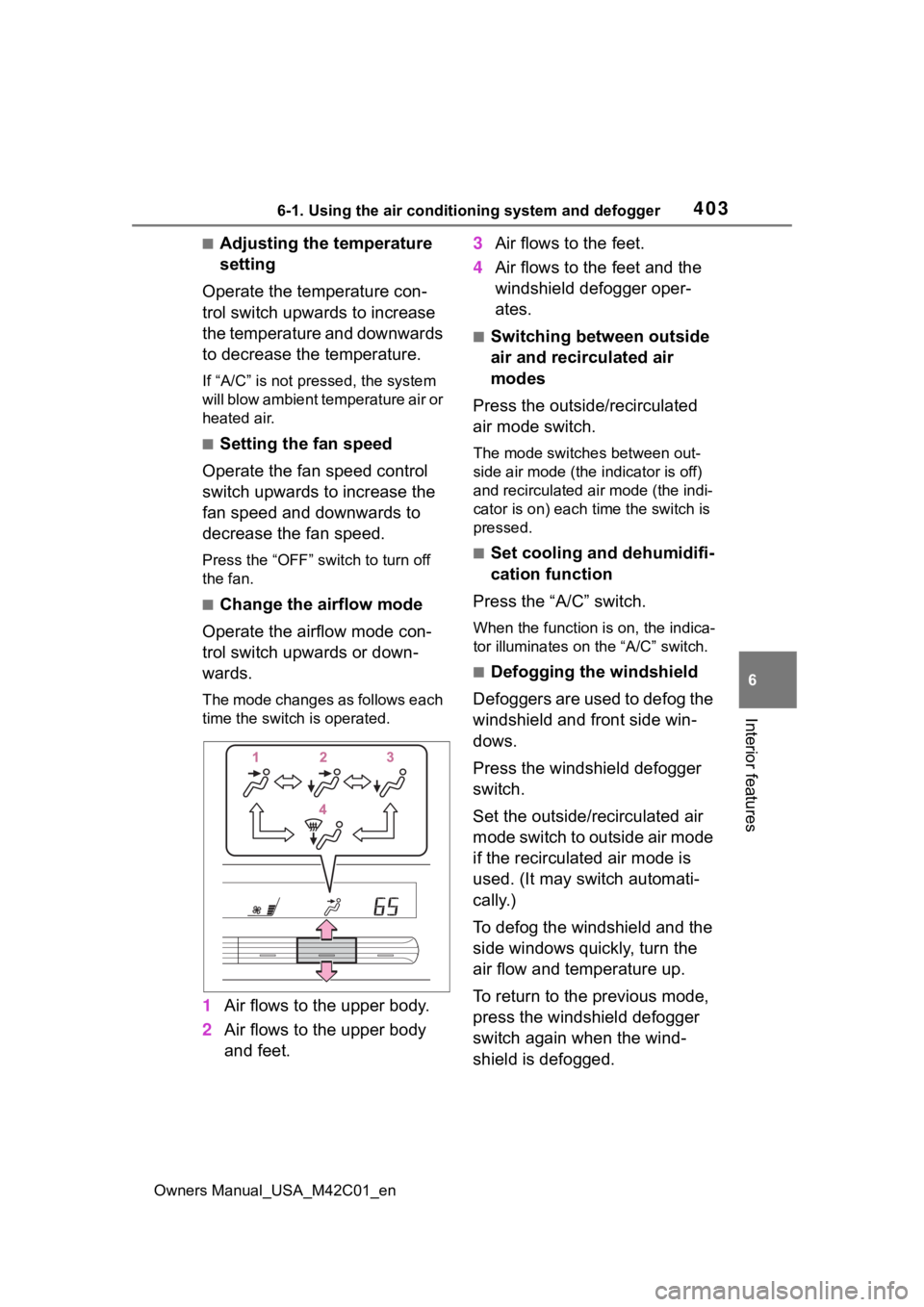
■Change the airflow mode
Operate the airflow mode con-
trol switch upwards or down-
wards.
The mode changes as follows each
time the switch is operated.
1 Air flows to the upper body.
2 Air flows to the upper body
and feet. 3
Air flows to the feet.
4 Air flows to the feet and the
windshield defogger oper-
ates.
■Switching between outside
air and recirculated air
modes
Press the outside/recirculated
air mode switch.
The mode switches between out-
side air mode (the indicator is off)
and recirculated air mode (the indi-
cator is on) each time the switch is
pressed.
■Set cooling and dehumidifi-
cation function
Press the “A/C” switch.
When the function is on, the indica-
tor illuminates on the “A/C” switch.
■Defogging the windshield
Defoggers are used to defog the
windshield and front side win-
dows.
Press the windshield defogger
switch.
Set the outside/recirculated air
mode switch to outside air mode
if the recirculated air mode is
used. (It may switch automati-
cally.)
To defog the windshield and the
side windows quickly, turn the
air flow and temperature up.
To return to the previous mode,
press the windshield defogger
switch again when the wind-
shield is defogged.
Page 406 of 628
4066-1. Using the air conditioning system and defogger
Owners Manual_USA_M42C01_en
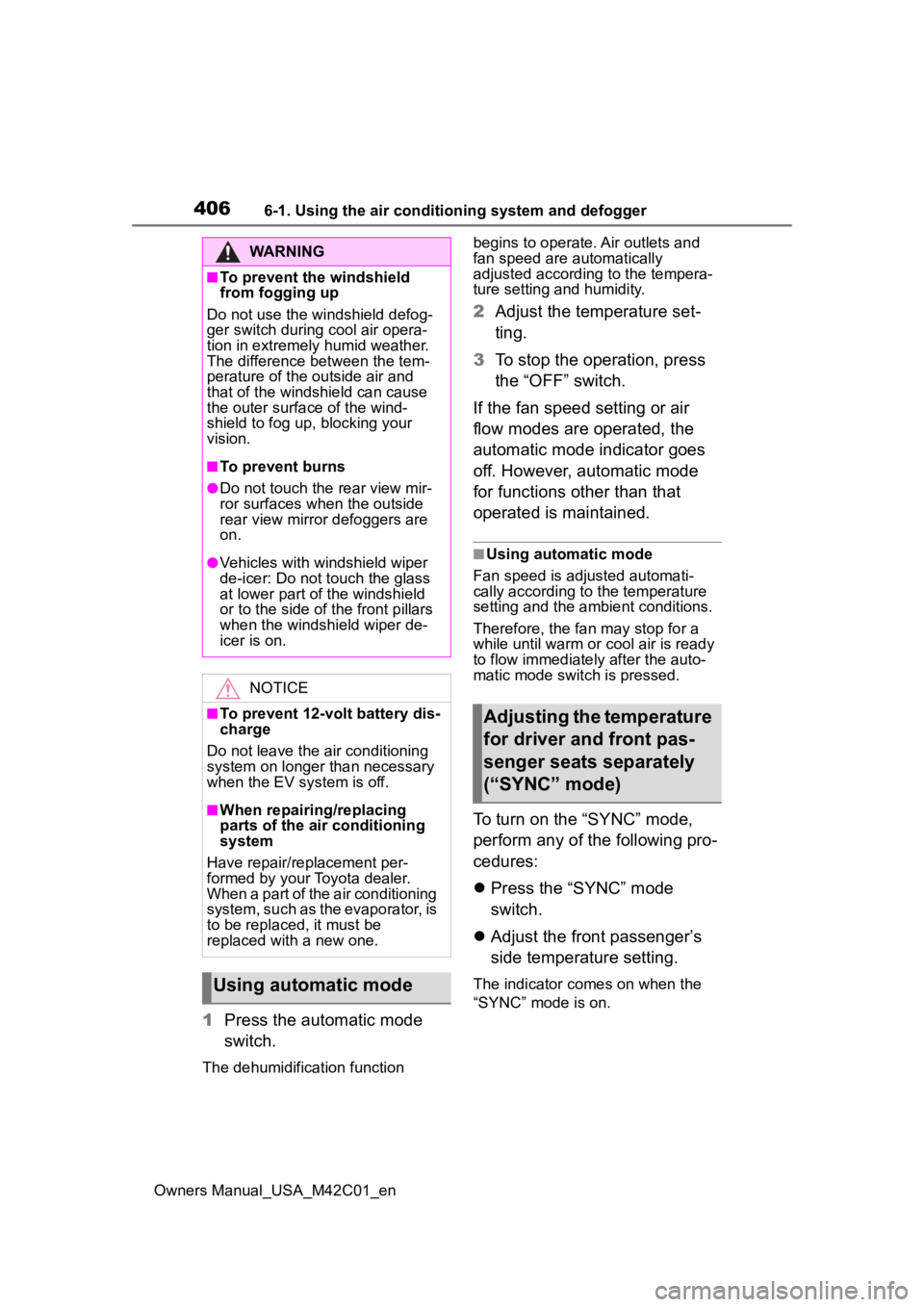
1Press the automatic mode
switch.
The dehumidification function begins to operate. Air outlets and
fan speed are automatically
adjusted according to the tempera-
ture setting and humidity.
2
Adjust the temperature set-
ting.
3 To stop the operation, press
the “OFF” switch.
If the fan speed setting or air
flow modes are operated, the
automatic mode indicator goes
off. However, automatic mode
for functions other than that
operated is maintained.
■Using automatic mode
Fan speed is adjusted automati-
cally according to the temperature
setting and the ambient conditions.
Therefore, the fan may stop for a
while until warm or cool air is ready
to flow immediately after the auto-
matic mode switch is pressed.
To turn on the “SYNC” mode,
perform any of the following pro-
cedures:
Press the “SYNC” mode
switch.
Adjust the front passenger’s
side temperature setting.
The indicator comes on when the
“SYNC” mode is on.
WARNING
■To prevent the windshield
from fogging up
Do not use the windshield defog-
ger switch during cool air opera-
tion in extremely humid weather.
The difference between the tem-
perature of the outside air and
that of the windshield can cause
the outer surface of the wind-
shield to fog up, blocking your
vision.
■To prevent burns
●Do not touch the rear view mir-
ror surfaces when the outside
rear view mirror defoggers are
on.
●Vehicles with windshield wiper
de-icer: Do not touch the glass
at lower part of the windshield
or to the side of the front pillars
when the windshield wiper de-
icer is on.
NOTICE
■To prevent 12-volt battery dis-
charge
Do not leave the air conditioning
system on longer than necessary
when the EV system is off.
■When repairing/replacing
parts of the air conditioning
system
Have repair/replacement per-
formed by your Toyota dealer.
When a part of the air conditioning
system, such as the evaporator, is
to be replaced, it must be
replaced with a new one.
Using automatic mode
Adjusting the temperature
for driver and front pas-
senger seats separately
(“SYNC” mode)