Page 495 of 628
4957-3. Do-it-yourself maintenance
Owners Manual_USA_M42C01_en
7
Maintenance and care
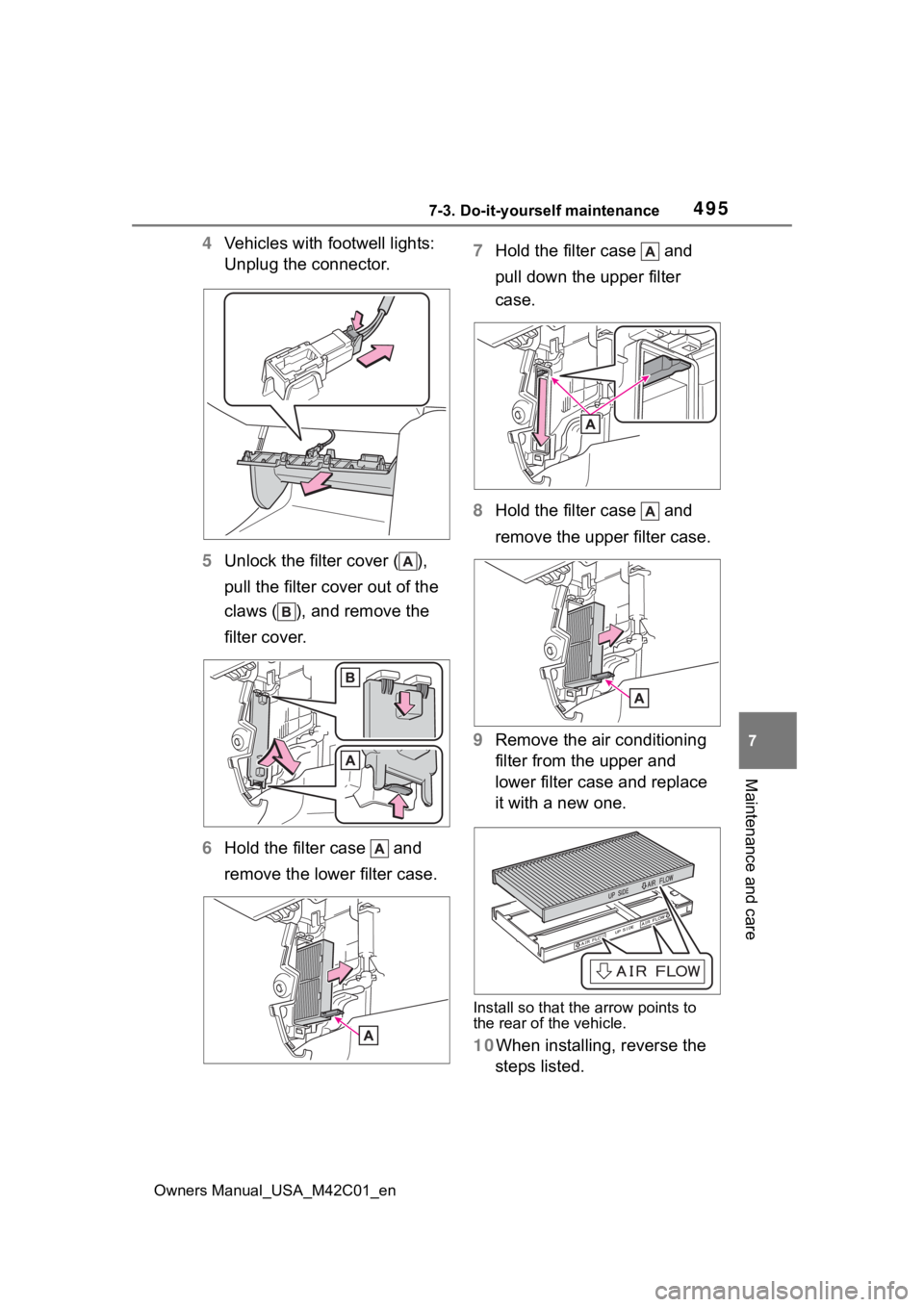
4 Vehicles with footwell lights:
Unplug the connector.
5 Unlock the filter cover ( ),
pull the filter cover out of the
claws ( ), and remove the
filter cover.
6 Hold the filter case and
remove the lower filter case. 7
Hold the filter case and
pull down the upper filter
case.
8 Hold the filter case and
remove the upper filter case.
9 Remove the air conditioning
filter from the upper and
lower filter case and replace
it with a new one.
Install so that the arrow points to
the rear of the vehicle.
10When installing, reverse the
steps listed.
Page 496 of 628

4967-3. Do-it-yourself maintenance
Owners Manual_USA_M42C01_en
■When installing the filter cover
Slide the recessed part of the fil-
ter cover on the upper surface of the
upper filter case as shown in the
figure, and attach it so that it is lifted
toward the insertion part of the
cover attachment.
■Checking interval
Inspect and replace the air condi-
tioning filter according to the mainte-
nance schedule. In dusty areas or
areas with heavy traffic flow, early
replacement may be required. (For
scheduled maintenance information,
please refer to the “Owner’s Manual
Supplement” or “Scheduled Mainte-
nance”.)
■If air flow from the vents
decreases dramatically
The filter may be clogged. Check
the filter and replace if necessary.
WARNING
■When replacing the air condi-
tioning filter
Observe the following precau-
tions. Failure to do so may result
in the air conditioning system
operating during the procedure,
possibly resulting in injury.
●Check that the charging con-
nector is not connected
●Do not use the Remote Air Con-
ditioning System
NOTICE
■When using the air condition-
ing system
●Make sure that a filter is always
installed. Using the air condi-
tioning system without a filter
may cause damage to the sys-
tem.
●The filter is replaceable. When
cleaning the filter, do not clean
with water or an air gun.
■To prevent damage to the fil-
ter cover
When moving the filter cover in
the direction of arrow to release
the fitting, pay attention not to
apply excessive force to the
claws. Otherwise, the claws may
be damaged.
Page 497 of 628
4977-3. Do-it-yourself maintenance
Owners Manual_USA_M42C01_en
7
Maintenance and care
■If the key battery is depleted
The following symptoms may occur:
●The smart key system and wire-
less remote contr ol will not func-
tion properly.
●The operational range will be
reduced.
Prepare the following before
replacing the battery:
Flathead screwdriver
Small flathead screwdriver
Lithium battery CR2450
■Use a CR2450 lithium battery
●Batteries can be purchased at
your Toyota dealer, local electrical
appliance shops or camera stores.
●Replace only with the same or
equivalent type recommended by
the manufacturer.
●Dispose of used ba tteries accord-
ing to the local laws.
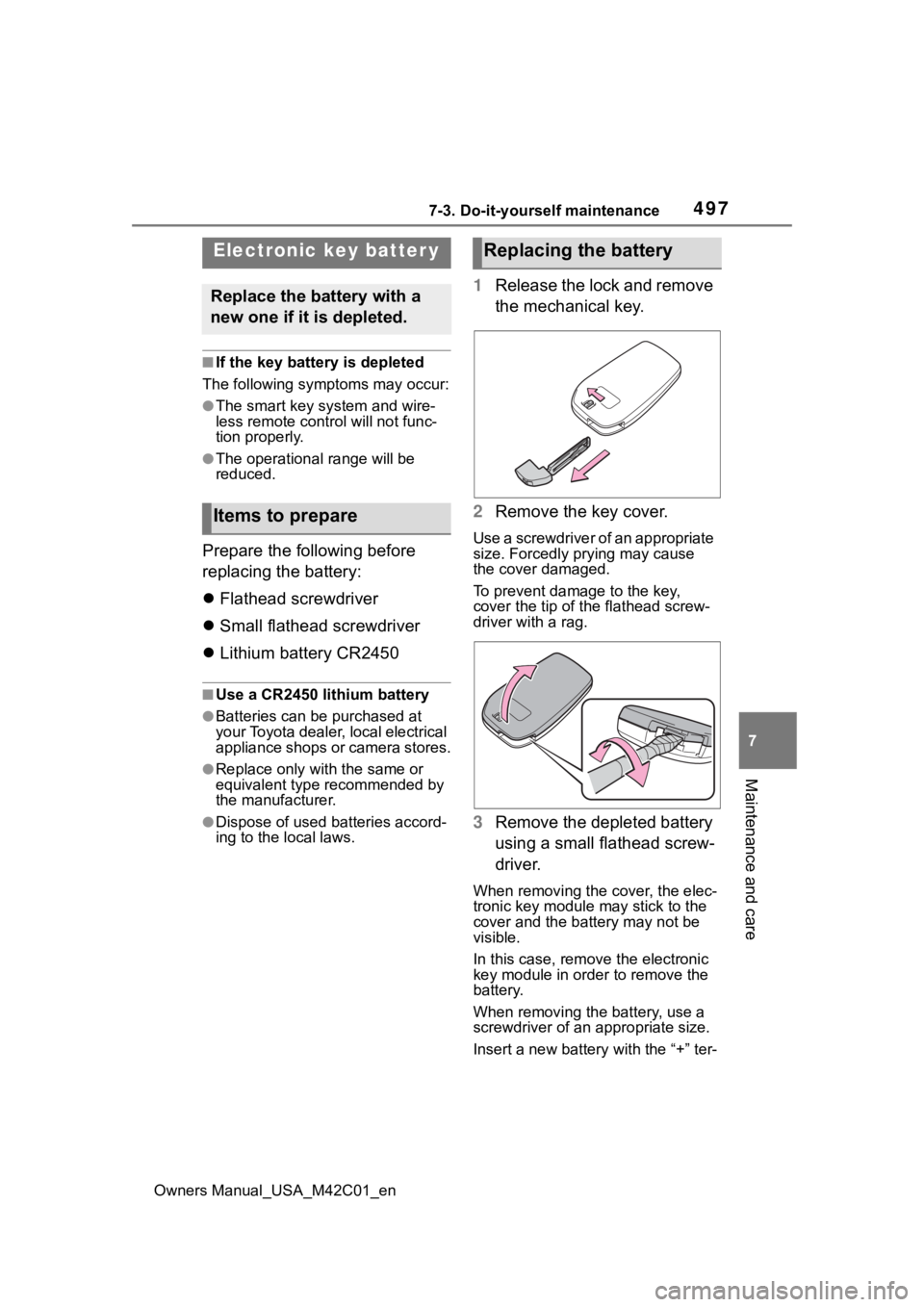
1 Release the lock and remove
the mechanical key.
2 Remove the key cover.
Use a screwdriver of an appropriate
size. Forcedly prying may cause
the cover damaged.
To prevent damage to the key,
cover the tip of the flathead screw-
driver with a rag.
3Remove the depleted battery
using a small flathead screw-
driver.
When removing the cover, the elec-
tronic key module may stick to the
cover and the batt ery may not be
visible.
In this case, remove the electronic
key module in order to remove the
battery.
When removing the battery, use a
screwdriver of an appropriate size.
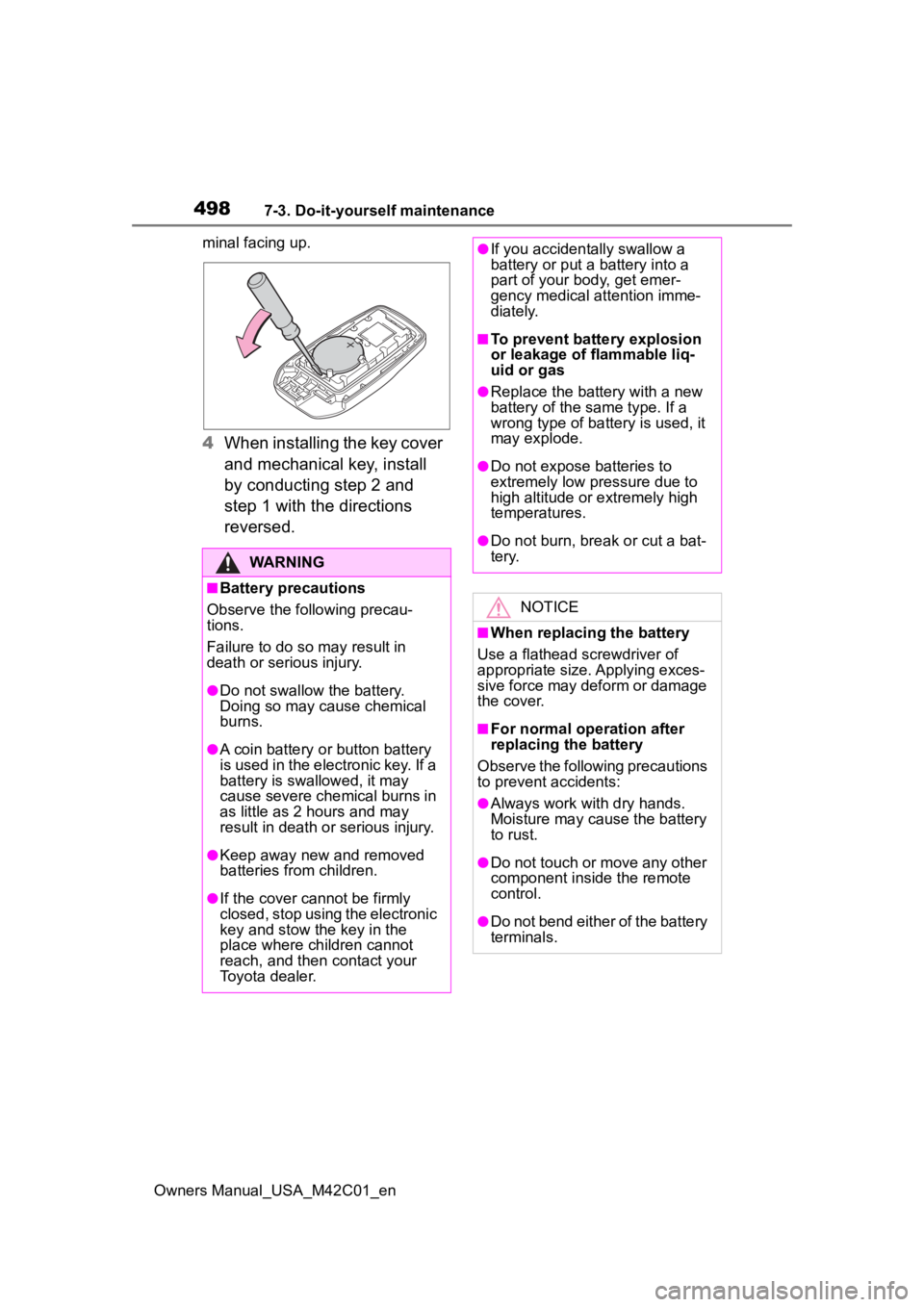
Insert a new battery with the “+” ter-
Electronic key batter y
Replace the battery with a
new one if it is depleted.
Items to prepare
Replacing the battery
Page 498 of 628
4987-3. Do-it-yourself maintenance
Owners Manual_USA_M42C01_enminal facing up.
4
When installing the key cover
and mechanical key, install
by conducting step 2 and
step 1 with the directions
reversed.
WARNING
■Battery precautions
Observe the following precau-
tions.
Failure to do so m ay result in
death or serious injury.
●Do not swallow the battery.
Doing so may cause chemical
burns.
●A coin battery o r button battery
is used in the electronic key. If a
battery is swallowed, it may
cause severe chemical burns in
as little as 2 hours and may
result in death or serious injury.
●Keep away new and removed
batteries from children.
●If the cover cannot be firmly
closed, stop using the electronic
key and stow the key in the
place where children cannot
reach, and then contact your
Toyota dealer.
●If you accidentally swallow a
battery or put a battery into a
part of your b ody, get emer-
gency medical attention imme-
diately.
■To prevent battery explosion
or leakage of flammable liq-
uid or gas
●Replace the battery with a new
battery of the same type. If a
wrong type of battery is used, it
may explode.
●Do not expose batteries to
extremely low pr essure due to
high altitude or extremely high
temperatures.
●Do not burn, bre ak or cut a bat-
tery.
NOTICE
■When replacing the battery
Use a flathead screwdriver of
appropriate size. Applying exces-
sive force may deform or damage
the cover.
■For normal operation after
replacing the battery
Observe the following precautions
to prevent accidents:
●Always work with dry hands.
Moisture may cause the battery
to rust.
●Do not touch or move any other
component inside the remote
control.
●Do not bend either of the battery
terminals.
Page 499 of 628
4997-3. Do-it-yourself maintenance
Owners Manual_USA_M42C01_en
7
Maintenance and care
1 Turn the power switch off.
Confirm that the charging connec-
tor is not connect ed. Also, do not
use the Remote Air Conditioning
System during the procedure.
2 Open the fuse box cover.
Motor compartment
Push the tab in and lift the lid off.
Left side instrument panel
Remove the lid.
3Remove the fuse.
Only type A fuse can be removed
using the pullout tool.
4Check if the fuse is blown.
Replace the blown fuse with a new
fuse of an appropriate amperage
rating. The amperage rating can be
found on the fuse box lid.
Type A
Normal fuse
Blown fuse
Type B
Normal fuse
Checking and replac-
ing fuses
If any of the electrical com-
ponents do not operate, a
fuse may have blown. If this
happens, check and replace
the fuses as necessary.
Checking and replacing
fuses
Page 500 of 628

5007-3. Do-it-yourself maintenance
Owners Manual_USA_M42C01_en
Blown fuse
Type C
Normal fuse
Blown fuse
■After a fuse is replaced
●When installing the lid, make sure
that the tab is installed securely.
●If the lights do n ot turn on even
after the fuse has been replaced,
a bulb may need replacement.
●If the replaced fuse blows again,
have the vehicle inspected Toyota
dealer.
■If there is an overload in a cir-
cuit
The fuses are designed to blow, pro-
tecting the wiring harness from
damage.
■When replacing an electronic
component, such as a lights,
etc.
Toyota recommends that you use
genuine Toyota products designed
for this vehicle. Because certain
bulbs are connected to circuits
designed to prevent overload, non-
genuine parts or parts not designed
for this vehicle may be unusable.
WARNING
■To prevent system break-
downs and vehicle fire
Observe the following precau-
tions.
Failure to do so may cause dam-
age to the vehicle, and possibly a
fire or injury.
●Never use a fuse of a higher
amperage rating than that indi-
cated, or use any other object in
place of a fuse.
●Always use a genuine Toyota
fuse or equivalent.
Never replace a fuse with a
wire, even as a temporary fix.
●Do not modify the fuses or fuse
boxes.
NOTICE
■Before replacing fuses
Have the cause of electrical over-
load determined and repaired
Toyota dealer as soon as possi-
ble.
Page 501 of 628
5017-3. Do-it-yourself maintenance
Owners Manual_USA_M42C01_en
7
Maintenance and care
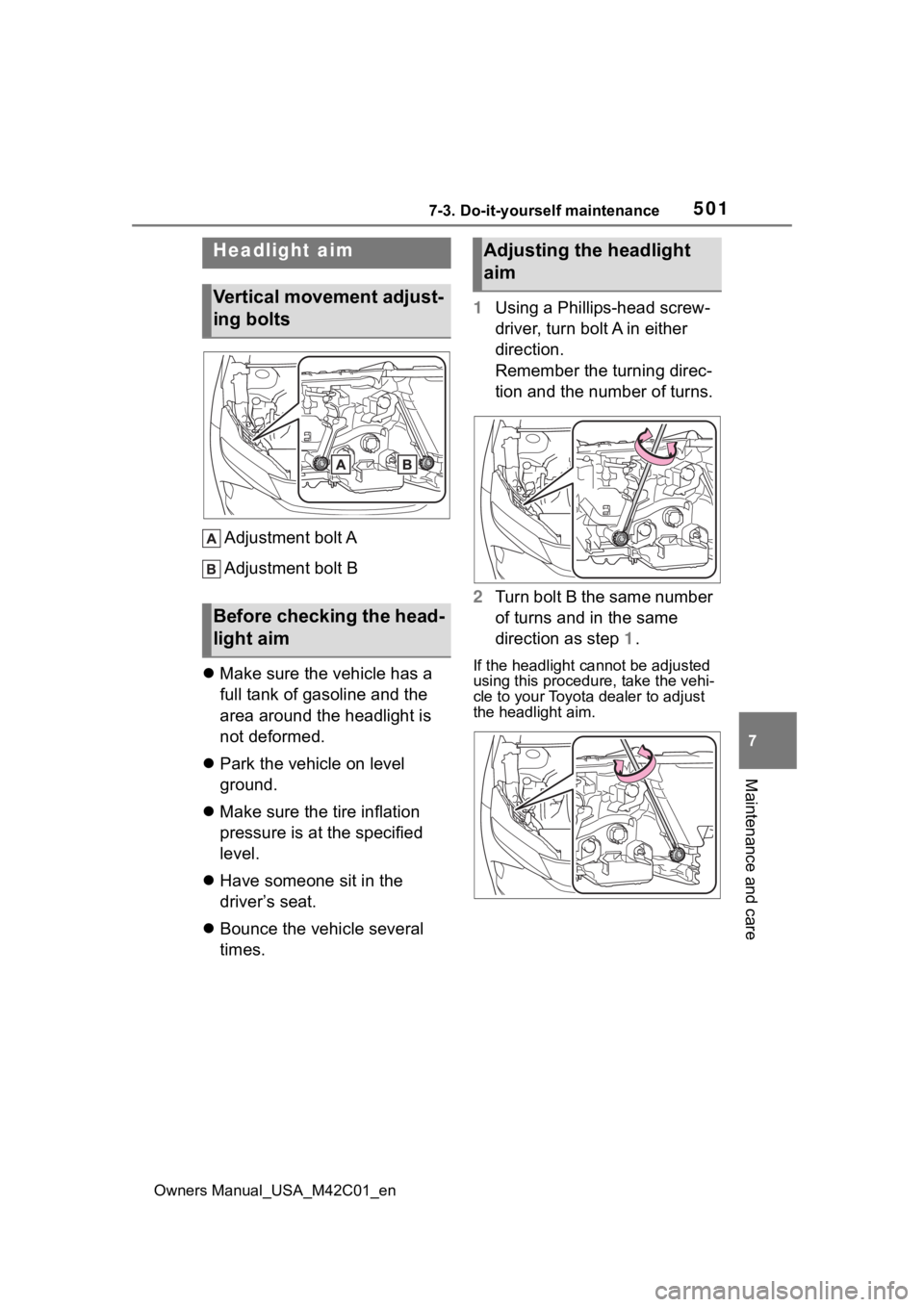
Adjustment bolt A
Adjustment bolt B
Make sure the vehicle has a
full tank of gasoline and the
area around the headlight is
not deformed.
Park the vehicle on level
ground.
Make sure the tire inflation
pressure is at the specified
level.
Have someone sit in the
driver’s seat.
Bounce the vehicle several
times. 1
Using a Phillips-head screw-
driver, turn bolt A in either
direction.
Remember the turning direc-
tion and the number of turns.
2 Turn bolt B the same number
of turns and in the same
direction as step 1.
If the headlight cannot be adjusted
using this procedu re, take the vehi-
cle to your Toyota dealer to adjust
the headlight aim.
Headlight aim
Vertical movement adjust-
ing bolts
Before checking the head-
light aim
Adjusting the headlight
aim
Page 502 of 628
5027-3. Do-it-yourself maintenance
Owners Manual_USA_M42C01_en
■LED lights
The lights consist of a number of
LEDs. If any of the LEDs burn out,
take your vehicle to your Toyota
dealer to have the light replaced.
■Condensation build-up on the
inside of the lens
Temporary condensation build-up
on the inside of the headlight lens
does not indicate a malfunction.
Contact your Toyota dealer for more
information in the following situa-
tions:
●Large drops of water have built up
on the inside of the lens.
●Water has built up inside the
headlight.
■When replacing an electronic
component, such as a lights,
etc.
P. 5 0 0
Light bulbs
If any exterior light does not
turn on, have it replaced by
your Toyota dealer.