2023 RAM CHASSIS CAB fuel pressure
[x] Cancel search: fuel pressurePage 94 of 444

92GETTING TO KNOW YOUR INSTRUMENT PANEL
You can customize your Instrument Cluster Display
with up to five tiles that may consist of the
following:
NOTE:These options may vary based on your vehicle trim
level.
Navigation
Route Set / Route Not Set
Trip A / Trip B
Vehicle Info
Coolant Temp
Trans Temp
Oil Temp
Oil Pressure
Battery Voltage
Oil Life
Tire Pressure
Fuel Economy
Air Suspension
Driver Info
Driver Assist
Audio
Audio Info
Off Road
Selec-Terrain / Air Suspension Status
Steering Angle
Pitch
Roll
Trailer Tow
Trailer Trip
Trailer Brake
Trailer Tire Pressure Monitor
OIL LIFE RESET
Use this QR code to access your
digital experience.
Your vehicle is equipped with an
engine oil change indicator
system. The “Oil Change
Required” message will display in
the instrument cluster display
after a single chime has sounded, to indicate the
next scheduled oil change interval. The engine oil
change indicator system is duty cycle based, which
means the engine oil change interval may
fluctuate, dependent upon your personal driving
style.
NOTE:Use the steering wheel instrument cluster display
controls for the following procedure. Oil Life Reset Procedure
1. Without pushing the brake pedal, push the
ENGINE START/STOP button and place the
ignition to the ON/RUN position (do not start
the engine).
2. Push and release the down arrow button to
scroll downward through the main menu to
“Vehicle Info.”
3. Push and release the right arrow button to
access the ”Vehicle Info” screen, then scroll up
or down to select “Oil Life.”
4. Push and hold the right arrow button to
select “Reset”.
5. Push and release the down arrow button to
select “Yes,” then push and release the
right arrow button to reset the Oil Life to
100%.
6. Push and release the up arrow button to
exit the instrument cluster display screen.
Secondary Method Of Resetting Engine Oil Life
1. Without pressing the brake pedal, push the ENGINE START/STOP button and place the
ignition to the ON/RUN position (do not start
the engine).
2. Fully press the accelerator pedal, slowly, three times within ten seconds.
23_DPF_OM_EN_USC_t.book Page 92
Page 96 of 444

94GETTING TO KNOW YOUR INSTRUMENT PANEL
Vehicle Info
Push and release the up or down arrow
button until the Vehicle Info menu item is
highlighted in the instrument cluster display. Push
and release the right arrow button to enter the
submenus items of Vehicle Info. Follow the
directional prompts to access or reset any of the
following Vehicle Info submenu items:
BASE AND MIDLINE CLUSTER
Tire Pressure Monitor System
Coolant Temperature — If Equipped
Trans Temperature — If Equipped
Oil Temperature
Oil Pressure
Exhaust Brake — If Equipped
Boost Pressure — If Equipped
Diesel Particulate Filter
Oil Life
Fuel Filter Life — If Equipped
Battery Voltage — If Equipped
Gauge Summary — If Equipped
Coolant Temp
Trans Temp
Oil Temp
Oil Pressure
Engine Hours — If Equipped
PREMIUM CLUSTER
Fuel Economy
Average
Current
Range to Empty
Gauge Summary
Coolant Temperature — If Equipped
Battery Voltage — If Equipped
Trans Temperature
Oil Summary
Oil Temperature
Oil Life
Oil Pressure — If Equipped
Tire Pressure Monitor System
Diesel Summary
Exhaust Brake — If Equipped
Boost Pressure — If Equipped
Fuel Filter Life — If Equipped
Diesel Particulate Filter
Fuel Tank Levels
Engine Hours — If Equipped
Off Road
Push and release the up or down arrow
button until the Off Road menu icon is displayed in
the instrument cluster display. Push and release
the left or right arrow button to scroll
through the information submenus.
Drivetrain
Front Wheel Angle: displays the graphical
and numerical value of calculated average
front wheel angle from the steering wheel
orientation.
Transfer Case Lock Status: displays “Lock”
graphic only during 4WD High, 4WD High
Part Time, 4WD Low status.
Axle Lock And Sway Bar Status (If
Equipped): displays front and rear or rear
only axle locker graphic, and sway bar
connection graphic with text message
(connected or disconnected).
23_DPF_OM_EN_USC_t.book Page 94
Page 97 of 444

GETTING TO KNOW YOUR INSTRUMENT PANEL95
Pitch And Roll
Displays the pitch and roll of the vehicle in
the graphic with the angle number on the
screen.
NOTE:When vehicle speed becomes too high to display
the pitch and roll, “- -” will display in place of the
numbers, and the graphic will be greyed out. A
message indicating the necessary speed for the
feature to become available will also display.
Fuel Economy — If Equipped
Push and release the up or down arrow
button until the Fuel Economy menu item is
highlighted in the instrument cluster display. Push
and Hold the right arrow button to reset
Average Fuel Economy.
Current Fuel Economy Gauge
Average Fuel Economy Value
Range To Empty
Fuel Tank Levels — If Equipped
Trip A/Trip B
Push and release the up or down arrow
button until the Trip menu item is highlighted in the
instrument cluster display. Push and release the
right arrow button to enter the submenus of Trip A and Trip B. The Trip A or Trip B information
will display the following:
Distance
Average Fuel Economy
Elapsed Time
Push and hold right arrow button to reset all
information.
Navigation — If Equipped
Push and release the up or down arrow
button until the Navigation display title is
highlighted in the instrument cluster display, “Hold
OK to Start Route” will display when no active route
is set. “Hold OK to Cancel Route” will display when
active route is set. Use the left or right arrow
button to zoom in or out on the display
Ú page 199.
Trailer Tow
Push and release the up or down arrow
button until the Trailer Tow menu item is
highlighted in the instrument cluster display. Push
and release the right or left arrow button to
cycle through the following trailer tow information:
Trip (trailer specific) Distance: Push and hold
the OK button to reset the distance.
Integrated Trailer Brake Module (ITBM):
Braking Output
Trailer Type
ITBM Gain
Trailer Tire Pressure Monitoring: The Instrument
Cluster Display will display the Trailer Tire Pres -
sure for a connected trailer with sensors that
match the active trailer profile. When a low tire
is present, the low tire value will be displayed in
red, and the affected low tire will have a red
glow. “Trailer Tire Low“ will be displayed on the
center bottom of the Instrument Cluster Display
screen.
Trailer Light Check – If Equipped: Push and hold
the OK button to begin the Trailer Light Test
sequence Ú page 190.
For vehicles equipped with Blind Spot Monitoring
(BSM):
When a Trailer Brake signal is detected, a
pop-up message will appear in the cluster
requiring user to select trailer type.
If a conventional trailer is selected, the BSM
operation will function as normal.
If Gooseneck/5th Wheel trailer is selected
BSM will be disabled due to unsupported
trailer type.
If no selection is made, the BSM system will
remain on until a selection is chosen.
3
23_DPF_OM_EN_USC_t.book Page 95
Page 98 of 444
96GETTING TO KNOW YOUR INSTRUMENT PANEL
NOTE:Trailer connection status is remembered after the
key cycle. If the trailer connection status has not
changed, no pop-up will appear in your Instrument
Cluster Display.
Audio
Push and release the up or down arrow
button until the Audio Menu icon/title is
highlighted in the instrument cluster display. This
menu will display the audio source information,
including the Song name, Artist name, and audio
source with an accompanying graphic.
Phone Call Status
When a call is incoming, a Phone Call Status
pop-up will display on the screen. The pop-up will
remain until the phone is answered or ignored.
NOTE:The call status will temporarily replace the
previous media source information displayed on
the screen. When the pop-up is no longer
displayed, the display will return to the last used
screen.
Stored Messages
Push and release the up or down arrow
button until the Messages Menu item is
highlighted. This feature shows the number of
stored warning messages. Push and release the
right or left arrow button to cycle through
stored messages.
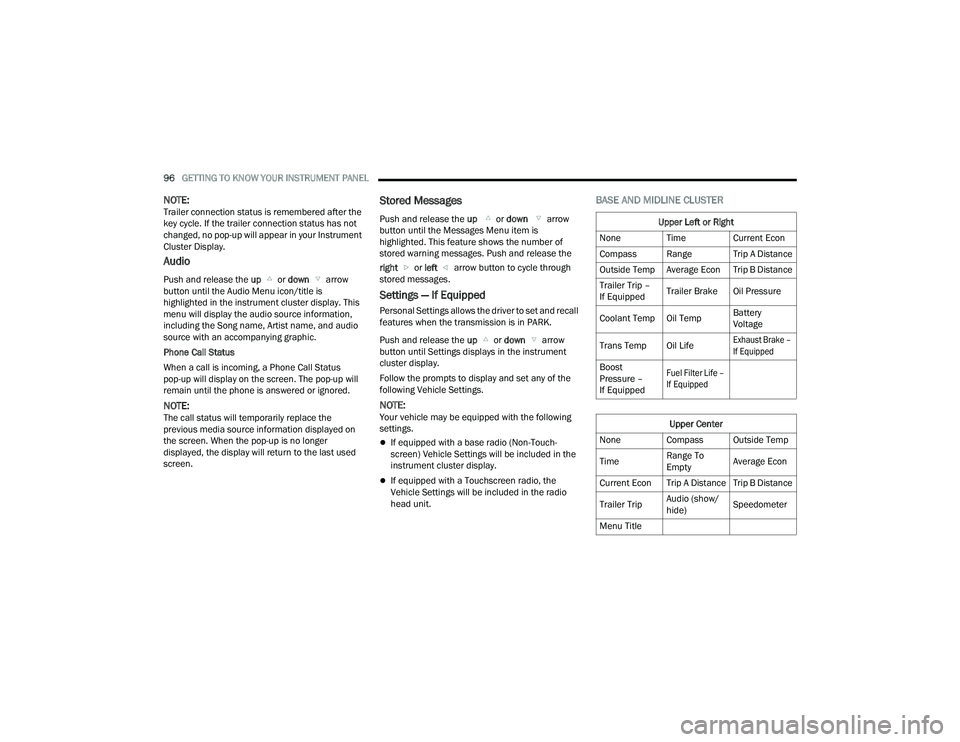
Settings — If Equipped
Personal Settings allows the driver to set and recall
features when the transmission is in PARK.
Push and release the up or down arrow
button until Settings displays in the instrument
cluster display.
Follow the prompts to display and set any of the
following Vehicle Settings.
NOTE:Your vehicle may be equipped with the following
settings.
If equipped with a base radio (Non-Touch -
screen) Vehicle Settings will be included in the
instrument cluster display.
If equipped with a Touchscreen radio, the
Vehicle Settings will be included in the radio
head unit.
BASE AND MIDLINE CLUSTER
Upper Left or Right
None Time Current Econ
Compass Range Trip A Distance
Outside Temp Average Econ Trip B Distance
Trailer Trip –
If Equipped Trailer Brake Oil Pressure
Coolant Temp Oil Temp Battery
Voltage
Trans Temp Oil Life
Exhaust Brake –
If Equipped
Boost
Pressure –
If Equipped
Fuel Filter Life –
If Equipped
Upper Center
None Compass Outside Temp
Time Range To
EmptyAverage Econ
Current Econ Trip A Distance Trip B Distance
Trailer Trip Audio (show/
hide)Speedometer
Menu Title
23_DPF_OM_EN_USC_t.book Page 96
Page 99 of 444

GETTING TO KNOW YOUR INSTRUMENT PANEL97
Current Gear
Off
On
Odometer
No Decimal Point
Decimal Point
Defaults (Restores All Settings To Default Settings)
Cancel
Restore
PREMIUM CLUSTER
Display Style
Modern
Traditional Current Gear
Off
On
Odometer
No Decimal Point
Decimal Point
Hide
Left or Right
None Range To
EmptyAverage Econ
Menu Icon Coolant Temp Oil Temp
Trans Temp Oil Life
Fuel Filter Life –
If Equipped
Lower Left or Right
None Time Current Econ
Compass Range Trip A Distance
Outside Temp Average Econ Trip B Distance
Trailer Trip –
If Equipped Trailer Brake Oil Pressure
Coolant Temp Oil Temp Battery
Voltage
Trans Temp Oil Life
Exhaust Brake –
If Equipped
Boost
Pressure –
If Equipped
Fuel Filter Life –
If Equipped
Favorite Menus
Speedometer Vehicle Info Driver Assist
Fuel Economy Trip Info Trailer Tow –
If Equipped
(show/hide)
Audio (show/
hide) Messages Screen Setup
Commercial
SettingsUpper Left or Right
None Time Current Econ
Compass Range Trip A Distance
Outside Temp Average Econ Trip B Distance
Trailer Trip –
If Equipped
Upper Center
None Badge Compass
Outside Temp Time Range To
Empty
Average Econ Current Econ Trip A Distance
Trip B Distance Trailer Trip Audio (show/
hide)
3
23_DPF_OM_EN_USC_t.book Page 97
Page 109 of 444

GETTING TO KNOW YOUR INSTRUMENT PANEL107
Low Fuel Warning Light
When the fuel level reaches
approximately 3.2 gal (12 L) this light will
turn on, and remain on until fuel is
added.
A single warning chime will sound with Low Fuel
Warning.
Low Coolant Level Warning Light
This telltale will turn on to indicate the
vehicle coolant level is low Ú page 353.
Loose Fuel Filler Cap Warning Light —
If Equipped
This warning light will illuminate when the
fuel filler cap is loose. Properly close the
filler cap to disengage the light. If the
light does not turn off, please see an
authorized dealer.
Tire Pressure Monitoring System (TPMS)
Warning Light — If Equipped
The warning light switches on and a
message is displayed to indicate that the
tire pressure is lower than the
recommended value and/or that slow
pressure loss is occurring. In these cases, optimal
tire duration and fuel consumption may not be
guaranteed. Should one or more tires be in the condition
previously mentioned, the display will show the
indications corresponding to each tire.
Each tire, including the spare (if provided), should
be checked monthly when cold and inflated to the
inflation pressure recommended by the vehicle
manufacturer on the vehicle placard or tire
inflation pressure label. If your vehicle has tires of
a different size than the size indicated on the
vehicle placard or tire inflation pressure label, you
should determine the proper tire inflation pressure
for those tires.
As an added safety feature, your vehicle has been
equipped with a TPMS that illuminates a low tire
pressure telltale when one or more of your tires is
significantly underinflated. Accordingly, when the
low tire pressure telltale illuminates, you should
stop and check your tires as soon as possible, and
inflate them to the proper pressure. Driving on a
significantly underinflated tire causes the tire to
overheat and can lead to tire failure. Underinflation also reduces fuel efficiency and tire tread life, and
may affect the vehicle’s handling and stopping
ability.
Please note that the TPMS is not a substitute for
proper tire maintenance, and it is the driver’s
responsibility to maintain correct tire pressure,
even if underinflation has not reached the level to
trigger illumination of the TPMS low tire pressure
telltale.
Your vehicle has also been equipped with a TPMS
malfunction indicator to indicate when the system
is not operating properly. The TPMS malfunction
indicator is combined with the low tire pressure
telltale. When the system detects a malfunction,
the telltale will flash for approximately one minute
and then remain continuously illuminated. This
sequence will continue upon subsequent vehicle
start-ups as long as the malfunction exists. When
the malfunction indicator is illuminated, the
system may not be able to detect or signal low tire
pressure as intended. TPMS malfunctions may
occur for a variety of reasons, including the
installation of replacement or alternate tires or
wheels on the vehicle that prevent the TPMS from
functioning properly. Always check the TPMS
malfunction telltale after replacing one or more
tires or wheels on your vehicle to ensure that the
replacement or alternate tires and wheels allow
the TPMS to continue to function properly.
CAUTION!
Do not continue driving with one or more flat
tires as handling may be compromised. Stop the
vehicle, avoiding sharp braking and steering. If a
tire puncture occurs, repair immediately using
the dedicated tire repair kit and contact an
authorized dealer as soon as possible.
3
23_DPF_OM_EN_USC_t.book Page 107
Page 121 of 444

STARTING AND OPERATING119
3. While the Wait To Start Indicator Light is on, the instrument cluster will additionally display
a gauge or bar whose initial length represents
the full "Wait to Start" time period. Its length
will decrease until it disappears when the
"Wait to Start" time has elapsed.
4. After the engine Wait To Start Indicator Light goes off, the engine will automatically crank.
5. After engine start-up, check to see that there is oil pressure.
6. Release the parking brake and drive.
NOTE:
Engine idle speed will automatically increase to
1,000 RPM and engage the Variable Geometry
Turbocharger at low coolant temperatures to
improve engine warm-up.
The engine will not automatically crank after the
engine Wait To Start Indicator Light goes off if a
door or the hood is ajar.
If the engine stalls, or if the ignition switch is left
ON for more than two minutes after the Wait To
Start Indicator Light goes out, reset the intake
air heater by turning the ignition switch to the
OFF position for at least 5 seconds and then
back ON. Repeat steps 1 through 6 of “Keyless
Enter ‘n Go™ Starting Procedure – Engine Mani -
fold Air Temperature 0°F To 66°F (–18°C to
19°C).”
EXTREME COLD WEATHER
The Cummins® Turbo Diesel engine is equipped
with several features designed to assist cold
weather starting and operation:
The engine block heater is a resistance heater
installed in the water jacket of the engine just
above and behind the oil filter. It requires a
110–115 Volt AC electrical outlet with a
grounded, three-wire extension cord.
NOTE:The engine block heater cord is a factory installed
option. If your vehicle is not equipped, heater cords
are available from an authorized Mopar® dealer.
A 12 Volt heater built into the fuel filter housings
aid in preventing fuel gelling. It is controlled by a
built-in thermostat.
An intake air heater system both improves
engine starting and reduces the amount of
white smoke generated by a warming engine.
NORMAL STARTING PROCEDURE —
E
NGINE MANIFOLD AIR TEMPERATURE
A
BOVE 66°F (19°C)
Observe the instrument panel cluster lights when
starting the engine.
1. Always apply the parking brake.
2. Shift into PARK for an automatic transmission.
3. Place the ignition switch in the ON/RUN
position and watch the instrument panel
cluster lights.
CAUTION!
If the Water in Fuel Indicator Light remains on,
DO NOT START the engine before you drain the
water from the fuel filters to avoid engine
damage Ú page 360.
CAUTION!
Do not crank engine for more than 25 seconds
at a time or starter motor damage may result.
Turn the ignition switch to the OFF position and
wait at least two minutes for the starter to cool
before repeating start procedure.
CAUTION!
If the Water in Fuel Indicator Light remains on,
DO NOT START the engine before you drain the
water from the fuel filters to avoid engine
damage Úpage 360.
4
23_DPF_OM_EN_USC_t.book Page 119
Page 122 of 444

120STARTING AND OPERATING
4. Place the ignition switch in the START position and crank the engine. Do not press the
accelerator during starting.
5. Check that the Oil Pressure Warning Light has turned off.
6. Release the parking brake.
STARTING PROCEDURE — ENGINE
M
ANIFOLD AIR TEMPERATURE 0°F TO
66°F (–18°C
TO 19°C)
NOTE:The temperature displayed in the instrument
cluster does not necessarily reflect the engine
manifold air temperature Ú page 89. When
engine temperatures fall below 66°F (19°C) the
Wait To Start Indicator Light will remain on indi -
cating the intake air heater system is active. Follow the steps in the “Normal Starting”
procedure except:
1. The Wait To Start Indicator Light will remain
on for a period of time that varies depending
on the engine temperature.
2. While the Wait To Start Indicator Light is on, the instrument cluster will additionally display
a gauge or bar whose initial length represents
the full “Wait to Start” time period. Its length
will decrease until it disappears when the
“Wait to Start” time has elapsed.
3. After the Wait To Start Indicator Light goes off, place the ignition switch in the START position.
Do not press the accelerator during starting. 4. After engine start-up, check that the Oil
Pressure Warning Light has turned off.
5. Release the parking brake and drive.
NOTE:
Engine idle speed will automatically increase to
1,000 RPM and engage the Variable Geometry
Turbocharger at low coolant temperatures to
improve engine warm-up.
Automatic equipped vehicles with optional
Keyless Enter ‘n Go™ – If the ENGINE START/
STOP button is pushed once while in PARK with
the ignition off and driver’s foot on the brake
pedal, the vehicle will automatically crank and
start after the “Wait to Start” time has elapsed.
If it is desired to abort the start process before it
completes, the driver’s foot should be fully
removed from the brake pedal prior to pushing
the start button again in order for the ignition to
move directly to off.
If the engine stalls, or if the ignition switch is left
on for more than two minutes after the Wait To
Start Indicator Light goes out, reset the intake
air heater by turning the ignition switch to the
OFF position for at least five seconds and then
back to the ON/RUN position. Repeat steps 1
through 5 of “Starting Procedure – Engine Mani -
fold Air Temperature 0°F To 66°F (–18°C to
19°C).”
CAUTION!
Do not crank engine for more than 25 seconds
at a time or starter motor damage may result.
Turn the ignition switch to the OFF position and
wait at least two minutes for the starter to cool
before repeating start procedure.
CAUTION!
If the Water in Fuel Indicator Light remains on,
DO NOT START the engine before you drain the
water from the fuel filters to avoid engine
damage Ú page 360.
CAUTION!
Do not crank engine for more than 25 seconds
at a time or starter motor damage may result.
Turn the ignition switch to the OFF position and
wait at least two minutes for the starter to cool
before repeating start procedure.
23_DPF_OM_EN_USC_t.book Page 120