2023 RAM 1500 transmission
[x] Cancel search: transmissionPage 239 of 416

MULTIMEDIA237
INTRODUCTION TO CONNECTED VEHICLE
S
ERVICES
One of the many benefits of your vehicle’s Uconnect
system is that you can now take advantage of SiriusXM
Guardian™ connected services. To unlock the full
potential of SiriusXM Guardian™ in your vehicle, you first
need to activate SiriusXM Guardian™ connected services.
NOTE:SiriusXM Guardian™ involves the collection, transmission
and use of data from your vehicle Úpage 252.
SiriusXM Guardian™ Contact Information
SiriusXM Guardian™/Care
US residents visit: https://www.driveuconnect.com/
sirius-xm-guardian.html or call 1-844-796-4827
Canadian residents visit: https://www.driveucon -
nect.ca/en/sirius-xm-guardian or call 1-877-324-9091
What Is SiriusXM Guardian™?
SiriusXM Guardian™ uses an embedded device in the
Uconnect system installed in your vehicle, which receives
GPS signals and communicates with the SiriusXM
Guardian™ Customer Care center via wireless and
landline communications networks. Depending on the
type of device in your vehicle, some SiriusXM Guardian™
connected services require an operable LTE (voice/data)
or 4G (data) network compatible with your device.
SiriusXM Guardian™ is available only on equipped
vehicles purchased within the continental United States,
Alaska, Hawaii, Puerto Rico and Canada.
NOTE:
Certain SiriusXM Guardian™ connected services are
dependent upon an operative telematics device, a
cellular connection, navigation map data, and GPS
satellite signal reception, which can limit the ability to
reach the response center or reach emergency
support.
Not all features of SiriusXM Guardian™ are available
everywhere at all times, particularly in remote or
enclosed areas.
Other factors outside the control of SiriusXM
Guardian™ that may limit or prevent service delivery
are hills, structures, buildings, tunnels, weather,
damage to the electrical system or other important
parts of your vehicle, network congestion, civil distur -
bances, actions of third parties or the government,
Internet failure, and/or the physical location of your
vehicle, such as in an underground parking structure or
under a bridge. Not all SiriusXM Guardian™ features are available for all
models.
SiriusXM Guardian™ provides:
The ability to remotely lock/unlock and remote start
your vehicle from virtually anywhere by using the
Vehicle Branded App or your computer.
If equipped — Send & Go capability with the Vehicle
Branded App. Use the Vehicle Branded App to easily
search, map and send your locations directly to your
Uconnect Navigation.
The ability to locate your vehicle, when you forget
where you parked, using the Vehicle Finder function of
the Vehicle Branded App.
Before you drive, familiarize yourself with the easy-to-use
Uconnect system and SiriusXM Guardian™ connected
services.
The ASSIST and SOS Call Buttons On Your Rearview Mirror
Or Overhead Console
If equipped, the ASSIST Button is used for contacting
Roadside Assistance, Vehicle Care, Uconnect Care, and
SiriusXM Guardian™ Customer Care. The SOS Call button
connects you directly to SiriusXM Guardian™ Customer
Care for assistance in an emergency.
WARNING!
ALWAYS obey traffic laws and pay attention to the road.
Your complete attention is always required while driving
to maintain safe control of your vehicle. Only use and
interact with the features and applications when it is
safe to do so. Failure to follow these warnings can
result in a collision and death or serious personal
injury.
5
23_DT_OM_EN_USC_t.book Page 237
Page 249 of 416

MULTIMEDIA247
This data collection and transmission begins when you
enroll in SiriusXM Guardian™ and will continue even if you
cancel your SiriusXM Guardian™ subscription unless you
call SiriusXM Guardian™ Customer Care and tell them to
deactivate your connected services.
Please see the Uconnect Privacy Policy for more
information, located at www.driveuconnect.com/
connectedservices/privacy.html (US Residents) or
www.driveuconnect.ca (Canadian Residents).
For more information on SiriusXM Guardian™ private
policy, see https://siriusxmcvs.com/privacy-policy.
NOTE:Your vehicle must be enrolled in an active subscription
with connected services. If you have concerns about the
operation, function or performance of your vehicle, please
take it to an authorized dealer. This report does not
replace regularly scheduled maintenance. Check the
instrument cluster warning lights and cautions in your
vehicle for the most accurate vehicle health information.
Vehicle Health Alert —If Equipped
Description
Your vehicle will send you an email alert if it senses a
problem with one of your vehicle’s key systems. For further
information, go to your Owner’s website.
NOTE:Vehicle Health Alert emails require you to register and
activate services. During this process you will be asked to
provide an email address to which the reports will be sent.
In-Vehicle Notifications — If Equipped
Description
Your vehicle will send you notifications to remind you when
services are needed, or to alert you of other important
information, such as recall notices. When you receive a
notification through your touchscreen, press OK to dismiss
the message, or press Call Care to speak with a SiriusXM
Guardian™ Customer Care agent.
NOTE:Pressing “OK” or the X button on the pop-up screen will
dismiss or close the pop-up, and the In-Vehicle Messages
mailbox will display. In the Mailbox, you can reopen
messages or delete messages.
Amazon Alexa Skill — If Equipped
Enjoy the convenience of using your voice to command
your vehicle with Amazon Alexa!
With Amazon Alexa, you can connect to your vehicle and
remotely access key services and features.
If your vehicle is equipped with Uconnect Navigation, you
can send a destination directly to your vehicle using Alexa.
If you need assistance, you can always ask Alexa for help,
or complete a list of commands by saying: “Alexa, ask
Here are a few of the many questions you can ask Alexa:
“Alexa, ask
“Alexa, ask
with your Voice Code.”
“Alexa, ask
Drive, Auburn Hills, Michigan to my
“Alexa, ask
An active subscription to SiriusXM Guardian™ is required.
To use Amazon Alexa, first, register for SiriusXM
Guardian™
Úpage 238.
Next, link the Uconnect system on your vehicle to Amazon
Alexa:
1. Download the Amazon Alexa app on your mobile device (Apple® or Android™).
2. Once in the app, tap MENU and go to SKILLS.
3. Search for
4. Tap SAVE SETTINGS when prompted.
5. Link the vehicle brand name to the
6. Log in using your Owner Account credentials. This will be the same user name and password you used when
registering for SiriusXM Guardian™ connected
services. There will be additional settings to confirm
on the following screen.
7. AUTHORIZE the account to return to the
You can now begin using the
Alexa!
5
23_DT_OM_EN_USC_t.book Page 247
Page 256 of 416

254MULTIMEDIA
Save
Pressing the SAVE button will let you save the timer data
for Recent, Last, and Best recorded times to an inserted
USB flash drive.
The Timers pages contain:
Reaction Time : Measures the driver's reaction time for
launching the vehicle against a simulated drag strip
timing light (behavior modeled after 500 Sportsman
Tree) displayed in the instrument cluster display.
NOTE:Drag timers (RT, 60 ft [20 m], 330 ft [100 m], 1/8 mile
[200 m], 1000 ft [300 m], and 1/4 mile [400 m]) and Acceleration Timers (0-60 mph [0-96 km/h] and
0-100 mph [0-160 km/h]) will be ready to acquire new
recent data measurements when the vehicle is at 0 mph
(0 km/h) and vehicle is in drive.
The timer listed shows the measured time required to
travel at the cited distance is met. Some timers will also
display speeds present at the time the distance was met.
0-60 mph (0-100 km/h)
0-100 mph (0-160 km/h)
60 ft (20 m) ET
330 ft (100 m) ET
⅛ Mile (200 m) + ET
⅛ Mile (200) + mph
1000 ft (300 m) ET
¼ Mile (400 m) + ET
¼ Mile (400 m) + mph
Brake Distance ft (meters)
NOTE:The distance measurement will be aborted if the brake
pedal is released or the parking brake is engaged, before
the vehicle comes to a complete stop.
Brake from mph (km/h)
NOTE:Brake Distance and Speed timers only display “ready”
when vehicle is traveling at a speed greater than 30 mph
(48 km/h).
GAUGES
When selected, this screen displays the following values:
Coolant Temperature
Shows the actual coolant temperature.
Oil Temperature
Shows the actual oil temperature.
Oil Pressure
Shows the actual oil pressure.
Trans Temp
Shows actual transmission oil temperature.
Battery Voltage
Shows actual battery voltage.
Intake Air Temp
Shows actual intake air temperature.
If a gauge is selected, the Gauge Detail View Page will
appear on the screen. This page shows gauge values for
the previous two minutes on the selected gauge. Pressing the Left or Right Arrow will cycle through the
details for each of the gauges. Pressing the minimize
button beside the graph will return to the Gauge menu.
G-FORCE
When G-Force is selected, the following features will be
available:
Vehicle Speed
Measures the current speed of the vehicle in either
mph or km/h, starting at zero with no maximum value.
Front G-Force
Measures the peak braking force on the front of the
vehicle.
Right G-Force
Measures the peak force on the right side of the
vehicle.
Left G-Force
Measures the peak force on the left side of the vehicle.
Rear G-Force
Measures the peak acceleration force on the rear of
the vehicle.
NOTE:Front, Right, Left, and Rear G-Forces are all peak values.
These readings can be reset by clearing peak G-Force on
the instrument cluster.
23_DT_OM_EN_USC_t.book Page 254
Page 257 of 416

MULTIMEDIA255
The friction circle display shows instantaneous G-Force as
a highlight and previous G-Force as dots within the circle.
The system records previous G-Force for three minutes.
If there are multiple samples at a given point, the color of
the dot will darken from blue to red. Vectors more frequent
will show in red; infrequent vectors will show in blue.
Pitch & Roll
The G-Force page displays the vehicle’s current pitch
(angle up and down) and roll (angle side to side) in
degrees. The Pitch & Roll gauges provide a visualization of
the current vehicle angle.
DYNAMOMETER (DYNO)/ENGINE
Dynamometer (Dyno)
The system will start drawing graphs for Power and Torque
(top chart) and Engine Speed (bottom chart). The graph
will fill from the left side of the x-axis and fill to the right
side of the x-axis (based on History time selected). Once
the right side of the page is reached, the graph will scroll
with the right side always being the most recent recorded
sample. The following options can be selected:
Pressing the STOP button will freeze the graph.
Selecting “Play” will clear the graph and restart the
process.
Press the + or - button to change the history of the
graph. The selectable options are “30”, “60”, “90”, and
“120” seconds. The graph will expand or constrict
depending on the setting selected.
Select the “Gear” display setting to turn the graph gear
markers on or off.
NOTE:The Gear On/Off feature will only display if your vehicle is
equipped with an Automatic Transmission.
Engine
Press the Left and Right Arrow buttons on the bottom of
the touchscreen to cycle between the Dyno and Engine
pages.
When selected, this screen displays the following values:
Vehicle Speed : Shows the actual vehicle speed.
Engine Power : Shows the instantaneous power.
Engine Torque: Shows the instantaneous torque.
Boost Pressure : Shows the actual engine boost pres -
sure.
Gear : Shows the current (or pending) operating gear of
the vehicle.
VEHICLE DYNAMICS
The Vehicle Dynamics page displays information
concerning the vehicle’s drivetrain.
Steering Angle — If Equipped
Steering Angle utilizes the steering angle sensor to
calculate the degree of the steering relative to zero
(straight ahead) reference angle. The zero degree
reference angle measurement indicates the actual front
tire steering angle.
Transfer Case
This feature will be active when the vehicle is in 4WD
HIGH, 4WD AUTO, Neutral, or 4WD LOW.
NOTE:A lock symbol will only be present on the Transfer Case
button when the vehicle is in 4WD LOW.
Rear Axle Locker
This feature will allow you to lock and unlock the rear axle.
To change the status, push the AXLE LOCK button.
5
23_DT_OM_EN_USC_t.book Page 255
Page 261 of 416
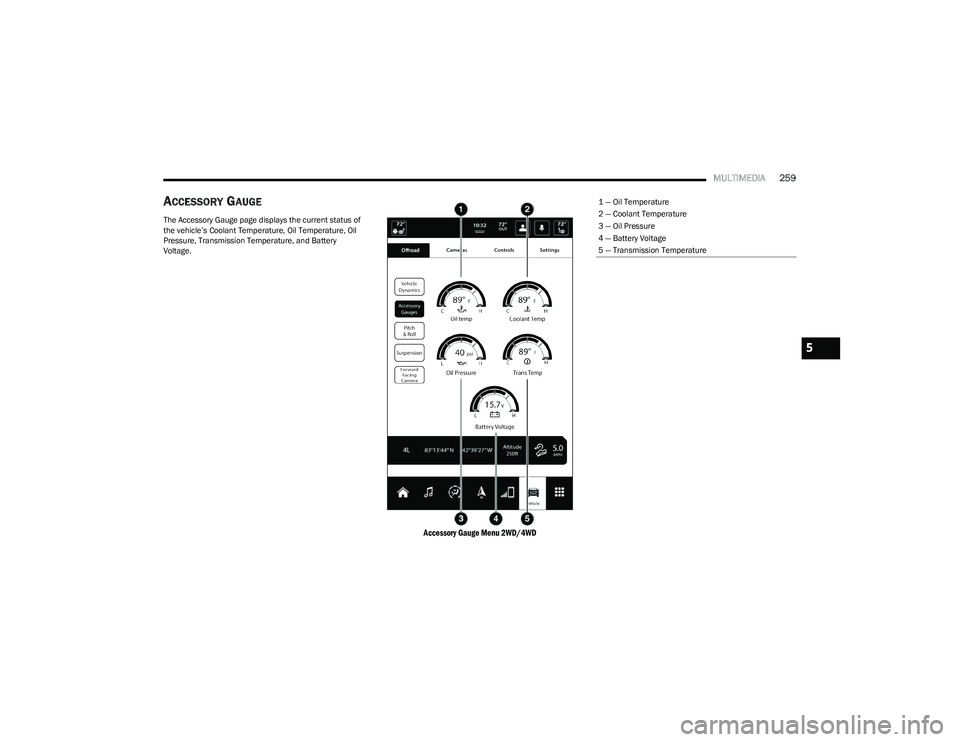
MULTIMEDIA259
ACCESSORY GAUGE
The Accessory Gauge page displays the current status of
the vehicle’s Coolant Temperature, Oil Temperature, Oil
Pressure, Transmission Temperature, and Battery
Voltage.
Accessory Gauge Menu 2WD/4WD
1 — Oil Temperature
2 — Coolant Temperature
3 — Oil Pressure
4 — Battery Voltage
5 — Transmission Temperature
5
23_DT_OM_EN_USC_t.book Page 259
Page 265 of 416

SAFETY263
REAR SEAT REMINDER ALERT (RSRA)
RSRA alerts of the possible presence of an object,
passenger, or pet in the rear seats through a visual and
auditory notification. When the system is activated, it
displays the message “Check Rear Seat” on the
instrument cluster display and sounds an auditory alert
upon the driver placing the ignition in the OFF position to
exit the vehicle. The system will activate automatically if a
rear door is opened within 10 minutes of the ignition being
placed in the ON/RUN position. RSRA should be used as a
reminder to check the rear seats, it does not directly
detect objects, passengers, or pets and is only activated
when the previous conditions are met.
To enable or disable RSRA, see
Úpage 191.
ELECTRONIC BRAKE CONTROL (EBC)
S
YSTEM
Your vehicle is equipped with an advanced Electronic
Brake Control (EBC) system. This system includes
Anti-Lock Brake System (ABS), Brake Assist System (BAS),
Electronic Brake Force Distribution (EBD), Electronic Roll
Mitigation (ERM), Electronic Stability Control (ESC), Hill
Start Assist (HSA), and Traction Control System (TCS).
These systems work together to enhance both vehicle
stability and control in various driving conditions.
Your vehicle may also be equipped with Trailer Sway
Control (TSC) and Hill Descent Control (HDC).
Brake Assist System (BAS)
The BAS is designed to optimize the vehicle’s braking
capability during emergency braking maneuvers. The
system detects an emergency braking situation by sensing
the rate and amount of brake application, and then
applies optimum pressure to the brakes. This can help
reduce braking distances. The BAS complements the
Anti-Lock Brake System (ABS). Applying the brakes very
quickly results in the best BAS assistance. To receive the
benefit of the system, you must apply continuous braking
pressure during the stopping sequence (do not “pump”
the brakes). Do not reduce brake pedal pressure unless
braking is no longer desired. Once the brake pedal is
released, the BAS is deactivated.
Brake System Warning Light
The red Brake System Warning Light will turn on when the
ignition is placed in the ON/RUN mode and may stay on for
as long as four seconds.
If the Brake System Warning Light remains on or comes on
while driving, it indicates that the brake system is not
functioning properly and that immediate service is
required. If the Brake System Warning Light does not
come on when the ignition is placed in the ON/RUN mode,
have the light repaired as soon as possible.
Electronic Brake Force Distribution (EBD)
EBD manages the distribution of the braking torque
between the front and rear axles by limiting braking
pressure to the rear axle. This is done to prevent overslip
of the rear wheels to avoid vehicle instability, and to
prevent the rear axle from entering the Anti-Lock Brake
System (ABS) before the front axle.
WARNING!
Before exiting a vehicle, always come to a complete
stop, then shift the automatic transmission into
PARK and apply the parking brake.
Always make sure the keyless ignition node is in the
OFF position, key fob is removed from the vehicle
and vehicle is locked.
Never leave children alone in a vehicle, or with
access to an unlocked vehicle. Leaving children in a
vehicle unattended is dangerous for a number of
reasons. A child or others could be seriously or fatally
injured. Children should be warned not to touch the
parking brake, brake pedal or the gear selector.
Do not leave children or animals inside parked vehi -
cles in hot weather. Interior heat buildup may cause
serious injury or death.
WARNING!
The Brake Assist System (BAS) cannot prevent the
natural laws of physics from acting on the vehicle, nor
can it increase the traction afforded by prevailing road
conditions. BAS cannot prevent collisions, including
those resulting from excessive speed in turns, driving
on very slippery surfaces, or hydroplaning. The
capabilities of a BAS-equipped vehicle must never be
exploited in a reckless or dangerous manner, which
could jeopardize the user's safety or the safety of
others.
6
23_DT_OM_EN_USC_t.book Page 263
Page 268 of 416

266SAFETY
The ESC Activation/Malfunction Indicator Light starts to
flash as soon as the tires lose traction and the ESC system
becomes active. The ESC Activation/Malfunction Indicator
Light also flashes when TCS is active. If the ESC
Activation/Malfunction Indicator Light begins to flash
during acceleration, ease up on the accelerator and apply
as little throttle as possible. Be sure to adapt your speed
and driving to the prevailing road conditions.
The ESC OFF Indicator Light indicates that the
Electronic Stability Control (ESC) is in a reduced
mode.
NOTE:
The ESC Activation/Malfunction Indicator Light and the
ESC OFF Indicator Light come on momentarily each
time the ignition is placed in the ON/RUN mode.
Each time the ignition is placed in the ON/RUN mode,
the ESC system will be on even if it was turned off previ -
ously.
The ESC system will make buzzing or clicking sounds
when it is active. This is normal; the sounds will stop
when ESC becomes inactive following the maneuver
that caused the ESC activation.
Hill Start Assist (HSA)
HSA is designed to mitigate roll back from a complete stop
while on an incline. If the driver releases the brake while
stopped on an incline, HSA will continue to hold the brake
pressure for a short period. If the driver does not apply the
throttle before this time expires, the system will release
brake pressure and the vehicle will roll down the hill as
normal. The following conditions must be met in order for HSA to
activate:
The feature must be enabled.
The vehicle must be stopped.
The parking brake must be off.
The driver door must be closed.
The vehicle must be on a sufficient grade.
The gear selection must match vehicle uphill direction
(i.e., vehicle facing uphill is in forward gear; vehicle
backing uphill is in REVERSE gear).
HSA will work in REVERSE gear and all forward gears.
The system will not activate if the transmission is in
PARK or NEUTRAL.
Disabling And Enabling HSA
This feature can be turned on or turned off. To change the
current setting, proceed as follows:
If disabling HSA using Uconnect Settings
Úpage 191.
Towing With HSA
HSA will also provide assistance to mitigate roll back while
towing a trailer.
WARNING!
There may be situations where the Hill Start Assist
(HSA) will not activate and slight rolling may occur, such
as on minor hills or with a loaded vehicle, or while
pulling a trailer. HSA is not a substitute for active driving
involvement. It is always the driver’s responsibility to be
attentive to distance to other vehicles, people, and
objects, and most importantly brake operation to
ensure safe operation of the vehicle under all road
conditions. Your complete attention is always required
while driving to maintain safe control of your vehicle.
Failure to follow these warnings can result in a collision
or serious personal injury.
WARNING!
If you use a trailer brake controller with your trailer,
the trailer brakes may be activated and deactivated
with the brake switch. If so, there may not be enough
brake pressure to hold both the vehicle and the
trailer on a hill when the brake pedal is released. In
order to avoid rolling down an incline while resuming
acceleration, manually activate the trailer brake or
apply more vehicle brake pressure prior to releasing
the brake pedal.
HSA is not a parking brake. Always apply the parking
brake fully when exiting your vehicle. Also, be certain
to place the transmission in PARK.
Failure to follow these warnings can result in a colli -
sion or serious personal injury.
23_DT_OM_EN_USC_t.book Page 266
Page 269 of 416

SAFETY267
Rain Brake Support (RBS)
RBS may improve braking performance in wet conditions.
It will periodically apply a small amount of brake pressure
to remove any water buildup on the front brake rotors.
It functions when the windshield wipers are in LO or HI
speed. When Rain Brake Support is active, there is no
notification to the driver and no driver interaction is
required.
Ready Alert Braking (RAB)
RAB may reduce the time required to reach full braking
during emergency braking situations. It anticipates when
an emergency braking situation may occur by monitoring
how fast the throttle is released by the driver. The
Electronic Brake Control system will prepare the brake
system for a panic stop.
Selec-Speed Control (SSC) — If Equipped
SSC is intended for off-road driving in 4WD Low only. SSC
maintains vehicle speed by actively controlling engine
torque and brakes.
SSC has three states:
1. Off (feature is not enabled and will not activate)
2. Enabled (feature is enabled and ready but activation
conditions are not met, or driver is actively overriding
with brake or throttle application)
3. Active (feature is enabled and actively controlling vehicle speed) Enabling SSC
SSC is enabled by pushing the SSC switch, but the
following conditions must also be met to enable SSC:
The driveline is in 4WD Low.
The vehicle speed is below 5 mph (8 km/h).
The parking brake is released.
The driver door is closed.
The driver is not applying throttle.
Activating SSC
Once SSC is enabled it will activate automatically once the
following conditions are met:
The driver releases the throttle.
The driver releases the brake.
The transmission is in any selection other than PARK.
Your vehicle speed is below 20 mph (32 km/h).
The set speed for SSC is selectable by the driver, and can
be adjusted by using the gear shift +/-. Additionally, the
SSC set speed may be reduced when climbing a grade and
the level of set speed reduction depends on the
magnitude of grade. The following summarizes the SSC
set speeds: SSC Target Set Speeds
1st = 0.6 mph (1 km/h)
2nd = 1.2 mph (2 km/h)
3rd = 1.8 mph (3 km/h)
4th = 2.5 mph (4 km/h)
5th = 3.1 mph (5 km/h)
6th = 3.7 mph (6 km/h)
7th = 4.3 mph (7 km/h)
8th = 5 mph (8 km/h)
9th = 5.6 mph (9 km/h) — if equipped
REVERSE = 0.6 mph (1 km/h)
NEUTRAL = 1.2 mph (2 km/h)
PARK = SSC remains enabled but not activeNOTE:
During SSC, the +/- gear selector input is used for SSC
target speed selection but will not affect the gear
chosen by the transmission. While actively controlling
SSC, the transmission will shift appropriately for the
driver-selected set speed and corresponding driving
conditions.
SSC operation is influenced by Off Road+ drive mode if
active. The differences may be notable to the driver as
a varying level of aggressiveness.
6
23_DT_OM_EN_USC_t.book Page 267