2023 RAM 1500 instrument panel
[x] Cancel search: instrument panelPage 118 of 416

116GETTING TO KNOW YOUR INSTRUMENT PANEL
LaneSense Indicator Light — If Equipped
When the LaneSense system is ON, but not
armed, the LaneSense indicator light
illuminates solid white. This occurs when only
left, right, or neither lane line has been
detected. If a single lane line is detected, the system is
ready to provide only visual warnings if an unintentional
lane departure occurs on the detected lane line
Úpage 161.
Cruise Control SET Indicator Light —
If Equipped With Base/Midline Instrument
Cluster Display
This light will turn on when the cruise control is
set Úpage 143.
BLUE INDICATOR LIGHTS
High Beam Indicator Light
This indicator light will illuminate to indicate
that the high beam headlights are on. With the
low beams activated, push the multifunction
lever forward (toward the front of the vehicle) to
turn on the high beams. Pull the multifunction lever
rearward (toward the rear of the vehicle) to turn off the
high beams. If the high beams are off, pull the lever toward
you for a temporary high beam on, “flash to pass”
scenario.
ONBOARD DIAGNOSTIC SYSTEM — OBD II
Your vehicle is equipped with a sophisticated Onboard
Diagnostic system called OBD II. This system monitors the
performance of the emissions, engine, and transmission
control systems. When these systems are operating
properly, your vehicle will provide excellent performance
and fuel economy, as well as engine emissions well within
current government regulations.
If any of these systems require service, the OBD II system
will turn on the Malfunction Indicator Light (MIL). It will
also store diagnostic codes and other information to
assist your service technician in making repairs. Although
your vehicle will usually be drivable and not need towing,
see an authorized dealer for service as soon as possible.
ONBOARD DIAGNOSTIC SYSTEM
(OBD II) C
YBERSECURITY
Your vehicle is required to have OBD II and a connection
port to allow access to information related to the
performance of your emissions controls. Authorized
service technicians may need to access this information to
assist with the diagnosis and service of your vehicle and
emissions system
Úpage 191.
CAUTION!
Prolonged driving with the MIL on could cause further
damage to the emission control system. It could also
affect fuel economy and driveability. The vehicle
must be serviced before any emissions tests can be
performed.
If the MIL is flashing while the vehicle is running,
severe catalytic converter damage and power loss
will soon occur. Immediate service is required.
WARNING!
ONLY an authorized service technician should
connect equipment to the OBD II connection port in
order to read the VIN, diagnose, or service your
vehicle.
If unauthorized equipment is connected to the OBD II
connection port, such as a driver-behavior tracking
device, it may:
Be possible that vehicle systems, including
safety related systems, could be impaired or a
loss of vehicle control could occur that may
result in an accident involving serious injury or
death.
Access, or allow others to access, information
stored in your vehicle systems, including
personal information.
23_DT_OM_EN_USC_t.book Page 116
Page 119 of 416

GETTING TO KNOW YOUR INSTRUMENT PANEL117
EMISSIONS INSPECTION AND
MAINTENANCE PROGRAMS
In some localities, it may be a legal requirement to pass an
inspection of your vehicle's emissions control system.
Failure to pass could prevent vehicle registration.
For states that require an Inspection and
Maintenance (I/M), this check verifies the
Malfunction Indicator Light (MIL) is functioning
and is not on when the engine is running, and
that the OBD II system is ready for testing.
Normally, the OBD II system will be ready. The OBD II
system may not be ready if your vehicle was recently
serviced, recently had a depleted battery or a battery
replacement. If the OBD II system should be determined
not ready for the I/M test, your vehicle may fail the test. Your vehicle has a simple ignition actuated test, which you
can use prior to going to the test station. To check if your
vehicle's OBD II system is ready, you must do the following:
1. Cycle the ignition switch to the ON position, but do
not crank or start the engine.
NOTE:If you crank or start the engine, you will have to start this
test over.
2. As soon as you cycle the ignition switch to the ON position, you will see the Malfunction Indicator Light
(MIL) symbol come on as part of a normal bulb check.
3. Approximately 15 seconds later, one of two things will happen:
The MIL will flash for about 10 seconds and then
return to being fully illuminated until you turn OFF
the ignition or start the engine. This means that
your vehicle's OBD II system is not ready and you
should not proceed to the I/M station.
The MIL will not flash at all and will remain fully illu -
minated until you place the ignition in the off posi -
tion or start the engine. This means that your
vehicle's OBD II system is ready and you can
proceed to the I/M station. If your OBD II system is
not ready, you should see an
authorized dealer or repair facility. If your vehicle was
recently serviced or had a battery failure or replacement,
you may need to do nothing more than drive your vehicle
as you normally would in order for your OBD II system to
update. A recheck with the approved test routine may then
indicate that the system is now ready.
Regardless of whether your vehicle's OBD II system is
ready or not, if the MIL is illuminated during normal vehicle
operation you should have your vehicle serviced before
going to the I/M station. The I/M station can fail your
vehicle because the MIL is on with the engine running.
3
23_DT_OM_EN_USC_t.book Page 117
Page 124 of 416

122STARTING AND OPERATING
ENGINE BREAK-IN RECOMMENDATIONS
A long break-in period is not required for the engine and
drivetrain (transmission and axle) in your vehicle.
Drive moderately during the first 300 miles (500 km).
After the initial 60 miles (100 km), speeds up to 50 or
55 mph (80 or 90 km/h) are desirable.
While cruising, brief full-throttle acceleration within the
limits of local traffic laws contributes to a good break-in.
Wide-open throttle acceleration in low gear can be
detrimental and should be avoided.
The engine oil installed in the engine at the factory is a
high-quality energy conserving type lubricant. Oil changes
should be consistent with anticipated climate conditions
under which vehicle operations will occur. For the
recommended viscosity and quality grades
Úpage 396.
NOTE:A new engine may consume some oil during its first few
thousand miles (kilometers) of operation. This should be
considered a normal part of the break-in and not inter -
preted as a problem. Please check your oil level with the
engine oil indicator often during the break-in period. Add
oil as required.
PARKING BRAKE
ELECTRIC PARK BRAKE (EPB)
Your vehicle is equipped with an EPB that offers simple
operation, and some additional features that make the
parking brake more convenient and useful.
The parking brake is primarily intended to prevent the
vehicle from rolling while parked. Before leaving the
vehicle, make sure that the parking brake is applied. Also,
be certain to leave the transmission in PARK.
You can engage the parking brake in two ways:
Manually, by applying the parking brake switch.
Automatically, by enabling the Auto Park Brake feature
in the Customer Programmable Features section of the
Uconnect settings.
The parking brake switch is located on the instrument
panel to the left of the steering wheel (below the
headlamp switch).
Electric Park Brake Switch
To apply the parking brake manually, pull up on the switch
momentarily. You may hear a slight sound from the back
of the vehicle while the parking brake engages. Once the
park brake is fully engaged, the BRAKE telltale light in the
instrument cluster and an indicator on the switch will
illuminate. If your foot is on the brake pedal while you
apply the parking brake, you may notice a small amount of
brake pedal movement. The parking brake can be applied
even when the ignition switch is OFF but the BRAKE
telltale light will not illuminate, however, it can only be
released when the ignition is in the ON/RUN position.
NOTE:The EPB Warning Light will illuminate if the EPB switch is
held for longer than 20 seconds in either the released or
applied position. The light will extinguish upon releasing
the switch.
If the Auto Park Brake feature is enabled, the parking
brake will automatically engage whenever the
transmission is placed into PARK. If your foot is on the
brake pedal, you may notice a small amount of brake
pedal movement while the parking brake is engaging.
The parking brake will release automatically when the
ignition is ON, the transmission is in DRIVE or REVERSE,
the driver seat belt is buckled, and an attempt is made to
drive away.
To release the parking brake manually, the ignition switch
must be in the ON/RUN position. Put your foot on the
brake pedal, then push the parking brake switch down
momentarily. You may hear a slight whirring sound from
the back of the vehicle while the parking brake
disengages.
CAUTION!
Never use Non-Detergent Oil or Straight Mineral Oil in
the engine or damage may result.
23_DT_OM_EN_USC_t.book Page 122
Page 127 of 416

STARTING AND OPERATING125
IGNITION PARK INTERLOCK
This vehicle is equipped with an Ignition Park Interlock
which requires the transmission to be in PARK before the
ignition can be turned to the OFF position. This helps the
driver avoid inadvertently leaving the vehicle without
placing the transmission in PARK. This system also locks
the transmission in PARK whenever the ignition is in the
OFF position.
NOTE:The transmission is NOT locked in PARK when the ignition
is in the ACC position (even though the engine will be off).
Ensure that the transmission is in PARK, and the ignition
is OFF (not in ACC position) before exiting the vehicle.
BRAKE/TRANSMISSION SHIFT
I
NTERLOCK (BTSI) SYSTEM
This vehicle is equipped with a BTSI system that holds the
transmission gear selector in PARK unless the brakes are
applied. To shift the transmission out of PARK, the engine
must be running and the brake pedal must be pressed. The brake pedal must also be pressed to shift from
NEUTRAL into DRIVE or REVERSE when the vehicle is
stopped or moving at low speeds.
8-SPEED AUTOMATIC TRANSMISSION
Rotary Shifter — If Equipped
The transmission is controlled using a rotary electronic
gear selector located on the instrument panel. The
transmission gear range (PRND) is displayed both above
the gear selector and in the instrument cluster. To select
a gear range, simply rotate the gear selector. You must
press the brake pedal to shift the transmission out of
PARK (or NEUTRAL, when the vehicle is stopped or moving
at low speeds). To shift past multiple gear ranges at once
(such as PARK to DRIVE), simply rotate the gear selector
to the appropriate detent. Select the DRIVE range for
normal driving.
NOTE:In the event of a mismatch between the gear selector
position and the actual transmission gear (for example,
driver selects PARK while driving), the position indicator
will blink continuously until the selector is returned to the
proper position, or the requested shift can be completed.
The electronically controlled transmission adapts its shift
schedule based on driver inputs, along with environmental
and road conditions. The transmission electronics are
self-calibrating; therefore, the first few shifts on a new
vehicle may be somewhat abrupt. This is a normal
condition, and precision shifts will develop within a few
hundred miles (kilometers).
Unintended movement of a vehicle could injure
those in or near the vehicle. As with all vehicles, you
should never exit a vehicle while the engine is
running. Before exiting a vehicle, always come to a
complete stop, then apply the parking brake, shift
the transmission into PARK, and turn the ignition
OFF. When the ignition is in the OFF position, the
transmission is locked in PARK, securing the vehicle
against unwanted movement.
When exiting the vehicle, always make sure the
ignition is in the OFF position, remove the key fob
from the vehicle, and lock the vehicle.
Never leave children alone in a vehicle, or with
access to an unlocked vehicle. Allowing children to
be in a vehicle unattended is dangerous for a
number of reasons. A child or others could be seri -
ously or fatally injured. Children should be warned
not to touch the parking brake, brake pedal or the
transmission gear selector.
Do not leave the key fob in or near the vehicle
(or in a location accessible to children), and do not
leave the ignition in the ACC or ON/RUN position.
A child could operate power windows, other controls,
or move the vehicle.
WARNING!CAUTION!
Shift into or out of PARK or REVERSE only after the
vehicle has come to a complete stop.
Do not shift between PARK, REVERSE, NEUTRAL, or
DRIVE when the engine is above idle speed.
Before shifting into any gear, make sure your foot is
firmly pressing the brake pedal.
4
23_DT_OM_EN_USC_t.book Page 125
Page 132 of 416

130STARTING AND OPERATING
When to Use TOW/HAUL Mode
Select TOW/HAUL mode when driving in conditions such
as: driving in hilly areas, towing a trailer, carrying a heavy
load, etc. This mode will improve performance and reduce
the potential for transmission overheating or failure due to
excessive shifting.
TOW/HAUL Switch
The TOW/HAUL Indicator Light will illuminate in the
instrument cluster to indicate that TOW/HAUL mode has
been activated. Pushing the switch a second time restores
normal operation. Normal operation is always the default
at engine start-up. If TOW/HAUL mode is desired, the
switch must be pushed each time the engine is started.
FOUR-WHEEL DRIVE OPERATION —
IF EQUIPPED
FOUR-POSITION ELECTRONICALLY
S
HIFTED TRANSFER CASE —
I
F EQUIPPED
This is an electronic shift transfer case and is operated by
the 4WD Control Switch (Transfer Case Switch), located on
the instrument panel.
Four-Position/On-Demand Transfer Case
This electronically shifted transfer case provides four
positions:
Two-Wheel Drive High Range (2WD) — This range is for
normal street and highway driving on dry hard surfaced
roads. Driving the vehicle in 2WD will have greater fuel
economy benefits as the front axle is not engaged in
2WD.
Four-Wheel Drive High Range (4WD HIGH) — This range
provides torque to the front driveshaft (engages
four-wheel drive) which allows front and rear wheels to
spin at the same speed. This provides additional
traction for loose or slippery road surfaces only.
WARNING!
Do not use the TOW/HAUL feature when driving in icy or
slippery conditions. The increased engine braking can
cause the rear wheels to slide, and the vehicle to swing
around with the possible loss of vehicle control, which
may cause an accident possibly resulting in personal
injury or death.
23_DT_OM_EN_USC_t.book Page 130
Page 134 of 416
132STARTING AND OPERATING
NOTE:Do not attempt to make a shift while only the front or rear
wheels are spinning. This could cause damage to driveline
components.
When operating your vehicle in 4WD LOW, the engine
speed is approximately three times that of the 2WD or
4WD HIGH positions at a given road speed. Take care not
to overspeed the engine and do not exceed 25 mph
(40 km/h).
Proper operation of four-wheel drive vehicles depends on
tires of equal size, type and circumference on each wheel.
Any difference in tire size can cause damage to the
drivetrain.
Because four-wheel drive provides improved traction,
there is a tendency to exceed safe turning and stopping
speeds. Do not go faster than road conditions permit.
Shifting Procedure
If any of the requirements to select a new transfer case
position have not been met, then the transfer case will
not shift. The position indicator light for the previous
position will remain on and the newly selected position
indicator light will continue to flash until all the require -
ments for the selected position have been met.
If all the requirements to select a new transfer case
position have been met, then the current position indi -
cator light will turn off and the selected position indi -
cator light will flash until the transfer case completes
the shift. When the shift is complete, the position indi -
cator light for the selected position will stop flashing
and remain on.
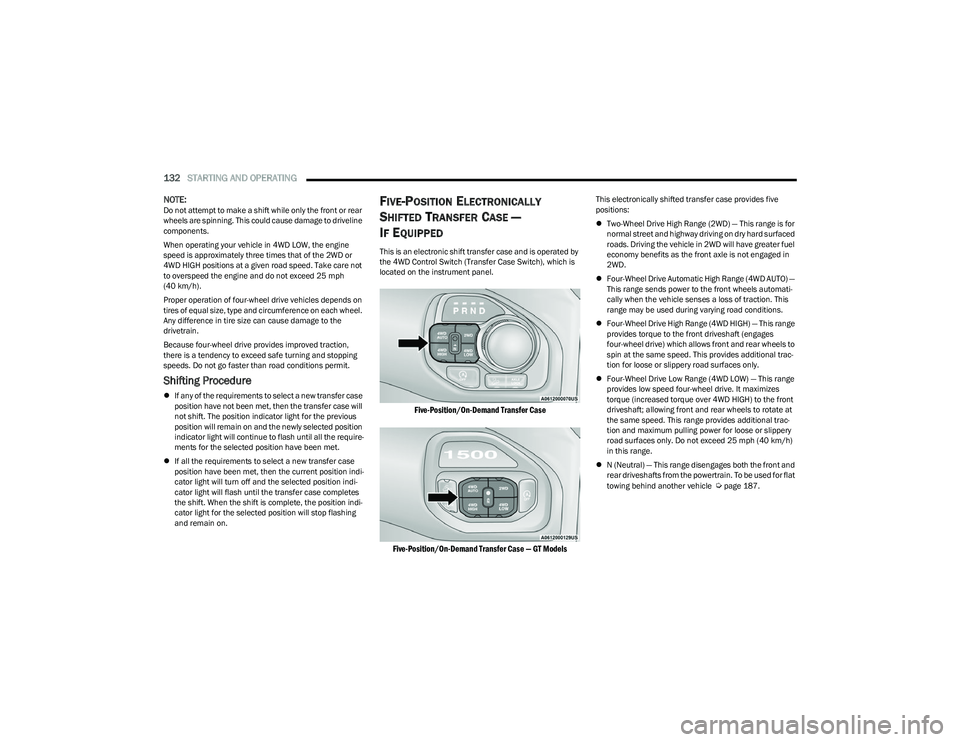
FIVE-POSITION ELECTRONICALLY
S
HIFTED TRANSFER CASE —
I
F EQUIPPED
This is an electronic shift transfer case and is operated by
the 4WD Control Switch (Transfer Case Switch), which is
located on the instrument panel.
Five-Position/On-Demand Transfer Case
Five-Position/On-Demand Transfer Case — GT Models
This electronically shifted transfer case provides five
positions:
Two-Wheel Drive High Range (2WD) — This range is for
normal street and highway driving on dry hard surfaced
roads. Driving the vehicle in 2WD will have greater fuel
economy benefits as the front axle is not engaged in
2WD.
Four-Wheel Drive Automatic High Range (4WD AUTO) —
This range sends power to the front wheels automati -
cally when the vehicle senses a loss of traction. This
range may be used during varying road conditions.
Four-Wheel Drive High Range (4WD HIGH) — This range
provides torque to the front driveshaft (engages
four-wheel drive) which allows front and rear wheels to
spin at the same speed. This provides additional trac -
tion for loose or slippery road surfaces only.
Four-Wheel Drive Low Range (4WD LOW) — This range
provides low speed four-wheel drive. It maximizes
torque (increased torque over 4WD HIGH) to the front
driveshaft; allowing front and rear wheels to rotate at
the same speed. This range provides additional trac -
tion and maximum pulling power for loose or slippery
road surfaces only. Do not exceed 25 mph (40 km/h)
in this range.
N (Neutral) — This range disengages both the front and
rear driveshafts from the powertrain. To be used for flat
towing behind another vehicle
Úpage 187.
23_DT_OM_EN_USC_t.book Page 132
Page 160 of 416

158STARTING AND OPERATING
NOTE:
The driver is always responsible for controlling the
vehicle, responsible for any surrounding objects, and
must intervene as required.
The system is provided to assist the driver and not to
substitute the driver.
During a semi-automatic maneuver, if the driver
touches the steering wheel after being instructed to
remove their hands from the steering wheel, the
system will cancel, and the driver will be required to
manually complete the parking maneuver.
The system may not work in all conditions
(e.g. environmental conditions such as heavy rain,
snow, etc., or if searching for a parking space that has
surfaces that will absorb the ultrasonic sensor waves).
New vehicles from the dealership must have at least
30 miles (48 km) accumulated before the ParkSense
Active Park Assist system is fully calibrated and
performs accurately. This is due to the system’s
dynamic vehicle calibration to improve the perfor -
mance of the feature.
The driver must control the vehicle’s brakes. The auto -
matic emergency braking feature is NOT intended to
substitute for the driver during REVERSE maneuvers.ENABLING AND DISABLING THE
P
ARKSENSE ACTIVE PARK ASSIST
S
YSTEM
The ParkSense Active Park Assist system can
be enabled and disabled with the ParkSense
Active Park Assist switch, located on the switch
panel below the Uconnect display.
NOTE:If your vehicle is equipped with a 12-inch Uconnect
display, the ParkSense Active Park Assist switch is located
above the display.
To enable or disable the ParkSense Active Park Assist
system, push the ParkSense Active Park Assist switch
once (LED turns on). Pushing the switch a second time will
disable the system (LED turns off).
The ParkSense Active Park Assist system will turn off
automatically for any of the following conditions:
Parking maneuver is completed.
Vehicle speed is greater than 18 mph (30 km/h) when
searching for a parking space.
Vehicle speed is greater than 5 mph (7 km/h) during
active steering guidance into the parking space.
Steering wheel is touched during active steering guid -
ance into the parking space.
ParkSense Front/Rear Park Assist switch is pushed.
Driver's door is opened.
Tailgate is opened.
Electronic Stability Control/Anti-Lock Braking System
intervention.
Vehicle is in 4WD Low.
Axle Locker is active.
Trailer is connected.
Trailer Reverse Steering Control (TRSC) is active.
Snowplow is connected.
NOTE:The ParkSense Active Park Assist system will allow a
maximum of eight shifts between DRIVE and REVERSE. If
the maneuver cannot be completed within eight shifts, the
system will cancel and the instrument cluster display will
instruct the driver to complete the maneuver manually.
The ParkSense Active Park Assist system will only operate
and search for a parking space when the following
conditions are present:
Gear selector is in DRIVE.
The ignition is in the ON/RUN position.
The ParkSense Active Park Assist switch is activated.
Driver's door is closed.
Tailgate is closed.
Vehicle speed is less than 15 mph (25 km/h).
The outer surface and the underside of the front and
rear fascias/bumpers are clean and clear of snow, ice,
mud, dirt or other obstruction.
NOTE:If the vehicle is driven above approximately 15 mph
(25 km/h), the instrument cluster display will instruct the
driver to slow down. If the vehicle is driven above approxi -
mately 18 mph (30 km/h), the system will cancel. The driver must then reactivate the system by pushing the
ParkSense Active Park Assist switch.
23_DT_OM_EN_USC_t.book Page 158
Page 163 of 416

STARTING AND OPERATING161
LANESENSE — IF EQUIPPED
LANESENSE OPERATION
The LaneSense system is operational at speeds above
37 mph (60 km/h) and below 112 mph (180 km/h).
The LaneSense system uses a forward looking camera to
detect lane markings and measure vehicle position within
the lane boundaries.
When both lane markings are detected and the driver
drifts out of the lane (no turn signal applied), the
LaneSense system provides a haptic warning in the form
of torque applied to the steering wheel, as well as a visual
warning in the instrument cluster display, to prompt the
driver to remain within the lane boundaries.
The driver may manually override the haptic warning by
applying force to the steering wheel at any time.
When only a single lane marking is detected and the driver
drifts across the lane marking (no turn signal applied), the
LaneSense system provides a visual warning through the
instrument cluster display to prompt the driver to remain
within the lane.
When only a single lane marking is detected, a haptic or a
torque warning will not be provided.
NOTE:
When operating conditions have been met, the Lane -
Sense system will monitor if the driver’s hands are on
the steering wheel and provide an audible and visual
warning to the driver if removed. The system will cancel
if the driver does not return their hands to the wheel.
LaneSense will disable when a snowplow is connected
to the vehicle.
TURNING LANESENSE ON OR OFF
The LaneSense button is located on the switch
panel below the Uconnect display.
NOTE:If your vehicle is equipped with a 12-inch Uconnect Display
screen, the LaneSense button is located above the
display.
To turn the LaneSense system on, push the LaneSense
button (LED turns off). A “LaneSense On” message is
shown in the instrument cluster display.
To turn the LaneSense system off, push the LaneSense
button again (LED turns on).
NOTE:The LaneSense system will retain the last system state on
or off from the last ignition cycle when the ignition is
placed in the ON/RUN position.
LANESENSE WARNING MESSAGE
The LaneSense system will indicate the current lane drift
condition through the instrument cluster display.
When the LaneSense system is on, the lane lines are gray
when both of the lane boundaries have not been detected
and the LaneSense telltale is solid white.
System ON (Gray Lines) With White Telltale
4
23_DT_OM_EN_USC_t.book Page 161