2023 RAM 1500 warning
[x] Cancel search: warningPage 42 of 416
40GETTING TO KNOW YOUR VEHICLE
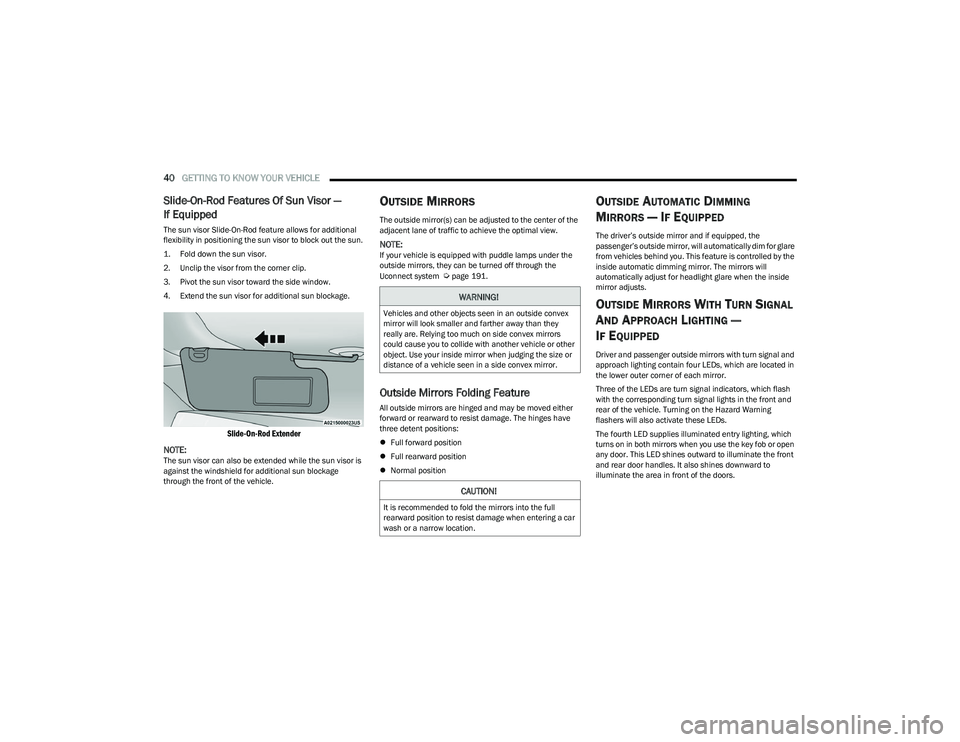
Slide-On-Rod Features Of Sun Visor —
If Equipped
The sun visor Slide-On-Rod feature allows for additional
flexibility in positioning the sun visor to block out the sun.
1. Fold down the sun visor.
2. Unclip the visor from the corner clip.
3. Pivot the sun visor toward the side window.
4. Extend the sun visor for additional sun blockage.
Slide-On-Rod Extender
NOTE:
The sun visor can also be extended while the sun visor is
against the windshield for additional sun blockage
through the front of the vehicle.
OUTSIDE MIRRORS
The outside mirror(s) can be adjusted to the center of the
adjacent lane of traffic to achieve the optimal view.
NOTE:If your vehicle is equipped with puddle lamps under the
outside mirrors, they can be turned off through the
Uconnect system
Úpage 191.
Outside Mirrors Folding Feature
All outside mirrors are hinged and may be moved either
forward or rearward to resist damage. The hinges have
three detent positions:
Full forward position
Full rearward position
Normal position
OUTSIDE AUTOMATIC DIMMING
M
IRRORS — IF EQUIPPED
The driver’s outside mirror and if equipped, the
passenger’s outside mirror, will automatically dim for glare
from vehicles behind you. This feature is controlled by the
inside automatic dimming mirror. The mirrors will
automatically adjust for headlight glare when the inside
mirror adjusts.
OUTSIDE MIRRORS WITH TURN SIGNAL
A
ND APPROACH LIGHTING —
I
F EQUIPPED
Driver and passenger outside mirrors with turn signal and
approach lighting contain four LEDs, which are located in
the lower outer corner of each mirror.
Three of the LEDs are turn signal indicators, which flash
with the corresponding turn signal lights in the front and
rear of the vehicle. Turning on the Hazard Warning
flashers will also activate these LEDs.
The fourth LED supplies illuminated entry lighting, which
turns on in both mirrors when you use the key fob or open
any door. This LED shines outward to illuminate the front
and rear door handles. It also shines downward to
illuminate the area in front of the doors.
WARNING!
Vehicles and other objects seen in an outside convex
mirror will look smaller and farther away than they
really are. Relying too much on side convex mirrors
could cause you to collide with another vehicle or other
object. Use your inside mirror when judging the size or
distance of a vehicle seen in a side convex mirror.
CAUTION!
It is recommended to fold the mirrors into the full
rearward position to resist damage when entering a car
wash or a narrow location.
23_DT_OM_EN_USC_t.book Page 40
Page 46 of 416

44GETTING TO KNOW YOUR VEHICLE
PROGRAMMING HOMELINK® TO A
G
ARAGE DOOR OPENER
To program any of the HomeLink® buttons to activate your
garage door opener motor, proceed as follows:
NOTE:All HomeLink® buttons are programmed using this
procedure. You do not need to erase all channels when
programming additional buttons.
1. Place the ignition switch into the ON/RUN position.
2. Place the garage door opener transmitter
1 to 3 inches (3 to 8 cm) away from the HomeLink®
button you wish to program, while keeping the
HomeLink® indicator light in view.
3. Push and hold the HomeLink® button you want to program while you push and hold the garage door
opener transmitter button you are trying to replicate.
4. Continue to hold both buttons and observe the HomeLink® indicator light. The HomeLink® indicator
light will flash slowly and then rapidly. Once this
happens, release both buttons.
NOTE:Make sure the garage door opener motor is plugged in
before moving on to the rolling code/non-rolling code final
steps. Rolling Code Garage Door Opener Final Steps
NOTE:You have 30 seconds in which to initiate rolling code final
step 2, after completing rolling code final step 1.
1. At the garage door opener motor (in the garage),
locate the “LEARN” or “TRAIN” button. This can
usually be found where the hanging antenna wire is
attached to the garage door opener motor. Firmly
push and release the “LEARN” or “TRAIN” button.
2. Return to the vehicle and push the programmed HomeLink® button three times (holding the button
for two seconds each time). If the garage door opener
motor operates, programming is complete.
3. Push the programmed HomeLink® button to confirm that the garage door opener motor operates. If the
garage door opener motor does not operate, repeat
the final steps for the rolling code procedure.
Non-Rolling Code Garage Door Opener Final Steps
1. Push and hold the programmed HomeLink® button and observe the HomeLink® indicator light. If the
HomeLink® indicator light stays on constantly,
programming is complete.
2. Push the programmed HomeLink® button to confirm that the garage door opener motor operates. If the
garage door opener motor does not operate, repeat
the steps from the beginning.
PROGRAMMING HOMELINK® TO A
M
ISCELLANEOUS DEVICE
The procedure on how to program HomeLink® to a
miscellaneous device follows the same procedure as
programming to a garage door opener
Úpage 44. Be sure
to determine if the device has a rolling code, or non-rolling
code before beginning the programming process.
NOTE:Canadian Radio Frequency (RF) laws require transmitter
signals to time-out (or quit) after several seconds of trans -
mission, which may not be long enough for HomeLink® to
pick up the signal during programming. Similar to this
Canadian law, some U.S. gate operators are designed to
time-out in the same manner. The procedure may need to
be performed multiple times to successfully pair the
device to your HomeLink® buttons.
WARNING!
Your motorized door or gate will open and close while
you are programming the universal transmitter.
Do not program the transmitter if people or pets are
in the path of the door or gate.
Do not run your vehicle in a closed garage or
confined area while programming the transmitter.
Exhaust gas from your vehicle contains carbon
monoxide (CO) which is odorless and colorless.
Carbon monoxide is poisonous when inhaled and
can cause you and others to be severely injured
or killed.
23_DT_OM_EN_USC_t.book Page 44
Page 48 of 416

46GETTING TO KNOW YOUR VEHICLE
TROUBLESHOOTING TIPS
If you are having trouble programming HomeLink®, here
are some of the most common solutions:
Replace the battery in the garage door opener
hand-held transmitter.
Push the LEARN button on the garage door opener to
complete the training for a rolling code.
Did you unplug the device for programming and
remember to plug it back in?
If you have any problems, or require assistance, please
call toll-free 1-800-355-3515 or, on the Internet at
HomeLink.com for information or assistance.
EXTERIOR LIGHTS
HEADLIGHT SWITCH
The headlight switch is located on the left side of the
instrument panel. This switch controls the operation of the
headlights, parking lights, automatic headlights (if
equipped), instrument panel light dimming, cargo light/
trailer spotter lights (if equipped), and fog lights (if
equipped).
Headlight Switch Headlight Switch (Vehicles Sold In Canada)
NOTE:
Vehicles sold in Canada are equipped with a headlight
switch with an AUTO and ON detent but without an OFF
detent. Headlights will be deactivated when the headlight
switch is placed in the parking lights position. However,
the Daytime Running Lights (DRLs) will be activated along
with the front and rear marker lights. The DRLs may be
deactivated when the parking brake is engaged.
To turn on the headlights, rotate the headlight switch
clockwise. When the headlight switch is on, the parking
lights, taillights, license plate light and instrument panel
lights are also turned on. To turn off the headlights, rotate
the headlight switch back to the O (off) position.
WARNING!
Vehicle exhaust contains carbon monoxide, a
dangerous gas. Do not run your vehicle in the garage
while programming the transceiver. Exhaust gas can
cause serious injury or death.
Your motorized door or gate will open and close while
you are programming the universal transceiver.
Do not program the transceiver if people, pets or
other objects are in the path of the door or gate. Only
use this transceiver with a garage door opener that
has a “stop and reverse” feature as required by
Federal safety standards. This includes most garage
door opener models manufactured after 1982.
Do not use a garage door opener without these
safety features.
1 — Rotate Headlight Control
2 — Push Fog Light Switch
3 — Ambient Light Dimmer Control
4 — Instrument Panel Dimmer Control
5 — Push Cargo Light Switch
1 — Rotate Headlight Control
2 — Push Fog Switch
3 — Ambient Light Dimmer Control
4 — Instrument Panel Dimmer Control
5 — Push Cargo Light Switch
23_DT_OM_EN_USC_t.book Page 46
Page 49 of 416

GETTING TO KNOW YOUR VEHICLE47
NOTE:For vehicles sold in Canada, rotate the headlight switch
clockwise from the parking lights and instrument panel
lights position to the first detent to turn on headlights,
parking lights, and instrument panel lights. Rotate the
headlight switch to the second detent for the AUTO
position.
NOTE:
Your vehicle is equipped with plastic headlight and fog
light (if equipped) lenses that are lighter and less
susceptible to stone breakage than glass lights. Plastic
is not as scratch resistant as glass and therefore
different lens cleaning procedures must be followed.
To minimize the possibility of scratching the lenses and
reducing light output, avoid wiping with a dry cloth.
To remove road dirt, wash with a mild soap solution
followed by rinsing.
MULTIFUNCTION LEVER
The multifunction lever is located on the left side of the
steering column.
Multifunction Lever
DAYTIME RUNNING LIGHTS (DRLS)
The Daytime Running Lights (DRLs) come on whenever the
engine is running, and the low beams are not on. The
lights will remain on until the ignition is placed in the OFF
or ACC position, or the parking brake is engaged.
NOTE:
For vehicles sold in Canada, the Daytime Running
Lights will automatically deactivate when the front fog
lights are turned on.
If allowed by law in the country in which the vehicle was
purchased, the Daytime Running Lights can be turned
on and off using the Uconnect system
Úpage 191.
On some vehicles, the Daytime Running Lights may
deactivate, or reduce intensity, on one side of the
vehicle (when a turn signal is activated on that side), or
on both sides of the vehicle (when the hazard warning
lights are activated).
HIGH/LOW BEAM SWITCH
Push the multifunction lever toward the instrument panel
to switch the headlights to high beams. Pulling the
multifunction lever back will turn the low beams on.
AUTOMATIC HIGH BEAM HEADLAMP
C
ONTROL — IF EQUIPPED
The Automatic High Beam Headlamp Control system
provides increased forward lighting at night by automating
high beam control through the use of a camera mounted
on the inside rearview mirror or a windshield mounted
camera. These cameras detect vehicle specific light and
automatically switch from high beams to low beams until
the approaching vehicle is out of view.
NOTE:
The Automatic High Beam Headlamp Control can be
turned on or off by selecting “ON” under “Auto Dim
High Beams” within your Uconnect Settings
Úpage 191, as well as turning the headlight switch to
the AUTO position.
Broken, muddy, or obstructed headlights and taillights
of vehicles in the field of view will cause headlights to
remain on longer (closer to the vehicle). Also, dirt, film,
and other obstructions on the windshield or camera
lens will cause the system to function improperly.
If the windshield or Automatic High Beam Headlamp
Control mirror is replaced, the mirror must be re-aimed
to ensure proper performance. See a local authorized
dealer.
To opt out of the Advanced Auto High Beam Sensitivity
Control (default) and enter Reduced High Beam Sensi -
tivity Control (not recommended), toggle the high beam
lever six full on/off cycles within 10 seconds of placing
the ignition in the ON position. The system will return to
the default setting upon placing the ignition in the OFF
position.
CAUTION!
Do not use abrasive cleaning components, solvents,
steel wool or other abrasive materials to clean the
lenses.
2
23_DT_OM_EN_USC_t.book Page 47
Page 55 of 416

GETTING TO KNOW YOUR VEHICLE53
The delay interval decreases as you rotate the knob until
it enters the low continual speed position. The delay can
be regulated from a maximum of about 18 seconds
between cycles, to a cycle every one second. The delay
intervals will double in duration when the vehicle speed is
10 mph (16 km/h) or less.
Windshield Washers
To use the windshield washer, push the washer knob,
located on the end of the multifunction lever, inward and
hold. Washer fluid will be sprayed and the wipers will
operate for two to three cycles after the washer knob is
released.
If the washer knob is pushed while in the delay range, the
wipers will operate for several seconds after the washer
knob is released. It will then resume the intermittent
interval previously selected. If the washer knob is pushed
while in the off position, the wipers will turn on and cycle
approximately three times after the washer knob is
released.
To prevent freeze-up of your windshield washer system in
cold weather, select a solution or mixture that meets or
exceeds the temperature range of your climate. This rating
information can be found on most washer fluid containers. Mist
When a single wipe to clear off road mist or spray from a
passing vehicle is needed, push the washer knob, located
on the end of the multifunction lever, inward briefly and
release. The wipers will cycle one time and automatically
shut off.
NOTE:The mist feature does not activate the washer pump;
therefore, no washer fluid will be sprayed on the wind
-
shield. The washer function must be used in order to spray
the windshield with washer fluid.
For information on wiper care and replacement, see
Úpage 347.
RAIN SENSING WIPERS — IF EQUIPPED
This feature senses rain or snowfall on the windshield and
automatically activates the wipers. Rotate the end of the
multifunction lever to one of four detent positions to
activate this feature.
The sensitivity of the system can be adjusted with the
multifunction lever. Wiper delay position one is the least
sensitive, and wiper delay detent position four is the most
sensitive.
Wiper delay position three should be used for normal rain
conditions.
Positions one and two can be used if the driver desires
less wiper sensitivity. Position four can be used if the
driver desires more sensitivity. Place the wiper switch in
the O (off) position when not using the system.
NOTE:
The Rain Sensing feature will not operate when the
wiper switch is in the low or high-speed position.
The Rain Sensing feature may not function properly
when ice, or dried salt water is present on the wind -
shield.
Use of products containing wax or silicone may reduce
Rain Sensing performance.
The Rain Sensing feature can be turned on and off
using the Uconnect system
Úpage 191.
The Rain Sensing system has protection features for the
wiper blades and arms, and will not operate under the
following conditions:
Low Ambient Temperature — When the ignition is first
placed in the ON position, the Rain Sensing system will
not operate until the wiper switch is moved, vehicle
speed is greater than 3 mph (5 km/h), or the outside
temperature is greater than 32°F (0°C).
Transmission In NEUTRAL Position — When the ignition
is ON, and the automatic transmission is in the
NEUTRAL position, the Rain Sensing system will not
operate until the wiper switch is moved, vehicle speed
is greater than 3 mph (5 km/h), or the gear selector is
moved out of the NEUTRAL position.
Remote Start Mode Inhibit — On vehicles equipped
with a Remote Start system, Rain Sensing wipers are
not operational when the vehicle is in the Remote
Start mode.
WARNING!
Sudden loss of visibility through the windshield could
lead to a collision. You might not see other vehicles or
other obstacles. To avoid sudden icing of the windshield
during freezing weather, warm the windshield with the
defroster before and during windshield washer use.
2
23_DT_OM_EN_USC_t.book Page 53
Page 62 of 416

60GETTING TO KNOW YOUR VEHICLE
Stop/Start System — If Equipped
While in an Autostop, the Climate Control system may
automatically adjust airflow to maintain cabin comfort.
Customer settings will be maintained upon return to an
engine running condition.
Operating Tips Chart
INTERIOR STORAGE AND EQUIPMENT
STORAGE
Glove Compartment
The glove compartment is located on the passenger side
of the instrument panel and features both an upper and
lower storage area.
Glove Compartment
If equipped with a covered upper glove compartment,
push the release button to open.
To open the lower glove compartment, pull the release
handle.
Door Storage — If Equipped
Front Door Storage
Storage areas are located in the door trim panels.
Rear Door Storage
Storage areas are located in the door trim panels.
Center Storage Compartment —
If Equipped
The center storage compartment is located between the
driver and passenger seats. The storage compartment
provides an armrest and contains both an upper and lower
storage area.
WEATHER CONTROL SETTINGS
Hot Weather And
Vehicle Interior Is Very Hot Set the mode control to
(Panel Mode), (A/C) on, and blower on high. Roll down the
windows for a minute to flush out the hot air. Adjust the controls as needed to achieve comfort.
Warm Weather Turn (A/C) on and set the
mode control to (Panel Mode).
Cool Sunny Operate in (Bi-Level Mode).
Cool & Humid Conditions Set the mode control to
(Floor Mode) and turn (A/C) on to keep windows clear.
Cold Weather Set the mode control to
(Floor Mode). If windshield fogging
starts to occur, move the control to
(Mix Mode).
1 — Upper Glove Compartment Release Button
(If Equipped)
2 — Upper Glove Compartment
3 — Lower Glove Compartment
WARNING!
Do not operate this vehicle with a glove compartment in
the open position. Driving with the glove compartment
open may result in injury in a collision.
23_DT_OM_EN_USC_t.book Page 60
Page 63 of 416

GETTING TO KNOW YOUR VEHICLE61
Center Storage Compartment
Pull on the upper handle on the front of the armrest to
raise the cover. The upper storage area contains a USB
power outlet that can be used to power small electrical
devices.
Center Storage Compartment
Upper Storage USB Outlet
With the upper lid closed, pull on the lower handle to open
the lower storage bin. The lower bin contains a power
inverter. There is also a fill line located along the rear
inside wall of the lower bin. Contents above the fill line
may interfere with cupholder placement if equipped with a
premium center console.
Forward Portion Of Lower Storage Bin
WARNING!
This armrest is not a seat. Anyone seated on the
armrest could be seriously injured during vehicle
operation, or a collision.
In a collision, the latch may open if the total weight of
the items stored exceeds about 10 lb (4.5 kg). These
items could be thrown about endangering occupants
of the vehicle. Items stored should not exceed a total
of 10 lb (4.5 kg).
1 — Upper Console Handle
2 — Lower Console Handle
1 — Wireless Charging Pad
2 — Power Inverter
3 — Storage Area
WARNING!
Do not operate this vehicle with a console compartment
lid in the open position. Driving with the console
compartment lid open may result in injury in a collision.
2
23_DT_OM_EN_USC_t.book Page 61
Page 69 of 416

GETTING TO KNOW YOUR VEHICLE67
(Continued)
When the vehicle is turned off, be sure to unplug any
equipment as to not drain the battery of the vehicle. All
accessories connected to the outlet(s) should be removed
or turned off when the vehicle is not in use to protect the
battery against discharge.
POWER INVERTER — IF EQUIPPED
A 115 Volt (400 Watts maximum) inverter may be located
inside the center console towards the right hand side. This
inverter can power cellular phones, electronics and other
low power devices requiring power up to 400 Watts.
Certain video game consoles exceed this power limit, as
will most power tools.
Center Console Power Inverter Outlet
There is also a second 115 Volt (400 Watts maximum)
power inverter located on the rear of the center console.
This inverter can power cellular phones, electronics and
other low power devices requiring power up to 400 Watts. Certain video game consoles exceed this power limit, as
will most power tools.
All power inverters are designed with built-in overload
protection. If the power rating of 400 Watts is exceeded,
the power inverter shuts down. Once the electrical device
has been removed from the outlet the inverter should
reset.
Rear Center Console Power Inverter Outlet
NOTE:
400 Watts is the maximum for the inverter, not each
outlet. If three outlets are in use, 400 Watts is shared
amongst the devices plugged in.
If equipped with a front bench seat, there may be a
115 Volt (400 Watts maximum) inverter located to the
right of the center stack, just below the climate controls.
This inverter can power cellular phones, electronics and
other low power devices requiring power up to 400 Watts.
WARNING!
To avoid serious injury or death:
Only devices designed for use in this type of outlet
should be inserted into any 12 Volt outlet.
Do not touch with wet hands.
Close the lid when not in use and while driving the
vehicle.
If this outlet is mishandled, it may cause an electric
shock and failure.
CAUTION!
Many accessories that can be plugged in draw power
from the vehicle's battery, even when not in use
(i.e., cellular phones, etc.). Eventually, if plugged in
long enough, the vehicle's battery will discharge suffi -
ciently to degrade battery life and/or prevent the
engine from starting.
Accessories that draw higher power (i.e., coolers,
vacuum cleaners, lights, etc.), will discharge the
battery even more quickly. Only use these intermit -
tently and with greater caution.
After the use of high power draw accessories, or long
periods of the vehicle not being started (with acces -
sories still plugged in), the vehicle must be driven a
sufficient length of time to allow the generator to
recharge the vehicle's battery.
CAUTION!
2
23_DT_OM_EN_USC_t.book Page 67