Page 259 of 416
MULTIMEDIA257
OFF-ROAD PAGES STATUS BAR
The Off-Road Pages Status Bar is located along the bottom
of Off-Road Pages and is present in each of the selectable
page options. It provides information for the following
items:
1. Transfer Case Status
2. Latitude/Longitude
3. Altitude of the vehicle
4. Status of Hill Descent or Selec-Speed Control at
Target Selected Speed in mph (km/h) — If Equipped
Status Bar 2WD/4WD
1 — Transfer Case Status
2 — Latitude/Longitude
3 — Altitude
4 — Hill Descent Or Selec-Speed Control Status
5
23_DT_OM_EN_USC_t.book Page 257
Page 260 of 416
258MULTIMEDIA
VEHICLE DYNAMICS
The Vehicle Dynamics page displays information
concerning the vehicle’s transfer case and steering angle.
The following information is displayed:
1. Steering angle in degrees
2. Status of Transfer Case
3. Status of the Rear Axle
4. Status of Front Axle — If Equipped
Drivetrain Menu 2WD/4WD
1 — Steering Angle
2 — Transfer Case Status
3 — Rear Axle
4 — Rear Axle Locker Status
23_DT_OM_EN_USC_t.book Page 258
Page 261 of 416
MULTIMEDIA259
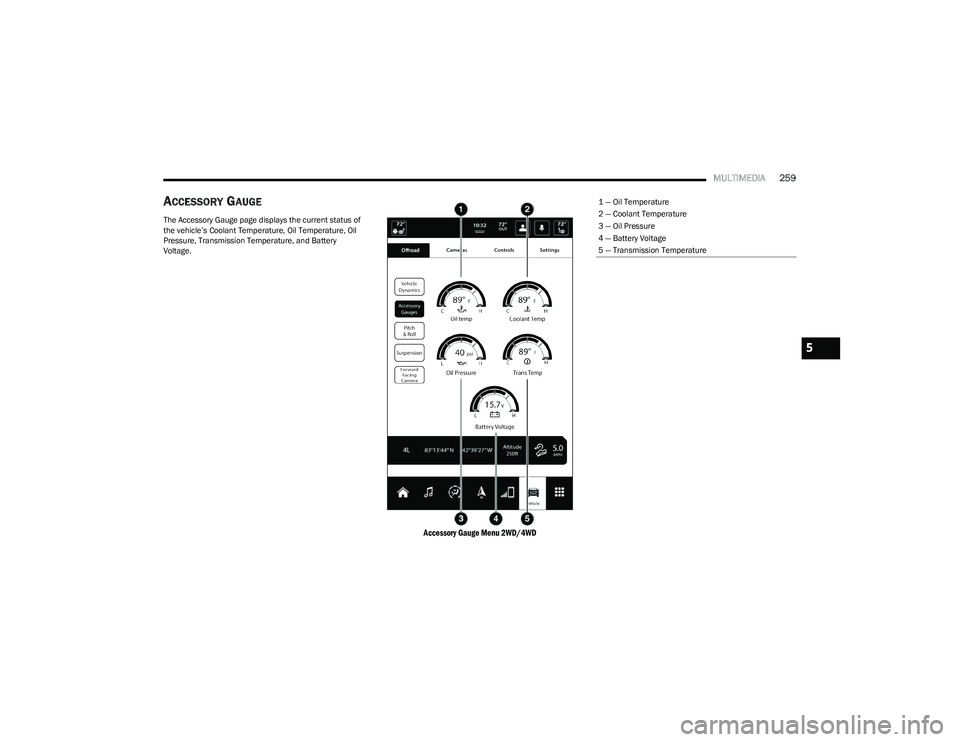
ACCESSORY GAUGE
The Accessory Gauge page displays the current status of
the vehicle’s Coolant Temperature, Oil Temperature, Oil
Pressure, Transmission Temperature, and Battery
Voltage.
Accessory Gauge Menu 2WD/4WD
1 — Oil Temperature
2 — Coolant Temperature
3 — Oil Pressure
4 — Battery Voltage
5 — Transmission Temperature
5
23_DT_OM_EN_USC_t.book Page 259
Page 262 of 416
260MULTIMEDIA
PITCH & ROLL
The Pitch & Roll page displays the vehicle’s current pitch
(angle up and down) and roll (angle side to side) in
degrees. The Pitch & Roll gauges provide a visualization of
the current vehicle angle.
NOTE:Pitch & Roll values may show upon startup. These
numbers will update once the vehicle is driven.
Pitch & Roll Menu 2WD/4WD
23_DT_OM_EN_USC_t.book Page 260
Page 269 of 416

SAFETY267
Rain Brake Support (RBS)
RBS may improve braking performance in wet conditions.
It will periodically apply a small amount of brake pressure
to remove any water buildup on the front brake rotors.
It functions when the windshield wipers are in LO or HI
speed. When Rain Brake Support is active, there is no
notification to the driver and no driver interaction is
required.
Ready Alert Braking (RAB)
RAB may reduce the time required to reach full braking
during emergency braking situations. It anticipates when
an emergency braking situation may occur by monitoring
how fast the throttle is released by the driver. The
Electronic Brake Control system will prepare the brake
system for a panic stop.
Selec-Speed Control (SSC) — If Equipped
SSC is intended for off-road driving in 4WD Low only. SSC
maintains vehicle speed by actively controlling engine
torque and brakes.
SSC has three states:
1. Off (feature is not enabled and will not activate)
2. Enabled (feature is enabled and ready but activation
conditions are not met, or driver is actively overriding
with brake or throttle application)
3. Active (feature is enabled and actively controlling vehicle speed) Enabling SSC
SSC is enabled by pushing the SSC switch, but the
following conditions must also be met to enable SSC:
The driveline is in 4WD Low.
The vehicle speed is below 5 mph (8 km/h).
The parking brake is released.
The driver door is closed.
The driver is not applying throttle.
Activating SSC
Once SSC is enabled it will activate automatically once the
following conditions are met:
The driver releases the throttle.
The driver releases the brake.
The transmission is in any selection other than PARK.
Your vehicle speed is below 20 mph (32 km/h).
The set speed for SSC is selectable by the driver, and can
be adjusted by using the gear shift +/-. Additionally, the
SSC set speed may be reduced when climbing a grade and
the level of set speed reduction depends on the
magnitude of grade. The following summarizes the SSC
set speeds: SSC Target Set Speeds
1st = 0.6 mph (1 km/h)
2nd = 1.2 mph (2 km/h)
3rd = 1.8 mph (3 km/h)
4th = 2.5 mph (4 km/h)
5th = 3.1 mph (5 km/h)
6th = 3.7 mph (6 km/h)
7th = 4.3 mph (7 km/h)
8th = 5 mph (8 km/h)
9th = 5.6 mph (9 km/h) — if equipped
REVERSE = 0.6 mph (1 km/h)
NEUTRAL = 1.2 mph (2 km/h)
PARK = SSC remains enabled but not activeNOTE:
During SSC, the +/- gear selector input is used for SSC
target speed selection but will not affect the gear
chosen by the transmission. While actively controlling
SSC, the transmission will shift appropriately for the
driver-selected set speed and corresponding driving
conditions.
SSC operation is influenced by Off Road+ drive mode if
active. The differences may be notable to the driver as
a varying level of aggressiveness.
6
23_DT_OM_EN_USC_t.book Page 267
Page 270 of 416

268SAFETY
Driver Override
The driver may override SSC activation with throttle or
brake application at any time.
Deactivating SSC
SSC will be deactivated but remain available if any of the
following conditions occur:
The driver overrides SSC set speed with throttle or
brake application.
The vehicle speed exceeds 20 mph (32 km/h) but
remains below 40 mph (64 km/h).
The vehicle is shifted into PARK.
Disabling SSC
SSC will deactivate and be disabled if any of the following
conditions occur:
The driver pushes the SSC switch.
The driveline is shifted out of the 4WD Low.
The parking brake is applied.
The driver door opens.
The vehicle is driven greater than 20 mph (32 km/h)
for greater than 70 seconds.
The vehicle is driven greater than 40 mph (64 km/h).
SSC will exist immediately. Feedback To The Driver
The instrument cluster has an SSC icon and the SSC
switch has a lamp which offers feedback to the driver
about the state SSC is in.
The cluster icon and switch lamp will illuminate and
remain on solid when SSC is enabled or activated.
These are the normal operating conditions for SSC.
The cluster icon and switch lamp will flash for several
seconds then extinguish when the driver pushes the
SSC switch but enabled conditions are not met.
The cluster icon and switch lamp will flash for several
seconds then extinguish when SSC disables due to
excess speed.
The cluster icon and switch lamp will flash then extin -
guish when SSC deactivates due to overheated brakes.
Traction Control System (TCS)
The TCS monitors the amount of wheel spin of each of the
driven wheels. If wheel spin is detected, the TCS may apply
brake pressure to the spinning wheel(s) and/or reduce
engine power to provide enhanced acceleration and
stability. A feature of the TCS, Brake Limited Differential (BLD)
functions similarly to a limited slip differential and controls
the wheel spin across a driven axle. If one wheel on a
driven axle is spinning faster than the other, the system
will apply the brake of the spinning wheel. This will allow
more engine torque to be applied to the wheel that is not
spinning. BLD may remain enabled even if TCS and
Electronic Stability Control (ESC) are in reduced modes.
Trailer Sway Control (TSC)
TSC uses sensors in the vehicle to recognize an
excessively swaying trailer and will take the appropriate
actions to attempt to stop the sway.
NOTE:TSC cannot stop all trailers from swaying. Always use
caution when towing a trailer and follow the trailer tongue
weight recommendations
Úpage 173.
When TSC is functioning, the ESC Activation/Malfunction
Indicator Light will flash, the engine power may be reduced
and you may feel the brakes being applied to individual
wheels to attempt to stop the trailer from swaying. TSC is
disabled when the ESC system is in the “Partial Off” or
“Full Off” modes.
WARNING!
SSC is only intended to assist the driver in controlling
vehicle speed when driving in off road conditions. The
driver must remain attentive to the driving conditions
and is responsible for maintaining a safe vehicle speed.
WARNING!
If TSC activates while driving, slow the vehicle down,
stop at the nearest safe location, and adjust the trailer
load to eliminate trailer sway.
23_DT_OM_EN_USC_t.book Page 268
Page 387 of 416
SERVICING AND MAINTENANCE385
4x4 (4WD)
Trim Level Axle
Tire/Wheel Size Snow Traction Device
(Maximum Projection Beyond Tire Profile Or Equivalent)
Tradesman
Bighorn Lonestar Laramie Rear
275/65R18
275/55R20 S Class
Longhorn Sport
Limited Rear
275/55R20 S Class
REBEL Not Chainable
WARNING!
Using tires of different size and type (M+S, Snow) between front and rear axles can cause unpredictable handling. You could lose control and have a collision.
8
23_DT_OM_EN_USC_t.book Page 385
Page 399 of 416

TECHNICAL SPECIFICATIONS397
CHASSIS FLUIDS AND LUBRICANTS
Component Fluid, Lubricant, or Genuine Part
Automatic Transmission Use only Mopar® ZF 8 & 9 Speed ATF Automatic Transmission Fluid, or equivalent.
Failure to use the correct fluid may affect the function or performance of your
transmission.
Transfer Case – 48-11 Active On-Demand 2–speed Transfer Case (With 4WD AUTO) We recommend using Mobil Fluid LT.
Transfer Case – 48-12 Part Time 2–Speed Transfer Case (Without 4WD AUTO) We recommend using Shell Spirax S2 ATF A389.
Front Axle We recommend using Mopar® GL-5 Synthetic Axle Lubricant SAE 75W-85.
Rear Axle (3.21/3.55) We recommend using Mopar® Synthetic Gear Lubricant SAE 75W-90 (MS-A0160).
Limited-Slip Rear Axles require the addition of 5 oz. (148 ml) Mopar® Limited Slip
Additive (MS-10111).
Rear Axle (3.92) We recommend using Mopar® Synthetic Gear Lubricant SAE 75W-140 (MS-8985).
Limited-Slip Rear Axles require the addition of 5 oz. (148 ml) Mopar® Limited Slip
Additive (MS-10111).
Max Tow Rear Axle (3.92) We recommend using Dana SAE 80W90 Axle Lubricant.
Brake Master Cylinder We recommend using Mopar® DOT 3 Brake Fluid, SAE J1709.
9
23_DT_OM_EN_USC_t.book Page 397