2023 RAM 1500 battery location
[x] Cancel search: battery locationPage 245 of 416

MULTIMEDIA243
Requirements
Vehicle must be properly equipped with SiriusXM
Guardian™.
Vehicle must have an operable LTE (voice/data) or 4G
(data) network connection. If using the Vehicle
Branded App to command your vehicle, your device
must be compatible and be connected to an operable
LTE (voice/data) or 4G (data) network connection.
Vehicle must be registered with SiriusXM Guardian™
and have an active subscription that includes the appli -
cable feature.
An ignition cycle is required for some remote
commands, such as Remote Vehicle Start and Remote
Door Lock/Unlock if following a Remote Horn & Lights
activation.
Your Remote Door Lock/Unlock request will not be
processed if the vehicle is in motion, the ignition key is
on or during an emergency call.
NOTE:All other remote services should be performed via your
Owner’s Site or through the Vehicle Branded App on your
compatible device.
Remote Vehicle Start
Description
The Remote Vehicle Start feature provides you with the
ability to start the engine on your vehicle without the keys
and from virtually any distance. Once started, the preset
climate controls in your vehicle can warm up or cool down
the interior. You can also send a command to turn off an engine that
has been started using Remote Vehicle Start. After
15 minutes, if you have not entered your vehicle with the
key, the engine will shut off automatically.
This remote function requires your vehicle to be equipped
with a factory-installed Remote Start system.
You can set up push notifications every time a command
is sent to activate or cancel Remote Start.
Working Vehicle Conditions
The vehicle must be off or in ACC mode.
The vehicle has been started with the key fob within the
last 14 days.
The vehicle must be in PARK or at a standstill.
The vehicle’s security system has been armed and not
triggered since the last vehicle start.
The doors, hood, and trunk/liftgate are closed.
The vehicle’s check engine light must be off.
The vehicle must have at least a quarter tank of fuel,
along with oil and battery power.
The vehicle’s hazard lights must be off.
If equipped, the vehicle must have an automatic trans -
mission.
The vehicle must be in an open area with cell tower
reception.
Your mobile device must have a cellular or Wi-Fi
connection.
If the Panic button has been pressed, the vehicle must
be started at least once after alarming the system.
NOTE:The SiriusXM Guardian™ Customer Care agents are not
authorized for Remote Vehicle Start services. Contact the
Uconnect Care Team for assistance.
Remote Horn & Lights
Description
It is easy to locate a vehicle in a dark, crowded or noisy
parking area by activating the horn and lights. It may also
help if you need to draw attention to your vehicle for any
reason.
If you want, you can set up push notifications every time a
command is sent to turn on the horn and lights.
Working Vehicle Conditions
The vehicle must in PARK or at a standstill.
The vehicle must be in an open area with cell tower
reception.
Your mobile device must have a cellular or Wi-Fi
connection.
NOTE:The Remote Horn & Lights feature is designed to be loud
and get noticed. Please keep in mind the surroundings
when using this feature. You are responsible for
compliance with local laws, rules and ordinances in the
location of your vehicle when using Remote Horn & Lights.
5
23_DT_OM_EN_USC_t.book Page 243
Page 291 of 416
SAFETY289
The ORC contains a backup power supply system that may
deploy the air bag system even if the battery loses power
or it becomes disconnected prior to deployment.
The ORC turns on the Air Bag Warning Light in the
instrument panel for approximately four to eight seconds
for a self-check when the ignition switch is first in the
ON/RUN position. After the self-check, the Air Bag Warning
Light will turn off. If the ORC detects a malfunction in any
part of the system, it turns on the Air Bag Warning Light,
either momentarily or continuously. A single chime will
sound to alert you if the light comes on again after initial
startup.
The ORC also includes diagnostics that will illuminate the
instrument panel Air Bag Warning Light if a malfunction is
detected that could affect the air bag system. The
diagnostics also record the nature of the malfunction.
While the air bag system is designed to be maintenance
free, if any of the following occurs, have an authorized
dealer service the air bag system immediately.
The Air Bag Warning Light does not come on during the
four to eight seconds when the ignition switch is first in
the ON/RUN position.
The Air Bag Warning Light remains on after the four to
eight-second interval.
The Air Bag Warning Light comes on intermittently or
remains on while driving.NOTE:If the speedometer, tachometer, or any engine related
gauges are not working, the Occupant Restraint Controller
(ORC) may also be disabled. In this condition the air bags
may not be ready to inflate for your protection. Have an
authorized dealer service the air bag system immediately.
Redundant Air Bag Warning Light
If a fault with the Air Bag Warning Light is
detected, which could affect the Supplemental
Restraint System (SRS), the Redundant Air Bag
Warning Light will illuminate on the instrument
panel. The Redundant Air Bag Warning Light will stay on
until the fault is cleared. In addition, a single chime will
sound to alert you that the Redundant Air Bag Warning
Light has come on and a fault has been detected. If the
Redundant Air Bag Warning Light comes on intermittently
or remains on while driving have an authorized dealer
service the vehicle immediately
Úpage 107.
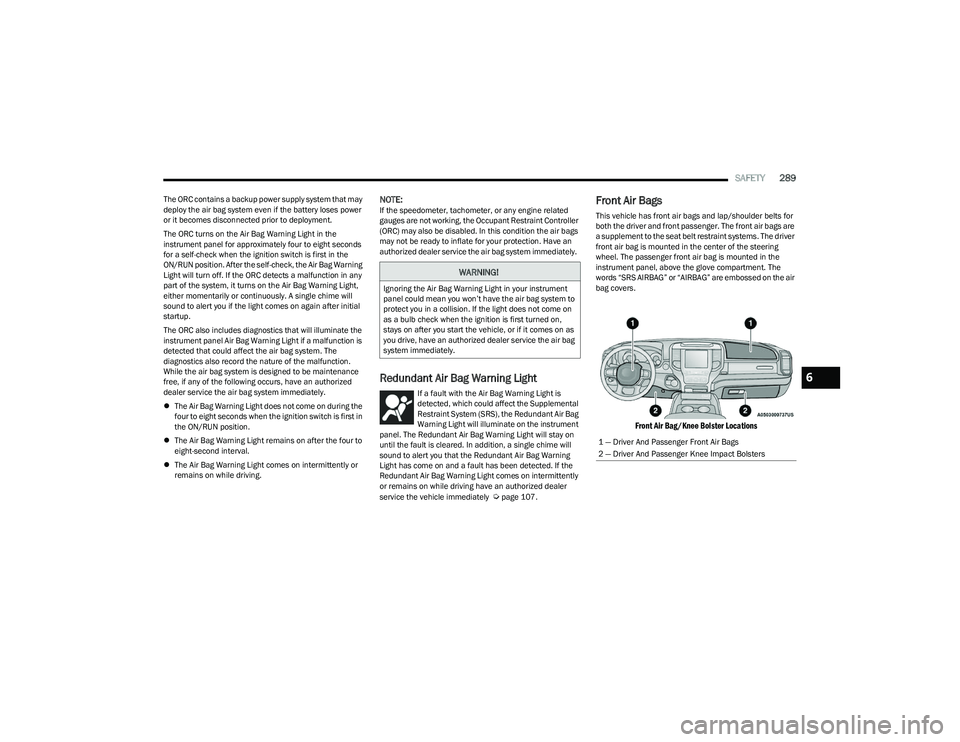
Front Air Bags
This vehicle has front air bags and lap/shoulder belts for
both the driver and front passenger. The front air bags are
a supplement to the seat belt restraint systems. The driver
front air bag is mounted in the center of the steering
wheel. The passenger front air bag is mounted in the
instrument panel, above the glove compartment. The
words “SRS AIRBAG” or “AIRBAG” are embossed on the air
bag covers.
Front Air Bag/Knee Bolster Locations
WARNING!
Ignoring the Air Bag Warning Light in your instrument
panel could mean you won’t have the air bag system to
protect you in a collision. If the light does not come on
as a bulb check when the ignition is first turned on,
stays on after you start the vehicle, or if it comes on as
you drive, have an authorized dealer service the air bag
system immediately.
1 — Driver And Passenger Front Air Bags
2 — Driver And Passenger Knee Impact Bolsters
6
23_DT_OM_EN_USC_t.book Page 289
Page 318 of 416

316IN CASE OF EMERGENCY
(Continued)
SOS Call System Limitations
Vehicles sold in Mexico
DO NOT have SOS Call system
capabilities.
SOS or other emergency line operators in Mexico may not
answer or respond to SOS system calls.
If the SOS Call system detects a malfunction, any of the
following may occur at the time the malfunction is
detected, and at the beginning of each ignition cycle:
The overhead console lights located within the ASSIST
and SOS buttons will continuously illuminate red.
The Device Screen will display the following message:
“Vehicle device requires service. Please contact an
authorized dealer.”
Where applicable, an In-Vehicle Audio message will
state “Vehicle device requires service. Please contact
an authorized dealer.” Even if the SOS Call system is fully functional, factors
beyond FCA US LLC’s control may prevent or stop the SOS
Call system operation. These include, but are not limited
to, the following factors:
The ignition is in the OFF position
The vehicle’s electrical systems are not intact
The SOS Call system software and/or hardware are
damaged during a crash
The vehicle battery loses power or becomes
disconnected during a vehicle crash
LTE (voice/data) or 4G (data) network and/or Global
Positioning Satellite signals are unavailable or
obstructed
Equipment malfunction at the SOS operator facility
Operator error by the SOS operator
LTE (voice/data) or 4G (data) network congestion
Weather
Buildings, structures, geographic terrain, or tunnels
WARNING!
If anyone in the vehicle could be in danger (e.g., fire
or smoke is visible, dangerous road conditions or
location), do not wait for voice contact from an Emer -
gency Services Agent. All occupants should exit the
vehicle immediately and move to a safe location.
Never place anything on or near the vehicle’s oper -
able network and GPS antennas. You could prevent
operable network and GPS signal reception, which
can prevent your vehicle from placing an emergency
call. An operable network and GPS signal reception is
required for the SOS Call system to function properly.
The SOS Call system is embedded into the vehicle’s
electrical system. Do not add aftermarket electrical
equipment to the vehicle’s electrical system. This
may prevent your vehicle from sending a signal to
initiate an emergency call. To avoid interference that
can cause the SOS Call system to fail, never add
aftermarket equipment (e.g., two-way mobile radio,
CB radio, data recorder, etc.) to your vehicle’s elec -
trical system or modify the antennas on your vehicle.
IF YOUR VEHICLE LOSES BATTERY POWER FOR ANY
REASON (INCLUDING DURING OR AFTER AN ACCI -
DENT), THE UCONNECT FEATURES, APPS AND
SERVICES, AMONG OTHERS, WILL NOT OPERATE.
Modifications to any part of the SOS Call system
could cause the air bag system to fail when you need
it. You could be injured if the air bag system is not
there to help protect you.
WARNING!
Ignoring the overhead console light could mean you
will not have SOS Call services. If the overhead
console light is illuminated and no SOS call placed,
have an authorized dealer service the SOS Call
system immediately.
The Occupant Restraint Control module turns on the
air bag Warning Light on the instrument panel if a
malfunction in any part of the system is detected.
If the Air Bag Warning Light is illuminated, have an
authorized dealer service the Occupant Restraint
Control system immediately.
WARNING!
23_DT_OM_EN_USC_t.book Page 316
Page 327 of 416

IN CASE OF EMERGENCY325
JUMP STARTING
If your vehicle has a discharged battery, it can be jump
started using a set of jumper cables and a battery in
another vehicle, or by using a portable battery booster
pack. Jump starting can be dangerous if done improperly,
so please follow the procedures in this section carefully.
NOTE:When using a portable battery booster pack, follow the
manufacturer's operating instructions and precautions.
PREPARATIONS FOR JUMP START
The battery in your vehicle is located in the front of the
engine compartment, behind the left headlight assembly.
Positive (+) Battery Post Location
NOTE:
The positive battery post may be covered with a protective
cap. Lift up on the cap to gain access to the positive
battery post. Do not jump off fuses. Only jump directly off
positive post which has a positive (+) symbol on or around
the post.
See the following steps to prepare for jump starting:
1. Shift the automatic transmission into PARK, apply the parking brake and turn the ignition OFF.
2. Turn off the heater, radio, and all electrical accessories.
3. If using another vehicle to jump start the battery, park the vehicle within the jumper cables’ reach, apply the
parking brake and make sure the ignition is OFF. 4. Pull upward and remove the protective cover over the
positive (+) battery post.
JUMP STARTING PROCEDURE
WARNING!
Do not attempt jump starting if the battery is frozen. It
could rupture or explode and cause personal injury.
CAUTION!
Do not use a portable battery booster pack or any other
booster source with a system voltage greater than
12 Volts or damage to the battery, starter motor,
alternator or electrical system may occur.
WARNING!
Do not allow vehicles to touch each other as this could
establish a ground connection and personal injury
could result.
WARNING!
Take care to avoid the radiator cooling fan whenever
the hood is raised. It can start anytime the ignition
switch is ON. You can be injured by moving fan
blades.
Remove any metal jewelry such as rings, watch
bands and bracelets that could make an inadvertent
electrical contact. You could be seriously injured.
Batteries contain sulfuric acid that can burn your
skin or eyes and generate hydrogen gas which is
flammable and explosive. Keep open flames or
sparks away from the battery.
WARNING!
Failure to follow this jump starting procedure could
result in personal injury or property damage due to
battery explosion.
CAUTION!
Failure to follow these procedures could result in
damage to the charging system of the booster vehicle
or the discharged vehicle.
7
23_DT_OM_EN_USC_t.book Page 325
Page 370 of 416

368SERVICING AND MAINTENANCE
Side Marker Lamp
See the following steps to replace:
1. Open the hood.
2. Disconnect and isolate the negative battery cable.
3. Locate the side marker lamp, which can be found on
the back side of the headlamps.
Side Marker Lamp
4. Disengage the side marker socket by rotating counterclockwise a quarter turn.
5. Pull the socket and bulb straight out from the housing.
6. Separate the bulb from the socket without twisting.
7. Reverse the procedure for installation of new bulb and covers.
FOG LAMPS — IF EQUIPPED
Please see an authorized dealer for service on LED and
Halogen front fog lamps.
Halogen
See the following steps to replace:
1. Reach under and behind the front fascia/bumper to access the back of the front fog lamp housing.
2. Disconnect the fog lamp wiring harness connector from the fog lamp bulb.
Fog Lamp Bulb
3. Rotate the bulb counterclockwise a quarter turn to unlock the bulb from the housing.
4. Pull the bulb straight out from the housing.
5. Reverse the procedure to install the bulb and cover.
REAR TAIL/STOP, TURN SIGNAL AND BACKUP
LAMPS
1. Remove the two screws and pushpin retainers that pass through the bed sheet metal.
Tail Lamp Locations
CAUTION!
Do not contaminate the bulb glass by touching it with
your fingers or by allowing it to contact other oily
surfaces. Shortened bulb life will result.
1 — Tail Lamp
2 — Fasteners
3 — Pushpin Retainers
23_DT_OM_EN_USC_t.book Page 368
Page 405 of 416

403
INDEX
AAccessory Drive Belt Inspection .................................. 346
Adaptive Cruise Control (ACC)
(Cruise Control) ................................................... 143
, 145
Adding Engine Coolant (Antifreeze) ............................ 350
Adding Fuel................................................................... 171
Additives, Fuel .............................................................. 393
Adjust Down...........................................................................32
Forward ...................................................................... 32
Rearward ....................................................................32
Up................................................................................ 32
Adjustable Pedals ...........................................................38
Advance Phone Connectivity ....................................... 235
Air Bag Air Bag Operation.................................................... 290
Air Bag Warning Light .................................... 288
, 291
Enhanced Accident Response ...................... 297, 332
Event Data Recorder (EDR).................................... 332 Front Air Bag ........................................................... 291
If Deployment Occurs ............................................. 297
Knee Impact Bolsters ............................................. 294
Maintaining Your Air Bag System .......................... 298
Maintenance ........................................................... 298
Redundant Air Bag Warning Light ......................... 289
Transporting Pets.................................................... 311
Air Bag Light ...............................................108
, 288, 311
Air Cleaner, Engine (Engine Air Cleaner Filter) ........... 342
Air Conditioner Maintenance ...................................... 344
Air Conditioner Refrigerant .......................................... 344
Air Conditioner System ................................................ 344 Air Conditioning........................................................ 54
, 56
Air Conditioning Filter ............................................59, 344
Air Conditioning System ................................................. 59
Air Conditioning, Operating Tips .................................... 59
Air Filter ............................................................... 342
, 344
Air Pressure Tires.......................................................................... 377
Air Suspension .................................................... 134
, 137
Alarm Panic........................................................................... 17
Security Alarm...................................................23
, 110
Alterations/Modifications Vehicle........................................................................ 11
Antifreeze (Engine Coolant) ............................... 350
, 395
Disposal ...................................................................351
Anti-Lock Brake System (ABS) ..................................... 262
Anti-Lock Warning Light................................................ 110
Assist, Hill Start ............................................................. 266
Audio Settings ............................................................... 224
Audio Systems (Radio) ................................................. 191
Auto Down Power Windows............................................ 70
Automatic Door Locks .................................................... 27 Automatic Headlights ..................................................... 48Automatic High Beams ................................................... 47
Automatic Tailgate Release ........................................... 75
Automatic Temperature Control (ATC) .......................... 59
Automatic Transmission ..................................... 125
, 353
Adding Fluid ............................................................. 353
Fluid And Filter Change ...........................................353
Fluid Change ............................................................353 Fluid Level Check ....................................................353 Fluid Type .......................................................353
, 397
Special Additives ..................................................... 353
Automatic Transmission Limp Home Mode ............... 128
AutoPark ....................................................................... 119
AUX Camera .................................................................. 168
Auxiliary Driving Systems ............................................. 269
Axle Fluid.............................................................. 353
, 397
Axle Locker System ...................................................... 140
Axle Lubrication ............................................................ 353
BBack-Up Camera........................................................... 163
Battery..................................................................108, 340
Charging System Light ............................................ 108
Keyless Key Fob Replacement................................. 17
Battery Saver Feature .................................................... 50
Bed Divider ..................................................................... 84 Bed Extender .................................................................. 84
Bed Step ......................................................................... 78
Bedliner......................................................................... 389
Belts, Seat..................................................................... 311
Blind Spot Monitoring .................................................. 269
Bluetooth Connecting To A Particular Mobile Phone Or Audio Device After Pairing ................................. 231
Body Builders Guide..........................................................9
Body Mechanism Lubrication ...................................... 347
Bodywork ...................................................................... 388
B-Pillar Location ........................................................... 374
Brake Assist System..................................................... 263
Brake Control System .................................................. 263
11
23_DT_OM_EN_USC_t.book Page 403
Page 408 of 416

406 H
Hazard Driving Through Flowing, Rising, OrShallow Standing Water .................................... 189
Hazard Warning Flashers ............................................ 314
Head Restraints .............................................................. 34
Head Rests ...................................................................... 34
Head Up Display (HUD) — If Equipped
b
................. 105
Headlights .................................................................... 366 Cleaning................................................................... 388
Delay ...........................................................................48
High Beam..................................................................47
High Beam/Low Beam Select Switch .......................47
Lights On Reminder ...................................................48
On With Wipers ..........................................................48
Passing ....................................................................... 48
Switch .........................................................................46
Heads Up Display (HUD) ..................................... 104
, 105
Heated Mirrors ................................................................42 Heated Seats...................................................................33
Heated Steering Wheel...................................................28Heater, Engine Block ................................................... 121
High Beam/Low Beam Select (Dimmer) Switch ...........47
Hill Start Assist ............................................................. 266
Hitches Trailer Towing .......................................................... 176
HomeLink (Garage Door Opener) ..................................42
Hood Release ..................................................................74
HUD ...................................................................... 104
, 105
IIgnition............................................................................. 20 Switch......................................................................... 20
Ignition Park Interlock ..................................................125
Illuminated Entry............................................................. 52
Inside Rearview Mirror ..........................................38
, 314
Instrument Cluster ............................................ 93, 95, 98
Descriptions ........................................................ 94, 96
Display........................................................................ 98
Engine Oil Reset ...................................................... 101
Location And Controls ............................................... 98
Menu Items .............................................................. 101
Instrument Cluster Display Audio ........................................................................ 103
Driver Assist ............................................................. 101
Fuel Economy .......................................................... 102
Off-Road ...................................................................102Speedometer ...........................................................101StopStart .................................................................. 103
Stored Messages..................................................... 103Trailer Tow................................................................ 103
Trip............................................................................103
Vehicle Info .............................................................. 102
Instrument Panel Lens Cleaning ................................. 391
Integrated Trailer Brake Control ..................................180
Interior Appearance Care ............................................. 390
Interior Lights .................................................................. 50
Introduction...................................................................237
Inverter Outlet (115V) .................................................... 67
JJack Location ................................................................ 317
Jacking And Tire Changing
b
.................................... 317
Jump Starting ............................................................... 325
KKey Fob ........................................................................... 16 Panic Alarm ............................................................... 17
Programming Additional Key Fobs ........................... 19
Key Fob Battery Replacement ....................................... 17
Key Fob Programming (Remote Keyless Entry)............ 19 Keyless Enter ‘n Go ............................................... 25
, 118
Passive Entry ............................................................. 25
Keys ................................................................................. 16
LLane Change Assist ........................................................ 49 LaneSense .................................................................... 161
Lap/Shoulder Belts ...................................................... 283
Latches ......................................................................... 313 Hood........................................................................... 74
Lead Free Gasoline ...................................................... 393
Leaks, Fluid................................................................... 313
Life Of Tires ................................................................... 379
Light Air Suspension ........................................................ 113
Light Bulbs ...........................................................313
, 365
23_DT_OM_EN_USC_t.book Page 406
Page 415 of 416

WARNING: Operating, servicing and maintaining a passenger vehicle or off-highway motor
vehicle can expose you to chemicals including engine exhaust, carbon monoxide, phthalates, and
lead, which are known to the State of California to cause cancer and birth defects or other reproductive
harm. To minimize exposure, avoid breathing exhaust, do not idle the engine except as necessary,
service your vehicle in a well-ventilated area and wear gloves or wash your hands frequently when
servicing your vehicle. For more information go to www.P65Warnings.ca.gov/passenger-vehicle.
The driver’s primary responsibility is the safe operation of the vehicle. Driving while distracted can result in loss of vehicle control, resulting in an accident and personal injury. FCA US LLC strongly recommends that the driver use extreme caution when using any device or feature that may take their attention off the road. Use of any electrical devices, such as cellular telephones, computers, portable radios, vehicle navigation or other devices, by the driver while the vehicle is moving is dangerous and could lead to a serious accident. Texting while driving is also dangerous and should never be done while the vehicle is moving. If you find yourself unable to devote your full attention to vehicle operation, pull off the road to a safe location and stop your vehicle. Some states or provinces prohibit the use of cellular telephones or texting while driving. It is always the driver’s responsibility to comply with all local laws.
This Owner’s Manual has been prepared to help you get acquainted with your new Ram brand vehicle and to provide a convenient reference for common questions.
Not all features shown in this manual may apply to your vehicle. For additional information on accessories to help personalize your vehicle, visit mopar.com/om (USA), owners.mopar.ca (Canada) or your local Ram brand dealer.
This Owner’s Manual is intended to familiarize you with the important features of your vehicle. Your most up-to-date Owner’s Manual, Radio Instruction Manual and Warranty Booklet can be found by visiting the website on the back cover.
U.S. Residents: If you are the first registered retail owner of your vehicle, you may obtain a complimentary printed copy of the Warranty Booklet by calling 1-866-726-4636 or by contacting your dealer. Replacement kits can be purchased by visiting www.techauthority.com.
Canadian Residents: If you are the first registered retail owner of your vehicle, you may obtain a complimentary printed copy of the Warranty Booklet or purchase a replacement kit by calling 1-800-387-1143 or by contacting your dealer.
DRIVING AND ALCOHOL
Drunk driving is one of the most frequent causes of accidents. Your driving ability can be seriously impaired with blood alcohol levels far below the legal minimum. If you are drinking, don’t drive. Ride with a designated non-drinking driver, call a cab, a friend or use public transportation.
WARNING
Driving after drinking can lead to an accident. Your perceptions are less sharp, your reflexes are slower and your judgment is impaired when you have been drinking. Never drink and then drive.
This Owner’s Manual illustrates and describes the operation of features and equipment that are either standard or optional on this vehicle. This manual may also include a description of features and equipment that are no longer available or were not ordered on this vehicle. Please disregard any features and equipment described in this manual that are not on this vehicle. FCA US LLC reserves the right to make changes in design and specifications, and/or make additions to or improvements to its products without imposing any obligation upon itself to install them on products previously manufactured.
With respect to any vehicles sold in Canada, the name FCA US LLC shall be deemed to be deleted and the name FCA Canada Inc. used in substitution therefore.
FCA US LLC reserves the right to modify the terms or discontinue the Roadside Assistance Program at any time. The Roadside Assistance Program is subject to restrictions and conditions of use, that are determined solely by FCA US LLC.
ROADSIDE ASSISTANCE 24 HOURS, 7 DAYS A WEEK AT YOUR SERVICE. CALL 1-800-521-2779 OR VISIT CHRYSLER.RSAHELP.COM (USA) CALL 1-800-363-4869 OR VISIT FCA.ROADSIDEAID.COM (CANADA) SERVICES: Flat Tire Service, Out Of Gas/Fuel Delivery, Battery Jump Assistance, Lockout Service and Towing Service
Please see the Customer Assistance chapter in this Owner’s Manual for further information.