2023 PEUGEOT 5008 tyre pressure
[x] Cancel search: tyre pressurePage 201 of 292
199
In the event of a breakdown
8Tyre inflation pressures are indicated on this label.
For more information on Identification
markings, particularly this label, refer to the
corresponding section.
Should the pressure of one or more tyres
be adjusted, it is necessary to reinitialise
the under-inflation detection system.
For more information on Tyre under-inflation
detection, refer to the corresponding section.
Repair procedure
Do not remove any foreign body
(e.g. nail, screw) which has penetrated
the tyre.
►
Park the vehicle without obstructing traffic
and apply the parking brake.
►
Follow the safety instructions (hazard
warning lamps, warning triangle, high visibility
jacket, etc.) according to the legislation in force
in the country in which you are driving.
►
Switch the ignition off.
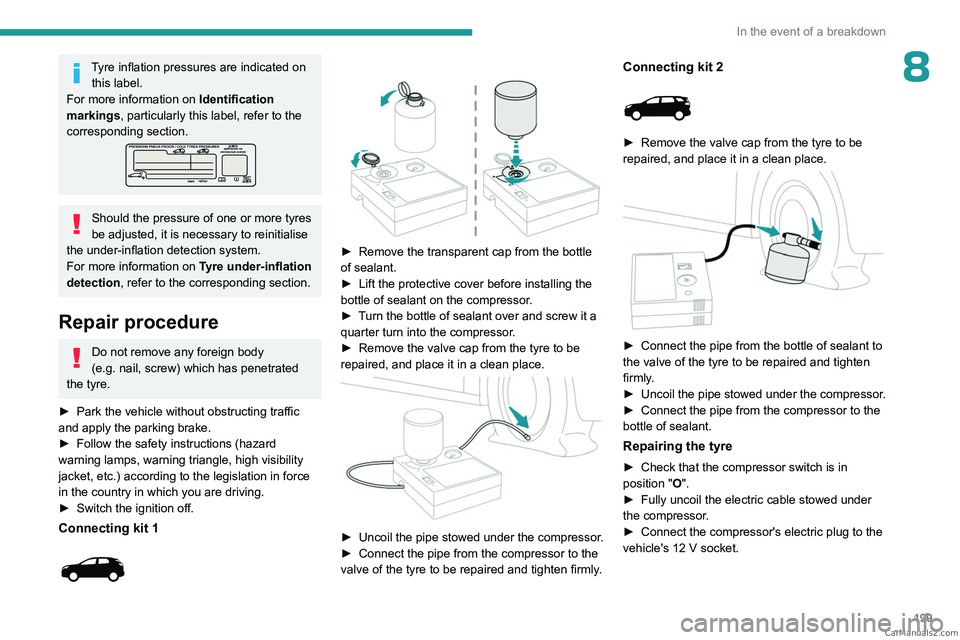
Connecting kit 1
► Remove the transparent cap from the bottle
of sealant.
►
Lift the protective cover before installing the
bottle of sealant on the compressor
.
►
T
urn the bottle of sealant over and screw it a
quarter turn into the compressor.
►
Remove the valve cap from the tyre to be
repaired, and place it in a clean place.
► Uncoil the pipe stowed under the compressor.
► Connect the pipe from the compressor to the
valve of the tyre to be repaired and tighten firmly
.
Connecting kit 2
► Remove the valve cap from the tyre to be
repaired, and place it in a clean place.
► Connect the pipe from the bottle of sealant to
the valve of the tyre to be repaired and tighten
firmly
.
►
Uncoil
the pipe stowed under the compressor.
►
Connect the pipe from the compressor to the
bottle of sealant.
Repairing the tyre
► Check that the compressor switch is in
position "O".
►
Fully uncoil the electric cable stowed under
the compressor
.
►
Connect the compressor's electric plug to the
vehicle's 12
V socket. CarM an uals 2 .c o m
Page 202 of 292
200
In the event of a breakdown
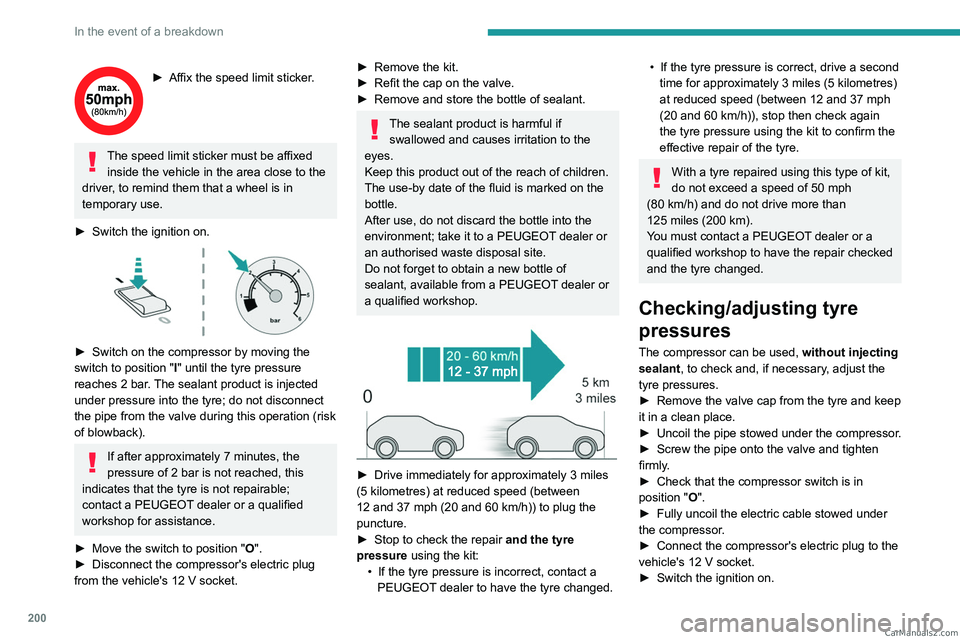
► Affix the speed limit sticker.
The speed limit sticker must be affixed
inside the vehicle in the area close to the
driver, to remind them that a wheel is in
temporary use.
►
Switch the ignition on.
► Switch on the compressor by moving the
switch to position "I" until the tyre pressure
reaches 2
bar. The sealant product is injected
under pressure into the tyre; do not disconnect
the pipe from the valve during this operation (risk
of blowback).
If after approximately 7 minutes, the
pressure of 2 bar is not reached, this
indicates that the tyre is not repairable;
contact a PEUGEOT dealer or a qualified
workshop for assistance.
►
Move the switch to position
"O".
►
Disconnect the compressor's electric plug
from the vehicle's 12
V socket.
► Remove the kit.
► Refit the cap on the valve.
►
Remove and store the bottle of sealant.
The sealant product is harmful if swallowed and causes irritation to the
eyes.
Keep this product out of the reach of children.
The use-by date of the fluid is marked on the
bottle.
After use, do not discard the bottle into the
environment; take it to a PEUGEOT dealer or
an authorised waste disposal site.
Do not forget to obtain a new bottle of
sealant, available from a PEUGEOT dealer or
a qualified workshop.
► Drive immediately for approximately 3 miles
(5 kilometres) at reduced speed (between
12 and 37
mph (20 and 60 km/h)) to plug the
puncture.
►
Stop to check the repair
and the tyre
pressure using the kit:
•
If the tyre pressure is incorrect, contact a
PEUGEOT
dealer to have the tyre changed.
• If the tyre pressure is correct, drive a second
time for approximately 3 miles (5 kilometres)
at reduced speed (between 12 and 37
mph
(20 and 60
km/h)), stop then check again
the tyre pressure using the kit to confirm the
effective repair of the tyre.
With a tyre repaired using this type of kit,
do not exceed a speed of 50 mph
(80
km/h) and do not drive more than
125
miles (200 km).
You must contact a PEUGEOT dealer or a
qualified workshop to have the repair checked
and the tyre changed.
Checking/adjusting tyre
pressures
The compressor can be used, without injecting
sealant, to check and, if necessary, adjust the
tyre pressures.
►
Remove the valve cap from the tyre and keep
it in a clean place.
►
Uncoil
the pipe stowed under the compressor.
►
Screw the pipe onto the valve and tighten
firmly
.
►
Check that the compressor switch is in
position
"O".
►
Fully uncoil the electric cable stowed under
the compressor
.
►
Connect the compressor's electric plug to the
vehicle's 12
V socket.
►
Switch the ignition on. CarM an uals 2 .c o m
Page 203 of 292
201
In the event of a breakdown
8► Start the compressor by placing the switch at
position "I" and adjust the pressure to the value
shown on the vehicle's tyre pressure label. To
deflate: press the black button located on the
compressor pipe, near the valve connection.
If after 7 minutes the pressure of 2 bar is
not reached, the tyre is damaged;
contact a PEUGEOT
dealer or a qualified
workshop for assistance.
►
Once the correct pressure is reached, put the
switch in position
"O".
►
Remove the kit and stow it.
►
Refit the cap on the valve.
Spare wheel
Visit this link to view explanatory videos:
http://q-r.to/bagGl9
Accessing the spare wheel
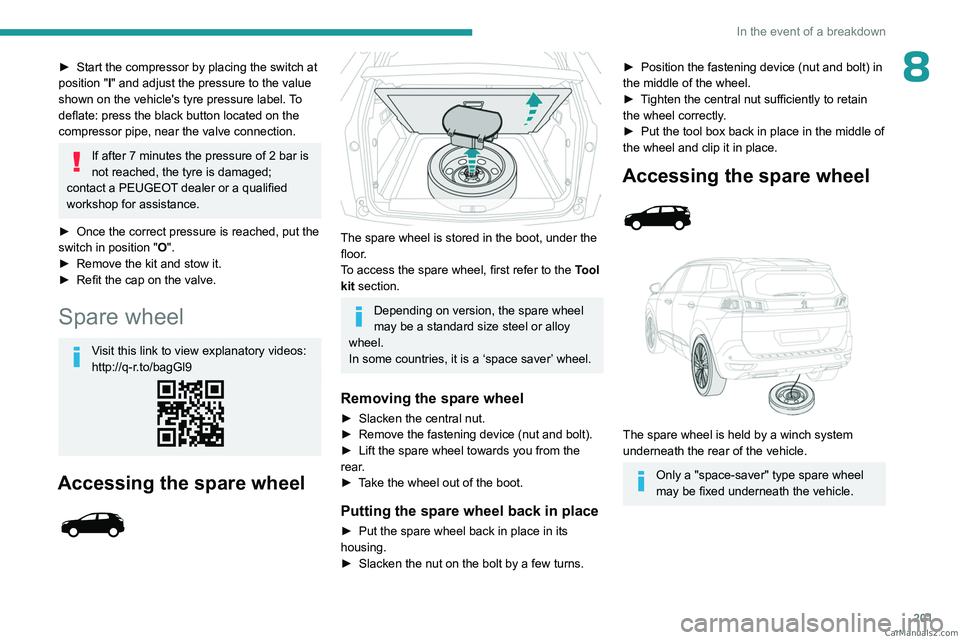
The spare wheel is stored in the boot, under the
floor.
To access the spare wheel, first refer to the Tool
kit
section.
Depending on version, the spare wheel
may be a standard size steel or alloy
wheel.
In some countries, it is a ‘space saver’ wheel.
Removing the spare wheel
► Slacken the central nut.
► Remove the fastening device (nut and bolt).
►
Lift the spare wheel towards you from the
rear
.
►
T
ake the wheel out of the boot.
Putting the spare wheel back in place
► Put the spare wheel back in place in its
housing.
►
Slacken the nut on the bolt by a few turns.
► Position the fastening device (nut and bolt) in
the middle of the wheel.
►
T
ighten the central nut sufficiently to retain
the wheel correctly.
►
Put the tool box back in place in the middle of
the wheel and clip it in place.
Accessing the spare wheel
The spare wheel is held by a winch system
underneath the rear of the vehicle.
Only a "space-saver" type spare wheel
may be fixed underneath the vehicle. CarM an uals 2 .c o m
Page 208 of 292
206
In the event of a breakdown
Deactivate certain driving aid functions
(Active Safety Brake, Adaptive cruise control,
etc.).
Do not exceed the maximum authorised
speed of 50 mph (80 km/h) or the maximum
distance of 50 miles (80 km).
Driving with more than one spare wheel of
this type is prohibited.
The wheel trim from the replaced wheel must
not be refitted.
Go to a PEUGEOT dealer or a qualified
workshop.
Have the tightening of the spare wheel's bolts
and its tyre pressure checked.
Have the punctured tyre examined. After
inspection, the technician will advise you on
whether the tyre can be repaired or if it must
be replaced.
Changing a bulb
In some weather conditions (e.g. low
temperature or humidity), misting on the
internal surface of the glass of the headlamps
and rear lamps is normal, and will disappear
after the lamps have been on for a few
minutes.
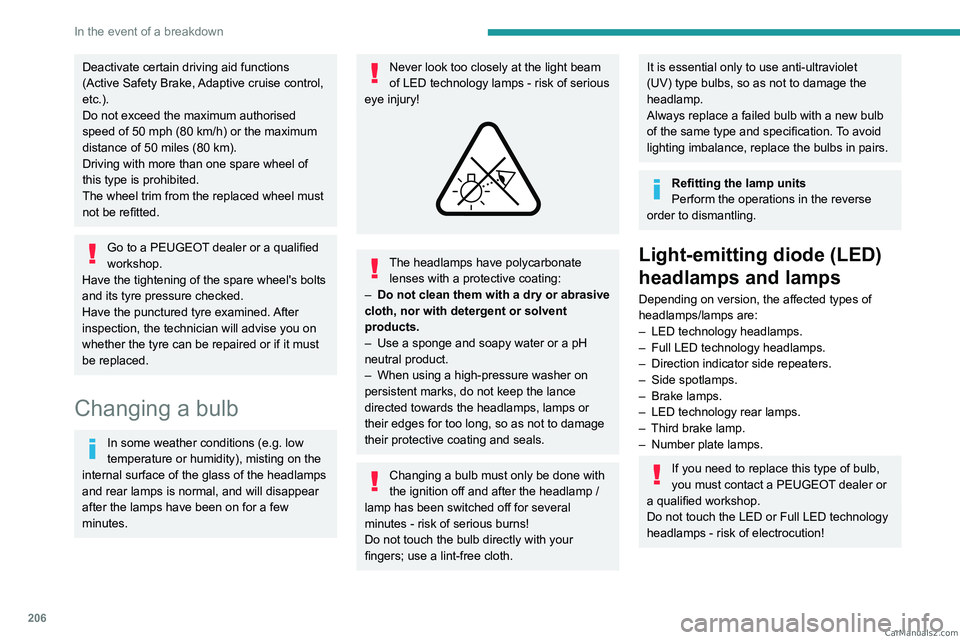
Never look too closely at the light beam
of LED technology lamps - risk of serious
eye injury!
The headlamps have polycarbonate lenses with a protective coating:
–
Do not clean them with a dry or abrasive
cloth, nor with detergent or solvent
products.
–
Use a sponge and soapy water or a pH
neutral product.
–
When using a high-pressure washer on
persistent marks, do not keep the lance
directed towards the headlamps, lamps or
their edges for too long, so as not to damage
their protective coating and seals.
Changing a bulb must only be done with
the ignition off and after the headlamp /
lamp has been switched off for several
minutes - risk of serious burns!
Do not touch the bulb directly with your
fingers; use a lint-free cloth.
It is essential only to use anti-ultraviolet
(UV) type bulbs, so as not to damage the
headlamp.
Always replace a failed bulb with a new bulb
of the same type and specification. To avoid
lighting imbalance, replace the bulbs in pairs.
Refitting the lamp units
Perform the operations in the reverse
order to dismantling.
Light-emitting diode (LED)
headlamps and lamps
Depending on version, the affected types of
headlamps/lamps are:
–
LED technology headlamps.
–
Full LED technology headlamps.
–
Direction indicator side repeaters.
–
Side spotlamps.
–
Brake lamps.
–
LED technology rear lamps.
–
Third brake lamp.
–
Number plate lamps.
If you need to replace this type of bulb,
you must contact a PEUGEOT dealer or
a qualified workshop.
Do not touch the LED or Full LED technology
headlamps - risk of electrocution! CarM an uals 2 .c o m
Page 225 of 292

223
Technical data
9
Identification markings
Various visible markings for vehicle identification
and vehicle search.
A. Vehicle Identification Number (VIN), under
the bonnet.
Stamped on the chassis.
B. Vehicle Identification Number (VIN), on the
dashboard.
Printed on an adhesive label visible through the
windscreen.
C. Manufacturer's label.
Affixed to the right-hand door.
Bears the following information:
–
Manufacturer
’s name.
– European whole vehicle type approval
number .
–
V
ehicle Identification number (VIN).
–
Gross vehicle weight (GVW).
–
Gross train weight (GTW).
–
Maximum weight on the front axle.
–
Maximum weight on the rear axle.
D. T
yres/paint code label.
Affixed to the driver's door.
Bears the following information about the tyres:
–
T
yre pressures, unladen and laden.
–
T
yre specification, made up of the dimensions
and type as well as the load and speed indices.
–
Spare tyre inflation pressure.
Also indicates the paint colour code.
The vehicle may be originally equipped with tyres with higher load and speed
indices than those indicated on the label,
without affecting tyre pressure (on cold tyres).
In the event of a change in the type of tyres,
contact a PEUGEOT dealer for the tyre fits
approved for the vehicle. CarM an uals 2 .c o m
Page 264 of 292

262
Vehicle data recording and privacy
Vehicle data recording
and privacy
Electronic control units are installed in your
vehicle. These control units process data
received from the vehicle's sensors, for example,
or data they generate themselves or exchange
with each other. Some of these control units are
required for the correct operation of your vehicle,
some others assist you while driving (driving or
manoeuvring aids), while others provide comfort
or infotainment functions.
The following contains general information about
how data is processed within the vehicle.
You will find additional information about the
specific data which is downloaded, stored
and transmitted to third parties and what it is
used for in your vehicle under the keyword
"Data protection". This information is directly
associated with the references for the functions
in question contained in the corresponding
vehicle handbook, or in the general terms and
conditions of sale.
This information is also available online.
Vehicle operating data
The control units process the data used for the
operation of the vehicle.
This data includes, for example:
–
Information about the state of the vehicle
(e.g.
speed, travel time, lateral acceleration,
wheel rotation rate, fastened seat belts display). –
Environmental conditions (e.g.
temperature,
rain sensor, distance sensor).
As a general rule, this data is temporary, is
not stored for longer than one operating cycle
and is only used within the vehicle itself. The
control units often record this data (including the
vehicle's key). This function allows either the
temporary or permanent storage of information
about the state of the vehicle, stresses on
components, servicing requirements, as well as
events and technical errors.
Depending on the vehicle's equipment level, the
data stored is as follows:
–
Operating state of system components
(e.g.
filling level, tyre pressures, battery charge
status).
–
Faults and malfunctions in important system
components (e.g.
lamps, brakes).
–
System reactions in specific driving situations
(e.g.
deployment of an airbag, triggering of
stability control and braking systems).
–
Information about events which have
damaged the vehicle.
–
For electric and rechargeable hybrid vehicles,
the traction battery charge level and the
estimated driving range.
In particular circumstances (e.g.
if the vehicle
has detected a malfunction), it may be necessary
to record data which would otherwise simply not
be stored.
When taking your vehicle in for servicing
(e.g.
repairs, maintenance), the stored operating
data may be read along with the vehicle's identification number and used if necessary.
The personnel working for the servicing network
(e.g.
garages, manufacturers) or third parties
(e.g. roadside assistance agents) may read
the vehicle's data. This also applies to work
carried out under warranty and quality assurance
measures.
This data is generally read via the OBD
(On-Board Diagnostics) port fitted by law to
the vehicle. It is used to report on the technical
state of the vehicle or its components and
facilitates the diagnosis of malfunctions, in
compliance with warranty obligations and for
quality improvement. This data, in particular the
information relating to stress on components,
technical events, operator errors and other
malfunctions, is sent to the Manufacturer, if
necessary, along with the vehicle's identification
number. The Manufacturer's liability may also be
engaged. The Manufacturer may also use the
operating data taken from the vehicle for product
recalls. This data may also be used to check the
customer's warranty and any claims made under
warranty.
Any malfunctions stored in the vehicle may be
reset by an after-sales service company during
servicing or repair work, or at your request. CarM an uals 2 .c o m
Page 268 of 292

266
Alphabetical index
Charging flap (Rechargeable
hybrid)
168, 175–177
Charging the traction battery
(Rechargeable hybrid)
19, 167, 175–177
CHECK
20
Checking the engine oil level
17
Checking the levels
185–186
Checking tyre pressures
(using the kit)
198, 200
Checks
185–186, 187–189
Checks, routine
187–188
Child lock
109
Children
94, 101–102, 105–106, 108
Children (safety)
109
Child seats
94, 97–101, 107, 108
Child seats, conventional
100–101
Child seats, i-Size
108
Child seats, ISOFIX
102, 104–105
Cleaning (advice)
168, 192–194
Closing the boot
29, 33
Closing the doors
29, 32
Collision Risk Alert
150–151
Configurations, seats
55
Configuration, vehicle
23–24
Connected applications
249
Connection, Android Auto
249
Connection, Apple CarPlay
231, 248
Connection, Bluetooth
232–233,
249–250, 254–255
Connection, MirrorLink
231
Connection, Wi-Fi network
250
Connectivity
248
Consumptions
24Container, AdBlue® 190
Control, emergency boot release
33
Control, emergency door
30–31
Control, heated seats
46
Controls, steering mounted
118, 121–123
Control stalk, lighting
74–75
Control stalk, wipers
80–82
Control unit
169–171, 176
Courtesy lamps
66
Cruise control
131, 134, 137–139
Cruise control, adaptive
139
Cruise control, adaptive with Stop function
134
Cruise control by speed limit recognition
134
Cup holder
62
D
DAB (Digital Audio Broadcasting) -
Digital radio
229, 252
Date (setting)
235, 257
Daytime running lamps
75, 207
Deactivating the passenger airbag
96, 99–100
Deadlocking
27, 29
Deferred charging
24, 176
Deferred charging (Rechargeable
hybrid)
23–24, 168, 175
Defrosting
48, 60
Defrosting, front
60
Defrosting, rear screen
61
Demisting
48, 60
Demisting, front
60
Demisting, rear
61
Dials and gauges 9
Digital instrument panel
9–10
Dimensions
222
Dipstick
17, 185
Direction indicators (turn signals)
75, 207
Domestic charging
171
Domestic charging (Rechargeable
hybrid)
176–177
Door pockets
62
Doors
32
Drive Assist Plus
139
Driver’s attention warning
153
Driving
42–43, 111–112
Driving aids camera (warnings)
130
Driving aids (recommendations)
130
Driving economically
7
Driving modes
89–90, 125
Driving positions (storing)
45–46
Dynamic stability control (DSC)
88, 90
E
EBFD 87
Eco-driving (advice)
7
ECO mode
125
Electric windows
38
Electronic brake force distribution (EBFD)
87
Emergency braking assistance (EBA)
87
Emergency call
85–86
Emergency switching off
11 4
Emergency warning lamps
84, 195
Emissions control system, SCR
19, 189 CarM an uals 2 .c o m
Page 271 of 292
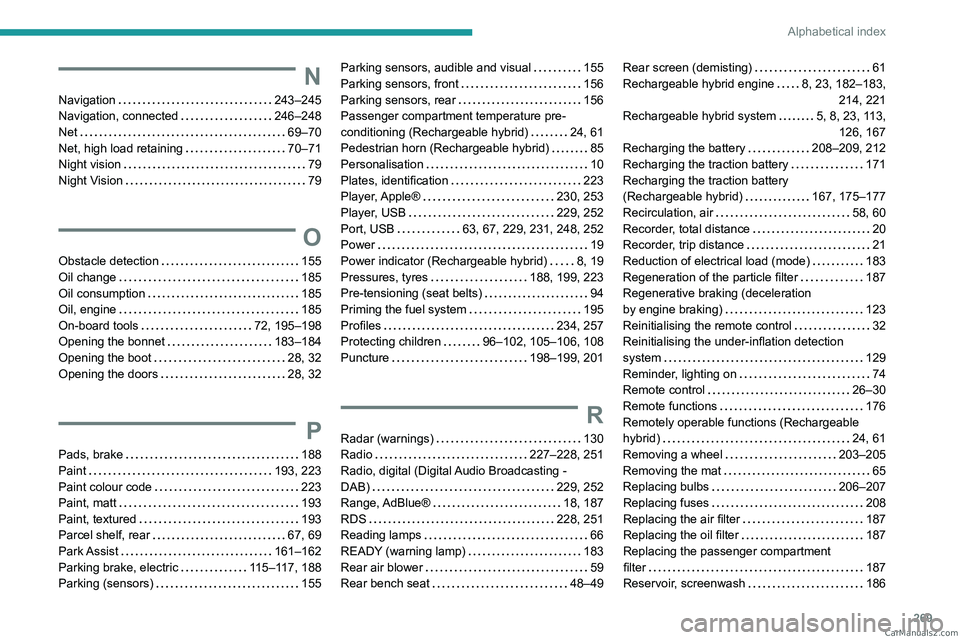
269
Alphabetical index
N
Navigation 243–245
Navigation, connected
246–248
Net
69–70
Net, high load retaining
70–71
Night vision
79
Night Vision
79
O
Obstacle detection 155
Oil change
185
Oil consumption
185
Oil, engine
185
On-board tools
72, 195–198
Opening the bonnet
183–184
Opening the boot
28, 32
Opening the doors
28, 32
P
Pads, brake 188
Paint
193, 223
Paint colour code
223
Paint, matt
193
Paint, textured
193
Parcel shelf, rear
67, 69
Park Assist
161–162
Parking brake, electric
115–117, 188
Parking (sensors)
155
Parking sensors, audible and visual 155
Parking sensors, front
156
Parking sensors, rear
156
Passenger compartment temperature pre-
conditioning (Rechargeable hybrid)
24, 61
Pedestrian horn (Rechargeable hybrid)
85
Personalisation
10
Plates, identification
223
Player, Apple®
230, 253
Player, USB
229, 252
Port, USB
63, 67, 229, 231, 248, 252
Power
19
Power indicator (Rechargeable hybrid)
8, 19
Pressures, tyres
188, 199, 223
Pre-tensioning (seat belts)
94
Priming the fuel system
195
Profiles
234, 257
Protecting children
96–102, 105–106, 108
Puncture
198–199, 201
R
Radar (warnings) 130
Radio
227–228, 251
Radio, digital (Digital Audio Broadcasting -
DAB)
229, 252
Range, AdBlue®
18, 187
RDS
228, 251
Reading lamps
66
READY (warning lamp)
183
Rear air blower
59
Rear bench seat
48–49
Rear screen (demisting) 61
Rechargeable hybrid engine
8, 23, 182–183, 214, 221
Rechargeable hybrid system
5, 8, 23, 113, 126, 167
Recharging the battery
208–209, 212
Recharging the traction battery
171
Recharging the traction battery
(Rechargeable hybrid)
167, 175–177
Recirculation, air
58, 60
Recorder, total distance
20
Recorder, trip distance
21
Reduction of electrical load (mode)
183
Regeneration of the particle filter
187
Regenerative braking (deceleration
by engine braking)
123
Reinitialising the remote control
32
Reinitialising the under-inflation detection
system
129
Reminder, lighting on
74
Remote control
26–30
Remote functions
176
Remotely operable functions (Rechargeable
hybrid)
24, 61
Removing a wheel
203–205
Removing the mat
65
Replacing bulbs
206–207
Replacing fuses
208
Replacing the air filter
187
Replacing the oil filter
187
Replacing the passenger compartment
filter
187
Reservoir, screenwash
186 CarM an uals 2 .c o m