2023 PEUGEOT 308 lane assist
[x] Cancel search: lane assistPage 5 of 260

3
Contents
Cruise control 11 6
Drive Assist Plus 11 8
Drive Assist 2.0 11 8
Adaptive cruise control 11 9
Lane positioning assist 123
Semi-automatic lane changing 126
Active Safety Brake with Collision Risk Alert
and Intelligent emergency braking assistance
130
Distraction detection 134
Lane keeping assist 135
Long-distance blind spot monitoring 138
Parking sensors 139
Visiopark 1 140
Visiopark 3 142
Rear cross traffic alert 144
7Practical informationCompatibility of fuels 147
Refuelling 147
Misfuel prevention (Diesel) 148
Rechargeable hybrid system 149
Charging the traction battery
(Rechargeable hybrid)
155
Towing device 158
Towing device with quickly detachable towball 159
Roof bars 162
Very cold climate screens 163
Snow chains 164
Energy economy mode 165
Bonnet 165
Engine compartment 166
Checking levels 167
Checks 168
AdBlue® (BlueHDi) 170
Free-wheeling 172
Advice on care and maintenance 173
8In the event of a breakdownWarning triangle 176
Running out of fuel (Diesel) 176
Tool kit 176
Temporary puncture repair kit 178
Spare wheel 181
Changing a bulb 184
Fuses 186
12
V battery/Accessory batteries 186
Towing the vehicle 192
9Technical dataEngine technical data and towed loads 194
Petrol engines 195
Diesel engines 197
Rechargeable hybrid engines 198
Dimensions 199
Identification markings 200
10 PEUGEOT i-Connect Advanced -PEUGEOT i-Connect
First steps 201
Customisation 204
Steering mounted controls 205
Applications 206
Voice commands 206
Navigation 207
Connectivity 208
Mirror Screen 210
Media 2 11
Phone 213
Settings 214
Help 215
11Vehicle data recording and privacy
■
Alphabetical index
■
Appendix CarM an uals 2 .c o m
Page 17 of 260
15
Dashboard instruments
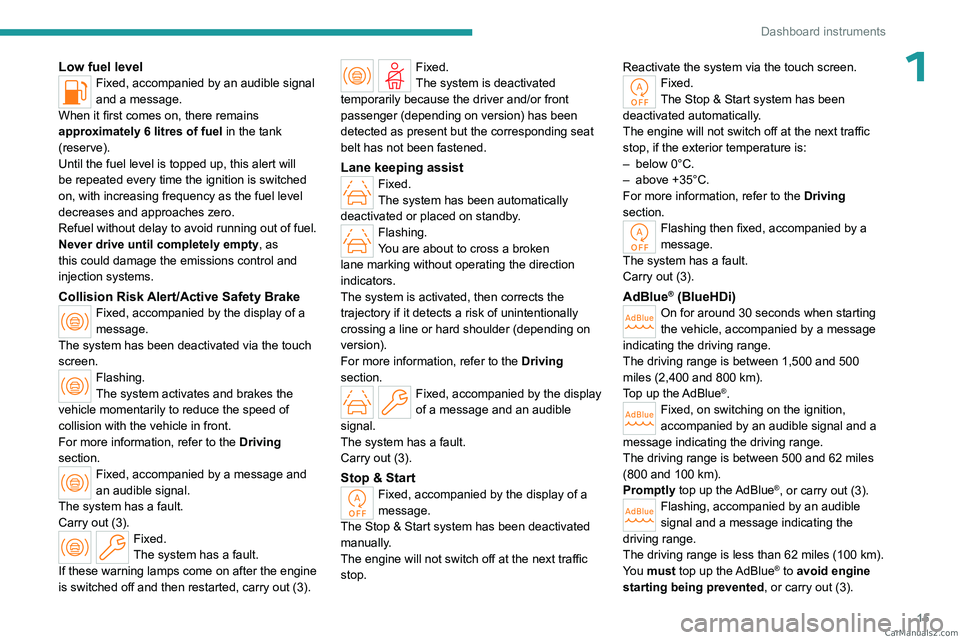
1Low fuel levelFixed, accompanied by an audible signal
and a message.
When it first comes on, there remains
approximately 6 litres of fuel in the tank
(reserve).
Until the fuel level is topped up, this alert will
be repeated every time the ignition is switched
on, with increasing frequency as the fuel level
decreases and approaches zero.
Refuel without delay to avoid running out of fuel.
Never drive until completely empty, as
this could damage the emissions control and
injection systems.
Collision Risk Alert/Active Safety BrakeFixed, accompanied by the display of a
message.
The system has been deactivated via the touch
screen.
Flashing.
The system activates and brakes the
vehicle momentarily to reduce the speed of
collision with the vehicle in front.
For more information, refer to the Driving
section.
Fixed, accompanied by a message and
an audible signal.
The system has a fault.
Carry out (3).
Fixed.
The system has a fault.
If these warning lamps come on after the engine
is switched off and then restarted, carry out (3).
Fixed.
The system is deactivated
temporarily because the driver and/or front
passenger (depending on version) has been
detected as present but the corresponding seat
belt has not been fastened.
Lane keeping assistFixed.
The system has been automatically
deactivated or placed on standby.
Flashing.
You are about to cross a broken
lane marking without operating the direction
indicators.
The system is activated, then corrects the
trajectory if it detects a risk of unintentionally
crossing a line or hard shoulder (depending on
version).
For more information, refer to the Driving
section.
Fixed, accompanied by the display
of a message and an audible
signal.
The system has a fault.
Carry out (3).
Stop & StartFixed, accompanied by the display of a
message.
The Stop & Start system has been deactivated
manually.
The engine will not switch off at the next traffic
stop. Reactivate the system via the touch screen.
Fixed.
The Stop & Start system has been
deactivated automatically.
The engine will not switch off at the next traffic
stop, if the exterior temperature is:
–
below 0°C.
–
above +35°C.
For more information, refer to the
Driving
section.
Flashing then fixed, accompanied by a
message.
The system has a fault.
Carry out (3).
AdBlue® (BlueHDi)On for around 30 seconds when starting
the vehicle, accompanied by a message
indicating the driving range.
The driving range is between 1,500 and 500
miles (2,400 and 800
km).
Top up the AdBlue
®.Fixed, on switching on the ignition,
accompanied by an audible signal and a
message indicating the driving range.
The driving range is between 500 and 62 miles
(800 and 100
km).
Promptly top up the AdBlue
®, or carry out (3).Flashing, accompanied by an audible
signal and a message indicating the
driving range.
The driving range is less than 62 miles (100
km).
You must top up the AdBlue
® to avoid engine
starting being prevented , or carry out
(3). CarM an uals 2 .c o m
Page 112 of 260
11 0
Driving
Mats/Pedal trims
The use of mats or pedal trims not
approved by PEUGEOT may interfere with
the operation of the speed limiter or cruise
control.
To avoid any risk of jamming the pedals:
–
Ensure that the mat is secured correctly
.
–
Never fit one mat on top of another
.
Units of speed
Ensure that the units of speed displayed
on the instrument panel (mph or km/h) are
those for the country you are driving in.
If this is not the case, when the vehicle is
stationary, set the display to the required
units of speed so that it complies with what is
authorised locally.
In case of doubt, contact a PEUGEOT dealer
or a qualified workshop.
Steering wheel with
hands-on detection
(with Drive Assist 2.0)
For more information, refer to the
General recommendations on the use
of driving and manoeuvring aids .
The steering wheel is equipped with a hands-on
detection system to avoid distraction on the part
of the driver.
It is prohibited to cover or attach anything to the
steering wheel.
The driver must always check the surroundings of the vehicle and
supervise the whole manoeuvre.
Any use of a system built into
Drive Assist
2.0
must remain under the driver’s vigilance.
The system also detects the presence of
hands when using the Lane Positioning assist
system with Drive Assist Plus.
The system may suffer interference or not work correctly if:
–
the steering wheel is covered by some
protection.
–
the driver wears thick gloves (e.g.
ski
gloves).
In the event of improper detection of hands
on the steering wheel, Drive Assist 2.0 is
not activated or is deactivated after a few
seconds.
Installation of mechanical anti-theft
devices on the steering wheel is
prohibited - risk of damage!
Shortcuts for driving aids
The full list of available driving aids can be found
in the Functions tab. Driving aids can be accessed directly to quickly
activate/deactivate them.
By default, driving aids are already stored in the
Shortcuts tab (e.g.
Stop & Start, Lane keeping
assist).
Other driving aids can be added or deleted from
this tab.
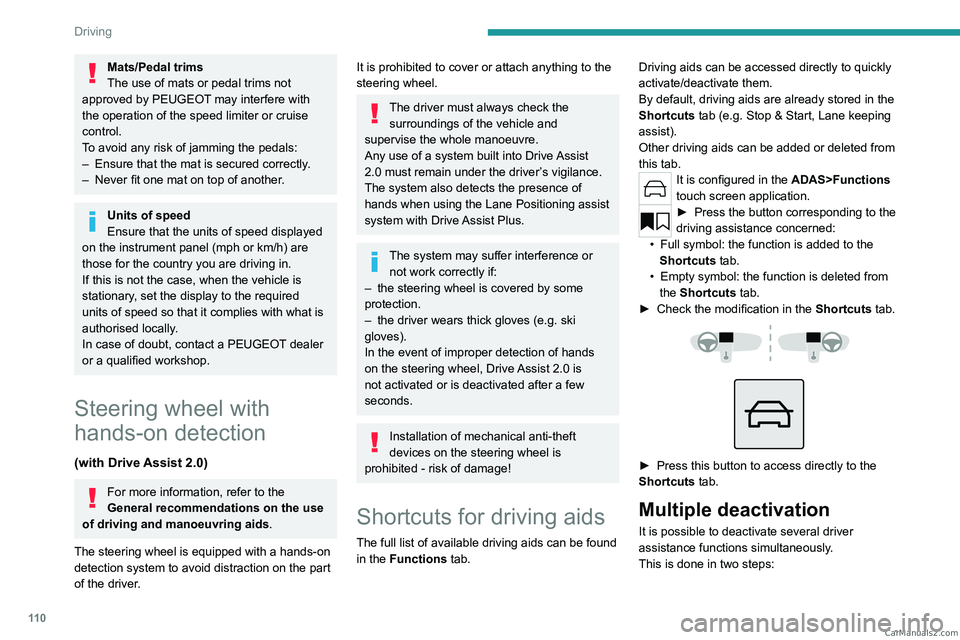
It is configured in the ADAS>Functions
touch screen application.
► Press the button corresponding to the
driving assistance concerned:
•
Full symbol: the function is added to the
Shortcuts
tab.
•
Empty symbol: the function is deleted from
the
Shortcuts tab.
►
Check the modification in the Shortcuts
tab.
► Press this button to access directly to the
Shortcuts tab.
Multiple deactivation
It is possible to deactivate several driver
assistance functions simultaneously.
This is done in two steps: CarM an uals 2 .c o m
Page 113 of 260

111
Driving
6– First of all, the selection of all the functions
that you want to deactivate.
–
Secondly
, the simultaneous deactivation of all
these functions.
Selection of functions
► Press this button on the dashboard to
display the ADAS
tabs.
►
Select the
Functions tab.
► Press this button to display the list of
available functions.
►
Select the functions to deactivate
(e.g.
Stop - Start, Lane Keeping Assist, Automatic
Braking System (Active Safety Brake)).
► Press this button to return to the
previous page.
The functions to deactivate are saved in the
system.
Deactivation of these functions
► Press and hold this bu tton on
the dashboard.
All previously selected functions are deactivated
until the vehicle is next restarted (confirmed by
an audible signal).
Road signs recognition
For more information, refer to the
General recommendations on the use
of driving and manoeuvring aids .
This system displays the maximum speed
authorised locally on the instrument panel, using:
–
Speed limit signs detected by the camera.
–
Speed limit information from the navigation
system’
s mapping.
–
Signs indicating a shared traffic zone detected
by the camera.
Sign detected Suggested speed (calculated)
Entry into a shared traffic zoneExample:
Without PEUGEOT
i-Connect
Advanced
10 mph or 20
km/h
(depending on
the units on the
instrument panel) With PEUGEOT i-Connect
Advanced
Display of the speed
in force in the country you are driving in. –
Some supplementary traffic signs detected by
the camera.
Supplementary
traffic sign detected Display of
the speed
associated with
the supplementary traffic sign
Speed limit when raining
Examples:
If the wiper control stalk is in the
"intermittent wipe"
or "automatic wipe" position (in order
to activate the rain sensor):
68 mph (110
km/h)
(for example)
Speed limit when towing
If an approved towing device is fixed to the vehicle:
56 mph (90
km/h)
(for example)
Speed limit
applicable over a certain distance Example:
43 mph (70 km/h)
(for example) CarM an uals 2 .c o m
Page 120 of 260
11 8
Driving
Off
► Press 1: the cruise control information display
disappears.
Malfunction
In the event of a malfunction, dashes are
displayed flashing and then fixed (orange)
instead of the speed setting.
Have it checked by a PEUGEOT dealer or a
qualified workshop.
Drive Assist Plus
Only available on versions with automatic
gearbox.
This system automatically adjusts the speed
and corrects the trajectory of the vehicle, using
Adaptive cruise control with Stop&Go function in
conjunction with Lane positioning assist.
These two functions must be activated and in
operation.
For more information on Adaptive cruise
control and Lane positioning assist , refer to
the corresponding sections.
The system assists the driver by acting on the steering, acceleration and braking
within the physical limits and capacities of the
vehicle. Certain road infrastructure elements
or vehicles in the surroundings may not be
properly seen or may be poorly interpreted by
the camera and radar, resulting in an
unexpected change in direction, a lack of
steering correction and/or inappropriate
management of acceleration or braking.
Primarily designed for driving on main
roads and motorways, this system only
works with moving vehicles driving in the
same direction as your vehicle.
Selecting/Deselecting the
system
ASSIST
► Press this button successively until the Drive
Assist Plus mode is displayed on the instrument
panel.
►
After a few seconds, the Drive
Assist Plus
mode is selected. The Driving aids mini-view is
displayed on the instrument panel.
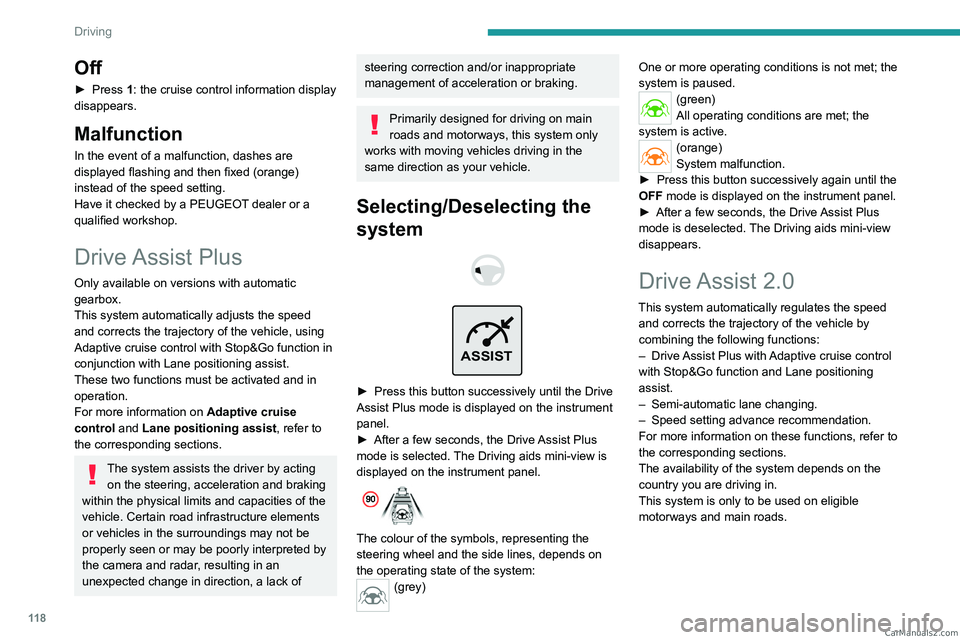
The colour of the symbols, representing the
steering wheel and the side lines, depends on
the operating state of the system:
(grey) One or more operating conditions is not met; the
system is paused.
(green)
All operating conditions are met; the
system is active.
(orange)
System malfunction.
►
Press this button successively again until the
OFF mode is displayed on the instrument panel.
►
After a few seconds, the Drive
Assist Plus
mode is deselected. The Driving aids mini-view
disappears.
Drive Assist 2.0
This system automatically regulates the speed and corrects the trajectory of the vehicle by
combining the following functions:
–
Drive
Assist Plus with Adaptive cruise control
with Stop&Go function and Lane positioning
assist.
–
Semi-automatic lane changing.
–
Speed setting advance recommendation.
For more information on these functions, refer to
the corresponding sections.
The availability of the system depends on the
country you are driving in.
This system is only to be used on eligible
motorways and main roads. CarM an uals 2 .c o m
Page 125 of 260
123
Driving
6can lead to an incorrect evaluation of
distances and result in inappropriate
acceleration or braking of the vehicle.
Pay particular attention:
– When motorcycles are present and
when there are vehicles staggered across the
traffic lane.
–
When entering a tunnel or crossing a
bridge.
If any of the following malfunctions
occurs, do not use the system:
–
Following an impact on the windscreen
close to the camera or on the front bumper
.
–
If a brake lamp is not working.
If the vehicle has undergone any of the
following modifications, do not use the
system:
–
Carrying long objects on roof bars.
–
Towing.
–
Front end of the vehicle modified (for
example by adding long-range headlamps or
painting the front bumper).
–
Obstructed radar
.
Malfunction
In the event of a malfunction, dashes are
displayed (orange) instead of the speed setting.
This warning lamp comes on, accompanied by a message and an
audible signal, to confirm the malfunction.
Have it checked by a PEUGEOT dealer or a
qualified workshop.
Lane positioning assist
For more information, refer to the
General recommendations on the use
of driving and manoeuvring aids .
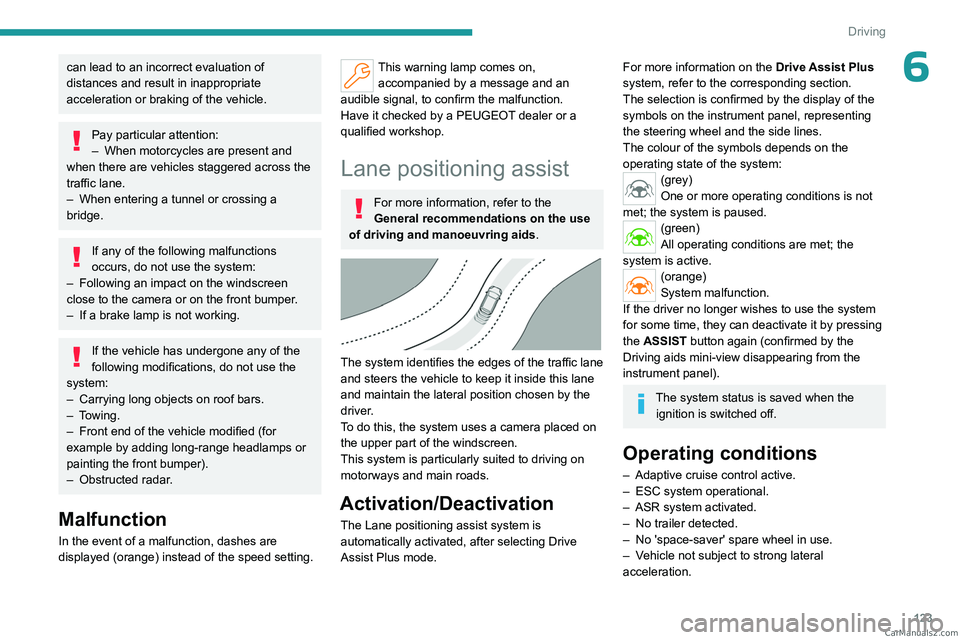
The system identifies the edges of the traffic lane
and steers the vehicle to keep it inside this lane
and maintain the lateral position chosen by the
driver.
To do this, the system uses a camera placed on
the upper part of the windscreen.
This system is particularly suited to driving on
motorways and main roads.
Activation/Deactivation
The Lane positioning assist system is
automatically activated, after selecting Drive
Assist Plus mode.
For more information on the Drive Assist Plus
system, refer to the corresponding section.
The selection is confirmed by the display of the
symbols on the instrument panel, representing
the steering wheel and the side lines.
The colour of the symbols depends on the
operating state of the system:
(grey)
One or more operating conditions is not
met; the system is paused.
(green)
All operating conditions are met; the
system is active.
(orange)
System malfunction.
If the driver no longer wishes to use the system
for some time, they can deactivate it by pressing
the ASSIST button again (confirmed by the
Driving aids mini-view disappearing from the
instrument panel).
The system status is saved when the ignition is switched off.
Operating conditions
– Adaptive cruise control active.
– ESC system operational.
–
ASR system activated.
–
No trailer detected.
–
No 'space-saver' spare wheel in use.
–
V
ehicle not subject to strong lateral
acceleration. CarM an uals 2 .c o m
Page 126 of 260
124
Driving
– Direction indicators off upon activation of the
system.
Cruise control
The driver must hold the steering wheel properly.
When cruise control is activated, the symbols are
displayed in green: with small steering inputs,
the system steers the vehicle and keeps it in the
position chosen by the driver in the traffic lane.
This position is not necessarily the centre of the
lane.
You can feel the steering wheel moving.
At any time, the driver can change the position of
the vehicle by intervening on the steering wheel
and maintaining the position until the system has
taken it into account. If the chosen position is too
off-centre, an automatic re-centering manoeuvre
can occur. The system adjusts to the newly
defined position.
Pausing/Suspending the
system
The driver must act promptly if they believe that the traffic conditions or the
state of the road surface require their
intervention, by moving the steering wheel to
temporarily suspend system operation. Any
action on the brake pedal that causes the
Adaptive cruise control
system to be paused
will also cause the system to be paused.
If the system detects that the driver is not
holding the wheel firmly enough, it
triggers a series of gradual alerts and then
deactivates itself if there is no response from
the driver.
If the function is suspended due to the
prolonged release of the force holding
the steering wheel, the system must be
reactivated by pressing the ASSIST button
again.
Automatic suspension
Suspension of the system is accompanied by a
specific audible signal.
–
T
riggering of the ESC system.
–
Insufficient lane detection. In this case, the
Lane keeping assist function can take over
,
and the system will reactivate itself once the
operating conditions are met again.
Paused by the driver
– Travelling outside the lane limits.
– T oo tight a grip on the steering wheel or
dynamic action on the steering wheel.
–
Action on the brake pedal (resulting in a pause
until cruise control is reactivated) or accelerator
pedal (suspension for as long as the pedal is
depressed).
–
Pausing of the
Adaptive cruise control system.
–
Deactivation of the
ASR system.
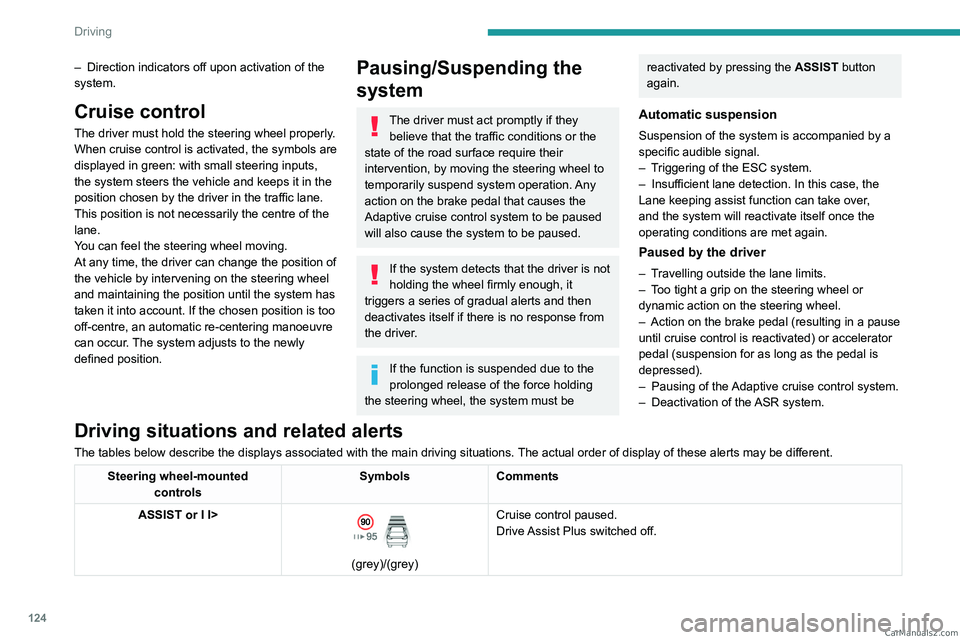
Driving situations and related alerts
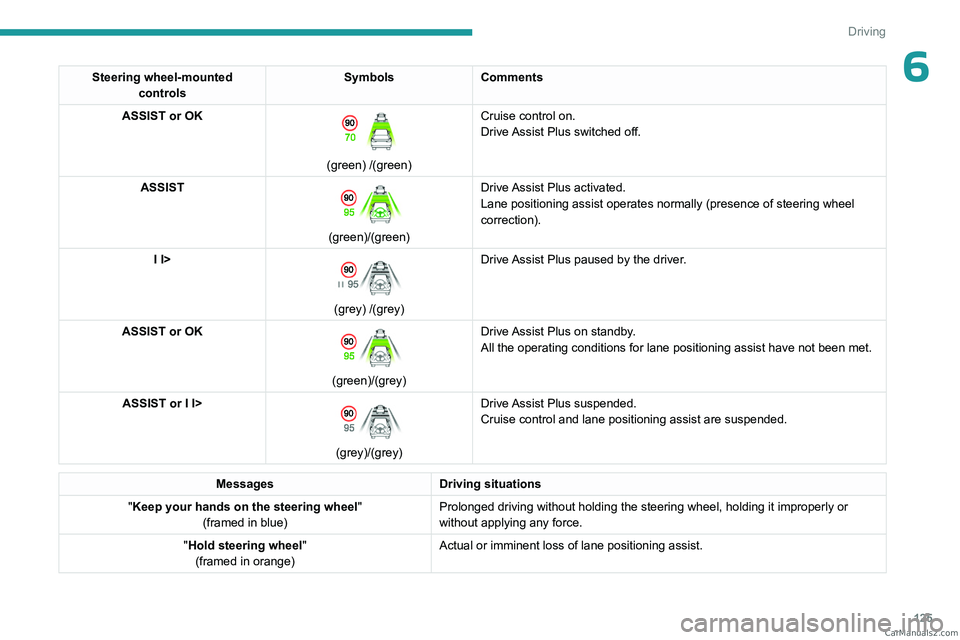
The tables below describe the displays associated with the main driving situations. The actual order of display of these alerts may be different.
Steering wheel-mounted
controls Symbols
Comments
ASSIST or I I>
(grey)/(grey) Cruise control paused.
Drive Assist Plus switched off. CarM an uals 2 .c o m
Page 127 of 260
125
Driving
6Steering wheel-mounted controls Symbols
Comments
ASSIST or OK
(green) /(green) Cruise control on.
Drive Assist Plus switched off.
ASSIST
(green)/(green) Drive Assist Plus activated.
Lane positioning assist operates normally (presence of steering wheel
correction).
I I>
(grey) /(grey) Drive Assist Plus paused by the driver.
ASSIST or OK
(green)/(grey) Drive Assist Plus on standby.
All the operating conditions for lane positioning assist have not been m\
et.
ASSIST or I I>
(grey)/(grey) Drive Assist Plus suspended.
Cruise control and lane positioning assist are suspended.
Messages
Driving situations
"Keep your hands on the steering wheel "
(framed in blue) Prolonged driving without holding the steering wheel, holding it imprope\
rly or
without applying any force.
"Hold steering wheel "
(framed in orange) Actual or imminent loss of lane positioning assist. CarM an uals 2 .c o m