2023 NISSAN TITAN tailgate
[x] Cancel search: tailgatePage 245 of 644
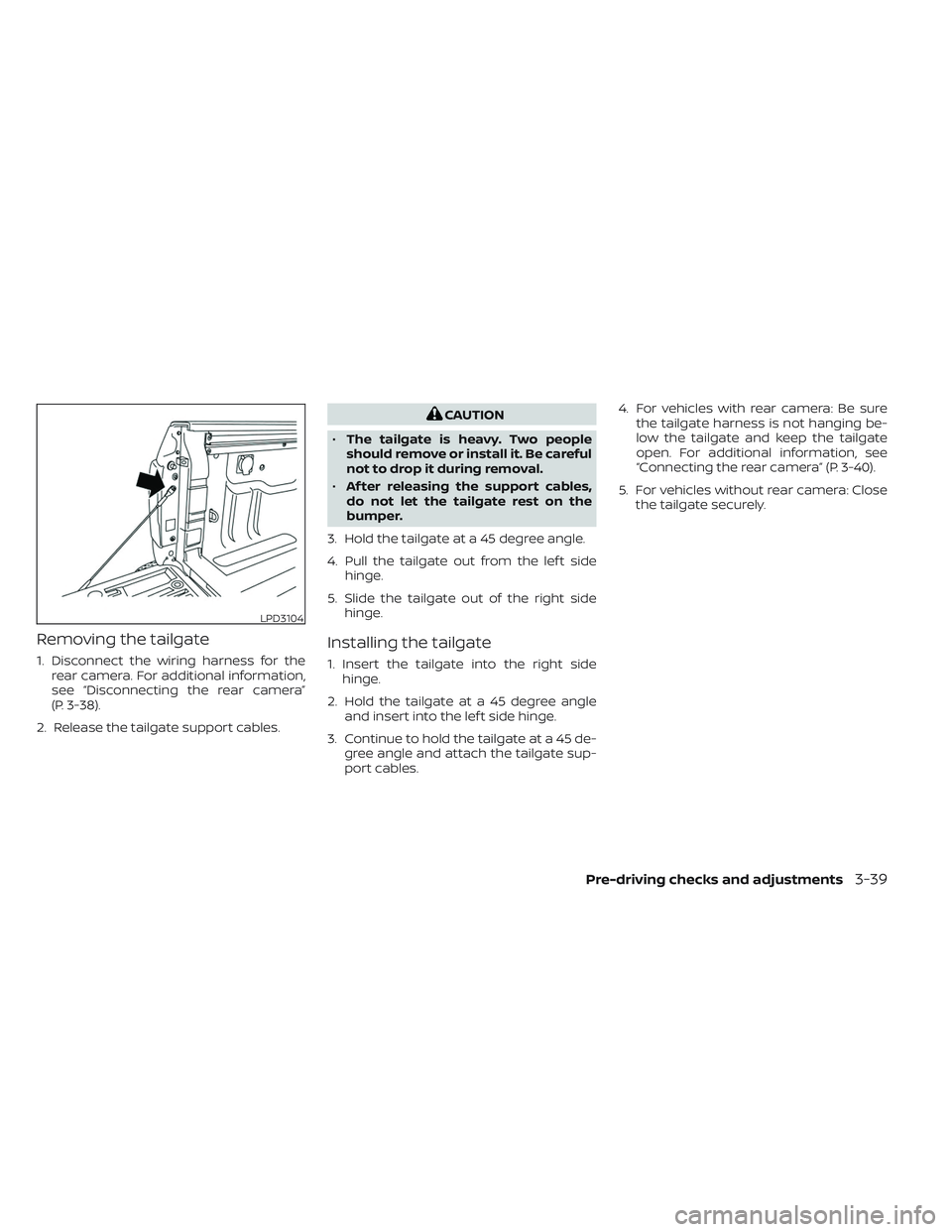
Removing the tailgate
1. Disconnect the wiring harness for therear camera. For additional information,
see “Disconnecting the rear camera”
(P. 3-38).
2. Release the tailgate support cables.
CAUTION
• The tailgate is heavy. Two people
should remove or install it. Be careful
not to drop it during removal.
• Af ter releasing the support cables,
do not let the tailgate rest on the
bumper.
3. Hold the tailgate at a 45 degree angle.
4. Pull the tailgate out from the lef t side hinge.
5. Slide the tailgate out of the right side hinge.
Installing the tailgate
1. Insert the tailgate into the right sidehinge.
2. Hold the tailgate at a 45 degree angle and insert into the lef t side hinge.
3. Continue to hold the tailgate at a 45 de- gree angle and attach the tailgate sup-
port cables. 4. For vehicles with rear camera: Be sure
the tailgate harness is not hanging be-
low the tailgate and keep the tailgate
open. For additional information, see
“Connecting the rear camera” (P. 3-40).
5. For vehicles without rear camera: Close the tailgate securely.
LPD3104
Pre-driving checks and adjustments3-39
Page 246 of 644
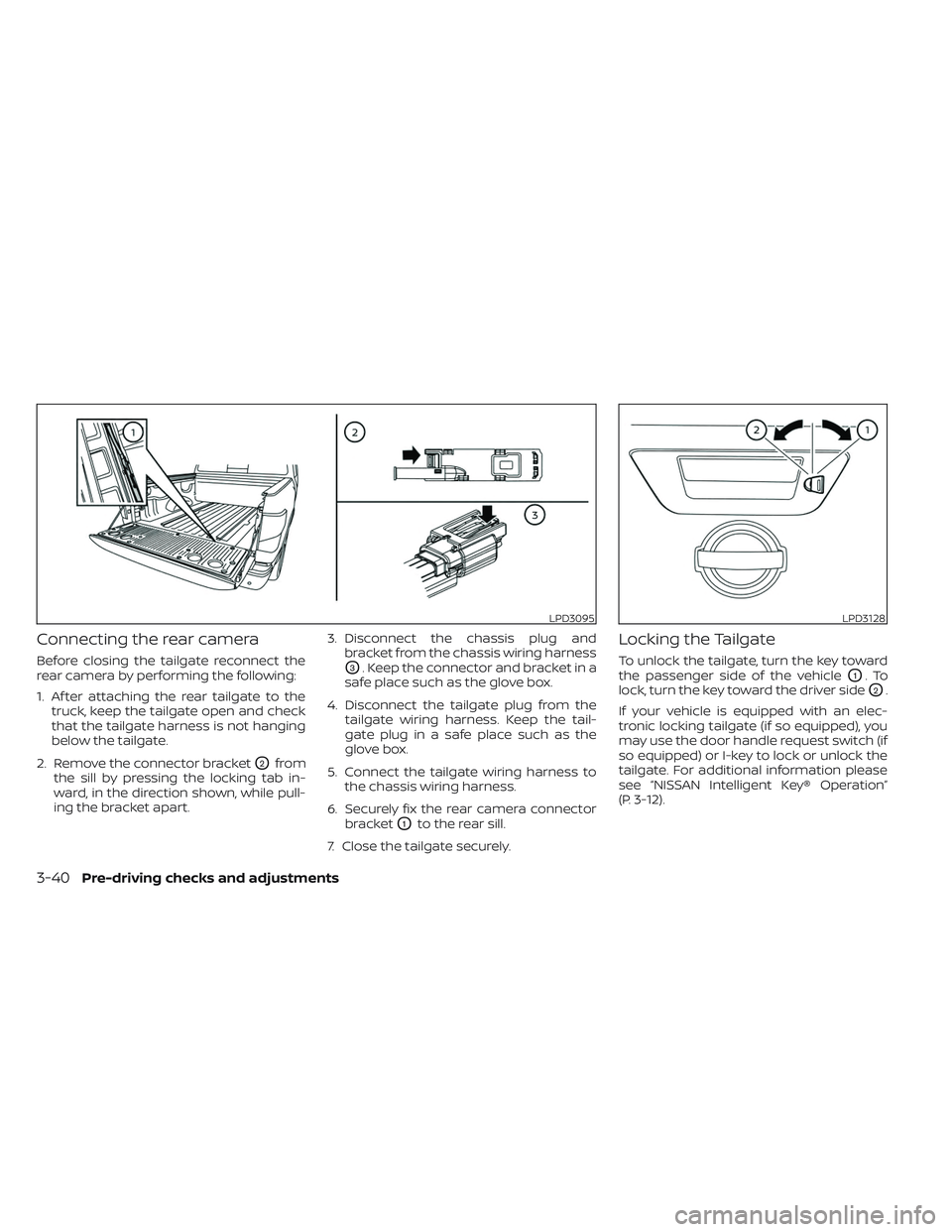
Connecting the rear camera
Before closing the tailgate reconnect the
rear camera by performing the following:
1. Af ter attaching the rear tailgate to thetruck, keep the tailgate open and check
that the tailgate harness is not hanging
below the tailgate.
2. Remove the connector bracket
O2from
the sill by pressing the locking tab in-
ward, in the direction shown, while pull-
ing the bracket apart. 3. Disconnect the chassis plug and
bracket from the chassis wiring harness
O3. Keep the connector and bracket in a
safe place such as the glove box.
4. Disconnect the tailgate plug from the tailgate wiring harness. Keep the tail-
gate plug in a safe place such as the
glove box.
5. Connect the tailgate wiring harness to the chassis wiring harness.
6. Securely fix the rear camera connector bracket
O1to the rear sill.
7. Close the tailgate securely.
Locking the Tailgate
To unlock the tailgate, turn the key toward
the passenger side of the vehicle
O1.To
lock, turn the key toward the driver side
O2.
If your vehicle is equipped with an elec-
tronic locking tailgate (if so equipped), you
may use the door handle request switch (if
so equipped) or I-key to lock or unlock the
tailgate. For additional information please
see “NISSAN Intelligent Key® Operation”
(P. 3-12).
LPD3095LPD3128
3-40Pre-driving checks and adjustments
Page 254 of 644
•The distance guide line and the ve-
hicle width line should be used as a
reference only when the vehicle is on
a level paved surface. The distance
viewed on the monitor is for refer-
ence only and may be different than
the actual distance between the ve-
hicle and displayed objects.
CAUTION
Do not scratch the camera lens when
cleaning dirt or snow from the front of
the camera.
The RearView Monitor system automati-
cally shows a rear view of the vehicle when
the shif t lever is shif ted into the R (Reverse)
position. While in R (Reverse), pressing the
CAMERA will cycle through guideline op-
tions. The radio can still be heard while the
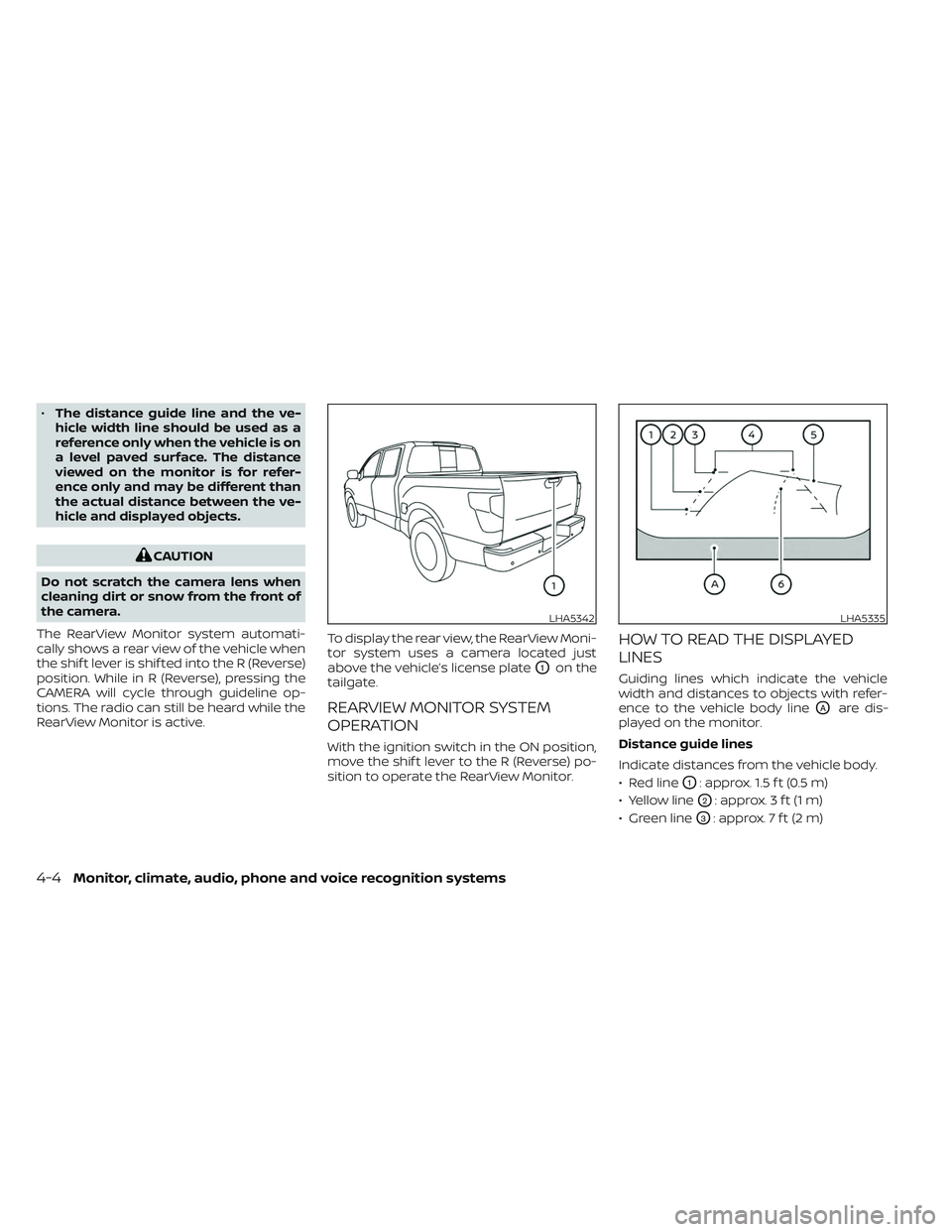
RearView Monitor is active. To display the rear view, the RearView Moni-
tor system uses a camera located just
above the vehicle’s license plate
O1on the
tailgate.
REARVIEW MONITOR SYSTEM
OPERATION
With the ignition switch in the ON position,
move the shif t lever to the R (Reverse) po-
sition to operate the RearView Monitor.
HOW TO READ THE DISPLAYED
LINES
Guiding lines which indicate the vehicle
width and distances to objects with refer-
ence to the vehicle body line
OAare dis-
played on the monitor.
Distance guide lines
Indicate distances from the vehicle body.
• Red line
O1: approx. 1.5 f t (0.5 m)
• Yellow line
O2: approx. 3 f t (1 m)
• Green line
O3: approx. 7 f t (2 m)
LHA5342LHA5335
4-4Monitor, climate, audio, phone and voice recognition systems
Page 259 of 644
•Underneath the bumper and the cor-
ner areas of the bumper cannot be
viewed on the RearView Monitor be-
cause of its monitoring range limita-
tion. The system will not show small
objects below the bumper, and may
not show objects close to the bum-
per or on the ground.
• Objects viewed in the RearView
Monitor differ from actual distance
because a wide-angle lens is used.
• Objects in the RearView Monitor will
appear visually opposite compared
to when viewed in the rearview and
outside mirrors.
• Use the displayed lines as a refer-
ence. The lines are highly affected by
the number of occupants, fuel level,
vehicle position, road conditions and
road grade.
• Make sure that the tailgate is se-
curely closed when backing up.
• Do not put anything on the rearview
camera. The rearview camera is in-
stalled on the tailgate. •
When washing the vehicle with high
pressure water, be sure not to spray it
around the camera. Otherwise, water
may enter the camera unit causing
water condensation on the lens, a
malfunction, fire or an electric shock.
• Do not strike the camera. It is a preci-
sion instrument. Otherwise, it may
malfunction or cause damage result-
ing in a fire or an electric shock.
The following are operating limitations and
do not represent a system malfunction:
• When the temperature is extremely high or low, the screen may not clearly display
objects.
• When strong light directly shines on the camera, objects may not be displayed
clearly.
• Vertical lines may be seen in objects on the screen. This is due to strong reflected
light from the bumper.
• The screen may flicker under fluorescent light. • The colors of objects on the RearView
Monitor may differ somewhat from the
actual color of objects.
• Objects on the monitor may not be clear in a dark environment.
• There may be a delay when switching between views.
• If dirt, rain or snow accumulate on the camera, RearView Monitor may not dis-
play objects clearly. Clean the camera.
• Do not use wax on the camera lens. Wipe off any wax with a clean cloth dampened
with a diluted mild cleaning agent, then
wipe with a dry cloth.
• Due to a sudden change in humidity, con- densation may form on the camera lens
causing the image to be unclear.
Monitor, climate, audio, phone and voice recognition systems4-9
Page 271 of 644
WARNING
Listed below are the system limitations
for Intelligent Around View® Monitor.
Failure to operate the vehicle in accor-
dance with these system limitations
could result in serious injury or death.
• Do not use the Intelligent Around
View® Monitor with the outside mir-
rors in the stored position, and make
sure that the tailgate is securely
closed when operating the vehicle
using the Intelligent Around View®
Monitor.
• The apparent distance between ob-
jects viewed on the Intelligent
Around View® Monitor differs from
the actual distance.
• The cameras are installed on the
front grille, the outside mirrors and
above the rear license plate. Do not
put anything on the vehicle that cov-
ers the cameras.
• When washing the vehicle with high
pressure water, be sure not to spray it
around the cameras. Otherwise, wa-
ter may enter the camera unit caus-
ing water condensation on the lens, a
malfunction, fire or an electric shock. •
Do not strike the cameras. They are
precision instruments. Doing so
could cause a malfunction or cause
damage resulting in a fire or an elec-
tric shock.
There are some areas where the system
will not show objects and the system does
not warn of moving objects. When in the
front or rear view display, an object below
the bumper or on the ground may not be
viewed
O1. When in the bird’s-eye view, a tall
object near the seam
O2of the camera
viewing areas will not appear in the
monitor.
The following are operating limitations and
do not represent a system malfunction:
• There may be a delay when switching between views.
• When the temperature is extremely high or low, the screen may not display objects
clearly.
• When strong light directly shines on the camera, objects may not be displayed
clearly.
• The screen may flicker under fluorescent light. • The colors of objects on the Intelligent
Around View® Monitor may differ some-
what from the actual color of objects.
• Objects on the Intelligent Around View® Monitor may not be clear and the color of
the object may differ in a dark
environment.
• There may be differences in sharpness between each camera view of the bird's-
eye view.
• Do not use wax on the camera lens. Wipe off any wax with a clean cloth that has
been dampened with a diluted mild
cleaning agent, then wipe with a dry
cloth.
• Due to a sudden change in humidity, con- densation may form on the camera lens
causing the image to be unclear.
• Under fluorescent lights, the screen may flicker.
• The vertical lines may appear on the sub- ject on the screen. This is caused by the
strong reflected light from the bumper.
Monitor, climate, audio, phone and voice recognition systems4-21
Page 275 of 644
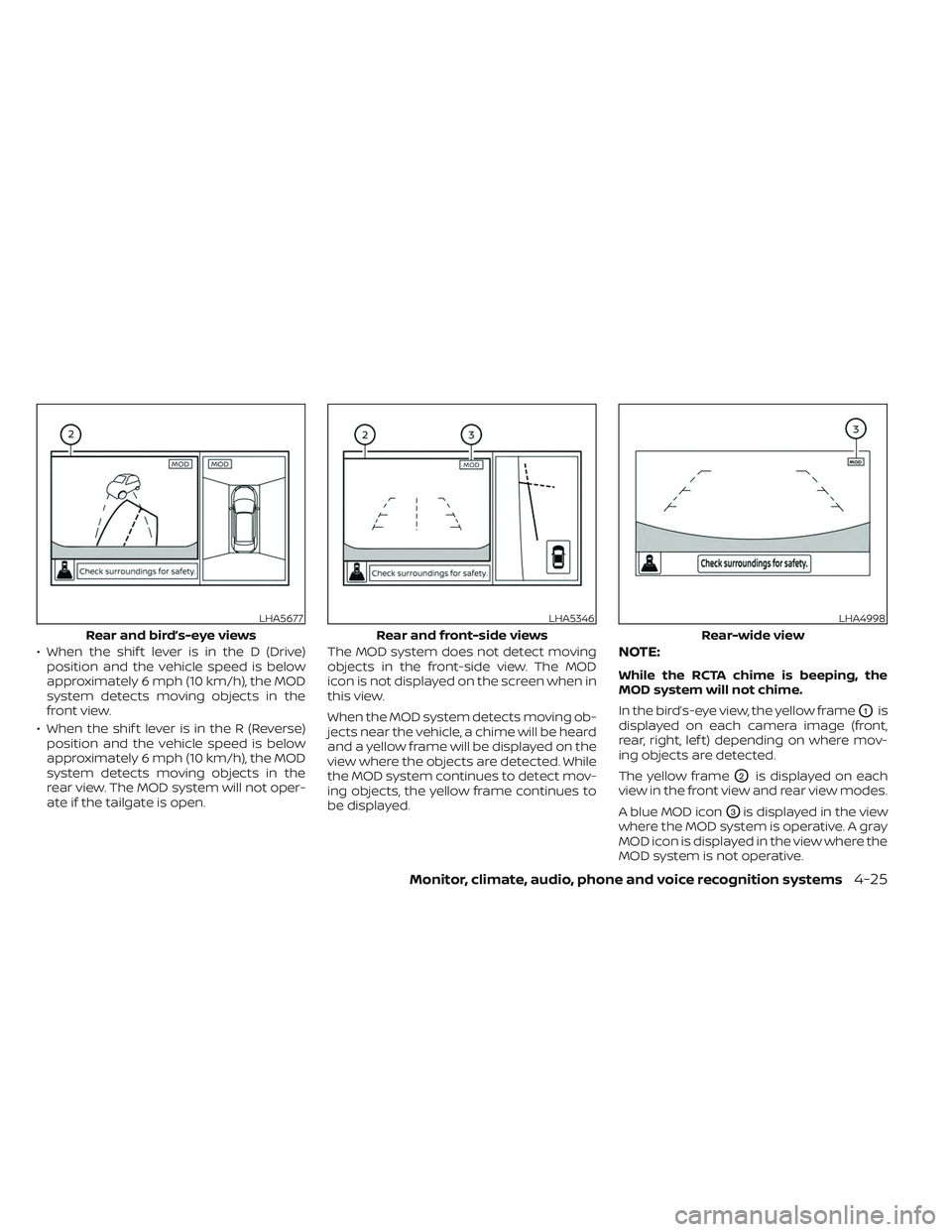
• When the shif t lever is in the D (Drive)position and the vehicle speed is below
approximately 6 mph (10 km/h), the MOD
system detects moving objects in the
front view.
• When the shif t lever is in the R (Reverse) position and the vehicle speed is below
approximately 6 mph (10 km/h), the MOD
system detects moving objects in the
rear view. The MOD system will not oper-
ate if the tailgate is open. The MOD system does not detect moving
objects in the front-side view. The MOD
icon is not displayed on the screen when in
this view.
When the MOD system detects moving ob-
jects near the vehicle, a chime will be heard
and a yellow frame will be displayed on the
view where the objects are detected. While
the MOD system continues to detect mov-
ing objects, the yellow frame continues to
be displayed.NOTE:
While the RCTA chime is beeping, the
MOD system will not chime.
In the bird’s-eye view, the yellow frame
O1is
displayed on each camera image (front,
rear, right, lef t) depending on where mov-
ing objects are detected.
The yellow frame
O2is displayed on each
view in the front view and rear view modes.
A blue MOD icon
O3is displayed in the view
where the MOD system is operative. A gray
MOD icon is displayed in the view where the
MOD system is not operative.
LHA5677
Rear and bird’s-eye views
LHA5346
Rear and front-side views
LHA4998
Rear-wide view
Monitor, climate, audio, phone and voice recognition systems4-25
Page 517 of 644
FOG LIGHTS (if so equipped)
For additional information on fog light bulb
replacement, refer to the instructions out-
lined in this section.
Replacing the LED fog light bulb
If LED fog light bulb replacement is re-
quired, it is recommended that you visit a
NISSAN dealer for this service.
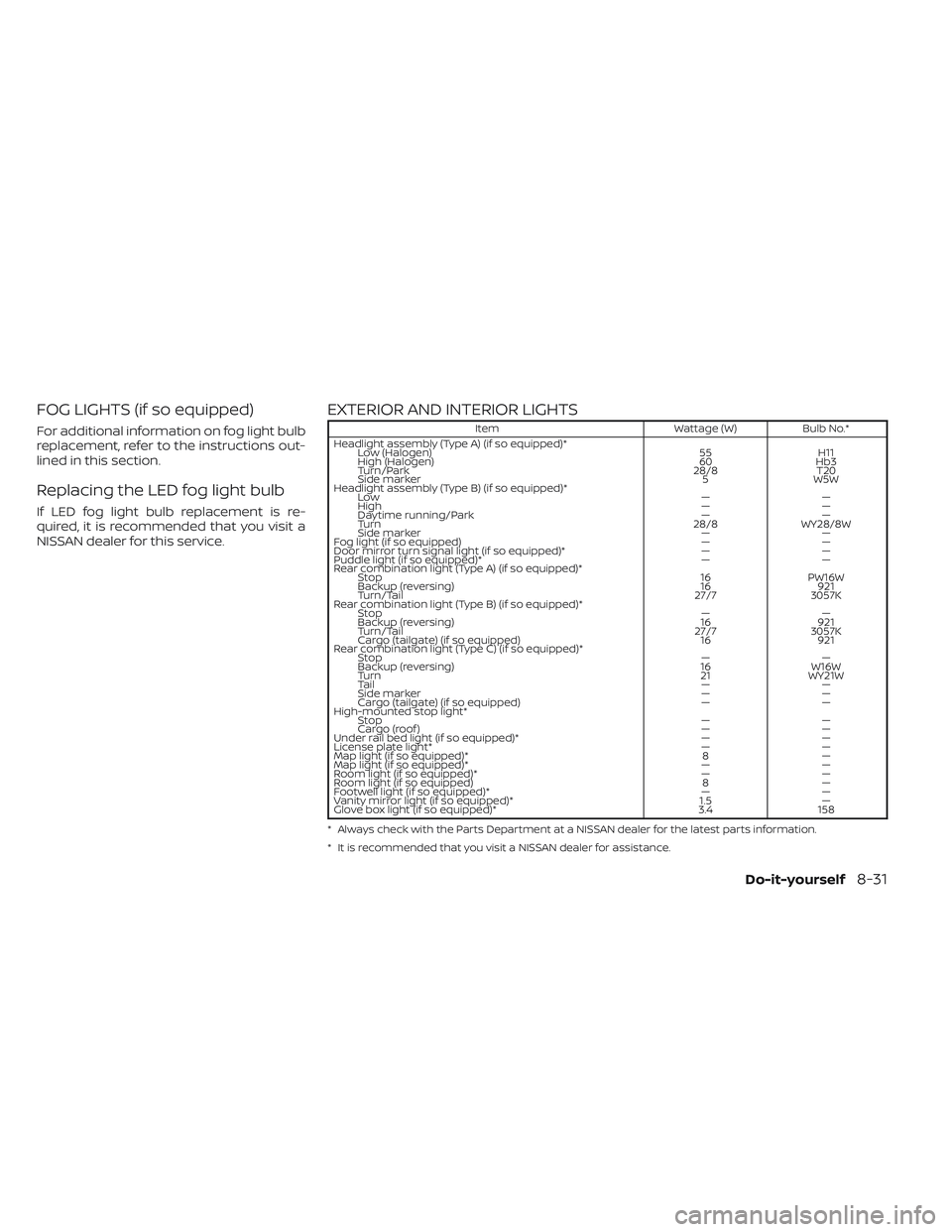
EXTERIOR AND INTERIOR LIGHTS
ItemWattage (W)Bulb No.*
Headlight assembly (Type A) (if so equipped)* Low (Halogen) 55H11
High (Halogen) 60Hb3
Turn/Park 28/8T20
Side marker 5W5W
Headlight assembly (Type B) (if so equipped)* Low ——
High ——
Daytime running/Park ——
Turn 28/8WY28/8W
Side marker ——
Fog light (if so equipped) ——
Door mirror turn signal light (if so equipped)* ——
Puddle light (if so equipped)* ——
Rear combination light (Type A) (if so equipped)* Stop 16PW16W
Backup (reversing) 16921
Turn/Tail 27/73057K
Rear combination light (Type B) (if so equipped)* Stop ——
Backup (reversing) 16921
Turn/Tail 27/73057K
Cargo (tailgate) (if so equipped) 16921
Rear combination light (Type C) (if so equipped)* Stop ——
Backup (reversing) 16W16W
Turn 21WY21W
Ta i l ——
Side marker ——
Cargo (tailgate) (if so equipped) ——
High-mounted stop light* Stop ——
Cargo (roof ) ——
Under rail bed light (if so equipped)* ——
License plate light* ——
Map light (if so equipped)* 8—
Map light (if so equipped)* ——
Room light (if so equipped)* ——
Room light (if so equipped) 8—
Footwell light (if so equipped)* ——
Vanity mirror light (if so equipped)* 1.5—
Glove box light (if so equipped)* 3.4158
* Always check with the Parts Department at a NISSAN dealer for the latest parts information.
* It is recommended that you visit a NISSAN dealer for assistance.
Do-it-yourself8-31
Page 519 of 644
Replacement procedures
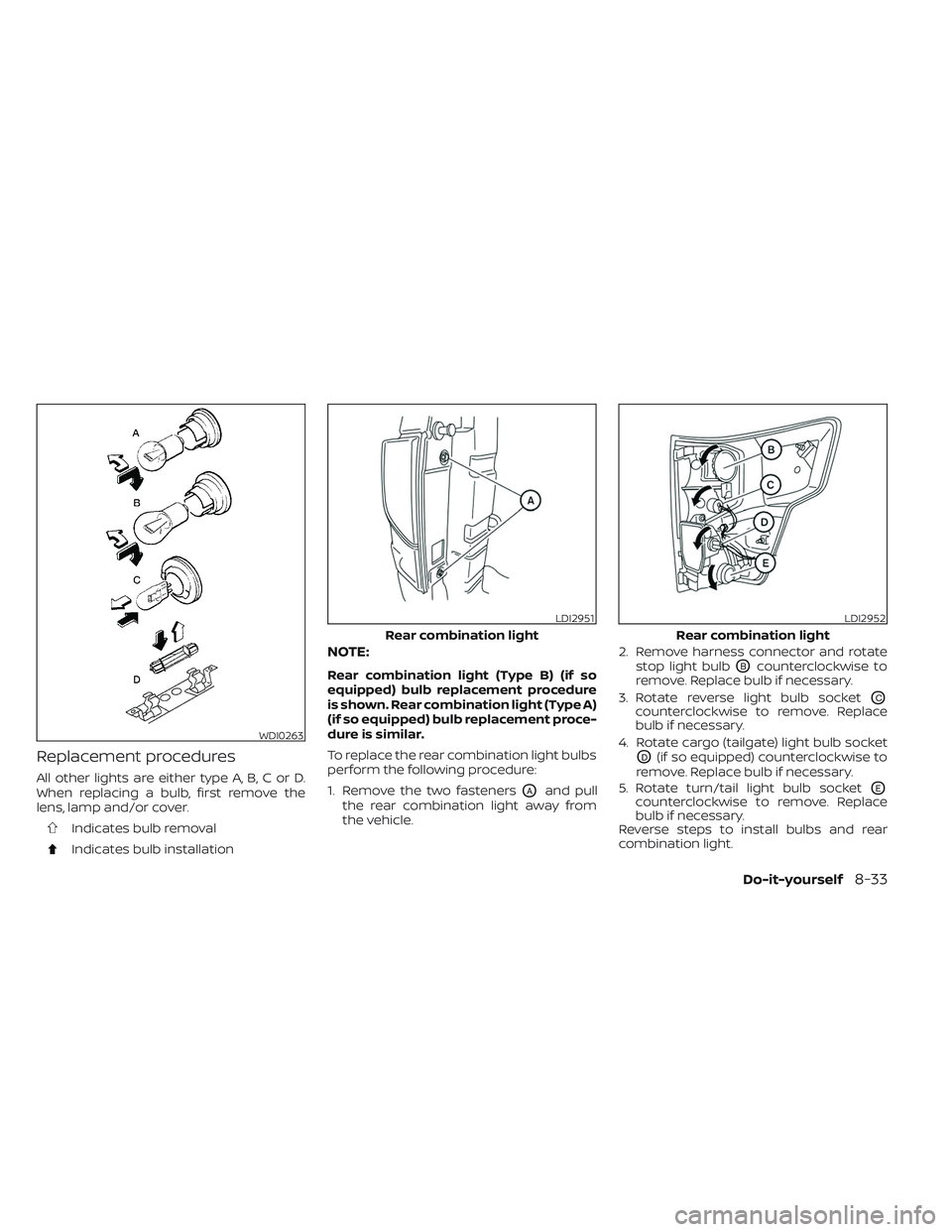
All other lights are either type A, B, C or D.
When replacing a bulb, first remove the
lens, lamp and/or cover.
Indicates bulb removal
Indicates bulb installation
NOTE:
Rear combination light (Type B) (if so
equipped) bulb replacement procedure
is shown. Rear combination light (Type A)
(if so equipped) bulb replacement proce-
dure is similar.
To replace the rear combination light bulbs
perform the following procedure:
1. Remove the two fasteners
OAand pull
the rear combination light away from
the vehicle. 2. Remove harness connector and rotate
stop light bulb
OBcounterclockwise to
remove. Replace bulb if necessary.
3. Rotate reverse light bulb socket
OCcounterclockwise to remove. Replace
bulb if necessary.
4. Rotate cargo (tailgate) light bulb socket
OD(if so equipped) counterclockwise to
remove. Replace bulb if necessary.
5. Rotate turn/tail light bulb socket
OEcounterclockwise to remove. Replace
bulb if necessary.
Reverse steps to install bulbs and rear
combination light.
WDI0263
LDI2951
Rear combination light
LDI2952
Rear combination light
Do-it-yourself8-33