Page 138 of 556
CAUTION
• Use the defroster when the engine is
running to avoid discharging the
battery.
• When cleaning the inner side of the
rear window, be careful not to scratch
or damage the rear window
defroster.
HEADLIGHT CONTROL SWITCH
Lighting
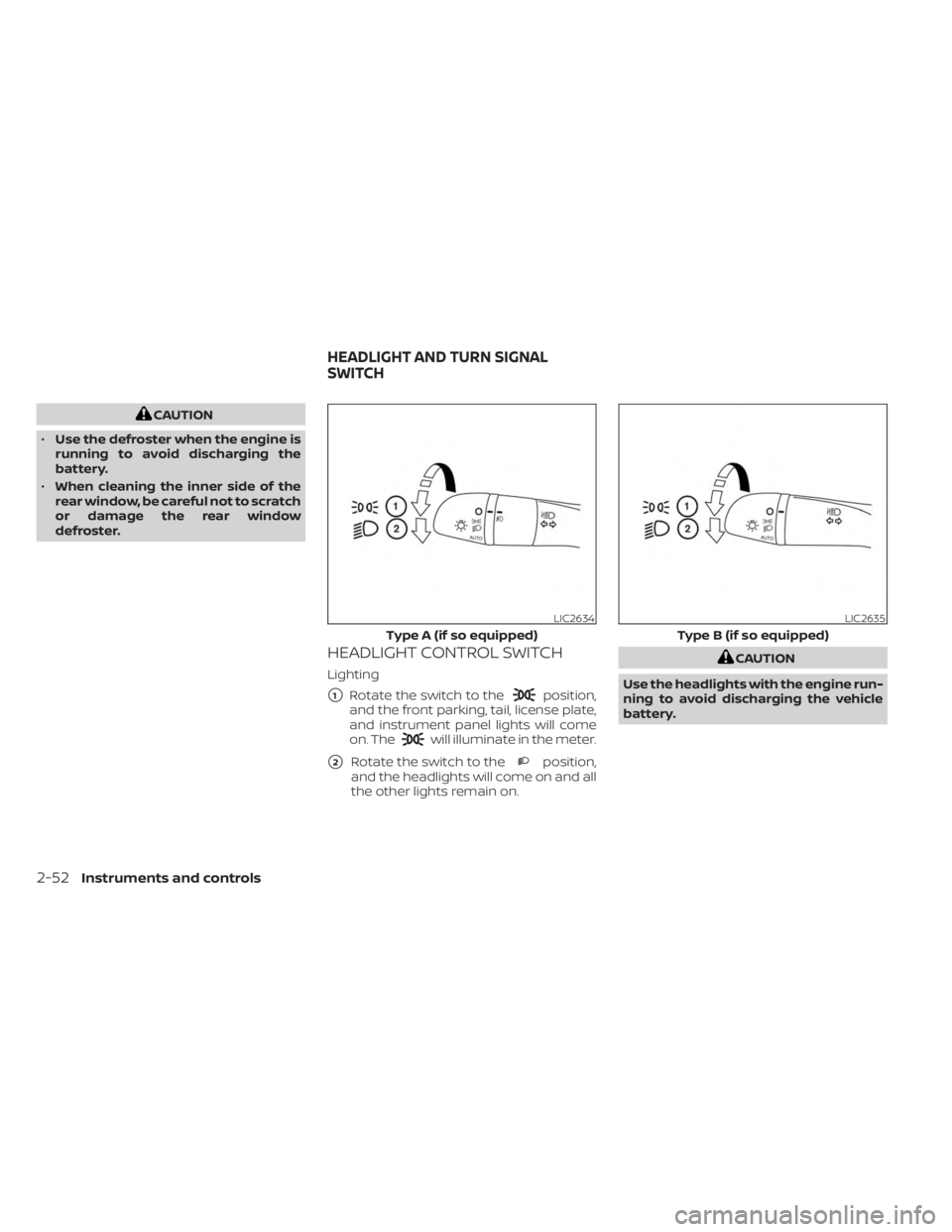
�1Rotate the switch to theposition,
and the front parking, tail, license plate,
and instrument panel lights will come
on. The
will illuminate in the meter.
�2Rotate the switch to theposition,
and the headlights will come on and all
the other lights remain on.
CAUTION
Use the headlights with the engine run-
ning to avoid discharging the vehicle
battery.
LIC2634
Type A (if so equipped)
LIC2635
Type B (if so equipped)
HEADLIGHT AND TURN SIGNAL
SWITCH
2-52Instruments and controls
Page 139 of 556
Autolight system
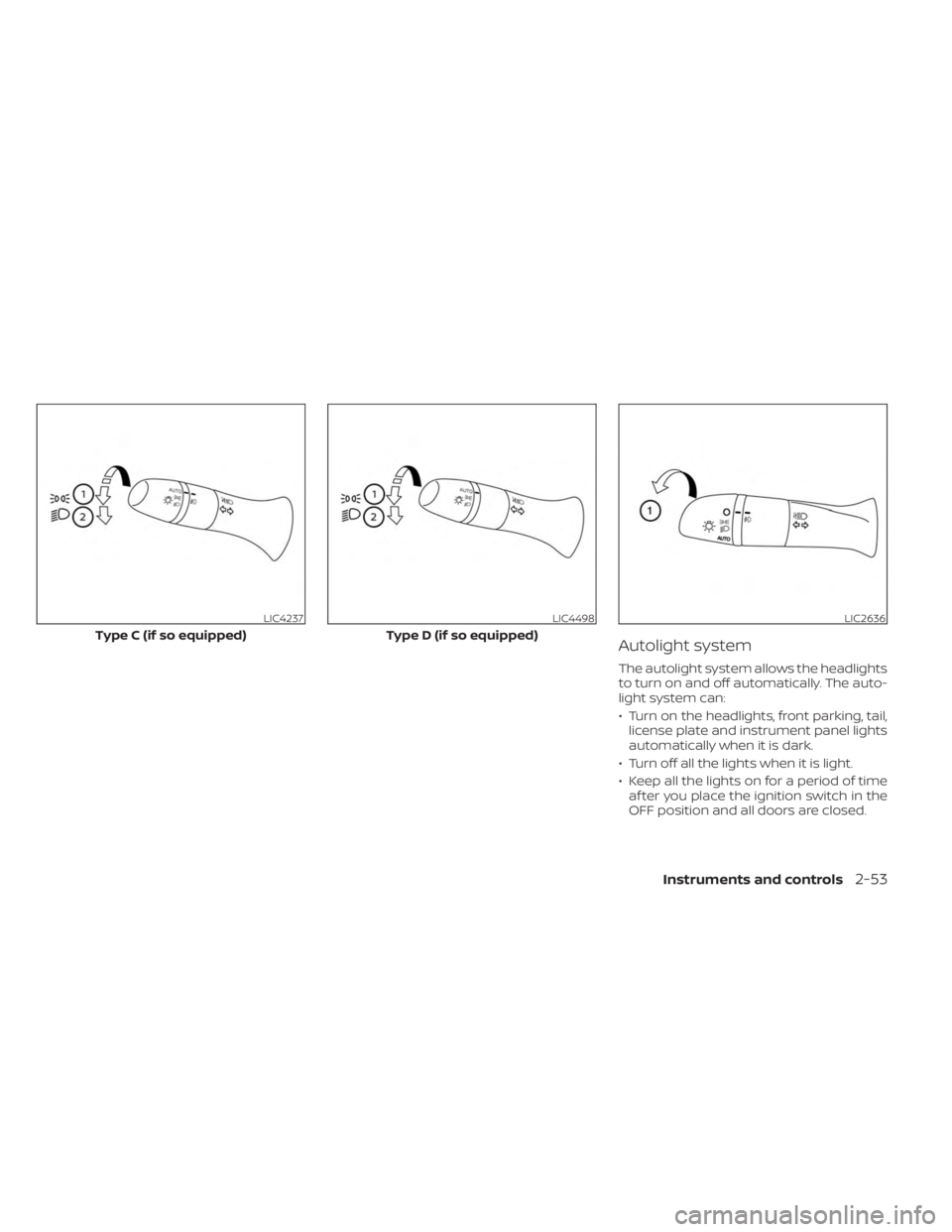
The autolight system allows the headlights
to turn on and off automatically. The auto-
light system can:
• Turn on the headlights, front parking, tail,license plate and instrument panel lights
automatically when it is dark.
• Turn off all the lights when it is light.
• Keep all the lights on for a period of time af ter you place the ignition switch in the
OFF position and all doors are closed.
LIC4237
Type C (if so equipped)
LIC4498
Type D (if so equipped)
LIC2636
Instruments and controls2-53
Page 140 of 556
To turn on the autolight system:
1.For USA: Turn the headlight switch to the
AUTO position
O1.
For CAN: Turn the headlight switch to the
AUTO
O1orposition.
2. Place the ignition switch in the ON position.
3. The autolight system automatically turns the headlights on and off.
Initially, if the ignition switch is placed in the
OFF position and a door is opened and lef t
open, the headlights remain on for a period
of time. If another door is opened while the
headlights are on, timer continues.
To turn the autolight system off:
For USA: Turn the switch to the OFF (if so
equipped),
,orposition.
For CAN: Turn the switch to the
position.
The headlights will turn on automatically at
twilight or in rainy weather (when the wind-
shield wiper is operated continuously).
If the ignition switch is placed in the OFF
position and one of the doors is opened
and this condition is continued, the head-
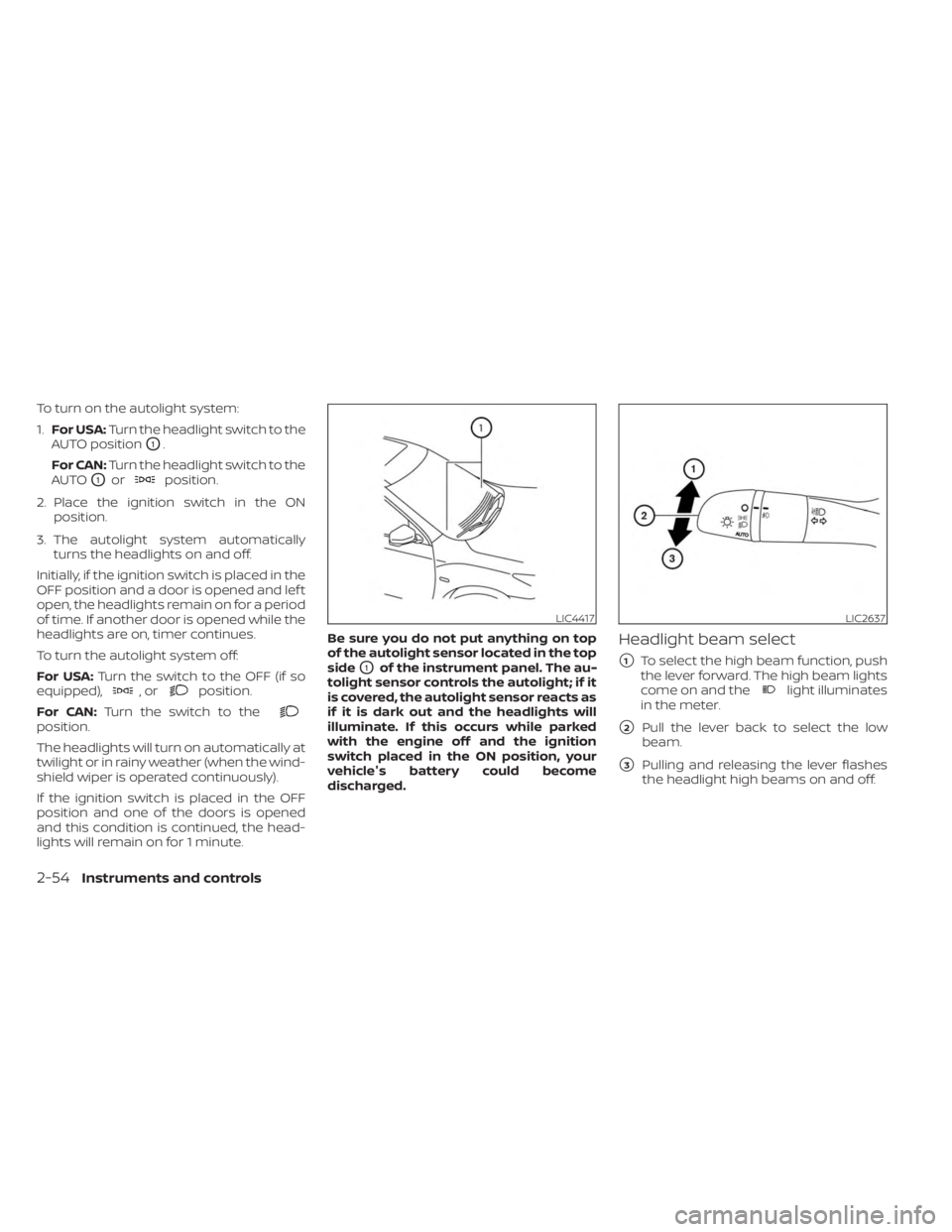
lights will remain on for 1 minute. Be sure you do not put anything on top
of the autolight sensor located in the top
side
O1of the instrument panel. The au-
tolight sensor controls the autolight; if it
is covered, the autolight sensor reacts as
if it is dark out and the headlights will
illuminate. If this occurs while parked
with the engine off and the ignition
switch placed in the ON position, your
vehicle's battery could become
discharged.
Headlight beam select
�1To select the high beam function, push
the lever forward. The high beam lights
come on and the
light illuminates
in the meter.
�2Pull the lever back to select the low
beam.
�3Pulling and releasing the lever flashes
the headlight high beams on and off.
LIC4417LIC2637
2-54Instruments and controls
Page 144 of 556
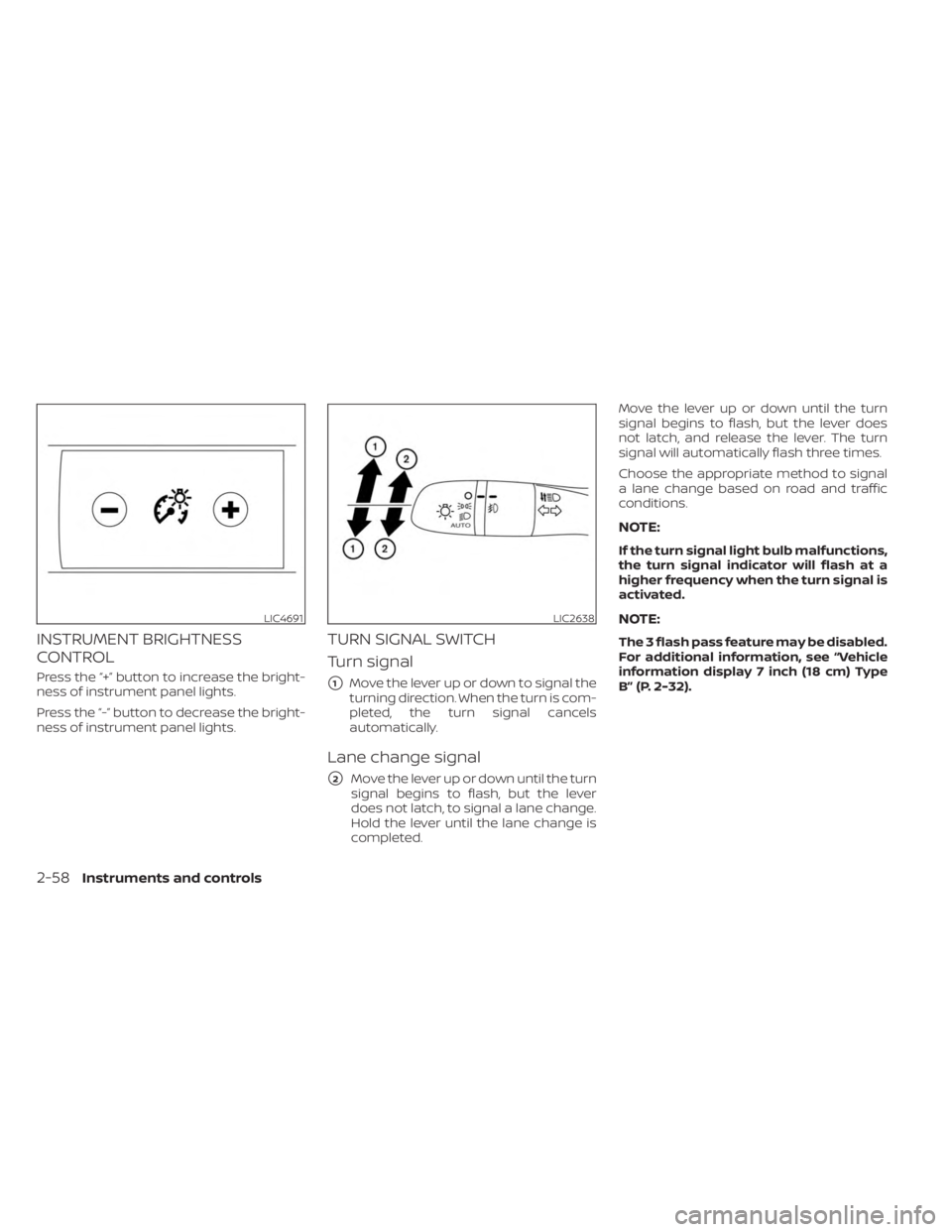
INSTRUMENT BRIGHTNESS
CONTROL
Press the “+” button to increase the bright-
ness of instrument panel lights.
Press the “-” button to decrease the bright-
ness of instrument panel lights.
TURN SIGNAL SWITCH
Turn signal
�1Move the lever up or down to signal the
turning direction. When the turn is com-
pleted, the turn signal cancels
automatically.
Lane change signal
�2Move the lever up or down until the turn
signal begins to flash, but the lever
does not latch, to signal a lane change.
Hold the lever until the lane change is
completed. Move the lever up or down until the turn
signal begins to flash, but the lever does
not latch, and release the lever. The turn
signal will automatically flash three times.
Choose the appropriate method to signal
a lane change based on road and traffic
conditions.
NOTE:
If the turn signal light bulb malfunctions,
the turn signal indicator will flash at a
higher frequency when the turn signal is
activated.
NOTE:
The 3 flash pass feature may be disabled.
For additional information, see “Vehicle
information display 7 inch (18 cm) Type
B” (P. 2-32).
LIC4691LIC2638
2-58Instruments and controls
Page 150 of 556
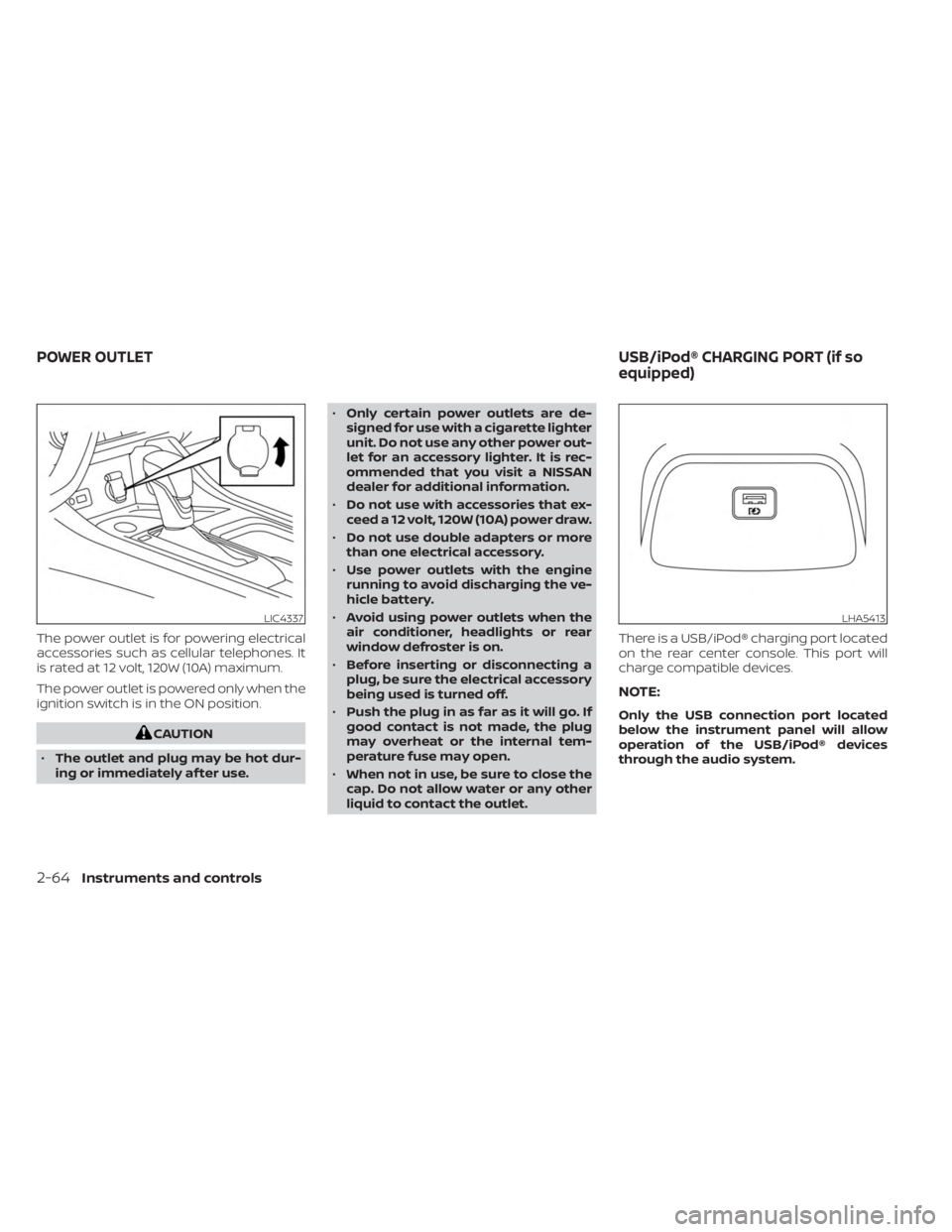
The power outlet is for powering electrical
accessories such as cellular telephones. It
is rated at 12 volt, 120W (10A) maximum.
The power outlet is powered only when the
ignition switch is in the ON position.
CAUTION
• The outlet and plug may be hot dur-
ing or immediately af ter use. •
Only certain power outlets are de-
signed for use with a cigarette lighter
unit. Do not use any other power out-
let for an accessory lighter. It is rec-
ommended that you visit a NISSAN
dealer for additional information.
• Do not use with accessories that ex-
ceed a 12 volt, 120W (10A) power draw.
• Do not use double adapters or more
than one electrical accessory.
• Use power outlets with the engine
running to avoid discharging the ve-
hicle battery.
• Avoid using power outlets when the
air conditioner, headlights or rear
window defroster is on.
• Before inserting or disconnecting a
plug, be sure the electrical accessory
being used is turned off.
• Push the plug in as far as it will go. If
good contact is not made, the plug
may overheat or the internal tem-
perature fuse may open.
• When not in use, be sure to close the
cap. Do not allow water or any other
liquid to contact the outlet. There is a USB/iPod® charging port located
on the rear center console. This port will
charge compatible devices.
NOTE:
Only the USB connection port located
below the instrument panel will allow
operation of the USB/iPod® devices
through the audio system.
LIC4337LHA5413
POWER OUTLET
USB/iPod® CHARGING PORT (if so
equipped)
2-64Instruments and controls
Page 151 of 556
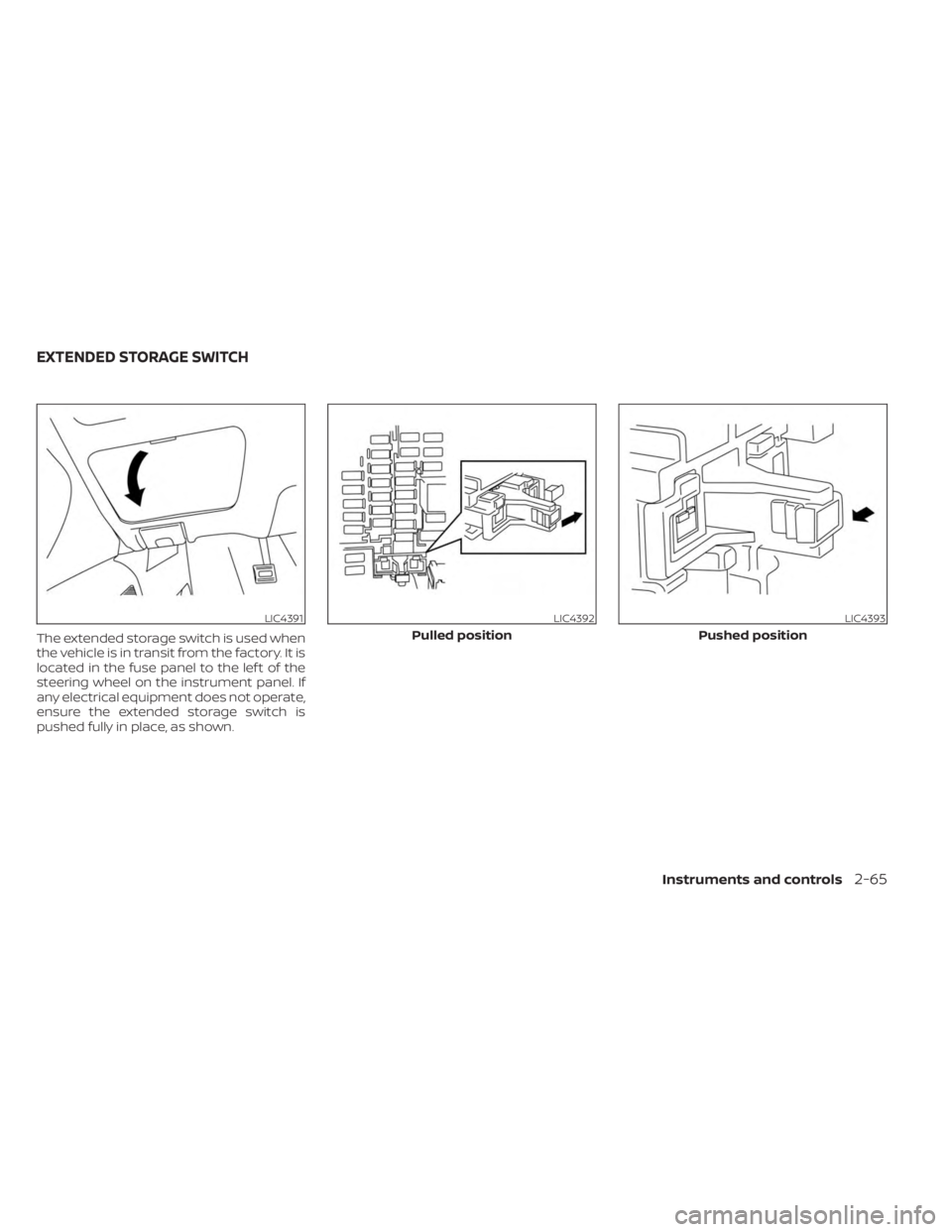
The extended storage switch is used when
the vehicle is in transit from the factory. It is
located in the fuse panel to the lef t of the
steering wheel on the instrument panel. If
any electrical equipment does not operate,
ensure the extended storage switch is
pushed fully in place, as shown.
LIC4391LIC4392
Pulled position
LIC4393
Pushed position
EXTENDED STORAGE SWITCH
Instruments and controls2-65
Page 156 of 556
POWER WINDOWS
WARNING
• Make sure that all passengers have
their hands, etc., inside the vehicle
while it is in motion and before clos-
ing the windows. Use the window
lock switch to prevent unexpected
use of the power windows.
• To help avoid risk of injury or death
through unintended operation of the
vehicle and/or its systems, including
entrapment in windows or inadver-
tent door lock activation, do not
leave children, people who require
the assistance of others or pets unat-
tended in your vehicle. Additionally,
the temperature inside a closed ve-
hicle on a warm day can quickly be-
come high enough to cause a signifi-
cant risk of injury or death to people
and pets.
The power windows operate when the ig-
nition switch is placed in the ON position or
for a period of time af ter the ignition switch
is placed in the OFF position. If the driver's
door is opened during this period of time,
the power to the windows is canceled.
Driver's side power window
switch
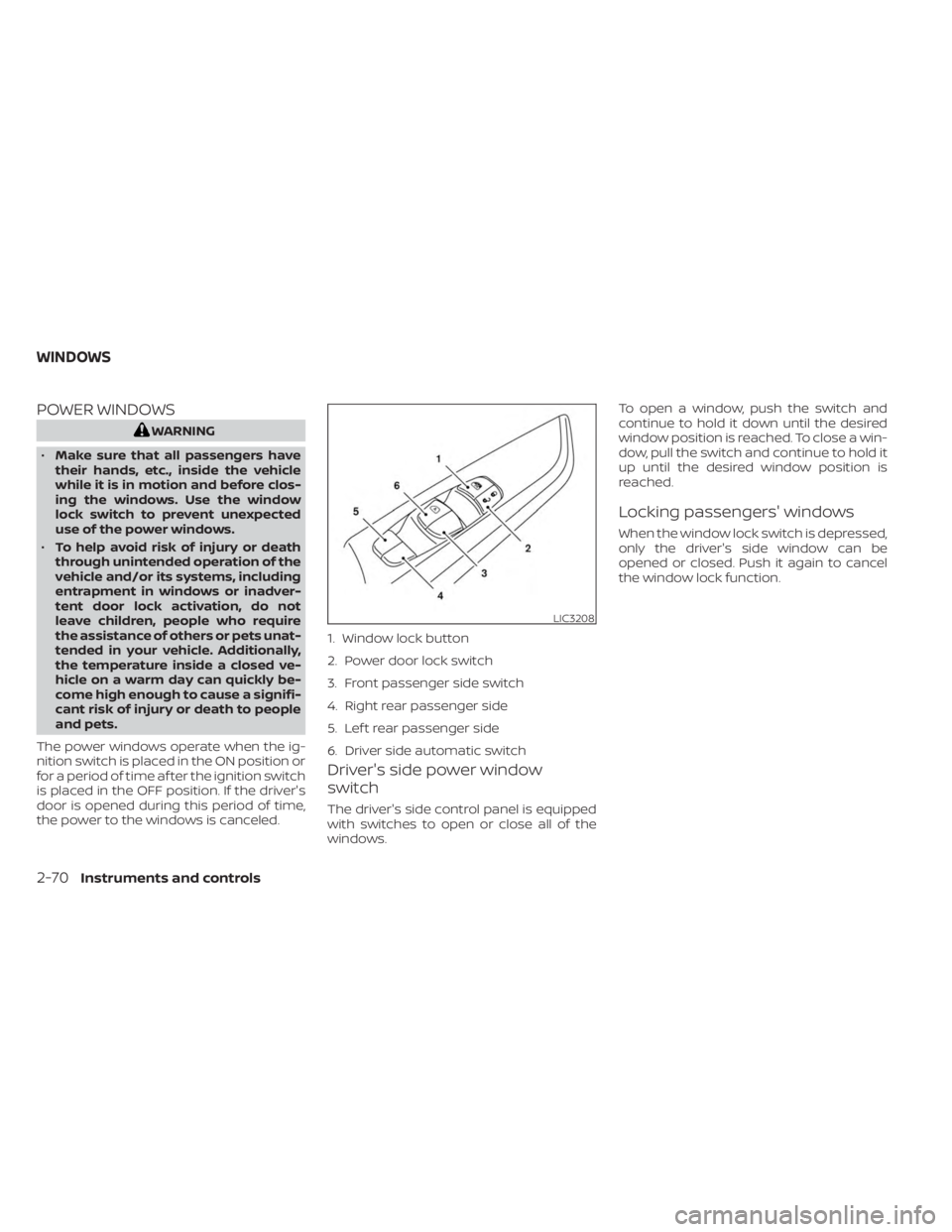
The driver's side control panel is equipped
with switches to open or close all of the
windows. To open a window, push the switch and
continue to hold it down until the desired
window position is reached. To close a win-
dow, pull the switch and continue to hold it
up until the desired window position is
reached.
Locking passengers' windows
When the window lock switch is depressed,
only the driver's side window can be
opened or closed. Push it again to cancel
the window lock function.
LIC3208
1. Window lock button
2. Power door lock switch
3. Front passenger side switch
4. Right rear passenger side
5. Lef t rear passenger side
6. Driver side automatic switch
WINDOWS
2-70Instruments and controls
Page 174 of 556
NOTE:
The doors may not lock when the Intelli-
gent Key is in the same hand that is op-
erating the request switch (if so
equipped) to lock the door. Put the Intel-
ligent Key in a purse, pocket or your
other hand.
CAUTION
The lockout protection may not func-
tion under the following conditions:
• When the Intelligent Key is placed on
top of the instrument panel.
• When the Intelligent Key is placed on
top of the rear parcel shelf.
• When the Intelligent Key is placed in-
side the glove box or a storage bin.
• When the Intelligent Key is placed in-
side the door pockets.
• When the Intelligent Key is placed on
or under the spare tire area.
• When the Intelligent Key is placed in-
side or near metallic materials.
• When the Intelligent Key battery is
discharged.
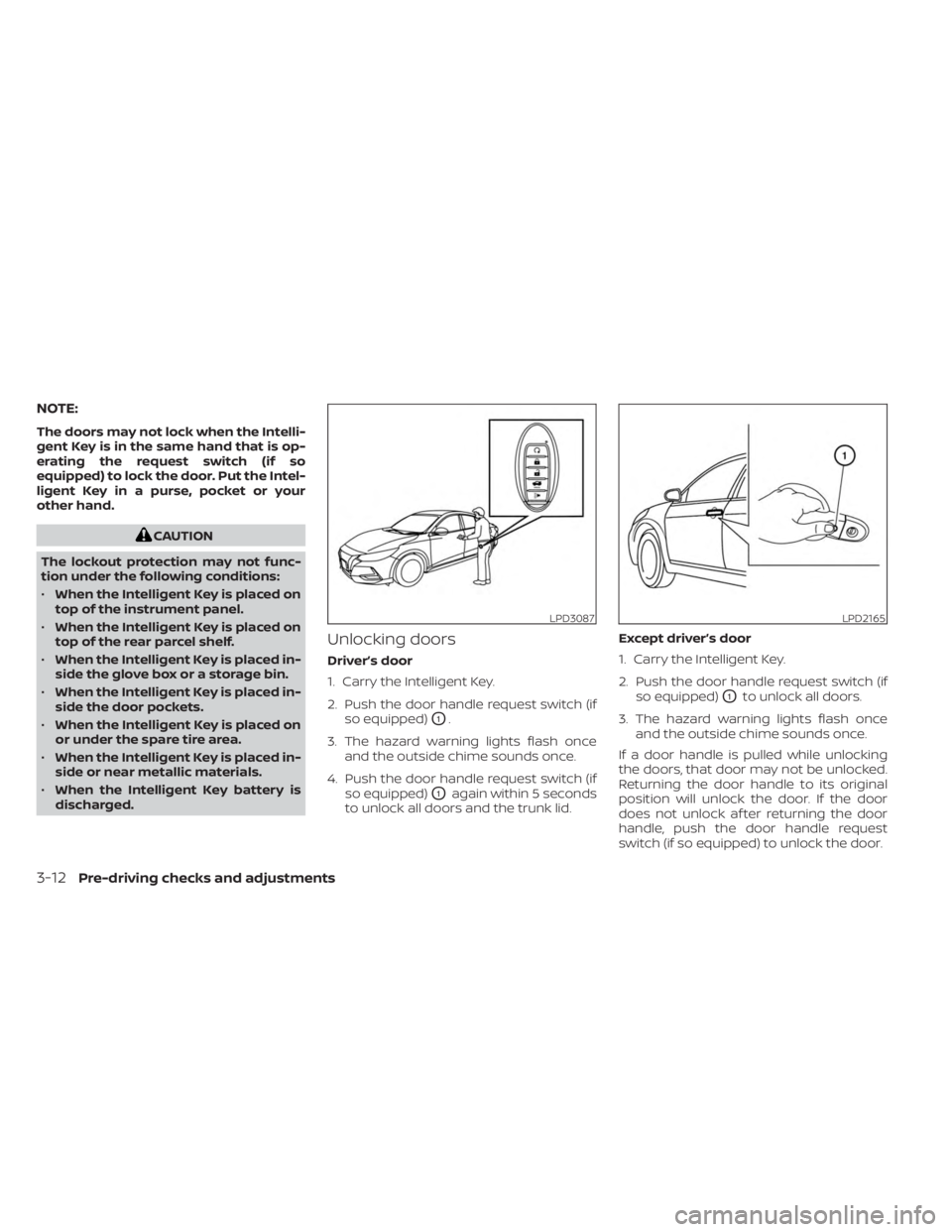
Unlocking doors
Driver’s door
1. Carry the Intelligent Key.
2. Push the door handle request switch (if so equipped)
O1.
3. The hazard warning lights flash once and the outside chime sounds once.
4. Push the door handle request switch (if so equipped)
O1again within 5 seconds
to unlock all doors and the trunk lid. Except driver’s door
1. Carry the Intelligent Key.
2. Push the door handle request switch (if
so equipped)
O1to unlock all doors.
3. The hazard warning lights flash once and the outside chime sounds once.
If a door handle is pulled while unlocking
the doors, that door may not be unlocked.
Returning the door handle to its original
position will unlock the door. If the door
does not unlock af ter returning the door
handle, push the door handle request
switch (if so equipped) to unlock the door.
LPD3087LPD2165
3-12Pre-driving checks and adjustments