2023 NISSAN QASHQAI Emergency brake
[x] Cancel search: Emergency brakePage 18 of 508

0-10Illustrated table of contents
Red lightNamePage
Brake warning light 2-11
Charge warning light2-12
Electronic parking brake
indicator light (if so
equipped)2-12
Master warning light
2-12
Seat belt warning light and
chime2-12
Security indicator light
2-13
Supplemental air bag
warning light2-13Yellow
light Name
Page
All-Wheel Drive (AWD) LOCK
indicator light (if so
equipped) 2-13
Anti-lock Braking System
(ABS) warning light
2-13
Automatic Emergency
Braking (AEB) system
warning light2-14
Electric power steering
warning light
2-14
Electronic parking brake
warning light (if so
equipped)2-14
Low tire pressure warning
light
2-14
Master warning light
2-16
Malfunction Indicator Light
(MIL)2-16
Rear Automatic Braking
(RAB) system warning light
2-17
Vehicle Dynamic Control
(VDC) off indicator light2-17
Vehicle Dynamic Control
(VDC) warning light
2-17Other
light Name
Page
Automatic brake hold indi-
cator light (green) (if so
equipped) 2-17
Automatic brake hold indi-
cator light (white) (if so
equipped)2-17
Exterior light indicator
2-18
Front fog light indicator
light (if so equipped)2-18
High beam assist indicator
light
2-18
High beam indicator light
2-18
Turn signal/hazard indica-
tor lights2-18
WARNING AND INDICATOR LIGHTS
Page 92 of 508
2-10Instruments and controls
Warning indicator light (red)Warning indicator light (yellow) Warning indicator light (other)
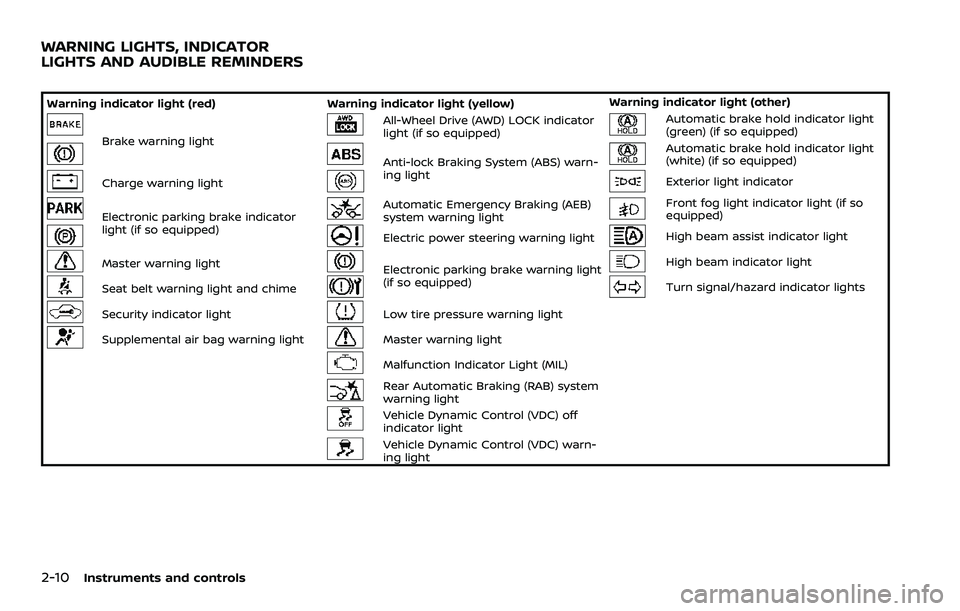
Brake warning light
All-Wheel Drive (AWD) LOCK indicator
light (if so equipped)Automatic brake hold indicator light
(green) (if so equipped)
Anti-lock Braking System (ABS) warn-
ing lightAutomatic brake hold indicator light
(white) (if so equipped)
Charge warning lightExterior light indicator
Electronic parking brake indicator
light (if so equipped)Automatic Emergency Braking (AEB)
system warning lightFront fog light indicator light (if so
equipped)
Electric power steering warning lightHigh beam assist indicator light
Master warning lightElectronic parking brake warning light
(if so equipped)High beam indicator light
Seat belt warning light and chimeTurn signal/hazard indicator lights
Security indicator lightLow tire pressure warning light
Supplemental air bag warning lightMaster warning light
Malfunction Indicator Light (MIL)
Rear Automatic Braking (RAB) system
warning light
Vehicle Dynamic Control (VDC) off
indicator light
Vehicle Dynamic Control (VDC) warn-
ing light
WARNING LIGHTS, INDICATOR
LIGHTS AND AUDIBLE REMINDERS
Page 96 of 508

2-14Instruments and controls
the engine is running, or while driving, it
may indicate the ABS is not functioning
properly. Have the system checked. It is
recommended you visit a NISSAN dealer
for this service.
If an ABS malfunction occurs, the anti-
lock function is turned off. The brake
system then operates normally, but with-
out anti-lock assistance. (See “Brake sys-
tem” (P.5-129).)
Automatic Emergency Braking
(AEB) system warning light
When the ignition switch is in the ON
position, the AEB system warning light
illuminates. After starting the engine, the
warning light turns off.
This light illuminates when the AEB with
Pedestrian Detection system is set to OFF
on the vehicle information display.
If the light illuminates when the AEB with
Pedestrian Detection system is ON, it may
indicate that the system is unavailable.
See “Automatic Emergency Braking (AEB)
with Pedestrian Detection system” (P.5-
97) or “Intelligent Forward Collision Warn-
ing (I-FCW)” (P.5-107).
Electric power steering warn-
ing light
When the ignition switch is in the ON
position, the electric power steering
warning light illuminates. After starting
the engine, the electric power steering
warning light turns off. This indicates the
electric power steering is operational.
If the electric power steering warning
light illuminates while the engine is run-
ning, it may indicate the electric power
steering is not functioning properly and
may need servicing. Have the system
checked. It is recommended that you visit
a NISSAN dealer for this service.
When the electric power steering warning
light illuminates with the engine running,
the power assist to the steering will cease
operation but you will still have control of
the vehicle. At this time, greater steering
efforts are required to operate the steer-
ing wheel, especially in sharp turns and at
low speeds.
(See “Electric power steering” (P.5-128).)
orElectronic parking
brake warning light (if so equipped)
The electronic parking brake warning
light functions for the electronic parking
brake system. If the warning light illumi-
nates, it may indicate that the electronic
parking brake system is not functioning
properly. Have the brake system checked,
and, if necessary, repaired. It is recom-
mended that you visit a NISSAN dealer for
this service.
Low tire pressure warning
light
Your vehicle is equipped with a Tire
Pressure Monitoring System (TPMS) that
monitors the tire pressure of all tires
except the spare tire (if so equipped).
The low tire pressure warning light warns
of low tire pressure or indicates that the
TPMS is not functioning properly.
After the ignition switch is placed in the
ON position, this light illuminates for
about 1 second and turns off.
Low tire pressure warning:
If the vehicle is being driven with low tire
pressure, the warning light will illuminate.
The “Tire Pressure Low - Add Air” warning
also appears in the vehicle information
display.
Page 103 of 508

SETTINGS
The setting mode allows you to change
the information displayed in the vehicle
information display:
.Driver Assistance
. Clock
. Meter Settings
. Vehicle Settings
. Maintenance
. Alarm (if so equipped)
. Tire Pressures
. Unit
. Language
. Factory Reset
Driver Assistance
To change the status, warnings or turn on
or off any of the systems/warnings dis-
played in the “Driver Assistance” menu,
use the
buttonsto select and the
OKto change a menu item:
. Driving Aids
. Parking Aids (if so equipped)
. Chassis Control (if so equipped)
. Driver Attention (if so equipped)
. Speed Limit Sign (if so equipped)
Driving Aids:
To change the status, warnings or turn on
or off any of the systems/warnings dis- played in the “Driving Aids” menu, use the
buttonsto select and the OKto
change a menu item:
. Steering Assist (if so equipped)
Allows user to turn the Steering Assist
ON/OFF.
. Emergency Brake
— Front
Allows user to turn the Automatic
Emergency Braking (AEB) with Pe-
destrian Detection system and In-
telligent Forward Collision Warning
(I-FCW) system ON/OFF
— Rear Allows user to turn the Rear Auto-
matic Braking (RAB) system ON/
OFF.
. Lane
— Warning (LDW)
Allows user to turn the Lane De-
parture Warning (LDW) system ON/
OFF.
— Prevention (LDP) Allows user to turn the Intelligent
Lane Intervention (I-LI) system ON/
OFF.
. Blind Spot
— Warning (BSW)
Allows user to turn the Blind Spot
Warning (BSW) system ON/OFF.
For additional information, see “ProPILOT assist” (P.5-64), “Automatic Emergency
Braking (AEB) with Pedestrian Detection
system” (P.5-97), “Rear Automatic Braking
(RAB)” (P.5-116), “Lane Departure Warning
(LDW)” (P.5-35), “Intelligent Lane Interven-
tion (I-LI)” (P.5-86), and “Blind Spot Warn-
ing (BSW)” (P.5-46).
Parking Aids (if so equipped):
To change the status or turn on or off any
of the systems displayed in the “Parking
Aids” menu, use the
buttonsto
select and the OKto change a menu
item:
. Moving Object (if so equipped)
Press the OK
to turn the Moving
Object Detection (MOD) ON/OFF.
. Cross Traffic
Press the OK
to turn the Rear Cross
Traffic Alert (RCTA) ON/OFF.
. Rear Sensor (if so equipped)
Allows user to turn the rear sensor
ON/OFF.
. Display (if so equipped)
Allows user to turn the Rear Sonar
System (RSS) display ON/OFF.
. Volume (if so equipped)
Allows user to select sensor volume
(High, Med. or Low).
. Range (if so equipped)
Allows user to select the sensor range
Instruments and controls2-21
Page 117 of 508

reached normal levels, the warning
should disappear.
If the warning continues to display, have
the system checked. It is recommended
that you visit a NISSAN dealer for this
service.
For additional information, refer to “Lane
Departure Warning (LDW)” (P.5-35), “Intel-
ligent Lane Intervention (I-LI)” (P.5-86) or
“Traffic Sign Recognition” (P.2-43).
35. Not Available: Poor Road Con-
ditions warning (if so equipped)
This message appears when the Intelli-
gent Lane Intervention (I-LI) system or the
Intelligent Cruise Control (ICC) system
becomes unavailable because the road
is slippery. See “Intelligent Lane Interven-
tion (I-LI)” (P.5-40) or “Intelligent Cruise
Control (ICC)” (P.5-75).
36. Currently unavailable warning
This message appears when the Intelli-
gent Lane Intervention (I-LI) system or the
Intelligent Cruise Control (ICC) system
becomes unavailable because the VDC is
turned off or operates. For additional
information, refer to “Intelligent Lane
Intervention (I-LI)” (P.5-40) or “Intelligent
Cruise Control (ICC)” (P.5-75).
37. Forward Driving Aids Tempora-
rily Disabled Front Sensor Blocked/
Unavailable: Front Radar Obstruc-
tion warning
This message appears when the front
radar sensor may be obstructed due to:
.mud, dirt, snow, ice, etc.
. inclement weather (rain, fog, snow,
etc)
All forward driving aids are temporarily
disabled until the system detects that the
front radar sensor is no longer ob-
structed.
See “Automatic Emergency Braking (AEB)
with Pedestrian Detection system” (P.5-
97), “Intelligent Forward Collision Warning
(I-FCW)” (P.5-107) or “ProPILOT assist” (P.5-
64).
38. Unavailable: Side Radar Ob-
struction warning
This warning appears when the Blind
Spot Warning (BSW)/Rear Cross Traffic
Alert (RCTA) system becomes unavailable
because a radar blockage is detected.
(See “Blind Spot Warning (BSW)” (P.5-46) or
“Rear Cross Traffic Alert (RCTA)” (P.5-54).)
39. Press Brake Pedal warning (for
electronic parking brake equipped
models)
This indicator appears in the following
situations:
. The driver tries to release the electro-
nic parking brake manually without
depressing the brake pedal.
. The vehicle is stopped on a steep hill
and there is a possibility of moving
backward, even if the electronic park-
ing brake is applied.
. This warning appears if the vehicle
moves while the automatic brake hold
(if so equipped) is activated.
40. Lane Departure Warning (LDW)/
Intelligent Lane Intervention (I-LI)
indicator
This indicator shows when the LDW and/
or I-LI systems are engaged.
See “Lane Departure Warning (LDW)” (P.5-
35) or “Intelligent Lane Intervention (I-LI)”
(P.5-40).
Instruments and controls2-35
Page 149 of 508

EMERGENCY SUPPORT
NissanConnect® Services provides var-
ious services to support dealing with
emergencies of the subscribed vehicle
and the driver.
For example, in case of an illness or
serious injury, you can seek support by
pushing the in-vehicle Emergency Call
(SOS) button and connecting to Nissan-
Connect® Services. NissanConnect® Ser-
vices can specify the location of the
vehicle via GPS, and the information will
be sent to the police or other agencies as
needed.
For information about other NissanCon-
nect® Services emergency support re-
lated services, refer to the
NissanConnect® Services website or con-
tact the NissanConnect® Customer Sup-
port Line.
NissanConnect® Services website:
For U.S.
www.nissanusa.com/connect
For Canada
http://www.nissan.ca/nissanconnect
(English)
www.nissan.ca/nissanconnect/fr
(French)NissanConnect® Customer Support Line:
1-855-426-6628
WARNING
.
Please note that the Automatic
Collision Notification service and
Emergency Call function cannot
be used in the following condi-
tions:
— Emergency functions and ser-
vices will not be available
without a paid subscription
to NissanConnect® Services.
— The NissanConnect® Services network system is disabled.
— The vehicle moves outside the service area where the TCU
(Telematics Control Unit) is
connected to the system.
— The vehicle is outside the area where the cellular network
service is receivable.
— The vehicle is in a location with poor signal reception
such as tunnels, underground
parking garages, behind
buildings or in mountainous
areas. — The line is busy.
— The TCU (Telematics Control
Unit) or other systems of your
vehicle are not working prop-
erly.
— It may not be possible to make an emergency call de-
pending on the severity of a
collision and/or emergency.
. Park the vehicle in a safe location
and set the parking brake before
operating the Emergency Call
(SOS) button.
. Only use this service in case of an
emergency. There may be a pen-
alty for inappropriate use of the
service.
. Radio waves could adversely af-
fect electric medical equipment.
Individuals who use pacemakers
should contact the device manu-
facturer regarding any possible
effects before using the system.
. The TCU (Telematics Control Unit)
antenna is installed inside the
upper central part of the instru-
ment panel. An occupant should
not get any closer to the antenna
than specified by the pacemaker
manufacturer. The radio waves
Instruments and controls2-67
EMERGENCY CALL (SOS) BUTTON
(if so equipped)
Page 241 of 508
5 Starting and driving
Precautions when starting and driving ...................... 5-4Exhaust gas (carbon monoxide) ................................ 5-4
Three-way catalyst ............................................................... 5-4
Tire Pressure Monitoring System (TPMS) ........... 5-5
Avoiding collision and rollover .................................... 5-8
On-pavement and off-road
driving precautions .............................................................. 5-9
Off-road recovery .................................................................. 5-9
Rapid air pressure loss ...................................................... 5-9
Drinking alcohol/drugs and driving ..................... 5-10
Driving safety precautions .......................................... 5-10
Ignition switch (models without Intelligent
Key system) ........................................................................\
............ 5-12
Continuously Variable
Transmission (CVT) ............................................................ 5-13
Manual Transmission (MT) ........................................... 5-13
Key positions ........................................................................\
.. 5-14
Push-button ignition switch (model with
Intelligent Key system) .......................................................... 5-14 Operating range for engine start function ...... 5-14
Push-button ignition switch operation ............. 5-15
Push-button ignition switch positions .............. 5-16
Emergency engine shut off ........................................ 5-16
Intelligent Key battery discharge ........................... 5-17
Before starting the engine ................................................. 5-17 Starting the engine (model without Intelligent
Key system) ........................................................................\
........... 5-18
Starting the engine (model with Intelligent
Key system) ........................................................................\
........... 5-19
Remote engine start (if so equipped) .............. 5-20
Driving the vehicle ................................................................... 5-20
Continuously Variable
Transmission (CVT) ......................................................... 5-20
Manual Transmission (MT) ........................................ 5-25
Parking brake ........................................................................\
....... 5-27
Pedal type ........................................................................\
....... 5-27
Switch type (models with electronic
parking brake system) ................................................. 5-27
Automatic brake hold (if so equipped) .................... 5-29 How to activate/deactivate the automatic
brake hold function ........................................................ 5-30
How to use the automatic brake
hold function ........................................................................\
5-31
SPORT mode switch (if so equipped) ....................... 5-32
ECO mode system ................................................................... 5-32
ECO Pedal Guide function ......................................... 5-33
Ambient ECO ........................................................................\
5-34
ECO Drive Report .............................................................. 5-34
Lane Departure Warning (LDW) ..................................... 5-35 LDW system operation ................................................. 5-36
How to enable/disable the LDW system ....... 5-37
Page 256 of 508
5-16Starting and driving
Continuously Variable Transmis-
sion (CVT) models
The ignition lock is designed so that the
ignition switch position cannot be
switched to OFF until the shift lever is
moved to the P (Park) position.
When the ignition switch cannot be
pushed toward the OFF position, proceed
as follows:
1. Move the shift lever into the P (Park)position.
2. Push the ignition switch. The ignition switch position will change to the ON
position.
3. Push the ignition switch again to the OFF position.
The shift lever can be moved from the P
(Park) position if the ignition switch is in
the ON position and the brake pedal is
depressed.
PUSH-BUTTON IGNITION SWITCH
POSITIONS
LOCK (Normal parking position)
The ignition switch can only be locked at
this position.
The ignition switch will lock when any
door is opened or closed with the ignition
switched off.
ON (Normal operating position)
The ignition system and the electrical
accessory power activate at this position
without the engine turned on.
The ON position has a battery saver
feature that will place the ignition switch
in the OFF position, if the vehicle is not
running, after some time under the fol-
lowing conditions:
. all doors are closed.
. shift lever is in P (Park) position (CVT
model) or N (Neutral) position (MT
model).
The battery saver feature will be can-
celled if any of the following occur:
. any door is opened.
. shift lever is moved out of the P (Park)
position (CVT model). .
ignition switch changes position.
OFF position
The engine is turned off in this position.
Auto ACC position
With the vehicle in the P (Park) position
(CVT models) or the N (Neutral) position
(MT models), the Intelligent Key with you
and the ignition placed from ON to OFF,
the radio can still be used for a period of
time, or until the driver’s door is opened.
After a period of time, functions such as
radio, navigation (if so equipped), and
Bluetooth® Hands-Free Phone System
may be restarted by turning on the audio
system (see the separate NissanConnect®
Owner’s Manual), or by pushing the UN-
LOCK button on the Intelligent Key for up
to a total of 30 minutes.
EMERGENCY ENGINE SHUT OFF
To shut off the engine in an emergency
situation while driving, perform the fol-
lowing procedure:
.Rapidly push the push-button ignition
switch 3 consecutive times in less
than 1.5 seconds, or
. Push and hold the push-button igni-
tion switch for more than 2 seconds.