2023 NISSAN PATHFINDER towing
[x] Cancel search: towingPage 447 of 665
–When driving on roads where
there are multiple lanes or unclear
lane markers due to road
construction
– When driving on roads where
there are sharply contrasting ob-
jects, such as shadows, snow, wa-
ter, wheel ruts, seams, or lines re-
maining af ter road repairs (the
Steering Assist could detect these
items as lane markers)
– When driving on roads where the
traveling lane merges or
separates
• Do not use the Steering Assist under
the following conditions because the
system may not properly detect lane
markers. Doing so could cause a loss
of vehicle control and result in an ac-
cident.
– During bad weather (rain, fog,
snow, dust, etc.)
– When rain, snow, sand, etc., is
thrown up by the wheels of other
vehicles
– When dirt, oil, ice, snow, water, or
another object adheres to the
camera unit –
When the lens of the camera unit
is foggy
– When strong light (for example,
sunlight or high beams from on-
coming vehicles) shines on the
camera
– When the headlights are not
bright due to dirt on the lens or
the headlights are off in tunnels or
darkness
– When a sudden change in bright-
ness occurs (for example, when
the vehicle enters or exits a tunnel
or is under a bridge)
– When driving on roads where the
traveling lane merges or sepa-
rates or where there are tempo-
rary lane markers because of road
construction
– When there is a lane closure due to
road repairs
– When driving on a bumpy road
surface, such as an uneven dirt
road
– When driving on sharp curves or
winding roads
– When driving on repeated uphill
and downhill roads •
Do not use the Steering Assist under
the following conditions because the
system will not operate properly:
– When driving with a tire that is not
within normal tire conditions (for
example, tire wear, abnormal tire
pressure, installation of a spare
tire, tire chains, nonstandard
wheels)
– When the vehicle is equipped with
non-original brake or suspension
parts
– When an object such as a sticker
or cargo obstructs the camera
– When excessively heavy baggage
is loaded in the rear seat or lug-
gage area of your vehicle
– When the vehicle load capacity is
exceeded
– When towing a trailer or other
vehicle
• Excessive noise will interfere with the
warning chime sound, and the beep
may not be heard.
5-124Starting and driving
Page 459 of 665

–The braking force becomes poor
due to wet brakes af ter driving
through a puddle or washing the
vehicle.
• Turn the RAB system off in the follow-
ing conditions to prevent the occur-
rence of an unexpected accident re-
sulting from sudden system
operation:
– The vehicle is towed.
– The vehicle is carried on a flatbed
truck.
– The vehicle is on the chassis
dynamometer.
– The vehicle drives on an uneven
road surface.
– The vehicle is towing an object (if
so equipped).
– Suspension parts other than
those designated as Genuine
NISSAN parts are used. (If the ve-
hicle height or the vehicle body in-
clination is changed, the system
may not detect an obstacle
correctly.)
– If the vehicle is using an accessory
like a bike rack, or cargo carrier
that blocks the sensors. •
Excessive noise (e.g., audio system
volume, an open vehicle window) will
interfere with the chime sound, and it
may not be heard.
SYSTEM MALFUNCTION
If the RAB system malfunctions, it will be
turned off automatically, the RAB system
warning light will illuminate, and the “Mal-
function” warning message will appear in
the vehicle information display.
Action to take
If the warning light illuminates, park the ve-
hicle in a safe location, turn the engine off,
and restart the engine. If the warning light
continues to illuminate, have the RAB sys-
tem checked. It is recommended that you
visit a NISSAN dealer for this service.
NOTE:
If the RAB system cannot be operated
temporarily, the RAB system warning
light blinks.
SYSTEM MAINTENANCE
Observe the following items to ensure
proper operation of the system:
• Always keep the parking sensors
O1
clean.
• If the parking sensors are dirty, wipe them off with a sof t cloth while being careful to
not damage them.
LSD4176
5-136Starting and driving
Page 466 of 665

–When the vehicle, pedestrian or
cyclist is offset from the vehicle’s
forward path.
– If the speed difference between
the two vehicles is small.
– The pedestrian’s profile is par-
tially obscured or unidentifiable;
for example, due to transporting
luggage, pushing a stroller, wear-
ing bulky or very loose-fitting
clothing or accessories, or being
in a unique posture (such as rais-
ing hands).
– There is poor contrast of a person
to the background, such as having
clothing color or pattern which is
similar to the background.
– For approximately 15 seconds af-
ter starting the engine.
– If the vehicle ahead has a unique
or unusual shape, extremely low
or high clearance heights, or un-
usual cargo loading or is narrow
(for example, a motorcycle).
– When the vehicle, pedestrian or
cyclist is located near a traffic
sign, a reflective area (for ex-
ample, water on road), or is in a
shadow. –
When multiple pedestrians or cy-
clists are grouped together.
– When the view of the pedestrian
or cyclist is obscured by a vehicle
or other object.
– While towing a trailer or other
vehicle.
• The system performance may be de-
graded in the following conditions:
– The vehicle is driven on a slippery
road.
– The vehicle is driven on a slope.
– Excessively heavy baggage is
loaded in the rear seat or the
cargo area of your vehicle.
• The system is designed to automati-
cally check the sensor’s (radar and
camera) functionality, within certain
limitations. The system may not de-
tect some forms of obstruction of the
sensor area such as ice, snow or
stickers, for example. In these cases,
the system may not be able to warn
the driver properly. Be sure that you
check, clean and clear sensor areas
regularly. •
In some road and traffic conditions,
the AEB with Pedestrian Detection
system may unexpectedly apply par-
tial braking. When acceleration is
necessary, depress the accelerator
pedal to override the system.
• The AEB with Pedestrian Detection
system may operate when a pattern,
object, shadow or lights are detected
that are similar to the outline of ve-
hicles, pedestrians or cyclists, or if
they are the same size and position
as a vehicle or motorcycle’s tail
lights.
• The system may keep operating
when the vehicle ahead is turning
right or lef t.
• The system may operate when your
vehicle is approaching and passing a
vehicle ahead.
• Depending on the road shape
(curved road, entrance and exit of the
curve, winding road, lane regulation,
under construction, etc.), the system
may operate temporarily for the on-
coming vehicle in front of your
vehicle.
Starting and driving5-143
Page 479 of 665

WARNING
Listed below are the system limitations
for the I-FCW system. Failure to operate
the vehicle in accordance with these
system limitations could result in seri-
ous injury or death.
• The I-FCW system cannot detect all
vehicles under all conditions. •
The radar sensor does not detect the
following objects:
– Pedestrians, animals or obstacles
in the roadway
– Oncoming vehicles
– Crossing vehicles
• (Illustration A) The I-FCW system
does not function when a vehicle
ahead is a narrow vehicle, such as a
motorcycle. •
The radar sensor may not detect a
vehicle ahead in the following condi-
tions:
– Snow or heavy rain
– Dirt, ice, snow or other material
covering the radar sensor.
– Interference by other radar
sources.
– Snow or road spray from traveling
vehicles.
– Driving in a tunnel
– Towing a trailer
LSD2265
Illustration B
5-156Starting and driving
Page 518 of 665

The display disappears under the following
conditions:
• The Idling Stop system is activated.
• The vehicle starts running.
IDLING STOP OFF SWITCH
The system can be temporarily deacti-
vated by pushing the Idling Stop OFF
switch. Pushing the switch again or restart-
ing the engine by using the ignition switch
will reactivate the Idling Stop System.
• When the Idling Stop System is deacti-vated while the engine is running, the en-
gine is prevented from automatically
stopping. • When the Idling Stop System is deacti-
vated af ter the engine has been auto-
matically stopped by the Idling Stop Sys-
tem, the engine will immediately restart if
suitable conditions are present. The en-
gine will then be prevented from auto-
matically stopping during the same
journey.
NOTE:
• The Idling Stop System ON or OFF mes- sage is displayed for a few seconds in
the vehicle information display when
the Idling Stop System OFF switch is
pushed. For additional information,
see “Idling Stop System Display ”
(P. 5-191).
• The Idling Stop System resets to ON every time the ignition switch is
switched from the OFF position to the
ON position.
• It is best to disable the ISS system when towing a trailer. You can do this
by either pushing the Idling Stop OFF
switch, or by selecting TOW mode with
the Drive Mode Selector.
LSD4207
Starting and driving5-195
Page 522 of 665

6 In case of emergency
Hazard warning flasher switch..................6-2
Emergency engine shut off ......................6-2
Flat tire ..........................................6-3
Tire Pressure Monitoring System
(TPMS) .......................................6-3
Changing a flat tire ...........................6-4
Jump starting ................................... 6-11Push starting
................................... 6-13
If your vehicle overheats ........................6-13
Towing your vehicle ............................ 6-14
Towing recommended by NISSAN ...........6-15
Vehicle recovery
(freeing a stuck vehicle) .....................6-17
Page 535 of 665

3. Turn off the air conditioner. Open all thewindows, move the heater or air condi-
tioner temperature control to maximum
hot and fan control to high speed.
4. Get out of the vehicle. Look and listen for steam or coolant escaping from the ra-
diator before opening the hood. If steam
or coolant is escaping, turn off the en-
gine. Do not open the hood further until
no steam or coolant can be seen.
5. Open the engine hood.
WARNING
If steam or water is coming from the
engine, stand clear to prevent getting
burned.
6. Visually check drive belts for damage or looseness. Also check if the cooling fan
is running. The radiator hoses and radia-
tor should not leak water. If coolant is
leaking, the water pump belt is missing
or loose, or the cooling fan does not run,
stop the engine.
WARNING
Be careful not to allow your hands, hair,
jewelry or clothing to come into con-
tact with, or get caught in, engine belts
or the engine cooling fan. The engine
cooling fan can start at any time.
7. Af ter the engine cools down, check the coolant level in the engine coolant reser-
voir tank with the engine running. Add
coolant to the engine coolant reservoir
tank if necessary. Have your vehicle re-
paired. It is recommended that you visit a
NISSAN dealer for this service. When towing your vehicle, all jurisdictional
and local regulations for towing must be
followed. Incorrect towing equipment
could damage your vehicle. Towing in-
structions are available from a NISSAN
dealer. Local service operators are gener-
ally familiar with the applicable laws and
procedures for towing. To assure proper
towing and to prevent accidental damage
to your vehicle, NISSAN recommends hav-
ing a service operator tow your vehicle. It is
advisable to have the service operator
carefully read the following precautions:
WARNING
• Never ride in a vehicle that is being
towed.
• Never get under your vehicle af ter it
has been lif ted by a tow truck.
CAUTION
• When towing, make sure that the
transmission, axles, steering system
and powertrain are in working condi-
tion. Use dollies or flatbed if any of
the listed systems are not working.
• Always attach safety chains before
towing.
TOWING YOUR VEHICLE
6-14In case of emergency
Page 536 of 665
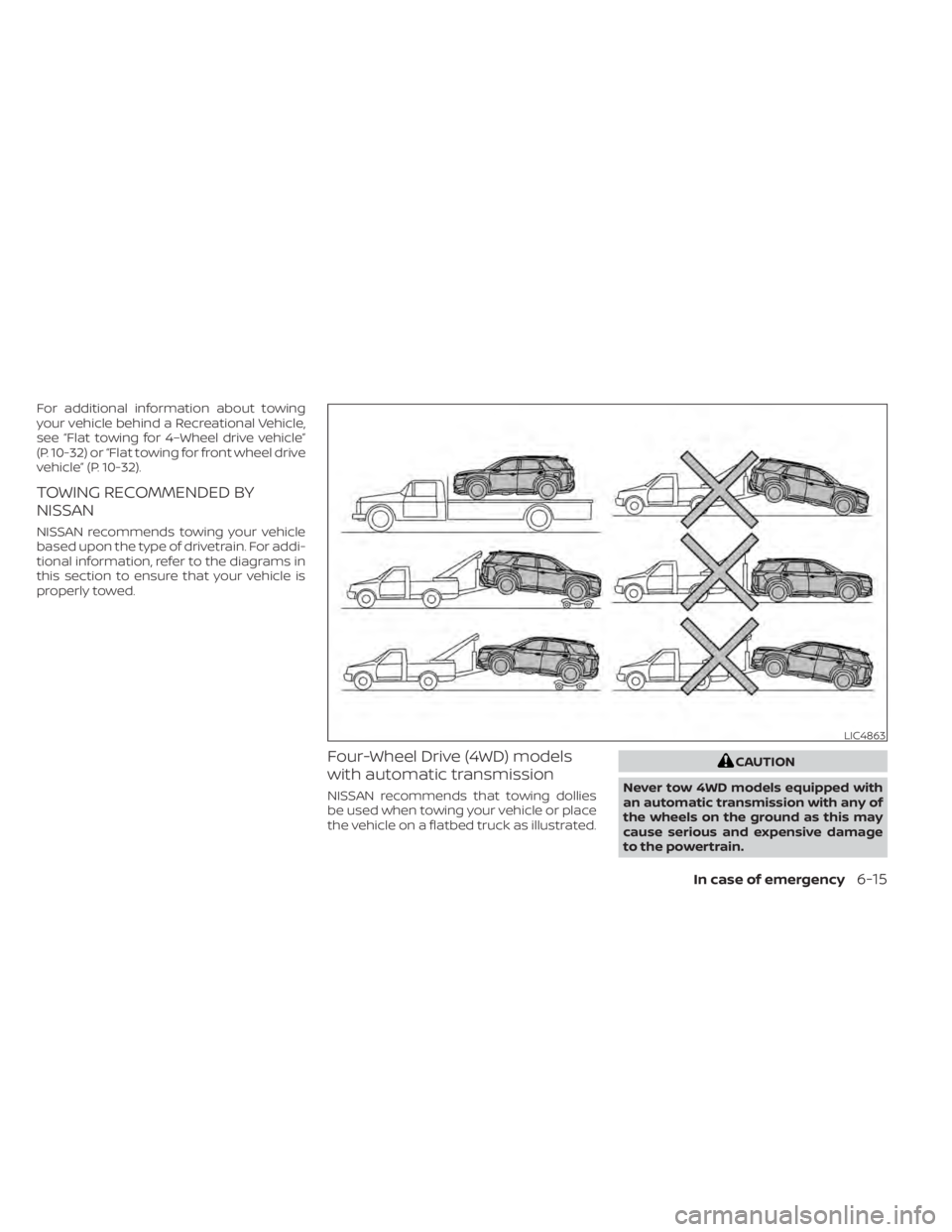
For additional information about towing
your vehicle behind a Recreational Vehicle,
see “Flat towing for 4–Wheel drive vehicle”
(P. 10-32) or “Flat towing for front wheel drive
vehicle” (P. 10-32).
TOWING RECOMMENDED BY
NISSAN
NISSAN recommends towing your vehicle
based upon the type of drivetrain. For addi-
tional information, refer to the diagrams in
this section to ensure that your vehicle is
properly towed.
Four-Wheel Drive (4WD) models
with automatic transmission
NISSAN recommends that towing dollies
be used when towing your vehicle or place
the vehicle on a flatbed truck as illustrated.
CAUTION
Never tow 4WD models equipped with
an automatic transmission with any of
the wheels on the ground as this may
cause serious and expensive damage
to the powertrain.
LIC4863
In case of emergency6-15