2023 NISSAN MURANO sonar
[x] Cancel search: sonarPage 13 of 518
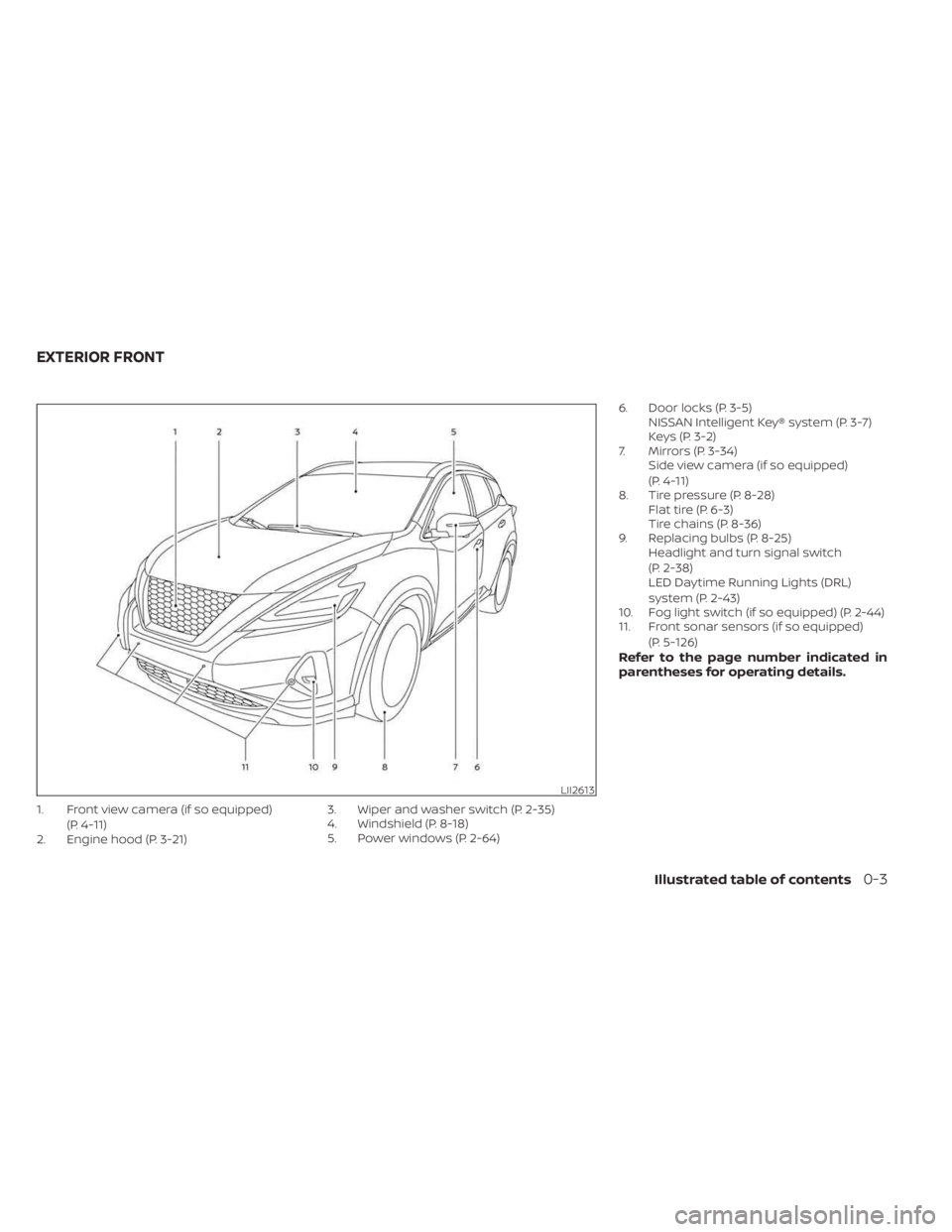
1. Front view camera (if so equipped)(P. 4-11)
2. Engine hood (P. 3-21) 3. Wiper and washer switch (P. 2-35)
4. Windshield (P. 8-18)
5. Power windows (P. 2-64)6. Door locks (P. 3-5)
NISSAN Intelligent Key® system (P. 3-7)
Keys (P. 3-2)
7. Mirrors (P. 3-34) Side view camera (if so equipped)
(P. 4-11)
8. Tire pressure (P. 8-28) Flat tire (P. 6-3)
Tire chains (P. 8-36)
9. Replacing bulbs (P. 8-25) Headlight and turn signal switch
(P. 2-38)
LED Daytime Running Lights (DRL)
system (P. 2-43)
10. Fog light switch (if so equipped) (P. 2-44)
11. Front sonar sensors (if so equipped)
(P. 5-126)
Refer to the page number indicated in
parentheses for operating details.
LII2613
EXTERIOR FRONT
Illustrated table of contents0-3
Page 14 of 518

1. Rearview camera (P. 4-3, 4-11)
2. Rear wiper and washer switch (P. 2-36)
3. Lif tgate release (P. 3-22)4. Rear sonar sensors (P. 5-126)
5. Replacing bulbs (P. 8-25)6. Fuel-filler door (P. 3-28)
Fuel recommendation (P. 10-4)
Fuel-filler cap (P. 3-28)
7. Child safety rear door lock (P. 3-7)
Refer to the page number indicated in
parentheses for operating details.
LII2576
EXTERIOR REAR
0-4Illustrated table of contents
Page 107 of 518
Operation
The MIL will come on in one of two ways:
• MIL on steady — An emission control sys-tem malfunction has been detected.
Check the fuel-filler cap if the Loose Fuel
Cap warning appears in the vehicle infor-
mation display. If the fuel-filler cap is loose
or missing, tighten or install the cap and
continue to drive the vehicle. The
light should turn off af ter a few driving
trips. If thelight does not turn off
af ter a few driving trips, have the vehicle
inspected. It is recommended that you
visit a NISSAN dealer for this service. You
do not need to have your vehicle towed
to the dealer.
• MIL blinking — An engine misfire has been detected which may damage the emis-
sion control system. To reduce or avoid
emission control system damage:– do not drive at speeds above 45 mph (72 km/h).
– avoid hard acceleration or decelera- tion.
– avoid steep uphill grades.
– if possible, reduce the amount of cargo being hauled or towed. The MIL may stop blinking and come on
steady. Have the vehicle inspected. It is rec-
ommended that you visit a NISSAN dealer
for this service. You do not need to have
your vehicle towed to the dealer.
CAUTION
Continued vehicle operation without
having the emission control system
checked and repaired as necessary
could lead to poor driveability, reduced
fuel economy, and possible damage to
the emission control system.
Master warning light
When the ignition switch is in the ON posi-
tion, the master warning light illuminates if
any of the following are displayed on the
vehicle information display:
• No Key Detected warning
• Low windshield washer fluid warning
• Door open warning (when vehicle is stopped)
• Low tire pressure warning
• Loose Fuel Cap warning
• Traffic Sign Recognition system fault (if so equipped) • Driver Attention Alert malfunction (if so
equipped)
• Push Engine Start Lock warning
• Key ID Incorrect warning
• I-Key System Fault warning
• CVT warning
• Sonar Parking Sensor Error warning
• LED Headlight Failure warning (when no other red warnings are on)
• Chassis Control warning
• Tire size incorrect warning
• AWD system error warning
• AWD high temperature warning
For additional information, see “Vehicle in-
formation display” (P. 2-18).
Power steering warning
light
WARNING
• If the engine is not running or is
turned off while driving, the power
assist for the steering will not work.
Steering will be harder to operate.
Instruments and controls2-15
Page 112 of 518
Driver Assistance
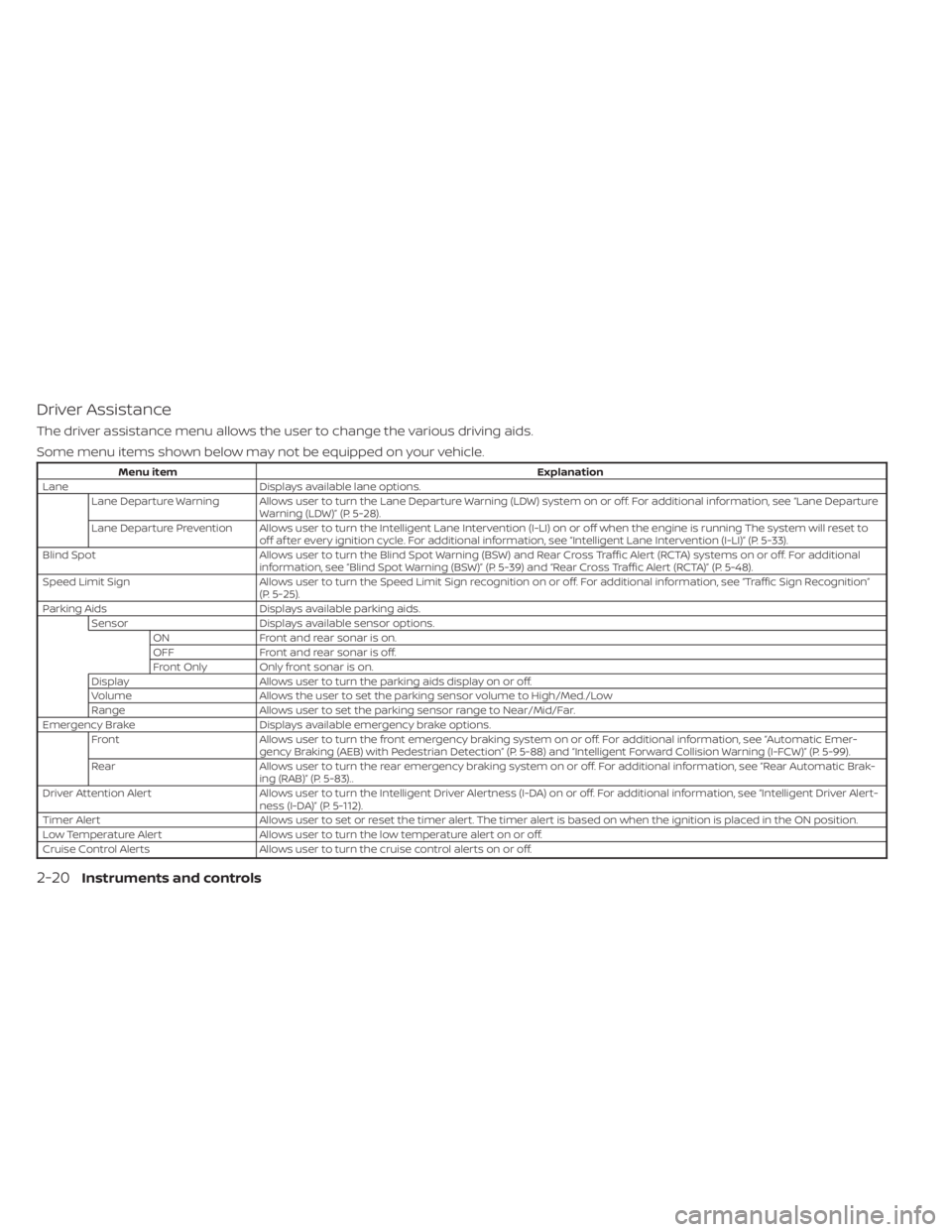
The driver assistance menu allows the user to change the various driving aids.
Some menu items shown below may not be equipped on your vehicle.
Menu itemExplanation
Lane Displays available lane options.
Lane Departure Warning Allows user to turn the Lane Departure Warning (LDW) system on or off. For additional information, see “Lane Departure Warning (LDW)” (P. 5-28).
Lane Departure Prevention Allows user to turn the Intelligent Lane Intervention (I-LI) on or off when the engine is running The system will reset to off af ter every ignition cycle. For additional information, see “Intelligent Lane Intervention (I-LI)” (P. 5-33).
Blind Spot Allows user to turn the Blind Spot Warning (BSW) and Rear Cross Traffic Alert (RCTA) systems on or off. For additional
information, see “Blind Spot Warning (BSW)” (P. 5-39) and “Rear Cross Traffic Alert (RCTA)” (P. 5-48).
Speed Limit Sign Allows user to turn the Speed Limit Sign recognition on or off. For additional information, see “Traffic Sign Recognition”
(P. 5-25).
Parking Aids Displays available parking aids.
Sensor Displays available sensor options.
ON Front and rear sonar is on.
OFF Front and rear sonar is off.
Front Only Only front sonar is on.
Display Allows user to turn the parking aids display on or off.
Volume Allows the user to set the parking sensor volume to High/Med./Low
Range Allows user to set the parking sensor range to Near/Mid/Far.
Emergency Brake Displays available emergency brake options.
Front Allows user to turn the front emergency braking system on or off. For additional information, see “Automatic Emer-
gency Braking (AEB) with Pedestrian Detection” (P. 5-88) and “Intelligent Forward Collision Warning (I-FCW)” (P. 5-99).
Rear Allows user to turn the rear emergency braking system on or off. For additional information, see “Rear Automatic Brak-
ing (RAB)” (P. 5-83)..
Driver Attention Alert Allows user to turn the Intelligent Driver Alertness (I-DA) on or off. For additional information, see “Intelligent Driver Al ert-
ness (I-DA)” (P. 5-112).
Timer Alert Allows user to set or reset the timer alert. The timer alert is based on when the ignition is placed in the ON position.
Low Temperature Alert Allows user to turn the low temperature alert on or off.
Cruise Control Alerts Allows user to turn the cruise control alerts on or off.
2-20Instruments and controls
Page 123 of 518
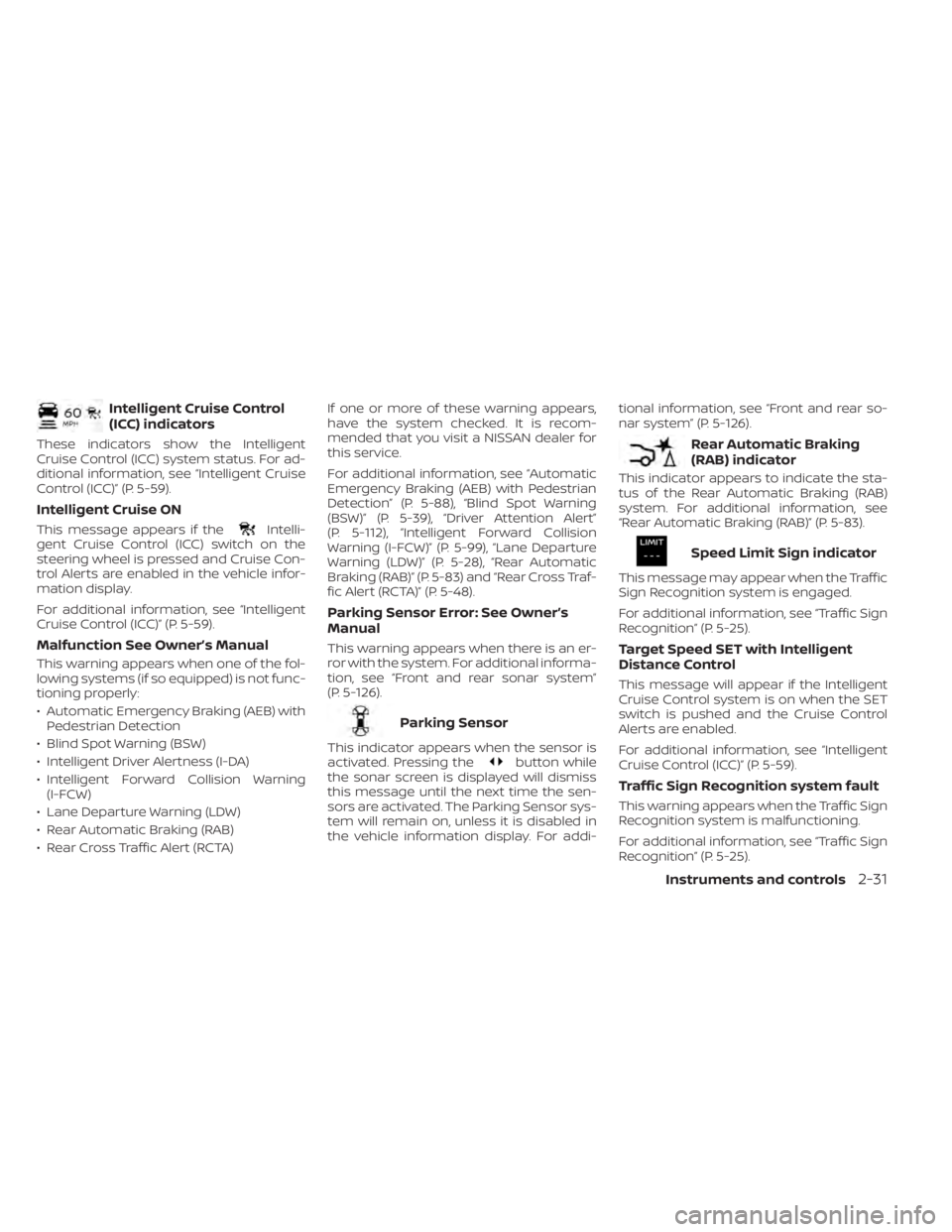
Intelligent Cruise Control
(ICC) indicators
These indicators show the Intelligent
Cruise Control (ICC) system status. For ad-
ditional information, see “Intelligent Cruise
Control (ICC)” (P. 5-59).
Intelligent Cruise ON
This message appears if theIntelli-
gent Cruise Control (ICC) switch on the
steering wheel is pressed and Cruise Con-
trol Alerts are enabled in the vehicle infor-
mation display.
For additional information, see “Intelligent
Cruise Control (ICC)” (P. 5-59).
Malfunction See Owner’s Manual
This warning appears when one of the fol-
lowing systems (if so equipped) is not func-
tioning properly:
• Automatic Emergency Braking (AEB) with Pedestrian Detection
• Blind Spot Warning (BSW)
• Intelligent Driver Alertness (I-DA)
• Intelligent Forward Collision Warning (I-FCW)
• Lane Departure Warning (LDW)
• Rear Automatic Braking (RAB)
• Rear Cross Traffic Alert (RCTA) If one or more of these warning appears,
have the system checked. It is recom-
mended that you visit a NISSAN dealer for
this service.
For additional information, see “Automatic
Emergency Braking (AEB) with Pedestrian
Detection” (P. 5-88), “Blind Spot Warning
(BSW)” (P. 5-39), “Driver Attention Alert”
(P. 5-112), “Intelligent Forward Collision
Warning (I-FCW)” (P. 5-99), “Lane Departure
Warning (LDW)” (P. 5-28), “Rear Automatic
Braking (RAB)” (P. 5-83) and “Rear Cross Traf-
fic Alert (RCTA)” (P. 5-48).
Parking Sensor Error: See Owner’s
Manual
This warning appears when there is an er-
ror with the system. For additional informa-
tion, see “Front and rear sonar system”
(P. 5-126).
Parking Sensor
This indicator appears when the sensor is
activated. Pressing thebutton while
the sonar screen is displayed will dismiss
this message until the next time the sen-
sors are activated. The Parking Sensor sys-
tem will remain on, unless it is disabled in
the vehicle information display. For addi- tional information, see “Front and rear so-
nar system” (P. 5-126).
Rear Automatic Braking
(RAB) indicator
This indicator appears to indicate the sta-
tus of the Rear Automatic Braking (RAB)
system. For additional information, see
“Rear Automatic Braking (RAB)” (P. 5-83).
Speed Limit Sign indicator
This message may appear when the Traffic
Sign Recognition system is engaged.
For additional information, see “Traffic Sign
Recognition” (P. 5-25).
Target Speed SET with Intelligent
Distance Control
This message will appear if the Intelligent
Cruise Control system is on when the SET
switch is pushed and the Cruise Control
Alerts are enabled.
For additional information, see “Intelligent
Cruise Control (ICC)” (P. 5-59).
Traffic Sign Recognition system fault
This warning appears when the Traffic Sign
Recognition system is malfunctioning.
For additional information, see “Traffic Sign
Recognition” (P. 5-25).
Instruments and controls2-31
Page 219 of 518
When the camera is first activated with the
bird’s-eye view in the display, a red icon (if so
equipped) will flash on the screen. This
indicates that the sonar system (if so
equipped) is activated. For additional infor-
mation on the front and rear sonar system
(if so equipped), see “Front and rear sonar
system” (P. 5-126).
The screen displayed on the Intelligent
Around View® Monitor will automatically re-
turn to the previous screen 3 minutes af ter
the CAMERA button has been pressed with
the shif t lever in a position other than the R
(Reverse) position.
Available views
WARNING
• The distance guide lines and the ve-
hicle width lines should be used as a
reference only when the vehicle is on
a paved, level surface. The apparent
distance viewed on the monitor may
be different than the actual distance
between the vehicle and displayed
objects. •
Use the displayed lines and the bird’s-
eye view as a reference. The lines and
the bird’s-eye view are greatly af-
fected by the number of occupants,
cargo, fuel level, vehicle position, road
condition and road grade.
• If the tires are replaced with different
sized tires, the predicted course lines
and the bird's-eye view may be dis-
played incorrectly.
• When driving the vehicle up a hill,
objects viewed in the monitor are
further than they appear. When driv-
ing the vehicle down a hill, objects
viewed in the monitor are closer than
they appear.
• Objects in the rear view will appear
visually opposite compared to when
viewed in the monitor and outside
mirrors.
• Use the mirrors or actually look to
properly judge distances to other
objects.
• On a snow-covered or slippery road,
there may be a difference between
the predicted course lines and the
actual course line. •
The vehicle width and predicted
course lines are wider than the actual
width and course.
• The displayed lines will appear
slightly off to the right, because the
rearview camera is not installed in
the rear center of the vehicle.
Monitor, climate, audio, phone and voice recognition systems4-13
Page 243 of 518
System maintenance......................5-110
Intelligent Driver Alertness (I-DA) ...............5-112
Intelligent Driver Alertness system
operation .................................. 5-112
How to enable/disable the Intelligent
Driver Alertness (I-DA) system ..............5-113
Intelligent Driver Alertness (I-DA)
system limitations ......................... 5-114
Break-in schedule ............................. 5-115
Fuel efficient driving tips .......................5-115
Increasing fuel economy ......................5-116
All-Wheel Drive (AWD) (if so equipped) ...........5-117
Parking/parking on hills .......................5-119
Power steering ................................ 5-120
Brake system ................................. 5-121
Brake precautions .......................... 5-121
Anti-lock Braking System (ABS) .............5-121
Brake Assist ................................ 5-123Vehicle Dynamic Control (VDC) system
........5-123
Rise-up and build-up ....................... 5-124
Brake force distribution ....................5-125
Hill start assist system ........................5-126
Front and rear sonar system (if so equipped) . . 5-126 System operation .......................... 5-127
How to enable/disable the front and
rear sonar system .......................... 5-129
Sonar limitations ........................... 5-130
System temporarily unavailable ............5-130
System maintenance ......................5-130
Cold weather driving .......................... 5-131
Freeing a frozen door lock ..................5-131
Antifreeze .................................. 5-131
Battery..................................... 5-131
Draining of coolant water ..................5-131
Tire equipment ............................. 5-131
Special winter equipment ..................5-132
Driving on snow or ice ......................5-132
Page 323 of 518

A chime sounds under the following conditions
and the control is automatically canceled:
• When the vehicle slows down more than8 mph (13 km/h) below the set speed
• When the shif t lever is not in the D (Drive) or manual shif t mode
• When the parking brake is applied
• When the VDC operates (including the traction control system)
• When a wheel slips
When the system is not operating properly,
the chime sounds and the color of the
cruise indicator will change to orange.
Action to take
If the color of the cruise indicator changes
to orange, stop the vehicle in a safe place
and place the shif t lever in the P (Park) po-
sition. Turn the engine off, restart the en-
gine, resume driving, and then perform the
setting again.
If it is not possible to set or the indicator
stays on, it may indicate that the system
is malfunctioning. Although the vehicle
is still drivable under normal conditions,
have the vehicle checked. It is recom-
mended that you visit a NISSAN dealer
for this service.
WARNING
Failure to follow the warnings and in-
structions for proper use of the RAB
system could result in serious injury or
death.
• The RAB system is a supplemental
aid to the driver. It is not a replace-
ment for proper driving procedures.
Always use the side and rear mirrors
and turn and look in the direction you
will move before and while backing
up. Never rely solely on the RAB sys-
tem. It is the driver’s responsibility to
stay alert, drive safely, and be in con-
trol of the vehicle at all times.
• There is a limitation to the RAB sys-
tem capability. The RAB system is not
effective in all situations.
•
Inclement weather or ultrasonic
sources such as an automatic car
wash, a truck’s compressed-air brakes
or a pneumatic drill may affect the
function of the system, this may in-
clude reduced performance or a false
activation.
The RAB system can assist the driver when
the vehicle is backing up and approaching
objects directly behind the vehicle. The RAB system detects obstacles behind
the vehicle using the parking sensors
O1
located on the rear bumper.
NOTE:
You can temporarily cancel the sonar
function in the vehicle, but the RAB sys-
tem will continue to operate. For addi-
tional information, please see “Front and
rear sonar system” (P. 5-126).
LSD3364
REAR AUTOMATIC BRAKING (RAB)
Starting and driving5-83