2023 NISSAN MURANO width
[x] Cancel search: widthPage 224 of 518
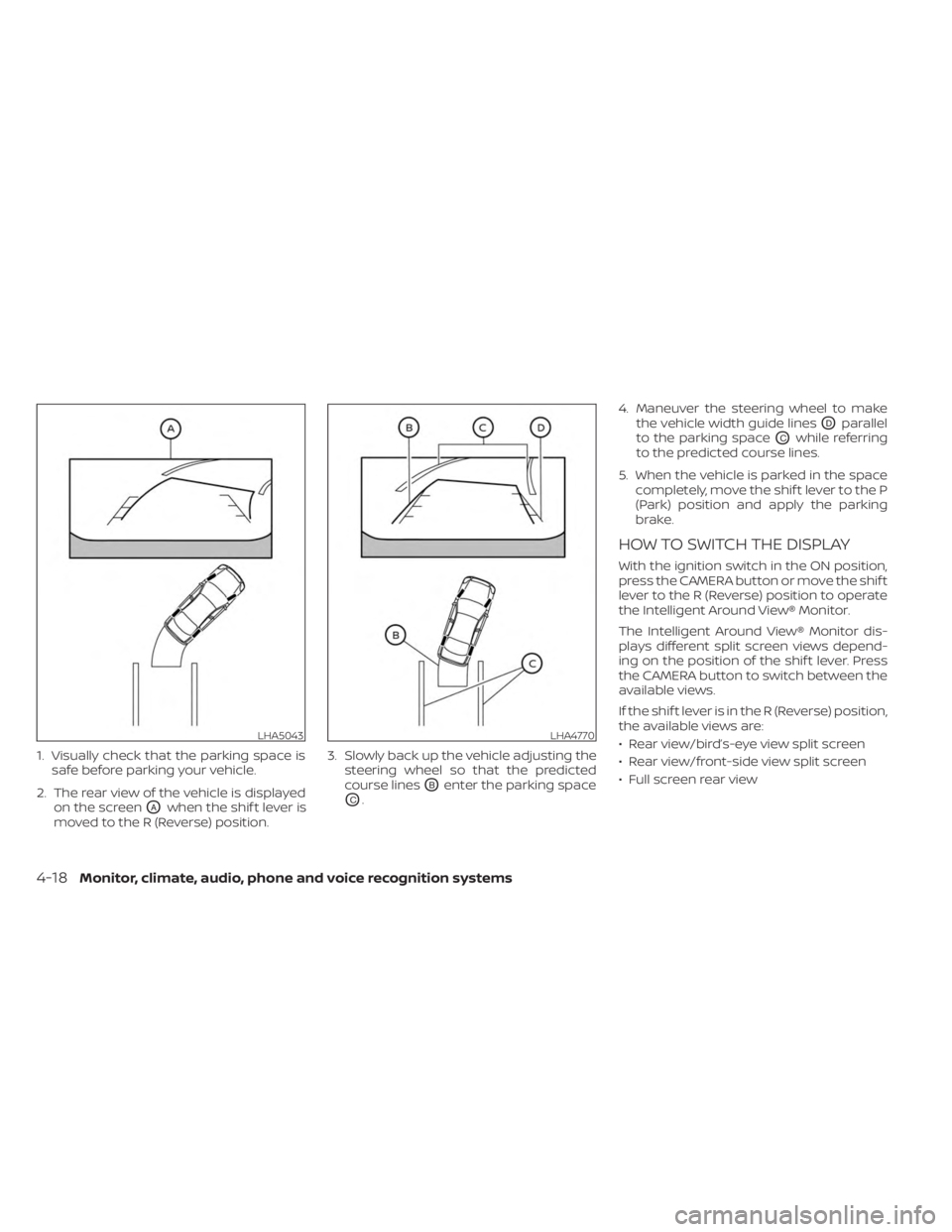
1. Visually check that the parking space issafe before parking your vehicle.
2. The rear view of the vehicle is displayed on the screen
OAwhen the shif t lever is
moved to the R (Reverse) position. 3. Slowly back up the vehicle adjusting the
steering wheel so that the predicted
course lines
OBenter the parking space
OC. 4. Maneuver the steering wheel to make
the vehicle width guide lines
ODparallel
to the parking space
OCwhile referring
to the predicted course lines.
5. When the vehicle is parked in the space completely, move the shif t lever to the P
(Park) position and apply the parking
brake.
HOW TO SWITCH THE DISPLAY
With the ignition switch in the ON position,
press the CAMERA button or move the shif t
lever to the R (Reverse) position to operate
the Intelligent Around View® Monitor.
The Intelligent Around View® Monitor dis-
plays different split screen views depend-
ing on the position of the shif t lever. Press
the CAMERA button to switch between the
available views.
If the shif t lever is in the R (Reverse) position,
the available views are:
• Rear view/bird’s-eye view split screen
• Rear view/front-side view split screen
• Full screen rear view
LHA5043LHA4770
4-18Monitor, climate, audio, phone and voice recognition systems
Page 271 of 518
LDW SYSTEM LIMITATIONS
WARNING
Listed below are the system limitations
for the LDW system. Failure to follow
the warnings and instructions for
proper use of the LDW system could re-
sult in serious injury or death.
• The system will not operate at
speeds below approximately 37 mph
(60 km/h) or if it cannot detect lane
markers.
• Do not use the LDW system under the
following conditions as it may not
function properly:
– During bad weather (rain, fog,
snow, etc.).
– When driving on slippery roads,
such as on ice or snow.
– When driving on winding or un-
even roads.
– When there is a lane closure due to
road repairs.
– When driving in a makeshif t or
temporary lane.
– When driving on roads where the
lane width is too narrow. –
When driving without normal tire
conditions (for example, tire wear,
low tire pressure, installation of
spare tire, tire chains, nonstan-
dard wheels).
– When the vehicle is equipped with
non-original brake parts or sus-
pension parts.
– When you are towing a trailer or
other vehicle.
• The system may not function prop-
erly under the following conditions:
– On roads where there are multiple
parallel lane markers; lane mark-
ers that are faded or not painted
clearly; yellow painted lane mark-
ers; non-standard lane markers;
or lane markers covered with wa-
ter, dirt, snow, etc.
– On roads where the discontinued
lane markers are still detectable.
– On roads where there are sharp
curves. –
On roads where there are sharply
contrasting objects, such as shad-
ows, snow, water, wheel ruts,
seams or lines remaining af ter
road repairs. (The LDW system
could detect these items as lane
markers.)
– On roads where the traveling lane
merges or separates.
– When the vehicle’s traveling direc-
tion does not align with the lane
marker.
– When traveling close to the ve-
hicle in front of you, which ob-
structs the lane camera unit de-
tection range.
– When rain, snow, dirt or an object
adheres to the windshield in front
of the lane camera unit.
– When the headlights are not
bright due to dirt on the lens or if
the aiming is not adjusted
properly.
– When strong light enters the lane
camera unit. (For example, the
light directly shines on the front of
the vehicle at sunrise or sunset.)
Starting and driving5-31
Page 276 of 518
Using “Settings” in the vehicle informa-
tion display:
1. Af ter starting the engine, press the
button until “Settings” displays in the ve-
hicle information display and then press
the OK button. Use the
button to
select “Driver Assistance.” Then press the
OK button.
2. Select “Lane” and press the OK button.
3. Select “Lane Departure Prevention” and press the OK button to turn the system
on or off.
I-LI SYSTEM LIMITATIONS
WARNING
Listed below are the system limitations
for the I-LI system. Failure to follow the
warnings and instructions for proper
use of the I-LI system could result in
serious injury or death.
• The I-LI system may activate if you
change lanes without first activating
your turn signal or, for example, if a
construction zone directs traffic to
cross an existing lane marker. If this
occurs you may need to apply correc-
tive steering to complete your lane
change. •
Because the I-LI may not activate un-
der the road, weather, and lane
marker conditions described in this
section, it may not activate every
time your vehicle begins to leave its
lane and you will need to apply cor-
rective steering.
• When the I-LI system is operating,
avoid excessive or sudden steering
maneuvers. Otherwise, you could
lose control of the vehicle.
• The I-LI system will not operate at
speeds below approximately 37 mph
(60 km/h) or if it cannot detect lane
markers.
• Do not use the I-LI system under the
following conditions as it may not
function properly:
– During bad weather (rain, fog,
snow, etc.).
– When driving on slippery roads,
such as on ice or snow.
– When driving on winding or un-
even roads.
– When there is a lane closure due to
road repairs.
– When driving in a makeshif t or
temporary lane. –
When driving on roads where the
lane width is too narrow.
–
When driving without normal tire conditions (for example, tire wear,
low tire pressure, installation of
spare tire, tire chains, non-
standard wheels).
– When the vehicle is equipped with
nonoriginal brake parts or sus-
pension parts.
– When you are towing a trailer or
other vehicle.
– On roads where there are multiple
parallel lane markers; lane mark-
ers that are faded or not painted
clearly; yellow painted lane mark-
ers; non-standard lane markers;
or lane markers covered with wa-
ter, dirt, snow, etc.
– On roads where discontinued lane
markers are still detectable.
– On roads where there are sharp
curves.
–
On roads where there are sharply contrasting objects, such as shad-
ows, snow, water, wheel ruts, seams
or lines remaining af ter road re-
pairs. (The I-LI system could detect
these items as lane markers.)
5-36Starting and driving
Page 282 of 518
NOTE:
• When enabling/disabling the system,the system will retain current settings
even if the engine is restarted.
• The RCTA system (if so equipped) is in- tegrated into the BSW system. There is
not a separate selection in the vehicle
information display for the RCTA sys-
tem. When the BSW is disabled, the
RCTA system is also disabled.
• When the BSW system is turned on, the BSW/RCTA indicator (white) in the ve-
hicle information display illuminates.
BSW SYSTEM LIMITATIONS
WARNING
Listed below are the system limitations
for the BSW system. Failure to operate
the vehicle in accordance with these
system limitations could result in seri-
ous injury or death.
• The BSW system cannot detect all ve-
hicles under all conditions.
• The radar sensors may not be able to
detect and activate BSW when cer-
tain objects are present such as:
– Pedestrian, bicycles, animals. –
Vehicles such as motorcycles, low
height vehicles, or high ground
clearance vehicles.
– Oncoming vehicles.
– Vehicles remaining in the detec-
tion zone when you accelerate
from a stop.
– A vehicle merging into an adjacent
lane at a speed approximately the
same as your vehicle.
– A vehicle approaching rapidly
from behind.
– A vehicle which your vehicle over-
takes rapidly.
– A vehicle that passes through the
detection zone quickly.
– When overtaking several vehicles
in a row, the vehicles af ter the first
vehicle may not be detected if
they are traveling close together.
• The radar sensor’s detection zone is
designed based on a standard lane
width. When driving in a wider lane,
the radar sensors may not detect ve-
hicles in an adjacent lane. When driv-
ing in a narrow lane, the radar sen-
sors may detect vehicles driving two
lanes away. •
The radar sensors are designed to ig-
nore most stationary objects; how-
ever, objects such as guardrails,
walls, foliage and parked vehicles
may occasionally be detected. This is
a normal operation condition.
• The following conditions may reduce
the ability of the radar to detect other
vehicles:
– Severe weather
– Road spray
– Ice/frost/snow/dirt build-up on
the vehicle
• Do not attach stickers (including
transparent material), install acces-
sories or apply additional paint near
the radar sensors. These conditions
may reduce the ability of the radar to
detect other vehicles.
• Excessive noise (for example, audio
system volume, open vehicle win-
dow) will interfere with the chime
sound, and it may not be heard.
5-42Starting and driving
Page 428 of 518
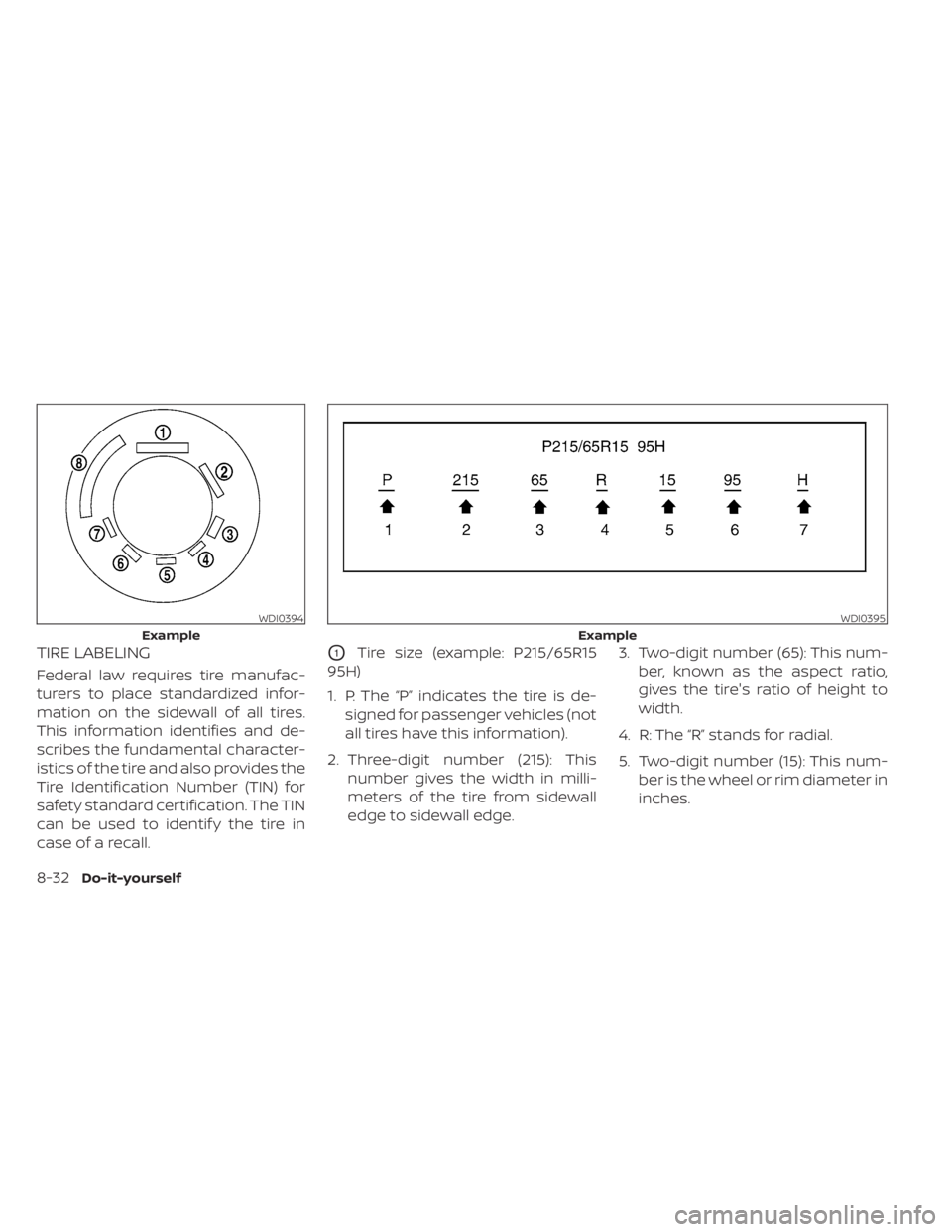
TIRE LABELING
Federal law requires tire manufac-
turers to place standardized infor-
mation on the sidewall of all tires.
This information identifies and de-
scribes the fundamental character-
istics of the tire and also provides the
Tire Identification Number (TIN) for
safety standard certification. The TIN
can be used to identif y the tire in
case of a recall.
O1Tire size (example: P215/65R15
95H)
1. P: The “P” indicates the tire is de- signed for passenger vehicles (not
all tires have this information).
2. Three-digit number (215): This number gives the width in milli-
meters of the tire from sidewall
edge to sidewall edge. 3. Two-digit number (65): This num-
ber, known as the aspect ratio,
gives the tire's ratio of height to
width.
4. R: The “R” stands for radial.
5. Two-digit number (15): This num- ber is the wheel or rim diameter in
inches.
WDI0394
Example
WDI0395
Example
8-32Do-it-yourself
Page 478 of 518
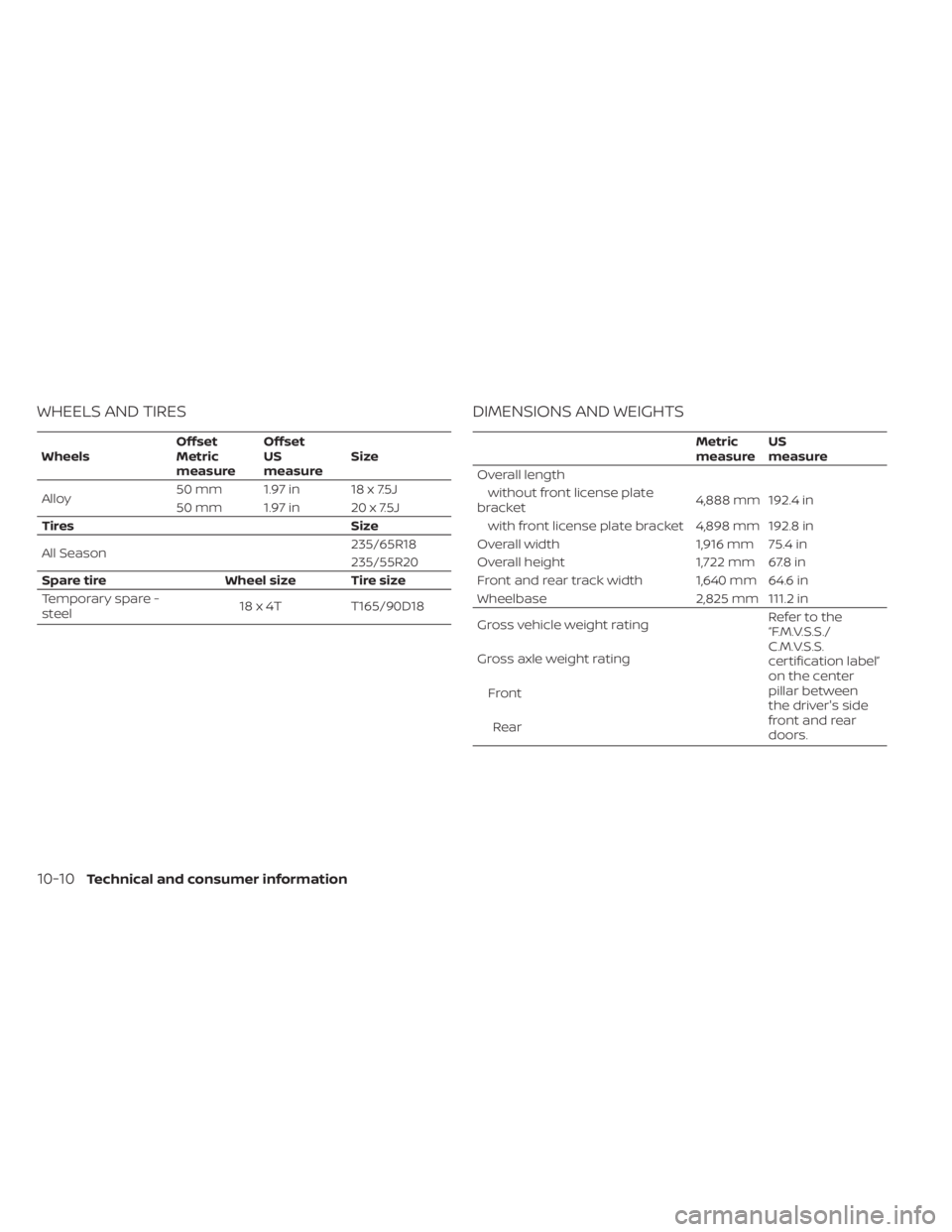
WHEELS AND TIRES
WheelsOffset
Metric
measureOffset
US
measure
Size
Alloy 50 mm 1.97 in 18 x 7.5J
50 mm 1.97 in 20 x 7.5J
Tires Size
All Season 235/65R18
235/55R20
Spare tire Wheel size Tire size
Temporary spare -
steel 18 x 4T T165/90D18
DIMENSIONS AND WEIGHTS
Metric
measureUS
measure
Overall length without front license plate
bracket 4,888 mm 192.4 in
with front license plate bracket 4,898 mm 192.8 in
Overall width 1,916 mm 75.4 in
Overall height 1,722 mm 67.8 in
Front and rear track width 1,640 mm 64.6 in
Wheelbase 2,825 mm 111.2 in
Gross vehicle weight rating Refertothe
“F.M.V.S.S./
C.M.V.S.S.
certification label”
on the center
pillar between
the driver's side
front and rear
doors.
Gross axle weight rating
FrontRear
10-10Technical and consumer information
Page 491 of 518
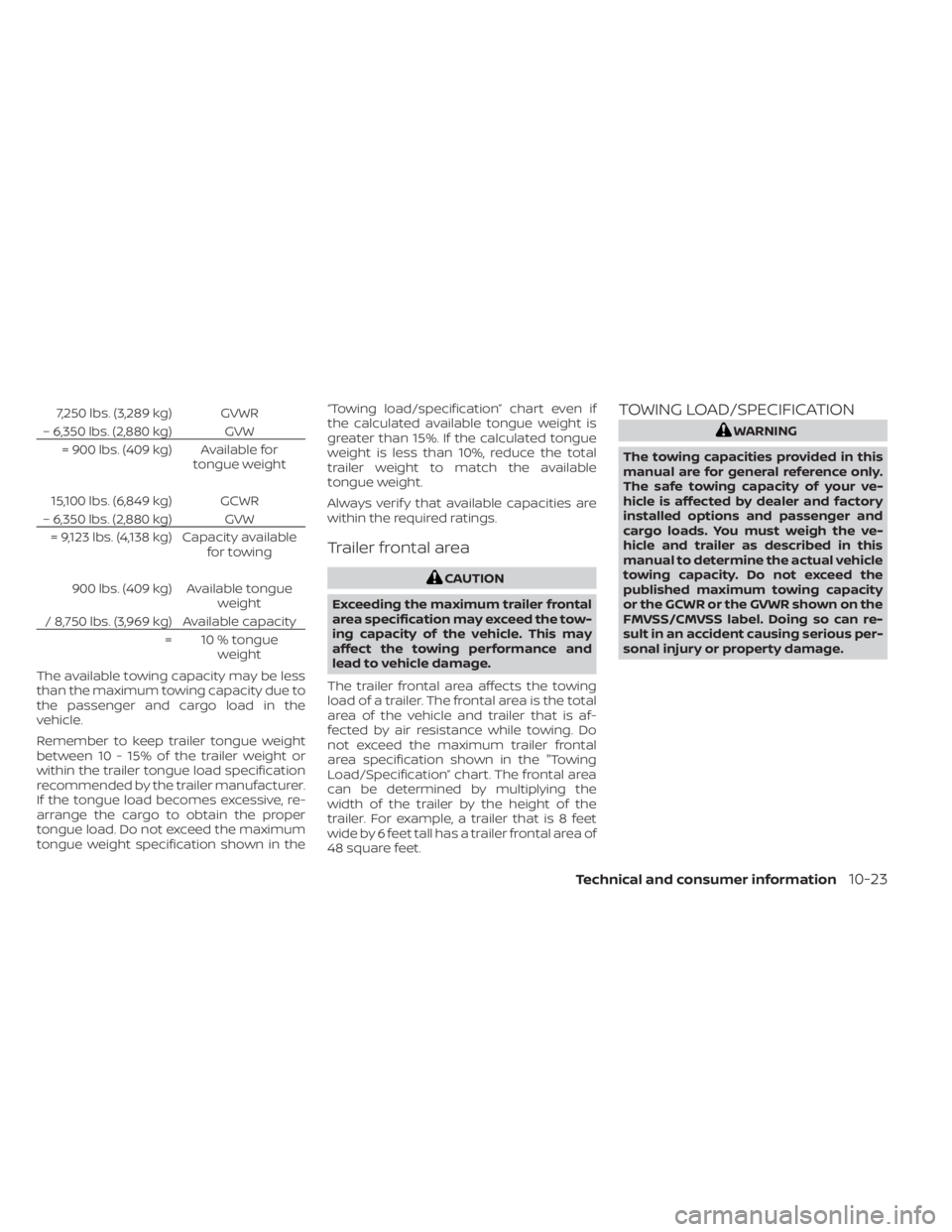
7,250 lbs. (3,289 kg) GVWR
– 6,350 lbs. (2,880 kg) GVW = 900 lbs. (409 kg) Available for tongue weight
15,100 lbs. (6,849 kg) GCWR
– 6,350 lbs. (2,880 kg) GVW = 9,123 lbs. (4,138 kg) Capacity available for towing
900 lbs. (409 kg) Available tongue weight
/ 8,750 lbs. (3,969 kg) Available capacity = 10 % tongueweight
The available towing capacity may be less
than the maximum towing capacity due to
the passenger and cargo load in the
vehicle.
Remember to keep trailer tongue weight
between 10 - 15% of the trailer weight or
within the trailer tongue load specification
recommended by the trailer manufacturer.
If the tongue load becomes excessive, re-
arrange the cargo to obtain the proper
tongue load. Do not exceed the maximum
tongue weight specification shown in the “Towing load/specification” chart even if
the calculated available tongue weight is
greater than 15%. If the calculated tongue
weight is less than 10%, reduce the total
trailer weight to match the available
tongue weight.
Always verif y that available capacities are
within the required ratings.
Trailer frontal area
CAUTION
Exceeding the maximum trailer frontal
area specification may exceed the tow-
ing capacity of the vehicle. This may
affect the towing performance and
lead to vehicle damage.
The trailer frontal area affects the towing
load of a trailer. The frontal area is the total
area of the vehicle and trailer that is af-
fected by air resistance while towing. Do
not exceed the maximum trailer frontal
area specification shown in the "Towing
Load/Specification” chart. The frontal area
can be determined by multiplying the
width of the trailer by the height of the
trailer. For example, a trailer that is 8 feet
wide by 6 feet tall has a trailer frontal area of
48 square feet.
TOWING LOAD/SPECIFICATION
WARNING
The towing capacities provided in this
manual are for general reference only.
The safe towing capacity of your ve-
hicle is affected by dealer and factory
installed options and passenger and
cargo loads. You must weigh the ve-
hicle and trailer as described in this
manual to determine the actual vehicle
towing capacity. Do not exceed the
published maximum towing capacity
or the GCWR or the GVWR shown on the
FMVSS/CMVSS label. Doing so can re-
sult in an accident causing serious per-
sonal injury or property damage.
Technical and consumer information10-23
Page 497 of 518
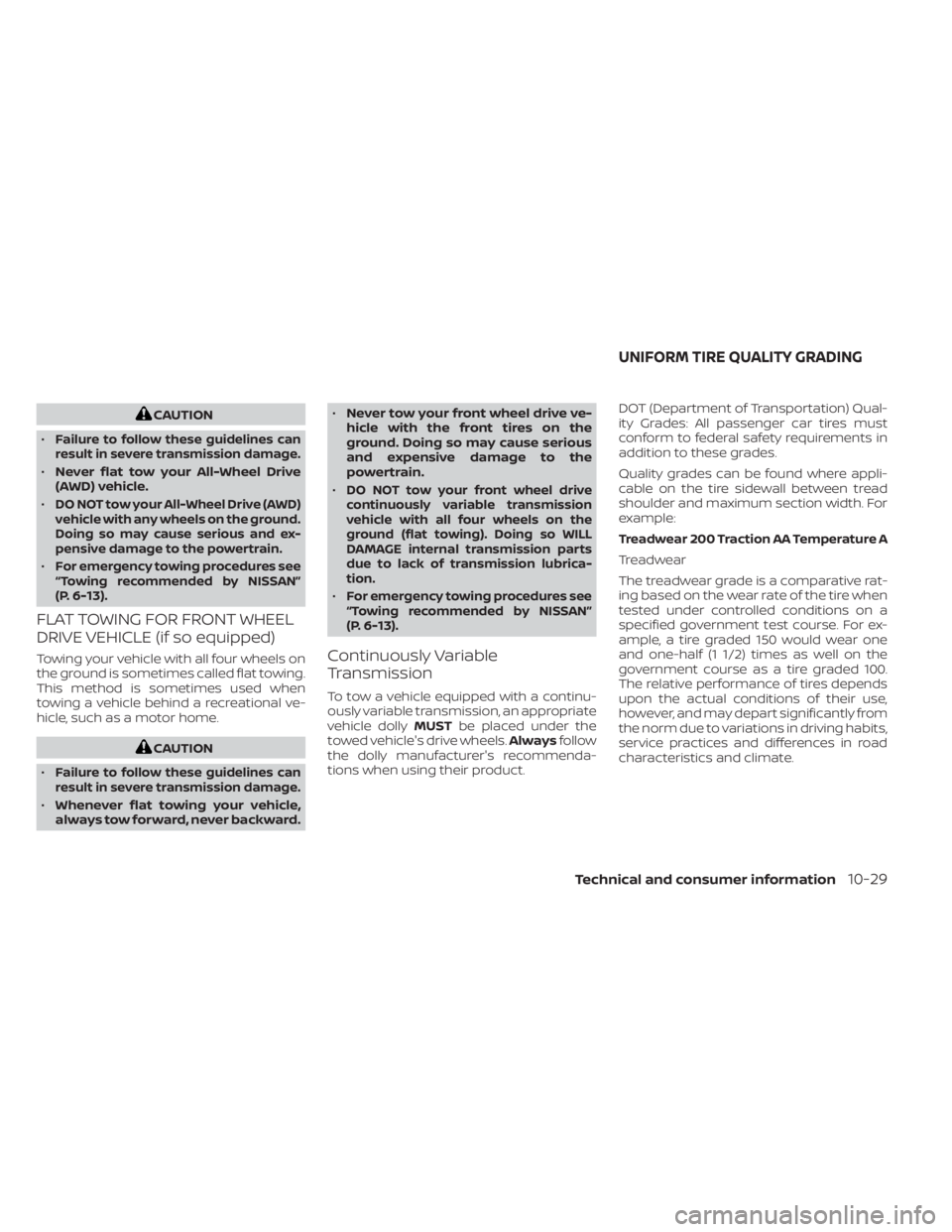
CAUTION
•
Failure to follow these guidelines can
result in severe transmission damage.
• Never flat tow your All-Wheel Drive
(AWD) vehicle.
•
DO NOT tow your All-Wheel Drive (AWD)
vehicle with any wheels on the ground.
Doing so may cause serious and ex-
pensive damage to the powertrain.
•For emergency towing procedures see
“Towing recommended by NISSAN”
(P. 6-13).
FLAT TOWING FOR FRONT WHEEL
DRIVE VEHICLE (if so equipped)
Towing your vehicle with all four wheels on
the ground is sometimes called flat towing.
This method is sometimes used when
towing a vehicle behind a recreational ve-
hicle, such as a motor home.
CAUTION
•
Failure to follow these guidelines can
result in severe transmission damage.
• Whenever flat towing your vehicle,
always tow forward, never backward. •
Never tow your front wheel drive ve-
hicle with the front tires on the
ground. Doing so may cause serious
and expensive damage to the
powertrain.
•
DO NOT tow your front wheel drive
continuously variable transmission
vehicle with all four wheels on the
ground (flat towing). Doing so WILL
DAMAGE internal transmission parts
due to lack of transmission lubrica-
tion.
•For emergency towing procedures see
“Towing recommended by NISSAN”
(P. 6-13).
Continuously Variable
Transmission
To tow a vehicle equipped with a continu-
ously variable transmission, an appropriate
vehicle dolly MUSTbe placed under the
towed vehicle's drive wheels. Alwaysfollow
the dolly manufacturer's recommenda-
tions when using their product. DOT (Department of Transportation) Qual-
ity Grades: All passenger car tires must
conform to federal safety requirements in
addition to these grades.
Quality grades can be found where appli-
cable on the tire sidewall between tread
shoulder and maximum section width. For
example:
Treadwear 200 Traction AA Temperature A
Treadwear
The treadwear grade is a comparative rat-
ing based on the wear rate of the tire when
tested under controlled conditions on a
specified government test course. For ex-
ample, a tire graded 150 would wear one
and one-half (1 1/2) times as well on the
government course as a tire graded 100.
The relative performance of tires depends
upon the actual conditions of their use,
however, and may depart significantly from
the norm due to variations in driving habits,
service practices and differences in road
characteristics and climate.
UNIFORM TIRE QUALITY GRADING
Technical and consumer information10-29