2023 NISSAN MICRA reset
[x] Cancel search: resetPage 164 of 346
∙ Refresh: Touch the “Refresh” key to scanand update the station list displayed on
the right side of the AM Menu screen.
(SEEK/TRACK) buttons
Press the
orbuttons to tune
from low to high or high to low frequencies
and to stop at the next broadcasting sta-
tion.
1 to 6 Station memory operations
Up to six stations can be registered in the
preset list.
1. Select the AM radio band.
2. Tune to the station you wish to store.
3. Touch and hold one of the preset num- bers in the preset list.
The information such as frequency will be
displayed on the preset list.
To select and listen to the preset stations,
push
on the steering wheel briefly or
touch a preferred station on the preset list
on the radio screen.
FM radio operation
Press theMENU button and touch the
“FM” key or press the AUDIO button and
select FM on the bottom of the Launch Bar
to bring up the FM display screen.
If another audio source is playing when the
“FM” key is pressed, the audio source play-
ing will automatically be turned off and the
last radio station played will begin playing.
The FM stereo indicator (STEREO) is shown
on the screen during FM stereo reception.
When the stereo broadcast signal is weak,
the radio automatically changes from ste-
reo to monaural reception.
FM Menu
Touch the “FM” Menu key to display the FM
Menu screen options:
∙ SCAN: To scan tune the stations, touch the “FM Menu” key on the radio screen
and then touch the “SCAN” key. The sta-
tions will be tuned from low to high fre-
quencies and stop at each broadcast-
ing stations for several seconds.
Touching the “SCAN” key again during
this period of several seconds will stop
tuning and the radio will remain tuned
to that station. ∙ Refresh: Touch the “Refresh” key to up-
date the station list displayed on the
right side of the FM Menu screen.
∙ RDS Info: Radio station and song infor- mation can be displayed on the FM dis-
play screen.
(SEEK/TRACK) buttons
Press the
orbuttons to tune
from low to high or high to low frequencies
and to stop at the next broadcasting sta-
tion.
1 to 12 Station memory operations
Up to 12 stations can be registered in the
preset list.
1. Select the FM radio band.
2. Tune to the station you wish to store.
3. Touch and hold one of the preset num- bers in the preset list.
The information such as frequency will be
displayed on the preset list.
To select and listen to the preset stations,
push
on the steering wheel briefly or
touch a preferred station on the preset list
on the radio screen.
Heater, air conditioner, audio and phone systems4-35
Page 176 of 346
STEERING WHEEL SWITCH FOR
AUDIO CONTROL
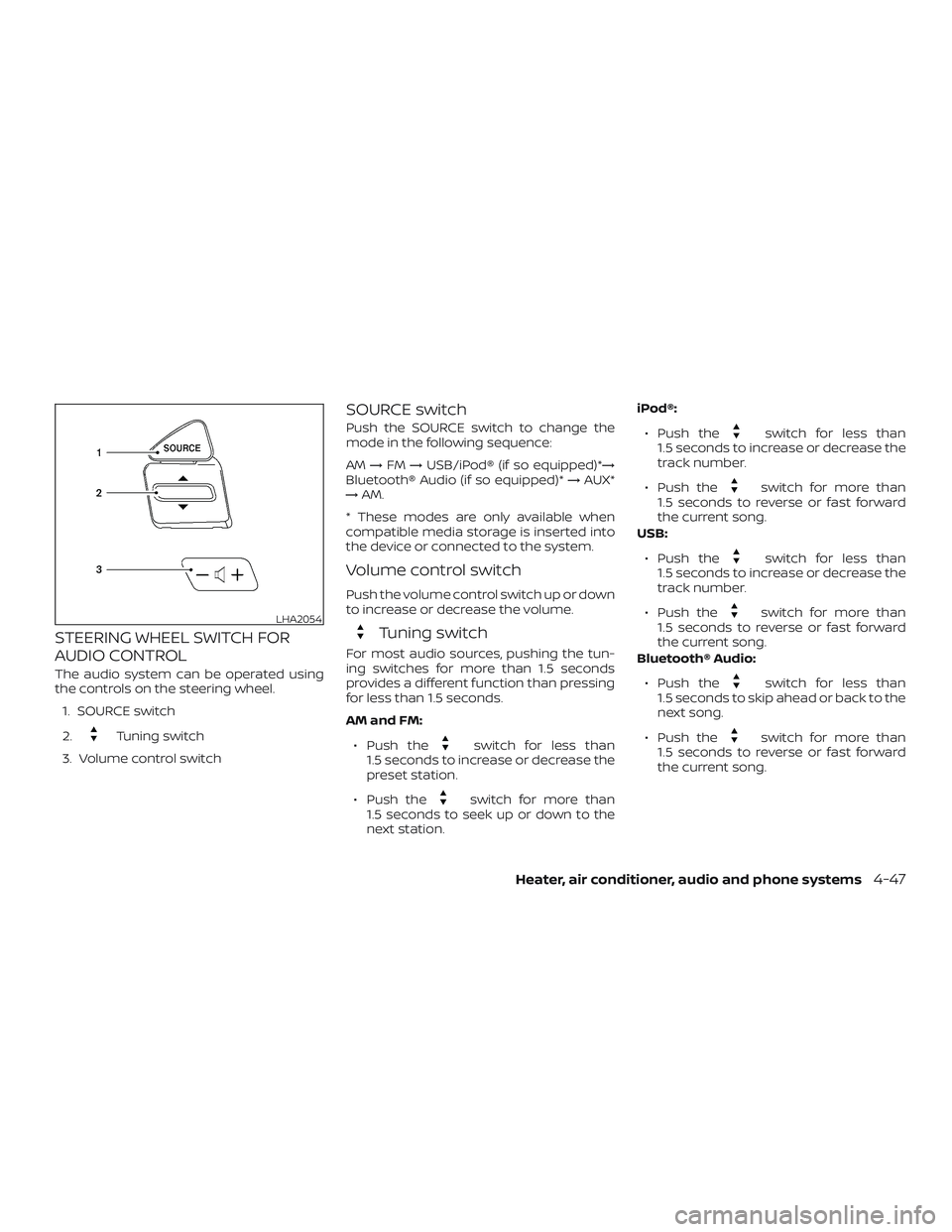
The audio system can be operated using
the controls on the steering wheel.1. SOURCE switch
2.
Tuning switch
3. Volume control switch
SOURCE switch
Push the SOURCE switch to change the
mode in the following sequence:
AM →FM →USB/iPod® (if so equipped)*→
Bluetooth® Audio (if so equipped)* →AUX*
→ AM.
* These modes are only available when
compatible media storage is inserted into
the device or connected to the system.
Volume control switch
Push the volume control switch up or down
to increase or decrease the volume.
Tuning switch
For most audio sources, pushing the tun-
ing switches for more than 1.5 seconds
provides a different function than pressing
for less than 1.5 seconds.
AM and FM:
∙ Push the
switch for less than
1.5 seconds to increase or decrease the
preset station.
∙ Push the
switch for more than
1.5 seconds to seek up or down to the
next station. iPod®:
∙ Push the
switch for less than
1.5 seconds to increase or decrease the
track number.
∙ Push the
switch for more than
1.5 seconds to reverse or fast forward
the current song.
USB:
∙ Push the
switch for less than
1.5 seconds to increase or decrease the
track number.
∙ Push the
switch for more than
1.5 seconds to reverse or fast forward
the current song.
Bluetooth® Audio:
∙ Push the
switch for less than
1.5 seconds to skip ahead or back to the
next song.
∙ Push the
switch for more than
1.5 seconds to reverse or fast forward
the current song.
LHA2054
Heater, air conditioner, audio and phone systems4-47
Page 212 of 346
Fail-safe
When the fail-safe operation occurs, the
Automatic Transmission will be locked in
any of the forward gears depending on
conditions.
If the vehicle is driven under extreme
conditions, such as excessive wheel
spinning and subsequent hard braking,
the fail-safe system may be activated.
This will occur even if all electrical cir-
cuits are functioning properly. In this
case:∙ Place the shif t lever in the P (Park)
position.
∙ Place the ignition switch in the OFF
position and wait for 3 seconds.
∙ Then place the ignition switch back in
the ON position.
The vehicle should return to its normal
operating condition. If it does not return
to its normal operating condition, have
the transmission checked and repaired,
if necessary. It is recommended that you
visit a NISSAN dealer for this service.
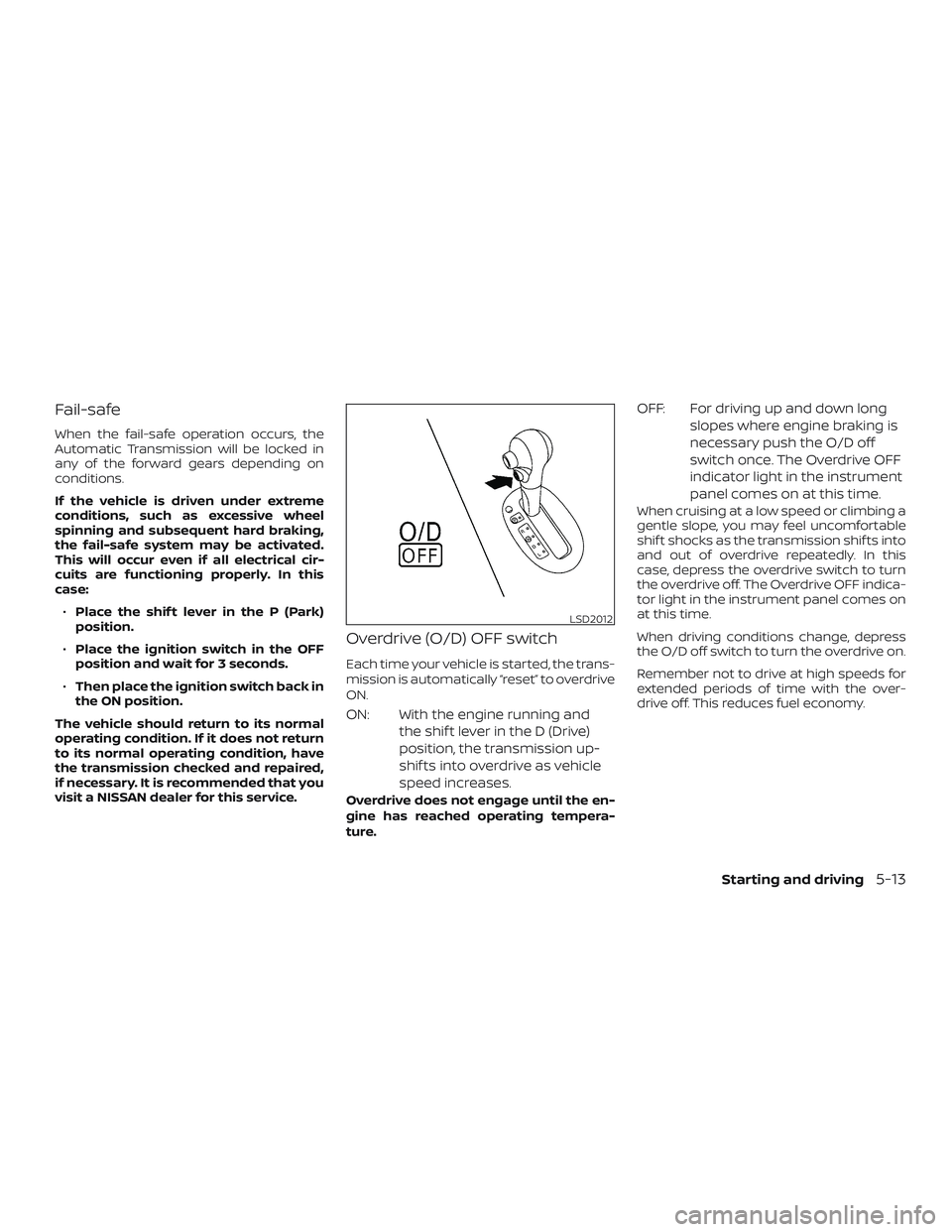
Overdrive (O/D) OFF switch
Each time your vehicle is started, the trans-
mission is automatically “reset” to overdrive
ON.
ON: With the engine running and the shif t lever in the D (Drive)
position, the transmission up-
shif ts into overdrive as vehicle
speed increases.
Overdrive does not engage until the en-
gine has reached operating tempera-
ture.
OFF: For driving up and down longslopes where engine braking is
necessary push the O/D off
switch once. The Overdrive OFF
indicator light in the instrument
panel comes on at this time.
When cruising at a low speed or climbing a
gentle slope, you may feel uncomfortable
shif t shocks as the transmission shif ts into
and out of overdrive repeatedly. In this
case, depress the overdrive switch to turn
the overdrive off. The Overdrive OFF indica-
tor light in the instrument panel comes on
at this time.
When driving conditions change, depress
the O/D off switch to turn the overdrive on.
Remember not to drive at high speeds for
extended periods of time with the over-
drive off. This reduces fuel economy.
LSD2012
Starting and driving5-13
Page 216 of 346
PRECAUTIONS ON CRUISE
CONTROL
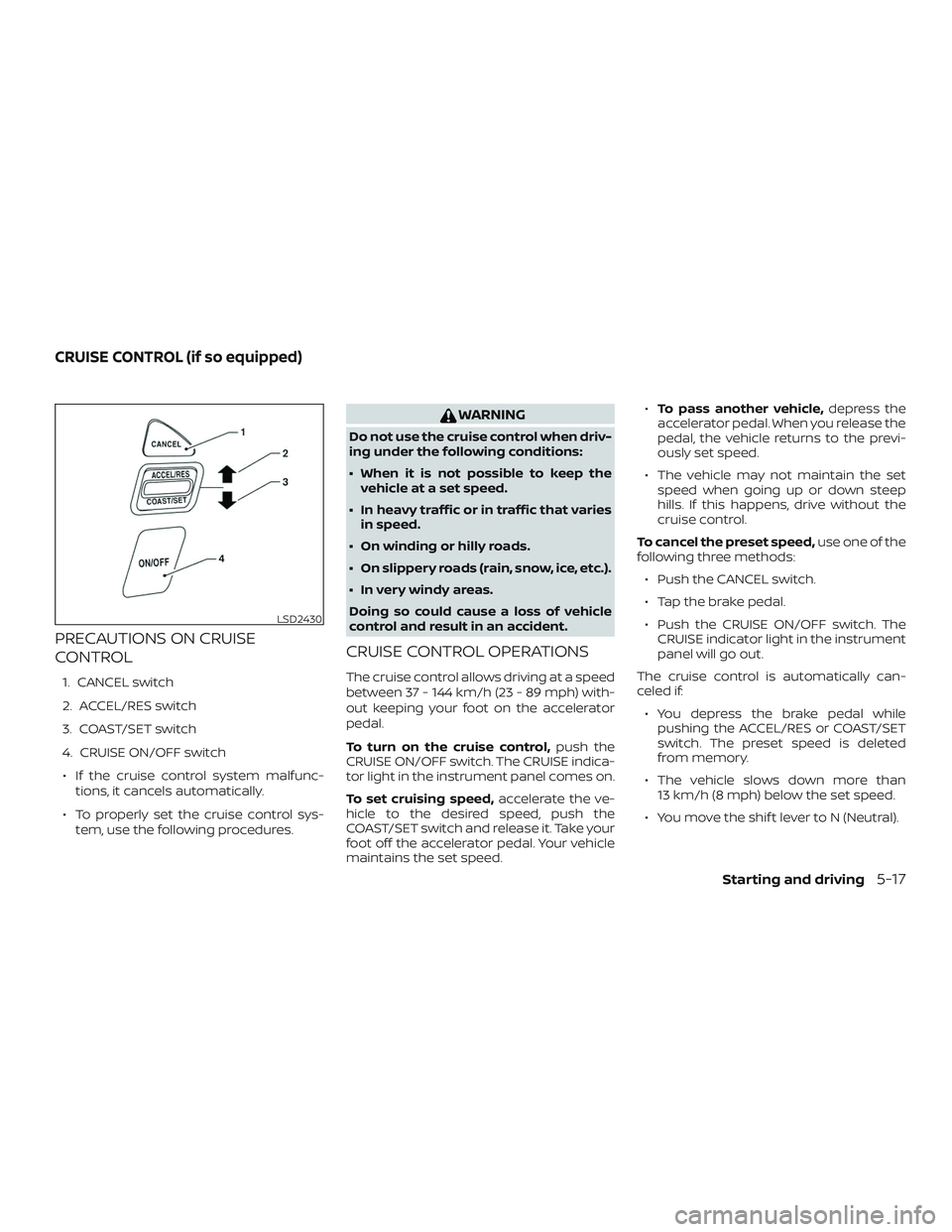
1. CANCEL switch
2. ACCEL/RES switch
3. COAST/SET switch
4. CRUISE ON/OFF switch∙ If the cruise control system malfunc- tions, it cancels automatically.
∙ To properly set the cruise control sys- tem, use the following procedures.
WARNING
Do not use the cruise control when driv-
ing under the following conditions:
∙ When it is not possible to keep thevehicle at a set speed.
∙ In heavy traffic or in traffic that varies in speed.
∙ On winding or hilly roads.
∙ On slippery roads (rain, snow, ice, etc.).
∙ In very windy areas.
Doing so could cause a loss of vehicle
control and result in an accident.
CRUISE CONTROL OPERATIONS
The cruise control allows driving at a speed
between 37 - 144 km/h (23 - 89 mph) with-
out keeping your foot on the accelerator
pedal.
To turn on the cruise control, push the
CRUISE ON/OFF switch. The CRUISE indica-
tor light in the instrument panel comes on.
To set cruising speed, accelerate the ve-
hicle to the desired speed, push the
COAST/SET switch and release it. Take your
foot off the accelerator pedal. Your vehicle
maintains the set speed. ∙
To pass another vehicle, depress the
accelerator pedal. When you release the
pedal, the vehicle returns to the previ-
ously set speed.
∙ The vehicle may not maintain the set speed when going up or down steep
hills. If this happens, drive without the
cruise control.
To cancel the preset speed, use one of the
following three methods:
∙ Push the CANCEL switch.
∙ Tap the brake pedal.
∙ Push the CRUISE ON/OFF switch. The CRUISE indicator light in the instrument
panel will go out.
The cruise control is automatically can-
celed if: ∙ You depress the brake pedal while pushing the ACCEL/RES or COAST/SET
switch. The preset speed is deleted
from memory.
∙ The vehicle slows down more than 13 km/h (8 mph) below the set speed.
∙ You move the shif t lever to N (Neutral).
LSD2430
CRUISE CONTROL (if so equipped)
Starting and driving5-17
Page 217 of 346
To reset at a faster cruising speed,use
one of the following three methods:
∙ Depress the accelerator pedal. When the vehicle attains the desired speed,
push and release the COAST/SET
switch.
∙ Push and hold the ACCEL/RES switch. When the vehicle attains the speed you
desire, release the switch.
∙ Push and release the ACCEL/RES switch. Each time you do this, the set
speed increases by about 1.6 km/h
(1 mph).
To reset at a slower cruising speed, use
one of the following three methods:
∙ Lightly tap the brake pedal. When the vehicle attains the desired speed, push
the COAST/SET switch and release it.
∙ Push and hold the COAST/SET switch. Release the switch when the vehicle
slows to the desired speed.
∙ Push and release the COAST/SET switch. Each time you do this, the set
speed decreases by about 1.6 km/h
(1 mph). To resume the preset speed,
push and
release the ACCEL/RES switch. The vehicle
returns to the last set cruising speed when
the vehicle speed is over 37 km/h (23 mph).CAUTION
During the first 2,000 km (1,200 miles),
follow these recommendations to ob-
tain maximum engine performance
and ensure the future reliability and
economy of your new vehicle. Failure to
follow these recommendations may re-
sult in shortened engine life and re-
duced engine performance.
∙ Avoid driving for long periods at con- stant speed, either fast or slow, and do
not run the engine over 4,000 rpm.
∙ Do not accelerate at full throttle in any gear.
∙ Avoid quick starts.
∙ Avoid hard braking as much as pos- sible.
BREAK-IN SCHEDULE
5-18Starting and driving
Page 225 of 346
to prevent one drive wheel from slipping by
transferring power to a non slipping drive
wheel. The
indicator light flashes if
this occurs. All other VDC functions are off
and the
indicator light will not flash.
The VDC system is automatically reset to
on when the ignition switch is placed in the
off position then back to the on position.
The computer has a built-in diagnostic fea-
ture that tests the system each time you
start the engine and move the vehicle for-
ward or in reverse at a slow speed. When
the self-test occurs, you may hear a clunk
noise and/or feel a pulsation in the brake
pedal. This is normal and is not an indica-
tion of a malfunction.
WARNING
∙ The VDC system is designed to help the driver maintain stability but does
not prevent accidents due to abrupt
steering operation at high speeds or
by careless or dangerous driving
techniques. Reduce vehicle speed and
be especially careful when driving and
cornering on slippery surfaces and al-
ways drive carefully. ∙ Do not modif y the vehicle’s suspen-
sion. If suspension parts such as
shock absorbers, struts, springs, sta-
bilizer bars, bushings and wheels are
not NISSAN recommended for your
vehicle or are extremely deteriorated,
the VDC system may not operate
properly. This could adversely affect
vehicle handling performance and
the
indicator light may flash.
∙ If brake related parts such as brake pads, rotors and calipers are not
NISSAN recommended or are ex-
tremely deteriorated, the VDC system
may not operate properly and
the
indicator light may
illuminate.
∙ If engine control related parts are not NISSAN recommended or are ex-
tremely deteriorated, the
indica-
tor light may illuminate.
∙ When driving on extremely inclined surfaces such as higher banked cor-
ners, the VDC system may not operate
properly and the
indicator light
may flash or the
indicator light
may illuminate. Do not drive on these
types of roads. ∙ When driving on an unstable surface
such as a turntable, ferry, elevator or
ramp, the
indicator light may
flash or the
indicator light may
illuminate. This is not a malfunction.
Restart the engine af ter driving onto
a stable surface.
∙ If wheels or tires other than the NISSAN recommended ones are used,
the VDC system may not operate
properly and the
indicator light
may flash and the
indicator light
may illuminate.
∙ The VDC system is not a substitute for winter tires or tire chains on a snow
covered road.
BRAKE FORCE DISTRIBUTION
During braking while driving through turns,
the system optimizes the distribution of
force to each of the front and rear wheels
depending on the radius of the turn.
5-26Starting and driving
Page 333 of 346
If you believe that your vehicle has a
defect which could cause a crash or
could cause injury or death, you
should immediately inform Trans-
port Canada in addition to notif ying
NISSAN.
If Transport Canada receives com-
plaints, it may open an investigation,
and if it finds that a safety defect
exists in a group of vehicles, it may
request that NISSAN conduct a recall
campaign. However, Transport
Canada cannot become involved in
individual problems between you,
your dealer, or NISSAN.
You may contact Transport Canada’s
Defect Investigations and Recalls Divi-
sion toll free at 1-800-333-0510. You
may also report safety defects online
at: https://wwwapps.tc.gc.ca/Saf-
Sec-Sur/7/PCDB-BDPP/fc-
cp.aspx?lang=eng (English speakers)
or https://wwwapps.tc.gc.ca/Saf-
Sec-Sur/7/PCDB-BDPP/fc-
cp.aspx?lang=fra (French speakers)Additional information concerning
motor vehicle safety may be obtained
from Transport Canada’s Road Safety
Information Centre at 1-800-333-0371
or online at www.tc.gc.ca/roadsafety
(English speakers) or
www.tc.gc.ca/securiteroutiere
(French speakers).
To notif y NISSAN of any safety con-
cerns please contact our Consumer
Information Centre toll free at 1-800-
387-0122.
Due to legal requirements in some Cana-
dian Provinces, your vehicle may be re-
quired to be in what is called the “ready
condition” for an Inspection/Maintenance
(I/M) test of the emission control system.
The vehicle is set to the “ready condition”
when it is driven through certain driving
patterns. Usually, the ready condition can
be obtained by ordinary usage of the ve-
hicle.
If a powertrain system component is re-
paired or the battery is disconnected, the
vehicle may be reset to a “not ready” condi-
tion. Before taking the I/M test, check the
vehicle’s inspection/maintenance test
readiness condition. Place the ignition
switch in the ON position without starting
the engine. If the Malfunction Indicator
Light (MIL) comes on steady for 20 seconds
and then blinks for 10 seconds, the I/M test
condition is “not ready”. If the MIL does not
blink af ter 20 seconds, the I/M test condi-
tion is “ready”. It is recommended that you
visit a NISSAN dealer to set the “ready con-
dition” or to prepare the vehicle for testing.
REPORTING SAFETY DEFECTS
READINESS FOR INSPECTION/
MAINTENANCE (I/M) TEST
10-20Technical and consumer information